
filex-watch: changes made on another machine
filex keeps a catalogue of every storage - what is in each folder - and keeps it current by watching the disk or by scanning it. A watch only sees what its own machine writes. When a storage's disk is somewhere else - a NAS share filex reaches over the network, the folder an SFTP storage points at - a file written there reaches filex only at the storage's next sync.
filex-watch is a small program that runs on the machine that owns the disk. It watches the storage's folder there and tells filex which folders changed; filex then looks at those folders alone, within seconds. It reads folder listings and nothing else: it never opens a file and never writes one.
| Where is the storage's disk? | What to use |
|---|---|
| On the machine filex runs on - a local folder, a disk, a Docker bind mount of either | Live watching (sync_mode: lazy) on the storage form: filex's own watch sees every write. filex-watch is not needed. |
| On another machine: a NAS share mounted over NFS or SMB, a folder another computer writes to | filex-watch on that machine, beside Live watching or any other sync mode |
| On a server filex reaches with a protocol (SFTP, FTP, WebDAV, SMB driver) | filex-watch on that server, watching the folder the storage points at |
| In an object store (S3, an object-store plugin) | Not applicable: there is no folder tree on a disk to watch. Keep the sync interval. The storage page shows no filex-watch card for such a storage, and a key for one is refused (watch_unsupported_driver) |
How it works
- On the storage's page in filex (Admin, Storages, the storage) the card Changes made on another machine (filex-watch) makes a key for it.
- filex-watch runs on the disk's machine with that key, filex's address, the storage's number and the folder that is the storage there.
- When files change, it waits for the burst to go quiet (1 second, 10 seconds at most for a burst that does not stop) and sends the folders that changed:
/photos/2026, never the files in them. - filex looks at each folder:
- on a storage in Live watching (
sync_mode: lazy), that one folder is read again and its catalogue brought up to date, exactly as its own watch would (LAZY-CATALOGUE.md); - on a storage in any other mode, the folder's subtree is rescanned (the same rescan as Sync with a folder, STORAGE.md → Sync). A change directly in the storage's top folder is a full scan: on a big storage in these modes, keep files in subfolders or use Live watching.
- on a storage in Live watching (
A resync brings the whole storage up to date at once. filex-watch asks for one when it starts, when it gets its connection back after a report it could not deliver, when more folders changed than it holds (4096), and once after filex itself started again: filex keeps the folders it has taken in memory until its catalogue has looked at them (a few seconds), and every answer names the filex process that gave it, so an agent that hears a new one knows some may be lost. On Live watching a resync reads again every folder the catalogue vouches for; every other folder is read from the disk anyway the next time somebody opens it. On any other mode it is a full scan.
filex's own trees on the storage (its trash, version history, thumbnails, drafts) are not watched, and a folder the storage excludes from scanning is not looked at when it is reported.
Install
1. Make a key
Open the storage's page in filex and, on the filex-watch card, give the key the name of the machine it is for (nas01) and press Make a key. The key starts with fxw_ and is shown once: copy it now. The card then shows the install commands for Linux, Docker, Windows and macOS, with the key, filex's address and the storage's number already in them; replace /path/to/the/folder with the folder on that machine that is the storage.
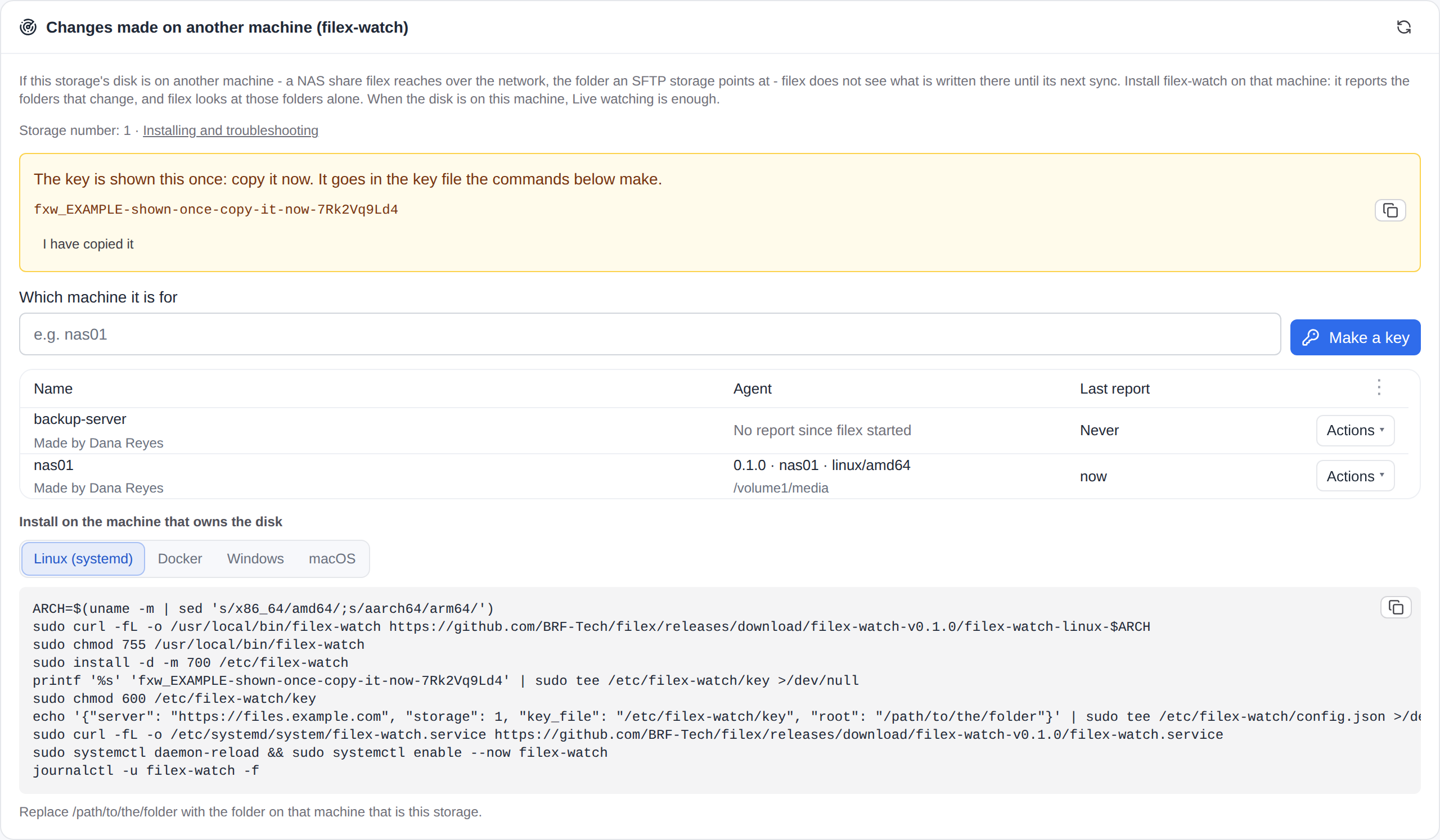
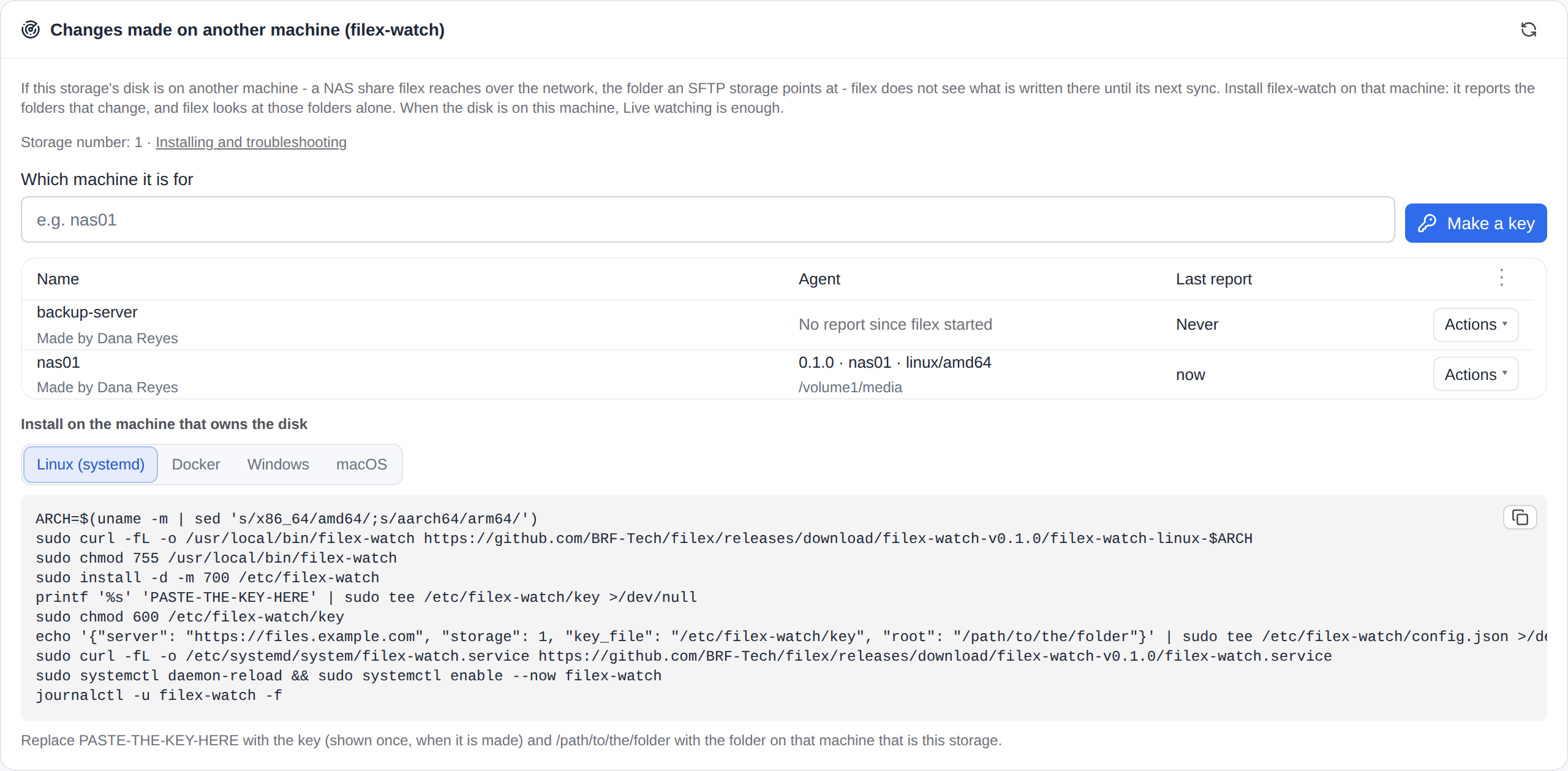
A storage can have up to 20 keys - one per machine is the rule of thumb. The same card lists them with what each one's agent last said (its version, host and folder) and when it last reported, and revokes one with Revoke.
2a. Linux (systemd)
ARCH=$(uname -m | sed 's/x86_64/amd64/;s/aarch64/arm64/')
sudo curl -fL -o /usr/local/bin/filex-watch \
  https://github.com/BRF-Tech/filex/releases/download/filex-watch-v0.1.0/filex-watch-linux-$ARCH
sudo chmod 755 /usr/local/bin/filex-watch
sudo install -d -m 700 /etc/filex-watch
printf '%s' 'fxw_…' | sudo tee /etc/filex-watch/key >/dev/null
sudo chmod 600 /etc/filex-watch/key
echo '{"server": "https://files.example.com", "storage": 7, "key_file": "/etc/filex-watch/key", "root": "/srv/share"}' \
  | sudo tee /etc/filex-watch/config.json >/dev/null
sudo curl -fL -o /etc/systemd/system/filex-watch.service \
  https://github.com/BRF-Tech/filex/releases/download/filex-watch-v0.1.0/filex-watch.service
sudo systemctl daemon-reload && sudo systemctl enable --now filex-watch
journalctl -u filex-watch -f
The unit starts after the network and the remote file systems are up, restarts filex-watch if it stops, and keeps it read-only on the system.
2b. Docker, on a NAS or beside the disk
sudo install -d -m 700 /etc/filex-watch
printf '%s' 'fxw_…' | sudo tee /etc/filex-watch/key >/dev/null
docker run -d --name filex-watch --restart unless-stopped \
  -e FILEX_WATCH_SERVER=https://files.example.com -e FILEX_WATCH_STORAGE=7 \
  -v /etc/filex-watch/key:/run/secrets/filex-watch-key:ro \
  -v /volume1/media:/watch:ro \
  ghcr.io/brf-tech/filex-watch:0.1.0
The image (ghcr.io/brf-tech/filex-watch:0.1.0, linux/amd64 and linux/arm64) watches /watch and reads the key from /run/secrets/filex-watch-key. With Compose, deploy/compose/docker-compose.filex-watch.yml does the same with a Compose secret and the container's rights cut down to reading folders.
⚠ Run it on the machine that owns the disk. The container beside filex, watching the same share through filex's own mount, sees no more than filex does.
2c. Windows (a service)
In PowerShell, as an administrator:
$data = "$env:ProgramData\filex-watch"
New-Item -ItemType Directory -Force $data | Out-Null
Invoke-WebRequest https://github.com/BRF-Tech/filex/releases/download/filex-watch-v0.1.0/filex-watch-windows-amd64.exe -OutFile "$data\filex-watch.exe"
Set-Content -NoNewline -Path "$data\key" -Value 'fxw_…'
icacls "$data\key" /inheritance:r /grant:r "SYSTEM:R" "Administrators:F" | Out-Null
Set-Content -Path "$data\config.json" -Value '{"server": "https://files.example.com", "storage": 7, "key_file": "C:/ProgramData/filex-watch/key", "root": "D:/Share", "log_file": "C:/ProgramData/filex-watch/filex-watch.log"}'
New-Service -Name filex-watch -DisplayName filex-watch -StartupType Automatic -BinaryPathName "$data\filex-watch.exe --config $data\config.json"
Start-Service filex-watch
Get-Content "$data\filex-watch.log" -Wait
Paths in the JSON file use /. On an ARM machine take filex-watch-windows-arm64.exe. To remove it: Stop-Service filex-watch, then sc.exe delete filex-watch.
2d. macOS (a launchd daemon)
ARCH=$(uname -m | sed 's/x86_64/amd64/')
sudo mkdir -p /usr/local/bin /usr/local/etc/filex-watch
sudo curl -fL -o /usr/local/bin/filex-watch \
  https://github.com/BRF-Tech/filex/releases/download/filex-watch-v0.1.0/filex-watch-darwin-$ARCH
sudo chmod 755 /usr/local/bin/filex-watch
printf '%s' 'fxw_…' | sudo tee /usr/local/etc/filex-watch/key >/dev/null
sudo chmod 600 /usr/local/etc/filex-watch/key
echo '{"server": "https://files.example.com", "storage": 7, "key_file": "/usr/local/etc/filex-watch/key", "root": "/Volumes/Share"}' \
  | sudo tee /usr/local/etc/filex-watch/config.json >/dev/null
sudo curl -fL -o /Library/LaunchDaemons/sh.filex.watch.plist \
  https://github.com/BRF-Tech/filex/releases/download/filex-watch-v0.1.0/sh.filex.watch.plist
sudo launchctl bootstrap system /Library/LaunchDaemons/sh.filex.watch.plist
tail -f /var/log/filex-watch.log
To stop it: sudo launchctl bootout system/sh.filex.watch. The binary is not signed with an Apple Developer ID; a download with curl is not quarantined, so macOS runs it.
3. Check
filex-watch check --config /etc/filex-watch/config.jsonsends one empty report and says what filex answered: ok - storage "media" takes this key's reports, or why not. The card on the storage's page shows the agent from its first report on.
Settings
Every setting has three names: a field of the JSON file (--config, FILEX_WATCH_CONFIG), an environment variable and a flag. The flag wins over the variable, the variable over the file.
| File | Variable | Flag | Default | |
|---|---|---|---|---|
server | FILEX_WATCH_SERVER | --server | - | filex's address, as people open it |
storage | FILEX_WATCH_STORAGE | --storage | - | the storage's number (on its filex-watch card) |
root | FILEX_WATCH_ROOT | --root | - | the folder on this machine that is the storage (/watch in the image) |
key_file | FILEX_WATCH_KEY_FILE | --key-file | - | the file holding the key (/run/secrets/filex-watch-key in the image) |
| - | FILEX_WATCH_KEY | - | - | the key itself, instead of a file |
insecure_skip_tls_verify | FILEX_WATCH_TLS_SKIP_VERIFY | --insecure-skip-tls-verify | false | do not check filex's certificate |
ca_file | FILEX_WATCH_CA_FILE | --ca-file | - | also trust the certificates in this PEM file |
log_file | FILEX_WATCH_LOG_FILE | --log-file | stderr | where the log goes |
quiet | FILEX_WATCH_QUIET | --quiet | 1s | wait this long after the last change of a burst |
max_wait | FILEX_WATCH_MAX_WAIT | --max-wait | 10s | send a burst that does not stop after this long |
heartbeat | FILEX_WATCH_HEARTBEAT | --heartbeat | 60s | with nothing to say, say "still here" this often |
subtree_resync | FILEX_WATCH_SUBTREE_RESYNC | --subtree-resync | 15m | re-read a folder this machine cannot watch this often |
queue_max | FILEX_WATCH_QUEUE_MAX | --queue-max | 4096 | folders to hold before asking for a resync instead |
verbose | FILEX_WATCH_VERBOSE | --verbose | false | log every report |
A duration is 1s, 15m, 1h30m or a number of seconds. An unknown field in the file is refused at start, as is a setting that cannot work (no key, a folder that is not there), each with what to set.
The key and what it opens
- One door, one storage. A filex-watch key is accepted at
POST /api/storages/{id}/watch/eventsfor the storage it was made for, and nowhere else: not the file API, not the agent API or MCP, not the admin API, not WebDAV, SFTP, FTP, NFS or S3. A leaked key makes filex look at one storage's folders sooner; it lists, reads and writes nothing. - It is an API key of its own kind: filex keeps only its hash, it is listed on the API / MCP page among the API keys as well (where it can be revoked too), and the card shows when it was last used.
- It reports as the administrator who made it, as they are now: an account that is switched off, no longer an administrator, or no longer in a tenant that has the storage stops the reports (
watch_owner_not_admin,watch_storage_gone); a new key made by an administrator starts them again. - The key never travels in a flag (a flag is on the process list for every user of the machine): a file readable by root only, or
FILEX_WATCH_KEY. - TLS. filex's certificate is checked. For a self-signed one, add its CA with
ca_file, or turn the check off withinsecure_skip_tls_verify(the same switch a storage has, STORAGE.md → Private and self-signed certificates); the agent says so in its log at start. A plainhttp://address sends the key in clear: only on a network you trust.
Limits
| reports a minute, per key | 120 (an agent sends at most one a second while a disk is busy, and a heartbeat a minute) |
| requests a minute, per address | 600 |
| folders in one report | 1000 (more are sent in several reports) |
| one report | 1 MiB |
| folder path | 4096 bytes |
| keys per storage | 20 |
Troubleshooting
| The agent's log, or the card, says | What to do |
|---|---|
watch_key_unknown | The key was revoked, or the key file holds something else. Make a new key and replace the file's content. |
watch_key_other_storage | The key belongs to another storage: set storage to the number the message names, or make a key on this storage's page. |
watch_owner_not_admin | The administrator who made the key no longer is one. An administrator makes a new key. |
watch_storage_off | The storage is switched off. Nothing to do on the agent: it keeps trying. |
watch_unsupported_driver (making a key) | The storage is an object store, or reports its own changes: filex-watch has nothing to watch for it. |
watch_rate_limited | More than 120 reports a minute. The agent holds the changes and sends them together; raise quiet on a disk that never rests. |
filex could not be reached | Network, address or certificate. The agent tries again (1 second, doubling to 5 minutes) and asks for a resync once it gets through. |
the operating system's watch limit is reached | Linux: sudo sysctl fs.inotify.max_user_watches=1048576 (and in /etc/sysctl.d/ to keep it). macOS: the open files limit. Meanwhile the folders past the limit are re-read every subtree_resync. |
the operating system dropped change events | A burst larger than the system's event queue: the agent asks for a resync, nothing is lost. On Linux, fs.inotify.max_queued_events. |
| The card shows no agent | The agent has not reported since filex started: filex-watch check, then its log. A report a minute (the heartbeat) is enough to show it. |
On a NAS, run filex-watch where the share's files live (the NAS itself), not on another client of the share: an NFS or SMB client sees its own writes only. Synology and QNAP run it as a container (2b). An NFS export with root_squash does not matter here - filex-watch reads the disk, not the export.
The protocol
For a program of your own (a storage's own event stream, a backup tool's hook), the door is plain HTTP:
POST /api/storages/7/watch/events
Authorization: Bearer fxw_…
Content-Type: application/json

{"protocol": 1, "agent": {"id": "a1b2", "version": "0.1.0", "host": "nas01"},
"seq": 42, "folders": ["/photos/2026", "/docs"], "resync": false, "subtrees": []}folders: the folders whose direct contents changed, relative to the storage's root,/first,/alone for the root...,., a backslash, a control character or text that is not UTF-8 is refused (400).resync: bring the whole storage up to date.subtrees: folders to re-read whole.seq: one number per batch, the same number when a batch is sent again; a batch filex already took is not queued twice. An empty report is a heartbeat.- The answer is
202 {"accepted": true, "seq": 42, "queued": 2, "ignored": 0, "storage": "media", "instance": "9f2c…"};ignoredcounts folders inside filex's own trees.instancenames the filex process that took the report, made at its start: when it changes, that process started again since the last answer and the folders the one before had taken but not yet looked at are gone, so send one report withresync: true. Remember the last one you heard; the first one is only remembered. A refusal is{"error": "<code>", "message": "<a sentence>"}- the codes are the ones under Troubleshooting, pluswatch_key_missing,watch_report_invalidandwatch_report_too_large.
The routes, and the storage page's (GET /api/admin/storages/{id}/watch, the keys under …/watch/keys), are in BACKEND.md → Admin: storages; the admin MCP tools are admin_storages_watch, admin_storages_watch_key_create and admin_storages_watch_key_delete (MCP.md). The types are backend/internal/watchproto, which filex and filex-watch both use.
Releases
filex-watch has its own version and its own releases, apart from filex's: a tag filex-watch-v<version> in the filex repository, and a GitHub Release that is never the repository's "latest" (that stays filex's). Each carries the binaries for Linux, Windows and macOS on amd64 and arm64, filex-watch.service, sh.filex.watch.plist, config.example.json and checksums.txt; verify a download with sha256sum -c checksums.txt. The image is ghcr.io/brf-tech/filex-watch:<version>. What each version changed: backend/cmd/filex-watch/CHANGELOG.md. filex-watch 0.1.0 needs filex 0.61 or later; the storage page's commands always name the version this filex was built with.