
Storage
filex doesn't store files itself - it mounts one or more storage backends and presents them as a unified tree. Each mounted storage shows up as a top-level folder you name. You can mix several at once (e.g. a local disk, an S3 bucket, and an SFTP server side by side).
Supported adapters: local filesystem · S3 / S3-compatible · SFTP · WebDAV · FTP/FTPS · SMB/CIFS.
That list is not the limit: a backend filex does not ship can be added as a storage plugin - a separate program that describes its own config form and appears here as plugin:<driver>, behaving like any adapter below. A plugin only gets that far by proving what it claims: filex probes every capability it declares before registering it, and probes it again against the configuration you type when you save a storage on it, so a driver that half works is refused rather than offered.
A NAS (Synology, QNAP, TrueNAS, a Windows share…) is supported two ways: the smb driver talks to the share directly, and for NFS you mount it with the operating system and serve the mount point with the local adapter. Most boxes also speak SFTP/FTP/WebDAV natively. See NAS.
Reaching filex from somewhere else - as an S3 endpoint, an SFTP server, an FTPS server, an NFS export or a mounted drive - is the other direction, and lives in PROTOCOLS.md.
- How storages work
- Adding a storage - several folders at once · ordering storages
- The storage config
- Adapters - local · NAS / SMB / NFS · S3 · SFTP · WebDAV · FTP
- Sync - staying in step with the backend
- Slow storage
- Read-only mounts
- Path validation & errors
How storages work
A storage is a row in filex's database, not an environment variable. It records the adapter (driver), a per-adapter config blob (bucket, host, credentials, …), a mount name, and options like read-only and sync cadence.
filex keeps a DB cache of the file tree so listings are fast (a few ms) instead of hitting the backend every time. A background sync worker keeps that cache in step with the real backend (see Sync).
Root-path guard. A storage must point at a sub-folder / prefix, never the bucket or filesystem root. This stops filex from ever shadowing pre-existing objects at the root. See Path validation.
How full a storage is, is not an admin-only number.GET /api/files/quota/storages answers {name, used_bytes, file_count} for each storage the caller can open - filtered by the same grant check the explorer's own root listing applies, so the set of drives somebody can measure is exactly the set they can browse. It is what Home's storage cards print for a non-admin. The figure is the drive's total, not that person's share of it (/api/files/quota/me is the per-user sum, and printing that under a drive's name would be a number about the person wearing a label about the drive), and a count is reused for 15 seconds so a page of cards costs one table scan rather than one per card.
Adding a storage
Three equivalent ways. The admin UI is recommended - it validates the path and offers a "Test connection" before saving.
Admin UI
Sign in as an admin → Storages → Add. Pick a driver, fill in the config fields, click Test connection, then Save. The first sync starts automatically. Scan every (minutes) on the same form is the storage's own poll cadence (sync_interval_s); leave it empty for the server default of 15 minutes - see Sync.
Mounting several folders at once
The root of a bucket, share or disk is never mounted as one storage - filex would take ownership of everything at the root of a namespace it shares with other tools (the root-path guard). A bucket that holds photos/, documents/ and archive/ therefore used to mean three trips through the form with the same credentials.
The form now does that in one go. Fill in the driver and its credentials, put the parent in the root field (the bucket root - an empty prefix - or any folder), and press List folders under this root in the Mount several folders at once card. Every folder directly under it is listed; tick the ones to mount, rename any you like, and Create N storages makes one storage per tick - same credentials, that folder as the storage's root, the read-only switch and scan cadence from the form applied to each. Each one is a separate entry in the sidebar, which is what "the whole bucket in filex" looks like.
Folders whose name starts with . (.filex-trash, .git, …) are not offered. The listing is a probe, not a mount: looking at a root is allowed, the rows are still created through the ordinary create and its guard.
Behind the button: POST /api/admin/storages/discover with {driver, config} → {ok, root_key, folders:[{name, root}]}, where root is the value to put under root_key for that folder's storage.
Editing a storage afterwards
Saving takes effect on the running process: the cached driver is dropped, the syncer is stopped and a new one is started from the row you just wrote. No restart, and no stale connection left holding the previous credentials.
Saved credentials are never shown back. A password, an S3 access or secret key, an SFTP private key - every field the driver marks secret, and any key that is a credential by name - comes back from the server as ***: on the Storages page, in a tenant administrator's storage settings, through an admin API key and through the admin_storages_* MCP tools. The form shows such a field empty with Saved - type to change it; left alone it keeps the saved value, typed into it replaces it. Test connection on the edit page tests with the saved value too.
⚠ A saved credential is only sent where it was saved. Change the storage's address (host, endpoint, url, …) or its driver and the credential has to be typed again - the save answers 400 SECRET_NEEDED naming the field. Otherwise anybody who may edit a storage but not read its password could point it at a server of their own and have filex send the password there.
⚠ Renaming a storage changes its address on every file protocol. The name is the first path segment:
| Protocol | Address |
|---|---|
| WebDAV | /dav/<storage name>/<path> |
| SFTP, FTPS, NFS | /<storage name>/<path> |
| S3-compatible API | the bucket is <storage name> |
So a mount, a bookmark or a script that used the old name answers 404 until it is updated. The edit form warns while the name field differs from what is saved. Nothing inside filex breaks - shares, permissions and the catalogue are keyed by id, not by name.
Use the stable address for anything automated. Every storage also carries a uid, assigned once when it is created and never changed, and every protocol accepts it in place of the name:
/dav/7f3a1b2c-4d5e-4f60-8a1b-2c3d4e5f6071/Documents/   WebDAV
/7f3a1b2c-4d5e-4f60-8a1b-2c3d4e5f6071/Documents/       SFTP, FTPS, NFS
s3://7f3a1b2c-4d5e-4f60-8a1b-2c3d4e5f6071/Documents/   the S3-compatible API
The rule lives in one place (internal/storageref) rather than in each server, so there is no protocol where only one of the two identifiers works.
It is on the storage's page in the admin UI, under Stable address, and in GET /api/admin/storages as uid. A mount written against it survives every rename. The name stays the address people type; the uid is the address a machine should be given.
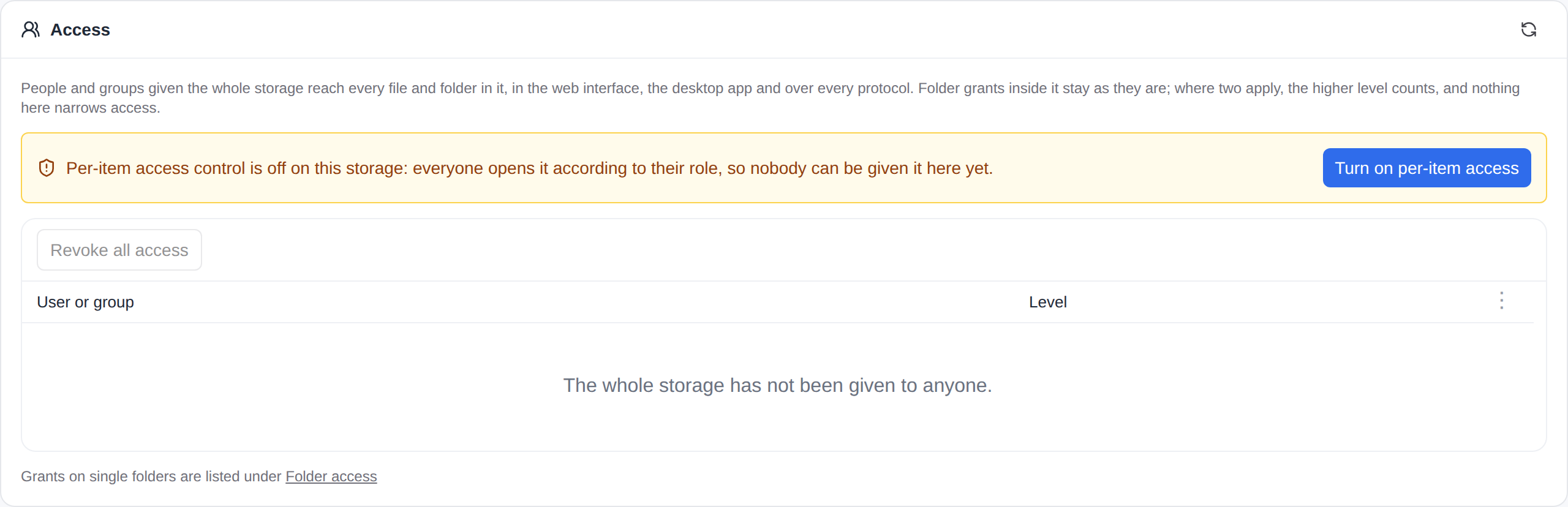
Access - the section under the form - gives the whole storage to people and groups, at a level each, and takes it back without touching folder grants. It needs Per-item access control (RBAC) on; while it is off the section says so and turns it on in place, asking first who keeps access (RBAC.md → A whole storage).
Ordering storages
The explorer's navigation panel (and Home's storage cards) list the storages in one order, decided in three layers - the most personal wins:
- The person's own order. Anybody can drag a storage row in the navigation panel, or use the row's menu (right click, a long press on a phone, or Shift+F10 on the focused row): Move up, Move down, Sort by name (writes a name-sorted order they can keep adjusting) and Use default order (drops their own order). It is kept on their account - the same per-person preferences document as their palette and language (
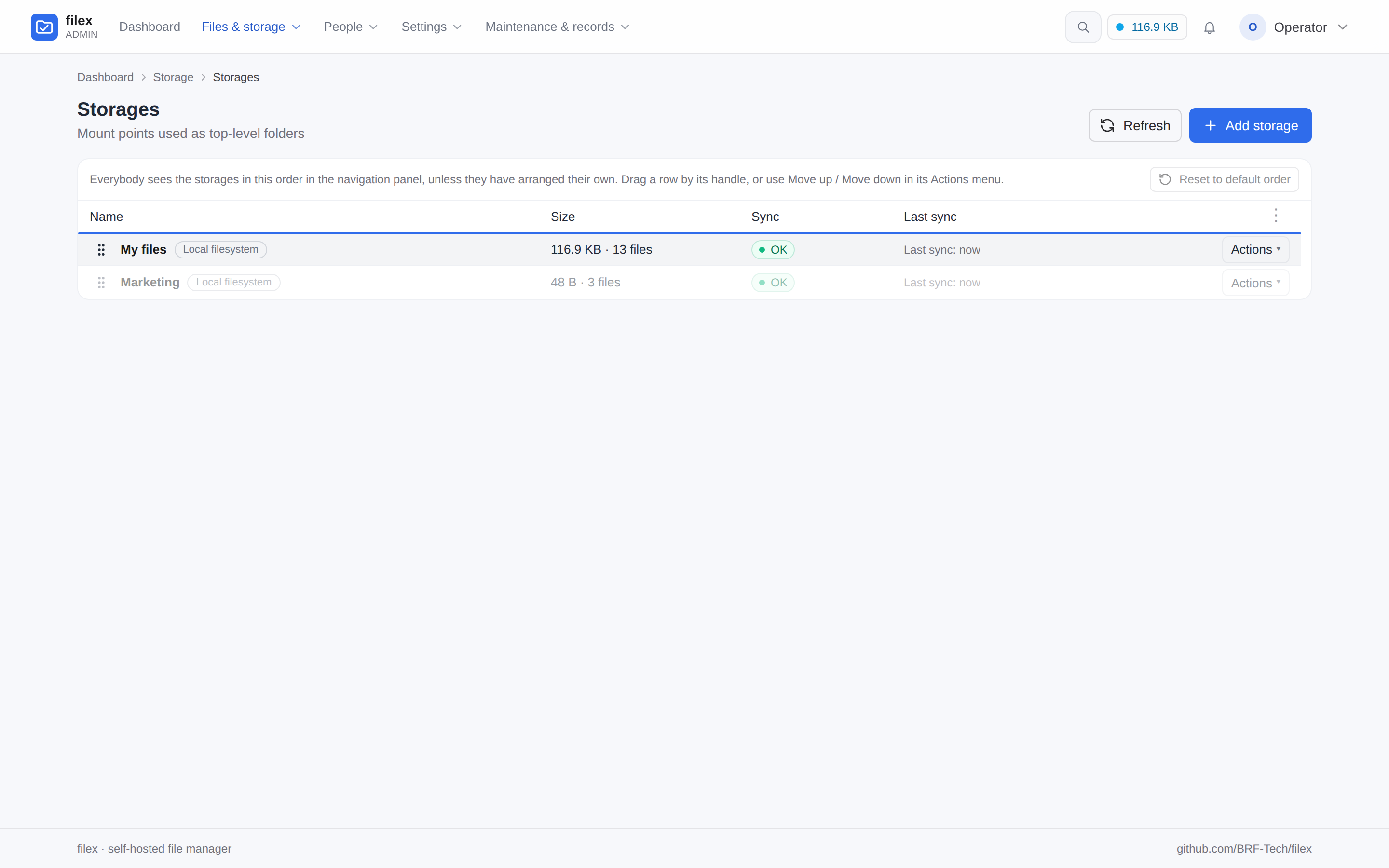
/api/me/prefs, keystorageOrder) - so it follows them to every browser. An embedded explorer with no account document keeps it in that browser. - The administrator's order. On Storages in the admin panel, drag a row by its handle, use Move up / Move down in its Actions menu, or press ↑/↓ on the focused handle. Reset to default order undoes it. Everybody who has not arranged their own sees this order.
- Creation order, when neither has been set - what every install showed before this existed.
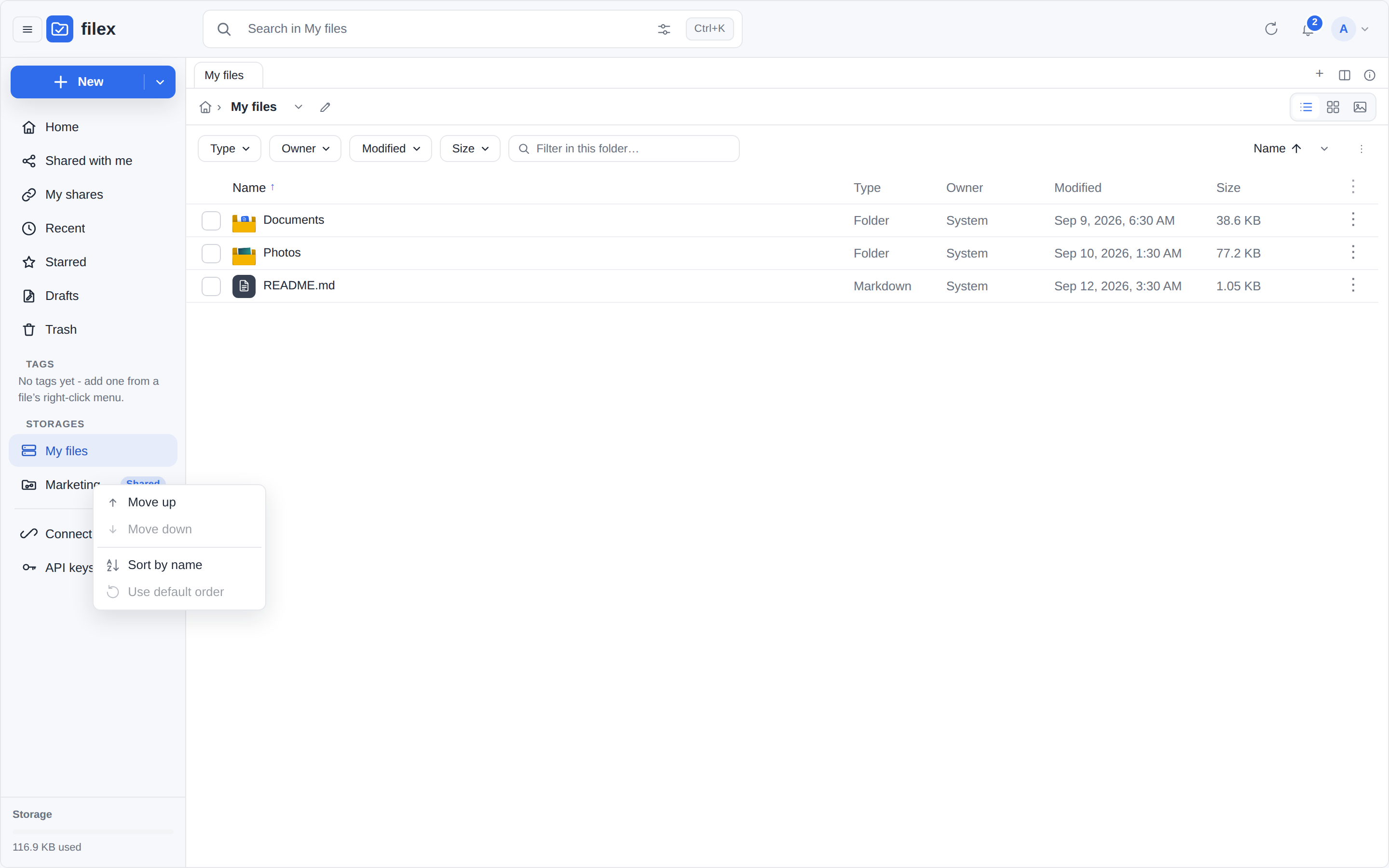
A storage the person's own order does not name - one added after they arranged theirs, or one they could not see then - keeps the position the administrator's (or creation) order gives it, and the storages they did arrange fill the other positions in their order. So a drive the administrator puts at the top shows up at the top for everybody, without undoing anybody's arrangement.
Over the API the administrator's order is one call with the whole list, first = top:
curl -X PUT https://files.example.com/api/admin/storages/order \
  -H "Authorization: Bearer $ADMIN_TOKEN" -H 'Content-Type: application/json' \
  -d '{"ids": [3, 1, 2]}'
The listed storages get positions 1…n; every other storage you administer goes back to "not placed" (after the placed ones, in creation order). {"ids": []} is Reset to default order. An id you cannot administer - including another tenant's - is refused with 400 and changes nothing. Each storage carries its position as sort_order (null = not placed) in GET /api/admin/storages, and the explorer's root listing says it for every drive the caller can open (storage_info[].sort_order). Both lists come back in this order.
⚠ In multi-tenant mode the position is kept on the storage row: a storage linked to two tenants has one position, set by whichever tenant admin reordered last.
Admin API
POST /api/admin/storages (admin session/token). Body is the storage config; config holds the per-adapter map:
curl -X POST https://files.example.com/api/admin/storages \
  -H 'Content-Type: application/json' -b cookies.txt \
  -d '{
    "name": "team-bucket",
    "driver": "s3",
    "mount_path": "/",
    "config": { "bucket": "my-bucket", "prefix": "filex", "region": "auto",
                "endpoint": "https://s3.example.com", "path_style": true,
                "access_key": "…", "secret_key": "…" },
    "read_only": false,
    "enabled": true
  }'
Test credentials without saving first: POST /api/admin/storages/test with the same body → {ok, sample_listing, object_count} or {ok:false, error:"…"} (the driver's error, verbatim). To list the folders under a root before mounting them one by one: POST /api/admin/storages/discover (see Mounting several folders at once).
The probe is bounded at 10 seconds. That is a limit on the button, not on the driver: the driver has its own budget (for S3, WebDAV and FTP, total_timeout_s, 15 s by default - see When the store is down), and an unreachable endpoint used to make this endpoint take 20-30 seconds to say so. A probe that runs out of time answers timed out after 10s - the endpoint did not answer: … with the driver's own error after it, so a slow endpoint reads differently from a wrong one.
CLI
Good for automation / first boot:
filex storage add \
  --name team-bucket --driver s3 --mount / \
  --config '{"bucket":"my-bucket","prefix":"filex","region":"auto",
             "endpoint":"https://s3.example.com","path_style":true,
             "access_key":"…","secret_key":"…"}'

filex storage list
filex storage remove --name team-bucket
filex storage add runs the same gates as the admin API before it writes: unknown --driver is refused (with the registered names), --config must parse as a JSON object, and the root-path guard applies. Required fields the driver declares but the config omits are reported as a warning, not an error - an S3 storage on an instance role legitimately ships no keys.
How the catalogue follows the storage is chosen as on the storage form (until 0.50 the command wrote every storage as poll):
| Flag | Default | What it sets |
|---|---|---|
--sync-mode | poll | poll, fsnotify, ondemand or lazy (Lazy catalogue; local storages only, refused on any other driver) |
--sync-interval | 900 | seconds between two scans |
--lazy-fill | background | lazy only: background (the rest is catalogued in the background) or on_open (only the folders people open) |
--lazy-max-watches | 1024 | lazy only: the most visited folders watched at once |
--lazy-watch-ttl | 60 | lazy only: minutes a visited folder stays watched after it was last opened |
The lazy settings are written into the storage's config (lazy_fill, lazy_max_watches, lazy_watch_ttl) and held to the form's bounds; one given without --sync-mode lazy is refused, as is a mode the sync worker does not implement.
filex storage add --name archive --driver local --mount / --config '{"root":"/srv/archive"}' --sync-mode lazy --lazy-fill on_openConnect a storage at install time (env / Compose / Helm)
You don't have to open the admin UI at all. A fresh install can come up with a storage already mounted, seeded from environment on first boot only, when no storage exists yet. The seed becomes a normal storage row you can edit afterwards; changing the env later never re-seeds. Leaving the driver empty seeds nothing.
The variables (see CONFIGURATION.md):
| Variable | For | Example |
|---|---|---|
FILEX_DEFAULT_STORAGE_DRIVER | all | local · s3 · sftp · webdav · ftp · smb |
FILEX_DEFAULT_STORAGE_NAME | all | Files (top-level folder label) |
FILEX_DEFAULT_STORAGE_PATH | local | /srv/files |
FILEX_DEFAULT_STORAGE_S3_* (BUCKET/PREFIX/ENDPOINT/REGION/ACCESS_KEY/SECRET_KEY/PATH_STYLE) | s3 | see below |
FILEX_DEFAULT_STORAGE_CONFIG | any driver | one line of the driver's config JSON |
Use the dedicated vars for local and S3. To connect any other existing external storage (sftp / webdav / ftp), set the driver name and put its config JSON in FILEX_DEFAULT_STORAGE_CONFIG.
Plain binary / systemd / docker run - set env directly:
# an existing S3 bucket (AWS / Hetzner / R2 / Backblaze)
FILEX_DEFAULT_STORAGE_DRIVER=s3
FILEX_DEFAULT_STORAGE_S3_BUCKET=my-bucket
FILEX_DEFAULT_STORAGE_S3_PREFIX=filex
FILEX_DEFAULT_STORAGE_S3_REGION=eu-central-1
FILEX_DEFAULT_STORAGE_S3_ACCESS_KEY=AKIA...
FILEX_DEFAULT_STORAGE_S3_SECRET_KEY=...

# an existing SFTP / NAS server (any driver → one JSON line)
FILEX_DEFAULT_STORAGE_DRIVER=sftp
FILEX_DEFAULT_STORAGE_CONFIG={"host":"nas.example.com","port":22,"user":"filex","password":"s3cret","root":"/srv/files"}
Docker Compose - put the same vars in .env. The shipped deploy/compose/.env.example has ready copy-paste blocks for the bundled S3 server, an external S3 bucket, SFTP and WebDAV.
Helm - set them under storage: in your values (deploy/helm/filex/values.yaml):
# an existing S3 bucket
storage:
  type: s3
  s3:
    bucket: my-bucket
    prefix: filex
    region: eu-central-1
    endpoint: "https://s3.eu-central-1.amazonaws.com"
    accessKey: "AKIA..."
secretKey: "..."# an existing SFTP / NAS - any driver via `config`
storage:
type: sftp
name: NAS
config:
host: nas.example.com
port: 22
user: filex
password: "s3cret"
root: /srv/filesThe storage config
| Field | Type | Default | Meaning |
|---|---|---|---|
name | string | - | Display name + top-level folder label. Required. |
driver | string | - | local · s3 · sftp · webdav · ftp · smb, or the name of an installed plugin. Required. |
config | object | {} | Per-adapter settings (see Adapters), plus scan_exclude, which every storage has - see Scan exclusions - and, for a lazy storage, lazy_fill · lazy_max_watches · lazy_watch_ttl (Lazy catalogue). |
mount_path | string | / | Logical mount point inside filex. |
sync_mode | string | poll | poll · fsnotify (the local driver, or a plugin that streams its own changes) · ondemand · lazy (local storages only - Lazy catalogue). Anything else is rejected on write - see Modes. |
sync_interval_s | int (seconds) | 900 | Poll cadence - Scan every (minutes) on the storage form. On a lazy storage: how old an unwatched folder's listing may get before it is checked again. Values < 5 s are clamped to 15 min. |
enabled | bool | true | Disabled storages are hidden and not synced. |
read_only | bool | false | Block all writes to this mount. |
rbac_enabled | bool | false | When true, per-user RBAC grants gate access; when false the storage is visible to all authenticated users. |
Driver descriptors (GET /api/admin/storage-drivers)
Every driver declares its own config contract - the keys it reads, their type, which one is the storage root, which hold credentials, defaults, placeholders and an i18n key per label. The admin UI's storage form, the storage editor and the replication-target dialog all render from this endpoint, and the root-path guard reads the same declaration, so a driver's fields cannot drift away from what the backend accepts.
curl -s https://files.example.com/api/admin/storage-drivers \
-H "Authorization: Bearer $TOKEN" | jq '.[] | {driver, fields: [.fields[].key]}'{
"driver": "s3",
"label": "S3 / Hetzner / MinIO",
"i18n_key": "storages.driver.s3",
"capabilities": { "read": true, "write": true, "presign": true, "…": true },
"fields": [
{ "key": "bucket", "type": "string", "required": true, "label": "Bucket",
"i18n_key": "storages.fields.bucket", "placeholder": "my-bucket" },
{ "key": "prefix", "type": "string", "required": true, "root": true,
"label": "Prefix", "i18n_key": "storages.fields.prefix" },
{ "key": "secret_key", "type": "password", "secret": true, "…": "…" }
]
}root: true marks the field the root-path guard checks. aliases lists older spellings of a key that the driver still reads, so configs written before a rename keep working. scan_fields lists the settings every storage has whatever its driver - today scan_exclude (Scan exclusions). They live in the same config object, and the storage form draws them beside the driver's fields; the replication-target dialog does not, since nothing scans a target. Adding a driver on the backend puts it in every picker without a frontend release.
capabilities on /api/capabilities still carries the plain storage_drivers: ["ftp","local","s3","sftp","smb","webdav"] name list for older callers.
Adapters
Each adapter's config object is passed verbatim to the driver. Only the keys below are read; unknown keys are ignored - scan_exclude among them, which the scan reads, not the driver (Scan exclusions). The same key lists are served machine-readably by GET /api/admin/storage-drivers.
A plugin driver appears in that same endpoint with the fields the plugin described, which is why the admin form renders it without a frontend release. See PLUGINS.md.
local
⚠⚠ Refused on a public demo.
FILEX_DEMO_MODEpublishes an admin login, and this driver means "a path on this host" - measured on filex's own demo, storages rooted at/data,/etcand/proc/1were all accepted before the guard existed. Since 0.21.6 the remote drivers are refused on a demo as well: adding one asks the server to connect to an address the visitor chose. A demo ships with the storage it demonstrates.
Serves a directory on the host running filex.
| key | required | default | notes |
|---|---|---|---|
path | yes* | - | Absolute path to serve. Created (0755) if missing. |
root | yes* | - | Legacy alias for path. |
follow_symlinks | no | false | Follow symlinks whose target is outside this folder. See Symlinks. |
*One of path / root. Example: {"path": "/data/files"}. Capabilities: read, write, move, copy, delete, mkdir, live change events (fsnotify).
Path traversal. A .. segment can never leave the configured folder, on any host. Wire paths use /; on Windows a \ is treated as a separator too, and on Linux it is treated as an ordinary character in a file name, because that is what each host means by it.
⚠ Fixed in v0.43.0 - this was not true before. On a Windows host a backslash payload escaped the folder:
?action=index&path=..\other-storagereturned the contents of a sibling directory, while the same request with a forward slash was correctly refused. Two roots whose names shared a prefix (storage1andstorage10) were also treated as one. Linux hosts were never affected. If you run filex on Windows, upgrade.
Symlinks
A symlink whose target is inside the folder is always followed. It appears as the thing it points at - a linked directory is a directory you can open, and a linked file reports the target's size - and this is true whether the link was made with a relative or an absolute path.
A symlink whose target is outside the folder is governed by follow_symlinks, which is off by default:
follow_symlinks: false (default) | follow_symlinks: true | |
|---|---|---|
| In listings | Shown, marked as a link that cannot be opened | Shown as its target |
| Open / download / write / delete through it | Refused | Allowed |
| Delete or rename the link itself | Allowed - the link is inside the folder, and only the link is removed | Allowed |
| Indexing, virus scanning, versioning, quota | Skipped | Treated as ordinary files |
Out-of-root links are shown rather than hidden on purpose: an entry you can see and cannot open is confusing, but an entry that silently is not there is worse.
Copying a folder that holds links. A link inside the storage is copied as what it points at. A link filex may not follow is skipped, not copied - its target's bytes never enter the copy - and the rest of the folder is copied anyway. Inside one storage a linked folder is skipped as well; copied to another storage it is carried with a cycle guard, and every skipped entry is named in the operation's result (Moving files between storages).
What that looks like. Such a row carries a badge in the list, the grid and the gallery alike - and on Recent, Starred, a tag view and search results - and its tooltip, its screen-reader label and the details panel all say the same sentence: what it is and why it will not open. The badge names the reason: Outside storage, Broken link or Remote link, and for an out-of-root link the sentence adds that an administrator can allow it with Follow symlinks that leave this folder in the storage's settings. A broken link reads differently on purpose: nothing can be configured back into working there, so it says the target no longer exists and has to be repaired or removed on the server. Opening such a row is refused in words, with the same sentence, rather than doing nothing - doing nothing was the original complaint (issue #34: a 0-byte file that would not open and said why to nobody).
Where the reason comes from. A listing read from the storage itself - before the storage's first sync has finished, or a folder the catalogue has not caught up with - takes it from the driver as it lists the link. Every other listing is answered by the catalogue, and the sync records the driver's reason with the link's row each time it lists the folder, so those listings name it too. It is the reason the last sync saw: a link whose target is deleted or comes back reads the new reason after the next sync of its folder (a listing read from the storage shows it at once). A link the sync has no reason for says Link and the general sentence (its target is outside the storage, missing, or on a remote server filex cannot resolve): a link row catalogued before 0.54, until the next sync of its folder fills the reason in - nothing needs to be done by hand - or a storage plugin whose driver gives no reason.
⚠ Turning
follow_symlinkson extends the storage. Everything behind the link becomes part of it - including deletion, quota accounting, full-text indexing and virus scanning. Turn it on only when you meant to mount that content.
⚠ Fixed in v0.43.0 - this was not true before. Symlinks leaving the folder were followed unconditionally by every operation, including recursive delete, with no option to control it. Planting such a link requires filesystem access to the server (it cannot be done through filex), but an administrator who created one to share a folder was also granting filex write and delete access to whatever it pointed at.
Other drivers. ftp and sftp report a remote symlink as a link and do not resolve it: filex's boundary on a remote host is the account's own permissions, so there is no in-root/out-of-root distinction to make. s3, webdav and smb have no symlinks.
Named pipes, sockets and devices
filex serves regular files and folders. A named pipe (FIFO), a Unix socket or a block/character device under a local storage - Docker overlay directories are full of them - is skipped: it is not listed, not catalogued, not indexed, not thumbnailed, not copied along with its folder, and a write onto its name is refused. A symlink pointing at one is skipped the same way. The server log says so once per entry (not on every scan):
WARN storage scan: skipped an entry that is not a regular file or folder - filex never opens named pipes, sockets or device nodes driver=local root=/data path=/data/.liveos/…/tmp/.cinit_cmd kind="named pipe"⚠ Fixed in v0.43.0 - this was not true before (issue #38). Anything that was not a folder or a symlink was treated as a file and opened to read its type, and opening a pipe nobody writes to never returns: one
mkfifoanywhere under the root left the storage scanrunningforever with nothing processed, and every later scan queued behind it.sftpskips a remote pipe, socket or device the same way - the SSH server would open it for filex and wait just the same.
NAS (NFS, SMB, and friends)
There are two ways, and since v0.20.0 the first one is usually better.
1 - the smb driver (SMB / CIFS). filex talks to the share itself: give it the host, the share NAME alone (media, not \\nas\media), an account and optionally a sub-folder. No /etc/fstab, nothing to mount on the host, and the whole configuration stays inside filex.
{ "name": "NAS", "driver": "smb", "mount_path": "/",
  "config": { "host": "nas.local", "share": "media",
              "user": "filex", "password": "…", "root": "projects" } }
⚠ There is no nfs driver - NFSv3 needs a privileged source port and, for anything beyond trust-me-it's-uid-1000, Kerberos. Mount NFS with the OS and use option 2. (The other direction does exist: filex can be served as NFSv3 - see PROTOCOLS.md.)
2 - mount it with the operating system and serve the mount point with the local adapter. Still supported, and the only option for NFS. It has three traps, and all three are below.
# NFS
sudo mount -t nfs nas.local:/volume1/files /mnt/nas

# SMB / CIFS - only if you prefer the OS mount to the smb driver above
sudo mount -t cifs //nas.local/files /mnt/nas \
-o credentials=/etc/nas.cred,uid=1000,gid=1000{ "name": "NAS", "driver": "local", "mount_path": "/",
"config": { "path": "/mnt/nas/filex" } }You may not need the mount at all. Most NAS boxes speak protocols filex talks natively - SFTP, FTP/FTPS, WebDAV, or an S3 endpoint (e.g. MinIO running on the box) for the S3 adapter. A native adapter keeps the whole configuration inside filex instead of half of it in /etc/fstab, so prefer one where the NAS offers it.
Docker: mount the share on the host and bind-mount it into the container (-v /mnt/nas:/data/nas), then point the storage at /data/nas/…. The official image sets no USER, so it runs as root unless you override it - meaning the permission that usually bites is on the NAS side (NFS root_squash, the SMB share's ACL), not inside the container. If you do run the container as a non-root user, the uid/gid mount options have to match it: CIFS assigns ownership at mount time, not from the file itself.
Trap 1 - use sync_mode: poll, never fsnotify. fsnotify is an OS-local watch (inotify / kqueue / ReadDirectoryChangesW). It sees what this machine writes to the mount and never sees what another machine writes to the NAS - so a file dropped on the share from a laptop would stay invisible until something else triggered a sync. filex only leaves the OS watch when the driver isn't local - and a mounted share is the local driver: nothing falls back, nothing warns. Choose poll explicitly and set an interval that matches how fresh you need the listing (sync_interval_s; 900 = 15 min is the default when you don't set one, and 60 s is reasonable on a busy share).
A poll over a mounted share detects a file changed by another machine, not only a new one, because a mount has no etag and drift falls back to size + modification time - see Drift detection. ⚠ That rests on the share reporting an honest mtime. NFS attribute caching can serve a stale one for a few seconds (
actimeo), and a share backed by FAT keeps timestamps in two-second steps; neither loses a change, both can delay it to the next pass.
Trap 2 - mount before filex starts. filex creates a storage's root directory if it is missing, so a storage pointed at an unmounted path will cheerfully serve an empty directory, and the next sync run reads "empty backend" as "everything was deleted". The tombstone guard blocks the first such run - it skips the delete pass when a run sees less than ~70 % of what the previous run saw - but it only ever compares against the last run that finished ok. Once that empty run is on record with a seen count of 0, the guard has nothing to compare against and the next empty run drops the tree from the cache. It buys you one cycle, not safety. Nothing is deleted on the NAS itself, and a sync against a properly mounted share restores the entries, but in between your users see an empty folder. Put the share in /etc/fstab with _netdev (or use a systemd .mount unit and order filex After= it).
Trap 3 - a share is fast to browse and slow to transfer. Listings, search and thumbnails come from filex's own index and caches, so the explorer stays quick over a slow mount; uploads and downloads move real bytes and run at the speed of the network path. See Slow storage.
S3 / S3-compatible
Works with AWS S3, MinIO, Cloudflare R2, Backblaze B2 (S3), Hetzner Object Storage / Ceph RGW, and other S3-compatible stores.
| key | required | default | notes |
|---|---|---|---|
bucket | yes | - | Bucket name. |
prefix | recommended | "" | Key prefix = the storage root. Must be non-empty (root guard). |
region | no | auto | e.g. us-east-1. auto suits R2/MinIO. |
endpoint | no | - | Custom endpoint for non-AWS (e.g. https://minio.example.com). Omit for AWS. |
path_style | no | auto | Path-style addressing. Auto-enabled when endpoint is set (MinIO/Hetzner/B2/R2 need it); AWS stays virtual-host. |
access_key | no | - | Static key. If omitted, the AWS default credential chain is used (env/IRSA/instance role). |
secret_key | no | - | Static secret (with access_key). |
disable_presign | no | true (since v0.42.2) | Uploads and the downloads behind public share links stream through filex, so the bucket endpoint never has to be reachable from a browser. Set false only when it is (AWS, a public MinIO) and you want the browser to talk to the bucket directly via presigned URLs - faster for very large files; the store must accept SDK-signed URLs. ⚠ A storage saved before v0.42.2 without this key now streams; set false explicitly to get the old redirect back. |
attempt_timeout_s | no | 10 (1-600) | How long one attempt may wait for a sign of life from the store: connecting (the DNS lookup included), the TLS handshake, the answer after the request is sent, and each next piece of the answer. Never a limit on a transfer that keeps moving. An upload the store stops taking is cut after 60 s (or this, if longer): the system hands a blocked upload to the network in bursts, so a slow store looks stopped for a second or two at a time. Copies, renames and the completion of a multipart upload wait up to 10 minutes for the answer (the store answers them only when the work is done); an upload's answer wait is lengthened by up to 16 s for the bytes still in the sockets' buffers. See When the store is down. |
max_attempts | no | 6 (1-20) | Attempts per request, the first included, when the failure can pass: a network error, a timeout, a 5xx, throttling. 1 turns retrying off. A refusal - 403, a missing bucket, a host name that does not resolve, a certificate that does not verify - is never retried. |
total_timeout_s | no | 15 (1-3600) | No new attempt starts unless it could finish within this many seconds of the first, so a store that is down is reported within this time. A transfer under way is not cut. A request that timed out is tried again only when this is at least twice attempt_timeout_s. |
Examples
// AWS
{ "bucket": "my-bucket", "prefix": "filex", "region": "eu-central-1",
  "access_key": "AKIA…", "secret_key": "…" }

// MinIO / self-hosted
{ "bucket": "my-bucket", "prefix": "filex", "region": "auto",
  "endpoint": "https://minio.example.com", "path_style": true,
  "access_key": "…", "secret_key": "…" }

// Cloudflare R2
{ "bucket": "my-bucket", "prefix": "filex", "region": "auto",
  "endpoint": "https://<account>.r2.cloudflarestorage.com",
  "access_key": "…", "secret_key": "…" }

// Backblaze B2 (S3 endpoint). The region is part of the endpoint host;
// `b2_authorize_account` reports yours as `s3ApiUrl`.
{ "bucket": "my-bucket", "prefix": "filex", "region": "eu-central-003",
  "endpoint": "https://s3.eu-central-003.backblazeb2.com",
  "access_key": "003…", "secret_key": "K003…" }
A local S3 server
The Compose stacks (the versitygw profile), the Helm chart (versitygw.enabled) and node e2e/run.mjs local --s3 bundle Versity S3 Gateway (versity/versitygw:v1.8.0, Apache-2.0) as their S3 server. It replaced MinIO in 0.50, when minio/minio stopped being published on Docker Hub. The alternatives were measured against filex's own S3 conformance test (TestLiveProviderConformance in backend/internal/storage/drivers/s3: write, stat and read back, a listing with a delimiter, a ranged read, a multipart upload, a rename by copy, a presigned GET, a delete):
| Versity S3 Gateway v1.8.0 | Garage v2.4.1 | SeaweedFS 4.48 | RustFS 1.0.0 | |
|---|---|---|---|---|
| license | Apache-2.0 | AGPL-3.0 | Apache-2.0 | Apache-2.0 |
| image download | 31 MB | 28 MB | 194 MB | 110 MB |
| memory, idle | 11-37 MiB | 35 MiB | 70 MiB | 136 MiB |
| start to first answer | 1.1 s | 1.6 s | 5.8 s | 1.3 s |
| first-start setup | environment only; a bucket is a directory | a config file (RPC secret, region) and a key ID in Garage's own format | environment only | a CreateBucket call |
| filex conformance | 8/8 | 8/8 | 8/8 | 8/8 |
| object versioning | yes (a versions directory) | no | yes | yes |
Its posix backend keeps every object as a plain file under <root>/<bucket>/<key>, so the data stays readable, and can be backed up, without the gateway.
docker run -d --name s3 -p 7070:7070 -v s3-data:/data -v s3-versions:/versions \
  -e ROOT_ACCESS_KEY=filex -e ROOT_SECRET_KEY=change-me \
  -e VGW_BACKEND=posix -e VGW_BACKEND_ARG=/data \
  -e VGW_VERSIONING_DIR=/versions -e VGW_HEALTH=/health \
  versity/versitygw:v1.8.0
docker exec s3 mkdir -p /data/filex # a bucket is a top-level directory{ "bucket": "filex", "prefix": "files", "region": "us-east-1",
"endpoint": "http://s3:7070", "path_style": true,
"access_key": "filex", "secret_key": "change-me" }- ⚠ The region is part of the signature. The gateway answers any region but its own (
us-east-1, orVGW_REGION) with400 AuthorizationHeaderMalformed, and filex signs a blank region asauto. Writeus-east-1. The Helm chart does this for you when it seeds the bundled server as the default storage. - The data directory needs extended attributes (ext4, xfs, btrfs and ZFS have them): the gateway keeps object metadata there. On a filesystem without them, set
VGW_META_SIDECARto a directory for that metadata. - Object versioning is on in the bundled setups:
VGW_VERSIONING_DIRnames a directory outside the data root that holds the older versions, and a bucket turns it on withPutBucketVersioning. The gateway's documentation calls versioning on the posix backend experimental. Measured on v1.8.0: two writes to one key keep two versions, a version is read back byversionId,ListObjectVersionslists them, and a delete leaves a delete marker; object lock (a bucket created with it, a default retention that refuses a delete, a legal hold) works too. filex does not need any of it and does not turn it on for its bucket: it keeps its own versions (Trash & versioning), and the gateway has no lifecycle rules, so nothing would ever expire the older versions. - Not implemented by the gateway: lifecycle rules and server-side encryption (filex uses neither; encrypted folders are filex's own). A web UI for buckets, users and policies:
VGW_WEBUI_PORT=:7071.
Moving off the bundled MinIO
A stack or chart that bundled MinIO keeps its objects in MinIO's own format, which the new server cannot read. Nothing is deleted for you: Compose never removes a volume on up, and the Helm chart refuses to render while minio.enabled is still true. Copy the bucket across while both run, then point the storage at the new server.
Compose (deploy/compose/docker-compose.full.yml):
Take the new compose file and
.envkeys (S3_ACCESS_KEY,S3_SECRET_KEY), putversitygwinCOMPOSE_PROFILES, and rundocker compose -f docker-compose.full.yml --env-file .env up -dwithout--remove-orphans: the oldminiocontainer keeps running from the image you already have, next to the newversitygw.Copy the bucket (here
filex) on the stack's network:bashdocker run --rm --network <project>_default rclone/rclone:1.75.1 sync \ ':s3,provider=Minio,endpoint="http://minio:9000",access_key_id=<MINIO_ROOT_USER>,secret_access_key=<MINIO_ROOT_PASSWORD>:filex' \ ':s3,provider=Other,endpoint="http://versitygw:7070",region=us-east-1,access_key_id=<S3_ACCESS_KEY>,secret_access_key=<S3_SECRET_KEY>:filex' \ --progressKeep the endpoints in double quotes: unquoted, rclone reads the
:ofhttp://as the end of the remote ("Custom endpointhttpwas not a valid URI"). Measured with these two images and rclone 1.75.1.In Storages, edit the storage: endpoint
http://versitygw:7070, regionus-east-1, the new keys. Open a few files.Then
docker compose -f docker-compose.full.yml --env-file .env up -d --remove-orphansstops MinIO, anddocker volume rm <project>_minio-datafrees its disk once you no longer want the copy.
Helm: the render stops with the commands for your release. In short:
kubectl annotate deployment/<release>-minio service/<release>-minio \
  pvc/<release>-minio-data helm.sh/resource-policy=keep
helm upgrade <release> brf-tech/filex --reuse-values \
  --set minio.enabled=false --set versitygw.enabled=true \
  --set versitygw.secretKey=<a new secret>
kubectl run rclone --rm -it --restart=Never --image=rclone/rclone:1.75.1 -- sync \
  ':s3,provider=Minio,endpoint="http://<release>-minio:9000",access_key_id=<rootUser>,secret_access_key=<rootPassword>:filex' \
  ':s3,provider=Other,endpoint="http://<release>-versitygw:7070",region=us-east-1,access_key_id=<accessKey>,secret_access_key=<secretKey>:filex'
Point the storage at http://<release>-versitygw:7070 (region us-east-1), then delete the three kept MinIO objects with kubectl delete.
Gotchas & failure modes
- ⚠ Backblaze B2 refuses the MASTER application key on its S3 endpoint, with
InvalidAccessKeyId: Malformed Access Key Idon the first write - which reads like a typo in the key rather than the wrong kind of key. Create an ordinary application key (Backblaze console → Application Keys → Add a New Application Key) and use that. Scope it to the one bucket while you are there. Measured 2026-09-12: with an application key, filex's whole storage surface passes on B2 - write, prefix listing, ranged read, a 12 MiB multipart upload read back byte-for-byte, rename, a presigned URL fetched by a browser, and delete (internal/storage/drivers/s3,TestLiveProviderConformance). - Presigned URLs are off by default (
disable_presign: true, since v0.42.2): every download streams through filex, so the bucket endpoint never has to be reachable from a browser. Turning them on ("disable_presign": false) makes downloads a redirect straight to the bucket - only worth it when the endpoint is public and the store accepts SDK-signed URLs. Hetzner Object Storage / Ceph RGW reject some of those withSignatureDoesNotMatch; if you turned presigning on and downloads fail there, turn it back off. - Empty folders are represented by a hidden
.emptymarker object (created on mkdir, hidden from listings). Folder move/delete/copy recurse the prefix, so deleting or renaming a folder works even though S3 has no real directories. - Filenames with spaces or non-ASCII characters are fully supported (the copy source is URL-encoded).
bucketmissing → the storage won't initialize (Test connectionshows the error). Wrong keys/endpoint →Test connectionfails with the SDK error.- Uploads are retried, up to 8 MiB. A request can only be retried if its body can be rewound, and every upload surface hands the driver a plain stream (the handler sniffs the first bytes to detect the type). So an upload that declares a size of at most 8 MiB is held in memory while it is sent and survives a transient
503; a larger one streams straight through and fails the request if the store wobbles mid-upload. The trade-off is deliberate: buffering every body would turn a rare failed upload into an out-of-memory kill on a large one. Browser uploads of big files go out as multipart parts, which the store can be asked for again independently.
When the store is down
A store can die in several ways, and each used to cost the person waiting on it differently. Measured against the SDK defaults filex used until v0.44.x (a listing and a 64 KiB upload, in the driver's test suite): a refused port 26 s, an address that drops the connection attempt (a host off the network) 142-147 s, a store that accepts the connection and never answers did not return at all, and a host name that does not resolve 0.1 s. On 2026-08-25 a drop into a Hetzner bucket that was answering 503 took 85.6 s to report it.
The three settings above bound all of them. With the defaults a dead store is reported within 15 s: a silent store after one 10 s attempt, a name that does not resolve at once. Three cases wait longer on purpose, because a working store looks the same for a while:
- a store that takes a whole upload of a few megabytes and then does not answer: 10 s plus up to 16 s for the upload's last megabytes, which may still be in the sockets' buffers when the request counts as sent;
- a store that stops reading in the middle of a large upload: a minute (the system hands a blocked upload to the network in bursts, so a slow store looks stopped for a second or two at a time);
- a store that never answers a copy or a rename: ten minutes (MinIO answers a copy only when it has copied the object).
It is reported as 503 storage_unavailable on the drop page and the upload ticket, and in the log as, for example:
s3 endpoint https://minio.example.com is unavailable: the connection was refused (6 attempts in 14.8s): …
s3 endpoint https://minio.example.com is unavailable: no answer within 10s of sending the request (1 attempt in 10.0s): …
s3 endpoint https://minio.example.com is unavailable: the host name minio.example.com does not resolve (1 attempt in 0.0s): …
(the SDK's own text follows the colon). In code, the error matches storage.ErrUnavailable; a refusal (403, a missing bucket, a bad certificate) does not, and keeps the store's own words (AccessDenied, x509: …).
What the limits do not do: cut a transfer that is moving. A 2 GB upload on a slow line, a download the browser reads slowly, a listing of a huge prefix that streams - none of them is measured against total_timeout_s; each read only has to make progress within attempt_timeout_s, and a send within a minute. An attempt that ran longer than total_timeout_s and then broke gets a fresh budget, so a long upload that loses its connection near the end is tried again (when its body can be sent again - see the bullet on uploads above). One that was cut for silence does not: it would only buy the same wait again.
Tuning:
- A flaky store that answers
503in bursts (measured on Hetzner: 12 times in one month): raisetotal_timeout_s(e.g. 60) so a background sync rides out a longer wobble. Uploads by people wait up to that long when it is really down. - A slow store that takes more than 10 s to start answering a listing (an HDD-backed MinIO with millions of objects under one prefix): raise
attempt_timeout_s, andtotal_timeout_sto at least twice it if a timed-out listing should be tried again. - The environment variable
AWS_MAX_ATTEMPTSandmax_attemptsin~/.aws/configdo not apply to storages: the storage's own setting wins.
WebDAV and FTP (v0.45.0, issue #73) have the same three settings, the same rule - silence is bounded, length never is - and the same code (backend/internal/storage/stall). Their defaults differ: an attempt waits 30 s on WebDAV (a Nextcloud listing of a large folder can take well over 10 s to start) and 15 s on FTP (what its connect alone was allowed before), with 3 attempts and a 15 s budget. What each sends again is in its table: WebDAV, FTP. Measured in the drivers' test suites against a local stand-in, with attempt_timeout_s 1 and total_timeout_s 3:
| the server… | WebDAV before | WebDAV now | FTP before | FTP now |
|---|---|---|---|---|
| refuses the connection | 0.0 s, not reported as down | 2.1-3.0 s | 0.0 s, not reported as down | 2.1-3.0 s |
| accepts it and never answers | 60 s | 1.3-2.1 s | never returned | 2.2 s |
| does not answer the connect (black hole) | 19.6 s | 2.0 s | 15 s | 2.0 s |
| worked, then stopped answering | - | - | never returned, and every other call on the storage waited | 2.0 s; the next caller 4.1 s; a caller that gave up after 0.3 s left at 0.3 s |
| stops reading an upload / sending an answer | 60 s | 1.0 s / 1.0 s | never returned | 2.0 s / 1.0 s |
| moves a file at 512 KB/s for 75 s, both ways | cut at 60.0 s | whole, 75.5 s | - | whole (4 MB each way at 512 KB/s, the reader pausing 2.5 s) |
The log says it the same way, naming the driver:
webdav server https://cloud.example.com is unavailable: no answer within 30s of sending the request (1 attempt in 30.0s): …
ftp server ftp.example.com:21 is unavailable: the server sent nothing for 15s (1 attempt in 30.0s): …
SFTP and SMB (0.50, issue #75) have the same three settings, the same rule and the same code, with FTP's defaults (an attempt waits 15 s, 3 attempts, a 15 s budget). ⚠ Their bound is per CALL, not per read: SSH's multiplexer and the SMB client each keep one read waiting on the connection for as long as the session is open, so a read deadline on the connection would cut a session that merely sits idle between two operations. Instead, while an operation runs, the server has to send something - and, for an upload, take something - at least once every attempt_timeout_s (an upload may go a minute without moving, as everywhere); when it does not, the connection is closed, the operation fails, and the next one opens a new session. An idle session is never cut. What each sends again is in its table: SFTP, SMB.
⚠ Up to 0.49 SFTP bounded only the connect and the SSH handshake (10 s) and SMB only the connect (dial_timeout_s, 15 s). After that a server that stopped answering held SFTP until the operating system gave up on the connection and SMB for good (its requests ran on the caller's context, which a sync pass or a queued job never ends), and both kept handing out the dead session: after a server restart every operation failed until filex restarted. The drivers' test suites now run the dead-store cases above against them - SFTP against an in-process SSH server, SMB's connection cases against a local stand-in and its transfer cases against Samba through a proxy that stalls (FILEX_SMB_TEST).
SFTP
| key | required | default | notes |
|---|---|---|---|
host | yes | - | Server hostname/IP. |
user | yes | - | SSH username. |
password | one-of | - | Password auth. |
private_key | one-of | - | PEM private key (string). Use instead of / with password. |
key_path | one-of | - | Path to a key file on the server, read at Init when private_key is empty. |
port | no | 22 | Integer. |
root | yes | / | Base directory. Must be a sub-folder - the root guard rejects /. Aliases: base_path, remote_path. |
known_hosts | no | ~/.filex/known_hosts | Strict OpenSSH known_hosts path. |
host_key | no | - | Pin a single host key. |
insecure_skip_host_key | no | false | Disable host-key checking (not recommended). |
attempt_timeout_s | no | 15 (1-600) | How long one attempt may wait for the server: connecting, the SSH handshake and login, the answer to each request, and each next piece of a download. Never a limit on a transfer that keeps moving; an upload the server stops taking is cut after 60 s (or this, if longer). See When the store is down. |
max_attempts | no | 3 (1-20) | A connection that could not be made (refused, silent, dropped) is tried again, and so is a listing, a stat, opening a download, a mkdir or a time change whose session broke. An upload, a rename, a copy or a delete that reached the server is not sent again. A wrong password or a host key that does not match is never retried. |
total_timeout_s | no | 15 (1-3600) | As for S3: no new attempt starts unless it could finish within this many seconds of the first. |
user also accepts the legacy spelling username. Provide either password, private_key or key_path. Host-key handling: if you don't pin a key or supply a known_hosts file, filex uses trust-on-first-use - it records the server key on first connect and refuses if it later changes (a MITM signal). Example: {"host":"sftp.example.com","user":"filex","private_key":"-----BEGIN OPENSSH PRIVATE KEY-----\n…","root":"/srv/files"}.
SMB
| key | required | default | notes |
|---|---|---|---|
host | yes | - | Server hostname/IP. |
share | yes | - | The share name alone (media, not \\nas\media). Alias: share_name. |
user | yes | - | Account name; guest for a share with no account. Alias: username. |
password | no | - | Password. |
domain | no | - | Windows domain or workgroup; leave empty for a NAS. Alias: workgroup. |
root | no | "" | Sub-folder inside the share; empty = the whole share. Aliases: base_path, path. |
port | no | 445 | Integer. |
attempt_timeout_s | no | 15 (1-600) | How long one attempt may wait for the server: connecting, the negotiation and login, mounting the share, the answer to each request, and each next piece of a download. Never a limit on a transfer that keeps moving; an upload the server stops taking is cut after 60 s (or this, if longer). Alias: dial_timeout_s, its old name from when it bounded the connect alone - a storage saved with it keeps its value. |
max_attempts | no | 3 (1-20) | A connection that could not be made is tried again, and so is a listing, a stat, opening a download, a mkdir or a time change whose session broke. An upload, a rename, a copy or a delete that reached the server is not sent again. A wrong password or a share that does not exist is never retried. |
total_timeout_s | no | 15 (1-3600) | As for S3: no new attempt starts unless it could finish within this many seconds of the first. |
See NAS (NFS, SMB, and friends) for when to use this driver rather than an operating-system mount.
WebDAV
Tested against Nextcloud, ownCloud, Apache mod_dav, nginx-dav, SabreDAV.
| key | required | default | notes |
|---|---|---|---|
url | yes | - | WebDAV base URL. |
user | yes | - | Basic-auth user. Alias: username. |
password | no | - | Basic-auth password. |
root | yes | "" | Sub-folder under the base URL - the mount point. Aliases: base_path, remote_path. |
attempt_timeout_s | no | 30 (1-600) | How long one attempt may wait for a sign of life from the server: connecting, the TLS handshake, the answer after the request is sent, and each next piece of the answer. Never a limit on a transfer that keeps moving; an upload the server stops taking is cut after 60 s (or this, if longer). COPY, MOVE (every rename) and DELETE wait up to 10 minutes for the answer, because the server answers them only when the whole tree is done. Longer than S3's 10 s: a PROPFIND of a large folder on Nextcloud can take well over 10 s to start answering. See When the store is down. |
max_attempts | no | 3 (1-20) | Attempts per request, the first included. A request that never reached the server (refused, no answer to the connect) is always tried again; one that reached it only when it changes nothing (PROPFIND, GET) or when the server answered 502, 503 or 504. An upload is never sent twice: its body is a stream. |
total_timeout_s | no | 15 (1-3600) | As for S3: no new attempt starts unless it could finish within this many seconds of the first. |
root is joined onto the base URL's path; a storage saved before the driver read it (empty root) still mounts exactly at the URL, unchanged. Only Basic auth is supported today (Bearer is planned). Example: {"url":"https://cloud.example.com/remote.php/dav/files/alice/","user":"alice","password":"…","root":"filex"}. MKCOL/MOVE/COPY/DELETE/PROPFIND back the file operations.
⚠ Until v0.45.0 every WebDAV request was cut at 60 s, body included: an upload or a download that took longer than a minute failed however well it was moving, and a server that was down took that minute to say so. Now only silence is bounded (the three settings above). The driver speaks HTTP/1.1: a request whose answer never comes is cut by closing its connection, which on HTTP/2 would cut every other request sharing it.
FTP / FTPS
| key | required | default | notes |
|---|---|---|---|
host | yes | - | Server hostname/IP. |
user | yes | - | Username. Alias: username. |
password | yes | - | Password (required, unlike SFTP). |
port | no | 21 | Integer. |
root | yes | / | Base directory. Must be a sub-folder - the root guard rejects /. Aliases: base_path, remote_path. |
tls | no | false | Explicit FTPS (AUTH TLS). |
passive | no | true | PASV mode; set false to disable. |
attempt_timeout_s | no | 15 (1-600) | How long one attempt may wait for the server: connecting, the greeting and the login, the answer to each command, and each next piece of a download. Never a limit on a transfer that keeps moving; an upload the server stops taking is cut after 60 s (or this, if longer), and the answer to an upload waits up to 16 s more for the bytes still in the sockets' buffers. See When the store is down. |
max_attempts | no | 3 (1-20) | A connection that could not be made (refused, silent, the server busy with 421) is tried again, and so is a listing, a stat, a download or a mkdir whose session broke. An upload, a rename or a delete that reached the server is not sent again. A wrong password (530) is never retried. |
total_timeout_s | no | 15 (1-3600) | As for S3: no new attempt starts unless it could finish within this many seconds of the first. |
FTP uses a single serialized control connection, so it's the slowest adapter and copies stream through a temporary file. Prefer SFTP where possible. A request whose client goes away while it waits for that connection stops waiting.
⚠ Until v0.45.0 only the TCP connect was bounded (15 s). A server that stopped answering left the liveness check that starts every operation (NOOP) waiting forever - while it held the storage's one connection, so every other operation on the storage waited forever behind it. So did a server that accepted the connection and never greeted, and a transfer the server stopped moving. Now each of those waits ends after attempt_timeout_s, a fresh connection is tried within the budget, and the storage answers 503 storage_unavailable. {"host":"ftp.example.com","user":"filex","password":"…","root":"/files","tls":true}.
Sync
filex serves listings from its DB cache, so it periodically reconciles that cache with the real backend to catch changes made outside filex (e.g. a file uploaded straight to the S3 console).
Modes (sync_mode):
poll(default) - a full recursive walk everysync_interval_sseconds. Intervals below 5 s are clamped to 15 minutes. On an object store the walk is one listing, not one request per folder: the S3 driver hands the sync worker the whole tree in a single un-delimitedListObjectsV2pass (1,000 keys a page), so 150,000 objects in a few thousand prefixes cost ~150 calls rather than a few thousand. Over two million objects the worker falls back to the per-directory walk rather than hold that much in memory.fsnotify- event-driven instead of timed. It resolves in this order: the OS watch (inotify / kqueue / ReadDirectoryChangesW) when the driver islocal; otherwise the driver's own change stream, when it has one - today that means a storage plugin declaringwatch, since no built-in remote driver implements it; otherwise it falls back to poll. Either way a 2-second debounce coalesces bursts liketar -xf, and every batch triggers the same full run a poll would, so an event stream affects latency, never correctness. The OS watch covers exactly what the scan walks: filex's own trees and the storage's scan exclusions are neither watched nor able to start a run, and a hidden folder the storage does not exclude is watched like any other. ⚠ A driver stream that ends (a plugin restarts, a connection drops) drops the storage back to polling rather than leaving it frozen with a stale index.ondemand- only syncs when explicitly triggered (POST /api/admin/storages/{id}/sync).lazy- local storages only. No walk up front: the folder somebody opens is listed straight from disk and catalogued first, and the rest is catalogued by a slow background pass or only as people open it. See Lazy catalogue.
The storage form offers the mode under Sync mode (lazy only for a driver that supports it). Those four are the whole list, and the server enforces it: a sync_mode it does not implement is refused when the storage is created or changed, with a message naming the modes that exist. It used to be stored as typed - a fsnotifiy typo saved happily and the storage quietly ran the poll loop, so the page showed a mode nothing was doing.
⚠ push is not one of them. It was declared as an enum value for "the backend pushes changes at us" and nothing was ever built behind it, so a storage set to push polled. It is now rejected like any other unsupported value; if you want an external writer to drive the sync, use ondemand and call POST /api/admin/storages/{id}/sync from that writer. Rows that already say push (only reachable by hand or by an API call made before this release) are left exactly as they are: they keep polling as they always did, they stay editable - a rename or a disable still saves - and the server now logs sync: unsupported sync_mode, falling back to poll once per storage at startup so the discrepancy is visible instead of silent. Changing such a row's mode to another unsupported value is what gets refused.
What a sync does: new objects are indexed, changed objects are updated (see Drift detection), and objects confirmed gone from the backend leave the cache for good - not into the trash, which holds only what filex itself deleted (TRASH-VERSIONING.md → What the trash holds) - and take their version history with them. A newly catalogued file and a file whose content drifted are also queued for an antivirus scan, one priority step below everything a person asked for, so a first import of twenty thousand files does not make an upload's scan wait behind it (PROTECTION.md → Files the sync discovers). A changed object's size, etag and time are copied onto its row; its mime is kept when the listing has none to offer (an object store's never does), since the row's came from sniffing the bytes at upload.
A staged upload whose bytes landed is settled. A row a staged upload left staged or failed - no staging session behind it any more, and the object at its key has the committed size and is not older than the commit - is marked stored, counted as updated, and queued for the antivirus scan it never had. Short of that evidence the row is left alone, metadata included (see UPLOADS.md → transfer_state).
A file deleted outside filex leaves the catalogue; it does not go to the Trash (issue #74). When a scan finds that a file or folder is gone from the storage - deleted in a shell, by another program, with aws s3 rm - its row is removed from the catalogue, with its search entry, thumbnail, shares, comments, tags and version records, and the owner's quota is released. The Trash holds only what was deleted in filex, whose bytes wait in .filex-trash/ and can be restored; an item deleted outside filex has nothing there to restore. Up to 0.47 such an item was listed in the Trash with a Restore that could bring nothing back. Those entries are no longer listed or restorable from the first start of 0.48, and the next full scan of their storage removes them (the nightly retention purge and Empty trash remove them too); nothing on the storage is touched.
Because removal cannot be undone, what counts as gone is decided carefully: the whole-listing guard below still applies, every missing row - folders included - must be confirmed gone by the driver's own Stat (an object the listing missed but Stat still sees is kept, and so is one that could not be checked), nothing below a folder whose listing failed is removed, and a folder row is removed only when nothing is left under it. An object that comes back at the same path is catalogued as a new file.
An entry the storage could not answer for (0.50, issue #104): when Stat answers neither "it is there" nor "not found" - a storage plugin that cannot look at a folder, a permission the account lacks, a backend error - the row is kept and marked unavailable with that answer. The explorer shows it with a ! badge and the answer in its tooltip; every operation on it, or on anything inside it, is refused with 409 ENTRY_UNAVAILABLE (explorer, REST, AI/MCP); a storage plugin's log and the audit trail record it. The next pass that gets an answer settles it: the mark goes when Stat succeeds or the listing holds the entry again, the row goes when Stat says "not found". Details: PLUGINS.md → An entry your Stat cannot answer for. Up to 0.49 such a row was kept as if nothing had happened.
What a sync does not do: it never un-deletes. Deleting in filex is a rename - the bytes move to .filex-trash/ and the row is soft-deleted and retagged to that key - and the walk used to see the object, find no live row, find the soft-deleted one and clear deleted_at. On every pass, on every driver, with no condition attached, which meant a deletion undid itself and an infected file left quarantine on a timer nobody set (quarantine is the same operation). Two rules replace it:
- the walk skips
.filex-trash/- the rows for everything in there already exist, retagged to those very keys, and the trash service owns them; - a trashed row is never revived. An object at a path where a trashed row still sits is catalogued as a new node; the old row stays in the trash, restorable and on the retention clock. Bytes that reappear at a path are not the file that was deleted there.
⚠ Anything found live inside .filex-trash/ is repaired, which is what heals an install that ran the old code: a revived deletion is soft-deleted again (keeping its storage_key, so restore still knows where to put it back) and a row minted for the trash's own bytes is dropped. Bytes are never touched either way.
The walk does not enter filex's other trees either. Version history lives at the storage root under .versions/<node id>/<n>, and .thumbs/ is a cache; neither is anybody's file. The walk used to skip only the trash, so a full scan minted a system-owned row for every snapshot folder and file - counted in the storage's totals, indexed for search - and, once such a row went unseen, the delete pass put the folder rows in the trash where they stood. Purging a trashed folder deletes its prefix on the backend: that is every version of every file. Three rules now hold:
- the walk skips
.versions/and.thumbs/at the storage root, exactly as it skips.filex-trash/(a user folder called.versionsbelow the root is the user's and is catalogued as usual); - rows an earlier scan minted in there - live ones and ones already in the trash - are dropped from the catalogue on the next full pass, deepest first, search documents included. The backend is never touched, and the version history's own rows (
node_versions, keyed by the versioned file) are unaffected; - the delete pass never removes a row inside
.filex-trash/,.versions/or.thumbs/, whatever else went wrong, so a failed cleanup is only a cleanup deferred to the next pass.
A tombstone guard protects against transient backend glitches: if a run sees fewer than ~70 % of the objects the previous run saw, the delete pass is skipped (so a flaky S3 endpoint doesn't wipe your tree from the cache).
⚠ On the first pass after upgrading to v0.34.0 this guard may trip once, and that is expected. seen no longer counts objects inside .filex-trash/, so a storage whose trash held more than ~30 % of its objects looks like it shrank: one warning, one skipped delete pass, and the next run compares like with like. The same holds once more after the upgrade that stopped counting .versions/ and .thumbs/, for a storage whose version history was a large share of its objects.
⚠ The comparison is against the last run that finished ok. A run that failed or was cut short (aborted) records whatever it had counted when it stopped, usually 0, and it no longer resets the baseline: it used to, and the run after an interrupted scan then deleted with nothing to compare against. A backend that stays empty is another matter: its run finishes ok with a seen count of 0, and the run after that has nothing to compare against and deletes. The guard buys a cycle to notice the outage in - see NAS trap 2.
A run always closes its own record. A run that is cancelled - a shutdown, an edit to the storage that restarts its syncer, the ceiling on a manual scan - is recorded as aborted with the reason, not left running. A run the server died in the middle of is closed the same way the next time the sync worker starts (interrupted: the server stopped during the scan), before any new run begins. Until then such a row said running for ever: on the storage list, in the sync history, and to filex thumb backfill, which refuses to render over a catalogue a sync has not finished - an aborted last run included.
Cadence is per storage. The poll loop uses the storage row's sync_interval_s (900 when you don't set one; anything under 5 s is treated as 15 minutes) - Scan every (minutes) on the storage form. Every enabled storage gets its own goroutine and walks its backend sequentially - there is no shared worker pool, so set the interval on the storage rather than looking for a global knob.
One run at a time. A storage is never walked by two runs at once. If a scan outlasts its interval the next tick is skipped (logged at INFO, not counted as a failure), and Scan now while a run is in flight starts no second walk: it answers 202 with status: "running" - the scan you asked for is the one in progress. Progress is under Storages → sync runs as before.
Rescanning one folder. POST /api/admin/storages/{id}/sync?path=<folder> rescans a single catalogued folder's subtree instead of the whole storage - for when you know what changed and a full scan is expensive (169,000 rows is about twenty minutes, and every row's seen_at is rewritten). It is the same walk with the same rules - new objects catalogued, changed ones updated, staged uploads settled - and three differences that keep it the folder's business:
- only rows inside the folder can be removed, and the ~70 % guard compares what the listing saw with the folder's own catalogued size;
- a listing that failed part-way removes nothing (a folder the walk could not look into is not a deleted folder);
- no sync-run row is written and the storage's last-synced time does not move.
It shares the one-run lock (while any scan walks the storage it answers 202status: "running"), answers with its counts when it is done, and gives up after ten minutes with 504 and the counts so far. The folder must already be in the catalogue (404 otherwise - rescan its parent); .., filex's own trees and a folder the storage excludes from scanning are refused with 400. See BACKEND.md for the answer.
Scan exclusions
A storage pointed at an existing tree used to catalogue everything under its root - a .git, a snapshot directory, a download client's half-finished files - and hand all of it to the search index, the thumbnailer and the virus scanner. Paths to exclude from scanning on the storage form (config.scan_exclude, on every driver) tells the scan what to leave alone: glob patterns, one per line, relative to the storage root. Blank lines and lines starting with # are ignored.
| Pattern | Excludes |
|---|---|
.* | every hidden file and folder, at any depth |
@eaDir | every folder of that name (Synology's thumbnails), at any depth |
*.tmp | every .tmp file, at any depth |
downloads/incomplete/** | that folder and everything in it |
/build or ./build | the build at the storage root only |
projects/**/node_modules | a node_modules anywhere under projects |
*matches within one name,?one character,[abc]/[!abc]a character class;**as a whole segment matches any number of folders, none included. A pattern without a/names an entry at any depth, the way.gitignorereads it; one with a/(or a leading/or./) is anchored at the storage root. A trailing/is ignored. Matching is case-sensitive.- A path is excluded when the pattern matches it or any folder above it, and the scan does not go into an excluded folder at all - it is never listed, so a big
.gitcosts nothing. On an object store the one-pass listing cannot leave a prefix out: the keys under it are returned and dropped, never held or catalogued. - One rule decides every walk that catalogues: the full scan, a folder rescan (an excluded folder is refused with 400), the catalogue of a copied folder, and the
fsnotifywatcher, which does not watch an excluded folder and ignores a change to an excluded name - a download client writing*.partfiles no longer starts a scan every two seconds. - filex's own names are outside the patterns:
.*does not take the desktop app's.filex-openworking copies, the.keepdirmarker or an encrypted folder's marker out of the catalogue (the "open with" round trip and the lock screen read their rows). The trash, the version history and the thumbnail cache are never walked, patterns or not. - Refused on save (400,
error: "SCAN_EXCLUDE_INVALID"and amessagenaming the pattern, in the reader's language): a pattern that would exclude everything (*,**,**/*, …),!(re-including a path is not supported),.., a broken glob, more than 200 patterns or one longer than 512 characters. A value that got into a storage row some other way is logged and ignored - that storage is scanned in full.
⚠⚠ It saves work; it is not access control. An excluded path is still on the storage and still served to whoever asks for it by path: the file protocols (WebDAV, SFTP, FTP, NFS, S3), the AI and MCP tools, a public share of the folder above it and an archive download all read the storage directly and see it. The explorer lists the catalogue, so once the storage has been scanned an excluded entry does not appear in its folder there - but typing its path opens it. Copies, moves and deletes act on the whole tree as always: a folder moved to another storage takes its .git with it. To keep people out of a folder, use permissions.
⚠ What was catalogued before you add a pattern stays as it is. The scan no longer looks at those rows, so it neither refreshes them nor removes them for being unseen - the folder is still there. Shares, comments, tags and version history on them are untouched; lifting the pattern brings them back under the scan. On the first full pass after a pattern that covers more than ~30 % of what the previous pass saw, the tombstone guard trips once (one warning, one skipped delete pass); a folder rescan discounts those rows from its own guard, so it is not affected.
What a person writes through filex into an excluded path - an upload, a new folder, a WebDAV client's save - is catalogued like any other write; only the scan stays out.
You can watch runs at GET /api/admin/storages/{id}/sync-runs and detect drift with GET /api/admin/storages/{id}/drift.
Lazy catalogue
Issue #45 - an idea by Alex (@ahjephson). The design, with every rule and its reason: LAZY-CATALOGUE.md.
Every other mode catalogues a storage by walking all of it before anything else happens, and keeps it current by walking all of it again. On a multi-terabyte NAS that is hours of disk I/O before the first folder is right. sync_mode: lazy (local storages only) turns that around:
- The folder somebody opens is listed straight from disk, at once, with what the catalogue already knows about its entries (owners, thumbnails, tags) laid over it, and is catalogued first, in the background - it never waits for anything else.
- Opened folders are watched (fsnotify) for changes made outside filex, within a budget: at most
lazy_max_watches(default 1024) folders, and none nobody has opened forlazy_watch_ttlminutes (default 60). A folder whose watch goes is checked again the next time somebody opens it. - ⚠ A folder nobody has visited is never treated as deleted. Rows are only removed from a folder that was just listed, completely, and only when each missing entry is confirmed gone.
Two behaviours, Catalog behavior on the storage form (lazy_fill):
Click first, fill in the background - background (default) | Only on open - on_open | |
|---|---|---|
| The rest of the tree | a slow background pass catalogues it, slowing down while people use the storage, honouring scan exclusions, and carrying on after a restart | never, until an administrator runs a full sync (Sync now, or Catalog everything on the explorer's notice) |
| Search, folder sizes, drive usage, antivirus, tags | cover everything once the pass has finished; say so until then | cover the folders people opened, and say so |
While a storage's catalogue does not cover all of it, the explorer shows one line above the listing and the search results saying so, a folder whose size leaves something out is drawn as ≥ 1.2 GB (or - when nothing below it is catalogued yet), and Home's drive card says at least … used. The storage page shows the catalogue's progress, the background pass's state and the watch budget in use.
A desktop folder sync pair on a lazy storage gets its whole subtree catalogued, and walked again every Scan every interval while the desktop is connected, so changes made outside filex still reach it.
⚠ The first sync of any storage. While any storage's first full sync has not finished (or, for ondemand, has never been run), a folder is listed from the storage with the catalogue laid over it too - a partly catalogued folder used to show only the entries the sync had reached. The explorer's notice says the same thing.
Drift detection: what a replaced file looks like
Catching a file that was changed outside filex is the whole point of the sync, so it matters exactly how "changed" is decided.
With an etag - the backend's own content fingerprint - that is the answer, and it is exact. Only S3 and WebDAV report one. A write filex makes itself records the etag the backend reports for the new bytes (or an empty one when the backend cannot be asked, which the next pass fills in). ⚠ It used to keep the etag of the file it had replaced, so a later out-of-band change that happened to restore those exact bytes compared equal and was never noticed.
Without one - local, SFTP, SMB, FTP, and any WebDAV server that omits the header - the comparison is the file's size and modification time, the two fields every one of those drivers does report. Both are already in the listing the walk just made, so a full walk costs what it always did: measured over 20 000 files on a local disk, three consecutive passes took 3.0-4.0 s before the change and 3.0-4.0 s after, and reported zero drift on every one of them.
| Change made outside filex | Noticed? |
|---|---|
| An ordinary edit - content and mtime both move | yes |
| A rewrite that keeps the same size (a config line swapped for one the same length) | yes, the mtime moved |
A file that grew or shrank, even with its mtime preserved (cp -p, rsync --times) | yes, the size moved |
| A restore from backup, whose mtime is older than the row's | yes - the test is inequality, not "newer than" |
| A replacement that preserves both the size and the mtime | no |
| A rewrite landing in the same clock second as the recorded mtime, with the size unchanged | no |
The last two need the file's content to detect. Hashing every file on every pass would turn a three-second walk of 20 000 files into something nobody can run - the same trade-off folder sync makes, and the one rsync makes by default. If a storage holds files that are rewritten in place without their size or timestamp changing, an on-demand POST /api/admin/storages/{id}/sync does not help either; nothing short of re-reading the bytes will.
Times are compared to the second. Finer would not detect more: Postgres stores timestamps to the microsecond, FTP's MDTM has no sub-second field at all, and FAT keeps two-second steps - so a finer comparison would report drift on every pass for files nothing touched, which on an install with antivirus enabled means re-scanning the whole storage every sync interval, forever.
⚠ Directories are not drift-checked. A folder's row carries its cached recursive size so the explorer can show folder sizes; a listing reports the directory entry's own few kilobytes. They never match, and comparing them would mark every folder on the storage as drifted on every pass.
Those cached folder sizes are recomputed at the end of every sync pass and shortly after any change to the storage - a move, copy, upload, delete or restore, whether it came through the explorer or over WebDAV, S3, SFTP or NFS: 2 seconds after a burst of changes ends, and at most 15 seconds into a long one, after which open listings are told to refresh. A storage that syncs rarely or only manually therefore still shows the right folder sizes.
Slow storage
A NAS over a VPN, an SFTP box on the other side of the country, a bucket in another region - filex is built so that the slow part stays the slow part.
Already fast, nothing to configure:
- Listings are served from the DB cache, not the backend. The driver is only consulted for a storage that has never synced (so a brand-new mount isn't empty while the first walk runs).
- Search runs against filex's own index/database and never touches the backend at query time (see SEARCH.md).
- Thumbnails are generated once and cached on local disk, so the second visit to a photo folder costs nothing.
Worth tuning:
| Knob | Where | Why |
|---|---|---|
sync_interval_s | storage row | Every poll is a full recursive walk of the backend. On a big, rarely changing share, raise it. |
sync_mode: ondemand | storage row | Never walks on its own - you trigger it with POST /api/admin/storages/{id}/sync (e.g. from the job that writes to the share). |
filex thumb backfill | CLI | Pays the first-browse cost up front instead of making a user wait (since 0.50 a listing draws what it shows anyway, in the background). Takes --storage <id|name>, --path <folder or file>, --rebuild, --limit N, --concurrency N, --retry-failed, --retry-skipped. The same walk as Admin → Tools → Thumbnail repair (thumbnails.md → Repair). |
FILEX_THUMB_BACKFILL_ON_BOOT=once | env | Same thing, once, in the background at startup. |
disable_presign: false | S3 config | The one speed-up here: with presigning ON, downloads (panel and public share links) are a redirect straight to the bucket instead of bytes through filex. Only when the bucket's endpoint is reachable from your users' browsers and accepts SDK-signed URLs; the default (true, since v0.42.2) streams, because a LAN-only MinIO turned every share download into a dead link (issue #32). |
Downloads support ranges. GET …?action=download|preview answers Accept-Ranges: bytes and serves 206 / Content-Range for a Range request, so video and audio seek, a dropped download resumes from where it stopped instead of restarting, and only the missing bytes are re-read from the backend. All six built-in drivers (local, s3, sftp, ftp, smb, webdav) can start a transfer at an offset; a driver that could not would answer Accept-Ranges: none and serve the whole object, never a wrong window. Public share links (/s/…) deliberately stay whole-object: one request there is one download against the link's cap.
Prepared copies for big downloads
Ranges make a download resumable and seekable, but they do not make a slow backend fast. So when a big file lives on a slow storage, filex fetches it to local disk once and says so while it happens:
- the first
?action=downloadis answered202- a progress page in a browser, or{"state":"preparing","percent":N}(withRetry-After) for an API client that sentX-Filex-Accept-Prepare: 1; - the client polls
?action=download&…&cache=status(the page does it for you) until{"ready":true}; - from then on the file is served from local disk - for every surface, with full
Rangesupport, at local-disk speed, without touching the backend again.
The copy is keyed on the file's identity (its ETag, or size+mtime for backends that have none), so a changed file invalidates itself: the next request prepares the new content rather than serving the old.
When it happens. Both conditions, together:
| Condition | How |
|---|---|
| The file is big | size ≥ FILEX_CACHE_MIN_SIZE (default 64 MiB) |
| The storage is slow | "slow": true in the storage's config, or measured below FILEX_CACHE_SLOW_BPS (default 10 MiB/s) |
{ "name": "nas", "driver": "local", "config": { "path": "/mnt/nas", "slow": true } }When it deliberately does not happen - the rule being "never make it worse":
- Small files are never prepared, whatever the flag says. One round trip beats a preparing screen.
- A storage that measures fast is not prepared even if you flagged it: a measurement at twice the threshold overrules the flag, because on a fast backend a prefetch replaces an instant stream with a wait. (Move a share onto a faster link and filex notices; you do not have to remember the flag.)
- Previews never wait. Scrubbing a video asks for a window, and it gets one. A preview still uses a copy that already exists.
Rangerequests are never answered202- a resume or a seek is a client already committed to a body.- An API client that did not opt in is never answered
202, and no copy is prepared for it: it gets the file, streamed from the backend. ⚠ Before this rule every non-browser download got the202JSON, and filex's own sync client (and the desktop app's drag-out and "open with") took the2xxfor the file - the JSON was written to disk under the file's name and the next sync uploaded it over the real file.Accept: application/jsonalone is not an opt-in: HTTP libraries send it on every request. The CLI and the desktop app ask forRange: bytes=0-, which no version of the server answers with202. - Public share links are never answered
202either: they spend one of the link's capped downloads before bytes leave, and "not yet" is not something to charge a visitor for. They do read from a copy that exists. - Files still being uploaded (
transfer_state: staged) are not prepared - their bytes are already on filex's local disk.
Disk. The cache directory (<data_dir>/cache) has a global ceiling, FILEX_CACHE_MAX_BYTES, default 20 GiB (since 0.57 the seed of File cache size on Admin → Settings → General), enforced with LRU eviction and counting copies that are still being fetched. It is never unlimited. An entry a request is currently reading is never evicted; when nothing can be freed, the new file is simply not prepared and streams from the backend as before.
What is not tuned away: moving bytes still takes as long as the link takes. An upload lands in filex's staging area first, so it is resumable and the client stops waiting on the backend (UPLOADS.md) - but the transfer to the backend still runs at the backend's speed, and the first download of a big file pays the full fetch before it is served. What the prepared copy buys is that nobody pays it twice, and that the person waiting is told why.
Moving files between storages
Copy, cut and drag work across storages, not only inside one. What each gesture means is the rule every desktop file manager taught its users:
| Gesture | Same storage | Different storages |
|---|---|---|
| Ctrl+C → paste | copy | copy |
| Ctrl+X → paste | move | move - the bytes are streamed over, then the original is deleted |
| Drag onto a folder | move | copy - the original stays, exactly like dragging between two drives |
Across two storages there is no server-side rename to hand a driver (an S3 bucket cannot rename a file into an SFTP host), so filex streams the bytes itself, one file at a time, through the queue you can watch in the ops tray:
- a whole tree travels, empty folders included;
- each file keeps its own modification time wherever the target can hold one, so a moved tree does not read as "everything changed just now" to the next sync run;
- every file is stat-checked on the far side before anything is deleted - a backend that accepts a write and stores fewer bytes fails the step instead of turning a move into data loss;
- a name already taken on the target becomes
name-copy,name-copy-2, …; nothing is overwritten; - filex's own
.filex-trashand.thumbsare skipped - they belong to the storage they are in; - a symlink the source cannot follow - broken, pointing outside the storage (Symlinks), or a remote
sftp/ftplink filex does not resolve - is left behind and named, never opened: one such link does not cost you the rest of the folder. A link to something inside the storage is carried as what it points at (a real folder or file on the far side); - a folder link that leads back into the folder being carried (
cycle -> .) is walked once and then refused, and so is anything more than 64 folders below the one you picked.
What was left behind is in the operation's result: the row in the ops tray ends partial and says which entries and why - for example copied, but 1 entry was left out: "photos/old" (a broken link).
⚠ A cross-storage move deletes the source outright; it does not go through the trash. Moving between storages is usually done to free the first one, and a trashed copy would keep both the bytes and the quota until the trash is emptied.
⚠ …except when something was left behind: then the source is kept, whole. A move deletes only what it carried, and a folder more than 64 levels deep is real data nobody linked. The copy on the far side is complete without the named entries; delete the source yourself once you have looked at the list.
Refusals happen at submit time, with a reason: an unknown target storage is a 400, a read-only target a 403 naming the storage, and a target folder you have no editor rights on a 403 - the permission is checked in the destination's storage, which is the one being written to.
Read-only mounts
Set read_only: true to expose a storage for browsing/download but block every write (upload, rename, move, delete, share-drop). Writes return 403 storage is read-only. Useful for archives or a replica you don't want edited.
The people using it are told, not refused: the storage's row in the navigation panel carries a Read-only tag, its card on Home says so, and on such a storage the panel's + New menu, the toolbar's New folder / Upload and the write entries of the context menu are not offered at all. Sharing a read-only file is still allowed - the level the ACL grants is unchanged, only the write affordances go.
Path validation & errors
Root-path guard. The API/UI reject a storage whose prefix/root is empty or / with 400, a code and the sentence in the reader's language:
{ "error": "ROOT_PATH_FORBIDDEN",
  "message": "A storage cannot be the whole of its backend. Enter a sub-folder for the path or prefix, such as fileman or data/files." }
Always mount a sub-folder (S3 prefix, or root/path for the others). To have every top-level folder of a bucket in filex, mount them as separate storages in one go - Mounting several folders at once.
Containment errors (local). Two refusals mean the path left the storage folder, and they are separate because they have different cures:
local: path escapes root
    - the request named a path outside the folder (a `..` segment).
      Nothing to configure; the path is wrong.

local: symlink target is outside the storage root
    - a real symlink, inside the folder, pointing out of it, with
      follow_symlinks off. Turn it on if you meant to mount that content.
Driver errors → HTTP: not found → 404, read-only → 403, unsupported → 501, already exists → 409, anything else → 500. The Test connection endpoint surfaces the raw driver error so you can debug credentials/endpoints before saving - prefixed with a timeout notice if the probe hit its 10-second bound rather than getting an answer.
See also
- CONFIGURATION.md - global config/env reference
- RBAC.md - per-storage and per-file access control
- INSTALLATION.md · DOCKER.md