
Office editing
filex edits Word, Excel and PowerPoint documents (and their OpenDocument kin) in the browser, alone or with others, and saves the edits straight back into the storage the file came from. There are two ways to do it:
| The Office editor app | An ONLYOFFICE Document Server | |
|---|---|---|
| What you run | nothing: an app you install in filex | a server of your own, next to filex |
| What it opens | the standard ONLYOFFICE set, the older doc, xls, ppt, rtf and .csv included (0.4.0; before it docx, xlsx, pptx, odt, ods, odp) | the standard ONLYOFFICE set (Supported file types), the older doc, xls, ppt and .csv included |
| Editing together | yes, through filex's own relay | yes, through the Document Server |
| Print, Download as, PDF | yes, in the browser | yes |
| + New | Word, Excel, PowerPoint and OpenDocument (0.4.0; before it Word, Excel, PowerPoint) | Word, Excel, PowerPoint and OpenDocument |
| A file of an encrypted folder | yes, decrypted in your browser | no |
| Office thumbnails, the apps' office conversions | yes, on the server, through the app's office engine (0.4.0, filex 0.57) | yes |
Start with the app (The Office editor app, and the whole of what it does on its own page, OFFICE-EDITOR.md): it needs no server, no address and no secret, and since its 0.4.0 it also brings the office engine that filex runs on the server for the thumbnails of office documents and the office conversions apps ask for (the Convert app's office targets, PDF from an office file) - the work filex used to ask a Document Server for. A Document Server stays supported and optional (The ONLYOFFICE Document Server): keep or connect one for the fonts added to it (Where it differs from a Document Server), or to edit in it. The two can be installed side by side; Default apps decides which one opens a file, and its Office engine section which one converts and draws (The engine and a Document Server).
Without either, office files open in the built-in read-only preview (What happens if it's not configured). Both work on every surface that embeds the explorer - the web app, the desktop app and any host page using <filex-explorer>. The desktop app also opens Office files from your own disk in the editor and writes them back to that path (Opening documents from your computer), so a machine with no Office installed gets an editor for the documents already on it.
The Office editor app
The Office editor app, filex-office-editor, runs ONLYOFFICE's editor inside filex, in the browser: the editor's files come from the app's own package and the document is converted in the browser, so nothing runs on a server of yours. It is an app like any other, AGPL-3.0, based on ONLYOFFICE Docs by Ascensio System SIA.
Install it - an administrator, once; filex never installs it by itself:
- From a store. On filex Apps, press Install on Office editor and give your filex's address: it opens the install review on your filex (Installing from a store). People who are not administrators can ask for it on the Apps → App store page, when it is shown to them (The store screen).
- From GitHub. Admin → Plugins → Apps → Install an app → GitHub repository,
BRF-Tech/filex-office-editorand the tag of its latest release (From GitHub, step by step). - From its files, on a server that cannot reach GitHub. Download
filex-app.json,ui.zipandengine.zipfrom the release, then Admin → Plugins → Apps → Install an app → Upload files: the manifest, Interfaceui.zip, Office engineengine.zip, and no module. The wizard says which file is missing before it uploads anything.
Read the permission review and press Install. From then on:
- Opening. A
.docx,.xlsx,.pptx,.odt,.odsor.odp- and, from 0.4.0, every kind of Supported file types, 45 in all - opens in the editor in place of the preview; a person who may only read it cannot save it. A password-protected document opens after the editor asks for its password, and stays protected. The editor's frame loads pictures, styles and fonts only from the app's own package,data:andblob:(the app asks for no address of its own), so a document's linked picture from another server is not fetched. On a phone a document opens to read, with Edit (On a phone). - Saving. Save writes a new version of the file, like any save in filex: the old one stays in its history. A file that changed since the editor opened it is not saved over: the save becomes a conflict copy beside it, as a Document Server's does (When the document changes while it is open). A format the editor cannot write (
.doc,.xls,.ppt...) is saved beside the file as DOCX, XLSX or PPTX (A save in another format). - Who and which language. Comments and tracked changes carry the person's name, and the editor opens in the person's language or in the one fixed for everybody (The editor's language).
- Spell checking and hyphenation work in filex's interface languages out of the box; an administrator adds any other language on the app's page (Dictionaries for the office editor).
- Editing together. Several people edit one document at once through filex's own relay, with no Document Server (Editing together).
- Print, Download as, PDF. Through filex, from the editor's menus; a PDF is made in the browser from the editor's own page layout.
- + New. New document gets Word, Excel and PowerPoint rows, and from 0.4.0 OpenDocument rows too (Creating new documents).
- Macros run after the editor asks whether they should (0.4.0).
- Encrypted folders. A file of an encrypted folder you have unlocked opens in the app, decrypted in your browser and encrypted again before a save leaves it (E2E-OFFICE.md).
On the server, with no Document Server (0.4.0 and filex 0.57):
- Office thumbnails. The app's office engine draws the picture of an office document's first page, the same one a Document Server draws (Thumbnails).
- Office conversions for apps. The Convert app's office targets, PDF from an office file and MCP's
file_convertrun on the app's engine (The office engine without a Document Server). - The older and rarer formats -
.doc,.xls,.ppt,.rtfand the rest of Supported file types - and.csv, which the app opens in its own delimiter and encoding and saves back the same way (CSV files).
Before 0.4.0 the app did none of these: office documents showed their type icon, office conversions needed a Document Server, and those formats opened in the preview, a CSV in filex's own table.
The ONLYOFFICE Document Server (optional)
A self-hosted ONLYOFFICE Document Server (Community Edition is fine) opens office documents for in-browser editing and co-authoring, draws office thumbnails, converts office documents for apps, opens a .csv in its spreadsheet editor (CSV files), and opens in each person's own filex language or in one the administrator chooses for everybody (The editor's language). filex's default install runs none; the shipped compose files keep one behind the onlyoffice profile, pinned to the version filex is tested against (1. Run the Document Server).
Set it up: Prerequisites, the three steps of Setup, and - before you fill in any address - Three machines, three addresses. Everything after that is reference.
Prerequisites
- A reachable OnlyOffice Document Server (Community Edition is fine).
- Three addresses that each work from the machine that needs them - read Three machines, three addresses first. It is the single most common cause of "it tested fine and then did not work".
Setup
1. Run the Document Server with a JWT secret
The compose files filex ships have it as an optional service, off unless you ask for it:
docker-compose.yml(the quick start): uncomment the ONLYOFFICE lines of.env-ONLYOFFICE_JWT_SECRETat least, and filex's own two (or do step 2 in the admin UI) - thendocker compose --profile onlyoffice up -d.deploy/compose/docker-compose.full.yml(the full stack, behind Caddy): addonlyofficetoCOMPOSE_PROFILESin its.env, and fill inONLYOFFICE_DOMAIN,ONLYOFFICE_JWT_SECRETandFILEX_ONLYOFFICE_URLthere (the lines are commented out). Its Caddyfile already has the Document Server's host.
Anywhere else, the service is:
# docker-compose.yml (excerpt)
services:
  onlyoffice:
    image: onlyoffice/documentserver:9.4.0.1
    environment:
      JWT_ENABLED: "true"
      JWT_SECRET: "a-long-random-shared-secret"   # keep this
      JWT_HEADER: "Authorization"
    ports:
      - "8080:80"
Pick a long random JWT_SECRET and keep it - filex needs the same value.
⚠ Pin the version. 9.4.0.1 is the one filex is tested against; the shipped compose files use it and take another from ONLYOFFICE_IMAGE in .env. Never latest: it moves under you, and a new Document Server can change what a save looks like (Docs 10.0 writes a CSV with the file's own delimiter, where 9.4 wrote commas; filex reads both - CSV files). Move to another version when you choose to, and test a save first.
⚠⚠ Always set one. The save callback route is public, and filex tells a genuine save from a forged one only by its signature: with a secret, an unsigned callback is refused. Without one there is nothing to check a callback against, so filex does not run ONLYOFFICE at all: a URL with no secret leaves opening and saving off, and the admin panel and External services show a red warning that cannot be dismissed until a secret is set.
2. Point filex at it
Two ways, and either is complete on its own.
In the admin UI - Settings → External services: fill in the URL and the JWT secret, press Test now, save. Test now tests the values in the form as they are, before you save them, and saves nothing (the card says so), so a wrong address never reaches the editors that are already open. Saving applies immediately; filex does not need a restart. This is the right route when the Document Server lives in a separate compose file or you would rather not hand filex a secret through the environment.
In the environment (or the equivalent external_services.onlyoffice block in config.yaml):
FILEX_ONLYOFFICE_URL=https://office.example.com   # Document Server base URL
FILEX_ONLYOFFICE_JWT=a-long-random-shared-secret  # MUST match JWT_SECRET above
Both are required: filex treats OnlyOffice as enabled only when both are set.
⚠ The environment gives the first value; the admin page keeps it. A service configured through env or config.yaml is written onto its stored row on a start where nothing is configured in it yet, and from then on the row is the admin page's: an edit there - switching OnlyOffice off included, which turns the Document Server off for the editor, the office thumbnails and the apps' office conversions alike (the Office editor app's engine, where there is one, goes on) - stands across restarts, and the card is labelled "First set by the environment". After changing FILEX_ONLYOFFICE_URL or FILEX_ONLYOFFICE_JWT on an install that already has the service, run filex settings reseed --external and restart filex (or make the same change on the card).
3. Make sure all three addresses work
The full picture is Three machines, three addresses; the short version:
- Serve both filex and the Document Server over HTTPS in production. Browsers block an HTTPS page from loading an HTTP iframe (mixed content), so an HTTP Document Server behind an HTTPS filex silently fails to load. The admin page names this case rather than reporting it as "unreachable".
- The Document Server URL must be one a browser can open - not only one filex can reach from inside the container network.
FILEX_PUBLIC_URLmust be resolvable from the Document Server container/host (it fetches source + posts callbacks there). In Docker, that usually means a real hostname or the compose service name - neverhttp://localhost.
Then press Test on Settings → External services and read both lines it prints. From the filex server: reachable and From this browser: not reachable together mean the address is container-internal: the editor loads in the browser, so it will fail there.
That's it - reopen an Office file in filex and it should launch the editor.
Three machines, three addresses
⚠ Read this before you fill in the Document Server URL. Almost every "it tests fine and then does not work" report is this and only this:
| Address | Who has to reach it | How it is checked |
|---|---|---|
| the Document Server URL | your browser - it loads the editor's JavaScript straight from there | the admin page probes it from your browser |
| the same Document Server URL | the filex process - it polls /healthcheck | the Test button |
the callback URL (or FILEX_PUBLIC_URL when it is empty) | the Document Server - it fetches the document and POSTs the save back | the Test button asks the Document Server to download a one-shot URL through filex's signed document fetch endpoint and reports whether it arrived and was served |
the Document Server's converted copy (<document-server>/cache/files/.../Editor.bin) | your browser again - after the Document Server has fetched and converted the document, the editor loads the converted copy from this address | not by the Test. The Document Server builds this address from the Host, X-Forwarded-Host and X-Forwarded-Proto headers it receives, so the reverse proxy in front of it has to pass them (see The browser leg after the download). When the editor says "Download failed", filex says whether it got this far |
These are three different machines, and an address that works for one can be useless to another. The classic case: on Docker or podman you type the container name, http://onlyoffice. filex reaches it, Test goes green, and your browser cannot resolve that name at all - so the editor fails with the same message as a missing configuration.
A green server line means "the filex process reached that URL". Nothing more. That is why the Test reports each leg on its own:
- The browser leg. The admin page probes the Document Server URL from your browser and prints From the filex server: … and From this browser: … as two separate lines; next to the field it warns about an address a browser cannot load (a bare container name, or
localhoston an install published elsewhere). - The callback leg. filex hands the Document Server's conversion endpoint a one-shot URL on the document fetch endpoint itself (
/api/files/onlyoffice/fetch), signed the way a document's URL is and checked by the same signature check, with filex's configuration in force, and watches for it to arrive: the page answers the document server reached filex or it did not, with the exact URL it was given. A reverse proxy that forwards some other path but not this one, or a fetch filex refuses, fails the Test as it fails every document; the line then says filex refused the request and why. Only the storage read is left out, because there is no document behind a probe (the editor's own diagnosis covers that: Failure: editor shows "Download failed"). A Document Server that refuses the request's signature is reported as unmeasured, not as a broken route: that is a JWT problem. - JWT. The Test asks the Document Server a second time, without a token. One that enforces JWT refuses it (error -8); one that takes it has JWT off, and the card shows a warning: with JWT off the Document Server still checks the token in filex's editor configuration, against its own secret, and refuses it, so no document opens ("The document security token is not correctly formed"); it refuses to download from private addresses, and posts its save callbacks unsigned, which filex refuses. Its log then says
checkJwt error ... invalid signaturefor the editor and... is not allowed. Because, It is private IP addressfor the download.
filex also warns about the shapes that certainly cannot work before you press anything: a callback address of localhost, 127.0.0.1 or 0.0.0.0, or a hostname filex itself cannot resolve.
Two commands that say which half is wrong
# the browser leg - run this from a workstation, not from the server
curl -I <document-server-url>/web-apps/apps/api/documents/api.js

# the callback leg - run this from INSIDE the document server container
podman exec -it onlyoffice curl -I "$FILEX_PUBLIC_URL/healthz"
Both must answer 200. The first failing while filex's own Test passes is exactly the container-name case above. The second failing means saves will be lost even though the editor opens.
When the Document Server needs a different address from your users
FILEX_PUBLIC_URL builds two different things: every share link a person clicks, and the document URL the Document Server fetches. Those usually want the same address, and sometimes they cannot be the same - a Document Server on a container network may only reach filex as http://filex:5212, while your users need https://files.example.com. Set the callback URL for that. It is the address the Document Server uses, and nothing else reads it:
FILEX_PUBLIC_URL=https://files.example.com      # people, share links, emails
FILEX_ONLYOFFICE_CALLBACK_URL=http://filex:5212 # the Document Server alone
The same field is in the admin page under the Document Server URL, and applies live. Leave it empty - the default, and what every single-address install wants - and the public URL is used.
Configuration reference
| Env var | config.yaml | Required | Description |
|---|---|---|---|
FILEX_ONLYOFFICE_URL | external_services.onlyoffice.url | yes | Document Server base URL (e.g. https://office.example.com) |
FILEX_ONLYOFFICE_JWT | external_services.onlyoffice.jwt_secret | yes | Shared HS256 secret - identical to the Document Server's JWT_SECRET |
FILEX_ONLYOFFICE_CALLBACK_URL | external_services.onlyoffice.callback_url | no | The address the Document Server uses to reach filex. Empty (the default) means FILEX_PUBLIC_URL. Set it only when those two must differ - see When the Document Server needs a different address |
FILEX_ONLYOFFICE_FRAME_ORIGIN | external_services.onlyoffice.frame_origin | no (recommended) | The Document Server's own origin (https://docs.example.com), whose proxy sends /filex-frame/* to filex: the editor's api.js runs in a frame there, not in filex's page. Read at start - see The editor in a frame of its own |
FILEX_APP_UI_ORIGIN | app_ui_origin | no | The origin app interfaces are served from; when FILEX_ONLYOFFICE_FRAME_ORIGIN is empty the editor's frame is served there |
FILEX_ONLYOFFICE_LANG | external_services.onlyoffice.editor_lang | no | The editor's language: auto (the default - each person's own filex language) or a language the editor offers (de, fr, tr, pt-PT, zh-TW, ...) for everybody. Seeds the row's language when it has none, like the URL; see The editor's language |
Both are optional in the sense that the admin UI can supply them instead - whichever way they arrive, the value the running process uses is the one in the external_services table, read on every request. GET /api/admin/external returns env_managed: true for a service the environment pins.
The signed fetch URL is valid for 1 hour by default.
How it works
Three pieces cooperate, all signed with one shared secret (HS256 / HMAC-SHA256):
 Browser                 filex                         OnlyOffice Document Server
   │  open doc  ───────────►│                                       │
   │  ◄── JWT-signed editor config (documentServerUrl + doc url)     │
   │  load iframe ──────────────────────────────────────────────────►│
   │                        │◄── GET signed fetch URL (source bytes) │  (1) fetch
   │                        │      /api/files/onlyoffice/fetch        │
   │      …user edits…      │                                        │
   │                        │◄── POST callback (JWT) on save ────────│  (2) save
   │                        │      /api/files/onlyoffice/callback     │
│ │──► write revision back to storage │- Config - filex builds a JSON editor descriptor, signs it with the shared secret, and hands it to the embedded iframe. It contains a signed, short-lived fetch URL the Document Server uses to pull the current bytes.
- Fetch -
GET /api/files/onlyoffice/fetch?...&sig=...streams the source to the Document Server. Public but unguessable (HMAC over node id + expiry) and time-limited - no filex session needed, because the Document Server is a server, not the user's browser. - Callback - on save the Document Server POSTs to
POST /api/files/onlyoffice/callback?node=<id>with a JWT; filex verifies the JWT, downloads the saved revision from the Document Server's own address, and writes it back through the storage driver. It acts on the signed payload only, and only on a document key it made for that document - see What a save callback is trusted for.
The shared secret configured in filex - on Settings → External services, or seeded from FILEX_ONLYOFFICE_JWT - must equal the Document Server's JWT secret. That is the entire trust relationship.
Thumbnails
The same Document Server draws the thumbnail of an office document - a picture of its first page - through its conversion service (ConvertService.ashx) rather than the editor. What is sent, the limits, the retries and what each answer means are in thumbnails.md → Office through OnlyOffice. What it means for the Document Server:
- Its own fetch address. It downloads the document from the same fetch endpoint the editor uses, with an address signed for that purpose (
p=thumb, part of the HMAC, 10 minutes; an app's office conversion usesp=convert), so a thumbnail's address is never an editor's, nor the other way round. filex downloads the picture only from the Document Server's own address; an answer naming any other address is refused and that address is never fetched. - Never an encrypted file. The thumbnail pipeline does not ask for an end-to-end encrypted file, and the fetch endpoint refuses ciphertext for a conversion (415).
- The editors go first. A Community Edition Document Server runs one converter, shared with the editors, and an editor opening a document has the higher priority. filex therefore sends it one document at a time per process (
thumbs.office_slots, 1 to 4), at mostthumbs.office_max_mb(25 MB), 60 seconds each, and asks again after a back-off (2, 8, 32 minutes, about 2 and about 8 hours) when it did not answer: an install with many office documents gets them drawn gradually, as they are listed, and an editor is never queued behind a folder of thumbnails for long. - The editor's diagnosis is not touched. What the fetch endpoint answers a thumbnail's download is kept apart from the record behind the editor's "Download failed" explanation (
GET /api/files/onlyoffice/diagnose).
Without a Document Server, the office engine the Office editor app brings (0.4.0) draws the same pictures on the server (The office engine without a Document Server); with both, Default apps → Office engine says which one draws. With neither, office documents show their type icon, and Admin → Tools → Thumbnail repair lists them as "No office engine runs". Install the app or connect a Document Server (no restart) and they are drawn as they are listed.
What a save does
A save-back is a write like any other write in filex, and goes through the same shared post-write gate every other surface does. First the callback checks that the file is still the version the editing session opened; a file that changed since is not written over, the save goes beside it (When the document changes while it is open). Before a byte is fetched it asks the question every write door asks: not a name filex keeps for itself (the desktop's working copy and its owner's draft excepted), not a document an app has frozen, and nothing inside a vault (encryption level 3, E2E-VAULT-FORMAT.md), where only the vault API writes - the save is answered {"error": 1} and nothing is written, over the document or beside it. Then, in order, it:
- takes a version snapshot, so the revision it is about to replace stays recoverable from the file's history - and refuses the save if that snapshot cannot be taken, because losing history is not a reason to also lose the file;
- writes the revision through the storage driver;
- refreshes the node row's size, mime, etag and mtime from the driver;
- runs the post-write gate: re-index (so content search returns the new text, not the old), thumbnail, a realtime change frame so a browser with the folder open updates instead of finding out on its next navigation, the canonical
file.updatedwebhook event stampedmeta.origin: "onlyoffice", and an antivirus scan (PROTECTION.md).
⚠ The event is file.updated and never file.uploaded: a save-back replaces a document that was already there. A subscriber that watched file.uploaded for edits needs to subscribe to file.updated as well.
⚠ The event carries no actor, so the in-app notification is admin-visible rather than scoped to one person's bell: the callback is a public route the Document Server posts, not a signed-in browser, so there is no request user to attribute it to - the same treatment every other actorless write gets (the sync walk, the async ops worker). The webhook delivery is unaffected.
When the scan runs, and why the status code decides it
The Document Server tells filex which kind of save this is, and the two kinds get different answers:
| Callback status | What it means | Scan |
|---|---|---|
| 2 - ready for saving | Every editor closed the document and the server assembled the final revision. It arrives once per editing session, roughly 10 s after the last editor disconnects. | Immediately, like an upload. The bytes are final and nobody is still typing. |
| 6 - force save | An interim save with the document still open. filex never asks for one and the document server does not send them by default (autoAssembly is off); an operator can switch them on, and then they repeat for as long as somebody keeps the document open. | Debounced - one scan per file per save window, the same treatment a Ctrl+S burst gets in the built-in text editor. |
Statuses 1, 3, 4 and 7 write nothing, so they announce nothing.
⚠ On a default install this means exactly one scan per editing session, run at once, not deferred. With force-save switched on, a long session costs one scan per window while it is open plus the immediate scan of the final revision when it closes - because a document server that dies mid-session never sends status 2 at all, and then the debounced scan of the interim bytes is the only one there will ever be. The window is the setting on Admin → Protection (antivirus.save_scan_window_minutes, default 30 min), one window shared with the text editor, not a second knob.
The editor in a frame of its own
The Document Server's editor API is a script, web-apps/apps/api/documents/api.js, that an integrator loads into its own page - and a script in filex's page can do whatever that page can: read the key the web client keeps for the session (sessionStorage), call filex's API as the signed-in person, read the page. That is why the security notes say to trust the Document Server as much as filex itself.
Set FILEX_ONLYOFFICE_FRAME_ORIGIN to the Document Server's own origin and that script runs there instead. filex then serves a small page, <document server origin>/filex-frame/editor, through the Document Server's reverse proxy, and the viewer frames it instead of loading api.js into its own page. The script runs on the origin it came from: no origin gets anything it did not have.
 filex's page (files.example.com)                 the frame (docs.example.com)
   POST /api/files/onlyoffice/config  ──► filex
   ◄── { documentServerUrl, config (signed), frame }
   <iframe src="frame#<session>" sandbox=…> ─────► GET /filex-frame/editor
                                                  (the proxy sends it to filex)
                                         ◄──────── hello {session}
   open {session, config} + a port ─────────────►  loads api.js from the Document Server,
                                                   new DocsAPI.DocEditor(config)
   ◄── over the port: started, ready, state {dirty}, error {channel, code}, failed
Setting it up
On the Document Server's host, send one path to filex and leave the rest alone. With Caddy:
docs.example.com {
	handle /filex-frame/* {
		reverse_proxy filex:5212
	}
	handle {
		reverse_proxy onlyoffice:80
	}
}
The proxy must pass the
Hostheader on (Caddy does). With nginx, alocation /filex-frame/ { proxy_pass http://filex:5212; proxy_set_header Host $host; }beside the Document Server's ownlocation /.Set
FILEX_ONLYOFFICE_FRAME_ORIGIN=https://docs.example.comon filex (YAMLexternal_services.onlyoffice.frame_origin) and restart: filex reads it at start, because it decides what that host may be answered.Open a document. The ONLYOFFICE card under External services loses its
editor_same_originnote, and the start-up log saysonlyoffice: the editor runs in a frame on its own origin.
On that host filex answers /filex-frame/editor and nothing else - not its pages, not its API, not a share - at the host's root, whatever filex's own FILEX_BASE_PATH; on every other host /filex-frame/ is a 404, so the page never runs on filex's own origin. A value that is not an origin, filex's own origin, or the app-interface origin stops filex at start, saying what to write.
Without it, FILEX_APP_UI_ORIGIN is used when it is set (the page is then <interface origin><base>/_appui/_onlyoffice/editor); the frame origin comes first when both are set.
With neither setting, api.js is loaded into filex's page. filex says so: the ONLYOFFICE card carries a note (editor_same_origin), filex logs a warning at start (onlyoffice: the editor's script (api.js) runs in filex's own pages), and the browser console says it once per page. There is no in-between on filex's own origin: the editor needs a frame with allow-same-origin (its own storage), and such a frame on filex's own origin is filex. Nor is the Document Server's origin the default, because it needs a proxy rule (step 1) that only you can write - a default relying on a rule nobody wrote yet would leave every editor blank after an upgrade.
Why the Document Server's own origin is enough
The Document Server's host is usually the same site as filex (docs.example.com beside files.example.com), and no new domain is needed:
- Origins, not sites, keep a page's things apart.
sessionStorage,localStorage, the page itself and itswindowbelong to one origin; a script ondocs.example.comreaches none offiles.example.com's. The frame's sandbox also takesdocument.domainaway from it and from everything inside it, so it cannot relax its way back (and filex's pages never set it). - Every cookie filex sets is HttpOnly. On a multi-tenant install the session cookie's
Domainis the parent domain (.example.com), so the browser sends it to the Document Server's host too - but no script there can read it. The cookies, all HttpOnly,SameSite=Lax,Securebehind TLS: the session (filex_session), a share's PIN unlock, the sign-in state and flow of an SSO sign-in. filex sets no cookie a script must read. - A request from there cannot use it.
SameSite=Laxdoes not keep the cookie off a same-site request, so filex's cross-origin guard refuses a state-changing request the browser says came from another origin - the same site included (Sec-Fetch-Site: same-site) - unless that origin is trusted, and the frame origin never is: not even when aFILEX_CORS_ALLOWED_ORIGINSwildcard (https://*.example.com) covers it. The same holds for reading: filex sends that origin no CORS answer, so no script there can read what filex answers, with the cookie or without.
What the Document Server's own code can do is what it always could: it sees the documents it edits, and its server receives the cookies the browser sends it - it is infrastructure you run. What changes is that it no longer runs in filex's page.
How it works
- What crosses. The editor configuration, as filex's server signed it, goes to the frame once; the editor's events come back over a
MessagePorthanded over with it. Nothing else: the Document Server fetches the document from filex and posts the save back server to server, so the frame needs no way to filex at all. - filex's checks. The page takes the frame's
helloonly from the frame element it drew (event.source), only from the origin the frame's address names, and only with the one-time session it put in that address's fragment, once per frame - never after the frame loaded a second document. It posts the configuration to that origin by name, never to*, and drops messages that are not the protocol's (filex-oo, version 1). - The frame's checks. It answers no page but its parent, takes the configuration only with its own session and only once, and loads
api.jsonly from the Document Server filex's server names in the page, never one the framing page names. Its policy allows no other script:script-srcis the frame's script by hash and the Document Server, andframe-src,connect-src,img-src,font-srcandform-actionname the Document Server only. It is servedno-store(a Document Server changed in the admin page is the one the next editor loads) and reads no cookie. - The frame element. Built with
sandbox="allow-scripts allow-same-origin allow-forms allow-popups allow-downloads allow-modals"before its address and before it is in the page,referrerpolicy="no-referrer", andallow="clipboard-read; clipboard-write; fullscreen; autoplay"(the editor's paste button, a slideshow, media in a presentation - no camera, microphone or screen).allow-same-originkeeps the frame on its own origin, which the editor needs for its storage, and that origin is not filex's. Noallow-top-navigation: the editor never takes the page away. - Who may frame it.
frame-ancestors *: the explorer is embedded in other sites by design (<filex-explorer>, tenants on their own domains), and the page holds nothing - it opens a configuration the framing page's own session obtained, which that page could hand to the Document Server directly. - Every surface. The web app, the editor tab, the desktop app's document windows and every embed open office documents through the one viewer, so they all take the frame when the server names one. A page that embeds the explorer and sends a Content-Security-Policy must allow the Document Server's origin in its
frame-src(INTEGRATION.md). - What does not change. Opening, editing, saving, "Download as" and printing inside the editor, a CSV or an older format and its note, the Download failed diagnosis, and the rule for a document that changes while it is open (the reload is this frame replaced by a new one on a fresh configuration; "edited" is the editor's
onDocumentStateChange, over the port). If the frame does not answer within 20 seconds, the viewer says the editor frame did not load from that origin (to an administrator) and the Document Server is not answering (to everybody else).
The editor's language
The editor opens in the language each person uses filex in: a Turkish screen gets ONLYOFFICE's menus and dialogs in Turkish, a German one in German - a language pack's language included, as long as ONLYOFFICE has it too. The same holds for the Office editor app: a language fixed for everybody (below) is handed to it too (session.editor_lang, APP-PLUGINS-API.md → Who is looking, and in which language), and the setting is read even with no Document Server configured.
The server decides, the same way for every surface that opens the editor (the explorer's viewer, the editor tab, the desktop app's document windows, <filex-explorer> embeds) - they all ask the same configuration endpoint, and the editor configuration it signs carries editorConfig.lang and editorConfig.region. In order, the first that the editor offers wins:
- A fixed language the administrator chose (below). It is everybody's, whatever their screen says.
- The language the request names (
langin the query or the body of/api/files/onlyoffice/config). - The language on the person's screen. The viewer sends it as the request's
Accept-Language(the language filex is drawing in, not the one the browser was installed in). - The person's account language (User settings → Preferences → Language).
- The instance's language,
FILEX_DEFAULT_LOCALE. - English.
A language the editor does not offer is skipped for the next one: a Persian screen (a language pack can speak Persian, ONLYOFFICE does not) gets the account's or the instance's language, or English. A regional or older tag reaches the nearest language the editor has: de-AT is de, nb and nn are no, zh-HK and zh-Hant are zh-TW, pt-AO is pt-PT (ONLYOFFICE's pt is Brazilian Portuguese).
editorConfig.region sets the spreadsheet's date, time and currency formats (and, from Docs 8.2, the default measurement unit). It is the screen's region when ONLYOFFICE lists it (en-GB, de-CH, es-MX), else the language's own (tr → tr-TR, de → de-DE, pt → pt-BR); for a language ONLYOFFICE lists no single region for (Arabic, Catalan, Norwegian, ...) it is left out and the editor derives it.
Choosing one language for everybody
Admin → External services → ONLYOFFICE → Editor language: Automatic (the default) or one of the languages the editor offers, named in themselves (Deutsch, Français, Türkçe, ...). Save the card; the next editor anybody opens uses it, no restart. The list is ONLYOFFICE's own (its API reference): 46 languages, pt-PT and zh-TW among them.
For a compose-managed install, FILEX_ONLYOFFICE_LANG (auto or a language code; de-DE and de_DE are read as de) gives the setting its first value, the way FILEX_ONLYOFFICE_URL gives the address: it is written onto a row that has no language of its own, a choice on the admin page stands across restarts, and the card says which variable gave the first value (filex settings reseed --external writes it again). A value the editor does not offer is logged at start and not written. Unset, the setting belongs to the admin page.
Over the API: GET /api/admin/external carries editor_lang, editor_languages and editor_lang_env_managed on the ONLYOFFICE row, and PATCH /api/admin/external/onlyoffice takes {"editor_lang": "de"} (or "auto"); a language the editor does not offer is 400 editor_lang_invalid (BACKEND.md → Admin: external services). The MCP tool admin_external_update takes the same field.
Supported file types
The Document Server's editor opens the standard OnlyOffice set, grouped into three document types (the Office editor app opens the same set from its 0.4.0, .csv included; earlier releases open docx, xlsx, pptx, odt, ods and odp):
- Documents (word):
doc, docx, docm, dot, dotx, dotm, odt, ott, rtf, txt, html, htm, epub, fodt, mht, xml, xps, pdf, wps, … - Spreadsheets (cell):
xls, xlsx, xlsm, xlt, xltx, xltm, xlsb, csv, ods, ots, fods, et, ett, … - Presentations (slide):
ppt, pptx, pptm, pot, potx, potm, pps, ppsx, ppsm, odp, otp, fodp, dps, dpt, …
An unknown extension returns 415 Unsupported Media Type - filex falls back to preview/download for those.
CSV files
While a Document Server is connected, a .csv opens in ONLYOFFICE's spreadsheet editor. That is the product's default, not a setting each install has to make: an installed app that opens CSV - the Office editor app, from its 0.4.0 - comes next, and filex's own read-only table is the last choice, the only one when there is neither. Only .csv (a .tsv opens in the table). An app's interface that edits a CSV is held to the same rules for how the file is written (CSV files: how they are written).
- Opening. A double click opens it the way an office document opens: a look first, in the editor's view mode, with an Edit button that opens the editor tab. A person without write access gets the view mode only, as for every office file.
- A choice like any other. ONLYOFFICE is a handler of the open capability for
.csv(APP-PLUGINS.md → Default apps, handler idonlyoffice): the file menu's Open with lists Open with ONLYOFFICE and Open with the built-in viewer, Choose an app… can make either the person's default (PUT /api/me/open-with/csv), and the administrator can reorder or switch it off under Admin → Plugins → Default apps, which lists.csvwhile OnlyOffice is configured (PUT /api/admin/file-types/csv). Switch OnlyOffice off and a.csvopens in the next choice - an app that opens CSV, or the table - without an error: a rule or a person's choice that names ONLYOFFICE is kept, and used again once it is back. An administrator sees Open with ONLYOFFICE greyed with where to set it up meanwhile; nobody else is offered it.
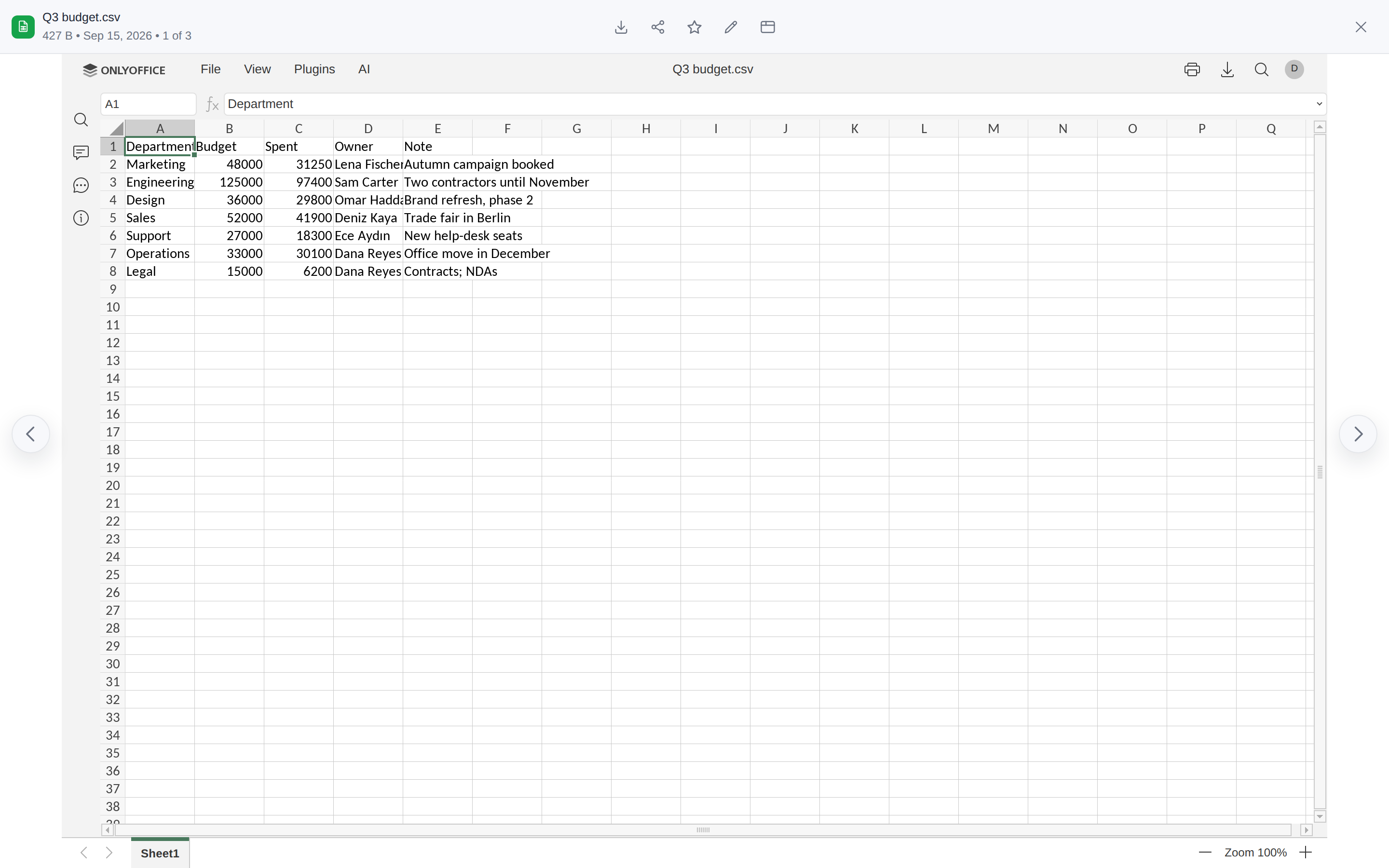 | 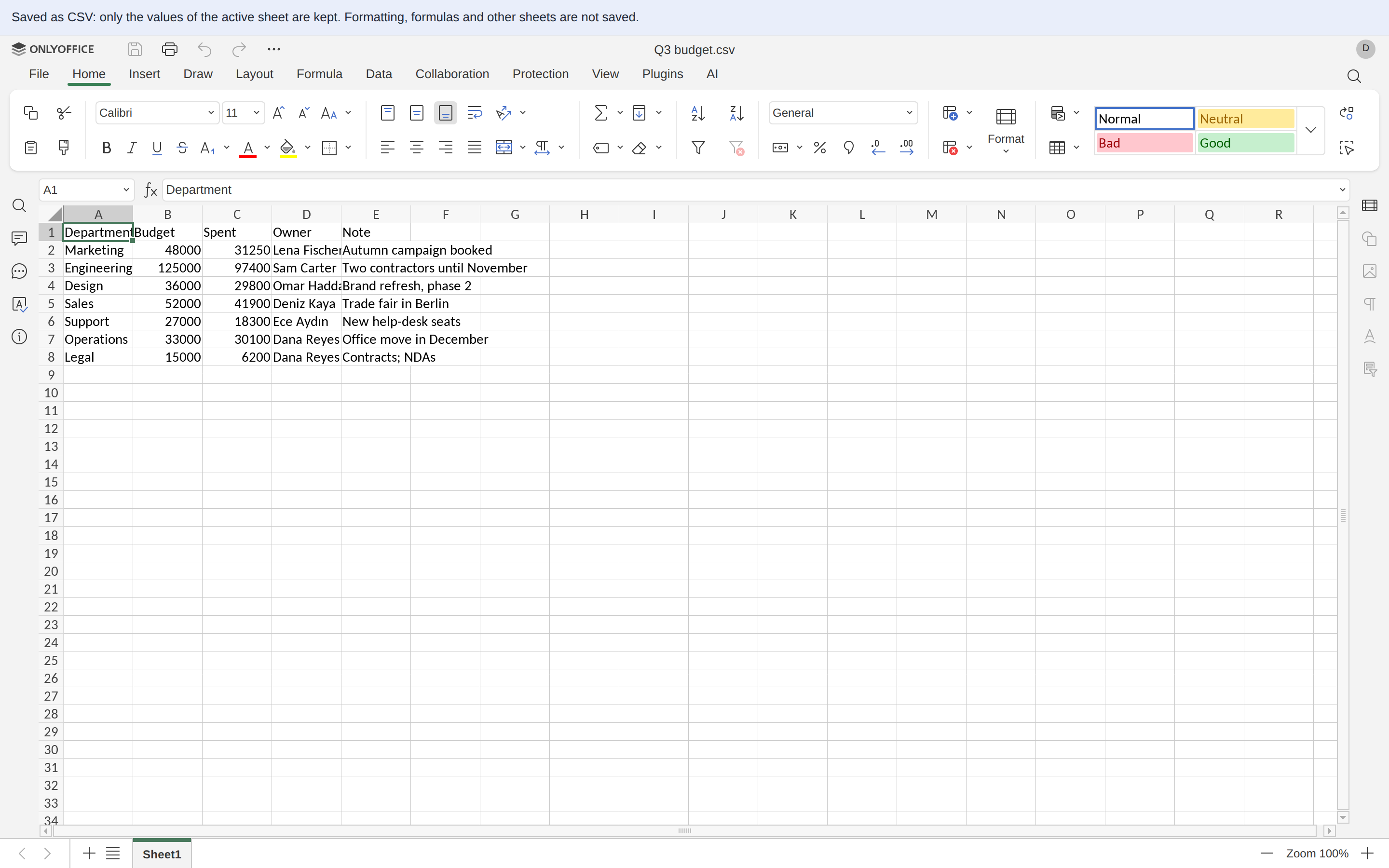 |
| A double click: the spreadsheet, a look first, no "Choose CSV options" question. | Edit: the editor tab, and filex's line on what a save as CSV keeps. |
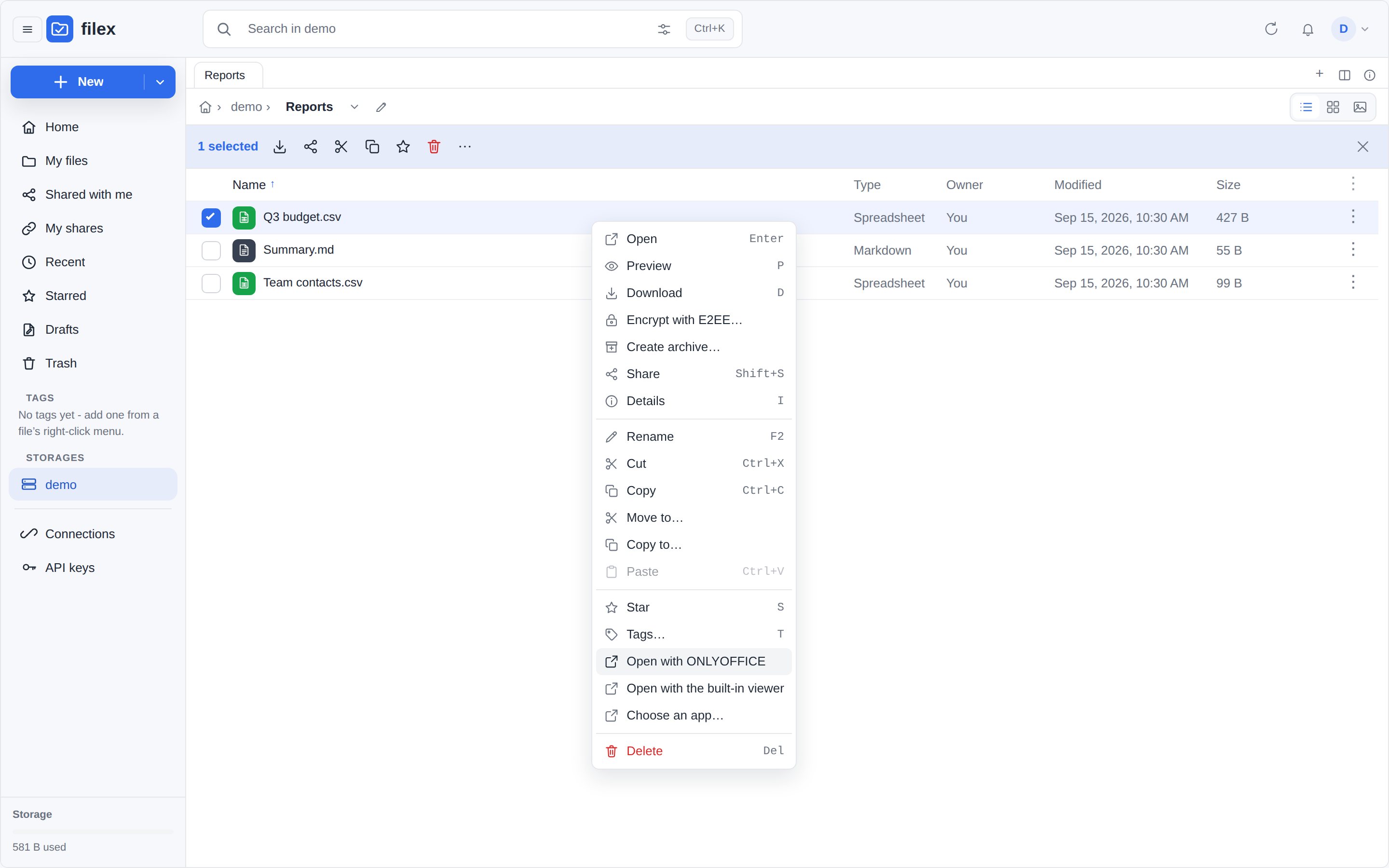 | 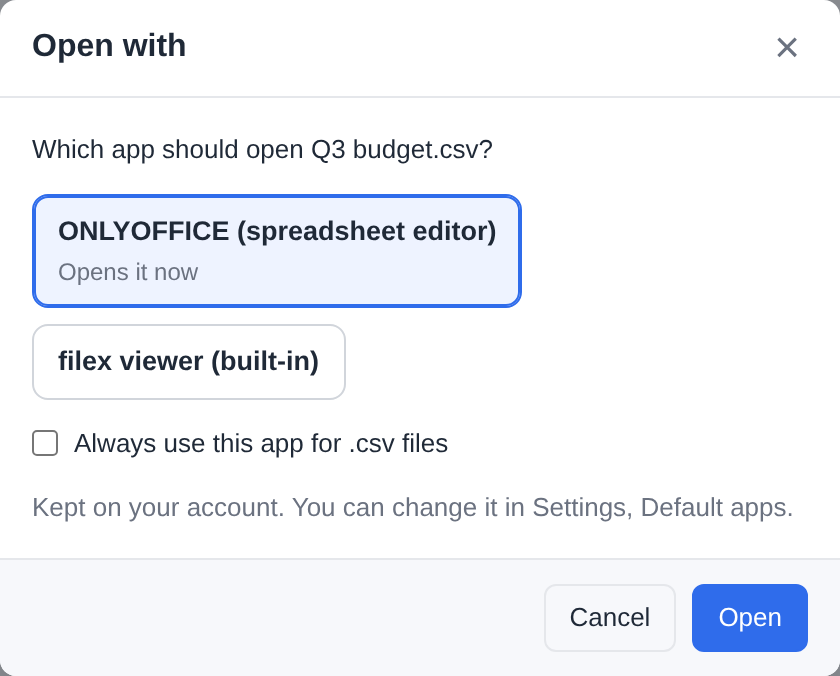 |
| The file's menu offers both. | Choose an app… can make either the person's default. |
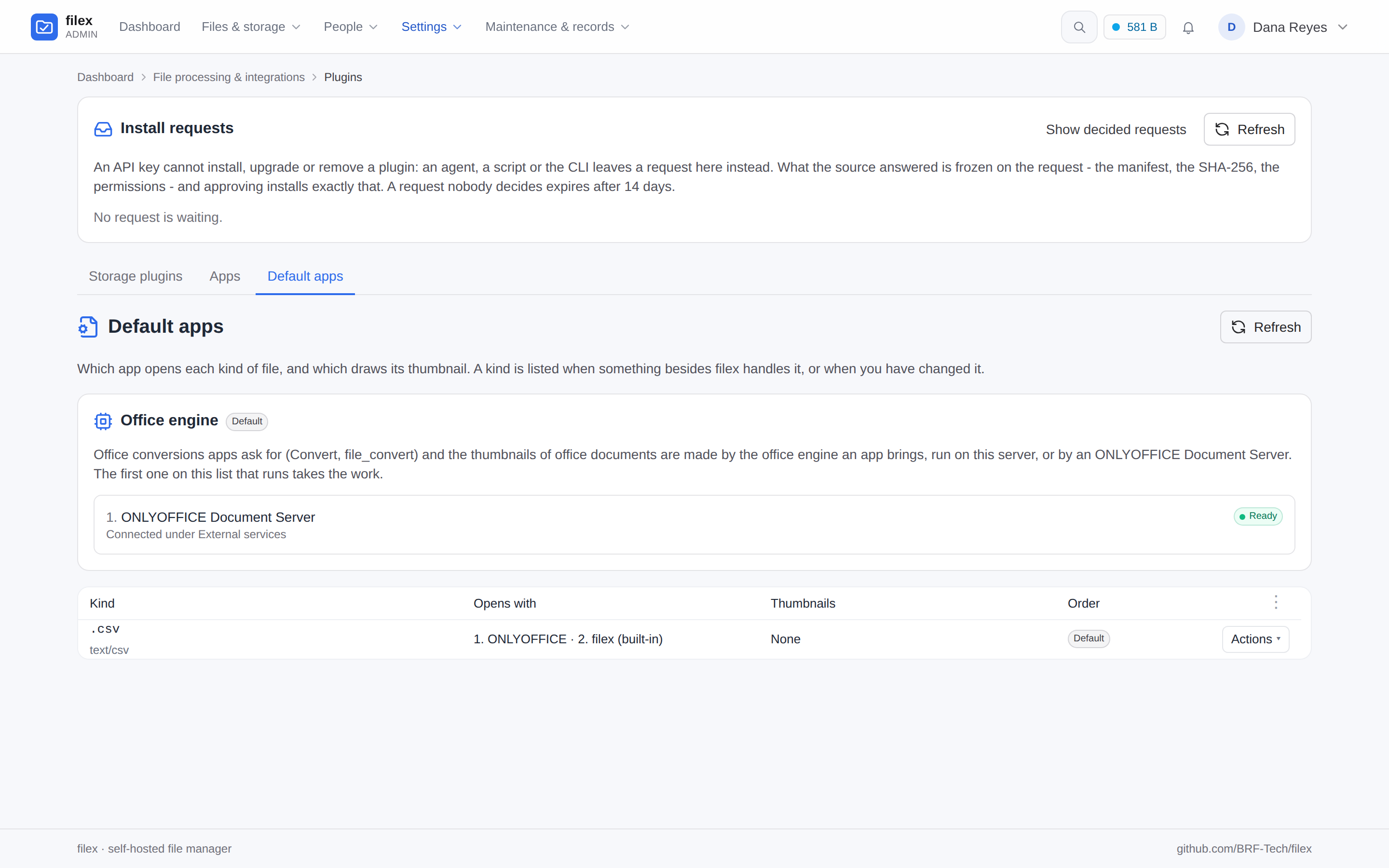 | 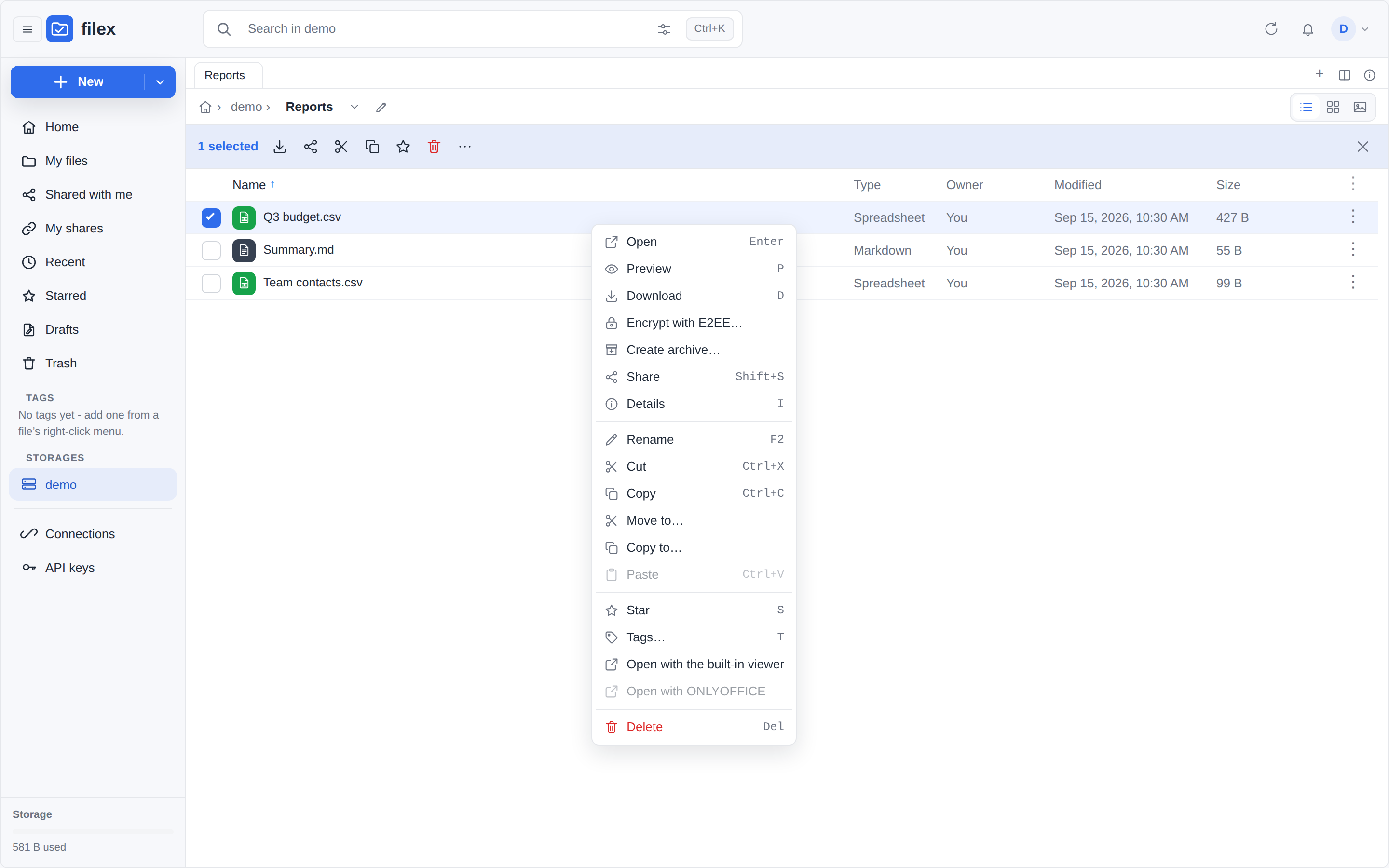 |
Admin → Plugins → Default apps lists .csv while ONLYOFFICE is connected. | ONLYOFFICE switched off: the table opens the file, and an administrator sees the row greyed. |
Opening without the "Choose CSV options" question
ONLYOFFICE asks for a CSV's encoding and delimiter before it shows anything, unless the editor's config carries them (document.options). filex reads the first 64 KiB of the file and passes what it finds, so the file opens straight away:
- the delimiter: comma, semicolon, tab or
|- the one that splits the first lines (outside quotes) into the same number of fields; a comma when nothing does (a one-column file, an empty one); - the encoding: UTF-8 (
codePage65001), with or without a byte order mark. A file in another encoding (UTF-16, a legacy code page such as Windows-1254) gets no options: ONLYOFFICE's dialog asks which one it is. Pick the file's own code page there. A wrong pick shows other letters in place of the file's, and a save that then holds a letter the file's encoding cannot hold is refused (What a save writes).
What a save writes
The Document Server saves an edited CSV when the last editor closes it, as for every document (What a save does). With its default (assemblyFormatAsOrigin: true) the callback's file is a CSV (filetype: "csv"), written the Document Server's own way, which depends on its version: Docs 9.4 writes commas, a UTF-8 byte order mark and \n line ends whatever the file was; Docs 10 writes the file's own delimiter. filex assumes neither.
- How the save is read. filex reads how the saved CSV is written from its own bytes: the byte order mark, the encoding (UTF-8, or UTF-16 by its mark), the line ends, and the delimiter - the one under which the save reads as the file's table, cell for cell, rather than the one filex expected. Docs 9.4 and Docs 10 are both saved right.
- How it is written. In the file's own way: its delimiter, its byte order mark or none, its
\r\nor\n, and its encoding - UTF-8, UTF-16 (little- or big-endian), or a legacy single-byte code page filex recognises from the file's bytes (windows-1250,windows-1251,windows-1252,windows-1253,windows-1254,windows-1257). A semicolon file stays a semicolon file, and a Windows-1254 file stays Windows-1254. A row nobody changed is written byte for byte as it was, and the cells nobody changed keep their text (Cells nobody changed keep their text). - When it is not written. A save that holds a character the file's encoding cannot hold (an emoji, or a letter of another alphabet, in a Windows-1254 file), and saved bytes that are not text in an encoding filex can read for that file, are refused: the file does not change, and the people who edited it are told as for any refused save (below). To keep such an edit, save a copy as UTF-8 from ONLYOFFICE (File → Download as) and upload it, or turn the file into UTF-8 first.
⚠⚠ A .csv is only ever written as CSV text:
- A Document Server with
assemblyFormatAsOrigin: falsesaves an edited CSV as XLSX (filetype: "xlsx", measured). filex converts it back to CSV through the Document Server's own conversion service (the file is offered to it for that one conversion, as an app's office conversion is: UTF-8, then the file's own way and its unchanged cells as above; what the conversion writes for a number or a date was not measured) and writes that. - Anything else - another type, bytes that are a zip or an old Excel workbook whatever the callback says, a conversion that fails, a save over 256 MiB - is not written, and everybody is told as for any refused save (A save in another format): the log, the Document Server, a bell notice to each editor (Your edit to list.csv was not saved, and why) and the audit log. The filex process that refused the save gives the next opening of the file a new editing session.
A CSV is the one kind converted back and written in place. Any other kind saved in another format is written beside the file and never over it: see A save in another format.
Cells nobody changed keep their text
ONLYOFFICE reads a CSV the way a spreadsheet does: a cell that looks like a number or a date becomes one, and a save writes every cell back as the spreadsheet shows it, edited or not - 007 as 7, 05320000001 as 5320000001, 01.02.2026 as 1/2/2026 (1.02.2026 with the editor in Turkish), and an empty cell at the end of every data row (Docs 9.4.0). So filex reads the file the save is about to replace, lines its rows up with the rows ONLYOFFICE saved, and writes the file's own text back wherever the saved text is the same value written ONLYOFFICE's way:
- A row in which nothing changed is written byte for byte as it was - its quotes, a delimiter at its end and its own line end included - wherever it stands now: a sort moves rows and changes none of them.
- In a row somebody edited, the cells they did not edit keep their text.
- A row added in ONLYOFFICE is written as ONLYOFFICE saved it, without the empty cells ONLYOFFICE pads a row with beyond the file's own width. A row deleted there is gone.
- Empty lines at the end of the file stay (ONLYOFFICE never writes them) unless a row was added under the last row, where they stood. An empty row in the middle stays as the file wrote it, a line of delimiters or a bare line end. A first line
sep=;stays, and the file ends with a line end if and only if it did.
"The same value written ONLYOFFICE's way" is only what Docs 9.4.0 writes for a cell nobody touched (measured with the editor in English, Turkish, German and French), and it is one way only: 7 is what ONLYOFFICE writes for 007, so the file keeps 007; 007 is never what it writes for 7. That is:
- A whole number without its leading zeros, its
+, or the spaces in front of it and one after it; one written as hexadecimal (0x10and16); and one too long for a spreadsheet's number (9007199254740993as9007199254740992, and every one from 2^63 up as-9.2233720368547758e+18- a 24-digit account number is kept). - A number with a decimal point, which ONLYOFFICE keeps to six decimals (
03.50and3.50;.5comes back as.0, the value gone). A decimal comma (3,5) is text to ONLYOFFICE in every language measured and comes back as it was. - A date with a four-digit year from 1900 on, written the way the editor's language writes one, with the same three numbers in the same order: English month/day/year without leading zeros (
1/2/2026), Turkish day.month.year with a two-digit month (1.02.2026); an ISO2026-02-01too. trueandfalse(saved asTRUEandFALSE), a tab inside a cell (dropped, unless the file is tab-separated) and a text longer than 32767 characters (cut there).
Every value measured, example by example, is in CONTRIBUTING.md → ONLYOFFICE CSV cell values as measured.
⚠ Nothing that only looks like one of these. A date ONLYOFFICE does not read as one (15.03.2026 in English, the 15th month) comes back as it was, and what a person types over it is theirs (in the English editor a typed 15/3/2026, 01.02.2026 or 1.2.2026 is saved as typed) - which is also why German's 01.02.2026 and French's 01/02/2026 are no rule. A line end inside a quoted cell comes back as it was.
⚠ What is still written as ONLYOFFICE writes it:
- The cell you edit - type
007and the file gets7(a decimal is the one exception: A decimal you type keeps the file's comma). A retype that only writes the same value another way cannot be told from no edit (ONLYOFFICE shows007as7already), so the file keeps007; edit the file as text for that. - What ONLYOFFICE changes in a way no rule puts back, edited or not: a time (
00:13as0:12, a minute short), a percent, a number with an exponent,5.as5, a date with a time, a two-digit year, a year before 1900, a day that is not in its month, a formula (=1+1as2). Keep such a file out of ONLYOFFICE, or edit it as text. - A date in an editor language other than English and Turkish, unless that language writes it the English or the Turkish way (German's
15.03.2026is the Turkish way and is kept; its01.02.2026is not), and a regional setting other than the language's own (en-GBwrites day first). The editor opens in the language of the person who edits (The editor's language), so this is a person whose filex speaks German, French or another language ONLYOFFICE has - or everybody, when the administrator fixes such a language. And a date typed as text the other language's way over a cell with the same three numbers in the same order (1.02.2026over1.2.2026in the English editor,1/13/2026over01/13/2026in the Turkish one) keeps the file's text: only the typed spelling is lost. - A file over 64 MiB or two million rows, or with a row of more than 16384 cells (as many columns as an ONLYOFFICE sheet has): only its delimiter, byte order mark and line ends are kept.
- A column added, removed or moved: the cells from that column on are ONLYOFFICE's, in every row; the cells before it keep their text only while they are more than half of the row's filled cells (otherwise the whole row is ONLYOFFICE's). A removed last column leaves an empty cell at the end of each row.
- A row filex cannot match: half or more of its cells changed at once; edited and also moved (edited, then the list sorted); or one of several rows that differ only in how a value is written (
A;007andA;7) when one of them was deleted or another added. A row typed to read like another row of the file (5where another row says05) is written as typed while the rows around it stand where they stood; when rows were added, deleted or moved there in the same save, or that other row was itself changed, the first of the rows that now read the same gets the file's text,05.
Keeping the cells never refuses a save, and never holds one back: what refuses one is only how the save is read and written (What a save writes). When the cells of a file cannot be kept at all it is written with the file's delimiter, byte order mark, line ends and encoding and ONLYOFFICE's values, and the log says onlyoffice callback: CSV cells not kept with the reason (too_large, too_many_records, too_many_fields, unreadable, or not_text for a UTF-16 file whose bytes do not read back as the same text). Two reasons are filex's own failure, logged as a warning and worth a report: check_failed (what filex was about to write did not read back as the save) and panic (its comparison failed; the line carries what failed and where, never a cell's text). The file is compared as it is on the storage when the save arrives, and the revision the save replaces stays in the file's history (What a save does).
A decimal you type keeps the file's comma
In an editor whose language writes decimals with a comma (Turkish, German), a decimal typed with a comma is a number, and ONLYOFFICE saves every number with a point: 3,5 typed over as 4,5 came back as 4.5, and up to 17 significant digits of it, 1,1 as 1.1000000000000001 (Docs 9.4.0). The file's own decimal commas that nobody touched are text to ONLYOFFICE and come back as they were, so a semicolon file could end up with 4.5 in a column of 3,5 and 1250,75. filex writes a decimal somebody typed, or put in a row they added, the way its column writes one:
- in a file not separated by commas (in a comma-separated one a comma is the delimiter, and nothing says it is a decimal mark);
- in a column of the file that holds a number with a decimal comma (
3,5,-0,25,1.250,75) and none with a point or an exponent (3.5,1.250,1e3) or with commas between thousands (1,250,000): a column of both has no way of writing a decimal to follow.1,250alone says nothing either way (a thousand and more, written the English way, which the English editor reads it as); - while that column still stands where it stood: the save must hold one of its decimal commas as the file had it, in a row filex lined up with the file's;
- and for a number the file does not hold in any of its cells, however it writes it there (
1.5,03.50,1e3, which ONLYOFFICE saves as1.50,3.50,1000.00000). After a column was deleted, added or moved, or cells were shifted along a row, the numbers that moved to the column's place are the file's own, not ones somebody typed, and they keep their point. So does a number typed that happens to be one the file holds elsewhere.
There 4.5 is written 4,5, -0.5 as -0,5, 0.1234567 as 0,1234567, with the digits the save has. ONLYOFFICE writes a number with up to 17 significant digits; one saved with 16 or 17, exactly as ONLYOFFICE writes that number, is written as the shortest decimal that is the same number, which is what was typed: 1.1000000000000001 as 1,1, 12345678.123455999 as 12345678,123456. Other digits are kept as saved, and a number longer than 17 digits is no number ONLYOFFICE wrote but a text, written as saved. Digit grouping is not added back (1.250,75 typed is written 1250,75).
Two more kinds of cell in such a column get the comma, though nobody typed them: a formula nobody touched, whose value is all the save holds (=7/2 is saved 3.5 and written 3,5), and a number that moved there from another column and that ONLYOFFICE kept to six decimals on the way, so that no cell of the file holds it (0.1234567 is saved 0.1234570 and written 0,1234570). In both the value is the one ONLYOFFICE saved, and only its decimal mark is the column's.
⚠ The save does not say which language typed a number: 4,5 typed in the Turkish editor and 4.5 typed in the English one save the same 4.5, and people in both may edit one file. So in such a column the comma is written whoever typed the number, and so is text typed with an apostrophe that reads like one ('4.5, saved 4.5). The English editor keeps a typed 4,5 as text, and the file gets it as typed.
⚠ Only a number written with a point and digits gets the comma. A whole number (4, typed is saved 4), a number with an exponent (1,5E+20 as 1.50e+20, and anything below 0.0001, 0,000001 as 9.9999999999999995e-07), a percent (4,5% as 4.50%) and what ONLYOFFICE reads as a date (4.5 typed in Turkish is saved 4.May) are written as ONLYOFFICE saved them. So is every decimal in a file whose cells cannot be kept (not_utf8, too_large and the others above), and in a column whose every decimal comma was typed over in the same save, which leaves nothing to show the column is still there.
A CSV saved from the Office editor app is written by the same rules: its editor is ONLYOFFICE's too, and filex writes its save the way it writes the Document Server's (The Office editor app).
The log line onlyoffice callback: CSV cells kept counts these cells in the Document Server's saves as commas. Every value measured, editor by editor, is in CONTRIBUTING.md → ONLYOFFICE CSV: a decimal typed, as measured.
What a CSV cannot keep
A CSV is values separated by a delimiter, nothing else. Saved as CSV, only the values of the active sheet are kept: formatting, formulas (their values are kept), other sheets, images and charts are not. ONLYOFFICE says so itself when a CSV opens in its editor ("The CSV format does not support saving a multi-sheet file or any elements except text. Only the active sheet will be saved.") - in English only, and, on a browser that opens it for the first time, partly under ONLYOFFICE's own "New" tip. So filex says it as well, in the person's language, in a line under the viewer's bar for as long as a CSV is open for editing. To keep any of that, save a copy in another format from ONLYOFFICE (File → Download as, Save copy as).
A save in another format
The Document Server writes an edited document back in its own format when it can (assemblyFormatAsOrigin, on by default) and in OOXML when it cannot, or when that setting is off. It writes no Word 97, Excel 97 or PowerPoint 97 file: with its defaults (Docs 9.4) an edited .xls comes back as XLSX and a .doc as DOCX (the callback's filetype, and zip bytes).
So the file is not touched. The edit is written beside it, in the format it came back in, under the same name with that format's extension: rapor.doc stays as it was and rapor.docx holds the edit. When that name is taken, the next free one is used - rapor (2).docx, the numbering New document uses - and nothing is replaced. Then:
- the new file is catalogued, indexed, scanned and announced like any new file (
file.uploaded,meta.origin: "onlyoffice",meta.saved_beside: the path of the file that was edited); - each person who edited the document is told in their bell, in their language - Your edit was saved as rapor.docx, and why (the webhook hears it once);
- the audit log writes
file.office_saved_beside, with the new file, the one that was edited and the format; - the next opening of
rapor.docis a new editing session (the file did not change, so its session key would not either).
Only for somebody who may create that file there. filex records whom it handed an editing session of the document (every editor config it signs names the person) and takes the editors from the callback's signed token (never from its body), keeping those the session had. The new file is written for the first of them whose account is on, whose tenant reaches the storage and whose permissions let them create it there (files.create: role, folder exceptions, grants, a blocked file type, an app's lock), checked at the save and on the new file's own name; the audit row names them. When nobody may, the save is not written: the editors read Your edit to rapor.doc was not saved - they cannot create files in that folder, so to keep an edit they download it from ONLYOFFICE's File menu before closing the document and save it somewhere else - and the audit log writes file.office_save_refused. Who opened a session is the filex process's memory: after a restart the signed editors are taken as they are.
It is kept only for the formats a document is saved in - DOCX, XLSX, PPTX (and their macro-enabled forms), ODT, ODS, ODP - and only when the bytes are the package the callback names. Anything else is not written: the file stays as it was, the log says onlyoffice callback refused: not written and why, the Document Server is told the save failed, the people who edited it get Your edit to rapor.doc was not saved with the reason (the bell's upload failed notice, file.upload_failed, the one an upload that never reached the storage gets, in their language), and the audit log writes file.office_save_refused. A file in its own format (a .docx saved as DOCX, an .odt as ODT) is written in place, as always; a .csv is converted back and written in place (CSV files).
A document opened from somebody's computer (the desktop app's Open with filex) is edited through a working copy, .filex-open/<session>-rapor.doc, and its save in another format is written beside that copy: .filex-open/<session>-rapor.docx, then <session>-rapor (2).docx for the next save of the session. Nobody is notified about it from here - the server announces nothing about filex's own folders, neither in the bell nor to a webhook. The desktop app (0.53 and later) brings it home beside the person's own file as rapor.docx and tells them, writes the session's later saves to that same file, and removes the copies with the session (DESKTOP.md → A save in another format). An older desktop app does not: the edit stays in the working folder and is removed with it.
The Office editor app saves the same way, by the same code: it says the save is in another format (file.save beside), and filex writes it beside the file under the same names, for a person who may create files there, with the bell's notice and an audit row (file.app_saved_beside); later saves of the same opening, and of an editing session, go to that file (APP-PLUGINS-API.md → Saving beside the file, conflict copies).
When the document changes while it is open
The Document Server edits the version it fetched when the editing session opened, and saves the whole document back when the session ends (about ten seconds after the last editor closes). If the file changed in between - another person saved it over WebDAV, a sync client brought a newer copy, an agent rewrote it on a mounted folder, a second editing session opened on the newer version - filex does not write that save over the newer version.
The session's version. When filex hands out an editing config it records, per document key, the version the storage driver reports for the file at that moment (size, modification time, etag). A second person handed the same key joins the running session and sees its version, so the first record stands. The session's own save moves the record on: a session that force-saves and then saves again is not "out of date" after its first save.
The save. Right before the callback writes over the file it asks the driver again. Same version: written, as always. Different: the save is written beside the file as <name>.filex-conflict-<time>.<ext> (UTC time, the name the desktop app gives its conflict copies too; the next free (2) when it is taken), and the file keeps the other change. As with a save in another format, it is written for one of the session's editors who may create a file in that folder; the editors get rapor.docx changed while you were editing it, with where their edit is (say rapor.filex-conflict-20261006T101500.docx), and the audit log writes file.office_saved_conflict. When none of them may create a file there the save is not written and they are told why (file.office_save_refused).
The open editor. An office document open in filex's viewer (the explorer, the editor tab, the embeds) joins its folder on the realtime feed, like the explorer does for the folder it shows. When a change names the document it asks the server whether its session is still current - POST /api/files/onlyoffice/session {path, key, action: "state"} answers {stale, known} - because the editor's own save looks the same on the feed. A stale session:
- with nothing unsaved in the editor, is reloaded: the editor is closed (
destroyEditor()) and a new one opened on a fresh configuration (a new key - the file changed), and a note says The file was updated outside filex; the new version is loaded; - with edits in the editor, asks which version stays: Keep the outside version (the edits made here are dropped:
action: "theirs", the session's save is not written when it comes), Write mine (action: "mine": the session now stands on the version there, and its save is written over it - over that version only; a later change makes it stale again), Keep both (nothing to send: the session's save goes beside the file, as above). Escape puts the question away without answering it; until an answer nothing is written over anything.
Who may answer. Write mine and Keep the outside version are taken only from one of the session's own editors: somebody filex handed an editing configuration with that key, for that document. The page sends the configuration's signed token with the answer, which any filex instance can check; without it, the instance that handed the configuration out remembers who it was, until it restarts. Anybody else - a person who only looked at the document, or one who may edit it but never opened it for editing - gets 403 not_your_session, and the save keeps its default (beside the file). Who answered, and what, is in the audit log (file.office_session_answered). Asking (action: "state") stays open to whoever may view the document; a key that is not the document's is answered {"stale": false, "known": false} and nothing is recorded under it.
"Edits in the editor" means ONLYOFFICE's onDocumentStateChange said true since this editor opened. It stays true when ONLYOFFICE later says false: that only means the edits reached the Document Server, not the file.
Where the record lives. In the database (table office_sessions), so a restart does not forget a running session and every filex instance behind the same database knows the sessions any of them handed out - an answer given through one instance (Write mine, Keep the outside version) holds for a save that arrives at another. A row is removed when its session ends (the last save, or closed with no change); one whose session never said so is swept two days later (an hourly look, on the server's minute maintenance tick). A session filex has no record of - opened before this table existed, or its record expired - is judged by the key the document would get now: an older key of that document is out of date, and is recorded as such.
The desktop app's "Open with filex" adds the same rule for a document on your own disk, where the server cannot see the change (DESKTOP.md → When the file changes while it is open).
The Office editor app keeps the same rule, written by the same code: a save of a document that changed after the app read it (or, editing together, after the session's base or last save) is written as a conflict copy beside it, teklif.filex-conflict-<UTC time>.docx, for a person who may create files there; the file keeps the other change, the bell says so, the audit log writes file.app_saved_conflict, and later saves of the same opening go to the copy. The app asks for it (file.save conflict: 'copy'); an app that does not gets the 0.56 answer (APP-PLUGINS-API.md → Saving beside the file, conflict copies).
Creating new documents
+ New → New document makes an empty Word, Excel, PowerPoint or OpenDocument file and opens it in the editor that handles it.
⚠ The bytes do not come from the Document Server, nor from LibreOffice. They are minimal valid documents embedded in the filex binary (backend/internal/newdoc - XML parts zipped in memory), so a .docx can be created on any install, the :slim image and the bare binary included.
What OnlyOffice decides is whether the type is offered at all: GET /api/files/capabilities publishes newdoc_types, every type this build can create, each naming the service its editor needs (requires: "onlyoffice", "drawio", or empty for the built-in code and markdown editors; BACKEND.md → Rules the server publishes), and the client crosses that against the external block. With no Document Server configured the six office formats (docx, xlsx, pptx, odt, ods, odp) are not in the picker and the dialog says why - "Office documents need an office engine, the Office editor app or ONLYOFFICE, and neither is set up here." - rather than creating a file nobody on this install could open. The sentence is the server's (capabilities.newdoc_withheld, in the reader's language), and it is said only when nothing here makes an office document: an app whose rows make .docx, .xlsx or .pptx (below) is a way to make them, and the line is not shown beside its rows.
An office app installed and no document server - the app's rows, and only draw.io said to be missing - then the same dialog in Turkish, the server's sentence in the reader's language:
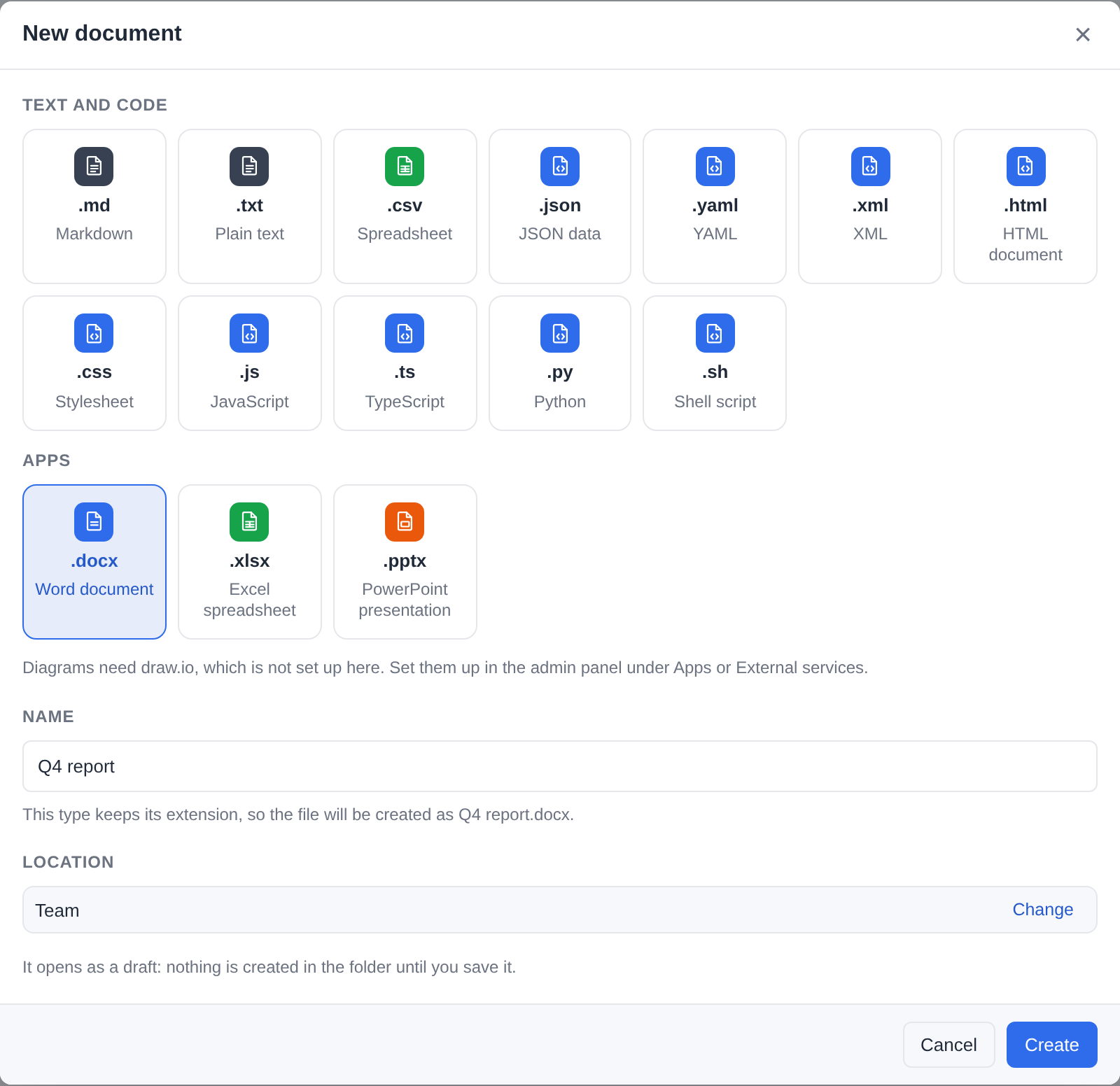
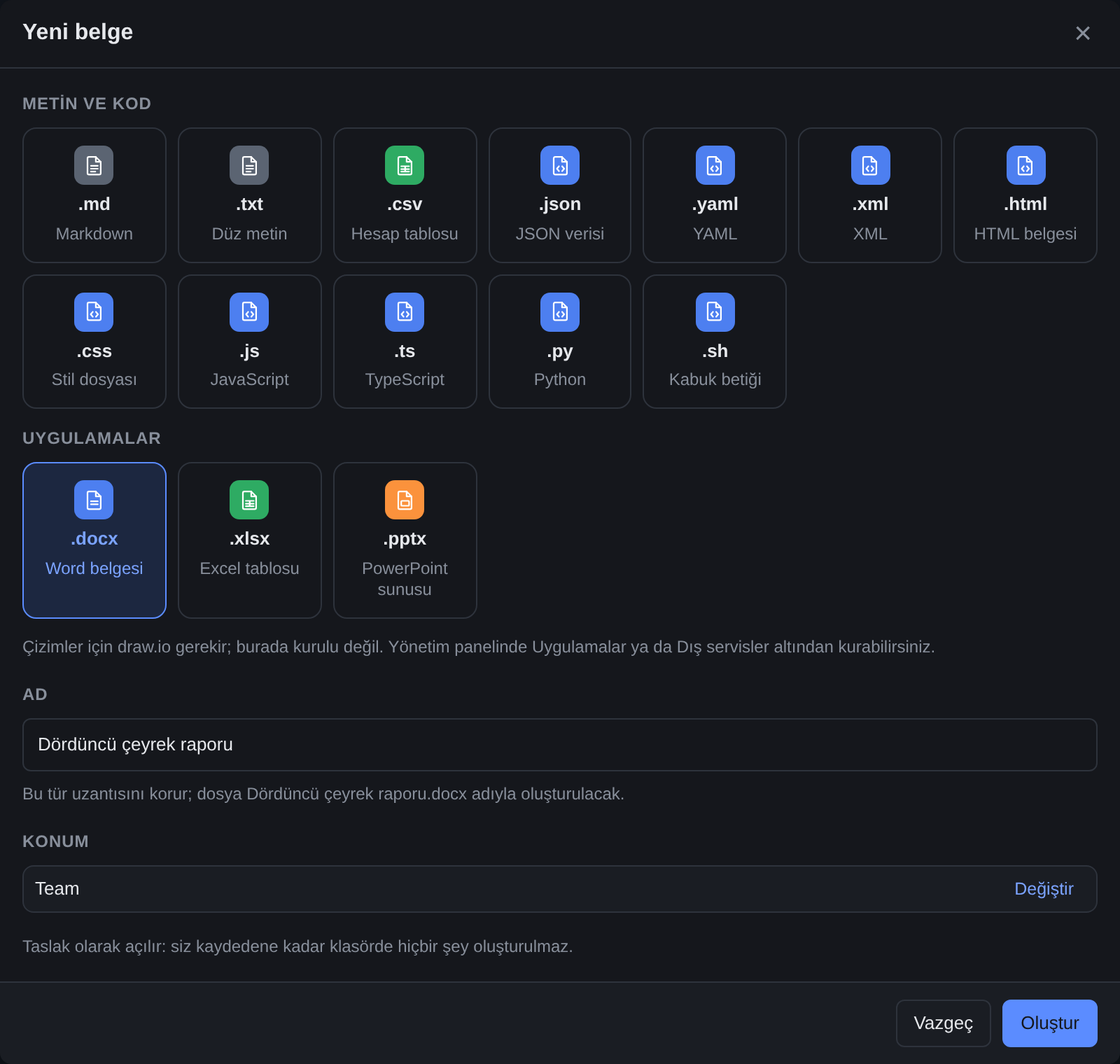
An installed app may add rows of its own (new_documents - draw.io's draw.io diagram, say): they are listed under Apps, in the app's own words, while the app runs, and the new file - empty, or a copy of the app's template - opens in the app's interface, a draft like any other (APP-PLUGINS.md).
Naming the file
The name field holds the whole file name. Choosing a type fills it in with that type's extension - Untitled.txt, Untitled.docx - and clicking into the field selects the name part only, the way a rename does, so typing replaces Untitled and keeps the extension. After that the name is yours:
- Text and code types take any name.
LICENSE,NOTICE,Makefile,Dockerfile,.gitignore,test.confandexample.customcan all be made as Plain text;READMEcan be made as Markdown. The type decides what the file is - its contents and the editor it opens in straight after - not what it is called, soLICENSEopens in the text editor. Opened again later, a file whose name says nothing (no extension, or one filex does not know) opens as plain text when the server says its bytes are text, and saves like any other text file. - Office documents and diagrams keep their extension. Their editors find them by it - OnlyOffice picks Word, Excel or PowerPoint from the extension, and
reportwith none is a ZIP nothing opens - so if you remove it the dialog says "This type keeps its extension, so the file will be created as report.docx" and the server adds it back. - A text type cannot borrow a document's extension.
x.docxmade as Plain text would be an empty.docxthat no editor opens, so the dialog refuses it and asks for the Word document type (or another extension). - Switching the type keeps what you typed. Only the previous type's default extension is swapped (
notes.txt→notes.md); a name with no extension, or one you chose (test.conf), stays as it is.
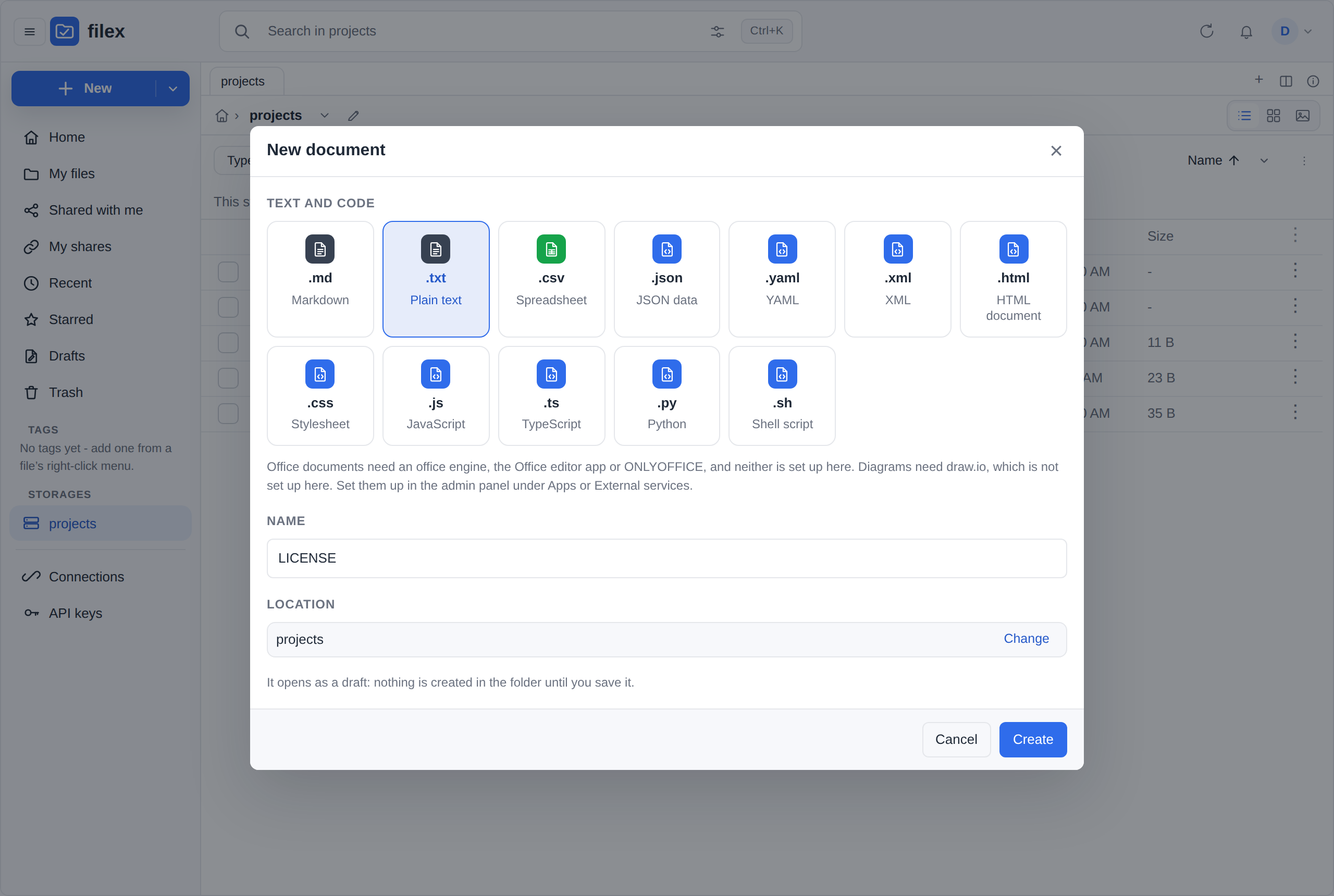
The create itself is POST /api/files/manager?action=newfile with {path, name, type, exact_name} - the extension rules, 400 EXT_NEEDS_TYPE and the answer are in API.md → The HTTP surface the component calls. Where the server keeps drafts (below), the explorer sends the same body to POST /api/files/drafts instead.
Drafts: nothing is in the folder until you save
Create makes a draft: a real file, with the name and type you chose, kept in your own drafts area of that storage - and the folder you were in gets nothing until you save it.
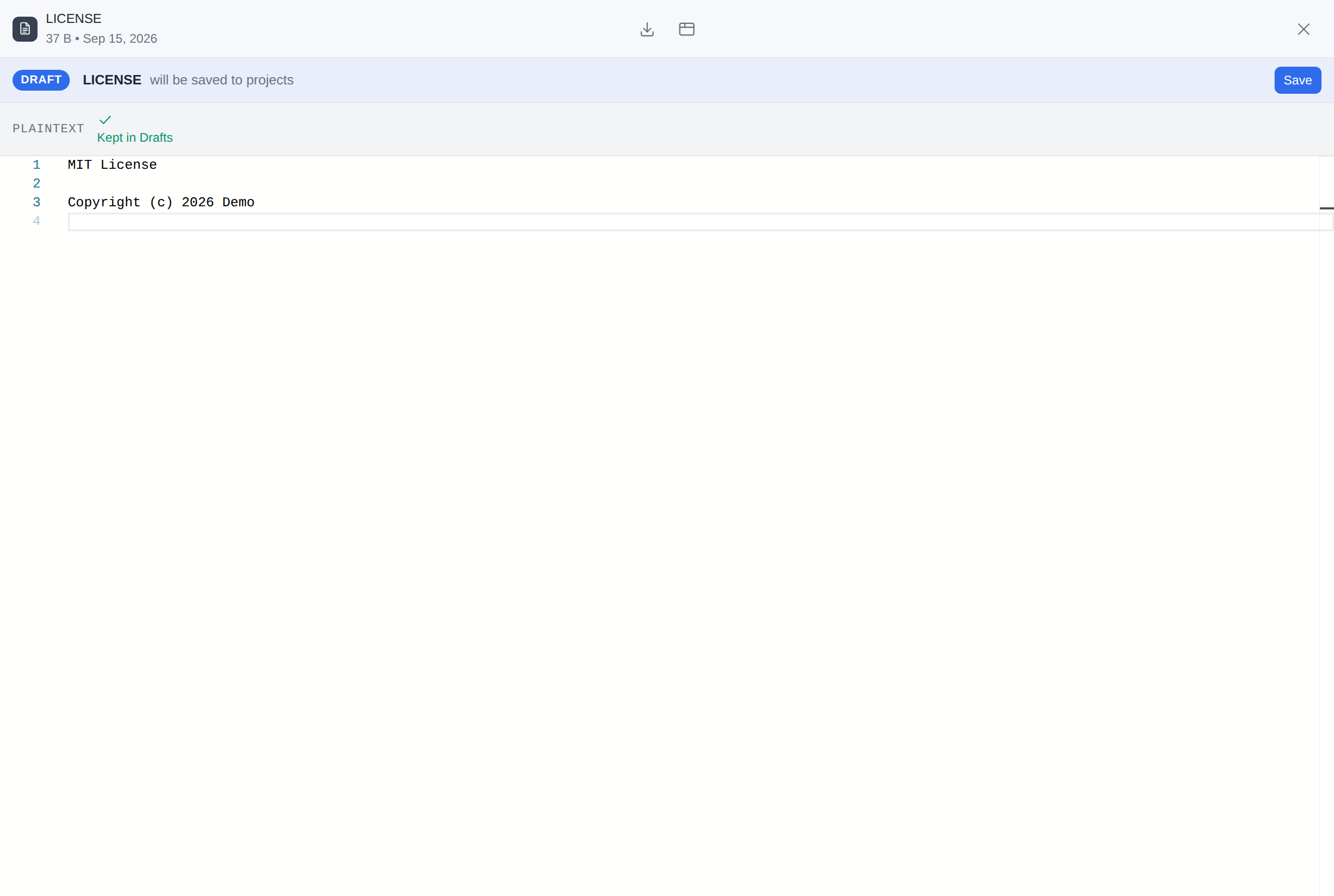
- The editor opens on the draft, with a bar above it that says where it will go ("will be saved to projects / docs") and a Save button. The built-in editors write into the draft as you type (every few seconds); the document server saves into it through its own autosave, and draw.io when you press its Save. While there are changes not yet written, the browser's own "leave this page?" question stands between you and a closed tab.
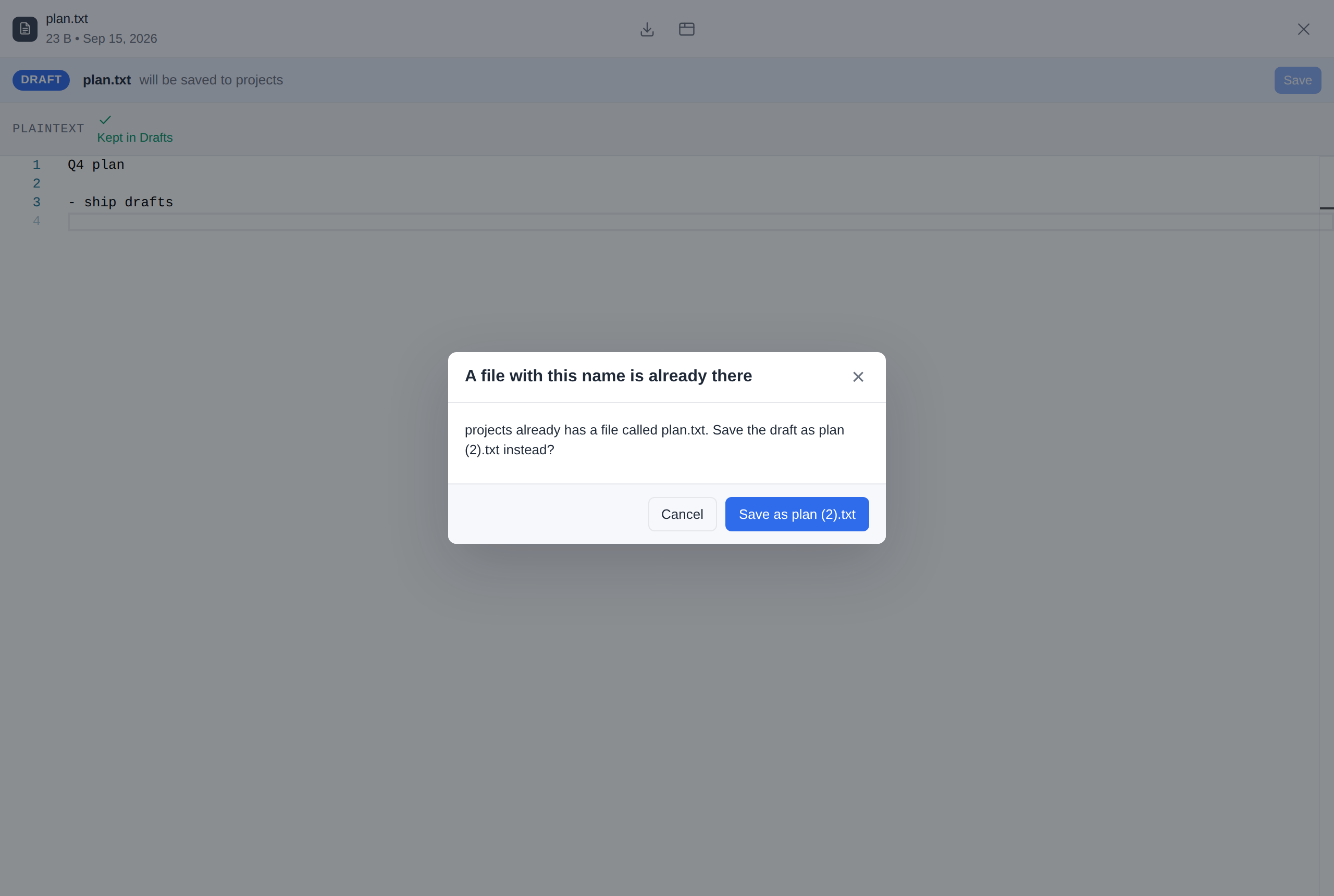
- Save puts the draft in its folder under its name. If a file has taken the name in the meantime, filex asks first - "projects / docs already has a file called report.txt. Save the draft as report (2).txt instead?" - and nothing moves before you answer. If the folder itself is gone, Save says so and the draft stays in Drafts.
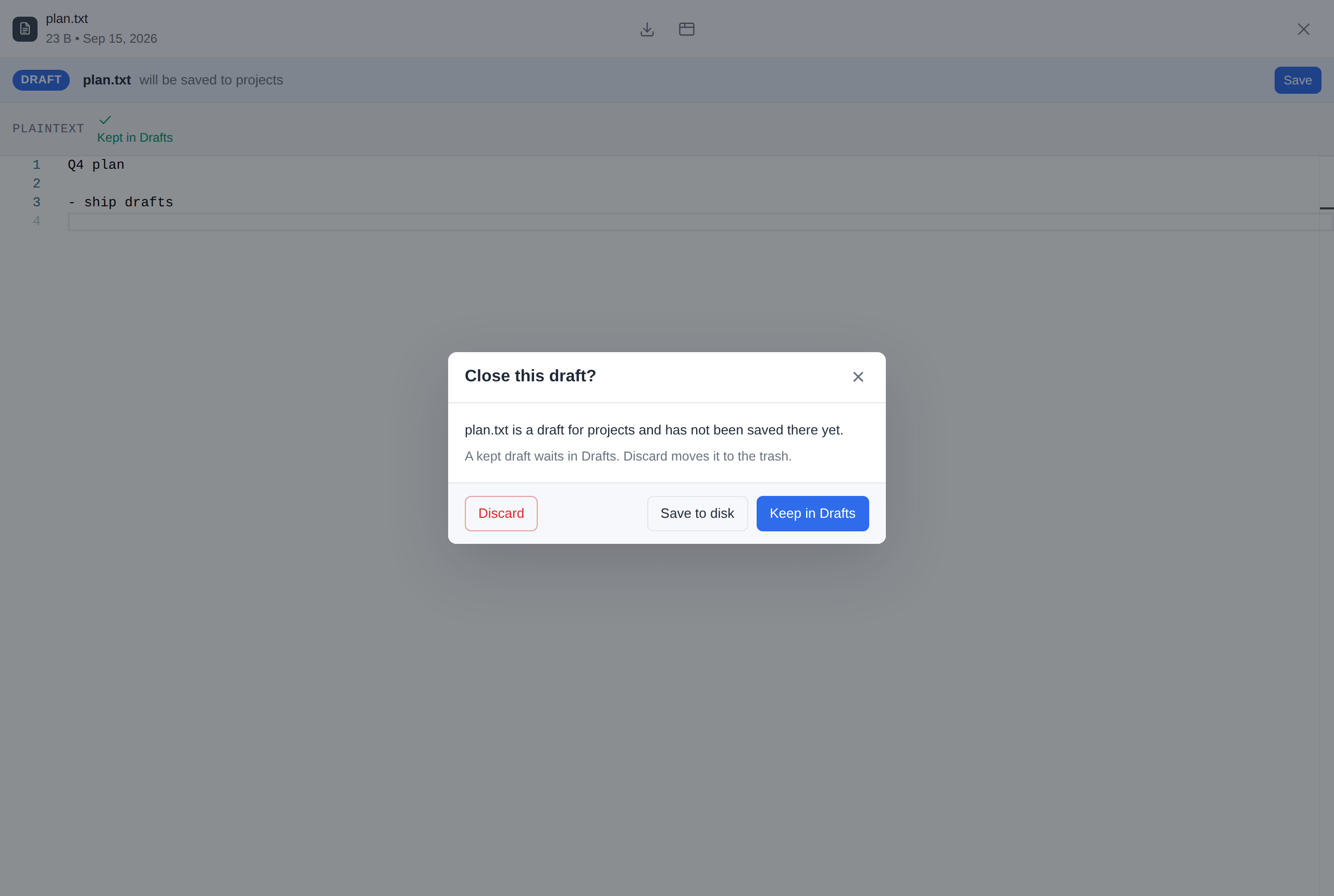
- Closing a draft you never saved asks three things: Save to disk, Keep in Drafts (the default) or Discard. A discarded draft goes to the Trash, where the usual retention deletes it; restoring it puts it back in Drafts.
- Drafts, in the navigation panel beside Recent, Starred and Trash, lists your drafts from every storage - name, where it will be saved, storage, modified - with Open, Save to disk and Delete on each row. The panel shows how many you have; a draft never raises a notification.
- A draft is yours alone. Nobody else sees it, an administrator included: it is not in any listing, search, share, WebDAV, S3, SFTP, FTPS or NFS view, desktop sync or storage usage figure, and no version history is kept of it. On disk it is
.filex-drafts/<your user id>/<key>/<name>- one of the names filex keeps for itself. - At most 50 drafts per person, by default. An administrator changes the number under Admin → Protection → Drafts (PROTECTION.md); at the limit, New document says so and offers to open Drafts - it never creates the file in the folder instead.
| What Create opens - a draft, under the bar that says where Save puts it | Closing a draft that was never saved |
|---|---|
 |  |
| Save, when a file has taken the name meanwhile | Drafts, in the navigation panel |
|---|---|
 | 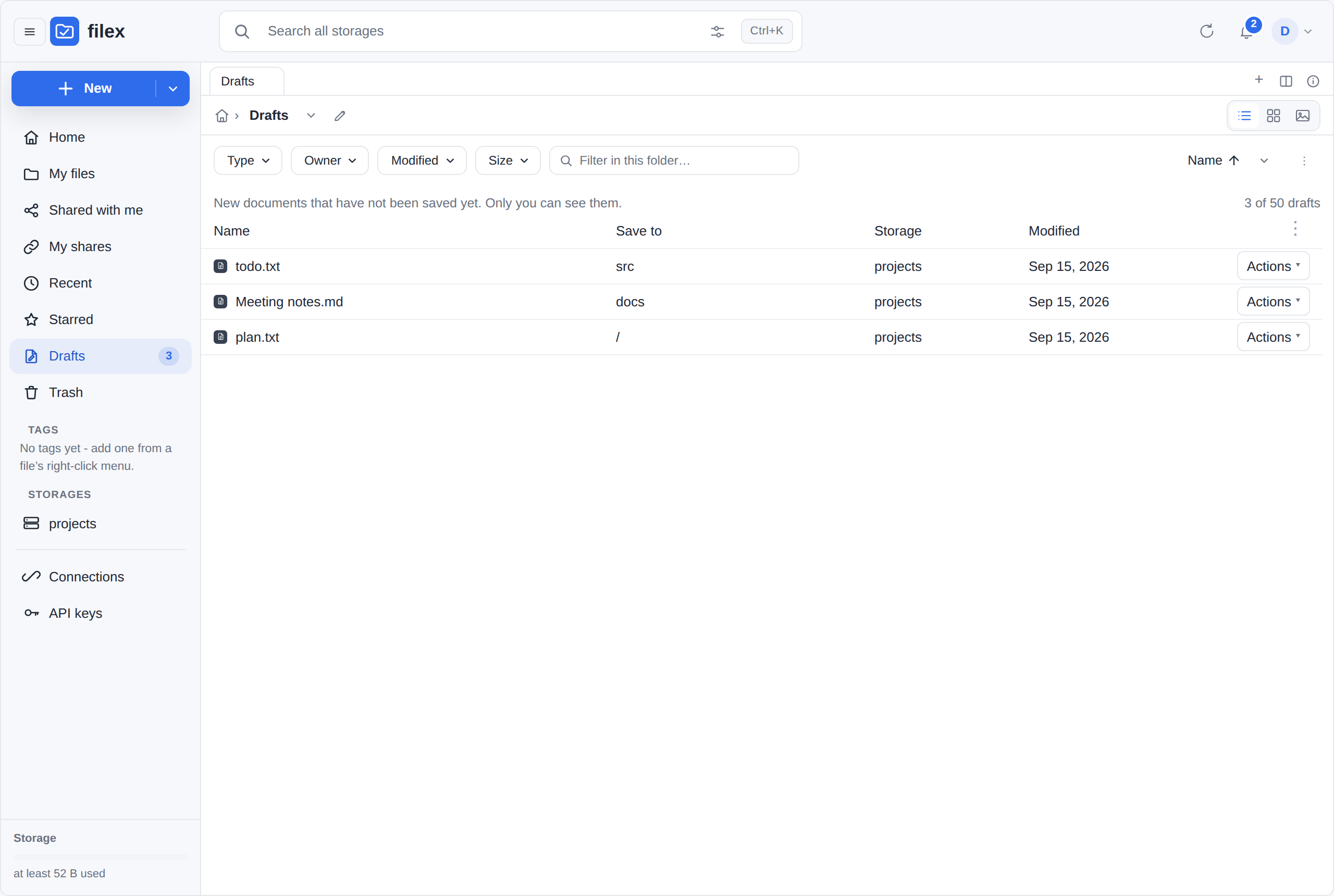 |
Drafts belong to a person, so a caller that is not one creates the file directly: an app token, and an embed confined to one folder by its host (one proxy token shared by all its users). GET /api/files/capabilities carries drafts: { limit } exactly when the caller's New document makes drafts. The endpoints are in BACKEND.md → Drafts.
Office conversions for apps (the office engine)
When an app converts an office document - the Convert app's Word, Excel, PowerPoint and OpenDocument targets, PDF and PDF/A from any of them, MCP's file_convert - filex hands the file to an office engine: the one the Office editor app brings (0.4.0), run on the server (The office engine without a Document Server), or a connected Document Server's conversion API. When both are there, Admin → Plugins → Default apps → Office engine decides which is asked first (the app's engine, by default). filex ships and runs no LibreOffice, not even one installed next to a bare binary.
A Document Server as the engine:
- Nothing more to set up. The engine uses the URL, the JWT secret and the callback address configured above, and the Document Server downloads the file through the same door as an editor's document (
/api/files/onlyoffice/fetch, with an address made for that one conversion and withdrawn when it ends). A setup where documents open in the editor converts too. - Live. Connecting or removing the Document Server under External services turns the engine on or off at once; no restart.
- What it does not do (Document Server 9.4): HTML from a spreadsheet or a presentation, and one CSV file per sheet (the first sheet is written). PDF/A comes out as PDF/A-2a. Text and CSV results are UTF-8 and start with a byte order mark; a CSV takes the separator asked for.
.odgdrawings and EPUB books are read.
Neither (no app brings an engine and no Document Server is connected): a job that asks for an office conversion fails with office_unconfigured and says that office documents are converted by the Office editor app's engine or by a Document Server; an administrator is told to install the app under Apps (or connect a Document Server under External services) - never a silent error. With the app installed but its engine still being prepared, and no Document Server, the job fails with office_preparing instead (Being prepared).
For app authors: PLUGIN-KIT → The office engine.
The office engine without a Document Server
The Office editor app brings an office engine for the server: ONLYOFFICE's converter (x2t) and its page layout (the editor's own scripts), compiled to WebAssembly. With it, filex does on its own what it asked a Document Server for:
- the office conversions apps ask for (
engines:office): the Convert app's Word, Excel, PowerPoint and OpenDocument targets, PDF, HTML and EPUB, and MCP'sfile_convert- unchanged for the apps; - the office thumbnails - the same 320-pixel picture of the first page (thumbnails.md → Office through OnlyOffice).
Set it up: install the Office editor app (a release that carries its engine; its manifest says engines.office). There is no address, no secret and no callback to fill in. For a few minutes after the install the engine is being prepared; Admin → Plugins → Default apps → Office engine says when it is ready.
How it runs
- In a process of its own. filex starts
filex office-engine- a hidden command of its own binary - and hands it one job at a time over its standard input and output. The engine's code never runs inside the server process and is never built into filex: it comes with the app's release (engine.zip, beside the app's interface bundle), checked against the SHA-256 its manifest names at install and every time a process starts. The editor's scripts and fonts are read from the app's installed package, read-only. - No network, no secrets. The engine sees the job's own directory and the app's package, nothing else, and its process gets none of filex's environment. A picture a document only links to (a
.docx's linked picture, an<img>of an HTML page or an EPUB chapter) is not fetched, for a thumbnail or a conversion alike: x2t and the layout run with no socket and no host function that could reach one, and nothing waits for it either. The picture is left out of the pages and the thumbnail, as a Document Server without a network leaves it: a.docx's thumbnail is drawn as the same document's without the link, and such a document converts in the time of one that names nothing elsewhere (measured with the Office editor 0.4.0's engine: 2 seconds to PDF and to a thumbnail, no request to the server it names). - Everywhere filex runs: Linux, Windows and macOS, amd64 and arm64 (the WebAssembly runtime is filex's own, wazero).
- Its deadline is filex's. A job that runs past its time - an engine call's (120 seconds unless the app asks for more, at most 900), a thumbnail's 60 - ends with its process; the next job starts another.
Being prepared
The engine is compiled once on each machine: after the app is installed or updated, and after filex itself is updated. That takes 3.5 to 5 minutes in the background; later processes load it from the cache in about a second. The cache is in <data dir>/office-engine/ (the compiled modules, the layout's precompiled scripts, and a marker per prepared version); deleting it only makes the next start prepare again.
While it is being prepared:
- Default apps shows the app's engine as Being prepared, since when (then Ready, or Failed with the reason);
- a conversion goes to the Document Server if one is connected, and otherwise fails with "the office engine is still being prepared" (the job's error code is
office_preparing, notoffice_unconfigured); - office thumbnails wait, and are drawn as their files are listed once it is ready.
A preparation that fails says why on Default apps (and in the log) and is tried again after 30 minutes, and at every start.
The engine and a Document Server
Both may be there. Admin → Plugins → Default apps → Office engine lists them in the order they are asked - by default the app's engine first, the Document Server after it - and its Runs first picks the one asked first (a rule sent to PUT /api/admin/file-types/engines/office may also switch one off). A job goes to the first one that runs now, so a Document Server listed second takes the work while the app's engine is being prepared. Office thumbnails follow the same order. Their drawer is ONLYOFFICE whichever back end draws, so the pictures a Document Server drew stay valid when the app's engine takes over, and the other way round.
Memory
| What | Limit |
|---|---|
FILEX_OFFICE_ENGINE_MAX_MB | The most memory one module of the engine may use, in MiB: 2048 by default, 512 to 4096 (x2t's own maximum). x2t needs 284 MiB to start; a 200,000-row CSV took 2.6 GiB. x2t's memory is reserved up to the cap when a job starts, so growing it never copies it; the reservation is address space only, so the system backs what x2t actually writes and takes it back when the job ends (measured on Linux and Windows: four thumbnails and five conversions in a row, no engine process above 750 MiB at its peak with the 2048 MiB default). A job that reaches the cap ends as too large. |
| The process | About twice the cap. filex reads the process's memory every half second on Linux and Windows and ends a process that goes past it; on macOS only the cap per module holds. |
| Processes | One per thumbs.office_slots (1 by default, at most 4) for conversions, and as many again for thumbnails; each takes one job at a time. A process ends after 3 idle minutes or 50 jobs; its layout worker is started again after 20 documents or 1.5 GiB. |
Where it differs from a Document Server
The pages and the conversions are the Document Server's own - a measured letter's PDF came out byte for byte the same; documents with SVG, EMF or WMF pictures, HTML to Markdown and text in legacy code pages (a Word 95 document, a CSV in windows-1254) come out as the Document Server's - with these differences:
- it is slower: a document's layout takes 2 to 20 seconds;
- the fonts are the app's (Liberation, Carlito, Caladea, with the same metrics as the Microsoft fonts they stand for): fonts added to a Document Server are not used;
- a picture or a style sheet a document links from another server (a
.docx's linked picture, an HTML page's picture) is left out and never fetched, as a Document Server without a network leaves it: the document converts and gets its thumbnail without it.
A document the engine cannot read fails with the engine's reason (a thumbnail is marked Damaged). If the fonts matter, keep a Document Server and put it first under Default apps → Office engine.
For app authors: the manifest's engines.office block and the engine process's protocol are in APP-PLUGINS-API.md → An app's office engine.
What happens if it's not configured
Nothing breaks. With no Document Server URL and secret - from either source:
- filex reports OnlyOffice as disabled in its capabilities.
- Office files open in the Office editor app when it is installed, and in the read-only preview (or download) when it is not. With the app installed, an earlier pick of filex's own viewer for an office type (a person's Always open with, a Default apps order, an Open with link) gives way to the app - in the browser, the editor tab and the desktop app alike; filex's viewer stays in Open with.
- A
.csvopens in the Office editor app when it is installed (0.4.0), and otherwise in filex's read-only table (CSV files); Open with ONLYOFFICE is greyed for an administrator, not offered to anybody else. - + New → New document offers the types a built-in editor opens - Markdown, plain text, CSV, JSON, YAML, XML, HTML and the code formats - and the Office editor app's Word, Excel and PowerPoint rows (and, from its 0.4.0, OpenDocument rows) when it is installed; with neither, it names the missing service for the office types (see Creating new documents).
- The editor endpoint returns
onlyoffice: not configuredif called directly. - Office conversions for apps and office thumbnails run on the Office editor app's engine when it is installed (0.4.0) and prepared (The office engine without a Document Server). Without it, apps cannot convert office documents (no office engine runs; see Office conversions for apps) and office documents have no thumbnail: their type icon, and the reason on the Thumbnail repair tab (Thumbnails).
You can add a Document Server later at any time - it's purely additive.
Failure modes & troubleshooting
Failure: "OnlyOffice not configured" / no Edit option
Only one (or neither) of URL and secret is set. Set both - in Settings → External services, which takes effect immediately, or as FILEX_ONLYOFFICE_URL + FILEX_ONLYOFFICE_JWT followed by a restart. Since 0.57 the variables only seed a service nothing is stored for yet: with an address already saved, run filex settings reseed --external before the restart, or set the secret on the page.
⚠ A URL with no secret is the usual cause, and it is easy to miss: the Test button probes /healthcheck and answers "reachable" for a Document Server that is perfectly healthy, while the editor still refuses because filex has nothing to sign the descriptor with. Reachable is not the same as configured.
Failure: editor shows "Download failed"
"Download failed." is one message for two different failures:
- the Document Server could not download the document from filex, or
- your browser could not load the converted copy back from the Document Server (
<document-server>/cache/files/.../Editor.bin).
The editor says which. Under the Document Server's "Download failed." it adds one of three sentences, from what filex's fetch endpoint saw for that document:
| The editor says | What filex saw | Where to look |
|---|---|---|
| The document server downloaded this file from filex, but your browser could not load the converted copy from the document server… | the Document Server fetched the document after it was opened, and filex served it | The browser leg after the download |
| The document server never asked filex for this file. If the file was opened before, the document server may be using its own copy of it. | no fetch for this document since filex last opened it | the third leg of the Test, and the Document Server's own log (below) |
| filex refused the document server's request for this file: … | the fetch arrived and filex refused it; the reason is named | the reason table below |
The editor asks GET /api/files/onlyoffice/diagnose?path=<storage>://<path> (or ?id=<node id>), which answers only a person who may open the document - the same tenant, root and viewer checks as the editor configuration, and the same 404 for a document they cannot see:
{ "verdict": "served", "opened_at": "2026-10-01T10:00:00Z",
  "fetch": { "at": "2026-10-01T10:00:01Z", "status": 200 },
  "scope": "this_process" }
verdict is served, not_requested or refused; a refusal's fetch carries reason_code and the English reason. No MCP tool offers it (an agent never opens the in-browser editor, and every refusal is in the server log with the same reason). ⚠ It is one filex process's memory - the last answer for up to 512 documents (least recently touched first out), empty after a restart - so behind a load balancer each replica knows only the requests it served, and not_requested from one of them is not the whole story: read the logs of all of them. A request whose signature does not check out only annotates a document filex opened, so a stranger cannot fill this memory or invent entries in it.
The Test only covers the first failure. To tell them apart from the logs, open a document the Document Server has not seen before (or create a new one) - it keeps a converted copy of every document it processed, keyed by the document's version, and does not ask filex again, so an old document can hide the answer. Then, within a minute:
podman logs --since 3m filex 2>&1 | grep -E 'onlyoffice/(config|fetch)|could not download'msg=http method=GET path=/api/files/onlyoffice/fetch status=200: filex served the document. It is failure 2 - read The browser leg after the download.msg="onlyoffice: the document server could not download this file" ... reason=...: filex refused the request, andreasonnames why (table below).only the
configline and nofetchline: the Document Server never asked filex. Read the third leg of the Test (below), and the Document Server's own download errors:bashpodman exec onlyoffice sh -c "grep -E 'downloadFile|private IP' /var/log/onlyoffice/documentserver/converter/out.log | tail -n 20"
⚠ A successful download writes no WARN line, only the msg=http access line with status=200. So "no WARN" does not mean "no request" - look for the access line.
A refusal is logged with its reason:
level=WARN msg="onlyoffice: the document server could not download this file"
      node=42 storage=3 reason="..." err="..."
reason (log) | reason_code (diagnosis) | What it means |
|---|---|---|
the link is malformed | bad_link | The address the Document Server sent was cut or rewritten on the way. |
signature refused | signature_expired, signature_bad | The link expired, or the JWT secret changed under a running editor (or the address was altered). See the token section below. |
no catalogue row for this document | not_found | The node was deleted between opening the editor and the download. |
the storage could not be opened | storage_unavailable | Wrong endpoint, wrong credentials, or the backend is down - this is about the storage, not about OnlyOffice. |
the document body could not be located | body_unavailable | The document is still being uploaded and its staged bytes are gone, or filex could not tell where its bytes are. |
the object is not on the storage | object_missing | The catalogue has the row, the bucket does not have the object. Run a sync. |
reading the object failed | read_failed | The storage answered, then failed mid-read. err carries the driver's own message. |
No fetch line at all means the request never arrived, and the problem is the third address - the route from the Document Server back to filex. Press Test in Settings → External services and read the third leg: it reports reached, did not reach, or could not be measured, and the last of those is not a pass. See Three machines, three addresses.
⚠ Check JWT before the private-address setting. When the Test reports error -4 for a container address such as http://filex:5212, first check that JWT is enabled on the Document Server with the same secret filex has. By default a Document Server fetches an address that arrives inside a signed (JWT) request without its private-address filter (the table below says where each release sets that) - so with JWT on, a container address works, and a -4 means the Document Server really cannot reach filex at that address (try it from inside its container, below). This command prints the three switches without printing the secret; all three must be true:
podman exec onlyoffice /var/www/onlyoffice/documentserver/npm/json \
  -f /etc/onlyoffice/documentserver/local.json services.CoAuthoring.token.enable
If they are not, set JWT_ENABLED=true and JWT_SECRET=<the secret filex has> on the Document Server container and recreate it. With JWT off the Document Server refuses filex's editor token (it checks it against its own secret, so no document opens), and filex refuses its save callbacks because they arrive unsigned.
The private-address filter matters when JWT is off on the Document Server (no token is verified, so no request counts as signed), or when its exemption for signed requests has been turned off:
| ONLYOFFICE Docs | Private addresses refused by default | A signed request skips the filter |
|---|---|---|
| 7.3 and earlier | no | - |
| 7.4 | yes | yes, always |
| 7.5 to 8.0 | yes | yes, unless services.CoAuthoring.server.allowPrivateIPAddressForSignedRequests is false |
| 8.1 and later | yes | yes, unless externalRequest.directIfIn.jwtToken is false or externalRequest.directIfIn.allowList is not empty |
(Read from the ONLYOFFICE server source; the defaults are in its server configuration reference.)
When the filter applies, the Document Server refuses to download from a private IP address (a docker or podman network, RFC 1918) and gives up before sending anything: filex logs nothing, the editor says "Download failed", and the Test reports error -4. Its own log shows:
... is not allowed. Because, It is private IP addressIf that line is there and JWT has to stay off (or the exemption for signed requests is off), allow private addresses on the Document Server and restart it - either the environment variable on its container:
ALLOW_PRIVATE_IP_ADDRESS=trueor, in its local.json:
{ "services": { "CoAuthoring": { "request-filtering-agent": { "allowPrivateIPAddress": true } } } }The browser leg after the download
When filex served the document (status=200) and the editor still says "Download failed", the Document Server did its part: it converted the document and told the editor where to load the converted copy. That address is <document-server>/cache/files/<key>/Editor.bin, and the Document Server builds it from the request it received - the Host, X-Forwarded-Host and X-Forwarded-Proto headers. A reverse proxy that does not pass them makes it build the wrong address: http:// behind an HTTPS page (the browser blocks it as mixed content), an internal host name, or a link its own web server then refuses (403).
To see it: press F12, open Network, tick Preserve log, open the document and type Editor.bin in the filter. Look at the request URL and its status, and at the Console for a "Mixed Content" error. If the URL starts with http://, has a host other than the Document Server's public one, or answers 403, fix the proxy in front of the Document Server. With nginx:
proxy_set_header Host $host;
proxy_set_header X-Forwarded-Host $host;
proxy_set_header X-Forwarded-Proto $scheme;
Caddy and Traefik send these by default. ONLYOFFICE's own guide: https://helpcenter.onlyoffice.com/installation/docs-community-proxy.aspx.
Failure: "token" error on open
The two JWT secrets don't match. The secret filex holds - the external_services row, whatever put it there - must equal the Document Server's JWT_SECRET; a mismatch makes the Document Server reject the config (or filex reject the callback) with a token error. ⚠ Correct it on whichever side is wrong: an edit in Admin → Settings → External services takes effect on the next request with no filex restart; a changed FILEX_ONLYOFFICE_JWT reaches a stored row only through filex settings reseed --external and a restart. The Document Server needs a restart either way.
A save callback that carries no token is refused as long as filex holds a secret (Always set one). If saves fail with the callback is not signed, the Document Server is running with JWT_ENABLED off - turn it on with the same secret.
Failure: document won't load or save
Almost always a reachability / URL problem - and which of the three addresses is wrong is the whole diagnosis. Open Settings → External services and read the two probe lines plus any warning next to the URL field; the two commands answer the same question from a shell.
- Won't load (blank iframe / "editor cannot connect"): the browser can't reach
FILEX_ONLYOFFICE_URL, or it's HTTP behind an HTTPS filex (mixed content). Serve the Document Server over HTTPS on a real hostname. - Won't fetch source ("Download failed", and filex logged no
path=/api/files/onlyoffice/fetchaccess line - the request never arrived): the Document Server can't reach the callback address (FILEX_ONLYOFFICE_CALLBACK_URL, orFILEX_PUBLIC_URLwhen it is empty). Press Test: the third line says whether the Document Server managed to download a probe file from filex, and prints the exact URL it was given. Make that URL resolve from the Document Server's network - or, when it cannot, set the callback URL to one that does - and check that a reverse proxy forwards/api/files/onlyoffice/fetchto filex. A document the Document Server converted before is not fetched again, so test with a new one. - Won't load the converted copy ("Download failed", and filex logged
path=/api/files/onlyoffice/fetch status=200): filex and the Document Server did their part, and the browser could not load<document-server>/cache/files/.../Editor.bin. That is the proxy in front of the Document Server - The browser leg after the download. - Edits aren't saved: the Document Server can't POST the callback to
/api/files/onlyoffice/callback. Same address and same fix - the save goes where the fetch came from. Check the filex logs for callback errors (onlyoffice: ...). - Test says the server leg is not reachable, but
curlto the Document Server works: read the line printed under it./healthcheck returned HTTP 502(or 503/504) means the Document Server's own nginx answered and the docservice process behind it did not - the network between the two machines is fine. The welcome page (/welcome/) is a static file nginx serves by itself, so it loads either way. Runsupervisorctl statusinside the Document Server container (ds:docserviceandds:convertermust beRUNNING) and read/var/log/onlyoffice/documentserver/docservice/err.log. Its own log shows the same thing asconnect() failed (111: Connection refused) while connecting to upstream … :8000.no answer within 3sis a different problem: filex gives up at three seconds, so a slow route or TLS handshake fails the check even when the service is up.
Failure: 415 on open
Unsupported extension (see the type list above). Expected - use preview/download.
Failure: "signature expired"
The signed fetch URL is older than its TTL (1h). Reopen the document to mint a fresh URL. (This only appears if the Document Server retries a stale fetch much later.)
Failure: saves refused since 0.54
The filex log says onlyoffice callback refused: and why (What a save callback is trusted for):
the saved document is not on the document server's address- the Document Server named its saved document on another origin than the Document Server URL filex is configured with (another scheme, host or port). Make the Document Server hand out its own address: a reverse proxy in front of it has to passHostandX-Forwarded-Protounchanged (the editor's converted copy needs the same), and a cache on an external object store has to be served from the Document Server's address.tokenwithwhy=the token has expired- the clocks of the two machines are more than five minutes apart beyond the token's own five-minute life. Sync both with NTP. (why=an editor configuration is not a callbackorthe token is not a document server callback: something other than the Document Server posted to the callback.)the key is not this document's- a callback for a session of another document, or of an editing session opened before the secret was changed and no longer on record. Reopen the document.
Security notes
- The fetch URL is public but signed (HMAC over node id + expiry) and expires - a leaked URL only exposes one node for a short window. A conversion's address (a thumbnail, an app's conversion) also signs its purpose and lives 10 minutes, and an end-to-end encrypted file is never served through one.
- The callback is authenticated by JWT - filex validates the Document Server's token before writing anything back, and only acts on the "ready to save" / "force save" statuses. What else it has to be is in What a save callback is trusted for.
- The shared secret is the whole trust boundary. Treat it as one wherever it lives - an env file with
chmod 600and not committed, or the stored row, whichGET /api/admin/externalredacts to"***"and never returns. - ⚠ Without
FILEX_ONLYOFFICE_FRAME_ORIGIN(orFILEX_APP_UI_ORIGIN) you trust the Document Server as much as filex's own pages. To open the editor, the explorer then loads the server'sweb-apps/apps/api/documents/api.jsas a script into the filex page itself - that is how the Document Server's editor API works - so that script runs with everything the page can do, in the signed-in person's session. Point filex only at a Document Server you run or trust as fully as filex, reach it over HTTPS, and keep its host as closely guarded as filex's. WithFILEX_ONLYOFFICE_FRAME_ORIGINthe script runs in a frame on the Document Server's own origin instead and reaches none of that (The editor in a frame of its own); the Document Server still sees the documents it edits, as it always must. (draw.io is different: it runs in its own frame, and filex only exchanges messages with that frame at its configured origin.)
What a save callback is trusted for
The callback route is public: the Document Server posts it, not a signed-in browser. filex acts on a callback only when all of this holds:
- The fields come from the signed token.
key,status,url,filetype,users,changesurlandhistoryare read from the verified token's payload - the body'stoken, or theAuthorization: Bearertoken (where the Document Server wraps them inpayload, its default). The body is read only to find the token; a field next to it is ignored. - The token is a callback. filex signs every editor configuration with the same secret (the Document Server checks it with that secret), and everybody who opens a document is handed one, to look at it too. A token that carries a part of an editor configuration (
document,editorConfig,documentType) is refused, and so is one without akeyand a numericstatus. - The key is that document's. Every document key filex hands out is sealed with the id of its document (an HMAC under the secret, after the version part:
<32 hex>-<32 hex>), so?node=, which is not signed, cannot point a session's save at another document - another tenant's included. A key without that seal (handed out before 0.54) is taken while filex has its session on record for that document (office_sessions). A callback for a key that is not the document's is answered{"error": 1}and writes nothing; its being edited and closed with no change statuses are answered{"error": 0}and change nothing. - The saved document comes from the Document Server.
urlis downloaded only when it is on the Document Server URL's origin (scheme, host and port), the same rule as a conversion's result, and a redirect to another origin is not followed.changesurlis never downloaded. - Its times hold. A token's
expandnbfare checked, five minutes of clock difference allowed; one with aniatand noexpmay be an hour old. The Document Server signs its callbacks with anexp(five minutes by default), but none is required: a token without one is not a forgery, and refusing it would lose the save.
A Document Server that hands out its saved documents on another address - its cache on an external object store served from that store's own address, or a proxy that rewrites the Host it sees - gets the saved document is not on the document server's address in reply, and the save is not written: serve the cache from the Document Server's own address (the browser loads the converted document from there too).
Only the Document Server ever needs /api/files/onlyoffice/callback. A reverse proxy in front of filex can let that path through from the Document Server's address alone, as one more layer.
See also
- APP-PLUGINS.md - installing apps, the Office editor among them, and Default apps
- E2E-OFFICE.md - editing office documents in an encrypted folder: the design, and what of it exists
- CONFIGURATION.md - full config/env reference
- INSTALLATION.md - running filex
- DOCKER.md - container deployment