
filex - groups
Backend internal/group. A group is a named set of people in one tenant. It can be given the two things a person can be given:
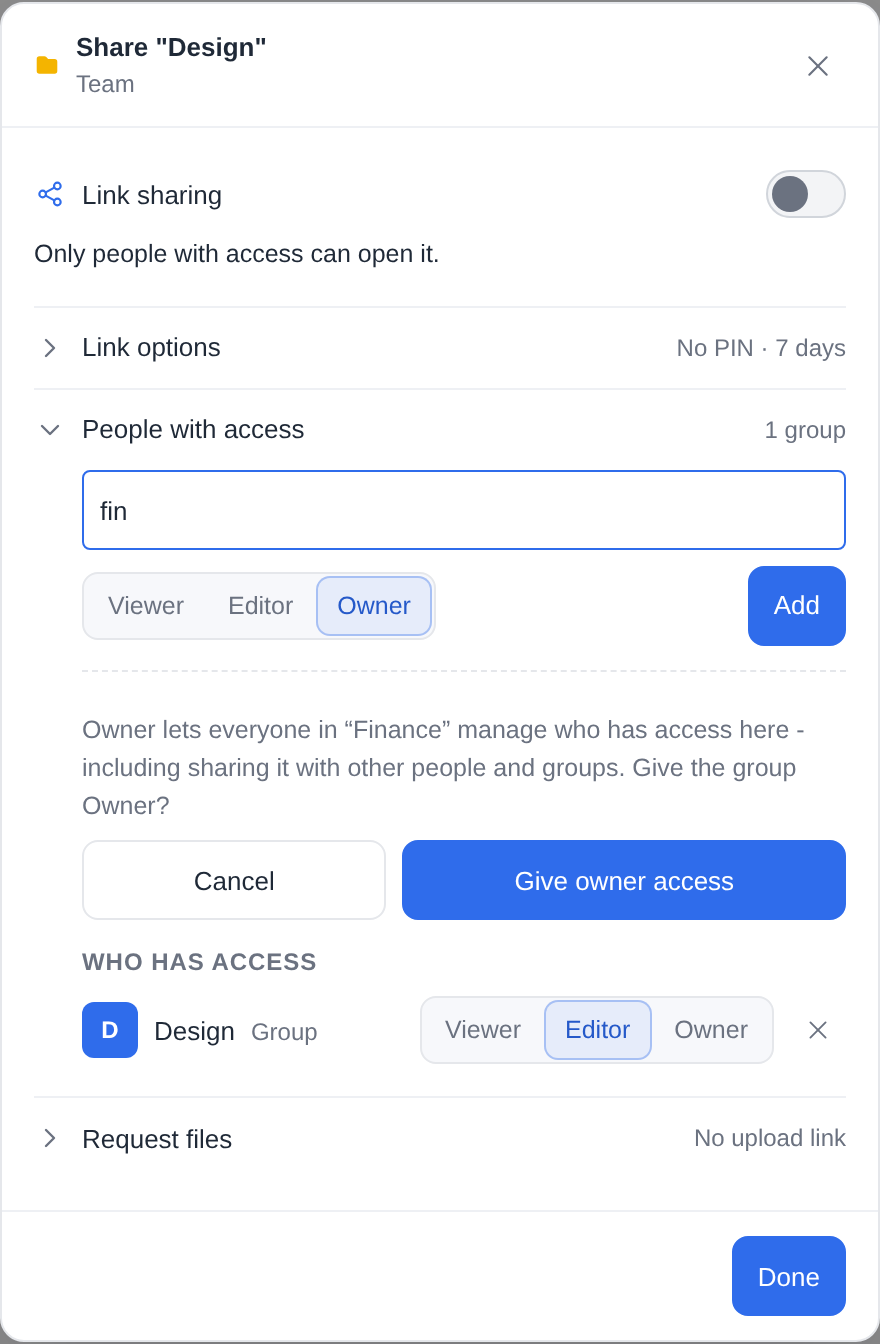
- Folder access - share a folder with the group in the explorer's sharing panel (Share → People), exactly as with a person, or give it a whole storage from the storage's Access section (RBAC.md → A whole storage). Every member reaches it at the level the group was given (RBAC.md).
- A role - a custom role (PERMISSIONS.md) that every member with no role of their own holds.
People are in a group because an administrator added them, or because the group is linked to an SSO or LDAP group their sign-in carries.
Nothing changes on upgrade: migration 00074 only adds tables, and migrations 00084 and 00086 a table, a label and a switch, off; until an administrator makes a group nobody is in one.
- Folder access
- The role
- Members and SSO links
- LDAP links
- Where people come from
- Tenants
- Who may manage groups
- API
- Audit
- Things to know
Folder access
A group's grant counts exactly as the same grant to each member would:
- the highest level covering a path wins - a person's own grant, or any of their groups';
- the account's ceiling still caps it - a Viewer account in a group granted Editor reaches the folder as a viewer (so, unlike a person's grant, any level can be given to a group);
- grants apply on storages with RBAC on only, like a person's;
- the item appears under Shared with me for every member - once, at the highest level they hold there (their own grant or a group's), capped by their account as the folder itself is.
Leaving the group ends the reach at once (the next request); deleting the group deletes its grants. Protocol sessions (WebDAV, SFTP, …) see the change when they reconnect, as for a person's grant.
The role
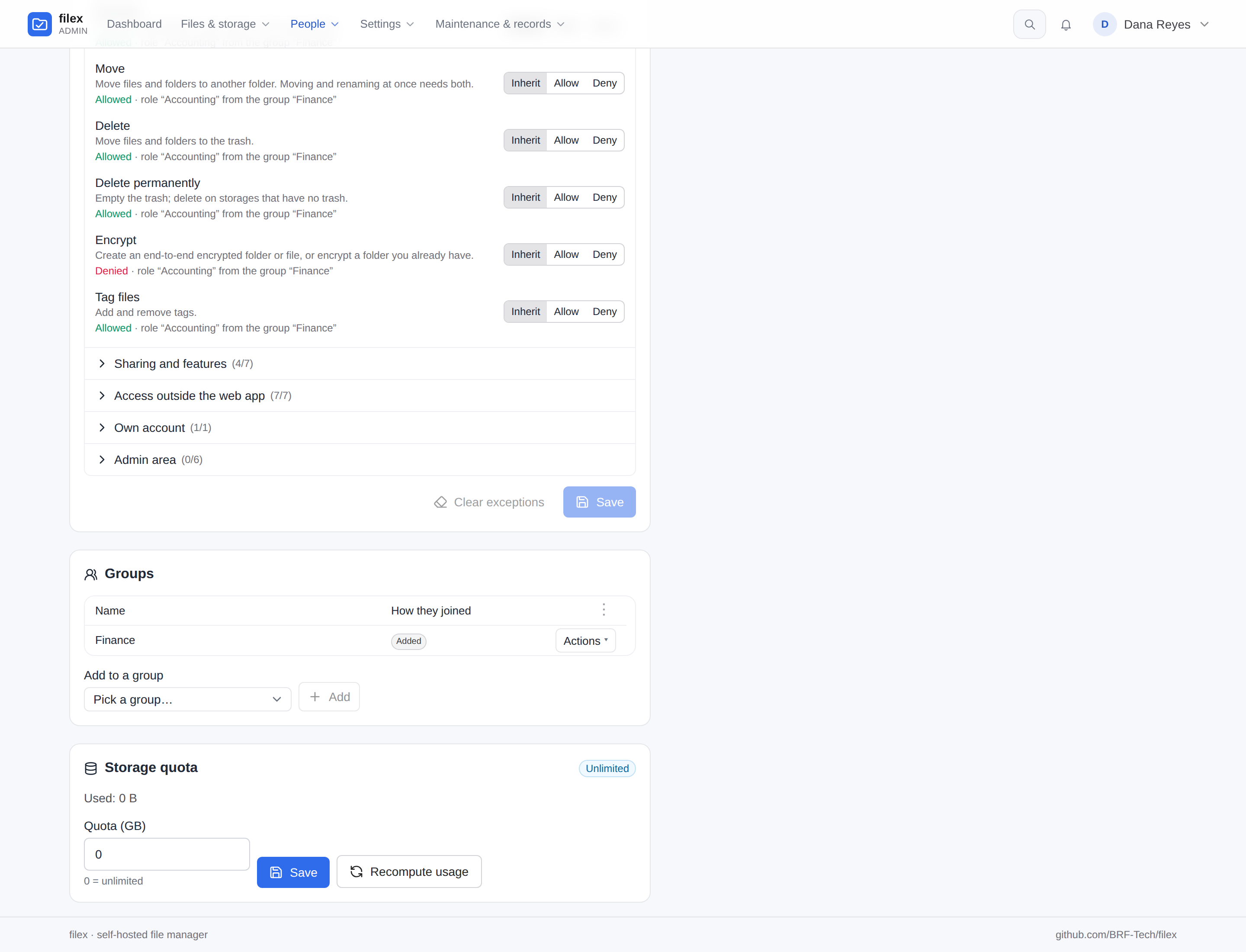
Every person has one role (PERMISSIONS.md). Groups only fill it in for someone who has none of their own:
- The person's own custom role, picked on their page, wins - whatever their groups hold.
- Otherwise, the role of the group they are in with the highest role priority (a number on the group's page, 0 by default; equal priorities: the older group). A group whose role is switched off is skipped for the next one - but if every role their groups hold is switched off, they get the first of them, which gives nothing, never the built-in User role.
- Otherwise, their built-in role - User or Viewer.
A person whose Role field shows a built-in role (User or Viewer) has no role of their own, so a group's role applies to them - picking User or Viewer there does not replace it. The page says so before saving, and after. To override a group's role for one person, give them a custom role on their page, or take them out of the group. Administrators are bound by no role, from a group or otherwise - and a group can make its members administrators (below).
Everything else is as if the role were given on the person's page: a switched-off role gives nothing, "different in some folders" applies per path, and the level underneath (User or Viewer, see PERMISSIONS.md) follows the role - joining a group whose role is read-only makes the account a Viewer, and while it is one its own Editor and Owner folder shares count as Viewer too (the person's page says so). filex keeps the level the account had before a group's role first moved it, and puts it back when no group role applies any more: leaving a read-only group gives back User; leaving a group whose role made a Viewer account a User gives back Viewer - never the full built-in User role the account never had.
The person's page, the Users list and the Roles page's counts say where a role comes from ("through the group Contractors"), and so does every refusal:
{
  "error": "permission_denied",
  "permission": "files.delete",
  "source": { "kind": "rule", "rule_id": 3, "rule_name": "No delete", "group_id": 2, "group_name": "Contractors" },
  "message": "The role “No delete”, which you have through the group “Contractors”, does not allow you to delete files."
}
Deleting a role groups hold asks, like one people hold, what they get instead: another role, or - for ?to=user / ?to=viewer - none, with their members left on that built-in level. Another role must be one every holder can hold: a tenant's role is refused for a group or a person of another tenant (400), before anything moves.
Administrators
A group can make its members administrators - the built-in Administrator role, full access - instead of giving a role: pick Administrator (full access) as the group's role (gives_admin in the API). Linked to an LDAP or SSO group, the directory then decides who administers filex: put cn=it-admins on the group, and whoever the directory lists there is an administrator at their next sign-in or directory sync. A company that signs everyone in through LDAP can then delete the local administrator from setup.
- Its LDAP links are full DNs (
cn=it-admins,ou=groups,dc=example,dc=com)- a name alone is refused - and count only for people of the group's own directory: the main directory for a group made here, the directory that brought it in for an imported one. Another directory (a partner's) can name its groups, DNs included, as it likes; it never makes administrators here.
- It comes before any role, the person's own included.
- Leaving the group - taken out here, or out of the LDAP / SSO group - gives back the level they had before (User or Viewer, or the role their other groups give), at their next sign-in or sync.
- The last administrator of a tenant still switched on is never demoted - and never switched off by directory sync - they stay one, and the log (or the sync report) says so. Make sure another administrator exists before taking the last one out of the directory group.
- An administrator made by hand on the person's page stays one whatever their groups do. One made by a group cannot be demoted on their page (
409): who is in the group decides. - Only a full administrator turns it on, changes or deletes such a group, or changes who is in it - and turning it on, new links, or adding people asks for a signed-in session, as promoting one person does.
- Such a group gives no other role and has no role priority.
Anyone who can change that directory group can make filex administrators - keep it, and who may edit it, as tight as the directory's own admin groups.
Members and SSO links
A membership is either:
| Source | How | Kept until |
|---|---|---|
Added (manual) | An administrator, on the group's page or the person's | Someone removes it |
SSO (sso) | The group names an SSO group the sign-in carried | The next sign-in that no longer carries it |
LDAP (ldap) | The group names an LDAP group the directory shows at sign-in | The next sign-in where it no longer does |
A group's SSO groups are names of the groups a sign-in carries - the same values a role's starting-role targets and the first sign-in rule's allowed_groups read, from whichever identity provider the person signs in with (LDAP.md):
| Provider | Where the groups come from |
|---|---|
| OIDC | the claim named by role_claim, in the ID or the access token, dotted paths such as realm_access.roles included (SSO.md) |
| LDAP | the entry's group_attr (memberOf): CN=Editors,OU=Groups,DC=corp counts as the whole value and as Editors |
Linux (pam) | the login's groups (id -Gn) (OS-LOGIN.md) |
| Windows | the token's groups, CORP\Editors and Editors (OS-LOGIN.md) |
| Header proxy | the roles header (header_roles, every line of it) - recorded whenever the request carries it, allowed_groups set or not (LDAP.md) |
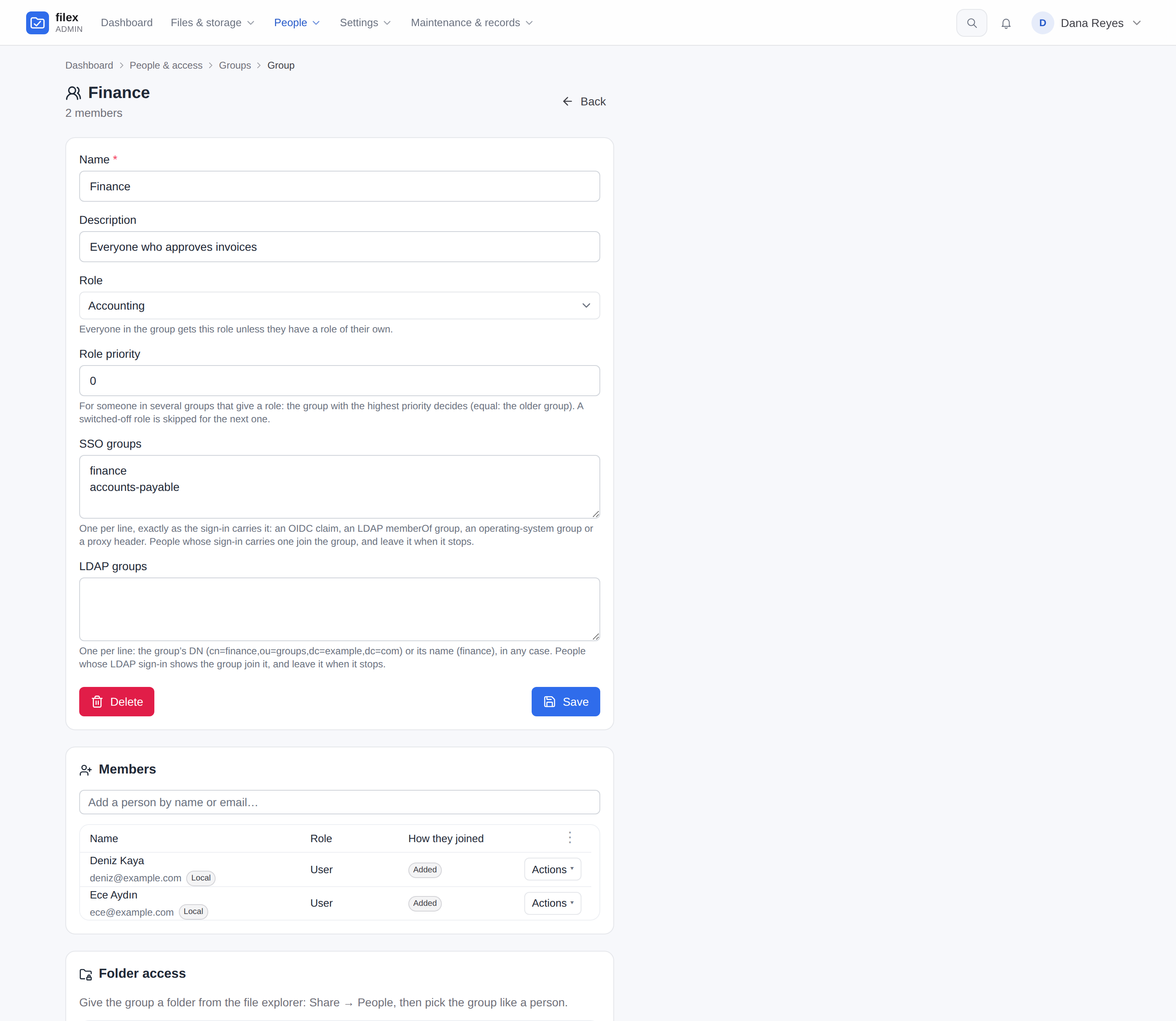
Compared exactly, one per line on the group's page. At every sign-in that reads groups the account joins each group of its tenant that names one of them and leaves each group it was in only through such a link that no longer does - the identity provider is the authority. It is one rule for every provider (auth.RecordSignInGroups): the groups are recorded, a new account gets its starting role, the linked groups follow, and the level their role sets is checked. A person added by hand stays whatever the provider says; adding by hand someone who is in through a link makes the membership manual.
Adding, changing or removing a group's SSO links takes effect at once, from the groups each person's last sign-in carried (filex keeps them) - not only at their next sign-in.
Removing an SSO member by hand is allowed, but they join again at their next sign-in while the provider still puts them in the group - the page says so before it does it. The header proxy signs a person in on every request, so it writes their groups only when the set it sends differs from the one recorded: someone removed by hand there joins again at the first request whose roles header has changed since.
A provider with nowhere to read groups from records none: OIDC without a role_claim (or a token without it) is no groups, and the account leaves every group it was in through a link; LDAP without group_attr and allowed_groups records nothing and leaves the memberships as the last recorded groups made them. The header proxy tells two cases apart: a request with no roles header says nothing about groups, and the last recorded ones stay; a roles header that is there and empty is no groups, and the account leaves every group it was in through a link.
LDAP links
A group's LDAP groups name groups of the LDAP / Active Directory server (LDAP.md → Groups), one per line on the group's page, either way:
- the group's DN -
cn=finance,ou=groups,dc=example,dc=com; - its common name alone -
finance- which matches that name under any OU.
Both are compared without case, and a DN without the spaces around its commas and equals signs (CN=Finance, OU=Groups is cn=finance,ou=groups); the page stores a link in that form. At every LDAP sign-in to the web UI the account joins each group of its tenant that names one of its directory groups and leaves each group it was in only through LDAP that no longer does - the directory is the authority. Members added by hand stay, as with SSO, and SSO and LDAP memberships never touch each other: a group may carry both kinds of link.
Adding, changing or removing a group's LDAP links takes effect at once, from the groups each person's last LDAP sign-in showed (filex keeps them, user_ldap_groups).
- Sign-in and directory sync read groups. WebDAV, SFTP, FTPS, S3 and NFS present the directory password on every request; they sign in, but they do not move memberships. Directory sync brings everyone's groups in step without waiting for them to sign in - and makes accounts for people who never have.
- A directory that cannot answer changes nothing. If the group search fails, the sign-in still succeeds (the password was right) and every membership stays as it was, until a sign-in that can read the groups.
- Nested groups are not followed: a person is in the groups their entry (or the group search) names. On Active Directory,
group_filter: (member:1.2.840.113556.1.4.1941:=%s)asks the server to follow them.
Groups from directory sync
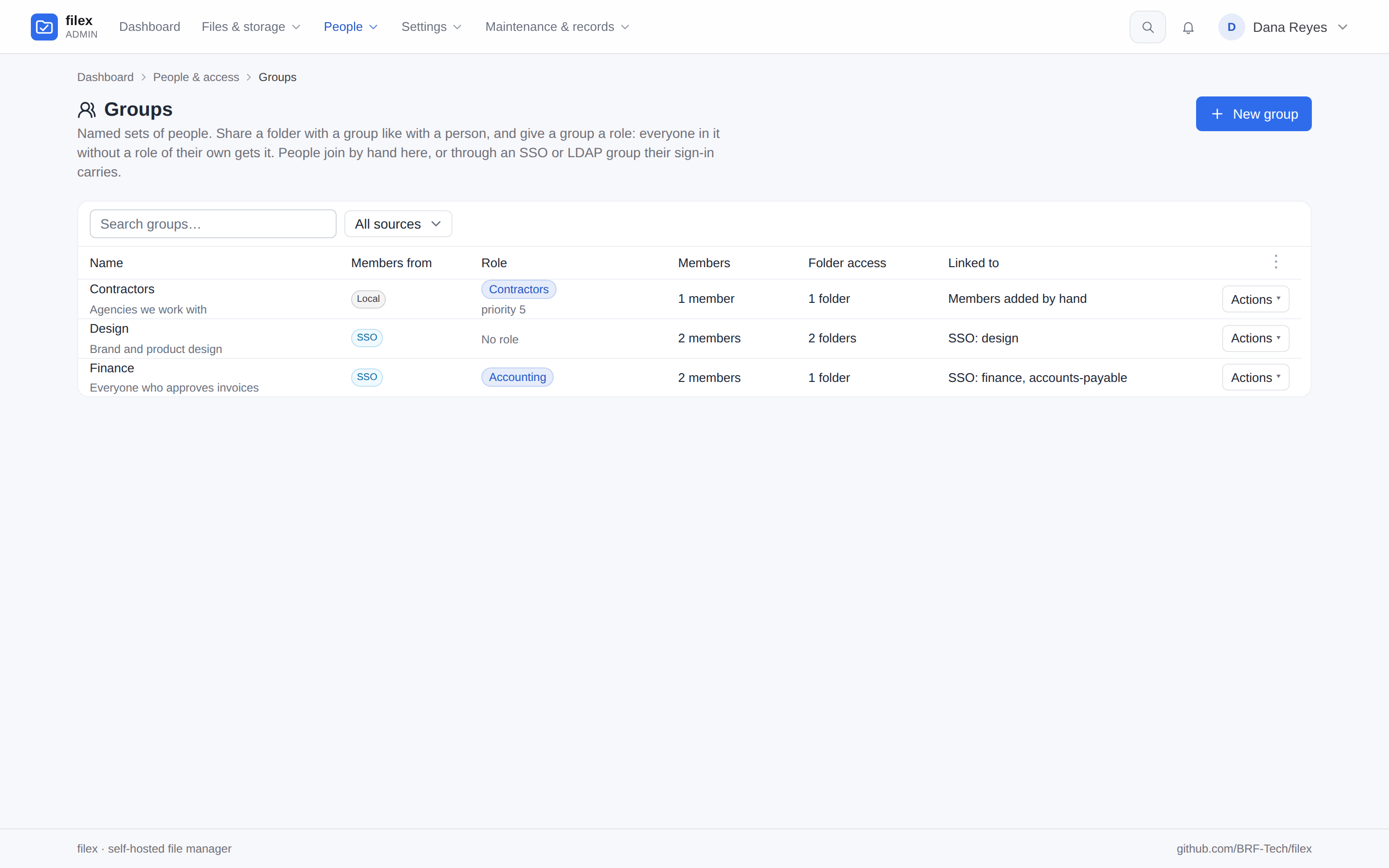
Directory sync brings every LDAP group in as a filex group linked to it (sync_groups, on by default). Such a group follows its directory group - renamed with it, flagged Removed from LDAP when it is gone (never deleted by sync: an administrator deletes it or keeps it as a filex group) - and its LDAP link is the directory's. Which groups exist is managed on the directory: one deleted here while the directory still has it comes back at the next sync. The Groups page shows 60 groups a page, three across, and filters by source: Local, SSO, LDAP, Synced from LDAP, Removed from LDAP.
Where people come from
Every account says where it comes from, on the Users page (the Source column), on the person's page and in a group's member list (users.auth_source, migration 00084):
| Source | The account was made |
|---|---|
Local (local) | Here - on the Users page, by an invitation, at first run |
SSO (sso) | By an OpenID Connect sign-in |
LDAP (ldap) | By an LDAP / Active Directory sign-in |
Proxy (proxy) | By a trusted reverse proxy's headers |
It is a label: it gates nothing. An account made here that later signs in through a directory stays Local. Accounts from before migration 00084: one with an OIDC subject is SSO; a directory account with no password here takes its directory's label at its next sign-in.
On the Groups page each group says where its members come from: Local (added by hand only), SSO and/or LDAP (the kinds of its links); on a group's page each member row shows both the account's source and the membership's (Added, SSO or LDAP).
The Users page also has a Groups column - each person's groups, coloured by how they are in them (added, SSO, LDAP) and linked to the group's page - and a filter that narrows the list to one group.
Tenants
A group belongs to one tenant, like a custom role (MULTI-TENANCY.md):
- A tenant administrator's group is its tenant's, whatever the request says; they see and change only their tenant's groups, and anything of another tenant reads as not found.
- Only people of the group's tenant can be members - by hand, through SSO or through LDAP. So the same SSO group name (
finance) in two tenants fills two separate groups. An account moved to another tenant leaves its old tenant's groups, and the role and level they gave it. - Its role must be install-wide or of the same tenant; it can be given folders only on its tenant's storages, and only its tenant's people see it in the sharing panel.
- The supertenant, or an install without tenants, can make an install-wide group. Its SSO and LDAP links match only the supertenant's sign-ins - another tenant's identity provider sending the same value does not put its people in it; the supertenant adds them by hand if it means to. On a single-tenant install every group is one. On a multi-tenant install such a group can hold people of every tenant, so a tenant's owners are never offered it for their folders.
Who may manage groups
Groups are managing people, so Admin → Groups is admin.users (delegated administration). A delegated administrator:
- gives a group only a role whose every allow they hold - and cannot add people to a group whose role they could not give them directly;
- never changes their own memberships (a group can carry folders and a role) - nor deletes a group they are in, or changes its role or priority, which would change their own role the same way;
- never changes a group's SSO or LDAP links, which decide membership at sign-in - theirs included - nor its role priority, which decides whose role a member of several groups gets. Both are an administrator's;
- is judged by the result, as on a person's page: taking someone out of a group, deleting a group, changing its role, or adding people (which can end a stricter role they had through another group) is refused (
403, with thepermissionsit would hand out) when a member would afterwards hold a permission the delegated administrator does not.
A group whose role has administration rights (any admin.* permission) makes its members delegated administrators, so giving a group such a role, changing its priority or links, or adding people to it needs an administrator signed in to the admin panel - an API key is refused with 403 {"error":"session_required"}, as when the role is given to one person (PERMISSIONS.md).
Giving a group folder access is done by the folder's owner in the sharing panel (share.users), like sharing with a person. Giving a group Owner lets every member manage who has access there, so the panel asks first.
⚠ Whoever holds
admin.usersis trusted with every folder your groups hold. A delegated administrator cannot grant a folder directly, but they manage who is in a group, and every member reaches the group's folders. So they can hand out access to those folders by adding people, including an account they opened themselves and know the password of, which lets them reach the folders too. filex does not refuse it: the result check judges permissions, not folder access (PERMISSIONS.md). Giveadmin.usersonly to someone you would trust with those folders.
API
| Method & path | Who | |
|---|---|---|
GET /api/admin/groups | admin.users | the tenant's groups, with member_count, grant_count |
POST /api/admin/groups | admin.users | {name, description, role_id, priority, links, provider_id?} → 201 {group, members, grants}. provider_id only from an unconfined caller; a name the tenant has → 409 |
GET /api/admin/groups/{id} | admin.users | {group, members[{user_id, email, name, role, source, added_at}], grants[{id, path, level, …}]} |
PUT /api/admin/groups/{id} | admin.users | name, description, role, priority (absent keeps it), links (the tenant never changes) |
DELETE /api/admin/groups/{id} | admin.users | the group, its memberships and its grants → 204 |
POST /api/admin/groups/{id}/members | admin.users | {"user_ids":[3,4]} |
DELETE /api/admin/groups/{id}/members/{user_id} | admin.users | |
GET /api/admin/users/{id}/groups | admin.users | {groups[{id, name, role_id, source}]} |
POST /api/admin/groups/{id}/detach | administrator, signed in to the panel (an API key is refused) | Keep a group whose directory group was removed as a filex group (drops its LDAP link); 409 while the directory has it |
GET /api/admin/groups/memberships | admin.users | {memberships{"<user id>":[{id, name, source}]}} - every person's groups the caller may see, for the Users list |
GET / PUT /api/admin/users/{id}/roles | admin.users | now also group_role: {role_id, group_id, group_name} when the person has none of their own - on a PUT of a built-in role, the group role that still decides |
GET /api/admin/roles | admin.users | now also group_assignments: user id → {role_id, group_id, group_name}; builtin_members no longer counts them |
GET /api/files/permissions/groups?q= | signed in | groups the caller could share with (names only) |
POST /api/files/permissions | owner + share.users | {path, group_id, level} - a group instead of user_id |
PATCH / DELETE /api/files/permissions/groups/{id} | owner + share.users | a group's grant (its own id space) |
DELETE /api/admin/grants/groups/{id} | admin.grants |
GET /api/files/permissions lists group grants beside people's, each with kind: "user" | "group" (a group's with group_id and group_name); GET /api/admin/grants does the same.
On the admin API-key surface (MCP.md) a group's grant is revoked by its own route and tool - DELETE /api/ai/admin/grants/groups/{id}, admin_group_grant_revoke {id} - never by admin_grant_revoke, which takes a person's grant: the two kinds are numbered apart, so a group row's id can be a person's grant too. admin_grant_set takes group_id in place of user_id. Groups themselves have no admin_* tool; they are managed in the admin panel or through /api/admin/groups (a signed-in session, or an administrator's admin-scoped API key).
A group body:
{
  "name": "Finance",
  "description": "Everyone who approves invoices",
  "role_id": 3,
  "priority": 0,
  "links": [
    { "kind": "sso", "value": "finance" },
    { "kind": "ldap", "value": "cn=finance,ou=groups,dc=example,dc=com" }
  ]
}
Names are unique within a tenant - the database holds it (install-wide groups count as one tenant), so two saves at once cannot both win. A name is at most 100 characters and a description 1000; a group names at most 50 SSO groups. links kinds other than sso and ldap are refused; an ldap value is stored lower case, without the spaces around a DN's separators. priority is between -1000 and 1000.
Audit
| Action | Details |
|---|---|
group.create / group.delete | the group (name, role_id, links); delete also members |
group.update | before / after |
group.members_add | user_ids |
group.member_remove | user_id |
group_grant.delete | a group's folder grant revoked on Admin → Folder access (ai.group_grant.delete through the API-key surface); a person's stays grants.delete |
Deleting a role groups hold adds groups (how many) to its permission_rule.delete row.
Things to know
- Storage.
user_groups(withpriorityandtenant_key, the unique name's scope),user_group_members(withsource),group_file_grants- a separate table with its own ids, so nothing that reads a person's grants ever meets a row without a person - anduser_group_levels, the level to give back.user_ldap_groupskeeps each person's last LDAP groups, asuser_sso_groupsdoes their SSO ones;users.auth_sourceis where the account comes from (migration 00084). - Several processes on one database see a membership or role change within 3 seconds (the permissions snapshot); folder access is read per request.
- Starting role or group? A role's Starting role for SSO groups (PERMISSIONS.md) sets a new account's role once, at its first sign-in. A group linked to the SSO group and holding the role follows the provider at every sign-in - use that.