
Thumbnails
filex renders preview thumbnails server-side for images (HEIC and AVIF included), video, audio, PDFs, office documents, SVGs, text files (their first lines) and archives (the list of what is in them), and a coloured placeholder card for everything else. Thumbnails are on by default - the grid, the list and the gallery all show a real preview where one exists and fall back to a per-type icon where it doesn't. (Thumbnails were a grid-only feature for a long time; the list drew a type glyph for every row, including a photograph.)
In the list a thumbnail is 24 pixels, and a page drawn that small is a white square on a white row. So every thumbnail that is not a picture of its own carries a small badge in its inline-end corner naming the kind (DOCX, PDF, ZIP, JAR), in the colour of the type's icon; right to left it sits in the other corner. That is an office document or a PDF's first page, a text or Markdown file's first lines, an archive's list, and whatever an app draws for its kinds (Admin → Plugins → Default apps); a kind with no type icon of its own wears the neutral grey of the unknown-type icon. Packages (.jar, .apk, .whl, .vsix, .nupkg, .xpi and the like) count as archives: the archive icon and colour, with their own name in the Type column. Photographs and video frames carry no badge, and a row without a thumbnail shows its coloured type icon as before. The list a folder shows when the pointer rests on it uses the same badge. The grid and the gallery draw their thumbnails large enough to read and have no badge.
The image, SVG and placeholder generators are built in and always work (SVG since 0.50: resvg, compiled to WebAssembly and run in-process). The richer kinds (video, audio, PDF, HEIC/AVIF) each shell out to an external tool that filex auto-detects on PATH at startup. If the tool is missing, a file of that kind is recorded as skipped with the tool named, and Admin → Tools → Thumbnail repair lists it with the reason; install the tool, restart, and the next listing (or a Fix repair) draws it. Office documents are drawn by ONLYOFFICE's converter, on the server: the office engine the Office editor app brings (0.4.0, filex 0.57), or an OnlyOffice Document Server filex is connected to (Office through OnlyOffice). The default install runs no Document Server, so office documents get their pictures once the app is installed and its engine prepared (a few minutes); with neither they get no thumbnail, and the repair tab says so.
A file whose thumbnail will not come because of the file itself (it is damaged, encrypted or too large) keeps its type icon with a small marker in its corner, and a resting pointer or a tap on the marker says why (Why a file has no thumbnail).
A thumbnail follows its file (0.50): a file changed outside filex, or one that never had a picture, is drawn again the next time a listing or the storage sync sees it, and Admin → Tools → Thumbnail repair redraws one file, a folder, a storage or all of them on demand. A folder shows the files that came into it last, drawn with the folder in all three views, and what it holds when the pointer rests on it; an administrator can turn that off.
- Folder previews
- Design notes (0.50): freshness, repair, folders, SVG
- Office through OnlyOffice
- Why a file has no thumbnail
- How it works
- Generators & required tools
- Configuration
- Reclaiming the cache
- The Docker image & bundled tools
- Serving
- Repair: catching up existing files
- What happens if it isn't configured / a tool is missing
- Failure modes & troubleshooting
- See also
Folder previews
A folder is drawn with the files that came into it last, the way a desktop draws a folder with something in it. The three views draw the same files, each in its own shape:
| View | The folder |
|---|---|
| Grid | The folder large, its back with the tab, up to three files rising out of it like prints, each turned a little, and its front over their lower half. Pointing at the card lifts them a little. |
| Gallery | The same folder large behind, and up to three prints fanned out in front of it from their foot. |
| List | The row's small folder, with the newest file rising out of its mouth. |
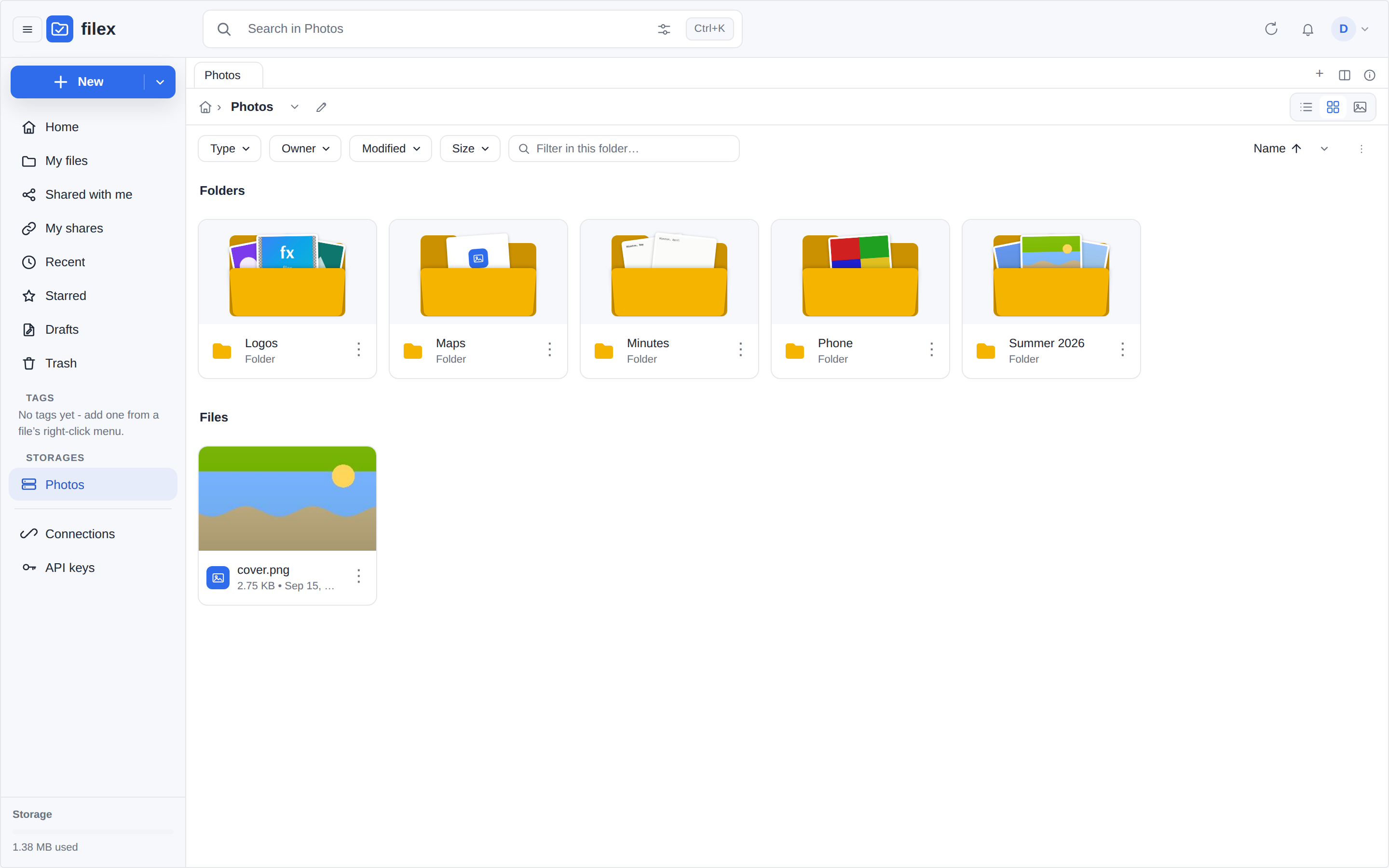
Which files. The three files directly in the folder that came in last: for each file, the later of when it entered the catalogue and its own modification time, newest first (the newest is the middle print, on top). Only the folder's own files: its subfolders are never looked into, so a folder that holds only folders is drawn empty, like an empty one. A file with a thumbnail is its picture; a text file is its first lines and an archive the list of what is in it (see Generators); a file with no thumbnail yet, or none at all, is its type icon on the print.
As soon as one folder in the view has files to show, every folder in that view is drawn so, an empty one empty and an encrypted one with its padlock, and the cards and rows keep one size and one look. A view where no folder has files to show keeps the classic folder icons. The files are read from the catalogue and from their own thumbnails when the folder is listed, so they follow them: a file that comes in or changes is shown at the next listing, drawn again first if it has to be.
Resting the mouse on a folder, in the grid or the list, shows a quiet list of what is inside: how many things, and the first eight (folders first), each with its thumbnail or type tile. It is not a menu: it takes no clicks, and goes away when the pointer leaves, a button is pressed, the page scrolls or a drag starts. On a touch screen it does not appear.
Both are part of the explorer package, so the web app, the desktop app and every embed draw the same thing.
Turning them off. Folder previews is a switch on the thumbnail settings card (Admin → Settings → General; setting thumbs.folder_previews, on by default, seeded once from FILEX_THUMBS_FOLDER_PREVIEWS). Off, listings send no folder files, the three views keep their classic folder icons (the grid its compact folder cards), and a resting pointer shows nothing. An explorer that is already open follows the switch the next time it loads (it reads folder_previews from the capabilities).
Design notes (0.50): freshness, repair, folders, SVG
This section records why the 0.50 pipeline looks the way it does. It starts from what 0.49 did, measured, because every change below answers one of those findings. (Issue #79: SVGs without a preview, and older JPEGs that never got one.)
What 0.49 did
| Finding | Where |
|---|---|
A thumbnail row did not record which content it was drawn from. The storage sync updated a drifted file's size, date and etag and left its ready thumbnail alone, so a file replaced on the backend kept its old picture for good. | sync/poll.go refreshEntry, thumbnails table |
| Two write paths drew nothing at all: saving in the text editor (an SVG edited in place kept its old preview) and restoring a version. | save_text.go, versions.go |
GET /api/files/thumb/{id} answered Cache-Control: private, max-age=86400 on a URL that never changed, so even a re-rendered thumbnail reached the grid a day later. | thumb.go, thumb_url.go |
Files the catalogue found by syncing (not by upload) never got a thumbnail until an operator ran filex thumb backfill. failed and skipped rows were never retried by anything else. | server/thumb_backfill.go |
An SVG was drawn only when rsvg-convert was on PATH. The :slim image and the bare binary do not ship it, so every SVG there was skipped, and stayed skipped after the tool was installed. | thumb/svg.go |
The pipeline went by the type the catalogue recorded, a content sniff that names a handful of formats. An uploaded or synced SVG (text/xml), a Word 97, Excel 97 or PowerPoint 97 file, a HEIC photo and a QuickTime movie (application/octet-stream) all got the extension's placeholder card, with every tool installed. | thumb/pipeline.go |
A kind whose tool was missing got the placeholder card as ready: nothing said why, and it was never drawn once the tool arrived. HEIC and AVIF ended failed. | thumb/pipeline.go |
| A transparent picture was drawn on black (the JPEG encoder's reading of "no alpha"). | thumb/image.go |
| The only way to repair anything was the CLI. | cmd/filex |
| A folder was a flat glyph. | GridView.vue, ListView.vue |
| Every listing asked the database for each file's thumbnail row separately (N+1 queries). | manager.go, lazy_listing.go |
Freshness: one signature, checked where the catalogue already is
A thumbnail row now stores the source signature of the content it was drawn from (thumbnails.source_sig) and when the latest render was attempted (thumbnails.attempted_at). The signature is the node's ContentFingerprint. It is the same value the search index already uses to decide whether to extract a file's text again: the backend's etag when it reports one, otherwise size + modification time. There is one definition of "the content changed", and the thumbnail does not get a second, different one.
Why metadata and not a hash of the bytes: the fingerprint costs nothing. It is already in the catalogue row the listing just read, so no byte is read and no request is made to the backend. Hashing would mean reading every file a folder listing shows. What each driver gives the fingerprint:
| Driver | What the fingerprint compares |
|---|---|
| S3 | the object's ETag (content MD5, or the multipart form <md5>-<parts>) |
| WebDAV | getetag |
| Local, SFTP, FTP/FTPS, SMB | size + modification time |
The size + time fallback misses a replacement that keeps both the size and the modification time (cp -p of a same-size file). That is the same gap the storage sync documents, for the same reason.
The check (thumb.Assess) runs in two places that already hold the catalogue's view of a file:
- every listing (folder, search, recent, starred, tags, shared with me): one batched thumbnail query per listing, compared in memory;
- the storage sync, for each row it just found drifted.
| Row | Verdict |
|---|---|
| none | render |
pending, attempted over 10 minutes ago (or never) | render: a crash left it |
ready, signature differs | serve the old picture, render the new one |
ready, no signature (drawn before 0.50) and the file's modification time is later than the render | serve the old picture, render the new one |
failed / skipped, signature differs | render: it is different content now |
skipped because an engine was missing, and that engine is available now | render |
an SVG's ready row with no signature (drawn before 0.50, most of them as the placeholder card) | render, once |
| anything attempted in the last 60 seconds | leave it (loop guard) |
| a kind whose thumbnail is only the placeholder card (code, 3D models, …) | leave it: the card shows the extension, not the content, and the views draw the type tile or the file's first lines instead; an upload and the repair tool still draw it. A text file (txt, md) and an archive are drawn: their thumbnails show their content |
| otherwise | leave it |
A render the listing asks for goes to a bounded in-memory refresher, not into the request: at most one entry per node, a fixed number of workers, and dropped when full. The catalogue is already the durable record of what is stale, so the next listing asks again. Writing each nudge to the persistent queue would add a database write per file to the listing path and make it no more durable. After a render the refresher sends the folder a derived change event. Every explorer showing that folder reloads and gets the new picture; the desktop sync engine ignores derived events.
thumb_url now carries v=<render time>, and the explorer's thumbnail cache key includes it, so a new render is a new URL. The one-day browser cache stays correct.
Repair: Admin, Tools, Thumbnail repair
The repair is not a context-menu entry. That menu is for actions on files, and this is maintenance. It lives under a new Tools menu in administration, where each tool opens as a tab (Thumbnail repair is the first). Its scope is one file, one folder with everything in it, or a whole storage. There are two modes:
- Fix renders what is missing, failed, skipped or stale;
- Rebuild renders everything in scope.
It runs as an operations job (thumb-repair), like Empty trash. That gives it live progress, cancellation, a place in the operations tray, a result (ready / failed / skipped), an audit entry, a tenant boundary (a tenant administrator reaches their own storages only), and it carries on after a restart. filex thumb backfill walks the same code: the CLI and the tab are two front ends of one repair function.
Folder previews
A folder is drawn with the files that came into it last, the way a desktop file manager does, in each view's own shape: rising out of the folder in the grid, fanned out in front of it in the gallery, the newest one rising out of the row's small folder in the list. One core component (FolderMosaic) draws all three, so the views cannot disagree about which files a folder shows, and the web app, the desktop app and every embed draw the same thing. A folder with nothing to show is the same drawing, empty, so each view keeps one size and one look. (A flat mosaic of four pictures, tried first, read as a photo rather than a folder; four variants were drawn in the real explorer and the three shapes chosen from them.)
"Came in last" is the later of the row's created_at (when the file entered the catalogue: an upload, a copy, a sync that found it) and the file's own backend_mtime, newest first, then by name; only the folder's own files, never its subfolders. It is one query per listing for all the folders shown (a window function per parent), filtered by the caller's permissions, and one batched query for the thumbnail rows. A file shown without a thumbnail is sent to the refresher like any other, so a folder nobody opened gets its pictures without anybody opening it; a file not shown is not.
⚠ On SQLite the two times are stored in two spellings: created_at is CURRENT_TIMESTAMP's YYYY-MM-DD HH:MM:SS in UTC, and backend_mtime is a Go time as the driver writes it, with the zone of the clock that read it (2026-10-01 04:09:47.036622866 +0300 +03). As text they do not compare, and julianday() cannot read the second: measured, it answered NULL and every folder showed its files by catalogue time alone. The query takes the first 19 characters and subtracts the offset (sqliteMtimeJD); MySQL and PostgreSQL compare their own datetime columns (GREATEST).
Hovering a folder shows a quiet list of what is inside. An administrator can turn both off (thumbs.folder_previews): the listing then does not compute them at all, and the explorer does not peek.
SVG: a built-in engine
SVG thumbnails no longer depend on rsvg-convert. filex carries resvg (Apache-2.0 OR MIT), compiled to WebAssembly, and runs it in the pure-Go wazero runtime that app plugins already use. The binary stays CGO_ENABLED=0, and every install draws SVGs the same way: the full image, :slim, and the bare binary. rsvg-convert is used only as a fallback, when it is on PATH and the built-in engine could not draw a file.
Four engines were measured against 54 real-world SVGs (W3C samples, Wikimedia, Inkscape, exports from draw.io, mermaid, Figma, Illustrator and matplotlib, and the badges in this repository), with rsvg-convert as the reference. The difference is the mean absolute pixel difference at 160 px, from 0 to 100:
| Engine | Pure Go | Failed or wrong | Notes |
|---|---|---|---|
| srwiley/oksvg | yes | 5 errors, 14 files above 15 | Unmaintained since 2022. Draws the Turkish flag blank. The use-bomb probe took 5 GB of RAM. |
| tdewolff/canvas | yes | 3 panics, 1 error, gradients and <use> wrong | Needs Go 1.26. |
| resvg → wasm (built-in) | host yes | 0: every file ≤ 2.7, except one text file at 6.0 (a font difference) | median ~10 ms per file once compiled; the heaviest file takes 0.9 s |
| rsvg-convert | no (C, a process per file) | reference | 25 to 250 ms per file, most of it starting the process |
How the built-in engine is contained:
- No imports. The module is built for
wasm32-unknown-unknownand imports nothing from the host. It cannot open a file, a socket or a clock. The SVG bytes and the fonts go in through its memory, and the pixels come out the same way. - An
<image>whosehrefis a path or a URL draws nothing. Embeddeddata:images do draw. XML entities that are not defined in the file, entity loops and<use>bombs are refused by the parser. - A fresh module instance per file. A file that crashes the engine or runs it out of memory cannot touch the next file.
- Limits. A memory ceiling (linear-memory pages), a per-file time limit (the context closes the instance), and an input size ceiling.
- The module is compiled once per process, the first time an SVG is drawn (about 2 s).
Text is drawn with the Go fonts, which are embedded. SVG files seldom depend on a particular typeface at thumbnail size.
⚠ Which files are SVGs. An upload, and the local driver's sync, record a file's type by sniffing its first bytes, and the sniff has no signature for SVG: it records text/xml (with an XML declaration) or text/plain. 0.49 went by that type, so every uploaded or synced SVG got the placeholder card, with or without rsvg-convert. The pipeline now takes an .svg whose recorded type is one of those generic ones for an SVG; a file that is not one after all fails in the engine and says so. The name overrides the sniff for SVG only: a text file named .png is still a text.
The engine source (the resvg glue, Cargo.toml, a pinned Cargo.lock) and the Docker build that reproduces the committed .wasm live in backend/internal/thumb/svgwasm/.
Types, missing tools, HEIC, transparency
Which generator a file reaches. The catalogue's type is a content sniff, and it names a handful of formats; what it cannot name it calls application/octet-stream or text/plain, and a container it does name (video/mp4, application/ogg) says nothing about what is inside. The pipeline used to believe it, so every uploaded SVG, every Word 97 document, every HEIC photo and every QuickTime movie got the placeholder card. Now, when the recorded type is one of those and the extension is one the pipeline knows, the extension decides (routeMime). A file named for a kind it is not fails in that generator and says so, which is the honest answer.
A missing tool is a reason, not a card. A file whose kind needs a program this install lacks is recorded skipped with no_tool:<kind>. The repair tab names the program; the next listing after the program is installed (and filex restarted, since the probe runs at boot) asks for the file again, and so does a Fix repair. The placeholder card it used to get as ready looked finished, said nothing, and was never redrawn.
HEIC, HEIF and AVIF through ImageMagick. Go cannot decode them. Measured on alpine:3.24 (the full image's base): ImageMagick 7.1.2 with imagemagick-heic (libheif 1.23, +3 MB, decoders only) reads all three and composes a phone's tiled photos (the test photo is a 2x2 grid of 512 px tiles, a colour per quarter). ffmpeg 8.1 decoded a single-tile HEIC too, but whether its command line composes tile grids could not be shown, so ImageMagick it is.
HEIC is measured, not assumed from ImageMagick. ImageMagick reads HEIC through libheif, and libheif decodes the HEVC picture inside it through a plugin. Ubuntu 24.04's libheif1 (1.17.6) only suggests that plugin (libheif-plugin-libde265), so apt install imagemagick never brings it: ImageMagick lists HEIC as a format and every phone photo fails with "Unsupported feature: Unsupported codec". The first 0.50 build took ImageMagick on PATH to mean HEIC could be drawn, and every HEIC ended failed in a repair. Now the server decodes a sample HEIC compiled into the binary (64x64, one colour, 406 bytes, made for this with heif-enc) through the very command the thumbnails use, and HEIC counts only when ImageMagick hands back that picture at its size and in its colour. It runs once, when the server starts (bounded at 15 s; a run that times out is tried again a minute later), and again only when the ImageMagick binary changes; every HEIC thumbnail reads the cached answer. Without a decoder a HEIC is skipped with no_tool:heic_codec, and About shows HEIC photos as a row of its own. AVIF is not part of it: its AV1 decoder is another plugin, which libheif1 depends on (on Alpine, libheif depends on both decoders).
Transparency on a checkerboard. The JPEG cache has no alpha. 0.49 let the encoder turn transparent pixels black; white, the first fix, hides a white logo. A grey checkerboard (#cccccc / #999999, 8 px) is what an image editor shows for "no background", and both greys sit in the middle, so a black logo and a white one stay legible on the light theme and the dark one.
Thumbnails drawn by apps: one chain per kind
An app may draw thumbnails: a thumbnails block in its manifest names the kinds it draws (extensions and media types) and its module answers a thumbnail export. filex itself is one more drawer, built-in, for the kinds it draws (images, SVG, video, audio, PDF, HEIC/AVIF, text, the archives it lists), and ONLYOFFICE another, for office documents while an office engine runs - the one an app brings, or a connected Document Server (Office through OnlyOffice). So every kind of file has an ordered list of handlers that can draw it, and the administrator decides that list (Admin → Plugins → Default apps, the same screen that decides which app opens a file: APP-PLUGINS.md → Default apps). The person has no say here: a thumbnail is the same picture for everybody.
The chain. For one file the handlers are OnlyOffice (for an office kind, while an office engine runs), the built-in one (when filex draws that kind) and every running app whose thumbnails rule matches the file (its extension, or its recorded type), in this default order: OnlyOffice first, then built-in, then the apps by name. An administrator's rule for the file's extension reorders that list and switches handlers off. The pipeline tries them in order; the first that draws wins. A handler that fails or skips (a missing tool, an app that errored, ran out of time, or was not given a file that large) passes the file to the next one. Nobody in the list drew it: the row keeps the first handler's state and reason (that is what Fix and the freshness rules below read: a tool that comes back, a limit that is raised).
| Chain for the kind | What the file gets |
|---|---|
| no handler at all (no built-in drawer, no app) | the placeholder card, as before |
| handlers exist, but the administrator switched every one off | skipped, no_handler |
| handlers in order | the first one's picture; the rest are not asked |
What the row records. Besides state, error, source_sig and attempted_at, a row says who drew it (generator: builtin, or app:<name>@<version>) and who was asked (attempts: each handler with its version and what it answered, in order, up to the one that drew). The repair tab shows both: drawn by e-Pack 1.2 after the built-in drawer had no tool, skipped: e-Pack ran out of time (10 s).
Freshness follows the chain. A picture is out of date not only when the file changed, but when the answer would now come from somebody else:
| The row | Stale when |
|---|---|
ready | any handler up to and including the one that drew it is now different: another one in front of it, it was switched off, removed, or upgraded (its version is part of what was recorded). A handler added after it changes nothing. |
failed / skipped | the chain is different in any way (a new handler may draw it), or an app's limit it hit was raised (app_too_large, app_timeout, like the SVG limits) |
drawn before 0.50 (no attempts) | as if the built-in drawer had drawn it: stale when the built-in drawer is no longer first for its kind. An office document's page (LibreOffice drew it) is therefore stale once an office engine runs, and kept while nobody here can draw office documents |
It is the same check as the rest of Freshness: a listing compares what it holds, in memory, and a Fix repair renders the same set. Changing the order for .png makes every .png thumbnail stale at once; they are drawn again as they are listed, or all of them by a repair.
The app's call. filex hands the app the bytes of that one file, its name, size and type, and the size it will be shown at (320 px). Nothing else: no path, no storage, no person, no other file. In the call the app may read that file (file_open on the reference it was given), read its own settings, fetch its pinned assets and, only with an http: permission the administrator approved at install, make HTTP requests; every other host function answers permission_denied. It answers a PNG or a JPEG of at most 4 MiB and 4096 x 4096 pixels (checked from the header before a pixel is decoded); filex scales it to 320 px, lays it on the transparency checkerboard and writes its own JPEG. An app never writes the cache.
Limits, per app, set by the administrator (the app's page, Thumbnails):
| Limit | Default | Range | When it is hit |
|---|---|---|---|
| Largest file sent | 32 MB | 1 to the instance's input ceiling (FILEX_APP_PLUGIN_MAX_INPUT_MB, 256) | not sent: app_too_large:<app>:<bytes> |
| Time per file | 10 s | 1 to 60 s | the instance is closed: app_timeout:<app>:<ms> |
| Memory | the manifest's (64 MB unless it asks) | 16 to 256 MB | the call fails: app_failed:<app> |
| Files drawn at once | 2 | 1 to 8 | the next file waits for a slot |
Anything else that goes wrong (the module errored, crashed, answered no picture, or a picture filex refuses) is app_failed:<app>, and the app's log says what.
Sending the file out. An app with no http: permission cannot reach the network, so the file never leaves the server. An app that holds one may send the file to that host (a conversion service, say); the install review already says which host. Each thumbnail call that made a request writes one audit row, app_plugin.thumbnail_sent (the app, the hosts, the file).
Encrypted files never reach an app. The end-to-end checks run before the chain (an encrypted folder, an encrypted file by its name or its first bytes), so ciphertext is skipped before any handler is asked.
Office through OnlyOffice
The thumbnail of an office document (Word, Excel, PowerPoint, OpenDocument, RTF, EPUB, Apple's Pages, Numbers and Keynote, Visio, OpenDocument drawings) is a picture of its first page made by ONLYOFFICE's converter, through one of two office engines: the one the Office editor app brings (0.4.0), which filex runs on the server (The Office editor app's engine, below, and ONLYOFFICE.md → The office engine without a Document Server), or an OnlyOffice Document Server filex is connected to (ONLYOFFICE.md). filex ships no office suite of its own; the default install runs no Document Server, so office documents show their type icon until the app is installed and its engine prepared, or a Document Server is connected. With no office engine an office document gets no thumbnail and says why: skipped, no_tool:office, "No office engine runs" on the repair tab, its type icon in the views. Install the app or configure OnlyOffice (no restart: both are read live) and the next listing draws it.
What is sent. For one document filex asks the document server's conversion service (ConvertService.ashx) for a PNG of the first page, at most 320 x 320 pixels with the page's proportions kept, and polls until it is done. The document server downloads the document from filex through the same fetch endpoint an editor uses, with an address signed for this purpose (p=thumb, part of the HMAC, good for 10 minutes); filex then downloads the picture, only from the document server's own address, at most 4 MiB, at most 4096 pixels on a side checked from the header, scales it and writes its own JPEG. A spreadsheet is laid out before it is drawn (spreadsheetLayout: as wide as its used columns, any height, gridlines, a 120 mm square page with 2 mm margins); without it the page is an A4 cut after the first columns and the picture is a few cells in a white margin. Every parameter is inside the signed token, because a document server with tokenRequiredParams (the default) ignores what is outside it.
What is never sent. An end-to-end encrypted file. The pipeline skips an encrypted folder's files and an .fxe by name before any handler is asked, reads the first bytes of every office document before the document server is asked to download it, and the fetch endpoint refuses ciphertext for a conversion (415) as a second defence. Such a file is marked Encrypted.
Gently. A Community Edition document server runs one converter, shared with the editors: an editor opening a document goes first, a conversion waits. So each filex process sends it one document at a time by default (thumbs.office_slots, 1 to 4), gives each 60 seconds (the request, the polling and the picture), and sends nothing larger than thumbs.office_max_mb (25 MB, 1 to 100; the document server's own download limit is 100 MB by default). Measured on Docs 9.4: a page takes 0.4 to 0.9 s, a 13 MB CSV sheet 15 s; four or eight at once took as long in total as one after another, each waiting its turn inside the document server.
The key, and the document server's cache. The document server keeps every result for about a day under the request's key, and the size and layout are not part of that name: asked again with the same key for a larger picture, it answered the old one in 53 ms. A failure is cached too (-3 and the others it calls Err; a download failure, a size limit, a dead-lettered task and a password are not). So the key is made of the filex instance, the file, its content fingerprint, a version of the parameters and the try: a new version of the file, new parameters or a retry is never answered from the cache.
What an answer means on the row.
| The document server answered | The row | Asked again |
|---|---|---|
| a picture | ready, generator onlyoffice | when the file changes, or the chain does |
| -3, -7, -9 (the file could not be read) | failed, oo_corrupt:<what>, marked Damaged | when the file changes, or a repair asks |
| -5 (a password) | skipped, oo_password, marked Encrypted | when the file changes, or a repair asks |
| -10 (its own size limit) | skipped, oo_too_large:0, marked Too large | when the file changes, or a repair asks |
over thumbs.office_max_mb (not sent) | skipped, oo_too_large:<bytes>, marked Too large | when the setting is raised past the file |
| -4 refused by filex (the file is encrypted) | skipped, e2e-encrypted content, marked Encrypted | never for this content |
| no office engine runs (none installed or connected, or an app's still being prepared) | skipped, no_tool:office | once one runs |
| anything else: -1, -2, -6, -8, a -4 that never reached filex, the network, an HTTP error, a timeout, a busy slot, a picture it could not fetch or read | failed, oo_retry:<tries>:<what>, no mark | after a back-off (below) |
Not every damaged file is refused: the document server draws an empty, a truncated or a mislabeled .docx as a blank page (measured on Docs 9.4), and that blank page is its thumbnail.
Retries. A failure that may pass is asked again after 2 minutes, then 8, 32, about 2 hours and about 8 hours (four times longer each time): six tries in all, each with its try in the key. After the sixth the row is left alone until the file changes, the chain changes or a repair asks for it. The repair tab says how many tries were made and what failed (ds-4, http-502, net, timeout, busy, ...). The retries are driven by the same listings and storage syncs that keep every thumbnail fresh, so a file nobody looks at is not asked for.
The pictures LibreOffice drew before 0.50 stay where they are while no office engine runs: nobody here could draw a better one, and drawing again would only replace a picture with "No office engine runs". Once an office engine runs the chain names ONLYOFFICE first for the office kinds, so those pictures are stale and are drawn again as they are listed, one document at a time (or all at once with a Fix repair).
Default apps. OnlyOffice is a thumbnail handler of filex's own, named ONLYOFFICE on the Default apps screen and in the repair tab's chain and "Who drew the thumbnails": first for the office kinds while an office engine runs, then filex's built-in drawer (for a kind it also draws), then the apps. An administrator reorders it or switches it off per kind like any other handler.
The Office editor app's engine. The same pictures are drawn without a Document Server by the office engine the Office editor app brings, which filex runs on the server (ONLYOFFICE.md → The office engine without a Document Server). It is the same drawer: the handler is still ONLYOFFICE (onlyoffice, the generator too), the job is the one a Document Server is given - the first page, 320 x 320 with its proportions kept, a spreadsheet laid out 120 mm wide with gridlines - and thumbs.office_slots, thumbs.office_max_mb, the 60 seconds, the answers on the row and the retries are the same. So a picture a Document Server drew does not go stale when the app's engine takes over, nor the other way round; which of the two draws, when both are there, is Default apps → Office engine. The engine's failures are recorded with its own short names (oo_corrupt:x2t-86, oo_corrupt:x2t-trap, oo_corrupt:layout-open, oo_too_large:0 for a document that reached its memory cap, oo_retry:<tries>:crash) and classed as the Document Server's codes are. While the app's engine is being prepared (a few minutes after it is installed or updated) and no Document Server is connected, office documents are skipped as no_tool:office, and drawn as they are listed once it is ready.
Several replicas. The fetch address is signed with the JWT secret and checked by any replica (no state), so the document server may download from another replica than the one that asked. The slots are per process: three replicas with one slot each send at most three documents at a time.
Why a file has no thumbnail
A file whose thumbnail will not come because of the file itself says so: the list, the grid and the gallery keep its type icon and put a small marker with an icon in its corner. Resting the pointer on the marker, or tapping it, shows a sentence. The listing carries the reason as thumb_note; one table (thumb/notes.go) decides which recorded reason gets which marker:
| Marker | Reasons |
|---|---|
| Damaged (a page with a cross) | oo_corrupt (the document server could not read it) |
| Encrypted (a padlock) | oo_password, archive_encrypted, e2e-encrypted ... (filex's end-to-end encryption: a file of an encrypted folder, an .fxe, or its content) |
| Too large (arrows apart) | oo_too_large, svg_too_large, archive_too_large, app_too_large |
Nothing else is marked: a failure that may pass (oo_retry, which is asked again), a missing program (no_tool), an administrator's choice (no_handler), a limit of time (svg_timeout, app_timeout) or a generator's own error (failed). Those say nothing wrong about the file; the repair tab lists them with the reason. A file with a picture has no marker, and the list's type badge is drawn only on a picture, so the two never meet.
How it works
The pipeline (backend/internal/thumb/) is a dispatcher: it inspects each file node's MIME type - falling back to the file extension when the MIME is empty, which is the common case for files discovered by a storage sync - and routes it to exactly one generator.
Every generator writes a JPEG to the cache directory as <cache_dir>/<nodeID>.jpg (regardless of source kind, the cache file is always <id>.jpg, roughly 320 px on the long edge) and updates a row in the thumbnails table with a state:
| State | Meaning |
|---|---|
pending | Dispatched, not finished yet (or left over from a crash). |
ready | A JPEG is cached and servable. |
skipped | Nothing to draw, by design: an end-to-end encrypted file, an SVG over the SVG limits, a kind whose program is missing (or an office document while no office engine runs), a kind whose handlers are all switched off, an app that could not draw it (Thumbnails drawn by apps), or an office document the office engine will not draw: a password, a size limit. Not an error; the row records why. |
failed | A generator ran but errored (broken file, tool crash), or the office engine could not read the document (oo_corrupt) or did not answer (oo_retry, asked again later: Office through OnlyOffice). Logged at WARN with the error stored on the row. |
Every row also records the source signature of the content it was drawn from (source_sig: the backend etag, else size + modification time) and when the render was attempted, so filex can tell a picture of this content from a picture of some earlier one (see Design notes), and (0.50) who drew it (generator: builtin, onlyoffice or app:<name>@<version>) and who was asked (attempts), so a change of who draws a kind makes its pictures stale (Thumbnails drawn by apps).
Generation is triggered four ways:
- After a write. The moment an upload, a public file-drop, a document created from + New, a save in the built-in editor or a version restore commits, filex dispatches the pipeline in a detached background goroutine with its own timeout (90 s on the browser upload path, 2 min on the staged, AI/REST and protocol paths; a large office document waiting for the document server's one converter is the reason the longer ones exist). The HTTP request returns immediately; a client disconnect can't abort an in-flight conversion. Errors are swallowed (the pipeline logs its own).
- When a listing or the storage sync sees a file whose thumbnail is missing or stale, a bounded background refresher draws it; the folder's open explorers reload when it is ready. A picture that is only out of date keeps being served until the new one replaces it.
- Admin → Tools → Thumbnail repair: see Repair.
filex thumb backfillandFILEX_THUMB_BACKFILL_ON_BOOT: the same walk the repair tool runs, from the command line.
What the tools read (0.56.2). ffmpeg, Ghostscript and pdftoppm read a path. A file on a local storage (a disk, or a share mounted into the container) is handed to them in place: filex opens it through the storage's own checks and the tool inherits it, so drawing a film's first frame reads the opening seconds, not the film. Anything else (an object store, an SMB, SFTP, WebDAV or FTP storage, a file still being transferred) is copied first, into <cache_dir>/.work/, and the copy is removed when the tool is done. filex empties that directory at startup, and removes the filex-vid-*, filex-aud-*, filex-pdf-* and filex-zip-* copies older than an hour that versions before 0.56.2 left in the system temp directory when the process was killed (#114).
Cached JPEGs are released two ways, both described in Reclaiming the cache.
Generators & required tools
| Kind | Source types | Generator | External binary (auto-detected on PATH) |
|---|---|---|---|
| Image | image/* - jpg, png, gif, bmp, tiff, webp | Built-in Go (stdlib + x/image) | none |
| HEIC / AVIF | heic, heif, avif | ImageMagick (libheif), scaled into the 320 box; a phone's tiled photos are composed whole, and their rotation honoured | magick (or convert) with libheif, and for HEIC libheif's HEVC decoder (libheif-plugin-libde265 on Debian/Ubuntu, libheif-libde265 on Alpine), checked at boot by decoding a sample |
| Video | video/* - mp4, webm, mov, mkv, avi, … | ffmpeg - the first frame that is not black, searched over the opening 10 s, scaled to 320 wide | ffmpeg |
| Audio | audio/* - mp3, wav, ogg, flac, m4a, aac, opus | ffmpeg - a 320×120 waveform image (showwavespic) | ffmpeg |
application/pdf | Ghostscript renders page 1 at 96 dpi (falls back to poppler), then the page is scaled down to thumbnail size | gs or pdftoppm | |
| Office | doc, docx, docm, dot, dotx, dotm, odt, ott, rtf, epub, pages; xls, xlsx, xlsm, xlsb, xlt, xltx, xltm, ods, ots, numbers; ppt, pptx, pptm, pps, ppsx, ppsm, pot, potx, potm, odp, otp, key (a Keynote package only, never a key file); odg, vsdx | ONLYOFFICE - the office engine the Office editor app brings, or a connected document server: a PNG of the first page, at most 320 px, a spreadsheet laid out as wide as its columns with gridlines (Office through OnlyOffice) | none here: the Office editor app installed, or OnlyOffice configured (Settings → External services) |
| SVG | image/svg+xml | Built-in: resvg compiled to WebAssembly, run in-process by wazero, under the SVG limits; rsvg-convert only when the built-in engine could not draw a file | none (rsvg-convert optional, as a fallback) |
| Text | txt, md, markdown, text | Built-in Go: the first lines (at most 8 KiB read, 16 lines) on a light page in the embedded Go Mono, a Markdown heading bold without its #; a picture the file names is a line of its text, never fetched | none |
| Archive | zip, tar, tar.gz / tgz, tar.bz2 | Built-in Go: the top-level names (a folder bold, with its slash) under a strip with the kind and the number of entries. A ZIP's central directory only; a tar's headers in order, until the list is full. Nothing is unpacked, and every read is bounded (below) | none |
| Placeholder | everything else - 3D models, code, raw docs, … | Built-in Go - a tinted card with the extension centred (colour hashed from the extension) | none |
Notes:
- Images decode with the Go standard library plus
golang.org/x/image(BMP / TIFF / WebP), capped at ~50 MB of decoded input, and are downscaled to fit 320×320 (aspect preserved; larger sources only) and encoded at JPEG quality 80. HEIC, HEIF and AVIF, which Go can't decode, go to ImageMagick (0.50; before, they endedfailed). - The type a file is drawn as (0.50). The catalogue records a file's type by sniffing its first bytes, and the sniff names only a handful of formats: an SVG comes out
text/xmlortext/plain; a Word 97, Excel 97 or PowerPoint 97 file, a HEIC photo and a QuickTime movie come outapplication/octet-stream; an.m4acomes outvideo/mp4, an.oggand an.ogvbothapplication/ogg. When the recorded type is one of those generic or container types and the extension is one this table knows, the extension decides. A file that is not what its name says fails in its generator and says so; before 0.50 all of these got the placeholder card. - SVG is checked before the generic
image/*branch, because Go's decoder can't parse SVG. The built-in engine imports nothing from the host: an<image>that names a path or a URL draws nothing, an XML entity from outside the file is refused, and each file gets a fresh engine instance with a memory ceiling. Text is drawn with the embedded Go fonts. - No thumbnail loads a picture from another server, whatever a person's Load remote images in previews says: a Markdown file's thumbnail is its text, an SVG's
<image>that names a URL draws nothing, and the explorer's cards and folder previews draw a file's first lines as text, never its markup, a Mermaid diagram is the card of its kind, and the office engine that draws an office document's or an EPUB's thumbnail has no network (a linked picture in a.docxis not fetched and is left out of the thumbnail: ONLYOFFICE.md). A file's preview holds such a picture until the person loads it (Features). - Transparency shows a checkerboard. A JPEG has no alpha channel, and the encoder alone turns a transparent pixel black (a logo on a black slab, 0.49). Every Go-drawn thumbnail (images, SVG, HEIC/AVIF, placeholder cards) is drawn over a grey checkerboard first (
#ccccccand#999999, 8 px squares): the pattern an image editor shows for "no background", so the thumbnail says the picture is transparent there, and its two mid greys keep a black logo and a white one legible on the light theme and the dark one alike. An opaque picture covers it entirely. - Office (0.50) is ONLYOFFICE's: a connected document server is asked for a picture of the first page, or, since 0.57, the office engine the Office editor app brings draws it on this machine, in a process of its own. One document at a time per process, 60 s each, at most 25 MB (both settings); a failure that may pass is asked again after a back-off, and a damaged, a protected or a too large document is marked so. Before 0.50 LibreOffice made a PDF and Ghostscript/poppler drew its first page; that path is gone with LibreOffice. See Office through OnlyOffice.
- Video: "first frame" means the first one with something in it. A great many real clips open on black - a fade-in, a slate, a camera's leader - so filex asks ffmpeg for the first frame whose average luma clears 24 (video black is 16, not 0) within the opening 10 seconds, and falls back to the literal first frame when the whole opening is dark, because then black really is what the video looks like. This replaced a single
-ss 1seek that failed two measured ways: a clip shorter than a second decoded no frame at all while ffmpeg exited zero (the row saidreadyand the card 404ed), and a 1.6 s fade-in produced a 581-byte pure-black JPEG. Every ffmpeg and Ghostscript run is now followed by a check that a file actually came out - an exit code does not tell you whether a frame did. - One PDF renderer (
renderPDFPage1). Until 0.50 the LibreOffice office path drew its PDF's first page through it as well; office.go once carried its own transcription of the gs/pdftoppm block, which is how it kept bugs the PDF path had already been fixed for - the missing downscale, the zero-exit-but-no-file case, and pdftoppm's zero-padded output name (page 1 of a 120-page file is-001.jpg, not-1.jpg, so the old rename silently missed on any PDF with ten or more pages). - A rasterised page is downscaled like everything else.
gs -r96renders A4 at 816×1056, and that used to be what the cache handed out: a 358 KB JPEG drawn inside a 184×108 card, for every PDF and office document in a folder. Pages now go through the same fit-to-320 step the image generator uses. In the card a page is anchored to its top rather than centre-cropped, so the letterhead and title - the only part that says which document it is - stay visible. - Text, code and CSV never reach the placeholder in the explorer. The grid, list and gallery draw a text file's card from the file's own first lines in the browser: a ranged read of at most 8 KiB, only once the card is on screen, only for files under 4 MB, cached per path and version. The server draws txt and md the same way (0.50) for where the browser cannot: a folder's prints, and every other client of the thumbnail URL. Code files are left to the browser: a source tree has thousands of them.
- An archive is listed, never unpacked (0.50). A ZIP is read from its central directory, the index at the end of the file, through ranged reads where the storage has them (a normal archive in one request); where it has none, a ZIP up to 64 MB is copied to a temporary file first and a larger one is skipped. A tar has no index, so its headers are read in order and reading stops as soon as the list is full. An archive is hostile input, so every read is bounded: 8 MB of ZIP directory, 64 MB of tar stream on either side of the decompression, 200,000 entries, 5 s in all. Past any of them the file is
skippedasarchive_too_large; an encrypted ZIP isskippedasarchive_encrypted; a damaged onefailedwith the reader's own words. All three keep their type icon and are listed on the repair tab with the reason.
Configuration
| Setting | Default | Where | Meaning |
|---|---|---|---|
FILEX_THUMBS_ENABLED | true | env | Master switch. Accepts 1 or true (case-insensitive) as on; any other value is off. Off, listings and the sync draw nothing in the background. |
thumbs.folder_previews | true | Admin → Settings → General (seed: FILEX_THUMBS_FOLDER_PREVIEWS) | Folder cards show up to three pictures from inside, and a resting pointer lists what a folder holds. Off: classic folder cards, no list. See Folder previews. |
thumbs.svg_max_mb | 5 | Admin → Settings → General (seed: FILEX_THUMBS_SVG_MAX_MB) | The largest SVG drawn, in MB (1-64). See SVG limits. |
thumbs.svg_timeout_seconds | 10 | same (seed: FILEX_THUMBS_SVG_TIMEOUT) | The longest time one SVG may take to draw, in seconds (1-120). |
thumbs.office_max_mb | 25 | same (seed: FILEX_THUMBS_OFFICE_MAX_MB) | The largest office document given to the office engine for a thumbnail, in MB (1-100). Larger ones are marked Too large; raising it draws them. See Office limits. |
thumbs.office_slots | 1 | same (seed: FILEX_THUMBS_OFFICE_SLOTS) | How many office documents one filex process has the office engine draw at once (1-4); with the Office editor app's engine, how many engine processes draw thumbnails. |
FILEX_THUMB_BACKFILL_ON_BOOT | (unset) | env | Set once (or true / 1) to run one background backfill on startup. See Repair. |
thumbs.cache_dir | <data_dir>/thumbs | config.yaml only | Directory the cached <id>.jpg files live in. No env override. |
thumbs.formats | [image, video, pdf, office] | config.yaml only | Read by nothing: it still loads, and changes nothing. Which kinds are drawn follows the tools installed (Generators) and, for an app's kinds, Default apps. |
thumbs.sweep + thumbs.sweep_interval_minutes | on, 360 | Admin → Settings → General (seed: FILEX_THUMBS_SWEEP_INTERVAL, 0 seeds the switch off; applies at the next start) | How often the cache is reconciled against the node catalogue (and, once per boot, pages cached at full size before 0.41.0 are scaled down). Off disables both. See Reclaiming the cache. |
FILEX_THUMBS_URL_TTL | 24h | env / thumbs.url_ttl | How long a stamped thumb_url stays valid - see Serving. Matches the endpoint's Cache-Control: private, max-age=86400. ⚠ 0 means use the default, not "never expires"; an unbounded stamp would be a permanent bearer capability for that preview. Shortening it never locks out the SPA, the desktop app or an embedded explorer - all three fetch with credentials and are authorized per request. |
There is no env var or config key for the external tools - filex probes PATH at boot (ffmpeg, gs, pdftoppm, ImageMagick, and rsvg-convert as the SVG fallback) and enables each kind accordingly. In practice a kind renders when its MIME type matches and its tool is present (SVG needs no tool; office documents need an office engine - the Office editor app's, or OnlyOffice configured - read live, no restart); cache_dir is the thumbs.* value read at runtime.
⚠ The folder switch, the two SVG limits and the two office settings are settings, not environment variables: the variables seed the setting on the first boot where it has no value, and are inert after that. Change them on the Thumbnail settings card (Admin → Settings → General; the repair tab links there).
SVG limits
An SVG larger than thumbs.svg_max_mb, or one that takes longer than thumbs.svg_timeout_seconds to draw, gets no thumbnail. It is recorded as skipped with the limit it was over (svg_too_large:<bytes> or svg_timeout:<milliseconds>), keeps its SVG icon in every view, and is listed with the reason under Admin → Tools → Thumbnail repair → Files without a thumbnail. A file over the size limit is skipped before a byte of it is read and without the engine ever running; one over the time limit is cut off and does not hold up the next file.
Raise a limit to draw them. The next listing that shows such a file, and any repair in Fix mode, sees that the limit in force would now let it through and draws it. The limits are the instance's: in a multi-tenant install only the platform's administrators change them, and tenant administrators see them read-only.
Why 5 MB and 10 s: of 54 real-world SVGs measured, the largest was 1.1 MB and the slowest took 0.93 s to draw; machine-made files of 10 MB and more take tens of seconds (GitHub #79). 5 MB is over four times the largest and 10 s over ten times the slowest, so neither limit stops a drawing a person made, and a machine-made file gives back its engine slot (the engine draws two SVGs at a time) after 10 seconds.
Office limits
An office document larger than thumbs.office_max_mb (25 MB) is not given to the office engine: it is skipped as oo_too_large:<bytes>, keeps its type icon with the Too large marker, and is listed on the repair tab. Raise the limit and the next listing (or a Fix repair) draws it. thumbs.office_slots (1) is how many documents one filex process has the office engine draw at once: a Community Edition document server has one converter, shared with the editors, so more slots only make each document wait inside it; the Office editor app's engine runs one process per slot (each holding up to FILEX_OFFICE_ENGINE_MAX_MB per module), so a slot more costs memory. Each document has 60 seconds. Like the SVG limits, both are the instance's.
Reclaiming the cache
A thumbnail outlives nothing: when its file is gone for good, so are its bytes.
At the moment of deletion. Purging a file - emptying the trash, a retention expiry, or "delete permanently" - removes its <id>.jpg and its thumbnails row there and then, so the space comes back when the user asks for it.
⚠ Trashing a file does not. A trashed file is restorable and keeps its thumbnail, so it is on screen the instant it comes back.
The sweeper. Every Tidy the thumbnail cache every interval (Admin → Settings → General, 6 hours by default; and once at boot) filex walks the cache directory and deletes files whose node no longer exists. This is what repairs an install that has been accumulating orphans - from a removed storage, a sync tombstone, or simply from a version of filex that never cleaned up at all - and it logs one line per pass, including the passes that delete nothing:
thumb cache sweep dir=/data/thumbs scanned=20412 removed=317 freed_bytes=6114233 kept=20095 skipped=0 interval=6h0m0sA file is deleted only when all of the following hold, which is what makes the sweeper safe to run unattended:
- its name is exactly
<digits>.jpg- nothing else in the directory is ever a candidate, so a file you put there yourself is left alone; - the database positively reports that node id absent from
nodes. A trashed node still has a row. If the query fails, the pass is abandoned and nothing is deleted - "I could not ask" is never read as "it is gone"; - node ids are never reused (
AUTOINCREMENTon SQLite,BIGSERIALon Postgres), so an id that is absent today cannot acquire a file tomorrow; - the file has not been written within the last 10 minutes, so a thumbnail still being generated is never judged mid-flight.
Pages cached at full size are scaled down, once per boot (since v0.43.0, #37). Before 0.41.0 PDF and office thumbnails were written at page size - 794×1123 for A4 - and 0.41.0 changed only new renders, so an upgraded install kept serving the old ones at full size. Every generator bounds the width at 320 px, so a cached <id>.jpg wider than that can only be one of those: after the boot sweep, the same worker rewrites each at the size a new render gets, through a temporary file renamed over it. It deletes nothing and regenerates nothing, and it leaves alone anything written in the last 10 minutes, anything that is not a readable JPEG, a header claiming more than 50 megapixels, and a file that changes while it works. One line says what it did:
thumb cache re-fit dir=/data/thumbs scanned=43467 refitted=14706 freed_bytes=1527318528 failed=0 skipped=0Switch Tidy the thumbnail cache off (Admin → Settings → General; FILEX_THUMBS_SWEEP_INTERVAL=0 seeds it off on a new install) to turn both off; nothing else in filex removes or rewrites a cached thumbnail on a schedule.
The Docker image & bundled tools
Image thumbnails and placeholder cards work on any image, including the smaller :slim image, because they need no external binary.
The default ghcr.io/brf-tech/filex:latest image bundles the tools that unlock the richer kinds:
ffmpeg           → video + audio thumbnails
ghostscript      → PDF (page 1)
poppler-utils    → PDF fallback
rsvg-convert     → SVG fallback (the built-in engine draws SVGs everywhere)
imagemagick      → HEIC/HEIF/AVIF photos (with imagemagick-heic); reported as
                   `thumbs.imagemagick` in the capabilities probe
imagemagick-heic → libheif for ImageMagick (0.50, +3 MB, decoders only)
libheif-libde265 → libheif's HEVC decoder, which a HEIC needs (libheif depends
                   on it; named so it cannot go missing); whether HEIC really
                   decodes is `thumbs.heic`
fonts (noto/liberation/dejavu)  → so PDF text isn't rendered as boxes
Office documents need nothing in the image: the office engine the Office editor app brings, or an OnlyOffice document server, draws them (Office through OnlyOffice), on the full image, on :slim and on the bare binary alike.
The :slim image deliberately ships none of them (together they are most of the full image's size, and they are the reason two images exist). SVG thumbnails need none of them since 0.50: the engine is built in, on every image and on the bare binary; rsvg-convert in the full image is only a fallback. Whatever image you run, the definitive check for what is actually present is the capabilities probe (thumbs.svg, thumbs.video, …) - and the boot log, which now names every tool that is missing (see What happens if it isn't configured).
If you build your own leaner image, drop tools from the install list - the capability probe will report video=false / pdf=false / etc. and the pipeline routes around the missing generators automatically.
Serving
GET /api/files/thumb/{id}Returns 404 unless the node's thumbnail state is
readyand the cached JPEG exists on disk.On success:
Content-Type: image/jpegandCache-Control: private, max-age=86400(cache for 1 day).Authorized, by one of two proofs. A bad id returns 400; no proof at all returns 401.
- A live stamp on the URL -
?exp=<unix seconds>&sig=<hex hmac>, an HMAC-SHA256 over"<id>.<exp>"under thethumb_signing_keysetting (generated on first use). This is what a bare<img src>can carry: it sends noAuthorizationheader, and the session cookie isSameSite=Laxso it is not sent by an<img>inside a third-party embed either. - An authenticated caller - session cookie or bearer/API token - who passes the node's tenancy scope, the token's
root:confinement and an ACL check at viewer level. A node the caller cannot reach answers 404 (the same answer as a node that does not exist, so the endpoint is not an enumeration oracle); a node they can see but not read answers 403.
- A live stamp on the URL -
File listings include a
thumb_urlper node, already stamped - the listing is the only place that knows the caller was allowed to see that node, so it carries the decision forward into the URL. It also carriesv=<render time>(0.50): a thumbnail drawn again is a new URL, so the one-day browser cache never keeps the old picture. The signature does not coverv.A folder row carries
preview(0.50): up to three{name, thumb_url}of the pictures inside it whose thumbnail is ready (none while folder previews are off); see Folder previews.
⚠ Before the release this note ships in, the
sigparameter was optional and the signing key was never written, soGET /api/files/thumb/{id}served a rendered preview of any file on the instance to any anonymous caller who could guess a node id - on single-tenant installs too. If you run an older build, put it behind authentication at the reverse proxy or upgrade.
⚠ The stamp is a capability, not an identity: whoever holds the URL can fetch that one node's preview until
exp. That is the same trade a share link makes, and it is what makes a header-less<img>possible at all.FILEX_THUMBS_URL_TTLbounds it.
⚠ The public folder-share page does not use this endpoint. It serves the same cached artefact through
/s/{token}/f/<path>?thumb=1, scoped to the share token, so an anonymous share viewer needs no stamp and no session.
Capabilities (used by the UI and handy for debugging) are exposed at GET /api/files/capabilities (legacy alias GET /api/capabilities) under thumbs:
curl https://files.example.com/api/files/capabilities | jq .thumbs{ "image": true, "imagemagick": true, "heic": true, "video": true,
"audio": true, "pdf": true, "office": true, "svg": true }(Every one of them is true on the stock full image with an office engine. On :slim and the bare binary image and svg are true and the tools' kinds false: SVG is built in since 0.50. office is an office engine running, on any image: OnlyOffice configured (a URL and a secret), or, since 0.57, an app's office engine available (app_plugins.engines.office) - the Office editor app's, once it is prepared; it follows the configuration without a restart, within the capabilities cache. heic is not imagemagick again: it says that ImageMagick decoded a sample HEIC when the server started, so "imagemagick": true, "heic": false is an ImageMagick whose libheif has no HEVC decoder - see HEIC / AVIF photos have no thumbnail. The admin panel's flat aliases carry it as heic too.)
(The capabilities answer is cached for an hour, but the thumbs values in it are fixed when filex starts: since v0.43.0 the engines - ffmpeg, ImageMagick, Ghostscript, poppler, rsvg - are looked for once per process, so About, Apps and the converter all agree. Install a tool, then restart filex; waiting for the cache to lapse does nothing. After the restart the files that tool can now draw are drawn as listings show them, or all at once with a repair. The HEIC decode check follows the same rule: it is made at start, and again only when the ImageMagick binary itself changes, so a libheif plugin installed beside an unchanged ImageMagick needs the restart too.)
Repair: catching up existing files
Since 0.50 a file that has no thumbnail, or whose thumbnail is of other content, is drawn when a listing or the storage sync sees it. To catch up a whole folder or storage at once (after installing ffmpeg, after raising an SVG limit, after restoring the cache from elsewhere), use the repair.
Admin → Tools → Thumbnail repair
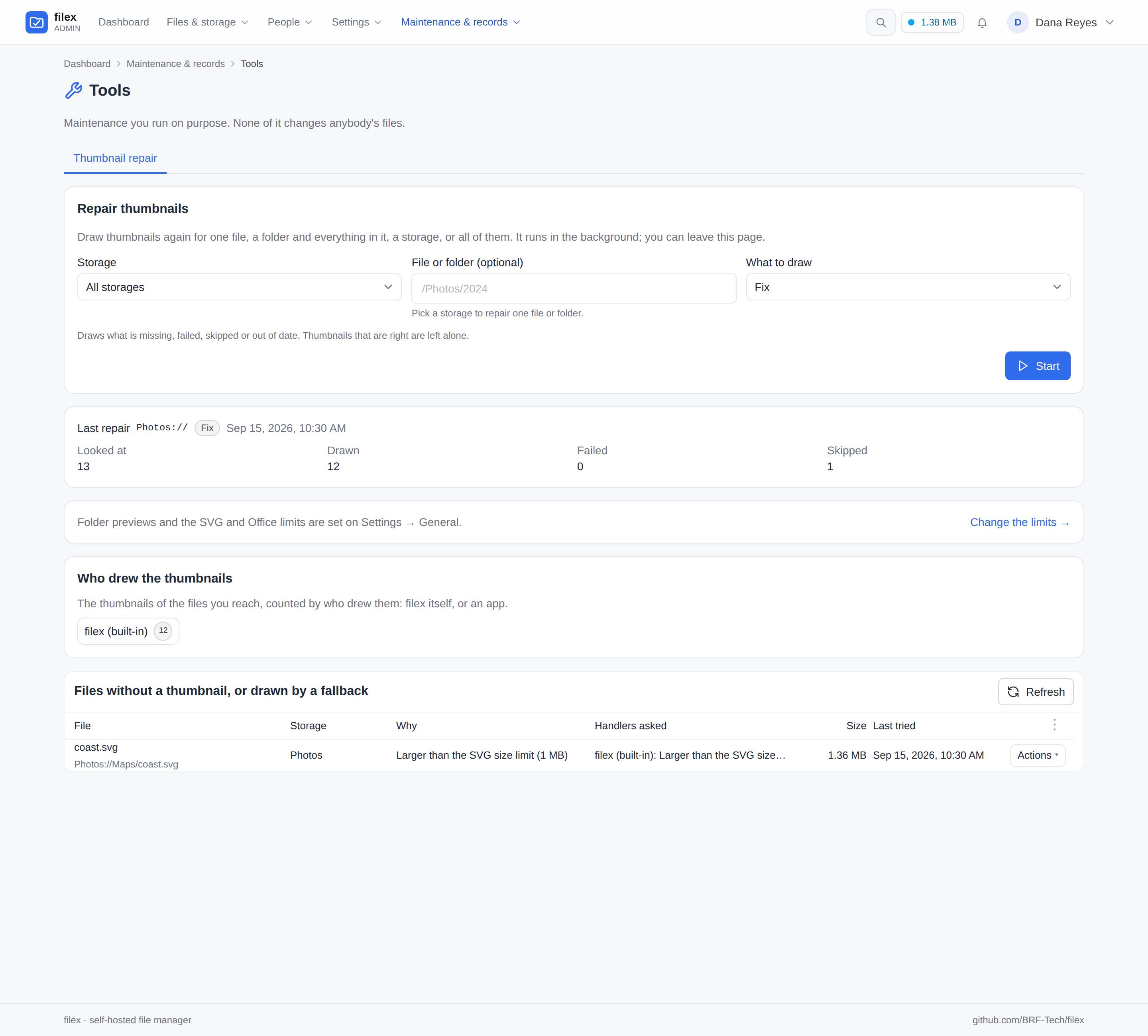
Pick all storages, one storage, or a file or folder inside a storage (the folder with everything in it), and a mode:
- Fix draws what is missing, left pending, failed, skipped or out of date; thumbnails that are right are left alone.
- Rebuild draws every file in scope again.
It runs as an operations job: it shows its progress, is in the operations tray, can be stopped, carries on after a restart, and ends with how many files it looked at, drew, failed and skipped, and which storages it left out (a storage whose sync is running, was interrupted, or never ran). One repair runs per tenant at a time; a second press is told so and follows the first. A tenant administrator repairs the tenant's own storages only. Every repair is in the audit log as thumbnail.repair.
Below it, a link to the Thumbnail settings (folder previews, SVG and Office limits), whose one home is Admin → Settings → General - Change the limits → (shown to whoever may open that page) - then Who drew the thumbnails (0.50: the thumbnails in your reach counted by who drew them - filex itself, each app with its version, and those from before 0.50) and Files without a thumbnail: the files whose thumbnail failed or was skipped, with the reason (too large, took too long, the program this kind needs is not installed, every handler of the kind is switched off, an app failed, ran out of time or was not sent a file that large, or the generator's own error), and the files that were drawn only after an earlier handler failed (drawn by … after … failed). Each row shows the handlers that were asked, in order, and what each answered; Try again repairs one of them.
API: POST /api/admin/tools/thumbnails/repair {path, mode} (path is storage://folder, storage://file, storage:// or "" for every storage; mode is fix or rebuild), GET the same path for the latest run, GET /api/admin/tools/thumbnails/problems (each row's code: svg_too_large / svg_timeout with limit, no_tool with tool = video, audio, pdf, heif, heic_codec or office (no office engine runs), archive_encrypted, archive_too_large, no_engine, no_handler, app_failed with app, app_timeout / app_too_large with app and limit (milliseconds / bytes), the office engine's oo_corrupt (detail: what failed), oo_password, oo_too_large (limit in bytes, 0 for the document server's own) and oo_retry (tries, detail), fell_back (a ready row: generator drew it after the first handler failed), or failed with detail; note is the marker the explorer shows on the file, corrupt, encrypted or too_large; attempts lists every handler asked: {handler, app?, version?, ok, code?, limit?, tool?, detail?, tries?}), GET /api/admin/tools/thumbnails/generators ({generators: [{generator, app?, version?, count}]}, the most first), and GET/PATCH /api/admin/tools/thumbnails/settings for folder_previews, the SVG limits and the office limits (office_max_mb, office_slots; platform administrators only; audited as thumbnail.settings_update). A run is cancelled with POST /api/files/ops/{op_id}/cancel.
A caller held to a folder - a root: token, or a session narrowed by X-Filex-Root - repairs inside that folder ("" is the folder itself, and a path outside it is refused with 403), and its list of files without a thumbnail names only the files inside it, with truncated judged by those alone. The list is read from the folder's storage, the most recent 5,000 problems of it at most. The generators are counted on the folder's storage only. The latest run - GET …/repair, and the job a 409 BUSY carries - is told in full when it is a run of that folder (or of a folder inside it), its refused storages narrowed to the folder's; of any other run the caller learns only that one is going ({"running": true, "queued": …}), and of one that has ended nothing ({"running": false}, as if none had been asked for).
filex thumb backfill
The same walk from the command line:
filex thumb backfill                          # every enabled storage
filex thumb backfill --storage local          # one storage, by name
filex thumb backfill --storage 2              # one storage, by id
filex thumb backfill --storage 2 --path /Pics # one folder and everything in it, or one file
filex thumb backfill --limit 100              # stop after 100 files (across all storages)
filex thumb backfill --retry-failed           # also re-run rows in state=failed
filex thumb backfill --retry-skipped          # also re-run rows in state=skipped
filex thumb backfill --stale=false            # leave out-of-date thumbnails alone
filex thumb backfill --rebuild                # every file, whatever its row says
filex thumb backfill --concurrency 8          # worker pool size (default 4)
filex thumb backfill --progress-every 50      # progress line every N files (default 25)
Which files are (re)processed:
| Existing state | Re-run? |
|---|---|
(no row) / pending | Always. |
ready | When it is of other content (the default; --stale=false leaves it), or with --rebuild. |
skipped | With --retry-skipped; without it, when the content changed, or when what stopped it is gone (an SVG engine, or an SVG limit that was raised). |
failed | With --retry-failed; without it, when the content changed. |
The walk skips trashed and soft-deleted nodes. It ends with a summary line - {processed: N, ok: M, failed: K, skipped: S} - and exits non-zero only on infrastructure errors (DB unreachable, unknown --storage, …); per-file failures are counted into failed but don't abort the run.
⚠ Search index lock. A running
filex serveholds an exclusive lock on the Bleve (boltdb) search index. Backfill never touches search, so it disables the index for its run (setsFILEX_SEARCH_ENABLED=falseunless you've already set it) - otherwise it would block indefinitely acquiring that lock. Only overrideFILEX_SEARCH_ENABLED=truewhen running backfill on a stopped node.
Boot-time backfill
For containers where you want each restart to make sure the grid is painted:
FILEX_THUMB_BACKFILL_ON_BOOT=once(values once, true, 1 are equivalent; anything else leaves it off). When set, serve launches one background backfill a couple of seconds after the HTTP listener is up - so the boot path stays fast - and logs progress at INFO via slog (thumb backfill (boot): starting one-shot backfill). It's off by default; most operators prefer to trigger backfills explicitly.
What happens if it isn't configured / a tool is missing
- Thumbnails are on by default. With zero external tools you still get real image previews plus placeholder cards for everything else.
- A missing tool says so at boot, by name. A grid of coloured rectangles looks like a design choice rather than a missing package, so nobody goes looking for the package - and two of the three ways filex ships (
:slim, the bare binary) arrive with none of these tools. With everything present the line is INFO (thumbs: every preview kind available …); otherwise it is a WARN naming each unavailable kind and what would install it:Office documents have a line of their own, naming the engine: INFOWARN thumbs: some previews will fall back to a plain type tile; the tool that draws them is not installed unavailable=audio,heic/avif,video install="audio needs ffmpeg; heic/avif needs imagemagick (with libheif); video needs ffmpeg"thumbs: office documents are drawn by OnlyOffice engine=onlyoffice document_server=…when a Document Server is configured, INFOthumbs: office documents are drawn by an app's office engine app=… version=… state=…when an app brings one (stateispreparingfor a few minutes after it is installed), otherwise a WARNthumbs: office documents get no thumbnail: no office engine runs herewith what to install or configure. An ImageMagick that is installed and cannot decode the sample HEIC is named the same way:unavailable=heic, withinstallsaying "heic needs libheif's HEVC decoder under imagemagick (libheif-plugin-libde265 on Debian/Ubuntu, libheif-libde265 on Alpine), then a restart" and quoting what ImageMagick said about the sample. - Missing tool for video / audio / PDF / HEIC, or no office engine for an office document (0.50) → state
skippedwith the reasonno_tool:<kind>(video,audio,pdf,heif,heic_codecfor a HEIC when ImageMagick is there and cannot decode HEVC, andofficewhen no office engine runs: no app brings one, or it is being prepared, and no OnlyOffice is configured), notfailedand not a placeholder card. The views show the type tile, and Admin → Tools → Thumbnail repair → Files without a thumbnail lists the file with what it needs ("FFmpeg is not installed", "ONLYOFFICE is not configured", "libheif's HEVC decoder is not installed (libheif-plugin-libde265)", …). Install the program and restart (the probe runs at boot), or install the Office editor app or configure OnlyOffice (no restart): the next listing that shows the file, or a Fix repair, draws it. (Before 0.50 these files got the extension's placeholder card asready, which said nothing about why and was never drawn again once the tool arrived.) - SVG needs no tool since 0.50. A row an older filex left
skippedbecausersvg-convertwas missing is drawn on its own after the upgrade. - A generator that runs but errors (tool present, but the file is broken / truncated / unsupported) → state
failed, a WARN is logged, and the error text is stored on the row. - Unsupported / other kinds (3D models, raw docs, …) always get the placeholder card (
ready). Text, code and CSV files get one too, but the explorer does not fetch it - it draws their first lines instead (see Generators).
Failure modes & troubleshooting
The grid shows icons, not previews
The thumbnail isn't ready. Inspect the thumbnails table:
sqlite3 <data_dir>/instance.sqlite \
  "SELECT node_id, state, error FROM thumbnails ORDER BY node_id DESC LIMIT 20;"
ready rows serve a JPEG; failed rows carry the generator error in error; skipped/absent rows fall back to the per-type icon.
Existing files never got thumbnails after I added the tools
Since 0.50 they are drawn as listings show them. To draw them all at once, run Admin → Tools → Thumbnail repair (or filex thumb backfill). If a whole storage is empty, run a sync first: the repair only walks nodes already in the catalogue, and says so for a storage that was never synced.
Office documents have no thumbnail
Office documents are drawn by ONLYOFFICE - the office engine the Office editor app brings, or a connected Document Server - so look there first:
- Admin → Plugins → Default apps → Office engine says which back ends there are and how each stands: none (install the Office editor app, or connect OnlyOffice under Settings → External services), Being prepared (the app's engine is compiled once after an install or an update - a few minutes; the pictures come as the files are listed once it is Ready), or Failed with the reason (tried again after 30 minutes and at every start). The repair tab says no office engine runs.
- An
x2t-…orlayout-…reason (Damaged): the app's engine could not read or draw the document. SVG, EMF and WMF pictures are drawn as a Document Server draws them, so this is a document the engine cannot read at all; a Document Server put first under Office engine is the other back end to try (ONLYOFFICE.md → Where it differs from a Document Server). - ONLYOFFICE did not answer (ds-4): the document server could not download the document from filex. That is the editor's third leg, the address the document server reaches filex at; Test now on the OnlyOffice card checks it (ONLYOFFICE.md). (ds-8): the JWT secrets differ. (net), (http-502), (timeout): the document server itself. These are asked again after a back-off, six times in all; a Fix repair asks at once.
- A marker on the file: Damaged (OnlyOffice could not read it), Encrypted (a password, or filex's own encryption), Too large (over
thumbs.office_max_mb, or the document server's own limit). Those are the file's; they are not asked again until it changes. - A thumbnail that is a blank page: the document server drew a damaged document as an empty page rather than refusing it.
- Upgraded from 0.49 and the office pictures did not change: they are LibreOffice's, kept while OnlyOffice is not configured, and redrawn by OnlyOffice as they are listed once it is.
An archive shows its icon, not its list
Look it up under Admin → Tools → Thumbnail repair → Files without a thumbnail. Encrypted archive: a ZIP whose entries are encrypted is not listed. Archive too large to list: past one of the listing limits (8 MB of directory, 64 MB of tar stream, 200,000 entries, 5 s; see Generators). Could not be drawn: the archive is damaged, and the tooltip carries the reader's words. Formats other than ZIP and tar (7z, rar) keep the placeholder card - unless an app draws them (Thumbnails drawn by apps).
An app should draw a kind, and the grid shows its icon
Admin → Plugins → Default apps says who draws the kind, in order, and whether the app is switched off for it; the app must be running (Apps tab). Files without a thumbnail says what each handler answered: every handler of this kind is switched off (no_handler), the app failed (its log says why), ran out of time or was not sent a file this large - raise its limits on the app's page (Thumbnails), and the files are drawn again. A kind filex draws itself asks the app only after filex failed, unless the app is put first.
An SVG has no thumbnail
Look it up under Admin → Tools → Thumbnail repair → Files without a thumbnail. Larger than the SVG size limit or Took longer than the SVG time limit: raise the limit (see SVG limits) and the file is drawn the next time it is listed, or press Try again. Could not be drawn: the file is not valid SVG; the tooltip carries the engine's own words. Rows an older filex left skipped because rsvg-convert was missing are drawn again on their own after the upgrade, and so are SVGs it drew as the green SVG placeholder card (it went by the type the upload recorded, which for an SVG is text/xml or text/plain).
PDF or video previews are blank / missing
If the tool is entirely absent the row is skipped with no_tool:pdf (or video, audio, office), and the repair tab says which program to install. If the tool is present but the row is failed, read the stored error - a broken PDF, an unreadable codec, or a permissions issue on the temp dir. A run that exits zero without producing an image is now caught rather than stored as ready: the error names it (ffmpeg exited 0 but wrote no frame, pdftoppm exited 0 but wrote no page) and carries both renderers' own output, because gs and pdftoppm fail for different reasons and only one of them usually prints why.
HEIC / AVIF photos have no thumbnail
Go's decoder only handles JPEG, PNG, GIF, BMP, TIFF and WebP, so HEIC, HEIF and AVIF are drawn through ImageMagick with libheif (0.50). The full image ships both (imagemagick-heic on Alpine); on :slim and the bare binary the rows are skipped with no_tool:heif. Install ImageMagick with HEIC support (apk add imagemagick imagemagick-heic, apt install imagemagick libheif1 libheif-plugin-libde265, brew install imagemagick) and restart. An AVIF row that is failed with "no decode delegate" means ImageMagick is there but was built without libheif.
⚠ Where libheif ships its decoders as separate plugins (Ubuntu 24.04, libheif 1.17), libheif1 alone reads the HEIC container but cannot decode the HEVC picture in it: ImageMagick lists HEIC as a format and every phone photo fails with "Unsupported feature: Unsupported codec". libheif-plugin-libde265 is the decoder, and libheif1 only suggests it, so apt does not install it, with or without recommends. filex finds this out for itself: at start it decodes a small HEIC compiled into the binary, and when that fails About shows HEIC photos: Not found next to ImageMagick: Found with what to install, thumbs.heic is false, the boot log names the plugin, and HEIC rows are skipped with no_tool:heic_codec ("libheif's HEVC decoder is not installed") instead of failed. Install the plugin, restart filex, and run a Fix repair on the storage (rows an earlier build left failed with "Unsupported codec" are redrawn by it too).
Backfill seems to hang
It's almost certainly the search-index lock - see the callout above. Backfill disables search for its run by design; don't force FILEX_SEARCH_ENABLED=true while filex serve is live.
A changed file shows the old thumbnail
Since 0.50 this fixes itself: a file replaced on the backing storage is noticed by the storage sync (or by a listing of a lazily catalogued folder), its thumbnail is drawn again in the background, and the open explorers reload. The new picture has a new URL, so no browser cache holds on to the old one. What filex cannot notice is a replacement that keeps both the size and the modification time on a storage that reports no etag (cp -p of a same-size file onto a local, SFTP, FTP or SMB storage); run a repair in Rebuild mode over that folder.
See also
- CONFIGURATION.md - full config/env reference
- DOCKER.md - image variants (slim vs full) and compose profiles
- STORAGE.md - storages and sync (where uploaded/synced files come from)
- INSTALLATION.md - running filex