
filex - roles and per-user permissions
Backend internal/perm. What an account may do, one permission at a time - through roles (named sets of permissions) and per-person exceptions - alongside the folder grants in RBAC.md, which decide where an account may reach.
Every person has one role, picked in the Role field on their own page: a built-in role - Administrator (everything, locked), User or Viewer - or a custom role, which is its own list of permissions, ticked the same way. Roles are managed on Admin → Roles. (In the API and the database a custom role is a permission rule - the names below use both.) A group can hold a custom role too: it is the role of every member with none of their own (GROUPS.md).
An installed app can add permissions of its own to this list - Request signatures, say - decided by the same roles and exceptions (App permissions). A public link stays open only while the person who made it may still make it (Public links follow their creator).
An upgrade changes nobody's access: every account starts from exactly what its role could do before this existed, until an administrator edits a role, gives one, or sets an exception.
- How an answer is reached
- The permissions
- Built-in roles and presets
- Custom roles
- Delegated administration
- App permissions
- Public links follow their creator
- Where each permission is enforced
- API
- Refusals
- Audit
- Things to know
How an answer is reached
A file action needs both of these:
- The path - the folder grant level (RBAC.md): viewer to read, editor to change, owner to share with a person or a group. A
vieweraccount is capped at viewer everywhere; an app lock caps a frozen file at viewer for everyone. - The permission - resolved per account, lowest layer first:
| Layer | Source |
|---|---|
| Built-in role | the User role's permissions (the install defaults) or the Viewer role's; Administrator: everything |
| Custom role | the one custom role the account holds - its own, else its highest-priority group's (GROUPS.md) - if it is enabled: its own list replaces the built-in role's; its "different in some folders" part applies per path |
| Exceptions | the account's own Allow / Deny (overrides in the API). Always win over roles |
Then two hard lines nothing crosses:
admin.fullfollows the built-in role alone - no custom role or exception grants it.- A
vieweraccount never holds a file-changing or sharing permission, even if something allows it.
Administrators are bound by no custom role and no exception (they could edit them anyway), including role limits such as Require 2FA.
Every answer carries its source - the built-in role, a named custom role (and, for a role held through a group, the group), or this person's exception - which the Users page shows beside each permission and every refusal names.
The permissions
30 in five groups. Keys are stored by name, never by position.
Files (path-checked - also need the folder level)
| Key | Allows |
|---|---|
files.download | Download, zip download, reading over WebDAV / SFTP / FTPS / S3 / NFS, desktop sync, the document editor's Download as. Asked of every file inside a folder that is archived or linked, and a copy, move, rename, extraction or app result never takes a file to where it could be downloaded from where it could not (RBAC.md). Previews stay open - a browser that renders a file has its bytes; this governs the explicit save. |
files.create | Upload a new file, new folder or file, copy into a folder, extract an archive, restore from trash |
files.modify | Overwrite, edit (text editor, ONLYOFFICE), save, restore a version, add to an archive |
files.rename | A new name in the same folder |
files.move | Into another folder (or storage). The protocols rename and move with one operation, so each one is judged by its two paths: same folder = rename, same name elsewhere = move, both at once needs both, at both ends. A copy is not a move - it needs files.create at the destination |
files.delete | Delete to the trash |
files.purge | Permanent delete - emptying the trash, and a delete on a storage that has no trash |
files.encrypt | Making something end-to-end encrypted: a new encrypted folder or .fxe file, the first step of encrypting a folder in place (its first .filex-e2e.json), an item renamed or moved onto one of those two names (unless it is a folder, a .fxe that stays a .fxe or a key file that stays its own folder's), and a copy of what is encrypted (a .fxe, a key file, a folder holding either). Needs the action's own permission too (files.create for a new file). Opening an encrypted folder, adding to it, changing its password and taking its encryption off are not encrypting (E2E-ENCRYPTION.md → Who may encrypt) |
files.tag | Add and remove tags |
A write decides create vs modify per file: replacing a file that is there is files.modify, adding one is files.create.
Sharing and features
| Key | Allows |
|---|---|
share.links | Public download links (web, agent API, the invite fallback) - and keeping the ones already made open (below) |
share.upload_links | Upload-only "drop" links (file requests) - and keeping them open |
share.users | Sharing with another account or a group (the per-item permissions panel, invites) |
comments.write | Posting comments. An API key also needs its own comments:rw (RBAC.md) |
ai.use | The agent REST + MCP API at /api/ai |
ai.assistant | The AI assistant in the explorer - its button and its routes (AI-ASSISTANT.md). What it does is held to the person's own permissions, tool by tool; it is not ai.use and needs no API key. Every preset holds it, and every role has it from the version that adds it (below) |
plugins.run | Running app actions and app view events. An app may put some of its actions behind a permission of its own as well (App permissions) |
Access outside the web app (checked at login)
| Key | Allows |
|---|---|
access.webdav | WebDAV (checked every request) |
access.sftp | SFTP by password or key; registering SSH keys |
access.ftp | FTPS |
access.s3 | S3 - creating keys and signing with them |
access.nfs | NFS - creating exports and mounting them |
access.api | Creating API keys and using any API key |
access.desktop | Desktop sign-in, and using the key a desktop pairing made |
Own account
| Key | Allows |
|---|---|
account.edit | Changing own name, email, picture and password. Off locks a shared or demo login. |
Admin area
admin.users, admin.grants, admin.shares, admin.audit, admin.monitor, and admin.full (the Administrator role) - see Delegated administration.
Built-in roles and presets
On Admin → Roles, User and Viewer are edited like any role (a grid of permissions, with presets to start from); Administrator is locked. The User role's permissions are the defaults every regular account starts from. The Viewer role can never be given file changes or sharing - those stay off however it is edited.
⚠ In multi-tenant mode the built-in roles belong to the whole platform. Each is one row, held by every account of every tenant without a custom role, so only the platform operator (an administrator of the supertenant) saves them; a tenant's administrator sees them read-only and gives their people a custom role instead (MULTI-TENANCY.md → Instance-wide admin surfaces).
| Preset | What it is |
|---|---|
| Full admin | Everything |
| Standard user | Everything outside the admin area - what a user could do before permissions existed. The User role until it is edited. |
| Read-only | Standard minus file changes and sharing - what a viewer could do before. The Viewer role until it is edited. |
| Upload-only | files.create, files.encrypt, account.edit and ai.assistant - a drop-box account |
| Guest | files.download and ai.assistant |
A preset on a person's page pins every permission of that one account to the preset (as exceptions); Clear exceptions goes back to inheriting.
Custom roles
Admin → Roles → New role. Creating and editing roles is for administrators - a role reaches everybody who holds it, so a delegated administrator could otherwise write one that grants themselves anything. Giving a role is done in the Role field on the person's page (Users → a person), by anyone with admin.users, who can give only roles whose every allow they hold themselves.
One role per person. Picking a custom role replaces the person's previous one; picking a built-in role ends their own custom one - a group's role still applies to someone with none of their own (GROUPS.md). A role that belongs to a tenant is given only to that tenant's accounts; one held outside its tenant (the account was moved since) gives nothing, like a switched-off role. An administrator is bound by no role, so picking a custom role for one makes them stop being an administrator (never the last one) - one save, one server call.
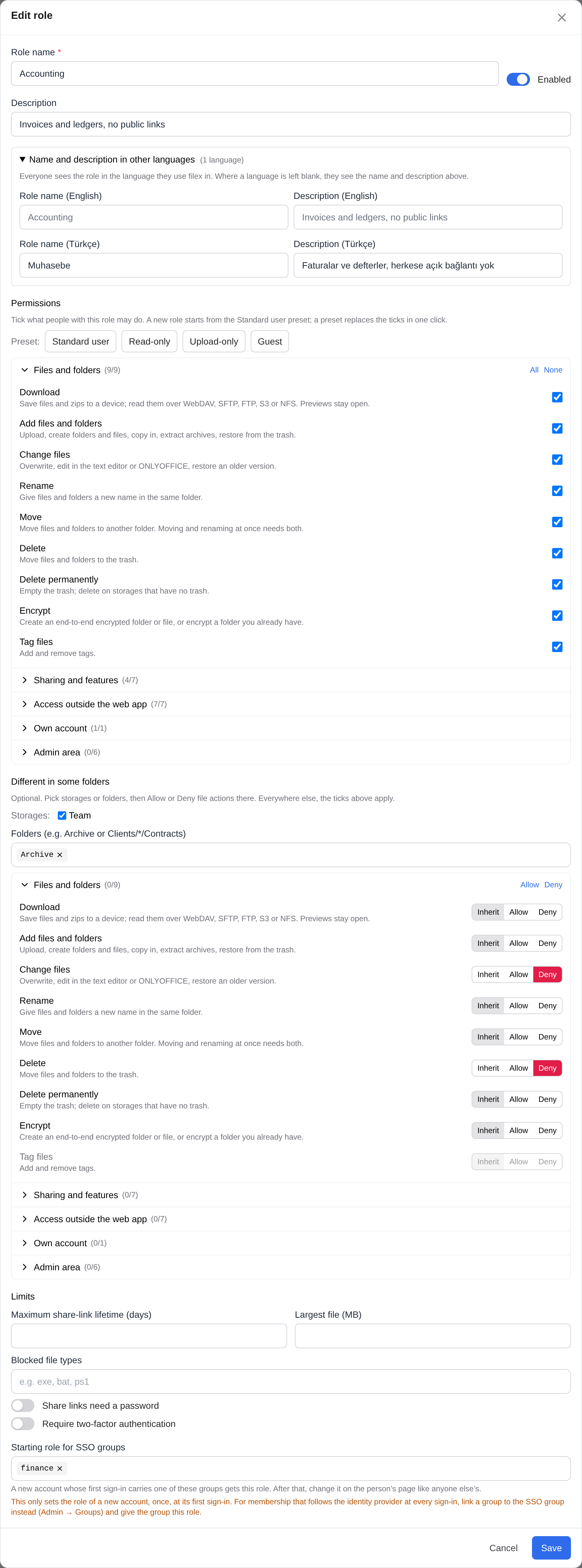
A role has:
Name and description in other languages (optional, folded under the description) - one pair of boxes per interface language the server offers: the ones filex ships and every installed language pack's. Everyone sees the role in the language they use filex in: the Roles page, the Users list and its filter, a person's page, the permission grid's "role “…”", and the refusal sentences, which use the reader's account language. A language left blank shows the role's own name and description; the name stays required, and the audit log records it.
Permissions - its own list, ticked like the built-in roles' (a preset replaces the ticks in one click). A new role starts from the Standard user preset.
Limits:
Limit Enforced Maximum share-link lifetime (days) A link asked for with no expiry, or a later one, is capped (reported as expiry_clamped, like the install-wide cap). The person is told the cap up front:GET /api/capabilities→share_link_max_daysis the shorter of this and the install's ceiling, and the share dialog offers only what it allowsShare links need a password A link asked for without one gets a generated PIN, returned to the creator. A link mailed from the Share dialog never carries its PIN; only the invitation to an address with no account does (Emailing a link) Blocked file types Upload, create, save or rename to a blocked extension is refused on every door ( exe,tar.gz; case-insensitive). Existing files of that type can still be read and deletedLargest file Every write door, including the agent API, the text editor and chunked uploads Require 2FA See below Different in some folders (optional) - pick storages and/or folders, then Allow or Deny file actions and links there (
files.*except tag,share.links,share.upload_links); everywhere else the list applies. So "no delete, except in Scratch" is one role. A pattern names a folder and everything in it (Archive=Archive/**);*matches within one name,**across folders (**/*.psdanywhere,Clients/*/Contracts). The server applies it per path, and a refusal names the role.Enabled - a role can be switched off without deleting it. A switched-off role gives its people nothing (not even sign-in to the API) until it is on again - never the built-in User role instead, which for a role that takes things away would be more access. Exceptions still apply. Refusals say the role is switched off.
Deleting a role nobody holds just deletes it. If people hold it, you choose what they get instead - User, Viewer or another role (
DELETE /api/admin/roles/{id}?to=user|viewer|<id>; withouttothe server answers409with the count).
The level underneath. filex keeps a folder-access level for everyone - Viewer can only look, User can also change. A custom role's people get it automatically: User if the role can add, change, delete or share anything (anywhere, or in some folders), Viewer otherwise - so a read-only role stays read-only on every door, even against a mistaken exception. Editing the role moves its people with it.
- Starting role for SSO groups (optional) - see below.
Starting role for SSO groups
For membership that follows the identity provider at every sign-in, link a group to the SSO group and give the group the role instead. The starting role below is kept for accounts that already rely on it; the role editor points to Groups.
A role can name SSO groups. When a new account is created at its first sign-in and the groups that sign-in carries name one of them, the account starts with that role (the lowest-numbered enabled one, if several match) and its level. The groups are those of whichever provider the person signs in with: OIDC's role_claim (ID token or access token; dotted paths like realm_access.roles work), LDAP's group_attr, the operating system's groups (pam, windows) or the header proxy's roles header, with or without its allowed_groups (LDAP.md → Groups from the roles header, the first sign-in rule). Only at creation: after that the role is the person's, changed on their page like anyone else's, and a later sign-in never hands it back or takes it away. An account the admin mapping makes an administrator gets no role. filex still stores each sign-in's groups (replaced every time), but they no longer change what an existing account may do - except through a filex group linked to one of them, whose role and folders follow the sign-in, for every provider alike (GROUPS.md).
Require 2FA
An account bound by it that has not enrolled TOTP can still sign in, but its session reaches only who-am-I, its permissions, enrolment and sign-out - every other call answers 403 "2fa_required", and the web app holds it at a screen that opens the Security settings. Its password logins over WebDAV / SFTP / FTPS are refused until it enrols. Exempt: administrators, SSO accounts (their second factor is the identity provider's), API keys.
Delegated administration
An account without the Administrator role but with an admin.* permission gets an admin panel showing only its pages:
| Permission | Pages / routes |
|---|---|
admin.users | Users (list, create, edit, delete, reset password, quotas), each person's exceptions, giving and taking custom roles, Groups (GROUPS.md) |
admin.grants | Folder access - every per-file and per-folder grant (RBAC.md); removing grants |
admin.shares | Everyone's shares; revoke, delete |
admin.audit | The audit log |
admin.monitor | Dashboard, usage, sync history, the job queue - read-only |
Everything else - storages, settings, SSO, plugins, updates, branding, webhooks, and creating or editing roles - stays the Administrator's. New admin routes are admin-only unless they name a permission.
A delegated administrator never edits, deletes, sets the quota of or resets the password of an administrator, never gives a built-in role above their own, and can allow only permissions they hold - as an exception or through a custom role (they can take any away). Delegation works from a signed-in session only, never an API key.
Their changes are judged by the result, not only by what the request names: after the change, the account may not hold anything the delegated administrator does not hold everywhere. So lifting a Deny (on someone else or on themselves), ending a restrictive custom role, picking the built-in User role for its holder, removing someone from a restrictive group, deleting such a group or clearing its role, or creating a User account are refused when the result would hand out a permission they lack (403, with the permissions it would have handed out). Taking away is never refused. And they can reset or set the password only of an account that holds nothing they do not - a password is a sign-in, and signing in as an account that holds more would be the same escalation.
⚠ Folder access is not judged this way -
admin.usersis trusted with it through groups. The result check above is about permissions. Folder access (a per-folder grant) is given by the folder's owner in the sharing panel, and a delegated administrator cannot grant a folder directly. Butadmin.usersmanages group membership, and every member reaches the folders the group was granted. So a person holdingadmin.userscan hand out access to any folder a group holds by adding people to that group, including an account they opened themselves and know the password of, which lets them reach those folders too. Neither is refused. The password rule does not count folder access either: resetting the password of an account that holds no permission beyond theirs is allowed even when that account reaches folders they do not. Giveadmin.usersonly to someone you would trust with the folders your groups hold.
A person's app permissions (below) are an administrator's to change: what an app key grants is decided by the app's own default, so "only what you hold" cannot be judged for it. A delegated administrator saves a person's exceptions with their app permissions exactly as they were, or is refused (403).
Handing out administration takes a session
Some changes make an account an administrator in all but name. An API key cannot make them - not even an administrator's own admin-scoped key; they answer 403 {"error": "session_required", "message": …}, and an administrator signed in to the admin panel makes them as before:
- creating an administrator, promoting an account to administrator, changing an administrator's role, and setting or resetting an administrator's password (RBAC.md);
- giving a person a role to or from Administrator, or a custom role that allows an admin-area permission (
PUT /api/admin/users/{id}/roles); - a person's exception that allows an admin-area permission (
PUT /api/admin/users/{id}/exceptions); - a custom role whose list - or whose "different in some folders" part - allows one, when it is created or when an edit adds it (
POST/PUT /api/admin/roles…); - giving a group a role that allows an admin-area permission, changing such a group's priority or SSO links, or adding people to it (
/api/admin/groups…, GROUPS.md); - a built-in role's permissions that include one (
PUT /api/admin/roles/builtin).
Taking an admin-area permission away is not a grant and stays open to a key.
App permissions
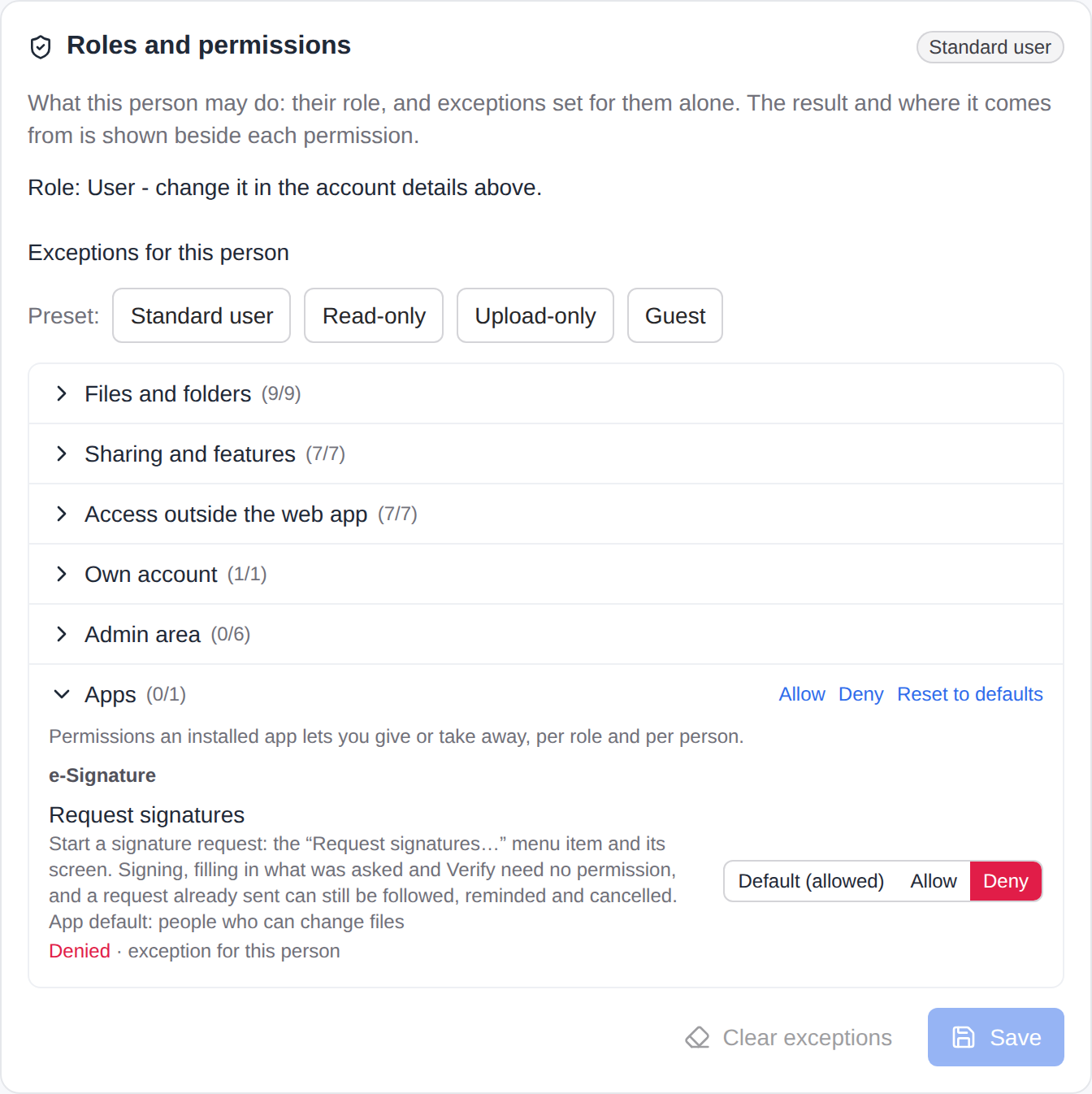
An installed app can declare permissions of its own - the actions an organisation would want to limit, and nothing else. A signing app puts Request signatures behind one, while signing what somebody sent you needs none. They appear here under the app's name and are decided the same way as the 30, per role and per person; the app's manifest declares them (user_permissions, PLUGIN-KIT.md).
The key is
app.<app>.<id>-app.sign.request. It is stored by name in the same three places as every other permission, and a key whose app is uninstalled is simply never asked.The answer, first match wins:
Layer Where it is set Administrator always holds it The person's exception PUT /api/admin/users/{id}/exceptions-{"overrides": {"app.sign.request": "deny"}}Their custom role the role's settings.apps-{"app.sign.request": "allow"}The built-in role PUT /api/admin/roles/builtin[?role=viewer]with"apps"- for a custom role's holder, the built-in role underneath it (User or Viewer, the level the role gives)The app's default the manifest's defaultfor it:viewer(every account),user(accounts that can change files - the default when the app names none) oradmin(administrators only, until granted)What it guards. An action or a screen that
requiresthe permission is left out of the file menu, the details panel and the Apps navigation for an account that does not hold it, and refused on every door that starts the app's work for a person: running the action, opening a screen and each of its events (so the job a screen queues too), and an interface's save and its calls to its module. The refusal is403 permission_deniedwith the key aspermission, itssourceand amessagein the reader's language (Refusals).plugins.runstill applies underneath: without it no app action runs at all.Where to set it. Admin → Roles: the editor of every role - User, Viewer and each custom role - has an Apps group below the permission groups, each app's permissions under its name, each one Default (…) / Allow / Deny. Default says what it comes to for that role: for a built-in role the app's default, for a custom role the answer of the built-in role its people are on, then the app's default. A person's page has the same rows among their exceptions, beside the answer and where it comes from; Default there is what their role alone gives them. A preset and Clear exceptions change the 30 only and leave the person's app exceptions as they are - the Apps group's own Reset to defaults clears those. A delegated administrator sees a person's app rows read-only.
Through the API.
GET /api/admin/roles/cataloguelists the installed apps' permissions underapps, with the app's labels, each one's default, and what that default comes to on each built-in role when nobody has decided -default_for,{"viewer": false, "user": true, "admin": true}for auserdefault. That is the server's own answer (the last layer of the table above), and the role editors' Default (…) is read from it. For a custom role it is the entry of the built-in role thatPOST /api/admin/roles/previewsays its people are on, unless that built-in role has a decision of its own. A person's exceptions answer (GET/PUT /api/admin/users/{id}/exceptions) carrieseffective.apps: for each app permission{key, allowed, source, inherited: {allowed, source}}-inheritedis the answer without the person's own exception. The wholeoverridesmap is replaced onPUT, so a client that writes the 30 must send theapp.*keys it read back with them, or they are cleared.
Public links follow their creator
A public link hands an item to people without an account, so making one needs edit rights on the item and share.links (a file request: share.upload_links) - on every door alike: the Share dialog, the agent API and the MCP file_share tool. A download link also needs files.download on the item, and a folder link serves, lists and packs only the files inside it that its creator may download. A link an app opens hands over only what the person its job runs for may download, and the copies an app's page hands over are withheld once its creator may no longer download the page's document; the page itself stays (APP-PLUGINS-API.md).
It keeps needing them. A link answers only while the person who made it still holds that permission, at the editor level, on the item (and, for a download link, files.download there): take share.links away from them - by a role, an exception, a folder part of a custom role, by taking their editor grant on the folder, or by taking them out of the group whose grant or role gave it - and every link they made there answers 404, like a link that never existed. Nothing is deleted: give the right back and the links answer again, and their owner still sees and revokes them under My shares. The download page, the link's metadata, a shared folder's browsing, the file request page and /api/public/* ask the same question.
Deleting the creator's account deletes the links they opened - download links and file requests alike - and the deletion's audit entry counts them (BACKEND.md → Admin: users). Two kinds of link are left alone: an app's own public page (a signing link - the app's own permission allowed the action that opened it, and an outside signer's page does not close because the requester's sharing rights changed or their account went), and a link with no recorded creator (made before links recorded one, or whose creator was deleted before 0.49.0 - there is nobody left to ask).
A file request also carries its creator's limits, because what is dropped lands in the creator's storage as the creator's file: a type their role blocks is refused (415 ext_not_allowed, with the extension), and a file over their largest-file limit answers 413 file_too_large.
Where each permission is enforced
The server enforces everything; the web app only hides what would be refused.
| Door | Login | File actions |
|---|---|---|
| Web app / REST | session or API key (access.api / access.desktop for keys) | per route and per file - perm_route_table_test.go fails the build on any state-changing route that is not classified |
Agent API /api/ai | ai.use (+ the key's access.api) | the same file permissions |
AI assistant /api/files/assistant | ai.assistant (a person: a session or their own key, never an app's) | the same file permissions, each tool as that person |
| WebDAV | access.webdav, every request | GET = download; PUT = create/modify; MKCOL = create; DELETE = delete (+purge without trash); MOVE = rename and/or move; COPY = create at the destination. PROPFIND stays on the grant |
| SFTP | access.sftp | read = download; write = create/modify; mkdir = create; rename = rename and/or move (+modify when it replaces); remove = delete (+purge without trash) |
| FTPS | access.ftp | RETR = download; STOR = create/modify; MKD = create; RNFR/RNTO = rename and/or move; DELE = delete |
| S3 | access.s3 | GET = download (HEAD stays open); PUT, multipart, copy destination = create/modify; DELETE = delete |
| NFS | access.nfs at mount | as SFTP |
On every door, a copy, move or rename (COPY, MOVE, rename, RNFR/RNTO, S3's copy) that would take a file from where files.download is refused to where it is allowed is refused as a download would be (RBAC.md).
Taking a protocol's permission away ends access at the next login. Inside an open session, file permissions follow the same short reload the grants have.
An API key is held to its own verbs on each of these doors as well - read, write, delete - whatever its account may do (RBAC.md → API tokens).
API
| Method & path | Who | |
|---|---|---|
GET /api/auth/me | anyone signed in | now also permissions (account-wide), permissions_in_folders (allowed only in some folders), permissions_by_folder (whose answer differs from folder to folder), permission_settings, two_factor_required - what the explorer reads to hide what would be refused |
GET /api/auth/me/permissions | anyone signed in | effective permissions with sources, limits, role ids, path-limited role ids |
GET /api/admin/roles/catalogue | admin.users | the 30 permissions, the presets, and apps: every installed app's own permissions (key, app, app_label, id, label, description, default, and default_for - what default comes to on each built-in role when nobody has decided: {"viewer":false,"user":true,"admin":true}) |
GET /api/admin/roles/exceptions | admin.users | user id → exceptions |
GET / PUT /api/admin/users/{id}/exceptions | admin.users | exceptions + effective (with effective.apps, App permissions) / {"overrides":{"files.delete":"deny","app.sign.request":"deny"}} - {} clears. The whole map is replaced. Allowing an admin.* permission needs a session; changing an app.* key needs an administrator |
GET / PUT /api/admin/users/{id}/roles | admin.users | a person's one role, set in one call: {"role_id":3} (a custom role - also sets the level underneath), {"role_id":null}, or {"role":"viewer"} (a built-in role; ends their own custom one - a group's role still applies, GROUPS.md). An administrator given a custom role stops being one - never the last administrator (409) |
GET /api/admin/roles/builtin[?role=viewer] | admin.users | a built-in role's permissions, its preset, and apps: its decisions about app permissions |
PUT /api/admin/roles/builtin[?role=viewer] | admin (multi-tenant: the supertenant's) | {"permissions":[…], "apps":{"app.sign.request":"deny"}, "shown":[…]} - apps absent leaves those decisions as they are, {} hands every one back to the app's default. shown (optional): the permissions the editor showed, so a list left without one of them is not pointed out as one an older version saved. A key the stored list holds that this version does not know is kept. A list with an admin.* permission needs a session. A tenant's admin gets 403 supertenant_only |
GET /api/admin/roles/gaps | admin | the roles the caller may edit that may have lost a permission (Things to know): {"gaps":[{"id":"builtin:user:files.encrypt","key":"files.encrypt","from":"files.create","role":"user"}, {"id":"role:12:files.encrypt","key":"files.encrypt","from":"files.create","rule_id":12,"rule_name":"Drop box"}]} - those nobody dismissed |
POST /api/admin/roles/gaps/restore · POST /api/admin/roles/gaps/dismiss | admin (a built-in role's: the supertenant's) | {"id":"builtin:user:files.encrypt"} → the gaps left. Restore adds the key to the list, or an Allow of it to the folder part; dismiss changes nothing in the role. 404 gap_gone when it is not there for the caller any more |
GET /api/admin/roles | admin.users | the custom roles, and assignments: user id → the role they hold |
POST /api/admin/roles | admin | create a custom role, with its names / descriptions in other languages (one that allows an admin.* permission needs a session) |
POST /api/admin/roles/preview | admin | what a role being edited comes to before it is saved: {"permissions":[…], "effects":{…}, "conditions":{…}} → {"holder_role":"user"} - the built-in role its people would be on (The level underneath, above). Nothing is checked or stored; the role editor asks it for each app permission's Default |
PUT / DELETE /api/admin/roles/{id} | admin | replace / delete a custom role - a PUT replaces names and descriptions too (an edit that adds an admin.* permission needs a session) |
A custom role body:
{
  "name": "Contractor",
  "description": "Outside staff",
  "names": { "tr": "Yüklenici" },
  "descriptions": { "tr": "Dışarıdan çalışanlar" },
  "enabled": true,
  "permissions": ["files.download", "files.create", "files.modify", "files.rename", "files.move", "account.edit"],
  "targets": [{ "kind": "sso_group", "value": "contractors" }],
  "effects": { "files.delete": "allow" },
  "conditions": { "paths": ["Scratch"] },
  "settings": { "share_link_max_days": 7, "blocked_extensions": ["exe"], "max_upload_bytes": 104857600, "require_2fa": true,
                "apps": { "app.sign.request": "allow" } }
}
permissions is the role's list. effects (Allow/Deny) is only for the folders in conditions and is refused without them. targets only name SSO groups (the starting role); any other target is refused - a person is given a role on their own page or through a group. settings.apps is the role's decisions about app permissions (allow / deny per app.<app>.<id> key); a key it does not name falls through to the built-in role, then the app's default. shown (optional, not stored) is what the editor showed, as for the built-in roles above. A key the stored role holds that this version does not know - a later version's - is kept in permissions and effects whether the body sends it back or not.
names and descriptions map an interface language - en, tr, or the code of an installed language pack, lower case - to the role's name and description in it. Each text is trimmed and a blank one dropped; a name is at most 100 characters (like name), a description 1000. A language the server does not offer is refused with 400, except one the role already carries (a language pack removed since), so the role can still be saved. A reader whose language has no entry - or only its main language has one: pt-br reads pt - sees name and description. name stays required; it is also what source.rule_name carries and what the audit log records.
Migration 00069 adds the tables (a person's exceptions, the custom roles, who holds which, the groups of their last SSO sign-in) and a source column on API tokens (what minted one - the desktop app or a person, so access.desktop and access.api can tell them apart), and changes nothing else: every account keeps its built-in role, and the built-in roles start from what they could always do. Migration 00071 adds a custom role's names_json and descriptions_json (empty for every existing role).
Refusals
A permission refusal is 403:
{
  "error": "permission_denied",
  "permission": "files.delete",
  "source": { "kind": "rule", "rule_id": 3, "rule_name": "Contractor" },
  "message": "The role “Contractor” does not allow you to delete files."
}
message is in the reader's language, and names the role by its name in that language when it has one (source.rule_name is always the role's own name; source.kind keeps the API's name, rule, for a custom role). A role held through a group adds group_id and group_name to source, and the sentence names the group (GROUPS.md). An app permission is refused the same way, with its key as permission and source.kind override, rule, base (the built-in role) or app_default (the app's own default). A refusal caused by the path (no grant, a read-only account, a lock) keeps its historical body. A blocked file type answers {"error":"blocked_file_type","extension":"exe"}; a file over the limit 413 {"code":"FILE_TOO_LARGE"} in the web app and each protocol's own "over the limit" answer elsewhere. A file request answers with its creator's limits in its own shape: 415 {"error":"ext_not_allowed", "extension":"exe"} and 413 {"error":"file_too_large"}. Protocol logins that are refused look exactly like a wrong password.
A change only a signed-in administrator may make (Handing out administration takes a session) answers an API key 403 {"error":"session_required","message":…}.
A refusal of files.encrypt has a shape of its own. The permission is one of three layers of who may encrypt, and a door answers for all of them alike: 403 {"error":"e2e_not_allowed","reason":"permission","message":…} (the other reasons name the tenant's ceiling and policy).
Audit
| Action | Details |
|---|---|
user.permissions_set | before / after exceptions |
user.roles_set | before / after custom role id (or null) |
permissions.defaults_set | the built-in role, before / after, and apps when its app decisions were changed |
permission_rule.create / .delete | the custom role, its own permissions among it |
permission_rule.update | before / after, each with the role's own permissions |
permission_gap.restore | the gap (target builtin:user:files.encrypt or role:<id>:files.encrypt), key, from, the built-in role or the rule_id, and before / after (the list, or the custom role) |
permission_gap.dismiss | the gap, key, from, and the built-in role or the rule_id |
Things to know
Download is a deterrent, not DRM. Previews still send a file's bytes to the browser.
Every explorer hides what would be refused. The web app passes the account's permissions to the explorer; the desktop app and an embedded explorer that pass none have the explorer read them from
/api/auth/meitself, so all of them hide the same buttons. An action whose answer differs from folder to folder (a role's "different in some folders" part) is asked of the server for the selected paths (POST /api/files/manager?action=allowed, which areadtoken may ask) before it is offered. The doors that make a link ask the same: + New → Request files and the share dialog's file-request section needshare.upload_links, its link switch and the details panel's Create linkshare.links, the people sectionshare.users. The server decides either way; hiding only spares a403.Desktop keys paired before this feature read as API keys: removing
access.apistops them until the desktop is paired again.Existing sessions: changes apply at once to the web app (checked per request); protocol sessions keep going until they reconnect.
Multiple processes on one database see a role change within 3 seconds.
A permission a new version adds does not take anything away. A saved role - the User or Viewer role once edited, every custom role and its folder part - lists only what it allows, so a permission it was saved without reads as not allowed. A permission carved out of an older one is therefore given, at the first start of the version that adds it, wherever the older one is allowed:
files.encryptto every role that allowsfiles.create, in its list or as an Allow in its folder part, and to every person whose own exception allowsfiles.create(an exception that already decidesfiles.encryptkeeps its decision; a Deny offiles.creategets nothing). Once: taking it away afterwards sticks. The server keeps the catalogue it has seen in thepermissions.cataloguesetting, and its start log says how many roles and people it changed. The setting only ever grows: a version started on a catalogue a later version recorded leaves it as it is, so that upgrading again does not take the later version's own permissions for new and hand them out a second time.Rolling back to a version without
files.encrypt(0.50 or older): the older version does not know the permission, and every saved role and person's exceptions the upgrade gave it to keeps it. The older Roles and People pages cannot save a custom role's list or a person's exceptions that hold it (400, an unknown permissionfiles.encrypt) until the server is upgraded again. Two saves go through without a word and leave it out: the built-in User role (the older page does not show the permission and writes the list back without it) and a custom role's folder part whose own list does not holdfiles.encrypt(the older editor keeps only the folder permissions it knows); applying a preset to a custom role on the older page replaces its list the same way. Upgrading again does not givefiles.encryptback to those, nor where an administrator took it away in between: it was merged once, at the first upgrade, and nothing stored tells the two apart.ai.assistant(0.57) comes on for everyone. It is carved out of nothing, and it is given to everybody: every preset holds it (Guest and Upload-only too), and the first start of 0.57 adds it to every saved role - the User and Viewer roles once edited, every custom role whatever else it allows, switched off or not, of every tenant. A person's own exceptions are not touched: without one for the key, a person follows their role. Once, likefiles.encrypt: an administrator who takes it away on Admin → Roles has taken it away, and no later start gives it back. The permission alone sends nothing anywhere - the assistant itself is off until an administrator sets it up and turns it on (AI-ASSISTANT.md), and what it does is held to the person's own permissions, so a guest's assistant can only read.A role that may have lost a permission is pointed out, from 0.52.0 on. Admin → Roles shows, above the table, the built-in User role when it allows
files.createbut notfiles.encrypt, and every custom role whose folder part allowsfiles.create, does not decidefiles.encrypt, and whose own list does not hold it. Each has Give back "Encrypt" (the key added to the list, or an Allow of it to the folder part; nothing else changes) and Dismiss, it was on purpose (not shown again while it stays that way; given back and lost again, it is shown again); both are in the audit log. Nothing is given back by itself. The administrators are told once in the bell (permission_gaps, NOTIFICATIONS.md): at a start that finds one nobody was told of, and after a save that leaves one. A save from the role editors, which show Encrypt, is a decision and is not pointed out: they send the permissions they showed (shown), and a save through the API without it is pointed out like one from an older page. Who sees and answers one is who may edit the list - the built-in role the platform operator, a custom role also its tenant's administrators. A custom role's own list is not looked at: the older pages refused to save one that heldfiles.encrypt, and "may add files, may not encrypt" is a role made on purpose.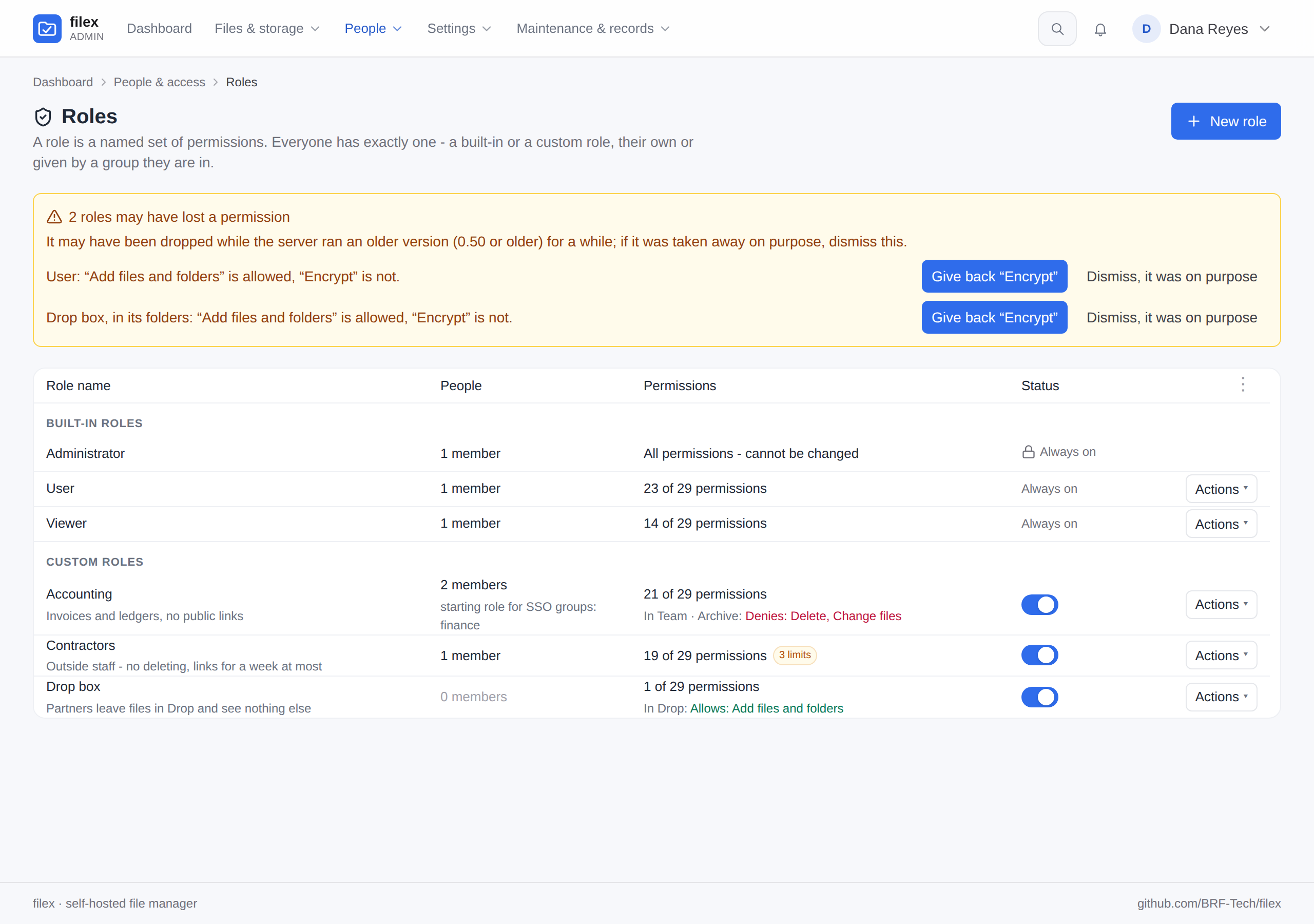
A permission a later version stored is kept. A role or a person's exceptions saved by a newer filex may hold a key this version does not know. The pages cannot show it, so they cannot have taken it away: every save - a built-in role, a custom role's list and its folder part, a person's exceptions, a preset, Clear exceptions - keeps it as stored, and a request may send it back. A key that was never stored is still refused (
400). Going back to this version from a later one leaves that version's permissions where they were for when it runs again. A folder part taken away takes them with it.