
Operating-system accounts
Let people sign in to filex with the login they already use on the machine filex runs on - no second password, no directory to run. The provider asks the operating system whether the password is right - filex never stores it - and then treats the person like any other account: storage permissions, shares, quotas and roles are filex's own.
There is one provider per operating system. Each is a page provider on Admin → Identity providers, switched on there without a restart (see SSO.md → Managing providers), and each is tested for real before it can be switched on: an operating-system provider can only be tested by signing somebody in, so the test takes a real account. There is no "switch on anyway".
Not from the environment. windows and pam are switched on on the page and nowhere else: the environment has no place for the test that switches them on. Written into FILEX_AUTH_DRIVERS (or auth.drivers in config.yaml), the entry is refused at start with a warning of its own - windows/pam is switched on from Admin → Identity providers, where its setup is checked; it cannot be set from the environment (with the provider's name and where it was written, from) - and the start goes on: every other provider in the list runs as usual.
| Provider | Operating system | How it judges a password |
|---|---|---|
windows | Windows (local accounts and the domain the machine is joined to) | LogonUserW - Windows |
pam | Linux | PAM, through the pamtester command - Linux (PAM) |
This page opens with what both share; the setup of each follows under its own heading.
- How an account comes to exist
- The e-mail token - choose it once
- Accounts that never sign in
- Groups and roles
- What this is not
- Windows
- Linux (PAM)
How an account comes to exist
A person types their machine login (alex) and password on the sign-in form - or as the user and password of WebDAV, SFTP or FTPS. (S3 and NFS never receive a password - they use the access keys and exports the account mints in the web app.) filex asks the operating system whether the password is right. What happens next is the same first-login rule as for OIDC, LDAP and the header proxy (LDAP.md → The first sign-in rule):
the account exists (same e-mail address)    → it signs in
auto_create is off                          → refused
allowed_groups is set, no group matches     → refused
otherwise                                   → the account is created
⚠ auto_create is OFF by default for the operating-system providers (it is on for the others). Having a login on the machine does not make anybody a filex user; an administrator creates their account, or turns auto_create on (optionally with allowed_groups, so only members of a group get one). The one exception is deliberate: the test account you give when you switch the provider on becomes a super administrator - see the setup below. (If that promotion itself fails after the provider was saved, the request answers 500 and can simply be repeated; a disabled account, or one that belongs to a tenant, is refused before anything is saved.)
The person is always told the same thing when they are refused - wrong credentials - whether the password was wrong, the account does not exist here, or the rule said no. Only the operator sees why: a log line and an audit row (auth.first_login_refused, with the reason and the login name; never a password or a group list).
The sign-in attempt limits apply above every provider: wrong attempts are counted per login name and per address, and a locked account refuses even the right password.
The e-mail token - choose it once
filex accounts are keyed by e-mail address. A machine login has none, so it gets one made from its name:
| Setting | alex becomes |
|---|---|
| nothing set | alex@local |
FILEX_OS_LOGIN_EMAIL_TOKEN=evim | alex@evim |
the provider's email_domain = corp.example | [email protected] |
a sign-in in tenant realm acme (multi-tenant) | [email protected] ([email protected] with the token above) |
⚠⚠ Set
FILEX_OS_LOGIN_EMAIL_TOKENonce, at installation, and never change it. The address is the account. Change the token later andalexsigns in asalex@evimwhile thealex@localaccount - its files, shares, quota - sits beside it: one person, two accounts. That is why the token is read from the environment only; nothing on the page or in the API edits it. (email_domainis the same kind of choice: pick it before the first person signs in.)
The same address is what the file protocols hand to the provider, so a login typed as alex or as alex@local reaches the same account. An address of another domain is never treated as a machine login.
The token is the installation's, not the OS providers' alone: an LDAP entry with no e-mail attribute is alex@local too (LDAP.md).
Multi-tenant installs: the realm goes in the address. Two tenants can each have an alex, and addresses are unique across the platform - so a tenant's machine account is <name>@<realm>.<token>: [email protected] in realm acme, [email protected] in realm beta, and alex@local only for the platform's own tenant. The realm is the tenant the account belongs to: the realm the sign-in named (the form's Realm field, acme/alex over SFTP, the tenant's own address). An operating-system provider has no provider pin (it is configured on the page only), so on a multi-tenant install a sign-in that names no tenant is the platform's own, where no account is created (MULTI-TENANCY.md → Realms). The file protocols' [email protected] is read back as alex in realm acme only. With email_domain set the address is alex@<email_domain> in every realm - so one provider with email_domain should not serve two tenants that may share a login name: the second one's person would find the first one's account, and is refused (another tenant's account is never signed in to).
Accounts that never sign in
System and service accounts are refused in every case - even with the right password, even if an administrator created a filex account for them:
- by name:
root,Administrator,daemon,www-data,systemd-*, underscore accounts and the other names filex reserves; - by what the operating system says: a UID below 1000, or a
nologin/falseshell (Linux - asked withgetent passwd, so sssd and LDAP-backed users are seen too); - Windows: the built-in Administrator by SID as well as by name (a renamed or translated one has no forbidden name), Guest and the other built-in accounts, machine accounts (
WORKSTATION$), everything underNT AUTHORITY\,NT SERVICE\andIIS APPPOOL\; only ordinary accounts (S-1-5-21-…with a RID of 1000 or more, or a Microsoft Entra ID account) sign in; - a name filex cannot carry as a username (fewer than 3 characters, a leading digit, characters outside
a-z 0-9 . - _): refused asinvalid_name.
The operating system is never asked about a refused account. If it cannot be asked at all (no getent), the sign-in is answered as could not decide, never as a wrong password.
Groups and roles
The operating-system groups of a person (on Linux id -Gn; on Windows the groups of the logon token) are recorded on their account at every sign-in, replacing the previous list, exactly as an OIDC or LDAP group claim is. Use them three ways:
allowed_groups- a comma list; withauto_createon, only members of at least one of them get an account;- roles - a custom role that targets an SSO group is the role a new account in that group starts with (PERMISSIONS.md). There is no second group-to-role table;
- filex groups - a group whose SSO links name one of them has the person as a member from their next sign-in, and loses them at the first sign-in that no longer carries it, with the group's folders and role - the same rule as for OIDC and LDAP.
What this is not
filex does not run file operations as the operating-system user. Signing in with a machine login means filex knows who you are; what you can reach is decided by filex's own permissions and storages, not by file ownership on the disk. (Impersonation is a separate, larger design and is out of scope.)
Windows
The windows provider calls the operating system's own sign-in (LogonUserW, a network logon: it judges the password and starts no session, loads no profile). It is written in plain Go - no cgo, no helper program, nothing to install beside filex.
What it needs
- filex running on Windows. On any other operating system the provider is listed but cannot start: it says "works only on Windows" on its card and in its test, and can never be switched on.
- For domain accounts, a machine joined to the domain (or able to reach a domain controller). Local accounts need nothing more.
- filex may run as any account - a network logon needs no special privilege. The machine's policy Access this computer from the network must let the account in (it does by default); when it does not, the operator's log says
network_logon_not_granted.
Names people can type
| Typed | Means |
|---|---|
alex | an account of this machine - or of the default domain, when one is set |
.\alex | this machine, said outright |
CORP\alex | the domain CORP (NetBIOS name) |
[email protected] | the user principal name (UPN) |
The filex username is the account name in lower case (alex), whichever way it was typed; the DOMAIN\ part is not part of it. Names are never repaired: a name filex cannot use (too short, starts with a digit, a character SFTP or S3 cannot carry) is refused, not quietly turned into another one.
The account's e-mail - its identity in filex - is derived once, so every way of typing a name finds the same account:
| Account | |
|---|---|
alex, .\alex (this machine) | alex@local - the installation's token, FILEX_OS_LOGIN_EMAIL_TOKEN; in tenant realm acme (multi-tenant) [email protected] |
CORP\alex | alex@corp |
[email protected] (UPN), or alex with default domain corp.example | [email protected] |
⚠ Choose the token before the first sign-in and leave it. It is part of every machine account's address; changing it later makes alex@evim a second account of the same person, next to the old alex@local. That is why it is an environment setting and not a field on the page.
Who gets an account
The first sign-in rule:
- the account exists (same e-mail) → signs in;
auto_createis off (the default) → refused;allowed_groupsis set and none of the person's Windows groups is in it → refused;- otherwise the account is created (in the tenant the login arrived for, on a multi-tenant install) and starts with the role its groups name - the same SSO group permission rules OIDC and LDAP use (PERMISSIONS.md).
The groups are read from the token Windows issues at each sign-in, and recorded (replacing the previous set): CORP\Editors and Editors both count, so either can be written in allowed_groups and in a role's SSO-group target. Built-in groups are included (BUILTIN\Administrators, Users, Everyone…), so a rule can target them. Deny-only groups and the logon-session SID are left out.
Windows settings
| Field | Default | Meaning |
|---|---|---|
auto_create | false | Open an account at the first sign-in. |
allowed_groups | empty | Comma list; only members of one of them get an account. |
domain | empty | Default domain for a name typed with none: a NetBIOS name (CORP) or a DNS name (corp.example). Empty = this machine's own accounts. |
protocol_login | true | Accept Windows passwords on WebDAV, SFTP and FTPS too, exactly as LDAP does. S3 and NFS never receive a password - they use the access keys and exports the account mints in the web app. |
show_refusal_reason | false | Tell a person whose password was right why they still may not sign in (no account at a first sign-in, no allowed group, a system account the SID named). Off, that is the wrong-password answer; on, the form also confirms the password to anybody guessing (why it is off). |
There is no field for a test account: it is sent with the test request and used once.
Switching it on
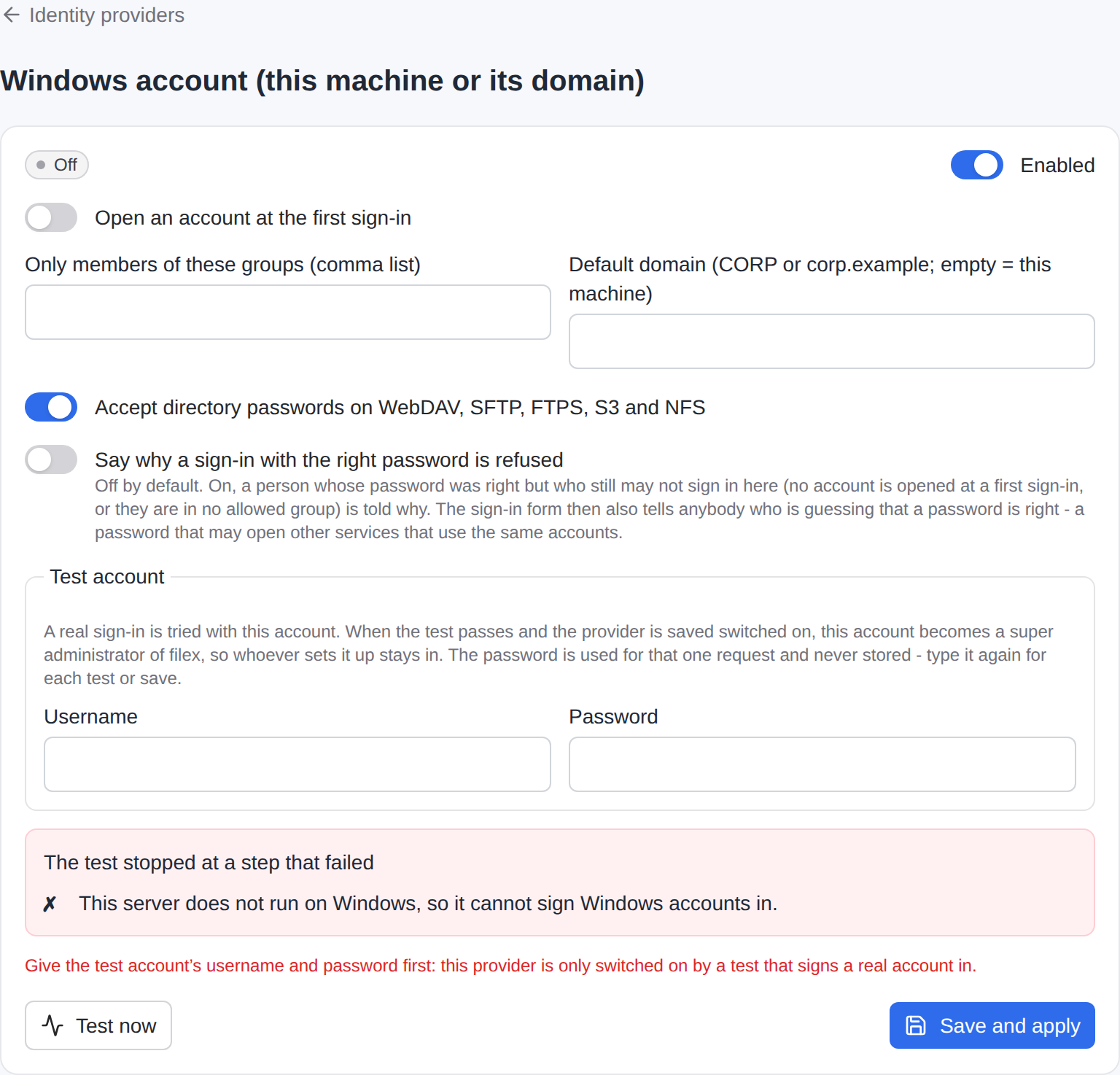
Admin → Identity providers → Windows account → Test now signs a real account in. Give it an account of this machine (or the domain) and its password in the card's Test account box - the password is used for that one call: it is never stored, logged, audited or sent back, and the page empties its box as soon as the call is answered (type it again for the next test or save). The steps:
| Step | Says |
|---|---|
platform | this machine can ask Windows (fails with unsupported_os anywhere else) |
test_account | an account and a password were given |
logon | the account signed in - or why it did not (credentials, account_locked_out, account_disabled, password_expired, network_logon_not_granted, …) |
account | it is an ordinary account filex accepts (not a system, service or built-in one) |
first_login_* | what the first sign-in rule comes to |
Saving the provider on needs that test to pass - confirm_failed_test does nothing for it. And the account that passed becomes a super administrator of filex (created if it does not exist, promoted if it does): the one deliberate exception to "auto_create is off", so whoever sets this up is never locked out of the instance they are setting up. It signs in through Windows, with no password of its own. Two safeguards: a disabled account is not switched back on, and an account that belongs to a tenant is not promoted (409 test_account_disabled / test_account_not_platform, and nothing is saved). Choose the account you want as administrator - nobody else gets this.
Since 0.50 only the first switch-on in a scope promotes: a later test, after the provider was on there before, promotes nobody. On a multi-tenant install the scope is the tenant the test signs in in (test_account.realm, default the platform's own tenant when the provider serves it): there the account becomes a super administrator, in any other tenant that tenant's administrator (an account of another tenant is refused, 409 test_account_other_tenant). A provider that was already on before the upgrade counts as having promoted in the platform's tenant. TENANT-ADMIN.md.
Switching a provider off needs no test.
If the machine can no longer run it
The provider is checked again every time it is loaded - at boot, on every save. If it cannot start (the data directory was copied to another operating system, the domain setting is invalid), only that provider is left out of the running set: its card says why, every other way in keeps working, and the administrators are told once per reason (a notification, auth_provider_down).
Locking accounts: filex first
filex counts wrong passwords itself, in front of every provider (CONFIGURATION.md → Sign-in attempt limits): 5 wrong attempts per account and 10 per address within 10 minutes, then a lock that doubles. That is lower than the lockout threshold Windows and Active Directory usually have (commonly 10), on purpose: filex's limit trips first, so somebody guessing passwords through filex is slowed down long before they could lock the person out of the machine or the domain. Raise filex's limits (or use the IP allow-list) only if your Windows threshold is higher still. When Windows itself has locked an account, the person hears the ordinary "invalid credentials" and the operator's log says account_locked_out.
What people hear, and what the operator hears
Every refusal is one answer to the person - the same as a wrong password: wrong password, unknown account, locked, disabled, expired, must change password, forbidden account, an account the first sign-in rule turned away. The one choice the operator has is show_refusal_reason (off by default): on, the two refusals that come only after Windows accepted the password - the first sign-in rule, and a system account only the SID gave away - tell the person why on the sign-in form (the first sign-in rule says what that costs). Everything else stays the one answer. The operator sees the reason in the log (windows: sign-in refused by the operating system … reason=account_disabled) and, for the name and first-sign-in rules, in an audit row. The one exception is when Windows could not be asked at all (no domain controller, access denied to the call itself): that is not a wrong password, so the login chain logs it as could not judge and reports it, and nobody is told their password is wrong.
The built-in Administrator is refused by SID as well as by name: a Windows in another language, or a renamed account, has no forbidden name - its SID ends in -500. Only ordinary accounts (S-1-5-21-… with a RID of 1000 or more, or a Microsoft Entra ID account) can sign in. This also closes Windows' "unknown user → Guest" fallback, which on some machines signs a made-up name in as Guest.
Limits
- No impersonation. filex does not perform file operations as the Windows user; the person is a filex account, and filex's storage permissions decide what they can touch. (Mapping a Windows sign-in onto file-system access is deliberately out of scope.)
- Passwords only. Windows Hello PINs and biometrics are not passwords and cannot be used; an account whose password has expired or must be changed at the next sign-in cannot sign in until it is changed in Windows.
- Two-factor (TOTP) is filex's own: an account with it enabled is asked for the code after the Windows password, as any account is.
API
GET /api/admin/auth-providers lists windows with fields, testable: true and test_account_required: true. PATCH /api/admin/auth-providers/windows takes {enabled, config: {auto_create, allowed_groups, domain, protocol_login, show_refusal_reason}, test_account: {username, password}} and answers 200 {ok, provider, checks, test_ok, super_admin}, or 409 test_failed (confirm_allowed: false, checks, failed), 409 test_account_disabled, 409 test_account_not_platform. POST /api/admin/auth-providers/windows/test takes {config?, test_account} and changes nothing. The same bodies work on /api/ai/admin/... and through the admin_auth_providers_update / admin_auth_providers_test MCP tools. Each of the checks carries id, status (ok, fail, unchecked), params and text: the step as one sentence in the reader's language (?lang= first, then the account's language), said by the server for every reader - the panel, a tenant's own page and the MCP tool alike. A failed step whose fix the driver worded (the PAM steps' hint) has that as its text.
Linux (PAM)
pam runs on a Linux server that runs filex directly - a package install, a systemd service, a VM. Inside Docker it is meaningless (the container has no PAM of the host, and no access to its users); use LDAP or OIDC there.
How it works
filex is not root and has no cgo. It runs a command you set up, with no shell:
sudo -n /usr/bin/pamtester filex <user> authenticate acct_mgmt- the password is written to the command's standard input, one line - never on the command line (visible in
ps), never in the environment, never in a log; authenticatechecks the password;acct_mgmtchecks the account (expired, locked, not permitted to log in);- the command runs in a session of its own, with no terminal, so
pamtesterreads the pipe and not an operator's terminal; - its environment is
PATH,LC_ALL=Cand nothing else - filex's own secrets (FILEX_SECRET_KEY, database URLs) never reach a process that runs as root; - the user name is one argument, checked to be plain (starts with a letter, then
a-z 0-9 . - _; never a dash), the command path and the PAM service name are configuration checked to be plain too. The argument vector has a fixed shape: the only part you can change is the pieces listed under Settings. There is no template string, so nobody's text can become a shell command.
Every sign-in has a time limit (10 seconds by default; PAM itself waits a couple of seconds after a wrong password on purpose, which fits) and a limit on simultaneous attempts (4). A fifth attempt while four are running is answered at once with busy - try again (503, Retry-After), which is not counted as a wrong password.
Three answers are kept apart:
| Answer | Meaning | What filex does |
|---|---|---|
| yes | PAM accepted the password and the account | signs in |
| no | wrong password, unknown user, locked or expired account | 401, like any wrong password |
| could not decide | pamtester missing, sudo wants a password, PAM itself failing, a timeout | not a wrong password: logged with the reason for the operator (Admin → Identity providers → Linux account (PAM) → Test now shows which step) |
A password containing a line break or a NUL is refused up front: the password goes to a pipe one line at a time, and a second line would answer a prompt the person was never shown.
Set it up
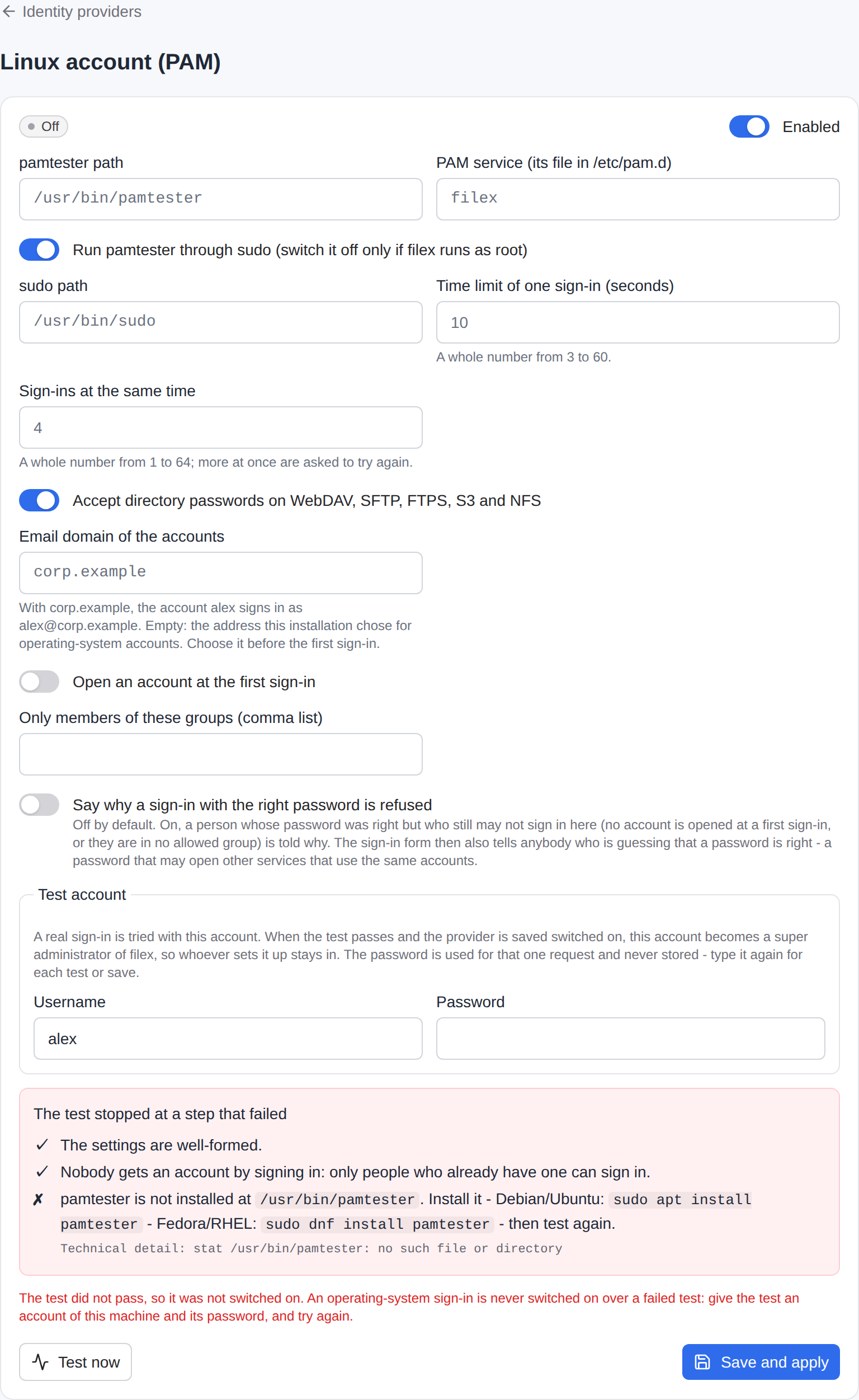
The provider will not switch on until every step below is true, and Test now says which one is not, with the command that fixes it.
0. The account filex runs as. filex runs as a system account of its own, never as root, and the sudoers line of step 3 names it. If you installed filex as a systemd service (INSTALLATION.md), it is there already (filex). Otherwise create one - it needs no home and no shell (give filex its FILEX_DATA_DIR):
sudo useradd --system --no-create-home --shell /usr/sbin/nologin filexfilex is one of the accounts that never sign in: the account can ask PAM about other people's passwords, and can never sign in to filex itself.
1. Install pamtester.
# Debian / Ubuntu
sudo apt install pamtester

# Fedora
sudo dnf install pamtester

# RHEL / Rocky / Alma (EPEL)
sudo dnf install epel-release && sudo dnf install pamtester
It installs to /usr/bin/pamtester. If yours is elsewhere, set pamtester_path.
2. Write the PAM service file /etc/pam.d/filex. The name is the service setting. It decides what a filex sign-in means; keep it separate from login and sshd so you can change one without the other.
Local Unix passwords (/etc/shadow):
auth    required pam_unix.so
account required pam_unix.so
The system's own stack (Debian / Ubuntu):
@include common-auth
@include common-account
A domain or directory through sssd:
auth    required pam_sss.so
account required pam_sss.so
Two-factor (Google Authenticator / TOTP): the person types their password immediately followed by the six-digit code in the one password box.
auth    required pam_google_authenticator.so forward_pass
auth    required pam_unix.so use_first_pass
account required pam_unix.so
⚠ The file must end in a real check. A stack that accepts anybody (pam_permit alone) is caught by the test - see step 4 below - and cannot be switched on.
⚠ Do not put pam_faillock / pam_tally2 in this file unless you mean it: a filex sign-in counts as an attempt against the machine account, so anyone who can reach the filex form could lock a person out of ssh too. filex's own attempt limits already sit in front of this provider.
3. Let filex run that one command through sudo, without a password. Create /etc/sudoers.d/filex with sudo visudo -f /etc/sudoers.d/filex and put in it (replace filex with the account filex runs as, if it is another):
filex ALL=(root) NOPASSWD: /usr/bin/pamtester filex *Classic sudo only - sudo --version prints Sudo version … - add this line above it. It matters on Red Hat family systems, where sudo otherwise insists on a terminal and a service has none:
Defaults:filex !requiretty⚠ Not with sudo-rs - sudo --version prints sudo-rs …; it is the default sudo from Ubuntu 25.10 on. sudo-rs has no requiretty and never asks for a terminal. Its visudo rejects a file that holds that line (unknown setting: 'requiretty', invalid sudoers file), and while the file is there every sudo on the machine prints that complaint.
Check the syntax with sudo visudo -cf /etc/sudoers.d/filex (the visudo of either sudo takes it).
4. Test it by hand (as root, or as the account filex runs as). A wrong password must answer Authentication failure - a clean no, not sudo: a password is required (sudo-rs: sudo: interactive authentication is required):
printf '%s\n' 'wrong-password' | sudo -u filex sudo -n /usr/bin/pamtester filex alex authenticate acct_mgmtChecked with pamtester 0.1.2 on Ubuntu 24.04, and on Ubuntu 26.04 with both sudo-rs 0.2.13 (the default sudo) and classic sudo (sudo.ws): typed in a terminal or with none (setsid), it reads the password from the pipe. A wrong one prints Password: pamtester: Authentication failure and exits 1; the right one prints pamtester: successfully authenticated and exits 0.
5. Switch it on. In Admin → Identity providers → Linux account (PAM) fill in the settings you need and give a test account - the username and password of a real account on this machine, in the card's Test account box (its password box is emptied once each test or save is answered). Test now runs, in order:
Step (id) | Checks | Fails when |
|---|---|---|
config | the settings are well-formed | a path is relative or has odd characters |
first_login_… | what happens to a person with no account | allowed_groups with nothing to read groups from |
pamtester | the tool is installed and runnable | not at pamtester_path → apt install pamtester |
pam_service | /etc/pam.d/<service> exists | missing → create it (step 2) |
sudo | sudo may run that one command without a password | password required / requiretty (classic sudo) / not in sudoers → the sudoers line (step 3) |
unknown_user | a login that does not exist is a clean "no" | sudo/PAM error → fix it; accepts anyone → your PAM file lets everybody in |
test_account | the account you gave really signs in | wrong password, locked or expired account, a system account (root, UID < 1000, nologin) |
Every failing step carries a reason and a hint - the sentence, in your language, that names the fix and the command. What is to be typed (a command, a path, a line for a file) is between backticks in the hint; the page shows it as code you can select and copy whole. The test stops at the first failure and the provider cannot be switched on until it passes: for this provider confirm_failed_test ("switch on anyway") is not honoured. A provider saved off saves whatever the test says.
When the test passes and you save it on, the test account becomes a super administrator of this filex - created if it has no account, raised if it has one. That is the one place auto_create: false is overridden, and it applies only to the account whose password just passed a real PAM sign-in in that very request.
6. Every start re-checks. When filex starts (and whenever the page reloads providers) steps pamtester, pam_service, sudo and unknown_user run again. If the setup has broken since - the package was removed, sudoers was edited - only this provider stays out of the running set: its card says failed with the reason, the log says why, and an audit row (auth.provider_unavailable, with the step and reason) is written, and the administrators are told once per reason (a notification, auth_provider_down - the same as for Windows). Every other way of signing in keeps working. Fix the cause and it comes up on the next reload.
Linux settings
| Field | Default | Meaning |
|---|---|---|
pamtester_path | /usr/bin/pamtester | Absolute path of the tool. |
service | filex | PAM service name = file in /etc/pam.d. |
use_sudo | true | Run it through sudo -n. Off only if filex runs as root (not recommended). |
sudo_path | /usr/bin/sudo | Absolute path of sudo. |
timeout_seconds | 10 | Time limit of one sign-in (3-60). |
max_concurrent | 4 | Simultaneous sign-ins (1-64); more get busy. |
protocol_login | true | Also judge passwords on WebDAV, SFTP and FTPS. S3 and NFS never receive a password - they use the access keys and exports the account mints in the web app. |
email_domain | (empty) | Give accounts <name>@<email_domain>; empty = <name>@<token>. Choose before the first sign-in. |
auto_create | false | Open an account at a first sign-in (above). |
allowed_groups | (empty) | With auto_create: only members of these groups get an account. |
show_refusal_reason | false | Tell a person whose password PAM accepted why the first sign-in rule still refuses them. Off, that is the wrong-password answer; on, the form also confirms the password to anybody guessing. A system account is refused before PAM is asked and is never told. |
Not a field on purpose: the e-mail token (FILEX_OS_LOGIN_EMAIL_TOKEN, above).
With protocol_login on and LDAP also running, the file protocols ask each directory in turn: the first to vouch for the password wins; one that is down is logged and the next is asked.
Through the API
The page, the REST API, /api/ai/admin and the admin_auth_providers_* MCP tools take the same request. The test account travels beside the settings, for that one request only - it is never stored, logged, audited or returned (only its username is audited):
curl -X PATCH https://files.example/api/admin/auth-providers/pam \
  -H 'Content-Type: application/json' -b cookies.txt \
  -d '{"enabled": true,
       "config": {"service": "filex", "auto_create": false},
       "test_account": {"username": "alex", "password": "…"}}'
409 test_failed (with "strict": true and "confirm_allowed": false) when the test does not pass, with the checks - each failing one has params.reason and params.hint. POST /api/admin/auth-providers/pam/test takes the same body (config as an unsaved draft, test_account) and changes nothing.
Security notes
sudoersgives filex one root-run command.pamtester filex *lets thefilexaccount ask PAM about any user's password as root. That is inherent to a password check done as root, and it is why the rule names the tool, the service and nothing else. Do not widen it; keep/etc/pam.d/filexyours.- filex being compromised means an attacker can guess machine passwords through it, just as through
ssh. The attempt limits bound that; leave them on. - A machine account with a weak password is now a filex login too. Use
allowed_groups(withauto_create) or leaveauto_createoff. - The password is in filex's memory for the length of the sign-in and on a local pipe. It is not in
argv, the environment, the logs, the audit trail, the provider list or any answer.
Troubleshooting
| You see | Cause | Fix |
|---|---|---|
Every sign-in fails, log says could not decide … password_required | sudo wants a password: the rule has no NOPASSWD: (classic sudo: a password is required; sudo-rs: interactive authentication is required) | the sudoers line (step 3) |
… not_allowed | sudoers has no rule for this command (classic sudo: is not allowed to execute; sudo-rs: may not run sudo, I'm afraid I can't do that) | the sudoers line (step 3); the account, the path of pamtester and the service name must match |
… requiretty | classic sudo insists on a terminal (you must have a tty to run sudo) | Defaults:filex !requiretty - classic sudo only (step 3) |
Every sudo on the machine prints unknown setting: 'requiretty' | a Defaults:filex !requiretty line with sudo-rs | remove that line (step 3); the test's detail shows the complaint after sudo's own answer |
… pam_error | PAM itself is failing (pamtester: System error, sssd down) | /etc/pam.d/filex, the system log |
… timeout | PAM or a directory behind it is slow | check the backend; raise timeout_seconds |
| Right password, still refused | the account is expired or locked (acct_mgmt), or a service account, or auto_create is off | chage -l alex; the audit row auth.first_login_refused names the reason |
Right password, still refused, 429 with Retry-After on the web form | filex's sign-in limit has locked the account or the address | Admin → Sign-in security lists the locks and unlocks them (sign-in attempt limits) |
503 busy | more simultaneous sign-ins than max_concurrent | raise it, or look for a client hammering the form |
| Card says failed after an upgrade of the OS | a package was removed, sudoers changed | Test now names the step |