
Configuration
filex reads configuration in this order (highest precedence first):
- Environment variables (
FILEX_*) config.yaml(path via--config,FILEX_CONFIG, or~/.filex/config.yamlif present)- Built-in defaults
For containers, environment variables are easiest. For rich setups (LDAP, proxy-header auth, custom CORS) a config.yaml is handier because a few settings are file-only (noted below). Individual storages are not configured here - they're database records; see STORAGE.md. Some settings live in the database and are edited in the admin panel; their variable only seeds them.
- Quick start - the few variables almost every install sets
- Variables that seed a stored setting
- Install-time settings (
FILEX_INSTALLATION_*) - Server & networking
- Logging
- Database
- Authentication
- Sign-in attempt limits
- Zero-touch seeding
- External services
- Protocol endpoints (S3 · SFTP · FTPS · NFS · WebDAV)
- Storage plugins
- Storage sync
- Uploads (staged / resumable)
- File operations (copy · move · delete)
- Archives
- Antivirus (ClamAV)
- Versioning on overwrite
- End-to-end encryption: the vault
- Editing together
- Downloads from slow storage (prepared copies)
- Thumbnails
- Search
- Usage & cost
- Queue
- Notifications
- CORS
- Security headers and framing
- Error reporting (Sentry/GlitchTip)
- Updates
- Demo mode
- Branding (white label)
- config.yaml
- Gotchas
Booleans are true only for
"1"or (case-insensitive)"true". Any other non-empty value is treated as false. Write1ortrue. (FILEX_MULTI_TENANT, set to any value at all, also pins Admin → Multi-tenant mode.) The exceptions, each of which is on unless switched off: the first-sign-in switch of each provider -FILEX_OIDC_AUTO_CREATE,FILEX_LDAP_AUTO_CREATEandFILEX_HEADER_AUTO_CREATE- andFILEX_AUTH_RECOVERY_LOGINare false only for0,false,nooroff(any other non-empty value is true, and unset keeps the default);FILEX_CACHEis off only for0orfalse. The seeds of a stored setting (FILEX_CLAMAV,FILEX_THUMBS_FOLDER_PREVIEWS) also takeyes/no/on/off, and a value they do not recognise is ignored, with a log line naming it, rather than read as false.
Quick start
Most installs set a handful of variables and leave the rest at their defaults:
| Env var | Set it to | Why |
|---|---|---|
FILEX_PUBLIC_URL | the address people open, e.g. https://files.example.com | Every share link, e-mail link and the OIDC redirect is built on it. Unset, they all point at http://localhost:5212 (Public URL). |
FILEX_DEFAULT_STORAGE_DRIVER + FILEX_DEFAULT_STORAGE_PATH | local and the folder to serve | Seeds the first storage on a fresh install, so the first screen has files (Zero-touch seeding). |
FILEX_DATA_DIR | a directory that survives a rebuild (the images use /data: mount a named volume there) | filex's own data: the SQLite database, the search index, the thumbnail cache (Server & networking). |
FILEX_SECRET_KEY | a long random value, backed up like the database | Seals the secrets filex has to read back. Without it S3 access keys, Web Push and several other features are refused or off (The secret key). |
FILEX_ADMIN_EMAIL + FILEX_ADMIN_PASSWORD | optional | The first administrator. Omitted, filex creates admin@local with a random password printed once (Zero-touch seeding). |
FILEX_DB_DRIVER + FILEX_DB_DSN | optional: postgres and its DSN | SQLite is the default; PostgreSQL is recommended for teams (Database). |
FILEX_PUBLIC_URL=https://files.example.com
FILEX_SECRET_KEY=change-me-to-32-random-bytes
FILEX_DEFAULT_STORAGE_DRIVER=local
FILEX_DEFAULT_STORAGE_PATH=/srv/files
Behind a reverse proxy, also read Trusted proxies (whose forwarded client address filex believes; the default auto covers a proxy container on filex's own container network, not a proxy on the host or on another machine) and, to serve filex under a path such as /filex, Base path. Everything else on this page is reference.
The secret key
FILEX_SECRET_KEY (secret_key in config.yaml) seals, with AES-GCM, the secrets filex has to read back rather than merely compare. Any 32+ random bytes. ⚠⚠ Treat it like the database, not like a password: back it up and do not rotate it casually.
| Sealed with it | Without the key | When the key changes or is lost |
|---|---|---|
| S3 access keys - SigV4 recomputes an HMAC chain from the secret, so it cannot be stored as a hash (PROTOCOLS.md) | Minting an access key fails rather than storing plaintext | Every existing access key stops verifying |
| The Web Push (VAPID) key | Push notifications stay off and say so | Push is off until the push key is rotated (Admin → Notifications) |
| A remote storage plugin's bearer token (a binary plugin gets a token minted per start, never stored) | Registering a remote plugin is refused | - |
| A paid app's license key | The app cannot be given a key (license_key_invalid) | The stored keys are unreadable: enter them again |
| The session keys of editing together in an ordinary folder | Such a file answers 503 coedit_no_secret_key and the app edits alone | Sessions open at that moment are unreadable: their members join again and their unsaved changes are lost |
| Client secrets and bind passwords saved on Admin → Identity providers, and an app's settings marked secret | Saving such a field is refused | - |
| A share link's PIN, so My shares can show it again | A PIN cannot be shown again (the link works) | The PINs sealed under the old key cannot be shown again (the links work) |
Variables that seed a stored setting
Some settings live in the database (settings table) and are edited in the admin panel. Their environment variable is only a seed: it is read on a boot where the setting has no stored row yet, and never again. Once a row exists - written by that first-boot seeding or by an administrator - the variable is inert: editing it in your compose file and restarting changes nothing. A start whose variable says something other than the stored value logs it once, with the command that applies it (FILEX_SYNC_INTERVAL is set but the stored value wins; run filex settings reseed sync.default_interval_minutes to apply it - the key and the variable, never either value). Change the setting in the admin panel, or write the variable again with filex settings reseed. The seed is applied per setting, not per family: a setting whose row does not exist yet is seeded from its variable even if its siblings already have rows, so an upgrade keeps exactly the values an install had.
The tables below mark each such variable as a seed: the ClamAV family (except FILEX_CLAMAV_BIN), FILEX_SHARE_MAX_TTL, FILEX_DRAFTS_LIMIT, FILEX_APPS_E2E_PLAINTEXT, the FILEX_THUMBS_SVG_*, FILEX_THUMBS_OFFICE_* and FILEX_THUMBS_FOLDER_PREVIEWS thumbnail settings, the FILEX_USAGE_* family, FILEX_SEARCH_CONTENT, FILEX_SEARCH_CONTENT_MAX, FILEX_SEARCH_MEMORY_PERCENT, FILEX_SEARCH_AUTO_REBUILD and FILEX_SEARCH_EXTRACT_MEMORY_MB (edited on Admin → Settings → General), and the server defaults edited on the admin panel: FILEX_DEFAULT_LOCALE, FILEX_SYNC_INTERVAL, FILEX_UPLOAD_STAGING_TTL, FILEX_CACHE_MAX_BYTES, FILEX_THUMBS_SWEEP_INTERVAL (Admin → Settings → General), FILEX_VERSIONS_ON_OVERWRITE (Protection), FILEX_APP_PLUGIN_MAX_*_MB, FILEX_PLUGIN_REQUEST_TTL_DAYS, FILEX_COEDIT_MAX_MEMBERS, FILEX_COEDIT_UNSAVED_DAYS (Plugins → Apps), FILEX_NOTIFY_ENABLED (Notifications), FILEX_WEBHOOK_LANG (Webhooks) and FILEX_TRUSTED_PROXIES (Sign-in security, Trusted proxies). The server defaults and the trusted proxies were read at every start up to 0.56; an install upgraded with the variable set and nothing stored gets the variable's value written at its first 0.57 start, so nothing it runs with changes. Their config.yaml keys seed the same way when the variable is not set; a value equal to the default seeds nothing, so a later release's default still reaches the install. The first admin, SMTP, branding and default storage of Zero-touch seeding and the external services are seeded the same way, once, when their record is absent.
Most of the server defaults are read when filex starts: a change on the admin panel applies at the next start, and its row says Applies at the next start until then. The default webhook's language applies at once.
Writing the environment again: filex settings reseed
To make a changed variable take over a value that is already stored, ask for it - then restart filex:
filex settings reseed sync.default_interval_minutes   # one setting, by its key
filex settings reseed --external                      # ONLYOFFICE and draw.io
filex settings reseed --all                           # every seeded setting
In a container: docker compose exec filex filex settings reseed --all. A setting whose variable is not set is left as it is, except a server default, which goes back to its built-in value. filex settings reseed login.trusted_proxies writes FILEX_TRUSTED_PROXIES over the list saved on the Sign-in security page, and a running server takes it within a minute; with no variable set, the saved list is left as it is (never dropped to auto). The keys are the ones the tables below name (instance.default_locale, cache.max_gb, drafts.limit...); filex settings reseed --help lists the flags.
Install-time settings (FILEX_INSTALLATION_*)
Settings with the FILEX_INSTALLATION_ prefix are decided at the first boot of an installation and cannot be edited afterwards. filex records what it was given in the settings table (key installation.pinned) and mirrors it to <data-dir>/installation.json; on every later boot it compares the two and refuses to start if they disagree, printing what changed and what your options are. These settings change the shape of data already written, so flipping one later would leave an installation whose guarantees hold for some of its data and not the rest. The one supervised exception is adopting escrow later.
| Env var | Default | Description |
|---|---|---|
FILEX_INSTALLATION_E2E_ESCROW_KEY | (unset - escrow off) | Base64 SPKI public key (RSA ≥ 2048, PEM armour and whitespace tolerated) enabling E2E key escrow. Generate the pair with filex e2e-escrow keygen; put the public half here and keep the private half yourself. |
FILEX_INSTALLATION_E2E_ESCROW_ADOPT | false | One-time consent to turn escrow on for an installation that already exists. Read only when the pinned record has no escrow key and the environment supplies one; ignored on a first boot, and it does not authorise changing or removing a key. See Adopting escrow later. |
Why escrow cannot simply be edited. An encrypted folder's master key is wrapped for the escrow key when the folder is created, and nothing can add that copy later without the folder password, which the server never has. So turning escrow on later opens nothing that already exists (allowed, see below), changing the key leaves old folders to the old private key and new ones to the new, and turning it off un-escrows nothing already created (what escrow can and cannot do).
If you did not mean to change it, the supported paths are: restore the original value, or start a new installation with a fresh data directory - keeping the old escrow private key for as long as the folders created under it exist.
⚠ An unparseable value is fatal, not ignored: running without escrow while the operator believes they configured it is the one failure worth crashing over. The private half never reaches filex (filex e2e-escrow keygen prints the pair and writes nothing), so losing it is unrecoverable (Key escrow).
Adopting escrow later
Turning escrow on for a running installation is allowed, once, and only when you say so in a second variable:
FILEX_INSTALLATION_E2E_ESCROW_KEY=MIIBoj...      # the public half
FILEX_INSTALLATION_E2E_ESCROW_ADOPT=1            # "yes, I mean it"
Start the server. It logs the adoption at WARN, writes it to the record (e2e_escrow_adopted_at and the fields beside it, shown in E2E-ENCRYPTION.md → Adopting escrow), and from that moment new encrypted folders carry an escrow slot. _ADOPT is read only while the pinned record has no escrow key, so leaving it set does nothing; drop it on the next deploy.
⚠⚠ Adoption is not retroactive. A folder that existed before it has no escrow-wrapped key, and nothing you do as operator gives it one; your escrow private key opens folders created after the adoption. Each folder's owner can grant a slot from their browser, with the folder password: filex offers it at their next unlock, says that it hands you a permanent second way in, and records a refusal so they are not asked again (offering an existing folder a slot). You can ask; you cannot take.
⚠ _ADOPT is not a general override: pointing the key at a different value, or removing it, still stops the server with the flag set.
Server & networking
| Env var | Default | Description |
|---|---|---|
FILEX_LISTEN | 0.0.0.0:5212 | Bind address. |
FILEX_PUBLIC_URL | http://localhost:5212 | The external URL users open - your real https://… domain behind a proxy. Every link filex hands out is built on it (Public URL). ⚠ Unless FILEX_ONLYOFFICE_CALLBACK_URL is set, it must also be reachable from inside the OnlyOffice container, which fetches and saves documents through it (three addresses). |
FILEX_BASE_PATH | - (the path of FILEX_PUBLIC_URL, usually none) | Serve filex under a sub-path behind a reverse proxy, e.g. /filex for https://example.com/filex/; FILEX_PUBLIC_URL=https://example.com/filex alone does the same. Unset with a root public URL: served at the root. The proxy must pass the full path. See Base path. |
FILEX_DATA_DIR | ~/.filex (/data in Docker) | Holds the SQLite DB, search index, thumbnail cache, first-run secret. |
FILEX_DEFAULT_LOCALE | - | Seed of the setting instance.default_locale (Admin → Settings → General → Default language): the interface language for someone who has not chosen one, over browser detection, and the language of the server's emails to an address with no account. A person's own choice still wins. Applies at the next start. Up to 0.56 the variable was read at every start; now it is read at the first start only and the stored value wins: change it on the page, or apply a changed variable with filex settings reseed instance.default_locale. |
FILEX_MULTI_TENANT | - (the switch) | Native multi-tenancy - one install serves N tenants, each a host-bound auth realm (provider) confined to its own storage(s). Off = a normal single-tenant install. The mode is a switch on Admin → Multi-tenant mode (the platform operator's; a change takes effect when filex is restarted). Set, this variable pins it both ways - 1/true on, any other value off - and the switch shows it locked; config file multi_tenant does the same when the variable is unset. Unset in both, the switch decides, and it is off until somebody turns it on. On, a sign-in names its tenant by the tenant's own address or its realm (the sign-in form's Realm field, realm/name over SFTP); a bare name is the platform's own tenant. See MULTI-TENANCY.md and its Realms section. |
FILEX_COOKIE_DOMAIN | - (host-only) | Domain attribute for the filex_session cookie, e.g. .example.com - subdomains of that domain then share the session. Applied on both set and clear, so logout removes the same cookie it created. Empty = host-only cookie. Secure/SameSite/HttpOnly are unaffected. Multi-tenant: only the last-resort fallback - the cookie Domain resolves per tenant (the provider's cookie_domain, else derived from the provider host by dropping its first label, else this value); ⚠ a tenant on its bare apex, or whose derivation would land on a public suffix (tenant.com.tr → .com.tr), must set cookie_domain explicitly (MULTI-TENANCY.md → session cookie). |
FILEX_TENANT_DOMAIN | - | Multi-tenant: gives every tenant an address of its own, <realm>.<tenant domain> (tenants.files.example → acme.tenants.files.example), and is the name a tenant's own domain points its CNAME at (TENANT-ADMIN.md). Needs a wildcard DNS record *.<tenant domain> of address records (A/AAAA) pointing at the platform: behind a wildcard CNAME every own domain's canonical name is that CNAME's target, and none can be proven. Empty = no platform subdomains and no own domains. On a platform subdomain or an own domain the session cookie is that address's alone. |
FILEX_TLS_MODE | proxy | Who issues the certificates of the tenants' addresses. proxy: the reverse proxy in front, which may ask filex first (/api/tls/ask for Caddy's on-demand TLS, /api/tls/certificate for a tenant's own certificate; both answer the proxy itself only). acme: filex terminates TLS itself and issues Let's Encrypt certificates (x/crypto/acme/autocert, cache in the data directory). A tenant's own certificate is served first either way. Any other value stops the server at start. TENANT-ADMIN.md, TLS. |
FILEX_TLS_LISTEN | :443 | acme mode: where filex's own TLS server listens. |
FILEX_TLS_HTTP_LISTEN | :80 | acme mode: the plain listener for the HTTP-01 challenge and the redirect to HTTPS; off for none (the TLS-ALPN-01 challenge on the TLS listener still works). |
FILEX_TLS_ACME_EMAIL | - | acme mode: the contact the ACME account is registered with. |
FILEX_TLS_ACME_DIRECTORY | Let's Encrypt | acme mode: another ACME directory URL (a staging directory, a private CA). The directory's own HTTPS certificate must be trusted, and filex has no setting of its own for that: a private CA's root is added the way any Go program takes one, SSL_CERT_FILE (replaces the system bundle, so give it a bundle with both) or SSL_CERT_DIR (adds a directory). |
FILEX_TRUSTED_PROXIES | auto | Reverse proxies whose forwarded client address (X-Forwarded-For / X-Real-IP) and scheme filex believes: addresses, CIDR networks and the words auto, loopback, private, link-local and none. A list replaces the default, so keep auto to add to it: auto, 203.0.113.0/24. Seed of login.trusted_proxies (Admin → Settings → Sign-in security): up to 0.56 the variable was read at every start; now it is written into the setting at the first start where the setting holds nothing, as typed, and the saved list wins from then on - change it on the page, or apply a changed variable with filex settings reseed login.trusted_proxies. A bad entry stops the server at start. See Trusted proxies. |
FILEX_CONFIG | - | Path to config.yaml (same as --config). |
Trusted proxies
Which peers filex believes about a client's address (X-Forwarded-For, X-Real-IP) and about how the client arrived (an X-Forwarded-Proto: http, which turns a tenant's links into http://, is read from these peers only). The list is the login.trusted_proxies setting (the Sign-in security page), else FILEX_TRUSTED_PROXIES, else auto. Since 0.57 the variable (or trusted_proxies in config.yaml) is a seed: a start where the setting holds nothing writes the variable's list into it, exactly as typed (auto, 172.18.0.1 stays auto, 172.18.0.1, auto stays auto), and from then on the saved list is the one in force - the page says First value from FILEX_TRUSTED_PROXIES while the two are the same, and names the variable's list beside the saved one when they are not. A changed variable is applied with filex settings reseed login.trusted_proxies; Remove the saved list on the page goes back to the variable's list (and the next start writes it in again).
A forwarded header is read only when the socket's peer is on the list, and the chain is walked from the trusted end: a header a client writes itself never decides the address the sign-in limit counts by, nor the one the access log, the audit log and the file-request limit record. Until your proxy is trusted, every visitor resolves to the proxy's address and shares one counter.
The list takes addresses and CIDR networks, comma or space separated, and five words: auto (below); loopback (this machine), private (the RFC 1918 / RFC 4193 private ranges, Go's netip.Addr.IsPrivate) and link-local (IsLinkLocalUnicast), one class of address each; and none, which trusts no proxy. An IPv4-mapped IPv6 address counts as the IPv4 address it carries. ⚠ private is RFC 1918 / RFC 4193 and nothing else, the LAN and every gateway included: a proxy that reaches filex over 100.64.0.0/10 (carrier-grade NAT - Tailscale, Cloudflare WARP, some pod networks) must be listed.
auto is worked out from where filex runs - at start, and again every minute, so a container joined to another network with docker network connect is noticed - and trusts:
| Where filex runs | auto trusts |
|---|---|
| A plain install - Linux, Windows or macOS, not in a container | This machine (127.0.0.0/8, ::1) only. |
| A container on a network of its own - Docker bridge or user-defined networks, Podman rootful (netavark, CNI), a Kubernetes pod | This machine, plus the subnet of each of the container's own veth interfaces (all of them when it is on several networks), minus every gateway - each next hop in /proc/net/route and /proc/net/ipv6_route, and each network's first host address, Docker's default gateway .1 / ::1 - and minus the container's own addresses. |
Host networking - network_mode: host, podman --network host, a pod with hostNetwork | This machine only: the container sees the host's own NICs and bridges. |
| A macvlan or ipvlan network | Never: it puts the container on the LAN. |
| Rootless Podman on its default network - pasta, slirp4netns | This machine only: its interface is a tun device, and what it relays arrives from the container's own address (pasta copies the host's; slirp4netns uses 10.0.2.100) or the gateway (10.0.2.2). On a user-defined network it is a container network like the rows above. |
| Kubernetes | The pod's own interface subnet: a node's /24 with flannel or kindnet, a /32 - the pod alone - with Calico or Cilium. |
| Anything that cannot be read, or that contradicts itself | This machine only, and a warning: in the log at start, and on the page. |
IPv6 container networks (a ULA such as fd00:dead:beef::/64) count like IPv4 ones, minus their gateway. Link-local addresses (fe80::/10, 169.254.0.0/16) never do - the host bridge's own link-local address sits there.
The gateway and filex's own address are carved out because a published port's connections arrive from them: trusting either would let anything that reaches the published port choose its own address (measured).
What to list by hand, next to auto - FILEX_TRUSTED_PROXIES=auto, <address>, or the page's address list:
- a proxy on the host that reaches filex's container through a published port: the gateway, e.g.
172.18.0.1- only when that port is published on127.0.0.1or firewalled, so that nothing but the proxy reaches it; - a proxy on another machine: its address;
- an ingress controller on another Kubernetes node: the cluster's pod network, e.g.
auto, 10.244.0.0/16(the Helm chart'strustedProxies); - a CDN or any other public hop in front of your proxy: its ranges.
A peer that is not trusted and sends X-Forwarded-For or X-Real-IP is named - in the log, once per peer and at most five lines a minute, and on the Sign-in security page with how often it was seen and a one-click Trust that saves auto, <address> (or the list in force plus the address), after a question that says what trusting a stranger costs. At most 256 such peers are remembered, a day each; only the peer's address is kept, never what it wrote. What auto resolved to and why is trusted_proxies_auto on GET /api/admin/login-security.
⚠ Where auto cannot see the truth from inside the container, list the proxy by hand (or write the list without auto):
- Docker Swarm's routing mesh (a port published in the default
ingressmode) relays every client from an address on the ingress network, which the container sees as a container network - publish inmode: host, or set the list. - A Docker or CNI bridge that also carries the host's LAN NIC (containers bridged straight onto the LAN) looks like a container network from inside.
- A network created with a custom
--gatewaythat is not the container's default route: its gateway is known only when it is the first host address or a route's next hop. - Nested runtimes (Docker-in-Docker, a kind or k3d node, a container inside an LXC system container): the outer network looks like a container network; a bridge next to it with no physical NIC is a contradiction, so
autofalls back to this machine and warns.
Public URL
FILEX_PUBLIC_URL is the one address filex hands to other people: every share link and file-request link, the links inside every email, the OIDC redirect and the address OnlyOffice fetches documents from. Set it to what a browser types to reach this instance - https://files.example.com, no trailing slash, the proxy's hostname rather than the container's.
When it is not set, filex assumes http://localhost:5212 and builds every one of those links on it. The link looks fine on the machine that runs filex and is dead everywhere else - and the first person to find out is whoever receives it. So an administrator signed in to the panel sees a banner saying the variable is unset until it is; GET /api/files/capabilities says the same thing as public_url_configured: false.
⚠ The variable is FILEX_PUBLIC_URL, exactly. filex reads no FILEX_APPLICATION_URL, APP_URL, BASE_URL or SITE_URL, and a typo in a compose file is not an error at startup - it is a share link to localhost some time later. The panel banner is there for precisely that case.
In multi-tenant mode a tenant's links are built on the tenant's own host; FILEX_PUBLIC_URL is the operator's fallback.
Base path
filex can live under a path of a domain it shares with other things - https://example.com/filex/ - instead of on a host of its own. One setting decides it:
FILEX_BASE_PATH=/filex(base_path: /filexinconfig.yaml), or- nothing at all, with
FILEX_PUBLIC_URL=https://example.com/filex: the path of the public URL is the base.
| You set | filex serves | Links are built on |
|---|---|---|
FILEX_PUBLIC_URL=https://files.example.com | the root (the default) | https://files.example.com |
FILEX_PUBLIC_URL=https://example.com/filex | /filex/… | https://example.com/filex |
FILEX_BASE_PATH=/filex + FILEX_PUBLIC_URL=https://example.com | /filex/… | https://example.com/filex (the base is added to the public URL) |
FILEX_BASE_PATH=/filex + FILEX_PUBLIC_URL=https://example.com/filex | /filex/… | https://example.com/filex |
FILEX_BASE_PATH=/filex + FILEX_PUBLIC_URL=https://example.com/files | refuses to start - the two disagree | - |
FILEX_BASE_PATH=/ | the root, said out loud (and refused if the public URL has a path) | - |
The value is checked when filex starts, and a bad one stops it with a message that says what to write instead:
- it starts with
/and does not end with one -/filex, not/filex/orfilex; - no empty,
.or..segment; - letters, digits and
- . _ ~only (anything else would need percent-encoding, and a prefix that can be spelled two ways is a prefix a request can be talked past).
The startup log names the base in effect and where it came from:
INFO http: serving under a base path base_path=/filex from=FILEX_PUBLIC_URL public_url=https://example.com/filex(http: serving at the root of the host (no base path) otherwise.)
What it changes, all of it at once:
- Every route answers under the base and nowhere else.
/filex/api/…,/filex/admin/,/filex/dav/…,/filex/s/<token>- and/api/…on the host's root is a plain 404, before any sign-in check runs. The one exception is/healthz, which answers at the root and at/filex/healthz, because the container images'HEALTHCHECKand a Kubernetes probe ask for it there. - The proxy passes the full path. filex takes the prefix off itself; a proxy that strips it (Caddy
handle_path, an nginxproxy_passwith a URI) sends requests filex no longer answers. Examples in DEPLOYMENT.md. - Every address filex hands out carries it: redirects, share and file-request links, links in e-mails, the OIDC callback (
<public>/api/auth/oidc/callback), the realtime socket, the WebDAV and S3 endpoints on the connection pages, the PWA manifest'sid,start_urlandscope(the only thing that moves them: branding does not). - Cookies are scoped to it (
Path=/filex), so the other applications on the same host do not receive filex's session. - The web app is the same build. The server tells it its base as it serves it; nothing is rebuilt per prefix.
⚠ Pick a base that is not one of filex's own route names (admin, drive, api, dav, s3, s, d, u, z, p, files, embed). The server works with any of them, but the desktop app, given an address someone pasted from the browser, cannot tell https://example.com/drive/ (filex under /drive) from the /drive/ page of a filex at the root.
⚠ Moving an existing install under a base path, or out of one, changes the installed web app's identity (the manifest id follows the base): browsers treat it as a new app, and people who installed it install it again. Links already sent keep pointing at the old address.
Logging
| Env var | Default | Description |
|---|---|---|
FILEX_LOG_LEVEL | info | debug · info · warn · error |
FILEX_LOG_FORMAT | text | text · json |
Every HTTP request writes one info line, msg=http:
| Field | Always | Meaning |
|---|---|---|
method, path, status, ip, dur_us | yes | the request, its answer, and how long it took (µs) |
user_id | when signed in | the account the request acted as |
token_id | when an API token was used | the token's row id (as listed on the API keys page), never its secret |
tenant | multi-tenant only | the tenant (provider) slug the request was scoped to |
action | /api/files/manager only | the file manager's verb - index, search, upload, rename, move, delete… - or other for anything it does not have |
time=2026-09-22T10:04:12.345Z level=INFO msg=http method=POST path=/api/files/manager status=500 ip=10.0.0.5 dur_us=812 user_id=12 token_id=34 action=uploadThat line is written when the answer is finished. At FILEX_LOG_LEVEL=debug each request also writes a debug line the moment it arrives, msg="http start", with method, path, ip and peer (the socket's own address, port included, where ip is the client as resolved through trusted proxies). A request with an arrival line and no msg=http line reached filex and has not been answered; one with neither never reached it.
status=499 is a request the client gave up on before filex answered it - a page being left, a cancelled download, a closed tab - whose handler then failed because of it ("context canceled"). It is logged and answered as 499 (nginx's "client closed request"), not as the server error it would otherwise read as; nobody is there to receive it. A refusal (4xx) keeps its own status, and a request that ran out of the SERVER's time stays a 5xx.
⚠ The query string is never logged. It carries thumbnail and OnlyOffice signatures, WebSocket tickets, share PINs, OIDC codes, S3 presigned credentials and people's search text. action is the only value read from it, and only as one of the manager's own verbs. The path is logged as sent, and share and drop links carry their token in it (/s/…, /d/…), so treat the access log as you would the database.
Database
| Env var | Default | Description |
|---|---|---|
FILEX_DB_DRIVER | sqlite | sqlite · postgres · mysql |
FILEX_DB_DSN | - | Connection string. Empty + sqlite → <data_dir>/instance.sqlite. |
DSN examples:
- postgres:
postgres://user:pass@host:5432/dbname?sslmode=require - mysql:
user:pass@tcp(host:3306)/dbname?parseTime=true&loc=UTC&charset=utf8mb4
Migrations run automatically on startup; also filex migrate up|down|status. SQLite (pure Go, CGO-free) is a fine default; PostgreSQL is recommended for teams/HA. MySQL needs 8.0.17+ (MariaDB 11.4+) and filex fills in parseTime, loc=UTC and time_zone='+00:00' when the DSN omits them.
All three engines run the migrations, a schema comparison and the writes of a first install in CI on every change - see DATABASES.md, which also explains why the queue driver follows the database.
Authentication
Pick drivers with FILEX_AUTH_DRIVERS (comma list, tried in order, first match wins). The API-token driver is always on regardless.
Precedence. OIDC, LDAP and the proxy header can also be set up on Admin → Identity providers, applied without a restart - and the operating-system sign-in (windows on a Windows server, pam on a Linux one, OS-LOGIN.md) can be set up only there. The environment wins: a driver listed in FILEX_AUTH_DRIVERS - or, when that variable is unset, in the config file's auth.drivers, or else the built-in default (local) - is built from the environment's settings only and shown on the page read-only with where it is defined; the page's providers are added after the environment's. local and the recovery sign-in are the environment's alone, so the page can never lock the instance out. See SSO.md → Managing providers on the Identity providers page.
| Env var | Default | Description |
|---|---|---|
FILEX_AUTH_DRIVERS | local | e.g. local,oidc, local,ldap, proxy_header. The operating-system providers windows and pam are not accepted here (nor in auth.drivers): they are switched on from Admin → Identity providers, where their setup is tested, and an entry for one is refused at start with a warning while the others start (OS-LOGIN.md). |
FILEX_AUTH_RECOVERY_LOGIN | true | Recovery sign-in. When no local driver is enabled - SSO or a directory only - the administrator filex created at installation can still sign in with its password, and nobody else can. The login page offers it behind an Administrator recovery sign-in link (/admin/login?local=1); two-factor still applies, and every such sign-in is logged at WARN. It exists for the day the identity provider is down. Set false if your policy forbids any password sign-in. |
OIDC / SSO (see SSO.md):
Env var (legacy FILEX_AUTH_OIDC_* also accepted) | Description |
|---|---|
FILEX_OIDC_ISSUER | IdP issuer URL |
FILEX_OIDC_CLIENT_ID | Client ID |
FILEX_OIDC_CLIENT_SECRET | Client secret |
FILEX_OIDC_REDIRECT_URL | <public>/api/auth/oidc/callback |
FILEX_OIDC_ROLE_CLAIM | Claim carrying roles/groups |
FILEX_OIDC_ADMIN_GROUP | Value that elevates to admin. Applied at every sign-in - added to the group → admin, removed → user; the setup account and the last admin are never demoted (SSO.md) |
FILEX_OIDC_AUTO_REDIRECT | SSO-first login (default false): the login page starts the OIDC flow immediately instead of showing the password form. Local login stays available behind a "Sign in with password" link (/admin/login?local=1) for break-glass/admin@local. The redirect is skipped on ?local=1, after a failed IdP round-trip (?error=oidc), on ?maintenance=1 and right after signing out (?signed_out=1), so a broken IdP can never cause a redirect loop and a sign-out is never undone by the next page. Requires oidc in FILEX_AUTH_DRIVERS. Multi-tenant: the flag is instance-global; the flow itself already dispatches per request host to the right tenant realm. |
FILEX_OIDC_AUTO_CREATE | false stops SSO from opening an account at a person's first sign-in (only existing accounts sign in). Default true. See LDAP.md → the first sign-in rule, the one rule every provider follows. |
FILEX_OIDC_ALLOWED_GROUPS | Comma list, judged against the FILEX_OIDC_ROLE_CLAIM claim: only members of one of these groups get an account on their first sign-in. |
FILEX_OIDC_TRUST_EMAIL | true takes every email address the provider sends as verified, email_verified or not. Off, an unverified address signs in to no account that is not yet bound to its SSO identity, and opens a new account switched off for an administrator to approve. Unset: the answer the upgrade to 0.50 took once (on when the database had accounts that came through SSO), off on a fresh install. ⚠ Only for a provider whose addresses all belong to their people. See SSO.md. |
FILEX_OIDC_LOGOUT | What Sign out ends for an SSO session (default idp): idp - filex's session and the IdP's (RP-initiated logout, when the IdP's discovery has an end_session_endpoint); the IdP must allow https://<host>/admin/login?signed_out=1 and https://<host>/drive/login?signed_out=1 (or https://<host>/*) as post-logout redirect URIs. local - filex's session only; the person stays signed in at the IdP. See SSO.md. |
LDAP (enable with FILEX_AUTH_DRIVERS=local,ldap):
| Env var | Description |
|---|---|
FILEX_LDAP_URL | Directory URL, e.g. ldaps://ldap.example.com |
FILEX_LDAP_BIND_DN | Service bind DN |
FILEX_LDAP_BIND_PASSWORD | Service bind password |
FILEX_LDAP_BASE_DN | Search base for users |
FILEX_LDAP_USER_FILTER | User filter, e.g. (mail=%s) |
FILEX_LDAP_EMAIL_ATTR | Attribute holding the email (e.g. mail) |
FILEX_LDAP_START_TLS | true to upgrade a plain connection with StartTLS |
FILEX_LDAP_CA_FILE | PEM bundle holding the CA that signed the directory certificate. Appended to the system trust store, not substituted for it. Needed for an internal/private CA on ldaps:// or StartTLS. |
FILEX_LDAP_PROTOCOL_LOGIN | false to stop directory accounts from signing in over WebDAV, SFTP and FTPS with their directory password. Default true. (S3 and NFS never take a password: they use the access keys and exports an account mints.) |
FILEX_LDAP_PROVIDER | Multi-tenant only. Tenant slug a newly created directory account is homed in when the login names no tenant - neither a realm nor a tenant's own address (a bare name over SFTP, FTPS without SNI, NFS, the platform's sign-in page with an empty Realm). Such a login is then that tenant's, and its account's address carries that tenant's realm. Unset ⇒ such a login refuses to create the account rather than falling back to the confine-exempt supertenant. See LDAP.md. |
FILEX_LDAP_AUTO_CREATE | false stops the directory from opening an account at a person's first sign-in (only existing accounts sign in). Default true. See LDAP.md. |
FILEX_LDAP_ALLOWED_GROUPS | Comma list: only members of one of these groups get an account on their first sign-in. |
FILEX_LDAP_SHOW_REFUSAL_REASON | true tells a person whose directory password was right why the first sign-in rule still refuses them (403 with a reason code). Default false: the wrong-password answer, so the form never confirms a directory password (why). The same switch is show_refusal_reason on every LDAP, PAM and Windows provider of the Identity providers page. |
FILEX_LDAP_GROUP_ATTR | Entry attribute listing a person's groups. Default memberOf. Unset, groups are read only once FILEX_LDAP_ALLOWED_GROUPS is set; set it to feed groups and starting roles without restricting who gets an account. It is also where a browser sign-in and directory sync read a person's groups for filex groups linked to LDAP groups (LDAP.md → Groups). |
FILEX_OS_LOGIN_EMAIL_TOKEN | What follows the @ of an account known only by a login name (alex → alex@local; in a tenant's realm on a multi-tenant install [email protected]). Default local. Set once at installation and never change it - a later change makes a second account of the same person. Environment or config.yaml (auth.login_email_token) only; a value that is not a DNS-like label (a-z, 0-9, ., -) stops the server at start. Applies to the operating-system providers too (OS-LOGIN.md, LDAP.md). |
FILEX_LDAP_GROUP_FILTER | Find a person's groups for the LDAP links by a search instead: %s is their DN, %u the name they signed in with, e.g. (member=%s) |
FILEX_LDAP_GROUP_BASE_DN | Where that search runs (default: the base DN) |
FILEX_LDAP_SYNC_INTERVAL | Run directory sync on its own this often (e.g. 6h, at least 5m); unset = only from Sync now. See LDAP.md → Directory sync |
FILEX_LDAP_SYNC_FILTER | The search listing every person for directory sync (default: the user filter with *) |
FILEX_LDAP_SYNC_DISABLE_MISSING | true to switch off accounts the directory made once it no longer lists them |
FILEX_LDAP_SYNC_GROUPS | false to stop directory sync bringing every directory group in as a filex group (on by default) |
FILEX_LDAP_SYNC_GROUP_FILTER | Which directory groups sync brings in (default: every group) |
FILEX_LDAP_EMAIL_DOMAINS | Only these e-mail domains (comma-separated) sign in through this directory or get an account from it. See LDAP.md → Several directories |
FILEX_LDAP_USER_FILTERmay contain the placeholder more than once - every%sis filled with the same escaped identifier, so the usual AD filter that accepts either address form works as written:(&(objectCategory=person)(objectClass=user)(|(mail=%s)(userPrincipalName=%s)))
Proxy-header - trust an authenticating reverse proxy (enable with FILEX_AUTH_DRIVERS=proxy_header):
| Env var | Description |
|---|---|
FILEX_HEADER_EMAIL | Header carrying the authenticated email (e.g. X-Auth-Email) |
FILEX_HEADER_GROUP | Header carrying roles/groups (e.g. X-Auth-Roles) - the person's groups, recorded whenever a request carries it; see LDAP.md → Groups from the roles header |
FILEX_HEADER_TRUSTED_IPS | Comma list of proxy CIDRs allowed to set the identity headers - checked against the direct peer, and a separate list from FILEX_TRUSTED_PROXIES (whose forwarded client address filex believes) |
FILEX_HEADER_ADMIN_GROUP | Group value that creates a new account as admin (an existing account's role is not changed by the header) |
FILEX_HEADER_AUTO_CREATE | false stops the proxy from opening an account for a person it names for the first time. Default true. See LDAP.md. |
FILEX_HEADER_ALLOWED_GROUPS | Comma list, judged against the roles header: only members of one of these groups get an account. Only a door - the header's groups are recorded with or without it. |
FILEX_HEADER_PROVIDER | Multi-tenant only. Tenant slug a newly created account is homed in when the request Host maps to no tenant. Unset ⇒ such a request refuses to create the account. See LDAP.md. |
LDAP and proxy-header can still be set under
auth.ldap.*/auth.header_proxy.*in config.yaml; the env vars above override those. See SSO.md → other auth drivers.
Local auth uses the filex_session cookie (12 h), bcrypt passwords, optional TOTP 2FA. First boot creates admin@local (or seed a known admin - see Zero-touch seeding and INSTALLATION.md).
Sign-in attempt limits
Wrong passwords are counted and, past a limit, the door shuts - for the web form and for every protocol that takes a password (WebDAV, FTPS, SFTP), because the limit sits above the driver chain (local, LDAP, recovery, whatever comes next). Nothing to switch on: it is on by default.
| What | Rule |
|---|---|
| Per account | 5 wrong attempts within 10 minutes lock the identifier typed (trimmed, lower-case) - whether or not an account by that name exists, so the reply to "how many tries are left" cannot be used to find out which names are real. On a multi-tenant install the tenant realm leads the key - acme/alex, whether it was typed in the Realm field, written as acme/alex over SFTP, or named by acme's own address - so acme/alex, beta/alex and the platform's alex are three counters. A realm nobody has is counted like a name nobody owns. |
| Per address | 10 wrong attempts within 10 minutes lock the client address. |
| Lock length | 1 minute, doubling with each lock in a row, up to 15 minutes. The doubling is forgotten after a success or a quiet spell. |
| While locked | Even the right password is refused (429 + Retry-After on the web and WebDAV; a plain refusal on FTPS / SFTP), and the refused attempt is not counted. A cached protocol credential is refused too - otherwise a lock would be a guessing oracle. |
| What is told | Every wrong attempt says how many tries are left and at which failure the lock falls; a lock says when it opens. Same words for a name nobody owns. In the reader's language. |
| What counts | A wrong password, and a wrong second-factor code. Not: the form asking for the code, a right password on a disabled account, an API token (not a password). |
| What resets | A success resets the account's counter - never the address's, so one valid login between guesses cannot launder a spray. A protocol's cached credential and an API token do not reset it either (a busy client would wipe the counter with every request). |
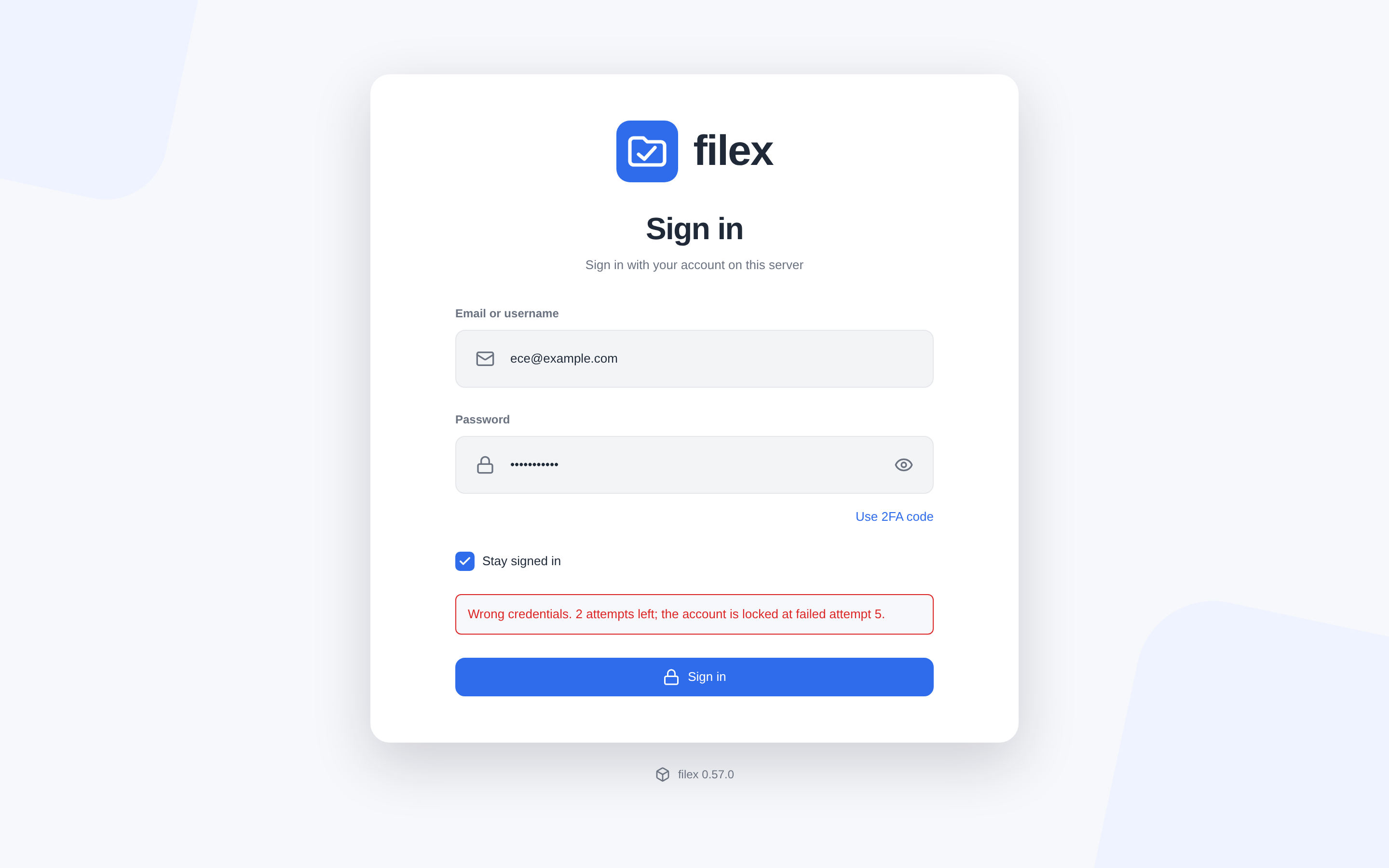
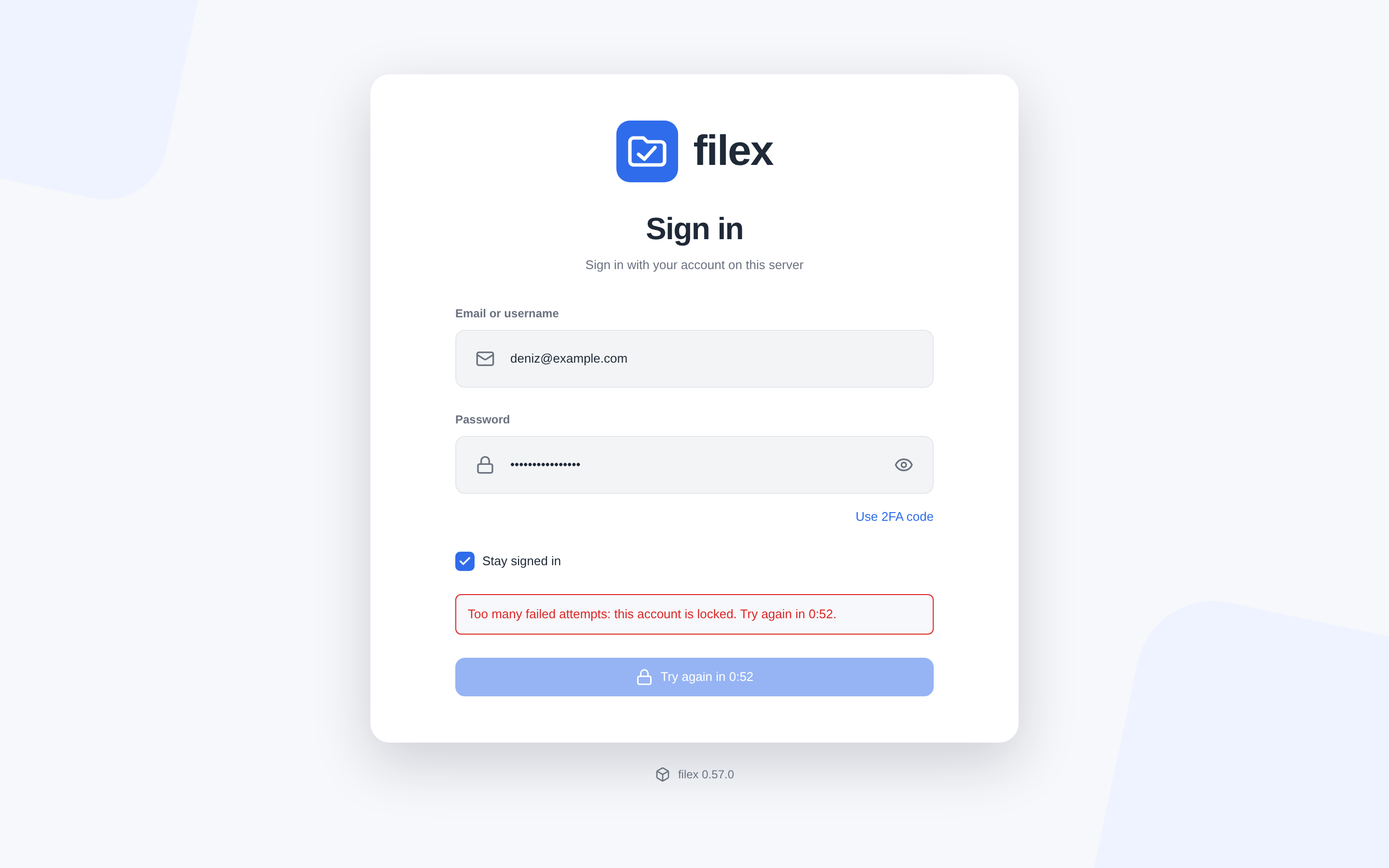
The IP allow-list (login.ip_allowlist) is the way back in. An address on it is exempt from the per-address limit, and may sign in to any locked account (the password must still be right - the lock is not applied to that address, and it is not lifted for anybody else). Its wrong attempts are audited and counted against nobody. No account is privileged: the bootstrap administrator is limited like everyone else, so put your office or VPN address on the list before you need it. your_ip on GET /api/admin/login-security shows the address filex sees you from. The one exception is a public demo's shared account (Demo mode): its password is printed on the sign-in page, so it is counted per address only.
Locking somebody out by typing their name wrongly is possible - that is what a lock is. The escalating length keeps the cost on the attacker's side, and the allow-list and the admin Unlock are the remedy.
Counters live in memory and are written through to the database (login_throttle). filex reads the table at start, so a lock placed before a restart or a deploy is in force after it; from then on every attempt is decided from memory and every change is written to the table as it happens. A write the database refuses (a full disk, a lost connection) does not change the decision: the limit goes on from memory - neither failing open nor locking everybody out - logs the failure, and writes the counter again with the next write that succeeds or at the next sweep. A table that cannot be read at start leaves an empty memory and the default settings, and is read again at the next sweep. The sweep runs every minute from start to stop, whatever the traffic: it reads the settings again, writes what the database is owed, releases the locks that ran out (auditing each), drops counters idle for a day and prunes the table. At most 100 000 counters are held (past that, idle ones go first, then the oldest; a counter with no lock in force before a lock). Listing the locks on the page runs the sweep too.
⚠ Several instances sharing one database: the settings are shared (each instance reads them every minute), the counters are per instance - each counts in its own memory and reads the table only at start. With N instances a guesser spread across all of them gets, in the worst case, N × the limit of wrong attempts per account (and per address); a lock one instance places is not seen by the others until they restart, and the table holds whichever instance wrote a counter last. If that matters, run the limit on one instance (or in front of all of them).
Audit trail (Audit page → filter login., or GET /api/admin/login-security/attempts, the page's Recent sign-in events): login.failed (every wrong attempt: identifier, address, door, reason, tries left), login.locked, login.unlocked (a lock that ran out - noticed at the next attempt for that account or address, or by the minute's sweep - or an administrator's unlock), login.allowlist_pass (an allow-listed address got into a locked account), and login_security.update (a change to the settings below). An administrator's unlock and settings change keep their name whichever door they came through - the panel, an admin API key, an MCP tool, the generic settings API - and the row says which (via); each is in the trail once. Never a password.
Settings, edited through /api/admin/login-security (the Sign-in security page), are instance-wide - on a multi-tenant install the page and its API are the platform operator's (403 supertenant_only for a tenant's administrator). They are held in memory like the counters and read from the database at start and every minute; a save is in force at once on the instance that saved it (the next attempt decides with it, no restart) and on every other instance within a minute. A database read that fails keeps the last value known (the default when there is none). A login.* key written through the generic settings API reaches the running limit the same way.
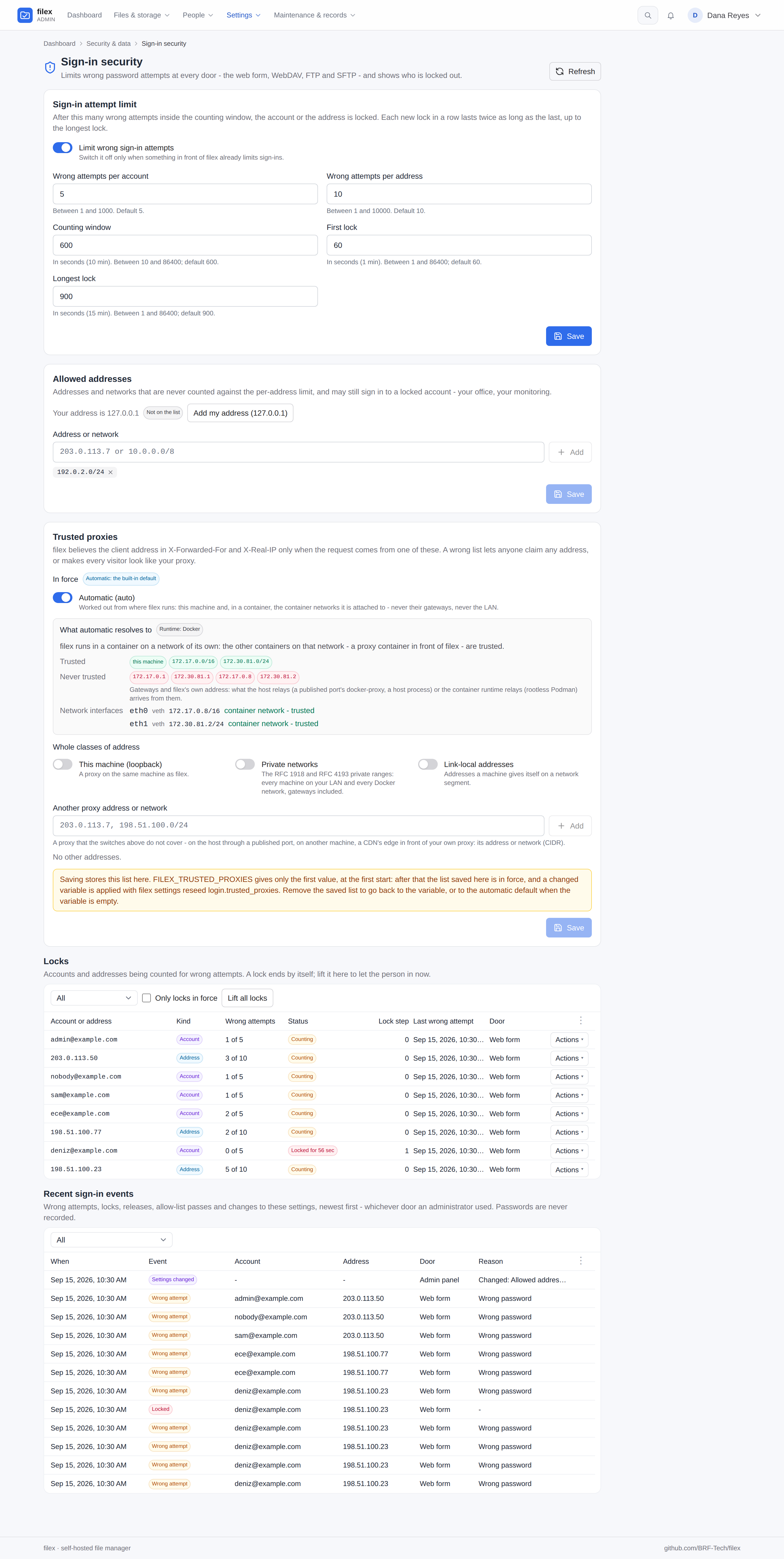
| Key | Default | Range |
|---|---|---|
login.throttle_enabled | true | Off = nothing is counted. |
login.account_max_fails | 5 | 1 - 1000 |
login.ip_max_fails | 10 | 1 - 10000 |
login.window_seconds | 600 | 10 - 86400 |
login.lock_base_seconds | 60 | 1 - 86400 |
login.lock_max_seconds | 900 | 1 - 86400 (never below the base) |
login.ip_allowlist | empty | Addresses and CIDR networks. |
login.trusted_proxies | FILEX_TRUSTED_PROXIES's list, written at the first start (seed); empty → auto | Addresses, CIDR networks and the words of Trusted proxies. On the page auto is a switch that shows what it resolved to and why, the three classes are three switches and the addresses a list of their own. |
Not covered: S3 (a signed request proves an HMAC over a random secret - there is no password to guess), NFS (an export is bound to an address, not a password), API tokens (256-bit), and the current password prompts on a signed-in account's profile.
Zero-touch seeding
These variables seed the database once, on first boot, only when the target record is absent. They let a fresh docker compose up / helm install come up fully configured from env alone - no admin-UI clicks. Once a record exists, later operator edits in the UI always win; changing the env afterwards does not re-seed or overwrite. (OIDC/LDAP/header auth are read live from env every boot and so are configured in Authentication, not here.)
First admin - created if the user table is empty:
| Env var | Default | Description |
|---|---|---|
FILEX_ADMIN_EMAIL | admin@local | Email of the seeded admin account. Its username is admin either way (reserved for this one account). |
FILEX_ADMIN_PASSWORD | (random, printed once) | Password for that admin. Omit both to get a random admin@local (see INSTALLATION.md → first run). |
SMTP (mailer) - seeded when host, port and from are all set:
| Env var | Description |
|---|---|
FILEX_SMTP_HOST | SMTP server host. |
FILEX_SMTP_PORT | SMTP server port. |
FILEX_SMTP_USERNAME | Auth username (optional). |
FILEX_SMTP_PASSWORD | Auth password (optional). |
FILEX_SMTP_FROM | From address on outbound mail. |
FILEX_SMTP_TLS | starttls · tls · none. |
Branding, trash & drafts:
| Env var | Description |
|---|---|
FILEX_SITE_NAME | Seeds the instance's Display name (branding.name, Admin → Settings → Branding): the name next to the logo, on the sign-in screen and in the mails filex sends. Upgrading: a site_name row an earlier release kept is carried into an empty Display name at start, then removed. |
FILEX_TRASH_RETENTION_DAYS | Days to keep trashed items before purge (see TRASH-VERSIONING.md). |
FILEX_SHARE_MAX_TTL | Longest life a new share link may be given - 7, 7d or 168h; 0 = no ceiling. Seeds share.max_ttl_days (default 7) once; afterwards the admin Protection page owns it. Existing links are never changed (see SHARING.md). |
FILEX_DRAFTS_LIMIT | How many drafts (new documents not saved yet) one person may keep, 1-1000. Seeds drafts.limit (default 50) once; afterwards the admin Protection page owns it (see PROTECTION.md → Drafts). |
Default storage - seeds one initial storage when no storage exists yet, so a fresh install already has a working place for files. Leave FILEX_DEFAULT_STORAGE_DRIVER empty to seed nothing. (See STORAGE.md for the storage model.)
| Env var | Applies to | Description |
|---|---|---|
FILEX_DEFAULT_STORAGE_DRIVER | all | Which driver to seed; empty = seed no storage. local and s3 have dedicated variables below; any other built-in driver (sftp, webdav, ftp, smb) is seeded by supplying its configuration as JSON in FILEX_DEFAULT_STORAGE_CONFIG. |
FILEX_DEFAULT_STORAGE_CONFIG | all | The driver's configuration as raw JSON, e.g. {"host":"…","user":"…"}. Required for a driver that has no dedicated variables, and accepted for local/s3 too, where it replaces them rather than merging. Invalid JSON seeds nothing and logs a warning. |
FILEX_DEFAULT_STORAGE_NAME | both | Display name / top-level folder label. |
FILEX_DEFAULT_STORAGE_MOUNT | both | Logical mount point (default /). |
FILEX_DEFAULT_STORAGE_PATH | local | On-disk directory to serve. |
FILEX_DEFAULT_STORAGE_S3_BUCKET | s3 | Bucket name. |
FILEX_DEFAULT_STORAGE_S3_PREFIX | s3 | Key prefix = storage root (keep non-empty - root guard). |
FILEX_DEFAULT_STORAGE_S3_ENDPOINT | s3 | Custom endpoint (MinIO/R2/Hetzner …); omit for AWS. |
FILEX_DEFAULT_STORAGE_S3_REGION | s3 | e.g. us-east-1; auto for R2/MinIO. |
FILEX_DEFAULT_STORAGE_S3_ACCESS_KEY | s3 | Access key. |
FILEX_DEFAULT_STORAGE_S3_SECRET_KEY | s3 | Secret key. |
FILEX_DEFAULT_STORAGE_S3_PATH_STYLE | s3 | true for path-style addressing (MinIO/Hetzner/B2/R2). |
External services
Each is optional - an empty URL disables it. Set via env, external_services.*, or the admin UI (Admin → Settings → External services).
The running process always uses the value in the external_services table, read on every request, so an admin-UI change applies without a restart. Env and config.yaml are a seed for that table, like every other setting a variable gives a first value to: a service nothing was configured in yet (no address stored) takes the environment's address, secret, callback address and editor language on the next start, and from then on the row is the admin page's - an edit there, switching the service off included, stands across restarts. GET /api/admin/external returns env_managed: true for a service the environment names, and the page says which variable gave its first value. To make the environment take over again, run filex settings reseed --external and restart (Writing the environment again).
Upgrading from 0.56 or earlier: up to 0.56 a service the environment named was written back onto its row at every start, so editing
FILEX_ONLYOFFICE_URLin compose and restarting changed it, and an edit on the admin page lasted until the next start. Now the stored row stands: after changing the variable, runfilex settings reseed --external(or change the address on External services), then restart. Nothing changes for an install whose page and environment already agree.
| Env var | Description |
|---|---|
FILEX_ONLYOFFICE_URL | ONLYOFFICE Document Server URL - optional: the Office editor app edits office documents without one (see ONLYOFFICE.md) |
FILEX_ONLYOFFICE_JWT | Shared JWT secret - must match the Document Server |
FILEX_ONLYOFFICE_CALLBACK_URL | Address the Document Server uses to reach filex; empty means FILEX_PUBLIC_URL. Only needed when the browser's address and the container's address differ |
FILEX_ONLYOFFICE_FRAME_ORIGIN | The Document Server's own origin (https://docs.example.com), whose reverse proxy sends /filex-frame/* to filex: the editor's api.js then runs in a frame there instead of in filex's page (ONLYOFFICE.md → The editor in a frame of its own). The same site as filex is fine. On that host filex answers /filex-frame/editor and nothing else. Read at start (not on the admin page); a value that is not an origin, filex's own or FILEX_APP_UI_ORIGIN stops the server. YAML: external_services.onlyoffice.frame_origin |
FILEX_ONLYOFFICE_LANG | The editor's language: auto (each person's own filex language) or a language the editor offers (de, fr, tr, pt-PT, zh-TW, ...) for everybody. Seeds the editor language of the ONLYOFFICE row when it has none (an admin-UI choice stands; filex settings reseed --external writes the variable's again); unset, External services → ONLYOFFICE → Editor language decides, auto by default. A value the editor does not offer is logged and ignored. YAML: external_services.onlyoffice.editor_lang (ONLYOFFICE.md → The editor's language) |
FILEX_DRAWIO_URL | Drawio embed URL (diagram editing) |
The same Document Server draws the thumbnails of office documents and runs the apps' office conversions, unless the office engine the Office editor app brings is asked first (by default it is, when installed: ONLYOFFICE.md → The engine and a Document Server; thumbnails.md → Office through OnlyOffice); their two limits are the FILEX_THUMBS_OFFICE_* settings under Thumbnails.
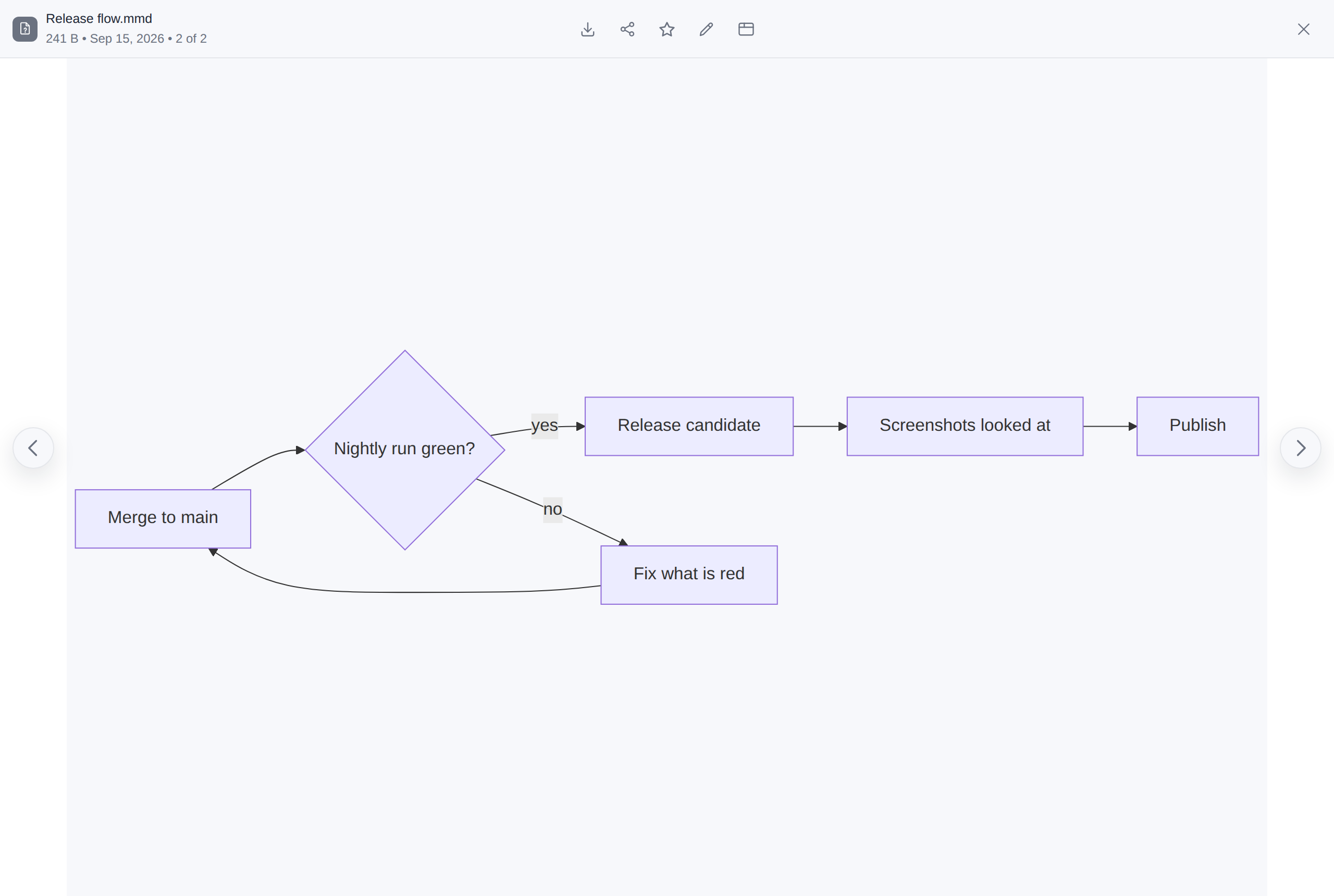
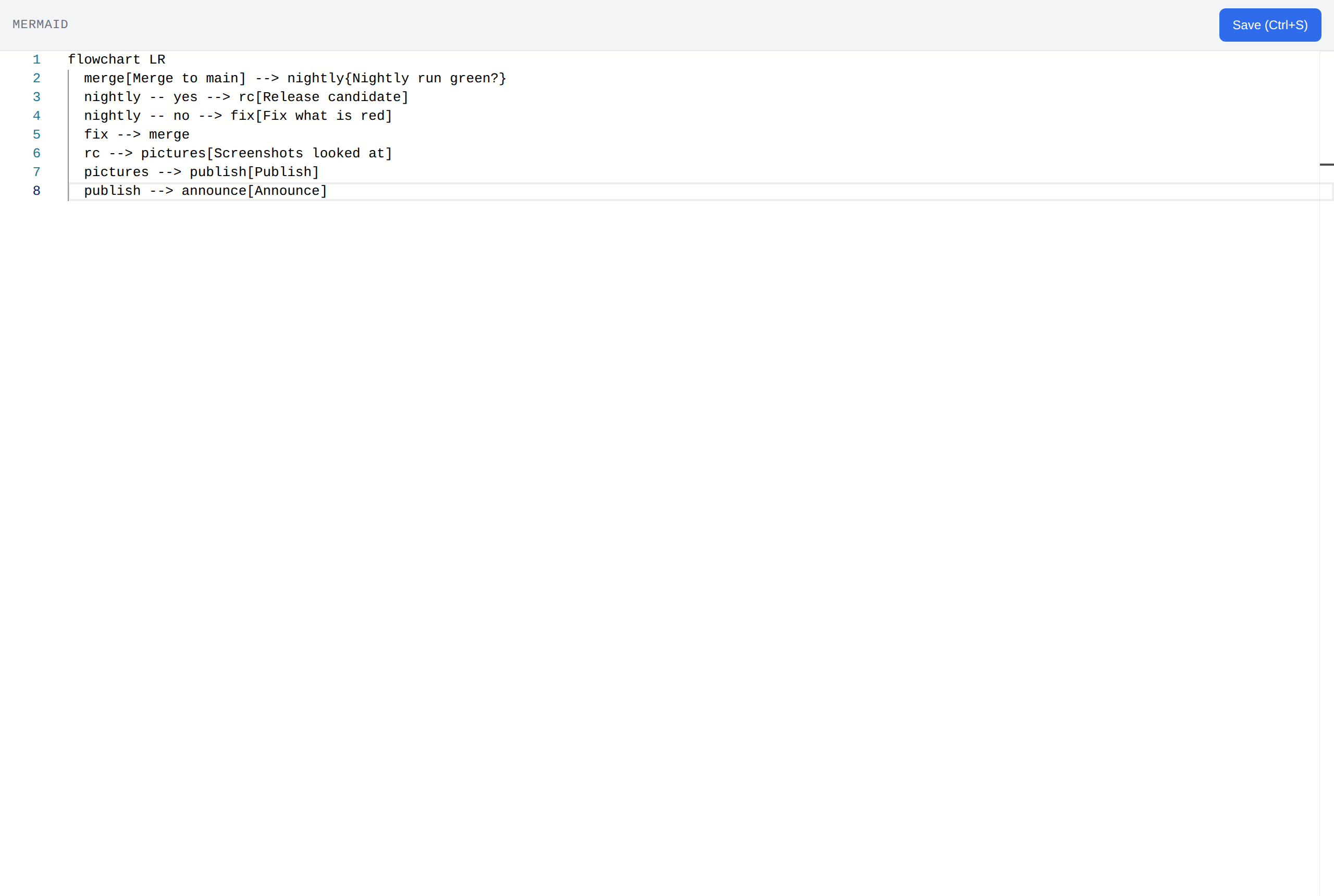
Mermaid needs no service. Mermaid diagrams render entirely client-side in the browser via a bundled
mermaidlibrary - there is nothing to deploy and no URL to set (FILEX_MERMAID_URLis not read). A.mmd/.mermaidfile is drawn by its viewer; Edit opens its source in the built-in text editor, which saves it as text.
A .mmd file opened - the diagram, drawn in the browser - and what Edit opens: its source in the text editor, saved as text:
Protocol endpoints (S3 · SFTP · FTPS · NFS · WebDAV)
filex can be reached as five protocols besides HTTP. Full picture, including which credential each one takes and the traps that cost real time: PROTOCOLS.md.
⚠ S3 and /dav are ON by default; the other three are OFF. The two that are on open no port of their own, refuse every unsigned or unauthenticated request, and need a minted credential before anything reaches them. The three that open a listener stay off until asked for.
| Env var | Default | Description |
|---|---|---|
FILEX_SECRET_KEY | - | ⚠⚠ Required once anybody mints an S3 access key; changing or losing it stops every existing access key from verifying. See The secret key. |
FILEX_S3 | 1 | The S3-compatible endpoint. Set 0 to switch it off. |
FILEX_S3_DOMAIN | - | Dedicated host for the endpoint, e.g. s3.example.com, which also enables virtual-hosted addressing (bucket.s3.example.com). Empty leaves the endpoint under /s3, path-style only. ⚠⚠ Never point this at the host the app itself serves - the whole site then answers as S3. ⚠ Setting it needs a wildcard A record and a wildcard certificate for *.<domain>; without both, current SDKs (which default to virtual-hosted) fail at TLS with nothing that names the cause. |
FILEX_SFTP | 0 | The SFTP endpoint. Its own TCP listener, not a route. |
FILEX_SFTP_ADDR | :2022 | Listen address. 2022 by convention - sftpgo and rclone serve sftp use it, while 2222 reads as "SSH in a container". |
FILEX_SFTP_HOST_KEY_DIR | <data>/ssh | Where the server's host keys live. ⚠ It must survive a rebuild: regenerating host keys gives every user the "REMOTE HOST IDENTIFICATION HAS CHANGED" warning, which is indistinguishable from an attack. |
FILEX_SFTP_BANNER | - | Text shown before authentication. |
FILEX_FTPS | 0 | The FTPS endpoint. ⚠ Explicit TLS is mandatory on both channels and there is no switch to relax it: plain FTP sends the password in the clear and the file after it. |
FILEX_FTPS_ADDR | :2121 | Control channel. Port 21 needs root. |
FILEX_FTPS_PASV_MIN / _MAX | 30000 / 30100 | The passive data-port range. ⚠⚠ Open it on the firewall too - a blocked range makes every transfer hang with no error on either side, which is the classic FTP failure and impossible to guess at from the client end. |
FILEX_FTPS_PUBLIC_HOST | - | The address to advertise for passive connections, when it differs from what the server sees (NAT, Docker). A host name or an IPv4 address; a name is resolved at startup, because the PASV reply itself can only carry a dotted quad. ⚠ IPv6 has no PASV representation at all - a v6-only deployment must rely on EPSV, which needs no address and so needs no setting. |
FILEX_FTPS_CERT / _KEY | - | TLS certificate. Absent, filex generates a self-signed one and the guide says so, so nobody has to discover it from a client warning. Re-read when the files change (mtime/size checked on every handshake), so a real, auto-renewing certificate - Caddy's, certbot's - can be mounted read-only and is picked up by the next connection with no restart. A renewal that lands half-written keeps the previous certificate serving and logs a warning. |
FILEX_FTPS_BANNER | - | Greeting line shown on connect. |
FILEX_NFS | 0 | The NFSv3 endpoint. ⚠⚠ NFSv3 is unencrypted - anyone who can read the traffic sees the files, and anyone who learns an export path can mount it. LAN or VPN only; for anything off-LAN the answer is filex mount. |
FILEX_NFS_ADDR | :2049 | Listen address. ⚠ There is no portmapper on 111, so clients must be given port= and mountport= explicitly - and Windows' "Client for NFS" cannot say that at all, so it only works on the standard 2049. |
FILEX_DAV | 1 | The WebDAV endpoint at /dav. |
Storage plugins
Drivers that live outside the binary - see PLUGINS.md.
| Variable | Default | Meaning |
|---|---|---|
FILEX_PLUGINS_DISABLED | 0, 1 in demo mode | Turns the whole subsystem off: nothing under <data-dir>/plugins is launched, no remote plugin is contacted, and the admin API answers 503 saying so. On by default (only an admin installs a plugin); an operator hardening a shared instance may not want the admin role to include “run a program on the server”. ⚠⚠ FILEX_DEMO_MODE moves the default to 1: a demo publishes an admin login, so "admin-only" means anybody, and installing a plugin runs an uploaded program on the host. Setting the variable yourself wins in either direction (0 turns them back on for a demo, deliberately). |
FILEX_PLUGIN_CONFORMANCE | enforce | enforce · warn · off. filex probes every capability a plugin declares - at install against the plugin's own throwaway area, and again when a storage on it is saved, against that real configuration. enforce refuses a plugin that fails its own claims and refuses to save a storage on it. warn registers it anyway and keeps the report - for somebody writing a plugin, never for a shared instance, where people meet an operation the UI offered and read the failure as filex being broken. off skips both gates. Anything unrecognised falls back to enforce. |
FILEX_PLUGIN_TRUSTED_KEYS | - | Comma-separated ed25519 public keys (hex or standard base64) allowed to sign a plugin. ⚠ Signature enforcement is off until you set it: until then a plugin is accepted on the strength of its sha256, which proves only that the file has not changed since it arrived - never who it came from. Set any key and an unsigned or badly signed binary is refused at install and at upgrade, and the signature is verified again at every start: a plugin installed before the keys were set is refused at its next start (signature required … reinstall) until it is reinstalled with a signature. A build's signature is over its name, version, platform and sha256; the old sha256-only form is still taken, with a warning, during its compatibility window (PLUGINS.md → Signed plugins, What is signed). |
FILEX_PLUGIN_MAX_INFLIGHT | 10 | Concurrent operations allowed per plugin. A caller that waits 5 s for a slot is refused rather than queued, and counted as outcome="busy" in the metrics - a sizing signal, not a bug. Raise it for a fast local plugin, lower it to keep a slow remote one from occupying the server. 0 or nonsense keeps the default. |
FILEX_PLUGIN_LOOPBACK_SOURCES | 0 | ⚠ Development and tests only - never on a server. 1 lets plugin and app downloads reach this machine (127.0.0.0/8, ::1) and nothing else that is private: a storage plugin from a URL or a source, an app's manifest, module and interface bundle, an install request, the update check, an app store (its keys, its install links, a license check). By default every one of them reaches public addresses only (see below). The end-to-end tests set it, because they serve plugin sources from a small server on 127.0.0.1. With it on, a manifest that names a loopback address makes filex send GET requests to its own services, so the server says so in its log at start. An app's own requests (http_request, asset_fetch) never follow it. YAML: plugin_loopback_sources. |
FILEX_APP_PLUGINS_DISABLED | 0, 1 in demo mode | Turns the app plugin runtime off: nothing under <data-dir>/app-plugins is loaded, the file menu shows no app rows, the admin tab explains why. Demo mode moves the default to 1 for the same reason as storage plugins; FILEX_APP_PLUGINS_DISABLED=0 turns them back on deliberately. |
FILEX_APP_PLUGIN_MAX_INPUT_MB | 256 | Seed of apps.max_input_mb (1-16384, Admin → Settings → Plugins → Apps): per-file ceiling on what one app job may read. Applies at the next start. Up to 0.56 the variable was read at every start; now it is read at the first start only and the stored value wins: change it on the page, or apply a changed variable with filex settings reseed apps.max_input_mb. |
FILEX_APP_PLUGIN_MAX_OUTPUT_MB | 512 | Seed of apps.max_output_mb (1-16384): per-file ceiling on what one app job may produce. Applies at the next start. Up to 0.56 the variable was read at every start; now it is read at the first start only and the stored value wins: change it on the page, or apply a changed variable with filex settings reseed apps.max_output_mb. |
FILEX_APP_PLUGIN_MAX_WASM_MB | 64 | Seed of apps.max_wasm_mb (1-1024): largest module an app install accepts. FILEX_PLUGIN_TRUSTED_KEYS applies to app modules too. Applies at the next start. Up to 0.56 the variable was read at every start; now it is read at the first start only and the stored value wins: change it on the page, or apply a changed variable with filex settings reseed apps.max_wasm_mb. |
FILEX_APPS_E2E_PLAINTEXT | true | Seed of apps.e2e_plaintext (0.56): an app granted files:e2e-plaintext may edit a file of an unlocked end-to-end encrypted folder - the person's browser decrypts it for the app's frame and encrypts the save; the server carries only ciphertext (E2E-ENCRYPTION.md → Editing in an app). false turns it off for every app: no app is offered such a file and both of the app's doors refuse it. Seeded once, like the other stored settings; afterwards PUT /api/admin/settings/apps.e2e_plaintext with {"value": "false"} (the instance's administrator). Read at every request. |
FILEX_APP_UI_ORIGIN | - | Serves apps' own interfaces from an origin of their own, e.g. https://apps.example-usercontent.com (a scheme and a host; another registrable domain than filex's). The proxy sends that host to filex too; filex answers only the interface route there and refuses it on its own host. With it and no FILEX_ONLYOFFICE_FRAME_ORIGIN, the ONLYOFFICE editor's frame is served there too (ONLYOFFICE.md → The editor in a frame of its own). Empty (the default): interfaces are served from filex's origin, opaque by sandbox. A value that is not an origin, or filex's own, stops the server. YAML: app_ui_origin. |
FILEX_APP_PLUGIN_MAX_UI_MB | 128 | Seed of apps.max_ui_mb (1-1024; applies at the next start): largest interface package (the app's ui zip) an install accepts; the files inside it are capped too (512 MiB unpacked, 20 000 files, 64 MiB per file). Up to 0.56 the variable was read at every start; now it is read at the first start only and the stored value wins: change it on the page, or apply a changed variable with filex settings reseed apps.max_ui_mb. |
FILEX_OFFICE_ENGINE_MAX_MB | 2048 | The most memory one module of the office engine an app brings may use, in MiB (512 to 4096, x2t's own maximum; out of range is clamped): a conversion or a thumbnail that reaches it ends as too large. The engine's process may hold about twice that before filex ends it (watched on Linux and Windows). A plain variable, not a stored setting: read whenever an engine process starts, so a change applies to the next one (idle processes end after 3 minutes; a restart applies it at once). YAML: office_engine_max_mb. |
FILEX_APP_PLUGIN_UPDATE_CHECK | 1 | The daily check that asks every installed app's source (its GitHub repository or address) for a newer version the running filex can run, and tells the administrators - it installs nothing: every newer version waits for an administrator's approval (APP-PLUGINS.md → Updates). The same switch covers the storage plugins' update sources. 0 = no request leaves the server for it - what an air-gapped install wants; Check for updates on the Apps tab still asks when pressed. A demo never checks. The time of the last check is stored, so a restart neither skips a day nor checks at every boot. YAML: app_plugin_update_check. |
FILEX_APP_STORE_URLS | - | Comma-separated app store origins (https://store.example, no path) trusted by configuration: their install links and license answers are accepted without an administrator approving the store first, signed with the keys in FILEX_APP_STORE_KEYS and no others. Set, it is an allow list (below). Unset, a store is trusted only by an administrator who compared its key fingerprints on its first install link (APP-PLUGINS.md → Trusted stores). A configured store has no remove button in the panel. YAML: app_store_urls. |
FILEX_APP_STORE_KEYS | - | Comma-separated ed25519 public keys (hex or standard base64) of the stores in FILEX_APP_STORE_URLS, each optionally prefixed with the one use it may sign for: index:<key> (install links) or license:<key> (license answers); a bare key may sign either. filex reads the store's /v1/keys.json for the key ids and accepts a key only when its material is listed here; a key the store publishes that is not here is refused (store_key_not_configured), never put to an administrator. Ignored (with a log line) when FILEX_APP_STORE_URLS names no store. Not the same setting as FILEX_PLUGIN_TRUSTED_KEYS, which checks modules. YAML: app_store_keys. |
FILEX_APP_GITHUB_RAW_BASE | https://raw.githubusercontent.com | Where a GitHub install (and a store link, which names a GitHub repository) reads a repository's files: <base>/<owner>/<name>/<ref>/filex-app.json. A mirror of GitHub's raw host for an install that cannot reach it, or the end-to-end tests' fake GitHub. The download guard applies to it like to every address: a loopback mirror needs FILEX_PLUGIN_LOOPBACK_SOURCES, a private one is refused. YAML: app_github_raw_base. |
FILEX_APP_CLOCK | - | ⚠ Screenshots and tests only - never on a server. An RFC 3339 instant (2026-09-15T10:30:00Z): the apps' clock reads it when filex starts and runs at real speed from there - the time inside every app module, and the host's own times it hands an app (a lock's end, a link's expiry, a certificate's not-after, a wake-up's window). The screenshot scenes set it so that what an app writes into its own words ("requested on", "frozen until", the date under a signature) is dated on their clock. Everything filex stores and compares stays on the real clock. The server says in its log at start that the clock is moved. No YAML key. |
FILEX_SECRET_KEY | - | Seals a remote plugin's bearer token and a paid app's license key; without it both are refused (The secret key). |
FILEX_PLUGIN_REQUEST_TTL_DAYS | 14 | Seed of apps.request_ttl_days (1-365, Admin → Settings → Plugins → Apps; applies at the next start, a request already made keeps its date): how long an install request - what an API key leaves instead of installing an app or a storage plugin - waits for an administrator before it expires. Checked hourly and whenever the requests are read. YAML: plugin_request_ttl_days. Up to 0.56 the variable was read at every start; now it is read at the first start only and the stored value wins: change it on the page, or apply a changed variable with filex settings reseed apps.request_ttl_days. |
Fixed, and documented in PLUGINS.md: where installed plugins, their signatures and their sockets live (Where things live); the environment a launched plugin sees - never FILEX_SECRET_KEY, the database DSN or any other FILEX_* value of filex's own (The protocol); the network rules for a plugin from a URL (public hosts only, after DNS and on every redirect, at most five) and a remote one (TLS unless its address is on the private network, its redirects not followed) (Install one); and the limits around the per-plugin ceiling - 5 s waiting for a slot, 60 s on metadata calls, no deadline on reads and writes, plugin log 50 lines/s, burst 200 (What a plugin may cost filex). Apps are downloaded by the same guarded client, under the same address rule (APP-PLUGINS.md → Install one); only FILEX_PLUGIN_LOOPBACK_SOURCES widens it, and only to this machine. In multi-tenant mode the plugins' admin surface is supertenant-only.
App stores allow list
Set, FILEX_APP_STORE_URLS is the whole list of app stores this filex takes install links and license answers from: any other store is refused (403 store_not_allowed) before anything is read from it - its keys, its links, its license checks - and no administrator can trust it on first use. A store an administrator trusted before the list was set is refused (and no longer listed) too, and a list whose entries all fail to parse admits no store at all - so does a value that names none (FILEX_APP_STORE_URLS=" , "): any value given is the list. Unset (not in the environment, or empty), a store is trusted by an administrator who compares its key fingerprints on its first link.
A store link also names the filex it was made for (filex_origin): filex holds it to the origin of FILEX_PUBLIC_URL, or - unset - to the origin the request arrived at, so set FILEX_PUBLIC_URL when a proxy in front of filex rewrites the host. A paid app's grace (the store unreachable) loses an hour at every start after an unclean stop - a crash, a kill, a power cut - and nothing at a clean one (APP-PLUGINS.md → Paid apps).
Storage sync
⚠ A single failed sync run is not an error. A run that cannot list the backend (a 503/504 from an object store under load, say) is logged at INFO and the catalogue is refreshed on the next tick. Only three consecutive failures are reported as a warning - that is a storage genuinely not answering, not a hiccup. The message carries the streak, and recovery is logged too.
Fallback cadence for the sync worker, used by storages that do not set their own sync_interval_s. A storage that does set one wins.
| Env var | Default | Description |
|---|---|---|
FILEX_SYNC_INTERVAL | 15m | Seed of sync.default_interval_minutes (1-1440, Admin → Settings → General → Scan storages every; applies at the next start): how often a storage with no interval of its own is scanned. A Go duration (30s, 15m, 1h), rounded up to whole minutes; 0 or a negative value is "unset". The 5 s floor applies to a storage's own sync_interval_s (under 5 s it falls back to this setting), not to this one. Up to 0.56 the variable was read at every start; now it is read at the first start only and the stored value wins: change it on the page, or apply a changed variable with filex settings reseed sync.default_interval_minutes. |
⚠ The variable is
FILEX_SYNC_INTERVAL, notFILEX_SYNC_DEFAULT_INTERVAL. An unparseable value logs a warning at boot and keeps the default rather than failing silently.
The sync worker runs one goroutine per enabled storage, so concurrency is the number of enabled storages and there is no pool to size: FILEX_SYNC_WORKERS is not read - setting it has no effect and produces no error; delete it from your environment.
Lazy catalogue settings
A local storage with sync_mode: lazy (STORAGE.md → Lazy catalogue, design in LAZY-CATALOGUE.md) reads three more keys from its own config. They are per storage, not environment variables: the storage form draws them under Sync mode when Lazy catalog is chosen, and the admin API refuses a value outside its bounds (400).
| Key | Default | Bounds | Meaning |
|---|---|---|---|
lazy_fill | background | background · on_open | Catalog behavior. background: the folder somebody opens is catalogued first and a slow background pass catalogues the rest. on_open: only the folders people open are catalogued; search, folder sizes and usage say so. |
lazy_max_watches | 1024 | 1 - 1,000,000 | How many opened folders are watched for changes made outside filex. Past it, the folder opened longest ago stops being watched and is checked again the next time somebody opens it. |
lazy_watch_ttl | 60 | 1 - 10,080 (minutes) | A folder nobody has opened for this long stops being watched. |
The storage's own sync_interval_s (Scan every) is how old an unwatched folder's listing may get before the background pass, or a connected desktop sync pair, checks it again.
⚠ Linux: the kernel's own watch limit. Each watched folder is one inotify watch, and
fs.inotify.max_user_watchescaps them for the whole user (8,192 on some distributions). When the kernel refuses one, filex logs it once and treats the budget as full - nothing breaks, folders are simply checked on open instead of watched. Raise the sysctl or lowerlazy_max_watchesif you see that line.
Uploads (staged / resumable)
Large uploads land in filex's own staging area first and are transferred to the storage backend by a background job, so they survive a dropped connection and work on every driver. See UPLOADS.md.
| Env var | Default | Description |
|---|---|---|
FILEX_UPLOAD_STAGING_DIR | <data_dir>/uploads | Where in-flight upload parts live. |
FILEX_UPLOAD_CHUNK_SIZE | 8388608 (8 MiB) | Default part size when the client does not request one. |
FILEX_UPLOAD_STAGING_TTL | 24h | Seed of upload.staging_ttl_hours (1-720, Admin → Settings → General; a duration, rounded up to whole hours; applies at the next start): idle time before the sweeper removes an abandoned staging directory. Staging that belongs to a file you delete permanently is released at once and does not wait for this. Up to 0.56 the variable was read at every start; now it is read at the first start only and the stored value wins: change it on the page, or apply a changed variable with filex settings reseed upload.staging_ttl_hours. |
⚠ The whole object passes through the staging directory - put it on a filesystem with room for the largest upload you expect.
beginrefuses when less thansize × 1.2is free.
File operations (copy · move · delete)
Copy, move and delete from the explorer (POST /api/files/copy, /move, /delete, /api/files/ops) are queued jobs, run one at a time in the order they were submitted.
| Env var | Default | Description |
|---|---|---|
FILEX_OPS_DELETE_WORKERS | 4 | How many items of one delete job are put in the trash at the same time. Below 1 means the default. |
Only the items inside a delete job overlap; jobs still run one after another, so a paste queued behind a delete still waits for it - it just waits less. On an object store every trashed file is several round trips, so a delete is almost all waiting on the network. Raise the value when the backend takes it; lower it (1 = one item at a time) when it answers with throttling errors. An item inside another item of the same job (a file and its folder) is left to the folder, so the folder goes to the trash whole.
Archives
Archive executable paths and the private workspace are process configuration; the live format and resource policy is managed under Settings → Archives. See ARCHIVES.md for the provider matrix and security model.
| Env var | Default | Description |
|---|---|---|
FILEX_ARCHIVE_7Z_BIN | 7zz or 7z on PATH | 7-Zip executable used for ZIP/7z/TAR creation, encryption and 7z/XZ extraction, and RAR extraction when that 7-Zip reads RAR (Alpine's package does not; see ARCHIVES.md). Plain ZIP and the TAR family are read by filex itself. Version 25.01 or newer is required. |
FILEX_ARCHIVE_WORK_DIR | <data-dir>/archive-work | Private local staging directory for provider input and output. Needs room for one archive's expanded size; fast local storage, preferably not the database's file system. |
archive:
  sevenzip_bin: /usr/local/bin/7zz
  work_dir: /var/lib/filex/archive-work
Antivirus (ClamAV)
Optional. filex scans written files with ClamAV, reached either through a local binary or through a clamd daemon over TCP or a unix socket; see PROTECTION.md for how to choose between them and for what a clean, infected or failed scan does.
⚠⚠ Every setting below except FILEX_CLAMAV_BIN lives in the database, edited on Settings → Protection in the admin UI; its variable is only a seed. Once filex has booted, editing the variable and restarting changes nothing: change them on the Protection page.
| Env var | Where it lives | Default | Description |
|---|---|---|---|
FILEX_CLAMAV | seed → database (antivirus.enabled) | on | The on/off switch. 0/false disables scanning. ⚠⚠ A seed, not a kill switch: an install that had FILEX_CLAMAV=0 keeps scanning off across an upgrade, but from then on the switch is on the Protection page. ⚠ Takes effect at the next restart, in both directions (see below). |
FILEX_CLAMAV_MODE | seed → database (antivirus.mode) | binary | How ClamAV is reached: binary (run clamdscan/clamscan from filex's own $PATH) or daemon (talk to a running clamd). ⚠ Setting FILEX_CLAMAV_ADDR without this seeds daemon, because a compose file that names a clamd container and comes up in binary mode is a deployment that looks configured and scans nothing. ⚠ Next restart. |
FILEX_CLAMAV_ADDR | seed → database (antivirus.clamd_addr) | unset | The clamd address for daemon mode: clamav:3310, tcp://127.0.0.1:3310, a bare host (port 3310 is assumed), or a unix socket path such as /var/run/clamav/clamd.ctl. The bytes are streamed to the daemon, so filex and clamd need no shared filesystem - which is what makes ClamAV-in-its-own-container work. An unparseable address is refused when you save it, not discovered at scan time. ⚠ Next restart. |
FILEX_CLAMAV_BIN | environment | unset | Absolute path to clamdscan/clamscan for binary mode; authoritative when set, and an invalid path disables scanning rather than silently falling back to $PATH. ⚠ Environment only, deliberately: the server executes this path, so an admin-writable field would turn an admin account into command execution as the filex process (a clamd address is only dialled, which is why that one is editable). |
FILEX_CLAMAV_MAX | seed → database (antivirus.max_scan_mb) | 100 MB | Largest file that gets scanned; bigger files are skipped, not failed. ⚠ The variable is in bytes, the stored setting is in megabytes - the number an admin types. The conversion at seed time rounds up, so an upgrade never shrinks an existing ceiling. Range 1-10240 MB. |
FILEX_CLAMAV_SAVE_WINDOW_MINUTES | seed → database (antivirus.save_scan_window_minutes) | 30 | How long a save from the built-in text editor waits before its scan is queued; further saves to the same file inside that window join it instead of queueing more. Range 2-60 minutes; 0 is refused. See below. |
⚠⚠ Three of them take effect at the next restart
The switch, the mode and the clamd address are stored the moment you save them and are in force only after filex restarts - in both directions. Turning scanning on does not start it and turning it off does not stop it until then, because the scan pipeline is wired once at boot (why both directions). The admin page says so when you change one and keeps a "restart required" band up until the restart has happened.
The scan-size ceiling and the save-scan window are not deferred: they are read per file, so they apply to the next file scanned.
Reaching a clamd container
services:
  filex:
    environment:
      FILEX_CLAMAV_ADDR: "clamav:3310"
  clamav:
    image: clamav/clamav:latest
    volumes:
      - clamav-db:/var/lib/clamav
volumes:
  clamav-db:
The Protection page shows whether clamd actually answered (reachable, with the error text beside it). ⚠ A daemon filex cannot reach never produces a clean verdict - the scan fails and retries on the queue - but nothing would say so without that field, so check it after changing an address.
The editor save-scan window
A file created in filex's text editor is scanned immediately, exactly like an upload. A save over a file that already exists schedules one scan FILEX_CLAMAV_SAVE_WINDOW_MINUTES from now, and every further save inside that window is absorbed into it - so a burst of Ctrl+S costs exactly one scan, and that scan reads the file as it stands when it runs, not the content of the save that scheduled it.
The trade: one scan per file per half-hour of editing (the default), paid for by the file sitting unscanned for up to that long after its last save. Shorter means more scans and less exposure; longer means fewer scans and more.
- Minimum 2 minutes. Below that the window stops coalescing anything while multiplying scans.
- Maximum 1 hour. The window is the time an infected file written through the editor stays live.
0is not accepted: it reads equally as "scan every save" and "never scan". To turn scanning off, use the switch on the Protection page (antivirus.enabled), which applies at the next restart.
A value outside the range is refused when you save it on the Protection page. A value already stored out of range - written by hand, or by an older build - is clamped to the nearest bound on read, with one WARN line naming the value in force, rather than refusing to boot.
⚠ The delay is a row in filex's operation queue (ops_queue.not_before), not a timer inside the process, so a restart or a deploy mid-window does not lose the pending scan. Changing the window never rewrites scans already scheduled: they keep the time they were given, and only scans scheduled afterwards use the new value.
Versioning on overwrite
Before any destructive-write surface replaces an existing file, it snapshots the bytes being replaced into version history - and refuses the write rather than let it through unrecorded when that snapshot cannot be taken. The full per-surface list, including the two batch surfaces that skip a refused member instead of failing the whole request, is in TRASH-VERSIONING.md.
| Env var | Default | Description |
|---|---|---|
FILEX_VERSIONS_ON_OVERWRITE | 1 | Seed of versions.on_overwrite (Admin → Settings → Protection → Keep a version before overwriting; applies at the next start): the master switch for the pre-write snapshot guard. Off for a deployment whose storage backend cannot afford the extra write - those writes then proceed unsnapshotted, and filex logs one WARN at boot naming the state. Once stored, the setting on the page is the one in force; filex settings reseed versions.on_overwrite writes the variable's value again. Up to 0.56 the variable was read at every start; now it is read at the first start only and the stored value wins: change it on the page, or apply a changed variable with filex settings reseed versions.on_overwrite. |
FILEX_VERSIONS_FAIL_OPEN | 0 | Lets a snapshot failure fall through to the write instead of refusing it, logging overwrite proceeding without a snapshot (naming the storage and path) each time; filex logs a WARN at boot while it is on. Off by default: a write must not proceed past a failed snapshot. It exists for one bind: when the object store fills up, snapshots start failing and the fail-closed default refuses every overwrite on the instance - desktop sync, WebDAV, OnlyOffice saves, the browser. |
⚠ These are independent. FILEX_VERSIONS_ON_OVERWRITE=0 skips the snapshot attempt entirely; FILEX_VERSIONS_FAIL_OPEN=1 still attempts it and still records one when it succeeds. Note also that versions.keep_n = 0 does not disable versioning - 0 means "unlimited", and the snapshot path falls back to its built-in retention default.
In config.yaml: versions_on_overwrite: false and versions_fail_open: true, both top-level alongside upload: / cache:.
End-to-end encryption: the vault
The third encryption level, the vault (format), is built - the web app, the desktop app, the embeds, filex decrypt and filex vault mount open it - and off by default: turn it on where people should be able to make one.
| Env var | Default | Description |
|---|---|---|
FILEX_E2E_VAULT | 0 | Turns the vault on: the API under /api/files/e2e/vault (BACKEND.md), e2e_vault: true in GET /api/files/capabilities (a client offers level 3 only then), and the rule that inside a vault folder only that API writes - every other door (the explorer, the queue, the agent API and MCP, archives, apps, the document server's save, WebDAV, S3, SFTP, FTPS, NFS) is refused there. Off, every vault route answers 404 VAULT_DISABLED, the capability is false, and the doors do not look for vaults: a vault made while it was on is then an ordinary encrypted folder to them, so do not turn it off on an instance whose people use vaults. |
In config.yaml: e2e_vault: true, top-level. The vault's write lock lives in the database (vault_locks), so every filex process on one database shares it; nothing else needs configuring.
Editing together
An app granted files:co-edit (the office editor) edits a file with other people through filex's relay (APP-PLUGINS-API.md → Editing together). It is on by default; the relay keeps its state in the database, so every filex process on one database serves the same sessions - the members' cursors included, through the database, with no other service between the processes.
| Env var | Default | Description |
|---|---|---|
FILEX_COEDIT | 1 | Off: every coedit.* call answers 503 coedit_off and an app edits alone. |
FILEX_COEDIT_DIR | <data_dir>/coedit | The sessions' sealed blobs (the base document a member who joins late opens, the images added while editing), one folder per session, removed with it. ⚠ Several instances on one database must share it, as they share the upload staging directory. |
FILEX_COEDIT_MAX_MEMBERS | 20 | Seed of coedit.max_members (2-200, Admin → Settings → Plugins → Apps; applies at the next start): people in one session; one more is refused (coedit_full) and edits alone. Up to 0.56 the variable was read at every start; now it is read at the first start only and the stored value wins: change it on the page, or apply a changed variable with filex settings reseed coedit.max_members. |
FILEX_COEDIT_MAX_LOG_MB | 64 | A session's sealed log. Past it a member has to save; the next opening starts a new session. |
FILEX_COEDIT_MAX_BLOB_MB | 256 | A session's blobs together. |
FILEX_COEDIT_UNSAVED_DAYS | 30 | Seed of coedit.unsaved_days (1-365; applies at the next start): how long a session nobody is in keeps its unsaved changes for the next person who opens the file (a saved one is forgotten after an hour). Up to 0.56 the variable was read at every start; now it is read at the first start only and the stored value wins: change it on the page, or apply a changed variable with filex settings reseed coedit.unsaved_days. |
FILEX_SECRET_KEY | - | ⚠ Needed to edit a file in an ordinary folder together: the server makes each session's key and keeps it sealed with this key (the unsaved work in the database and in FILEX_COEDIT_DIR stays sealed at rest); without it, and when it changes, see The secret key. A file of an end-to-end encrypted folder does not use it: its session's key is made and sealed with the folder key in the members' browsers. |
In config.yaml: coedit: {enabled, dir, max_members, max_log_mb, max_blob_mb, unsaved_days}. A member whose page goes quiet for 45 s is dropped, the changes lease lasts 60 s, a socket ticket 60 s, a member's cursor is written for the other processes at most twice a second: these are fixed.
Downloads from slow storage (prepared copies)
When a big file lives on a slow backend, filex fetches it to local disk once, tells the user it is preparing (with a percentage), and then serves it - and every later request - at local-disk speed, with full Range support. See Slow storage in STORAGE.md.
| Env var | Default | Description |
|---|---|---|
FILEX_CACHE | 1 | Master switch. 0 disables prepared copies entirely. |
FILEX_CACHE_DIR | <data_dir>/cache | Where prepared copies live. |
FILEX_CACHE_MIN_SIZE | 67108864 (64 MiB) | Smallest file worth preparing. Below it, nothing is ever cached. |
FILEX_CACHE_MAX_BYTES | 21474836480 (20 GiB) | Seed of cache.max_gb (1-10240 GB, Admin → Settings → General → File cache size; bytes, rounded up to whole GB; applies at the next start): the global ceiling on the cache directory, enforced with LRU eviction. Up to 0.56 the variable was read at every start; now it is read at the first start only and the stored value wins: change it on the page, or apply a changed variable with filex settings reseed cache.max_gb. |
FILEX_CACHE_SLOW_BPS | 10485760 (10 MiB/s) | Measured throughput below which a storage counts as slow. |
A file is prepared only when it is at least MIN_SIZE and its storage is slow - either flagged by you ("slow": true in the storage config) or measured below SLOW_BPS. Small files, and files on storages that measure fast, are streamed directly: nothing is prepared and nobody waits.
⚠ The cap is not optional and cannot be set to "unlimited". When the cache is full of entries that are being read, a new file is simply not prepared and streams from the backend - filex will not exceed the ceiling to make room.
The cache directory also holds folder-share ZIPs (<cache_dir>/sharezips). They are not covered by FILEX_CACHE_MAX_BYTES; they are bounded by their shares and by two knobs of their own - an archive is deleted as soon as no active share can serve it, and in any case after a week. See Folder ZIPs are cached in SHARING.md.
| Env var | Default | Description |
|---|---|---|
FILEX_SHAREZIP_WARM_MAX_BYTES | 2147483648 (2 GiB) | Largest folder (sum of file sizes) the background warmer pre-builds. Bigger folders are zipped on demand when a visitor clicks, never refused. 0 = no ceiling. |
FILEX_SHAREZIP_MAX_AGE | 7d | A cached archive older than this is swept even if its share is still live, and rebuilt when next needed. Go durations plus a d suffix. 0 = keep for the share's life. |
⚠ Exclude <data_dir>/cache from your backups. Everything under it is regenerable, and a single folder-share archive can be tens of gigabytes.
Thumbnails
| Env var | Default | Description |
|---|---|---|
FILEX_THUMBS_ENABLED | true | Master switch. |
FILEX_THUMB_BACKFILL_ON_BOOT | - | Set once to backfill missing thumbnails on startup. |
FILEX_THUMBS_SWEEP_INTERVAL | 6h | Seed of thumbs.sweep (on/off) and thumbs.sweep_interval_minutes (10-10080, Admin → Settings → General; applies at the next start): how often cached thumbnails whose node no longer exists are deleted (also once at boot). Once per boot the same worker also scales down pages cached at full size by a version before 0.41.0. 0 seeds the switch off, which disables both. Up to 0.56 the variable was read at every start; now it is read at the first start only and the stored value wins: change it on the page, or apply a changed variable with filex settings reseed thumbs.sweep thumbs.sweep_interval_minutes. |
FILEX_THUMBS_SVG_MAX_MB | 5 | Seed of the setting thumbs.svg_max_mb (1-64): the largest SVG drawn. The setting is edited in Admin → Settings → General (Thumbnail settings). See thumbnails.md → SVG limits. |
FILEX_THUMBS_SVG_TIMEOUT | 10 | Seed of thumbs.svg_timeout_seconds (1-120): the longest time one SVG may take to draw. |
FILEX_THUMBS_OFFICE_MAX_MB | 25 | Seed of thumbs.office_max_mb (1-100): the largest office document the office engine (an app's, or OnlyOffice) is given for a thumbnail; larger ones are marked Too large. See thumbnails.md → Office limits. |
FILEX_THUMBS_OFFICE_SLOTS | 1 | Seed of thumbs.office_slots (1-4): how many office documents one filex process has the office engine draw at once (a Community Edition document server runs one converter, shared with the editors). With an app's engine it is also how many engine processes run for thumbnails, and as many for conversions. |
FILEX_THUMBS_FOLDER_PREVIEWS | true | Seed of thumbs.folder_previews: folder cards show up to three pictures from inside, and a resting pointer lists what a folder holds. Switched in Admin → Settings → General (Thumbnail settings). See thumbnails.md → Folder previews. |
FILEX_THUMBS_URL_TTL | 24h | How long a stamped thumb_url (?exp=&sig=) stays valid. The stamp is what lets a bare <img src> fetch a preview with no header and no cookie; an authenticated caller never needs one. ⚠ 0 means use the default, not "never expires". See thumbnails.md → Serving. |
Kinds and their tool requirements (auto-detected on PATH; the default Docker image bundles all of them, Dockerfile.slim deliberately none): images = built-in; SVG = built-in (resvg in WebAssembly; rsvg-convert is only its fallback); HEIC/HEIF/AVIF = ImageMagick with libheif (imagemagick-heic on Alpine), and for HEIC libheif's HEVC decoder (libheif-plugin-libde265 on Debian/Ubuntu, which apt does not install on its own; checked at boot by decoding a sample, thumbs.heic); video/audio = ffmpeg; PDF = gs or pdftoppm; office = no tool here: an office engine draws office documents - the one the Office editor app brings (0.4.0), or the OnlyOffice document server configured under External services; with neither they get no thumbnail and the repair tab says "No office engine runs"). A missing tool turns that kind off: its files are recorded as skipped with the tool named, show a plain type tile, and are listed under Admin → Tools → Thumbnail repair until the tool is installed (restart, then the next listing or a Fix repair draws them). The server also says so once at boot, at WARN, naming each unavailable kind and the package that draws it (thumbs: some previews will fall back to a plain type tile…). The cache dir is config.yaml only (thumbs.cache_dir); which kinds are drawn follows the tools installed, not a list in the configuration. See thumbnails.md.
Search
| Env var | Default | Description |
|---|---|---|
FILEX_SEARCH_ENABLED | true | Embedded Bleve full-text index. |
FILEX_SEARCH_CONTENT | true | Seed of search.content (Admin → Settings → General → Search settings, "Search inside files"): extract text from files into the index (content search). 0 stops reading file text; text already indexed keeps matching. |
FILEX_SEARCH_CONTENT_MAX | 5242880 | Seed of search.content_max_mb: source files larger than this are never content-extracted. In BYTES here, stored in MB (rounded up, 1-1024). |
FILEX_SEARCH_MEMORY_PERCENT | 25 | Seed of search.memory_percent: share, in percent (1-50), of the memory filex was given - the container's limit, or the machine's RAM - that indexing may take. Over it, content extraction and a rebuild wait for the index to give memory back. |
FILEX_SEARCH_EXTRACT_MEMORY_MB | 0 (automatic) | Seed of search.extract_memory_mb: the memory, in MB (0-16384), one extraction process may reach. PDF and office files are read in a process of their own; one that passes this is stopped, the file is found by its name only, and filex goes on. 0 takes it from the indexing budget above, shared by the extractions that run at once (between 256 MB and 1 GB; 512 MB when the memory filex was given cannot be read). A value under 64 counts as 64. |
FILEX_SEARCH_AUTO_REBUILD | true | Seed of search.auto_rebuild: rebuild the index in the background at startup when it was written by an older document schema. The replacement is built alongside the live index and swapped in, so search never goes dark. Off leaves the index alone and reports needs_rebuild instead. |
FILEX_TESSERACT_BIN | unset (tesseract on $PATH) | Path to the tesseract binary used to OCR images (png/jpg/webp/tiff) into the content index. When set it is authoritative: a value that does not resolve turns OCR off rather than falling back to $PATH. Unset, filex looks for tesseract on $PATH; if there is none, images are skipped silently and the capabilities endpoint reports ocr: false. |
Index path is config.yaml only (search.index_path, default <data_dir>/search.bleve). See SEARCH.md.
Usage & cost
The Admin → Usage & cost page reads five rows of the settings table, written from that page or through PATCH /api/admin/settings. Each variable is a seed: once a row exists the variable is inert and the page's value wins. There is no config.yaml block.
| Variable | Setting | What |
|---|---|---|
FILEX_USAGE_PROVIDER | usage.provider | b2, or empty for none |
FILEX_USAGE_REPORT_STORAGE | usage.report_storage | the filex storage whose root is the provider's report bucket |
FILEX_USAGE_ACCOUNT_ID | usage.account_id | the provider account id (optional for B2) |
FILEX_USAGE_PREFIX | usage.prefix | folder inside that storage holding the dated reports |
FILEX_USAGE_PRICING | usage.pricing | the price table, as JSON |
See USAGE.md.
Queue
| Env var | Default | Description |
|---|---|---|
FILEX_QUEUE_DRIVER | (follows FILEX_DB_DRIVER) | sqlite · postgres · mysql · redis |
FILEX_QUEUE_DSN | - | postgres://… or redis://… (ignored when the queue shares the app DB) |
FILEX_QUEUE_WORKERS | 4 | Worker pool size. |
FILEX_QUEUE_ENABLED | true | Disable to run without the persistent queue. |
⚠ Unset means the queue follows the database, not "sqlite": never pin sqlite on a PostgreSQL or MySQL install.
Use redis for multi-node deployments, or postgres with its own DSN (postgres and mysql both claim with SELECT … FOR UPDATE SKIP LOCKED; redis keeps its pending set in a sorted set and claims with a Lua script). Sharing the application database is fine single-node.
All of them serve ops in the same order - priority DESC, then oldest first - so a background sweep never overtakes a person's request whichever one you run. ⚠ An install that ran the redis driver of a version before 0.34.0 has its pending list converted on startup, keeping every queued op; that older build cannot read it afterwards.
Notifications
| Env var | Default | Description |
|---|---|---|
FILEX_NOTIFY_ENABLED | true | Seed of notify.enabled (Admin → Settings → Notifications; applies at the next start): the in-app bell, the emails, push and the webhooks. Up to 0.56 the variable was read at every start; now it is read at the first start only and the stored value wins: change it on the page, or apply a changed variable with filex settings reseed notify.enabled. |
FILEX_WEBHOOK_URL | - | The legacy single webhook: one JSON POST per event, no event filter. Empty = in-app only, plus whatever targets exist. |
FILEX_WEBHOOK_TOKEN | - | Sent as Authorization: Bearer to that legacy webhook only. |
FILEX_WEBHOOK_LANG | - | Seed of notify.webhook_lang (Admin → Settings → Webhooks; applies at once): the language the default webhook's title and body are said in (tr, en, a language pack's). Empty = the instance's default language, else English. A webhook target sets its own in Admin → Webhooks (Which language). Up to 0.56 the variable was read at every start; now it is read at the first start only and the stored value wins: change it on the page, or apply a changed variable with filex settings reseed notify.webhook_lang. |
FILEX_PUSH_ENABLED | true | Web Push: what a person's bell tells them reaches their phone and browsers while filex is closed, once they turn it on for a device. ⚠ Needs FILEX_SECRET_KEY: the VAPID key pushes are signed with is made at the first start and stored sealed with it. |
FILEX_PUSH_SUBJECT | FILEX_PUBLIC_URL (https) | The contact a push service may write to about this server: mailto:[email protected] or an https address. Without an https public address: mailto:filex@<its host>. |
FILEX_PUSH_HOSTS | - | Push services accepted besides the browsers' own (Chrome, Firefox, Safari, Edge), comma separated; * accepts any https host that is a name, never an address. The sender connects directly, not through HTTP_PROXY / HTTPS_PROXY. |
⚠ The legacy webhook is not the whole notification surface: webhook targets are rows managed in Admin → Webhooks, each with its own URL, its own signing secret and its own per-event allow-list. One event produces one POST per destination. There is no environment variable for them.
⚠ A write that replaced an existing file emits file.updated, not file.uploaded: subscribe to both to see new files and edits.
The notification digest - optional, off out of the box (every kind is told at once) - is not an environment variable either: how long a held kind waits (1-15 minutes, default 1) and which kinds are held by default: an administrator sets it under Admin → Notifications → Notification digest, per tenant on a multi-tenant install, and each person chooses their own urgent kinds in their notification settings (The digest).
See NOTIFICATIONS.md.
CORS
| Env var | Default | Description |
|---|---|---|
FILEX_CORS_ALLOWED_ORIGINS | * | Comma list. Restrict when embedding the component from specific origins. It is also the one list of other origins that may change things with a visitor's session (below); * grants that to nobody. An entry is an exact origin (https://work.example.com) or a pattern with one * (https://*.example.com). |
allowed_methods / allowed_headers are config.yaml only. Default allowed headers: Authorization, Content-Type, X-Filex-Pin, Content-Range, Range, X-Filex-Accept-Prepare. If you use API-token root confinement from a browser, add X-Filex-Token / X-Filex-Root. Content-Range and Retry-After are exposed to the page.
⚠ If you set allowed_headers yourself, keep Content-Range in it: every chunk of an upload larger than the chunk size (8 MiB by default) is a PUT carrying it, and a preflight that does not allow it makes the browser refuse the chunk - small uploads keep working, which looks like a size limit rather than CORS. A same-origin deployment is unaffected.
Requests from other origins
A browser attaches filex's session cookie to every request it sends to filex, whichever page sent it. So filex refuses a request that changes something (any method but GET, HEAD and OPTIONS, and a WebSocket upgrade) when a browser sent it from another origin with nothing but that ambient session: the answer is 403 with {"error": "cross_origin_refused", "message": …}, and nothing runs. It reads what the browser says about the request: Sec-Fetch-Site first, then Origin, then Referer.
These pass, with no setting:
- filex's own pages: the same origin, which is each tenant's own host on a multi-tenant install and the same host under a
FILEX_BASE_PATH. The installed app (PWA) is filex's own page too. - filex's own address (
FILEX_PUBLIC_URL), so the platform's pages reach a tenant's host (the sign-in handoff). - A request with a key:
Authorization: Bearer …orX-Filex-Token. The desktop app, an embed withauth: { kind: 'bearer' }, an embed whose host proxies with a key, ShareX, MCP clients and the CLI all send one; a browser cannot put either header on a request to another origin unless the CORS answer allows it. - Links that carry their own credential: share and file-request links (
/s/…,/d/…,/api/public/…), upload tickets (/u/…), a WebSocketticket, S3 (signed), the document server's callback and the desktop sign-in exchange. - A client that is not a browser (no
Sec-Fetch-Site,OriginorRefererat all): scripts,curl -b, WebDAV and S3 clients. - An origin in
FILEX_CORS_ALLOWED_ORIGINS, exactly or by its*pattern. This is the only place to name another origin that may write with a visitor's session; there is no second list.
These are refused:
- Another origin on the same site.
blog.example.comandfiles.example.comshare a site, so the browser sends the session cookie (SameSite=Laxstops only other sites); a page there is refused unless it is inFILEX_CORS_ALLOWED_ORIGINS. Ahttps://*.example.comentry trusts every page on every subdomain: list the hosts you mean. *, the default, trusts nobody for this. It lets any page read what filex answers without credentials; it says nothing about writing with somebody's session.Origin: null(a sandboxed frame, afile://page).- The sign-in form posted from another origin, with or without a session: a forged sign-in would put the visitor in an account the page chose, and what they upload next would land there. The same holds for the tenant sign-in handoff.
Three origins filex knows are deliberately not trusted:
FILEX_ONLYOFFICE_FRAME_ORIGIN, normally the Document Server's own origin, where the ONLYOFFICE editor's script runs in a frame of its own (ONLYOFFICE.md → The editor in a frame of its own). It is usually the same site as filex, so the browser sends the session cookie with its requests - and filex refuses every write that names it even when aFILEX_CORS_ALLOWED_ORIGINSentry or wildcard covers it, and sends it no CORS answer. The editor never needs filex's API: the Document Server saves server to server.FILEX_APP_UI_ORIGIN, held the same way, whatever the CORS list says: an app's interface runs sandboxed withoutallow-same-origin(Origin: null) and reaches filex through the explorer's bridge, never with the session; and the ONLYOFFICE editor's frame is served there when there is no frame origin. Trusting it would hand third-party app code the person's session the day that sandbox loosened.FILEX_FRAME_ANCESTORS: a dashboard that frames filex needs nothing here - the framed page is filex's own, so its requests are same-origin, and the dashboard's own page writing with the session is exactly what is refused.
A refused request that carried a live session writes an audit row, auth.cross_origin_refused, naming the account (at most one a minute per account), and a warning in the log.
Cookies. Every cookie filex sets is HttpOnly, so no script on any host the browser sends one to can read it - the session (filex_session; SameSite=Lax, Secure behind TLS, and on a multi-tenant install Domain the parent domain, so every sibling host receives it), a share's PIN unlock, and an SSO sign-in's state and flow (host-only). filex sets no cookie a script must read; a sibling host can neither read the session nor, through the rules above, use it.
Security headers and framing
filex itself sends these on its answers, so every install has them whether or not a reverse proxy adds anything:
| Header | Value | On |
|---|---|---|
X-Content-Type-Options | nosniff | every answer |
Referrer-Policy | strict-origin-when-cross-origin | every answer |
Content-Security-Policy | frame-ancestors 'self' + FILEX_FRAME_ANCESTORS; frame-src filex's own /_appui/, /z/, /_print/ and /api/files/pdf/ (a PDF's preview, 0.57.4) + the editors below | filex's own pages (HTML) |
| Env var | Default | Description |
|---|---|---|
FILEX_FRAME_ANCESTORS | (empty: filex only) | The pages, besides filex itself, that may show filex's pages inside a frame - a home dashboard such as Homarr or Organizr - and the sites the web component runs on when its apps print (the print page, below). Origins separated by commas or spaces: https://home.example.com, http://10.0.0.5:7575, https://*.example.com for every subdomain, or * for any page (the protection is then off). frame_ancestors in config.yaml. |
⚠ A value that is not an origin (home.example.com with no scheme, a path, a quote) stops the server at startup with a message saying what to write; the startup log names the origins in force.
What it does and does not touch:
- A dashboard that shows filex in an
<iframe>needs its origin inFILEX_FRAME_ANCESTORS; without it the browser shows its own "refused to connect" page in the frame. The same applies to a share link (/s/…) shown inside another site's frame. - The web component is not a frame.
<filex-explorer>embedded in another site (INTEGRATION.md) runs in the host's page and is not affected, and neither is what it shows from filex there - a PDF, an image, a download:frame-ancestorsis sent on filex's pages, not on a file's own bytes. One exception, below: printing from an app there needs the site inFILEX_FRAME_ANCESTORS. - The desktop app opens filex in its own window, not in a frame, and is not affected; its page may frame the print page without being listed.
- The print page (
/_print/: filex prints an app's PDF from it, APP-PLUGINS-API.md → Printing a PDF) says who may frame it itself:frame-ancestors 'self', the origins ofFILEX_FRAME_ANCESTORSand the desktop app's page (app://filex). The explorer frames it to print, so where the web component runs in another site, that site must be listed for its apps to print; elsewhere the page is refused and the app is toldunavailable(an app such as the office editor then hands the PDF over as a download). Not any site: the page shows a PDF it is handed under filex's address, so one every site could frame would let any site pass its own PDF off as filex's. It prints only on the person's click on its own button, wherever it is framed. Content-Security-Policyhere isframe-ancestorsandframe-src; a handler that sets a policy of its own keeps it, and getsframe-ancestorsadded when it names none (neverframe-src: that could only widen it) - except an app interface's page, which names none on purpose (APP-PLUGINS-API.md → An app's own interface), and the print page, which names its own (above).
What filex's pages may frame (frame-src). Three paths of filex itself, named for the host the page was asked on and for the host of FILEX_PUBLIC_URL when it is set: the app interfaces (<host>/_appui/, left out when they have an origin of their own), the frame a download starts in (<host>/z/) and the print page (<host>/_print/; it frames the PDF as a blob: of its own, which filex's pages never do). Plus the origin of each editor switched on under Admin → External services (draw.io, ONLYOFFICE), read live, so an edit there applies to the next page without a restart. Nothing else: not 'self' (an app's interface could then navigate its own frame to any page of filex), not another site, not a data: or blob: document. This is what keeps an app's interface inside its frame: one that tries to navigate itself to its author's server, or to a document of its own making, is refused by the page around it. ⚠ Give editors a host of their own: one served from filex's own origin (a proxy path such as /onlyoffice/) is named by that origin, which frames filex whole again. An editor served from another address than the one configured (a proxy that rewrites it) is refused, so configure the address the browser uses.
Error reporting
Optional Sentry-wire reporting (works with self-hosted GlitchTip). Empty DSN = off.
| Env var | Default | Description |
|---|---|---|
FILEX_SENTRY_DSN | - | Sentry/GlitchTip DSN. |
FILEX_SENTRY_ENVIRONMENT | - | Tag events (e.g. production). |
What is reported. filex does not sprinkle capture calls through the code; it forwards its own log. Every ERROR record and every WARN record that carries an err attribute becomes one event, grouped by the log message (thumb generate failed, ops: step failed, …). INFO never reaches the tracker - a listener closed by a shutdown, for instance, is an INFO line.
Log attributes travel with the event. Everything the log line carries - path, err, driver, attempt, storage, node, … plus source (file.go:line of the call site) - is attached twice:
- as tags when the value is short (first line, up to 120 characters), so the issue list and the tag filter show which file, driver or error;
- in full under the
logcontext of the event (an ffmpeg transcript inerris kept whole there, untruncated).
Values whose key names a credential (token, password, secret, authorization, cookie, credential, private, *_key, key) are replaced with [filtered] before either. Log sites do not log secrets on purpose, but a wrapped HTTP error or a config dump can carry one, and the key is the cheapest reliable signal; an S3 object key is caught by the same rule - the path beside it says the same thing.
Updates
Release awareness and - on installs that own their binary - self-upgrade. Full behaviour, including everything that is checked before anything is applied automatically, is in UPDATES.md.
| Env var | Default | Description |
|---|---|---|
FILEX_UPDATE_CHECK | 1 | Master switch for the periodic check. 0 = no outbound request, ever. |
FILEX_UPDATE_POLICY | manual | off · manual · patch · minor - how far filex may move on its own. The default announces only. |
AUTO_UPGRADE | - | Shorthand for FILEX_UPDATE_POLICY=patch (z-moves apply themselves; y and x are announced). An explicit policy set afterwards wins. |
FILEX_UPDATE_CHANNEL | stable | Release channel. |
FILEX_UPDATE_MANIFEST_URL | https://filex.sh/updates/stable.json | Release index location - point it at your own mirror for air-gapped installs. |
FILEX_UPDATE_WINDOW | - | Daily maintenance window for automatic upgrades, e.g. 03:00-05:00 (server local time). Empty = any time. |
FILEX_UPDATE_INTERVAL | 24h | Time between checks. Anything under 1h is raised to 1h. |
FILEX_UPDATE_PRE_COMMAND | - | Shell command run immediately before a self-upgrade (database dump for postgres/mysql). A non-zero exit aborts the upgrade. sqlite is snapshotted by filex itself with VACUUM INTO. |
FILEX_INSTALL_MODE | auto-detected | binary, docker or package (or the package manager by name: homebrew, winget, snap), when detection is wrong for your setup. Container installs never self-apply - the image layer is immutable, so a replaced binary reverts at the next up. Package-manager installs never self-apply either - the manager owns the binary and upgrades it (UPDATES.md). |
FILEX_SYSTEMD_UNIT | auto-detected | The unit systemctl restart is run against after a self-upgrade, e.g. filex.service. Consulted only when the process runs under systemd; left unset, the unit is read from /proc/self/cgroup. Set it when that detection names the wrong unit. |
FILEX_UPDATE_TARGET is the one variable in this table filex sets for you rather than reads: it is exported into the environment of FILEX_UPDATE_PRE_COMMAND and holds the version about to be installed (e.g. v0.34.2). Setting it in the server's own environment changes nothing - it is overwritten for the child process. Use it to name your dump after the version it precedes:
FILEX_UPDATE_PRE_COMMAND='pg_dump -Fc filex > /backups/filex-pre-$FILEX_UPDATE_TARGET.dump'Demo mode
| Env var | Default | Description |
|---|---|---|
FILEX_DEMO_MODE | false | Renders an "Open the demo" CTA on the login page. |
FILEX_DEMO_USER | [email protected] | The account the CTA logs in as. |
FILEX_DEMO_PASS | demo | The password the CTA submits, and the one printed under the button. These are published credentials - on a demo instance the server returns them in /api/capabilities so the page can use them, which is the whole point of a demo. Neither variable creates or changes the account: keep the DB user in sync yourself. |
⚠⚠ Demo mode is not only a login page. Because the credentials are published, "admin-only" means "public" on that instance, so the whole admin surface goes read-only (every admin write, through the panel, an admin API key or an admin_* MCP tool, is refused with 403, as are changes to the shared account itself), every address the operator surfaces show is masked (hidden on the demo), storage plugins and apps are off by default, and the shared account is counted by the sign-in attempt limit per address only, so nobody can lock it for everybody. Nothing here runs unless FILEX_DEMO_MODE is on. The full list: DEMO.md.
Branding (white label)
Admin → Settings → Branding names the instance. It is kept in the settings table (no environment variable; on a multi-tenant install each tenant's host has its own) and is public: GET /api/branding answers the sign-in page before anybody is signed in.
| Setting | What it does |
|---|---|
branding.name | The name shown instead of "filex": the sign-in page, the tab title, the public share pages and the installed app. |
branding.logo_url | A data:image/… URI (up to 256 KB), an http(s) URL or a site-relative path. |
branding.accent | #rgb / #rrggbb; the accent colour, and the installed app's title bar. |
branding.footer_text | A line at the foot of the public pages. |
branding.hide_powered_by | true hides the "Shared with filex" line. |
branding.sso_label | The SSO button's text on the sign-in page. |
The installed app (PWA)
A phone or a desktop browser installs filex from the web app manifest (/admin/manifest.webmanifest) and index.html, and the server writes the branding into both as it serves them, so an instance installs under its own name and icon and three instances on one phone are three apps you can tell apart:
- the manifest -
nameandshort_namearebranding.name,theme_colorisbranding.accent, andiconsare drawn from the logo; index.html- the<title>, thetheme-colormeta, the favicon and theapple-touch-icon(iOS "Add to Home Screen"), in the first paint, before any script runs.
Both are read without a session (Chrome's WebAPK server fetches the manifest and its icons with none) and carry nothing that is not already public.
The offers inside filex use the same name: the band offering the install, the settings row Install as a web app and the notification hints for an iPhone say branding.name, and filex where none is set. The band's mark is the manifest's own first any icon, read from the manifest, so it is the picture the home screen gets.
Icons. A logo in PNG, JPEG, GIF or WebP - given as a data: URI or as an http(s) address - is drawn by the server at 192 and 512 px, as any (the logo as large as it fits, its transparency kept) and as maskable (the logo inside the safe zone on a solid background - the logo's own corner colour when that is opaque, white otherwise). They are served from /admin/brand-icons/<hash>-…png, an address named after the logo, so a new logo is a new address: Chrome checks an installed app's manifest about once a day and updates its icon when an address changes.
A logo given as an address is fetched by the server. The address is one an administrator typed, so the fetch goes through the same guarded client as plugin downloads: only a public address (checked after DNS and on every redirect hop, at most five hops, never from https down to http), an answer of 200 with an image type, at most 1 MiB, within 10 seconds. It runs in the background: the address is read again every hour, a failed read keeps the icon the address gave last (and is tried again ten minutes later), and only the first page after a new address waits for it, 1.5 seconds at most. An address on the server's own network (localhost, 10.x, 192.168.x, a link-local or WARP/Tailscale address) is never fetched: host the logo publicly or upload it as a data: URI.
Two kinds of logo cannot be drawn:
- an SVG logo is offered as the
anyicon, with filex's own PNG icons behind it for the places that take no SVG (Android's installed app, iOS, notifications) - filex draws no PNG icons from an SVG logo. Upload a PNG for a branded home-screen icon everywhere; - a site-relative logo (
/branding/logo.png) names this server itself and is not fetched, so the installed app keeps filex's icons under the brand's name and colour. Adata:URI or a public address works.
⚠⚠ The manifest id and start_url never follow the branding. They are the installed app's identity: an app installed before the branding was set, or before it changed, is renamed and re-iconed in place rather than installed a second time. Only FILEX_BASE_PATH moves them.
Updates of an app already installed. The service worker keeps index.html and the manifest in its precache. The server adds the branding's fingerprint to their revisions in sw.js, so a branding change reaches an installed app the way a filex update does: a new worker, which fetches both again and takes over when the app's update prompt is accepted or the app is closed. The tab title follows the branding at once (/api/branding).
config.yaml
Every field is optional; pass with --config /path/to/config.yaml.
listen: "0.0.0.0:5212"
public_url: "https://files.example.com"
# base_path: "/filex"   # served under a sub-path - see "Base path"; unset = the public URL's path
data_dir: "/data"
trusted_proxies: ""                # FILEX_TRUSTED_PROXIES - empty = auto (see "Trusted proxies")

log:   { level: info, format: text }
db:    { driver: sqlite, dsn: "" }

auth:
  drivers: [local, oidc]           # local | oidc | ldap | proxy_header (windows / pam: Admin → Identity providers only)
  login_email_token: ""            # FILEX_OS_LOGIN_EMAIL_TOKEN - set once, never change (empty = local)
  oidc:
    issuer: https://id.example.com/realms/main
    client_id: filex
    client_secret: "…"
    redirect_url: https://files.example.com/api/auth/oidc/callback
    role_claim: realm_access.roles
    admin_group: filex-admin
    auto_create: true              # first sign-in opens an account (the first sign-in rule)
    allowed_groups: ""             # only these role_claim groups get one
    # trust_email: false           # unset = the 0.50 upgrade's answer; true = every address counts as verified
  ldap:                            # also overridable via FILEX_LDAP_*
    url: ldaps://ldap.example.com
    bind_dn: "cn=svc,dc=example,dc=com"
    bind_password: "…"
    base_dn: "ou=people,dc=example,dc=com"
    user_filter: "(mail=%s)"
    email_attr: mail
    start_tls: false
    ca_file: ""                    # PEM bundle for a private CA (optional)
    protocol_login: true           # directory passwords on WebDAV/SFTP/FTPS
    provider: ""                   # multi-tenant only - tenant slug for logins that name no tenant
    auto_create: true
    allowed_groups: ""
    group_attr: ""                 # memberOf when empty; read once allowed_groups is set
    show_refusal_reason: false     # tell a refused first sign-in why (confirms the password)
    group_filter: ""               # LDAP links: find a person's groups by a search, e.g. "(member=%s)"
    group_base_dn: ""              # where that search runs (default base_dn)
    sync_interval: ""              # directory sync on its own, e.g. 6h (off by default)
    sync_filter: ""                # who sync lists (default: user_filter with *)
    sync_disable_missing: false    # switch off accounts the directory stopped listing
    sync_groups: true              # bring every directory group in as a filex group
    sync_group_filter: ""          # which ones (default: every group)
    email_domains: ""              # only these e-mail domains sign in through it
  header_proxy:                    # trust an auth proxy - also FILEX_HEADER_*
    email_header: X-Auth-Email
    group_header: X-Auth-Roles
    trusted_ips: ["10.0.0.0/8"]
    admin_group: admin
    provider: ""                   # multi-tenant only - tenant slug when Host matches none
    auto_create: true
    allowed_groups: ""             # judged against group_header (recorded as groups either way)

external_services:
  onlyoffice: { url: https://office.example.com, jwt_secret: "…" }
  drawio:     { url: "" }        # mermaid renders client-side - no service

sync:   { default_interval: 15m }   # ⚠ no `workers` key - see Storage sync
thumbs: { enabled: true, cache_dir: "", url_ttl: 24h }
search: { enabled: true, index_path: "" }
cors:
  allowed_origins: ["*"]           # also the only origins that may write with a visitor's session; `*` trusts none for that
  allowed_methods: [GET, POST, PUT, DELETE, PATCH, OPTIONS]
  allowed_headers: [Authorization, Content-Type, X-Filex-Pin, Content-Range, Range, X-Filex-Accept-Prepare]  # the defaults; drop Content-Range and large uploads break
frame_ancestors: []                # FILEX_FRAME_ANCESTORS - pages that may frame filex's pages
queue:  { driver: "", dsn: "", workers: 4, enabled: true }   # "" follows the database - never pin sqlite on Postgres/MySQL
ops:    { delete_workers: 4 }        # items of one delete job trashed at once
notify: { enabled: true, webhook_url: "", webhook_token: "" }
demo:   { mode: false, user: [email protected], pass: demo }
sentry: { dsn: "", environment: "" }
versions_on_overwrite: true       # pre-write snapshot guard - see Versioning on overwrite
versions_fail_open: false         # let a failed snapshot through instead of refusing the write

seed:                              # first-boot only-if-absent (see Zero-touch seeding)
  admin_email: ""
  admin_password: ""
  site_name: ""                    # FILEX_SITE_NAME - seeds the Display name (branding.name)
  trash_retention_days: """"
  share_max_ttl_days: ""           # FILEX_SHARE_MAX_TTL - "7", "7d", "0" = no ceiling
  smtp:    { host: "", port: "", username: "", password: "", from: "", tls: starttls }
  storage: { driver: "", name: "", mount_path: "/", path: "",
             config: "",                # raw JSON for drivers with no fields of their own
             bucket: "", prefix: "", endpoint: "", region: "",
             access_key: "", secret_key: "", path_style: false }
Some settings (branding, default thumbnail policy) live in the database settings table and are managed from the admin UI, not here.
Gotchas
FILEX_SYNC_DEFAULT_INTERVALandFILEX_SYNC_WORKERSare not read - the interval isFILEX_SYNC_INTERVAL, and there is no worker pool to size (Storage sync).- ⚠⚠ Seeds are not overrides.
FILEX_CLAMAV*(exceptFILEX_CLAMAV_BIN) and every other variable marked seed is read on a boot where its setting has no stored row yet, and never again: after the first boot, editing it and restarting changes nothing, silently. Edit the setting in the admin panel (Settings → Protection for ClamAV) (Variables that seed a stored setting). FILEX_DEFAULT_STORAGE_*only takes effect on a fresh install (it seeds a default storage when none exists yet); it never edits or replaces an existing storage. See Zero-touch seeding.- Booleans accept only
"1"/"true"; anything else is false - except the switches listed in the note at the top of this page (the three*_AUTO_CREATE, which are false only for0/false/no/off, among them). - LDAP and proxy-header have env vars (
FILEX_LDAP_*/FILEX_HEADER_*); the env value overrides the matchingconfig.yamlfield. FILEX_INSTALLATION_*settings are frozen after the first boot and make filex refuse to start if they change - deliberately. The single exception is turning escrow on, which can be adopted withFILEX_INSTALLATION_E2E_ESCROW_ADOPT=1and is not retroactive. See Install-time settings.FILEX_TRUSTED_PROXIESis a seed (since 0.57): it is written into thelogin.trusted_proxiessetting at the first start where the setting holds nothing, and from then on editing the variable and restarting changes nothing (the start logs that it did not) - change the list on the Sign-in security page, or runfilex settings reseed login.trusted_proxies. Unset, it isauto, which does not trust a proxy on the host reaching filex's container through a published port, one on another machine, or a CDN or other public hop in front of your proxy: until each is listed (auto, 192.0.2.10), every visitor resolves to that proxy's address and shares its sign-in counter. The Sign-in security page names such a peer and offers to add it. It is a different list fromFILEX_HEADER_TRUSTED_IPS, which says who may send the proxy-header driver its identity headers (Trusted proxies).FILEX_OS_LOGIN_EMAIL_TOKENis part of the address of every account known only by a login name (LDAP without a mail attribute, Windows, Linux PAM): changing it later makes a second account of each such person.