
Apps (app plugins)
A storage plugin teaches filex a backend. An app teaches it a thing to do with files: sign them, convert them, send them somewhere, ask an outside person to act on them. Apps appear as rows in the file menu, as screens filex draws for them, as a section in a file's details, as a home screen under Apps in the navigation, and - when they say so - as a link an outside participant opens without an account.
An app is a WebAssembly module that runs inside the filex process, an interface of its own in a sandboxed frame (An app's own interface), or both. The module's sandbox hands it nothing it was not granted: no filesystem, no network, no environment, no database - only the host functions filex exposes, each behind a permission the administrator approved at install, and only the files the person who ran the action selected. So an app from a stranger's repository cannot read your storages, call home or run a program on your server. The heavy engines an app may need (ffmpeg, ImageMagick, Ghostscript, poppler, rsvg) are the server's own binaries, one permission each, with the arguments checked so they can only name the files the app was handed. Office documents go through the office engine: the one the Office editor app brings (from its 0.4.0), which filex runs on the server in a process of its own, or an ONLYOFFICE Document Server you connect under External services - filex ships and runs no LibreOffice (The office engine).
Admin → Plugins → Apps → Install an app      Explorer: right-click a file
   ┌─────────────────────────┐                ┌────────────────────────────────┐
   │ filex-app.json + .wasm  │──sha256──▶     │ Request signatures… / Convert… │──▶ ops job ──▶ output file
   │ (GitHub / upload / URL) │  + review      │ (from the app's manifest)      │
   └─────────────────────────┘                └────────────────────────────────┘
A storage plugin is a separate program that runs with filex's filesystem and environment; an app is sandboxed. The admin panel's Plugins page has one tab for each - Storage plugins and Apps - managed through different APIs, and opens on Apps once the runtime is on and an app is installed.
This page is for the person who runs filex. Writing an app is PLUGIN-KIT.md; the wire contract, route by route, is APP-PLUGINS-API.md.
Your first app in five minutes: install one from its GitHub repository - BRF-Tech/filex-convert at its latest release tag, say - read the permission review, press Install, and right-click a file in the explorer: Convert… is in the menu. Installing through an app store is the same review. The sections after that are reference.
The apps that ship alongside filex
All five are public repositories - read them before you install them, fork them, or use them as the starting point for your own. e-Signature and Convert are modules; filextext, draw.io and the Office editor are only an interface, with nothing that runs on the server.
| App | Repository | What it adds |
|---|---|---|
| e-Signature | BRF-Tech/filex-sign | Sign…, Request signatures…, Sign / Fill and Verify on PDFs, and only on PDFs (an office document is converted with Convert first); a Signatures home screen; a Signatures section in a document's details. In English, Turkish, Spanish, German and French. The worked example on this page: Signing documents, end to end. |
| Convert | BRF-Tech/filex-convert | Convert… on any file or selection: images, video, audio, documents, e-books, archives, data, subtitles and fonts. See Converting files. |
| filextext | BRF-Tech/filextext-app | An end-to-end encrypted text workspace in one .fxtxt file - pages and folders, AFFiNE's BlockSuite editor - encrypted in the browser with filex's own end-to-end keys, so the server stores ciphertext only. Opens .fxtxt in place of the preview and adds Encrypted workspace (.fxtxt) to New document. In English and Turkish. |
| draw.io | BRF-Tech/filex-drawio | The draw.io diagram editor: .drawio and .dio open in it in place of the preview, Save writes a new version, New document gets draw.io diagram. Loads its translations, shapes and templates from its own package (ui:package-fetch) and reaches nothing else. |
| Office editor | BRF-Tech/filex-office-editor | ONLYOFFICE's editor in the browser, with no Document Server: Word, Excel and PowerPoint documents and their OpenDocument, legacy and template kinds open in it in place of the preview, several people edit one at once through filex's relay, a file of an unlocked encrypted folder too. Save writes a new version; a format it cannot write (.doc, .xls, .ppt) is saved beside the file, a file changed meanwhile gets a conflict copy, as with a Document Server. New document gets the office rows. From its 0.4.0 it also brings the office engine filex runs on the server - office conversions for apps and office thumbnails, with no Document Server - and dictionaries for more languages. AGPL-3.0. See docs/ONLYOFFICE.md → The Office editor app. |
Install one
Admin → Plugins → Apps → Install an app. The wizard has three steps - Source, Review, Install - and three sources:
| Source | What you give | What filex does |
|---|---|---|
| GitHub repository | owner/name (a pasted https://github.com/… address is trimmed) and the tag of the release you want | Fetches filex-app.json from the repository at that ref, reads wasm.url (where {tag} stands for the ref you gave) and wasm.sha256 - for an interface, ui.bundle.url and ui.bundle.sha256 - downloads the module or the package and refuses it unless the hash matches |
| Upload files | its filex-app.json and the files it names, each in its own field: the .wasm module (none for a language pack or an app that is only an interface), the interface bundle ui.zip for a manifest with a ui block, the office engine engine.zip for one with an engines.office block (the Office editor from 0.4.0), plus a detached signature when the instance requires one | Installs what you uploaded; the hashes are recorded. A manifest that names ui.zip or engine.zip without the file chosen is said at once, before anything is uploaded |
| From a URL | the module's URL, the manifest's URL and the module's SHA-256 | The GitHub path with the two addresses spelled out |
An app is a public repository whose root holds filex-app.json. Installed from a repository or an address, an app follows it: filex says when a newer version is there, and an administrator approves it - nothing updates itself (Updates). An app store is a catalogue that points at a release of such a repository, vouches for its bytes and, for a paid app, issues its license; it installs nothing either.
⚠ An app is downloaded from a public address. Every download - the manifest, the module and the interface bundle it names, for an install, an install request and the update check alike - goes through the guarded client the storage plugins use: an address on this machine, the private network or the cloud metadata service is refused, judged after DNS and on every redirect (at most five), and so is a redirect from https:// to plain http://; the wizard says not an address filex downloads apps from. Install an app hosted on an internal server with Upload files. For development only, FILEX_PLUGIN_LOOPBACK_SOURCES=1 opens this machine (and nothing else) to the downloads - CONFIGURATION.md; never on a server.
From GitHub, step by step
- Admin → Plugins → Apps → Install an app → GitHub repository.
- Repository:
BRF-Tech/filex-sign(orBRF-Tech/filex-convert). Ref: the tag of a release - the repository's Releases page lists them. ⚠ Give the tag. Left empty, filex reads the manifest frommain(thenmaster) and puts that branch name where the manifest's download address says{tag}, and a release asset does not live under a branch name - the download fails withfetch_failed. - Review permissions. filex has already fetched the module and checked its SHA-256 at this point; nothing is installed yet.
- Read the review (below), tick I understand what this app can do and want to install it, press Install.
- The wizard ends on "The app is installed and running." The app's rows are in the file menu from the next time it is opened.
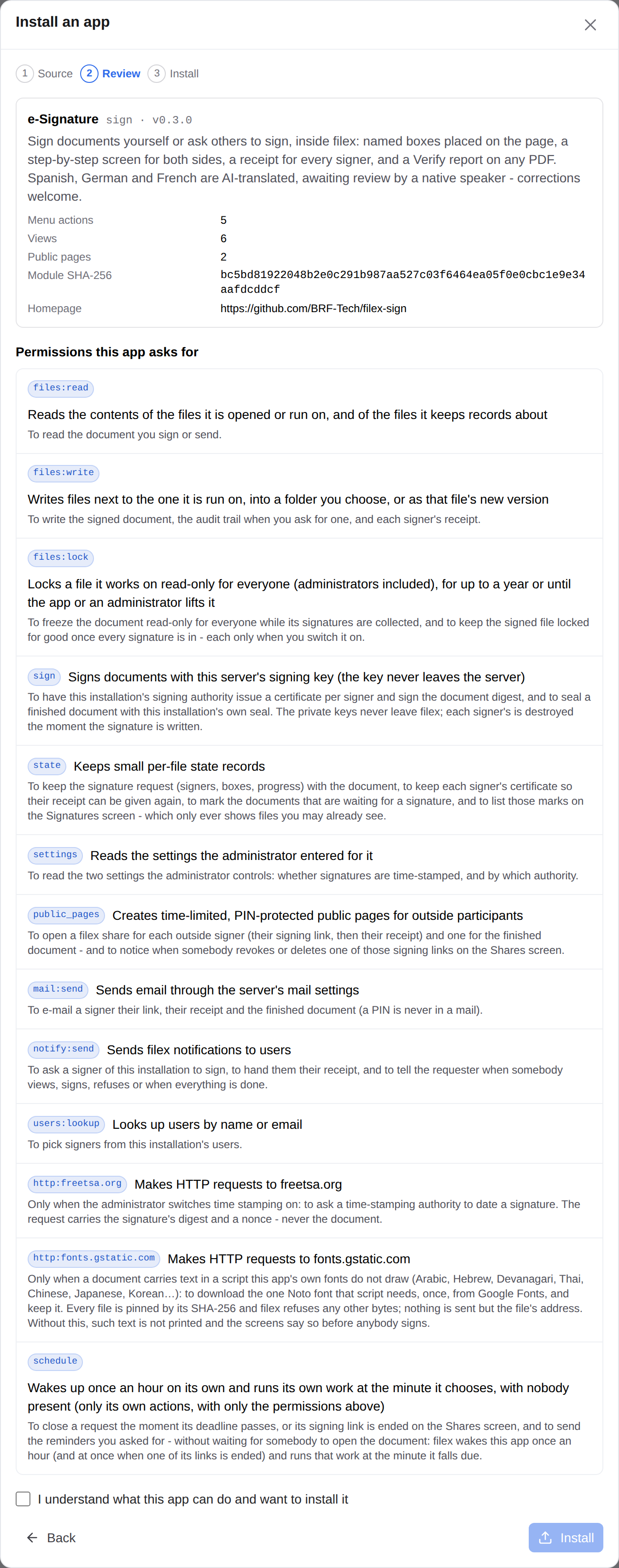
The permission review
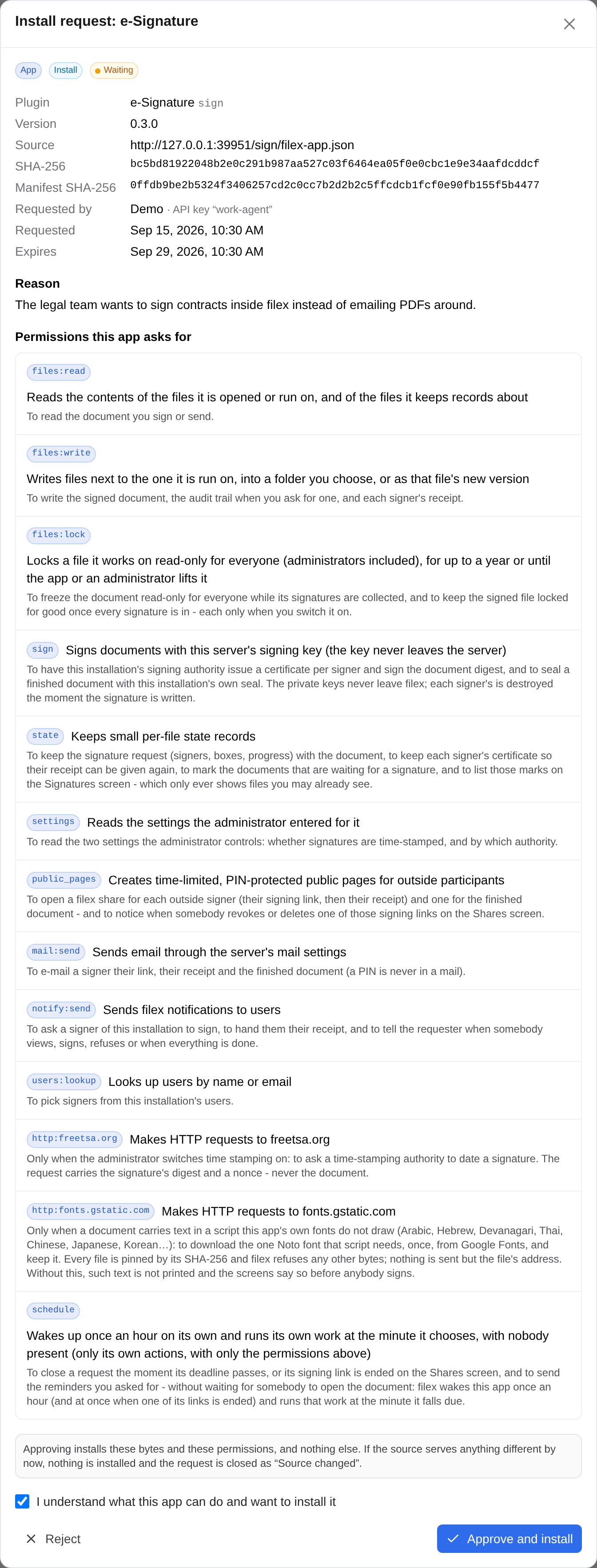
The wizard always stops here before anything is installed: a summary of the app (its label, name and version, description, how many menu actions, views and public pages it has, the module's SHA-256, its homepage), then every permission the manifest asks for - the permission's id, what it allows in plain words, and the reason the author gave for asking. Installing grants exactly that list - no more (an app cannot use a permission it did not declare) and no less (the install is refused with the missing ones named). An upgrade whose new manifest asks for a permission the installed one did not have stops at the same review, and the old version keeps running until you approve. An upgrade's review also says the version jump (Version 1.1.0 → 1.2.0) and how the grant changes: the permissions it adds - marked New, and what you are approving - and those it no longer asks for. What e-Signature asks for, line by line, is under Before you start.
An app whose manifest says it works with other filex versions (its filex range) is said so at the review, in red - "sign 1.2.0 works with filex >=0.48.0; this is filex 0.47.0. It cannot be installed here." - and Install stays off; the install itself answers incompatible.
After Install, filex compiles the module and calls its describe export. A module whose answer does not match the manifest you approved - another name, version or manifest version, or a permission the manifest did not declare - is refused and removed: the manifest is the operator's intent, the module's own answer the proof it is the same program. An app granted schedule whose module has no tick export is refused too.
Signed modules. Set FILEX_PLUGIN_TRUSTED_KEYS and an unsigned or badly signed module is refused at install and at upgrade. ⚠ A GitHub or URL install made through the wizard carries no detached signature, so on such an instance install with Upload files and paste the signature beside the module.
Installing from a store
An app store is a catalogue of reviewed apps (the reference one is filex Apps). Pressing Install on an app there asks for this filex's address and opens an install link on it:
https://files.example.com/admin/store-install#store=https%3A%2F%2Fapps.filex.sh&intent=<token>The link only ever opens a review - the same one as for a repository typed into the wizard - and nothing is installed until Install is pressed. What the link adds is that the store vouches for the app (which repository, which release, which bytes, which permissions) and that a paid app comes with its license.
- Sign in. The page is the admin panel's (
/admin/store-install). Not signed in - or signed out while the page was open - you go through the sign-in (the password form, LDAP or single sign-on) and come back to it: the link waits in that browser tab. Somebody who is not an administrator is taken to their own pages and the store is asked nothing. How the link is kept out of history and logs: What filex checks before the review opens. - Trust the store - the first time only (Trusted stores).
- Read the review - the install review, filled in from the link, marked From store <origin>, with the repository and the release it names. A paid app asks for its license key (Paid apps).
- Install, or close the dialog. Either way the store is told how the link ended (
installedorcancelled), and the link is used up on this filex.
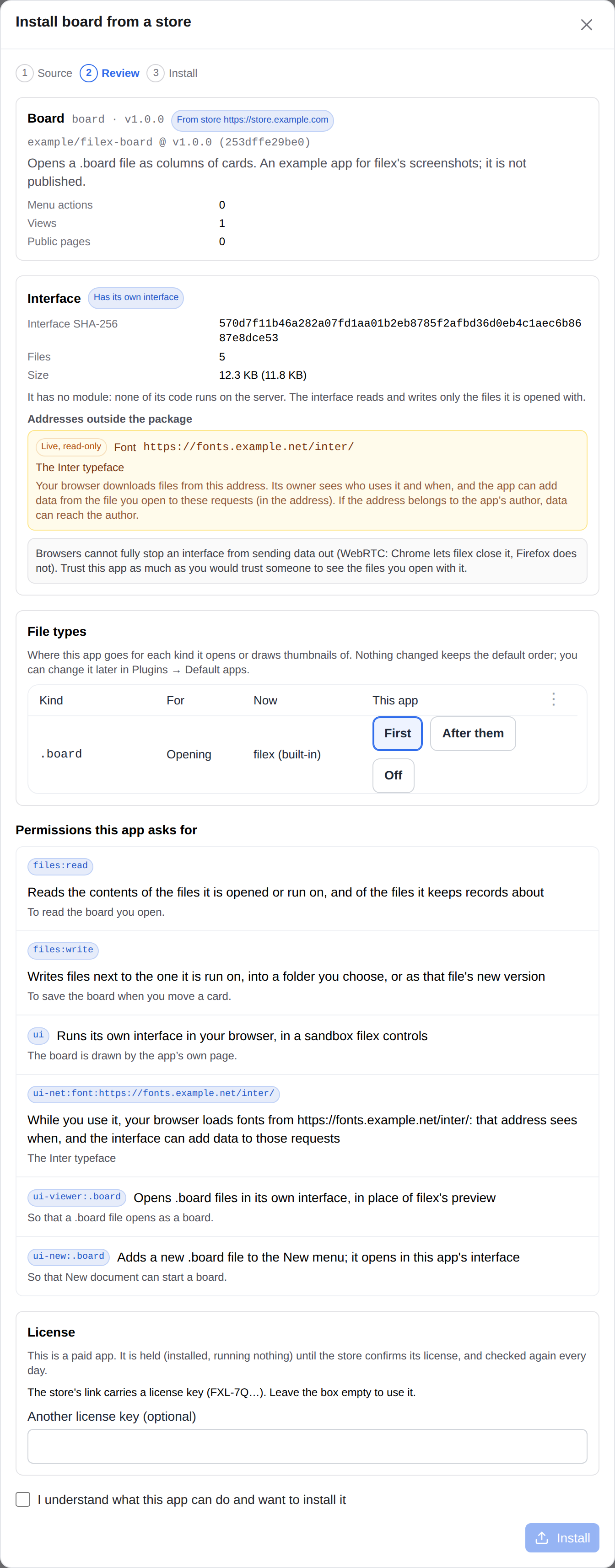
The rest of the store side is reference, under Stores in detail: what filex checks before the review opens, what a store link is held to, trusted stores and their keys, paid apps, the store screen people browse inside filex, and connecting a store.
What the administrator controls after install
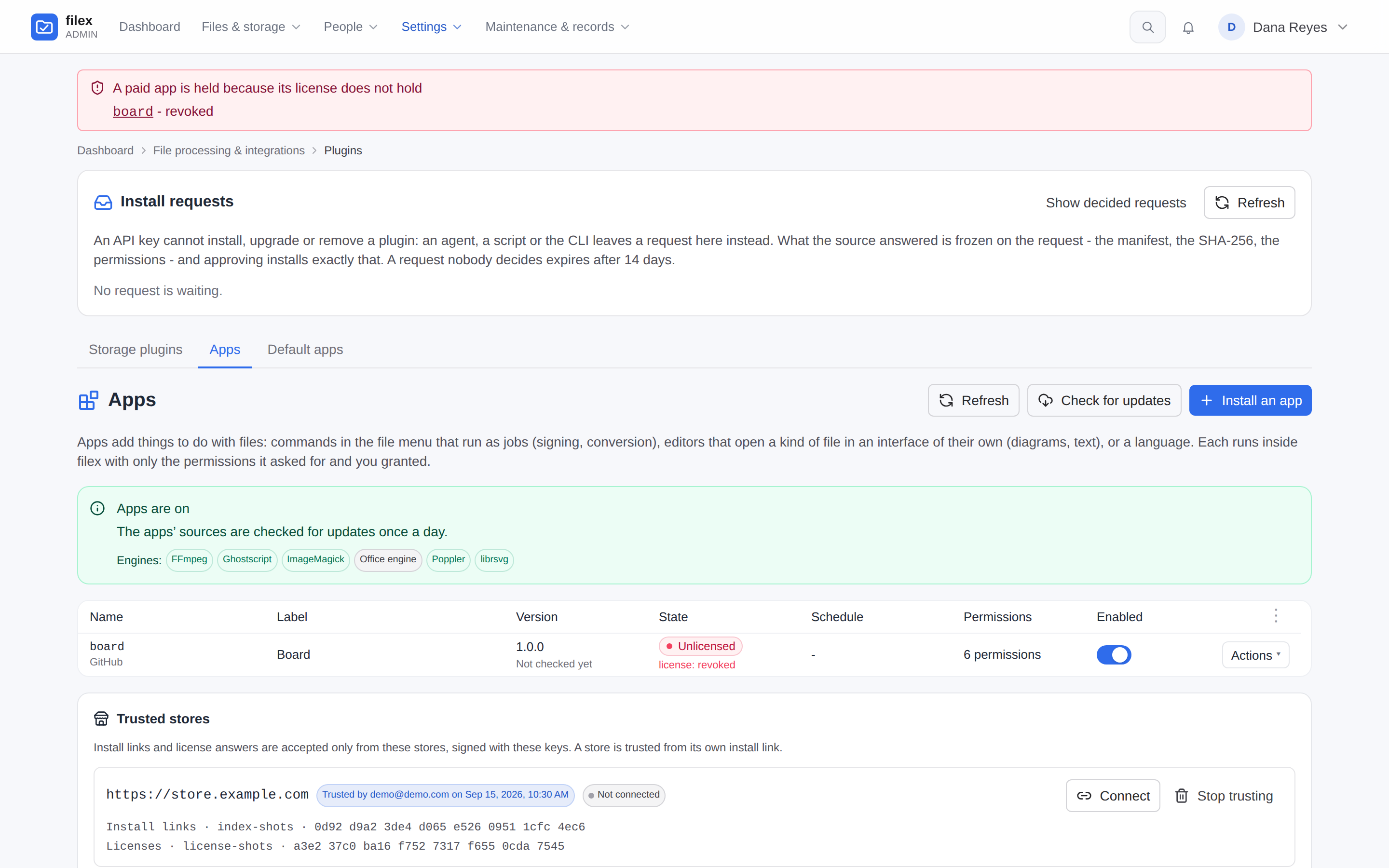
The Apps tab lists every installed app: its name (with the source, and Signed when it is), label, version - and under it what the last update check found (Updates) - state (Running, Off, Refused or Failed, with the reason), a Wakes hourly badge for an app granted schedule, how many permissions it holds, an Enabled switch, and the row's Actions menu: Details, Review update (when there is one), Back to version (when the version the last approval replaced is kept), Upgrade, Remove. A banner above the table says whether apps are on here, which engines this host has, whether signatures are required, and when the apps' sources were last checked for updates; Check for updates beside Refresh asks them now. A language pack sits in the same list - its row says what it is and, per language, how much of this filex it translates.
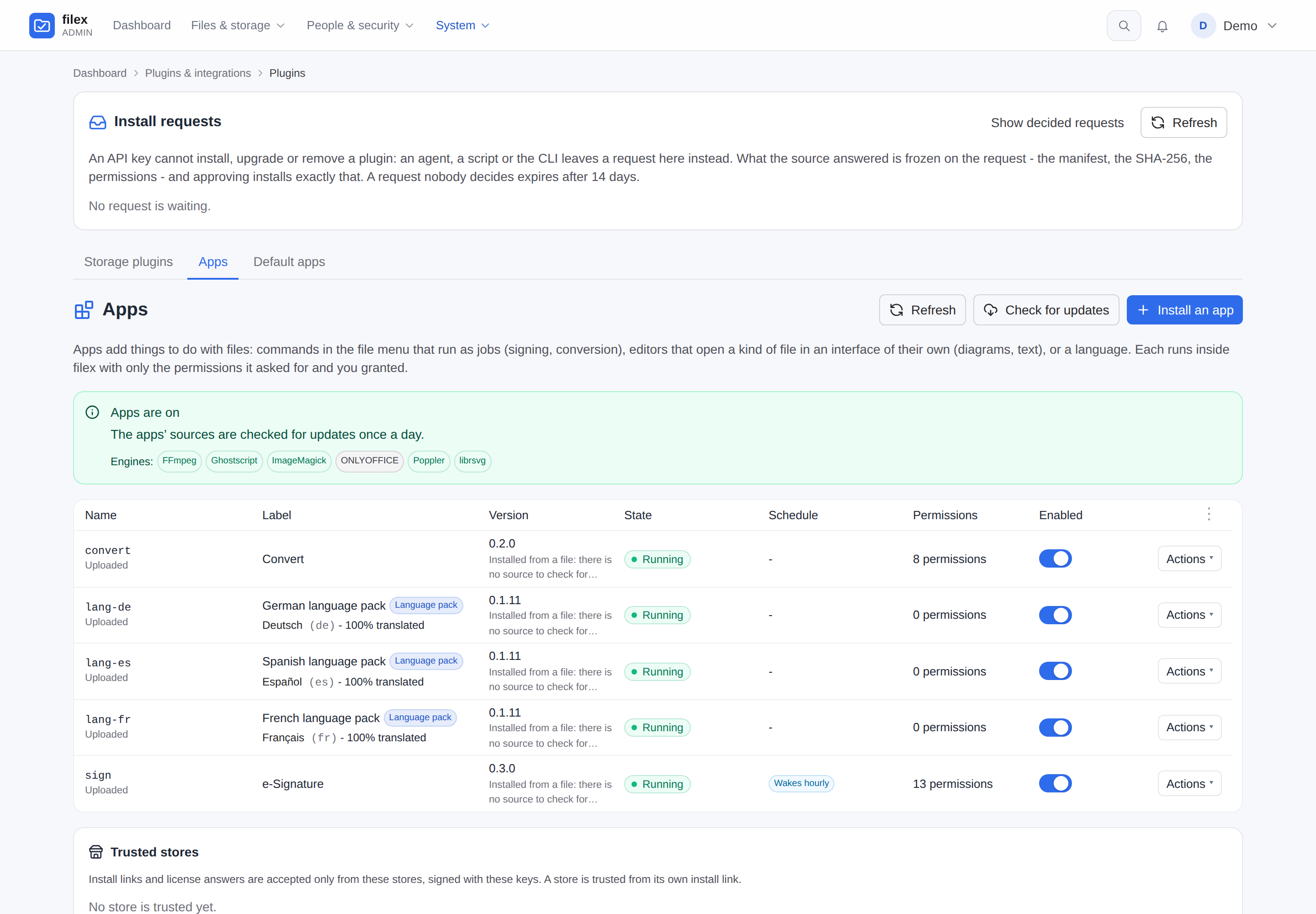
- Enabled. Switching an app off removes it from every menu at once; its data (settings, per-file state, the links it opened) stays - including any file locks it holds, on purpose (a document out for signature does not become editable because the app was switched off), so lift them yourself from the app's details if the flow is never coming back. Its public links answer not available while it is off.
- Upgrade takes the same three sources as an install, and stops at the review when the new version asks for more. Review update is the upgrade to the newer version the app's own source has - no source to type in, the wizard opens on its review (Updates).
- Back to version puts back the version the last approval replaced (Going back), for everybody, after asking; the version it replaces is kept in its turn, so you can go forward the same way.
- Remove deletes the module, its settings, its action overrides, its per-file state (every request it had open), its locks (every lock it held is lifted), its queued work and its schedule. The links it opened stay in Shares but answer not available from that moment. The instance's signing authority is not the app's and stays.
Details opens the app's own page - /admin/plugins/apps/<name>, one section per card, Back returns to the Apps tab:
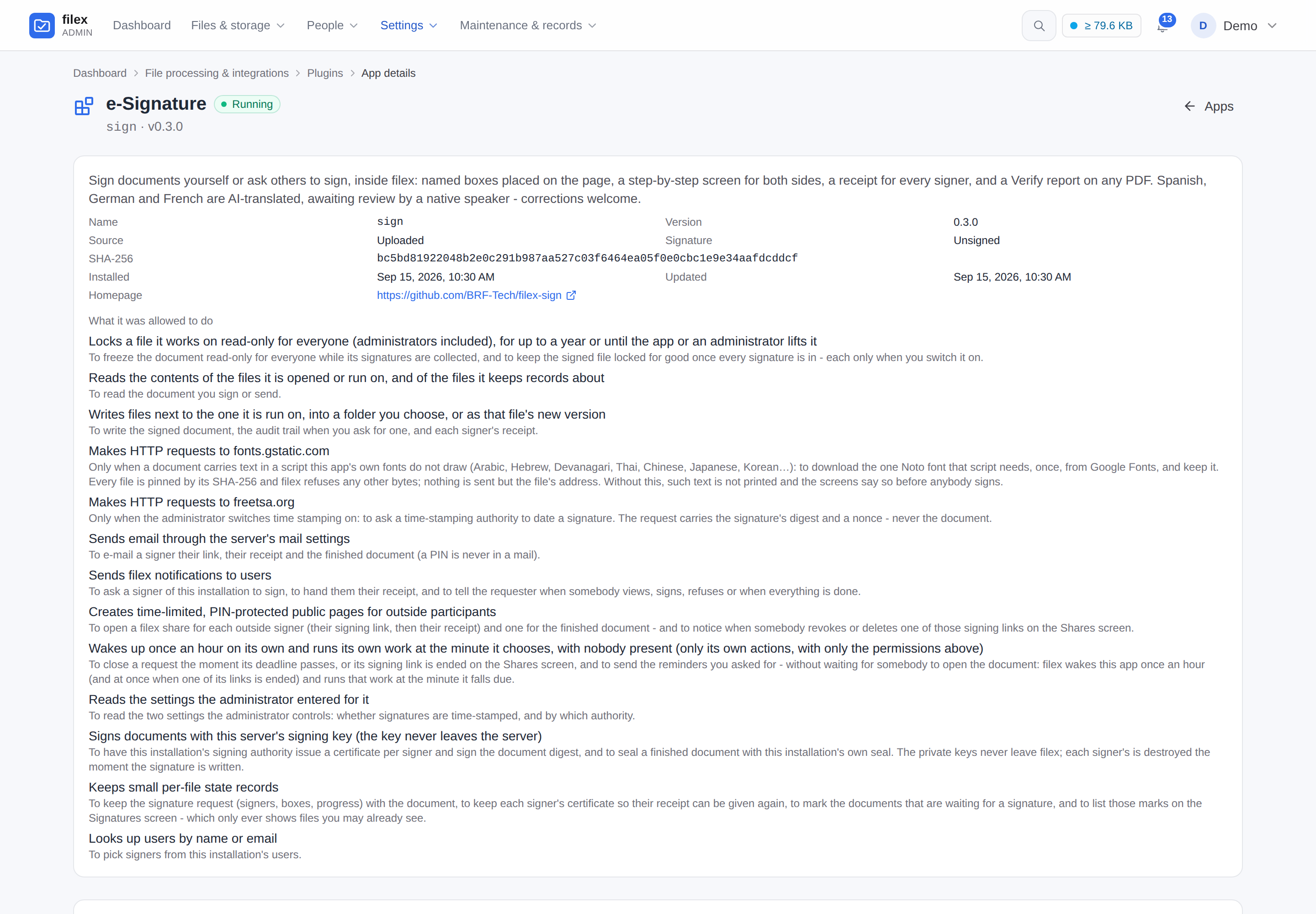
- The facts - name, version, the version kept to go back to, source (for a GitHub install,
https://github.com/<repo>@<tag>), signed or unsigned, SHA-256 (and the interface's, for an app that has one), when it was installed and updated, and what it was allowed to do - in the sentences the install review showed, the permission's key only as a tooltip. - Settings - the form the manifest declares (
settings[], the same field shapes storage drivers use; a choice is a row of buttons, never a dropdown). A secret field is sealed at rest with the instance key and opened only inside the app's ownsettings_getcall; the page shows***, and saving***keeps it. The server checks every value against its field before it stores anything and says in your language which field it refused, whoever saved it (the rules). - Menu actions - one row per action in the file menu: turn it off, restrict it to administrators, or change the applies rule (which kinds, extensions and MIME types it is offered for, and whether several files may be selected). The manifest's rule is the author's default; your changes win. ⚠ Switching an action off is checked again at the moment anything would run it - a scheduled piece of work and a job asked for from a public link included. To stop new e-Signature requests, switch off Request signatures…; to stop the app altogether, switch the app off.
- ⚠ An app's hidden actions (e-Signature's Apply a signer's submission, a scheduled expire) are its machinery, not menu rows: they are not listed, an override sent for one is not stored, and one already in the table is not honoured.
- ⚠ What you change is stored as a change against the manifest - the extensions and MIME types you added and removed, and what you set differently - and applied to the rule the app declares now, with the engines present now. Extensions offered only while an engine is on the server (
applies.engine_ext, such as an office file while an office engine runs to convert it) are listed in the editor with the rest, marked; they appear when the engine is there and go when it is not, unless you took them out. An upgrade that adds an extension reaches a customised action too, and the manifest's own conditions (e-Signature's "only on a file with a request open") are never lost by customising. Keeping only extensions whose engine is missing offers the action on nothing, not on every file; clearing every extension and MIME type is how you say "any file".
- Schedule - for an app granted
scheduleonly: when it wakes next, what its last wake-up decided, and the work it asked for, each piece with its due time, its state and the queue job it became. Read-only. - File locks - the files this app has frozen, with the reason and until when. Lift the lock is the way out for an abandoned flow; it is audited (
app_plugin.unlock), and the app is not told. - Log - the last 500 lines the app logged, plus the host's own warnings about it (a refused host call, a load failure, each wake-up's decision), refreshed every two seconds while the page is open. The ring is in memory: a restart empties it. A line that repeats one of the last 50 is counted on the line already there (
count,lastinGET /api/admin/app-plugins/{id}/logs) - one rule for app plugins and storage plugins alike (PLUGINS.md → Plugin log).
App permissions
An app may declare permissions of its own - the actions an organisation would want to limit to some people - and you hand them out per role and per person, like the permissions filex has itself. A signing app can put Request signatures behind one: everybody may sign what they were sent, and only the roles you choose may send documents round for signature.
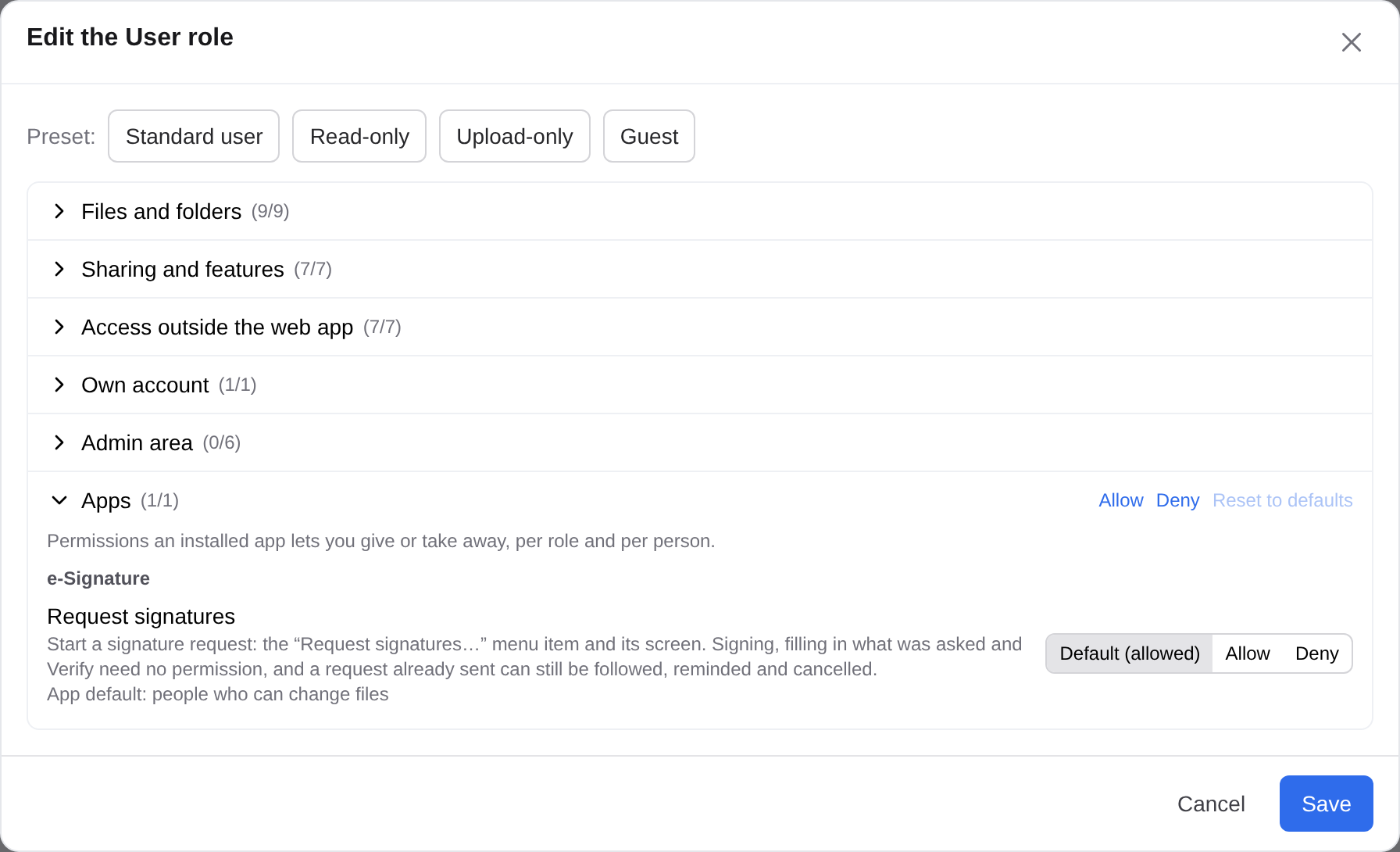
- Where you decide. Admin → Roles: every role's editor has an Apps group (Default (…) / Allow / Deny per app permission), and a person's page has the same rows among their exceptions. The default is the app's -
viewer(every account),user(accounts that can change files, the usual choice and what an app gets when it names none) oradmin(administrators only, until you grant it) - and holds until you decide otherwise. The key (app.sign.request), the order the layers are asked in and the API: PERMISSIONS.md → App permissions. - What a person without it sees. The action is not in their file menu, and a screen, details section or home screen that needs it is not drawn; every door that starts the app's work for them asks again and refuses with
403 permission_denied, naming the permission, where the answer came from (source) and a sentence in their language (PERMISSIONS.md → Refusals). - What the app is told. Every job, screen event and interface call tells the app which of its permissions the person holds, decided exactly as the doors decide them, so its own screens can leave out a hint to something the reader cannot do (e-Signature's Signatures panel, Verify screen and Signatures screen suggest Request signatures… only to people who hold it).
- A delegated administrator leaves a person's app permissions as they are: what an app key grants depends on the app, so "only what you hold" cannot be judged for it.
- Removing the app takes its permissions out of the list; decisions about them stay stored and are simply never asked, so reinstalling it brings them back.
- For the app's author: the manifest declares them (
user_permissions, andrequireson each action or screen - PLUGIN-KIT.md → User permissions); such a manifest needs filex 0.49.0 or later, so the app says"filex": ">=0.49.0".
Updates
An app installed from a GitHub repository or an address follows it. Once a day - and whenever you press Check for updates on the Apps tab - filex asks each app's source whether there is a newer version this filex can run, and tells you.
⚠⚠ Nothing updates itself - not an app with a module, not an app with its own interface, not a language pack, not a storage plugin. A newer version waits for an administrator to approve it, and everybody then uses the version approved: an app's interface is code that runs in every person's browser, so the administrator who approved a version decides the next one.
| Installed from | Where filex looks for a newer version |
|---|---|
a GitHub repository at a release tag (v0.1.1 - how apps with a module are released) | the repository's releases: the newest one that is neither a draft nor a pre-release, whose filex-app.json at that tag names the same app and whose filex range lets this filex in. A release that needs a newer filex - by its range, or because its manifest carries fields this filex does not know - is stepped over to the newest one that does not (up to five are read per check). The release's notes come with it, for the review |
a GitHub repository at a branch (main - how language packs are published) | that branch's filex-app.json, when its version is higher |
| an address | the manifest's address again; the module from the new manifest's wasm.url when that is a full address, else from the address it was installed from |
| uploaded files | nowhere - the row says Installed from a file: there is no source to check for updates |
"Newer" is a higher semantic version in the manifest's version; a pre-release (1.2.0-rc.1) is never taken.
Approving a newer version
A row with a newer version says Update available - or Needs approval when it asks for a new permission, or when a language pack now brings a module (code that runs where nothing did). Actions → Review update opens the review of that version, fetched from the app's own source, and says what it changes: the version jump; the permissions it adds (marked New) and drops; the module and the interface by their SHA-256 before and after (and whether a module arrives where there was none), with the interface files added, removed and changed in a list you can open; the filex range and the signature when they change; and the source's release notes - a GitHub release's body, drawn as Markdown through the explorer's preview pipeline and its sanitizer, so nothing in it runs, and a picture in it from another server waits behind a placeholder until you load it, as in a preview.
Upgrade installs it for everybody once you have ticked the box. A newer version is fetched and checked exactly as an install is - HTTPS only, public addresses only (after DNS and on every redirect), the size caps, the SHA-256 its manifest pins, the signature on an instance that requires one, the module's own description of itself - and installed through the same upgrade: the old files are kept until the new module has proven itself, and put back when it does not. On an instance that only accepts signed apps (FILEX_PLUGIN_TRUSTED_KEYS) a repository carries no detached signature: upload the signed module to upgrade. An app that is switched off can be upgraded too, and stays off.
Going back
The version an approval replaced is kept - its module, manifest, interface and mirrored files, and the permissions it ran under - one version per app, under <FILEX_APP_PLUGINS_DIR>/_versions/. Actions → Back to version puts it back for everybody, after asking, without a new approval of its permissions (they were approved when that version was installed). The version it replaces is kept in its turn, so going forward again is the same action.
A kept version is held to the hashes recorded when it was replaced: files that changed on disk since are refused, and the running version stays. Removing the app removes what it kept. A browser tab still open on the replaced interface keeps loading its files until it is reloaded - the address carries the interface's hash, so an approval never swaps files under an open page.
What you are told
- The Version cell, under the version: Update available (and the jump,
1.0.0 → 1.0.1), Needs approval (and what it adds), Could not check (and why), a newer version that needs a newer filex, Up to date, or Not checked yet - and, when one is kept, Version 0.9.0 is kept to go back to. (A row filex 0.47 wrote may still say Update failed: the version its automatic update tried and undid.) - The bell, administrators only: once per version, not every day, a newer one that waits for you; and every approved change - "Spanish language pack is now 0.1.4", or back. A source that could not be read is not rung (an air-gapped server would hear it every day); the list says it.
- The people using the app: an interface that is open when a version is approved says so above itself, with Reload (which asks about unsaved changes first); the first time someone opens the app after an approval, it says "… was updated to 1.3.0" - once per person.
- The app's Log: every check, every upgrade and every return. The Audit log:
app_plugin.upgradeandapp_plugin.rollback, each naming the administrator, withfrom,to, the permissions added and dropped, and the interface's hashes when they changed.
Which filex an app works with
An app's manifest may say which filex versions it works with - filex, a range such as >=0.47.0 <0.60.0 (the syntax: PLUGIN-KIT.md). filex does not install, upgrade to or update to a version whose range leaves it out; the review says so first, and the update check takes the newest version that fits.
An installed app that filex has been upgraded past keeps running, marked Not compatible with this filex on its row with the range it declares, and a line in its log: the range is its author's promise, not a proof, and switching it off on an upgrade would take a language or a signing flow away from everybody with nobody having decided it. Switch it off yourself if it misbehaves. A development build of filex checks no range at all (the banner says so), and a release candidate counts as its release (PLUGIN-KIT.md).
Upgrading filex does not make you chase app updates: an app built for a release keeps working unchanged for at least 6 minor releases or 12 months, whichever is longer. An old form filex has replaced is refused only after that, and only once a CHANGELOG has announced it a release ahead (PLUGIN-KIT.md → Compatibility window).
Switching the check off, restarts and shutdowns
FILEX_APP_PLUGIN_UPDATE_CHECK=0 stops the daily check: no request leaves the server for it - what an air-gapped install wants. Check for updates still asks when you press it. A demo instance never checks and never updates.
The time of the last check is stored, so a restart neither skips a day nor checks at every boot (a check that is due runs two minutes after start). One check runs at a time: Check for updates pressed while the daily one runs waits for it. A shutdown waits for an update in flight to finish its swap, and a server that stopped in the middle of one - a crash, a power cut - puts the previous version back at the next start.
Apps that wake up on their own
An app granted the schedule permission also runs when nobody clicked: filex wakes it once an hour, it answers with the work it wants done and when, and filex runs each piece at the minute it named. That is how a signature request closes itself at its deadline and tells both sides, and how the reminders a requester asked for go out.
- It is a permission, in the install review like every other: "Wakes up once an hour on its own and runs its own work at the minute it chooses, with nobody present." An app you never granted it is never woken. The app list marks the ones you did.
- It runs the app's own actions, with only the permissions you already granted - it cannot reach further asleep than it can awake. But no person is behind it, so no one's file permissions narrow it: on a multi-tenant instance this is an instance-wide grant. Give it to apps you would let run unattended.
- You see every run where you already look: each scheduled piece of work is an ordinary job in the queue tray (
plugin-action, with the app, the action and its message, and no person as its actor), and every wake-up writes a line to the app's log (wake-up: <what the app said> - N scheduled). - Your switches still win. Switch the app off and its pending work is dropped with the reason recorded, while the wake-up survives so turning it back on costs an hour at most. Switch one action off and nothing scheduled can run it - checked again at the moment it would run. Remove the app and its schedule goes with it.
FILEX_APP_PLUGINS_DISABLED=1means nothing is ever woken, and demo mode stops the schedule even if the runtime is on.- A wake-up that crashes or hangs is torn down at its budget (30 seconds at most), recorded, and asked again next hour; nothing retries in between.
The contract - what a wake-up may touch, the bounds, two servers on one database - is APP-PLUGINS-API.md → The scheduled wake-up.
What a person sees
Menu rows. Right-click a file (or several) and the actions whose rule accepts the selection appear under the built-in ones, and a row can follow the file's state (e-Signature offers Request signatures… on a document with nothing pending and Sign / Fill on one with a request open). What is never offered:
- a writing action without editor on the file, or on a read-only storage (the server says on each action whether a click would go through, and the menu shows only those);
- files inside an encrypted folder and single encrypted files (
.fxe) - the server has no key to hand the app, and every app door refuses them (403 encrypted) - wherever they are listed (the folder, Recent, Starred, a tag view, a search, Shared with me); nor is Open with an app, except one grantedfiles:e2e-plaintexton a file of a folder you have unlocked (Editing in an app); - filex's own folders (the trash, the version history): a run on a path there is answered not found;
- an action that needs one of the app's own permissions, to people who do not hold it (App permissions).
The menu's filter is a convenience; the server checks all of this again when the action runs.
Locks. An app may lock a file while its flow runs (a document out for signature): the file turns read-only for everyone, administrators included - no saves, no new versions, no rename, move or delete of the file or of the folders above it, and no upload over it - until the app lifts the lock or its time limit passes (at most a year; 30 days unless the app picks), or, for a lock the app asked for with no end, until an administrator lifts it. The row shows a Locked badge, and the details say which app holds it, why and until when. Siblings and uploads into the same folder are unaffected; the locking app itself still writes its result into the file.
Jobs. Running an action queues a job in the same tray as copies and moves: progress, a message the app chose, Cancel, and Open on the output once it landed. Outputs are written next to the input under the name the app or its manifest chose (a taken name gets a suffix, nothing is overwritten), or as a new version of the input when the action says so - through the same path every other write takes, so versioning, antivirus, search and the activity feed all see them.
Screens. Some actions open a screen first (a conversion's options, a signing wizard). The app describes it as data - fields, steps, a list, a people picker, a PDF with boxes to name or to place, a signature pad - and filex draws it with its own components, as a dialog or, for wizards that want the whole window, as a full page in a new tab. No app ships HTML or script into your browser this way; anything not in filex's catalogue of screen parts is dropped before it is drawn. A screen may let you choose where the result goes - a new version, a new file beside it, or a name of your own. Three rules hold on every screen, whichever app drew it: every choice is visible (a row of buttons, never a dropdown), nothing is hidden behind "advanced", and one step asks one thing (at most one primary button beside Back). A field may appear or become required depending on another's answer; a field that is not showing sends no value - the server drops it.
A screen can take you to a file. An app's home screen is a list of documents: click a row and you land on the file with the right screen already open. filex checks the destination against your permissions, not the app's, so a screen never sends you somewhere you could not have gone yourself - the link simply is not offered.
Details panel and navigation. An app can add a section to a file's details (e-Signature's Signatures: who has signed, who is still to), and a home screen under Apps in the explorer's navigation panel - and, for administrators, under Apps in the admin panel's navigation.
Its own language, and maybe yours. An app declares the languages it speaks, and filex refuses to install one whose own screens are missing a language it promised. An app may also ship a language for filex itself: a language the interface did not have appears in every picker (the settings dialog, public links) while the app is installed, and leaves with it.
Language packs. An app that ONLY adds languages is a language pack: a manifest with no module, installed from the manifest alone (Files → the manifest, or a GitHub repository holding
filex-app.json), that never runs anything. It translates the interface and the text the server writes (emails, notifications, the no-JavaScript pages behind a link, the install review), each in its reader's language, and its row says, per language, how much of this filex it translates - Español - 97% translated · the rest shows in English. A right-to-left language lays the interface out right to left (RTL.md). Writing one: PLUGIN-KIT.md → Writing a language pack and the template repository.Notifications and mail. An app may notify people through the bell (
plugin.notice, subscribable like any other event - see NOTIFICATIONS.md) - the whole instance or one person, with a link that opens the file and the app's screen on it (a "please sign" lands you in the signing screen). It may also send plain-text mail through the server's SMTP - following each person's own notification settings, at most 60 an hour, always signed off with the app's name.
An app's own interface
Besides the screens filex draws for it, an app may bring its own interface - HTML, CSS and JavaScript its author wrote: a diagram editor, a text editor for a format of its own, a viewer. An app is a module, an interface, or both:
| The app has | Example |
|---|---|
| a module (the WebAssembly engine) | Convert, e-Signature |
| an interface | draw.io, filextext: everything happens in the browser, there is nothing for a module to do |
| both | an editor that asks its module for the heavy part |
filex serves the interface from the app's own package and runs it in a sandboxed frame:
- The package is what you approved. The interface is a zip pinned by its SHA-256 in the manifest (or checked at upload), read once at install and never unpacked: every file the browser gets is looked up in the zip's own index. A file the package does not hold does not exist.
- The frame is given no connection, no storage and no cookie. It is an opaque origin (
sandbox="allow-scripts", neverallow-same-origin), and every page of the interface is served with a policy filex builds from the app's grant -connect-src 'none', scripts only from the package, no frame of its own, no form, no plug-in, unless you granted one of the narrow exceptions below. The interface cannot read filex's session, call filex's API or see the page around it. - Everything else goes through filex. The interface talks to filex over a message channel filex set up with that one frame, and filex decides every call: it reads only the files the interface was opened with, saves only over those (a new version, or the draft it is), and only when the app holds
files:read/files:writeand the person may write the file. The server checks every save again.
⚠ What a sandbox cannot promise. Browsers cannot entirely stop a page from sending data out: WebRTC connections ignore a page's content policy. filex closes what can be closed - Chrome honours a Connection-Allowlist filex sends, in Firefox a script filex runs before the app's own removes WebRTC - but on a page that embeds the explorer without a content policy of its own, and in browsers that do not know these measures, an interface that wants to send what it can see may find a way. Trust an app with an interface as far as you trust its author with the files you open in it. The install review says this in so many words; it never says the app "cannot reach the network".
Decided on purpose:
- Any page may frame an interface (its pages carry no
frame-ancestors, and filex adds none). The explorer is embedded in other sites (the web component, the desktop app) that filex cannot list, and an interface withui:frame-packageframes its own pages from its sandbox, an opaque origin noframe-ancestorssource matches, not even*. A page that frames an interface directly, without filex, gets nothing from it: the interface holds no session, no storage and no file of the person's - everything it has comes from the page that answered its hello. - An interface's address is built from the host it was asked on, not from
FILEX_PUBLIC_URL: the same filex answers on a LAN address, a tenant's host and its public name, and the page and its interface must be on the same one. The page is revalidated at every opening and varies onHost, so no cache hands one host's answer to another.
What the review shows
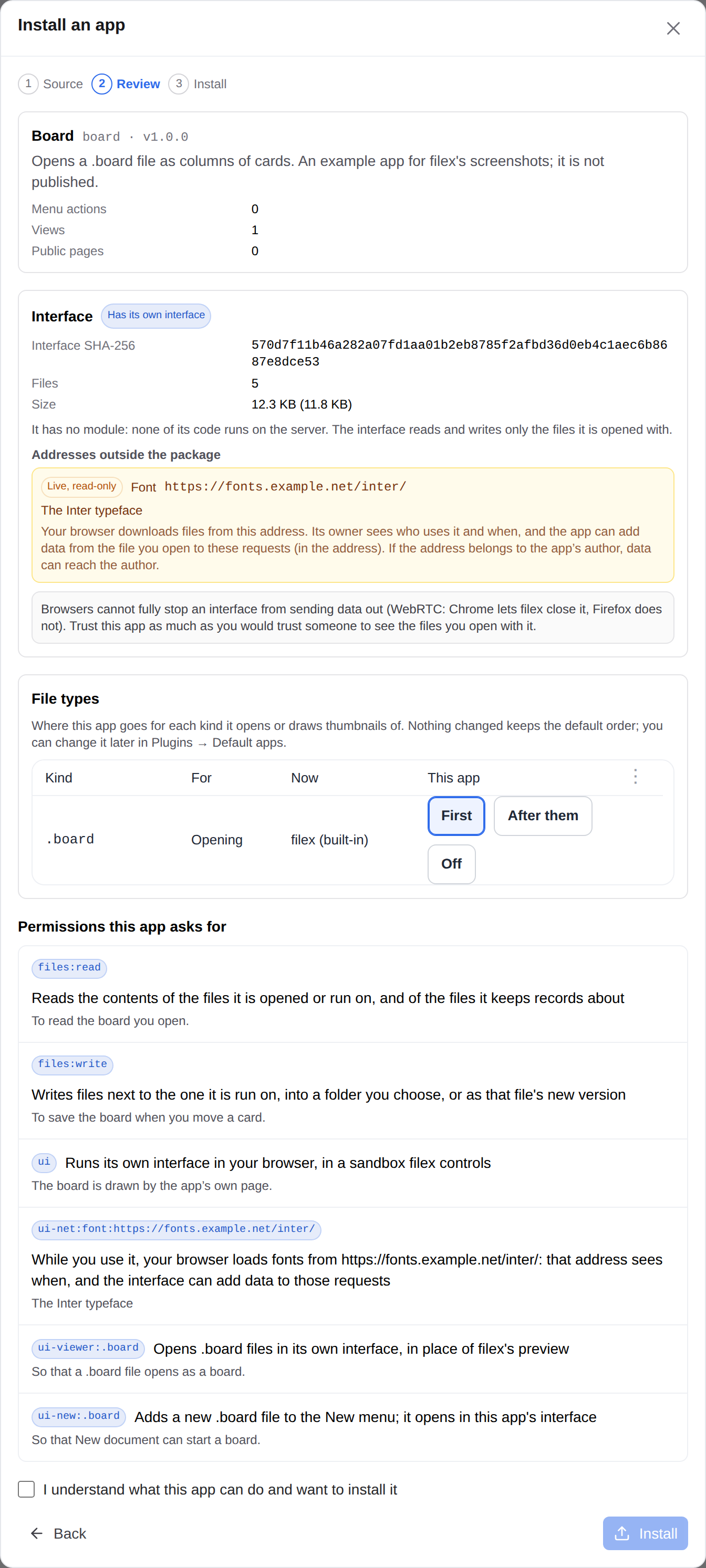
On top of the permission list, an app with an interface gets an Interface group:
- Has its own interface, the package's SHA-256, its size and how many files it holds, and whether the app also has a module.
- Every address outside the package the interface loads, one line each, with the author's reason:
- Mirrored (green) - filex downloads this file once and serves it itself; browsers never ask this address. The file is pinned by its SHA-256 at install; a download that does not match is refused. Not a permission.
- Live, read only (yellow) - your browser loads files from this address. Its owner sees who uses the app and when, and the interface can add data from the file you opened to those requests (in the address). If the address belongs to the app's author, that means the data can reach the author. A live address is a permission (
ui-net:…) you grant like any other; only styles, fonts, images and audio or video can be live. Scripts are never loaded from outside the package, and an interface never exchanges data with an address - an app that needs data asks its module, whosehttp:<host>permission you approve and whose requests go through the server. - Exceptions, each a permission with its own line in plain words (what each one lets the page do, exactly: APP-PLUGINS-API.md → Permissions an interface adds):
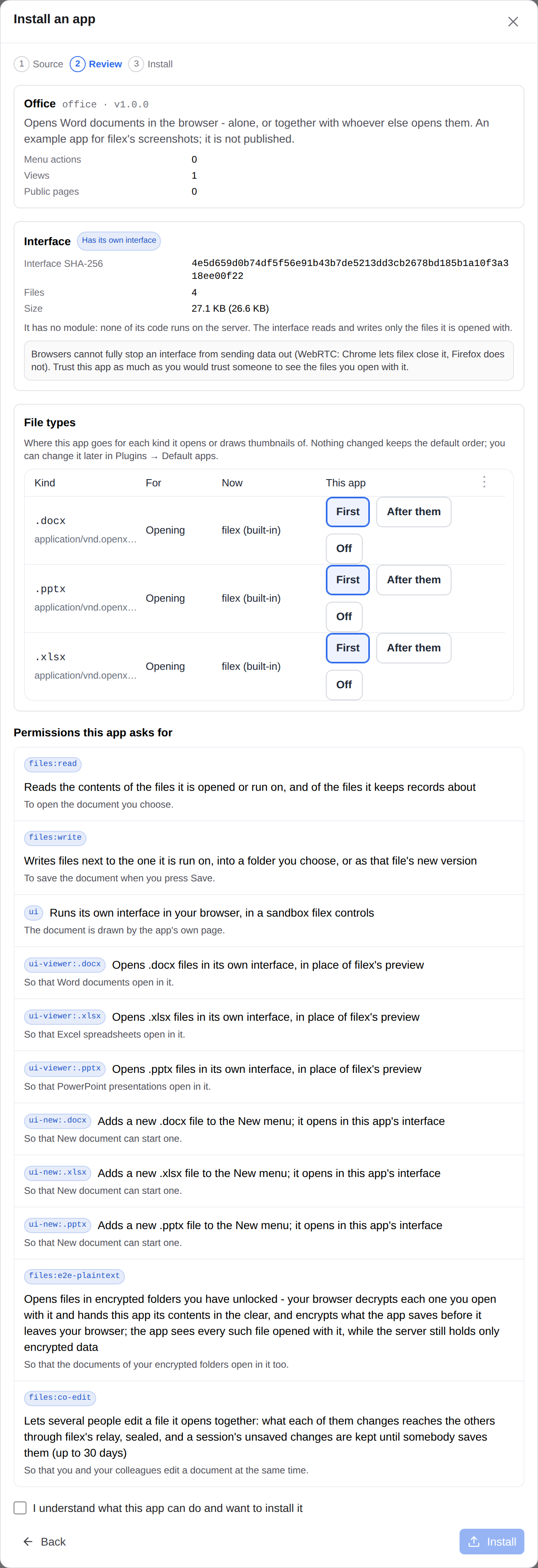
ui:evalandui:wasm-eval(code or WebAssembly the page builds while it runs - no channel opens, but a mistake in the interface is easier to exploit);ui:download(hands you a file to keep, each time you allow it);ui:package-fetch(reads this version's own package files, nothing else);ui:frame-package(opens pages of its own package in frames, as the office editor app does with ONLYOFFICE's editor - never another site, app, filex page or adata:/blob:page);ui:connect-blob(readsblob:addresses it made itself, which reach no server);ui:print(hands filex a PDF to print, each time you allow it - the print dialog can save it too). The last three need filex 0.55 or later ("filex": ">=0.55.0"). - Opens files in encrypted folders you have unlocked -
files:e2e-plaintext: your browser decrypts each such file you open with the app and encrypts what it saves. ⚠ Read it as what it is: the app sees every such file opened with it - the encryption keeps the server out, not this app. Needs"filex": ">=0.56.0"(E2E-ENCRYPTION.md → Editing in an app). - Edits files together with other people -
files:co-edit: changes reach the others through filex's relay, sealed; the app never holds a key or opens a connection. Needs"filex": ">=0.56.0", the server'sFILEX_SECRET_KEYin an ordinary folder andfiles:e2e-plaintextin an encrypted one (APP-PLUGINS-API.md → Editing together, CONFIGURATION.md → Editing together).
- The honest note about WebRTC, always.
An upgrade that adds an address, changes one, or adds an exception is a new permission and stops at the review like any other.
The review of an app that edits office documents (filex 0.56; a small example app, written for these pictures): the two permissions filex derives from its manifest - files:e2e-plaintext and files:co-edit - in filex's own words, under the author's reasons:
What a person sees
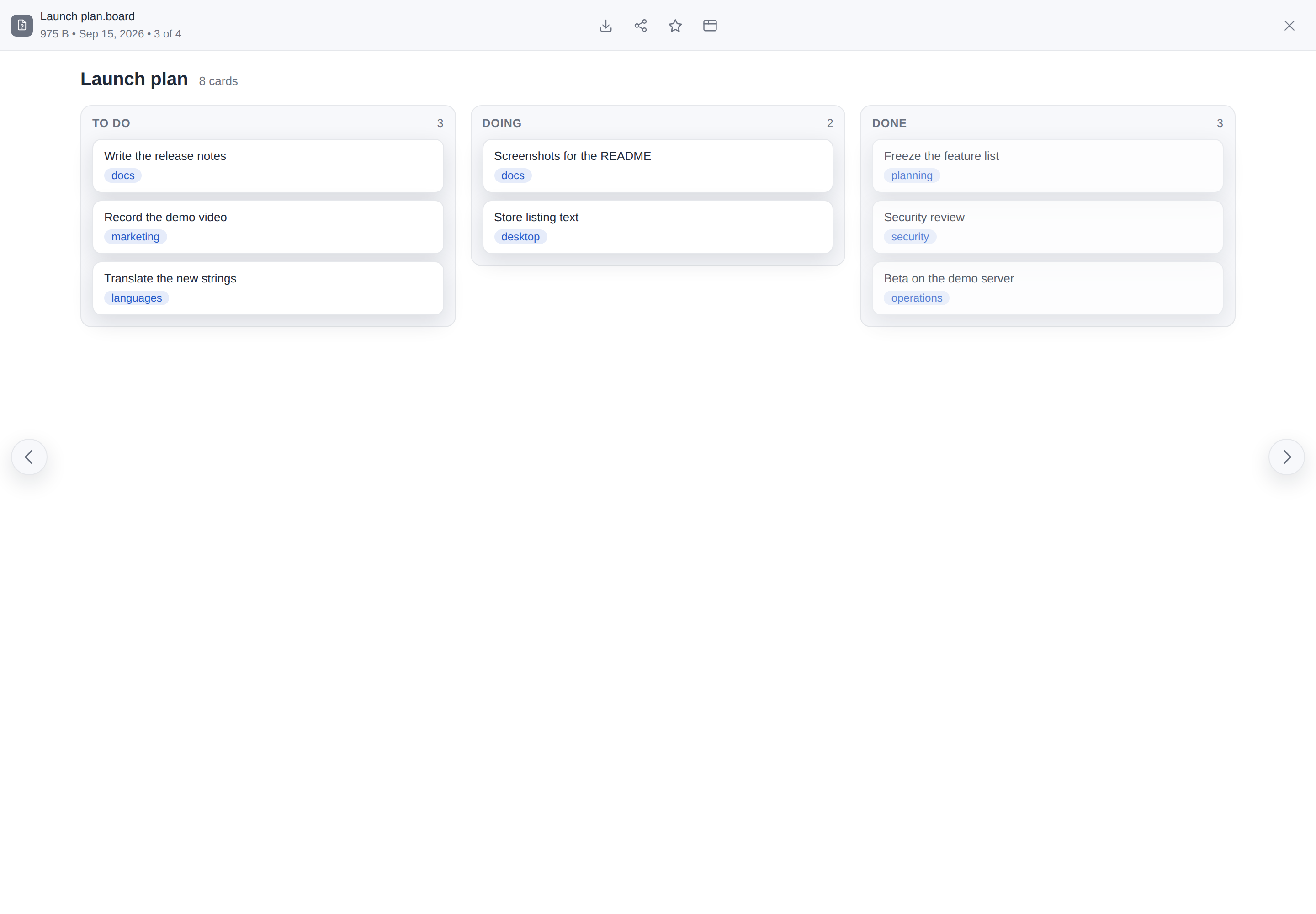
- A file type the app opens. An app whose interface is a viewer (a Markdown editor for
.md, say) opens those files: double-click, Open and Preview show it in the preview's place, under the same bar; Open with the app in the file menu picks it when several apps open the type, and Open in new tab opens it in a tab of its own. Saving writes a new version (with versioning on, the previous one is kept); a document made with New document is a draft until its first Save (Drafts) and the app writes into the draft without knowing it. - Editing together (
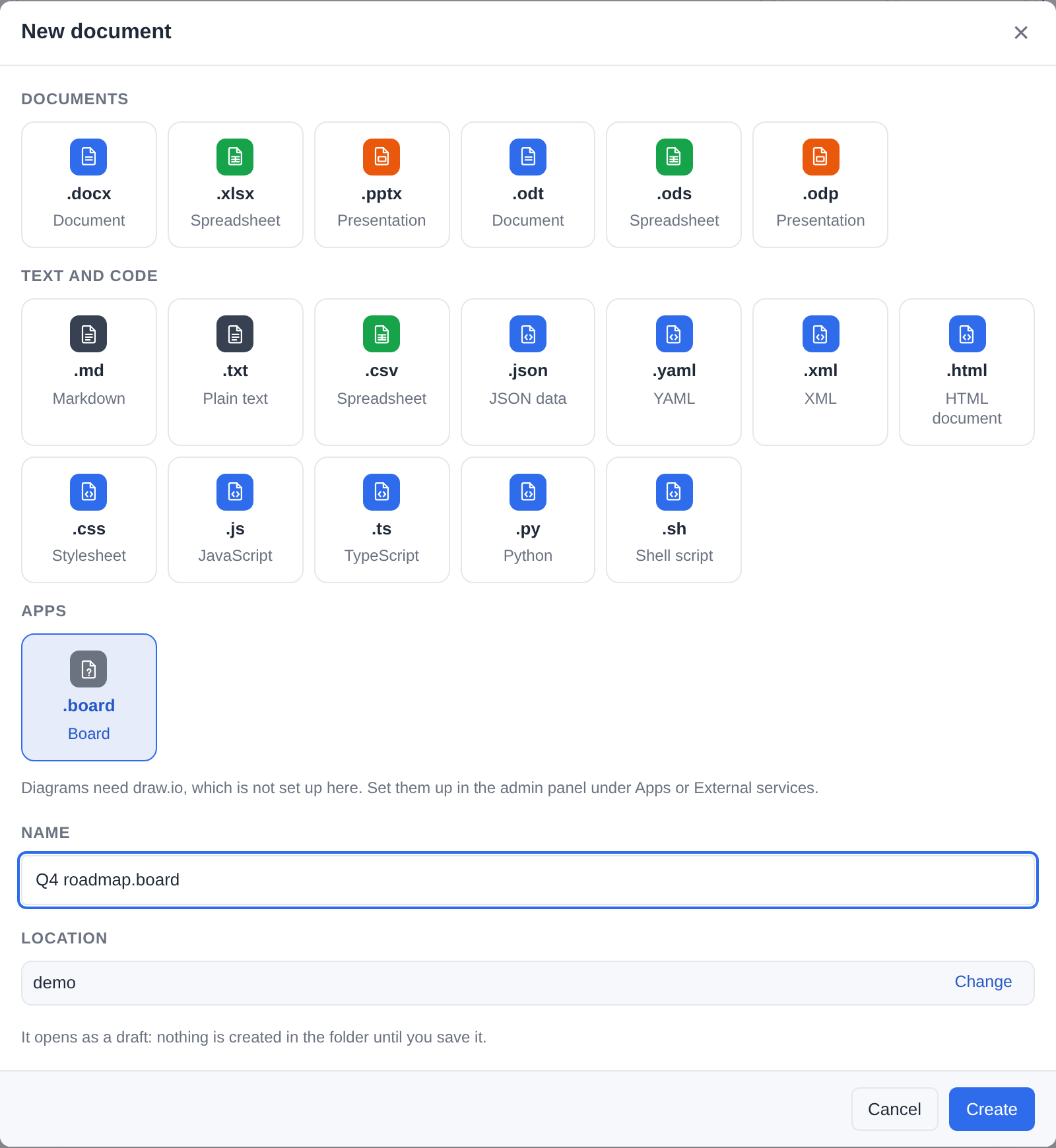
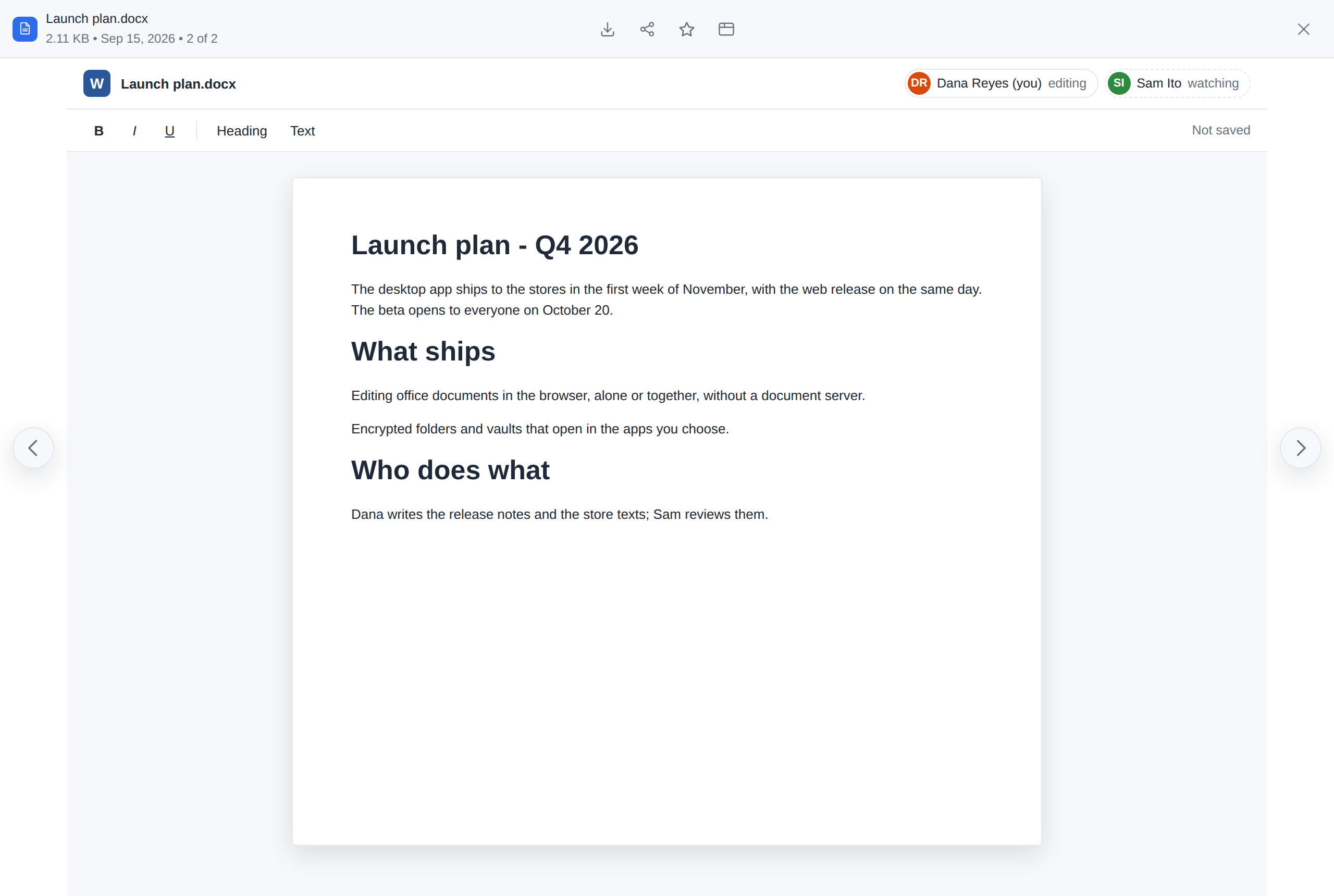
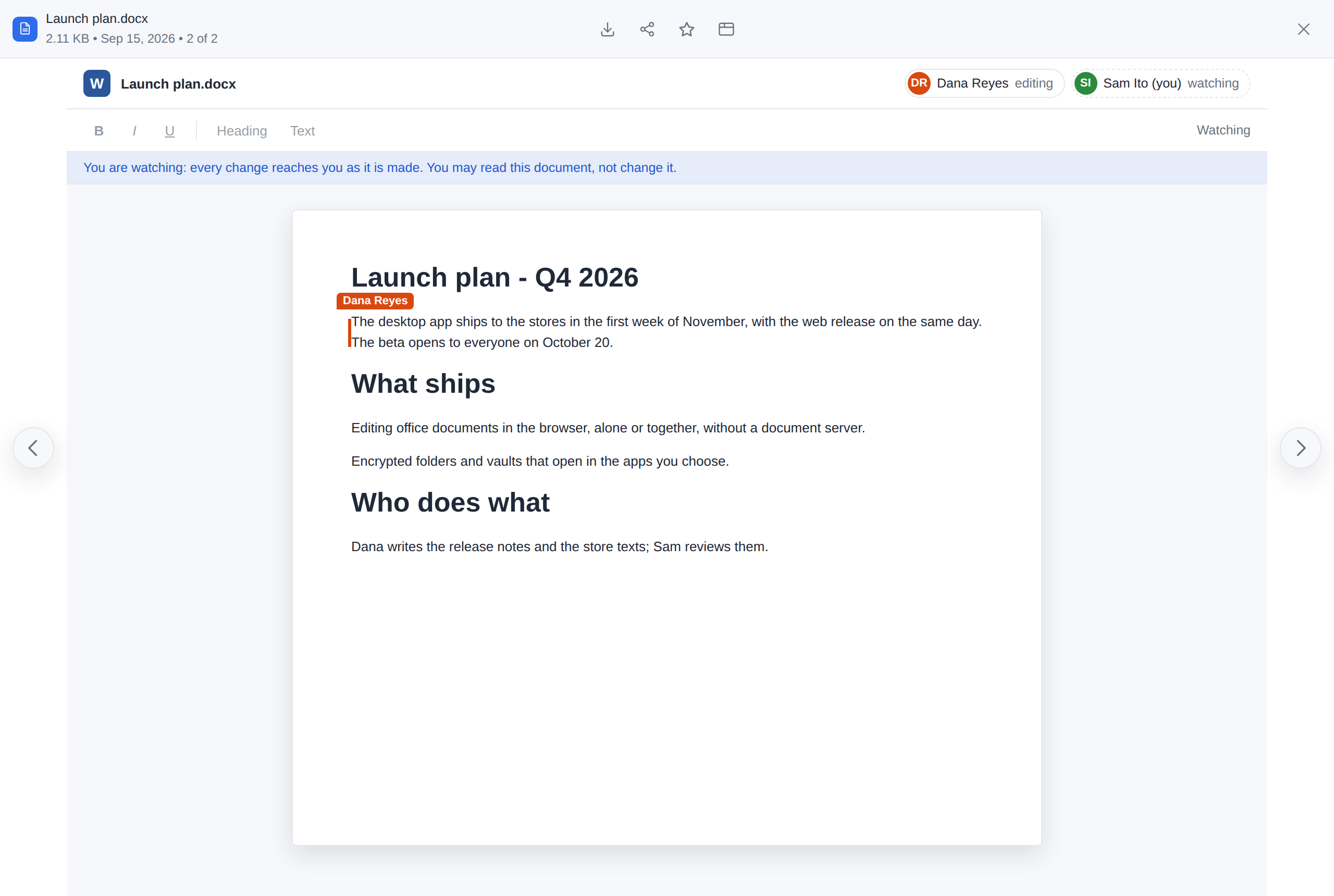
files:co-edit). Two people who open the same file in such an app edit it together, each seeing the other's changes as they are made and who is in the editor. Whoever opens it later joins the same session - the next day too, while it holds changes nobody saved (for 30 days); a person who may only read the file watches. A change made while the connection is gone is kept in the browser and sent when it is back, or when the file is opened again - after asking, in a sentence above the editor, when somebody else changed the document meanwhile. The last one who may write saves what is not saved yet when they leave (APP-PLUGINS-API.md → Editing together). - New files of the app's kind. An app may add rows to New document (draw.io: draw.io diagram), under Apps, in the app's own words. The file is made from the app's template (or empty) and opens in the app - a draft until its first save. The review lists each kind (Adds a new .drawio file to the New menu).
- Unsaved changes. An interface says when it holds changes it has not saved; closing it then asks Save and close, Close without saving or Keep editing, and the browser asks before the tab goes.
- Save as. An interface may save a new file (a copy, an export of its own kind): filex asks where in its own folder dialog - the one Move to… uses, titled with the app's name and the file's - opened in the file's folder. Only a folder you may write into can be chosen; closing the dialog saves nothing. The app saves only its own kind of file there, and never into an encrypted folder. A file you may only view can still be saved as a new file somewhere you may write.
- Dialogs, pages, the details panel, the Apps list. An action whose screen is the app's interface opens it in a dialog or a tab; an interface can be a section of a file's details, or the app's home screen under Apps.
- The look. The interface is handed filex's colours and language and follows them when they change.
- Its own small store. An interface cannot keep anything in the browser; what it keeps (a panel's width, a recent colour) lives with the person's preferences, 16 KiB per app - in a separate store sealed by the browser while it holds a file of an encrypted folder (E2E-ENCRYPTION.md → The app's own store, sealed).
- A file of an encrypted folder (
files:e2e-plaintext). With the folder unlocked, Open and Open with offer an app that asks for encrypted folders beside filex's own viewer; your browser decrypts the file for the app and encrypts what it saves, and the server sees only ciphertext. In a vault too, not for a single.fxe. What the app may not do meanwhile, how the browser picks the app, and Lock: E2E-ENCRYPTION.md → Editing in an app. An administrator turns it off for every app with the settingapps.e2e_plaintext(false; seeded once fromFILEX_APPS_E2E_PLAINTEXT). - Printing (
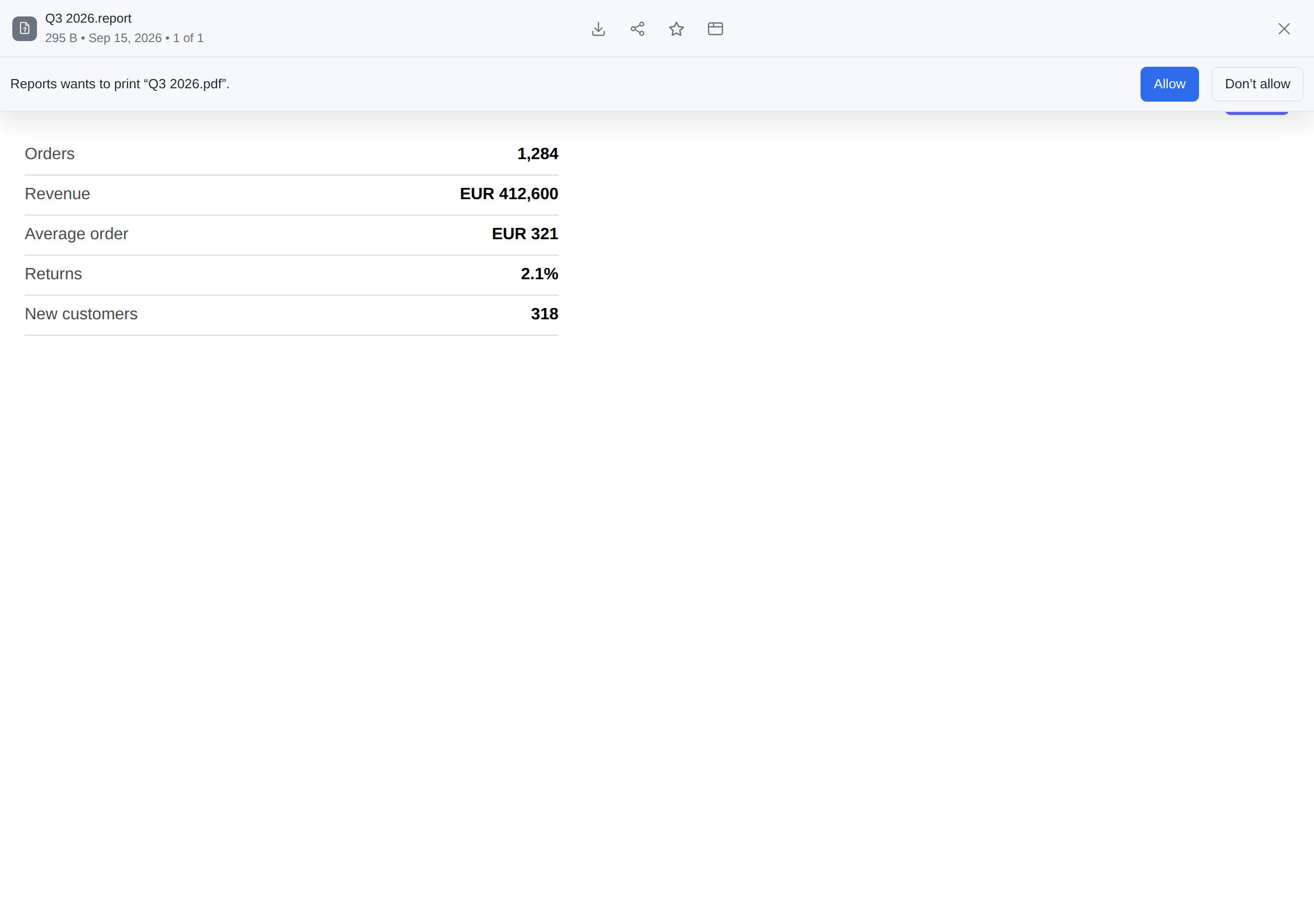
ui:print). An interface hands filex a PDF and filex opens the browser's print dialog for it - always after asking, in a row over the top of the interface and in its own words - Reports wants to print “Q3 2026.pdf”. - with Allow and Don’t allow (no to the app meanscancelled, and nothing is printed). Only your click on that Allow opens the dialog, even right after you clicked Print in the app: it is a button of filex's own print page, and nothing else can press it. Downloads (ui:download) are asked the same way when the app asks on its own.
| The review of an app with its own interface | Its kind of file in New document, under Apps |
|---|---|
 |  |
| …and the interface open on its file type, where filex's preview would be (a small example app, written for these pictures) |
|---|
 |
The 0.56 screens, with an example app that edits Word documents (written for these pictures, like the one above):
Editing together - Dana edits, and the app lists who is in the document; Sam may only read the file, so filex lets him in as a watcher, and her sentence and her cursor reach him as she types:
New document with the app installed and no document server: its Word, Excel and PowerPoint rows under Apps, and no line saying office documents need ONLYOFFICE - only the one about draw.io, in the server's words:
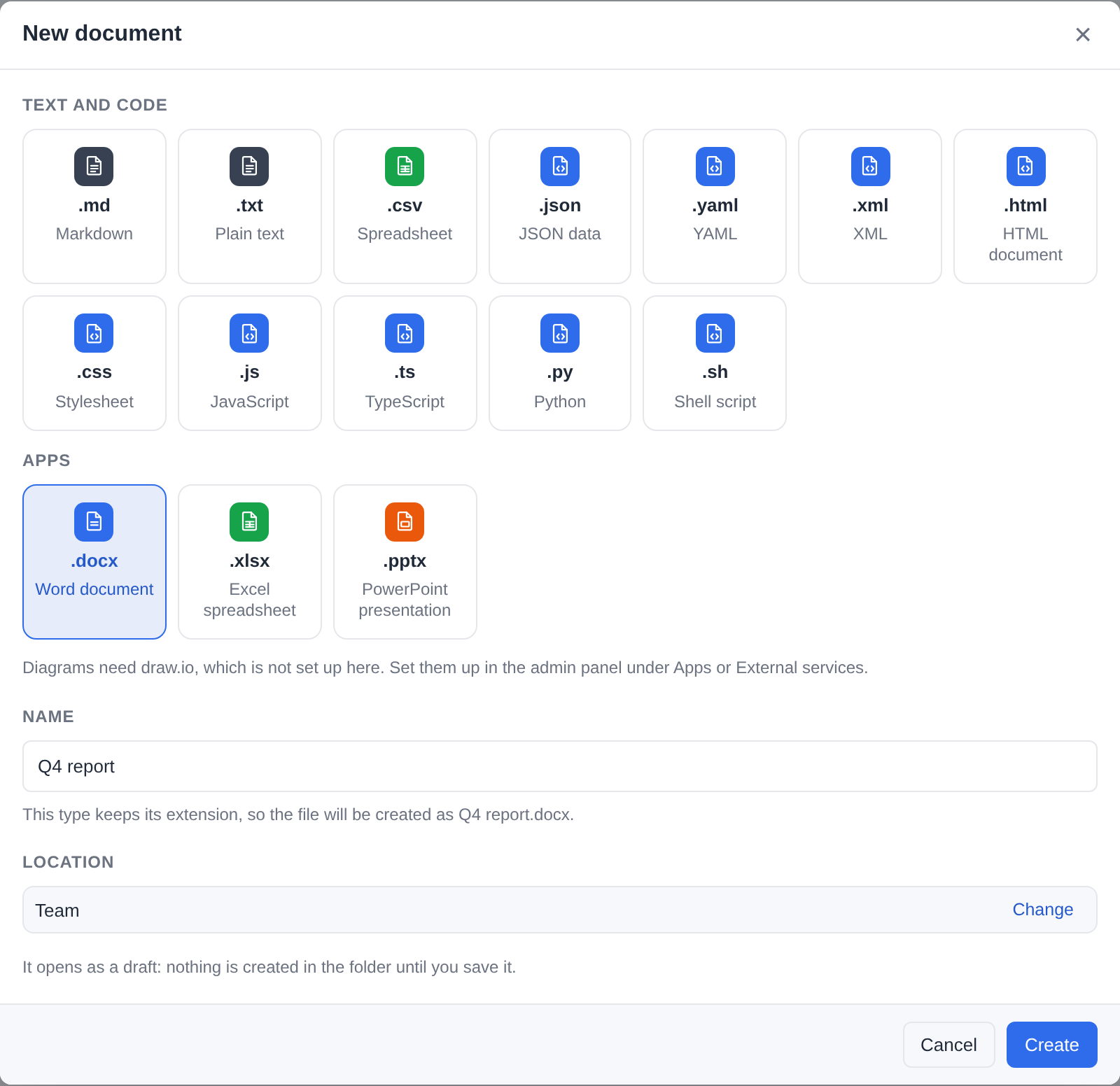
On a phone the app's interface takes the viewer's whole width; the previous and next arrows lie over its edges:
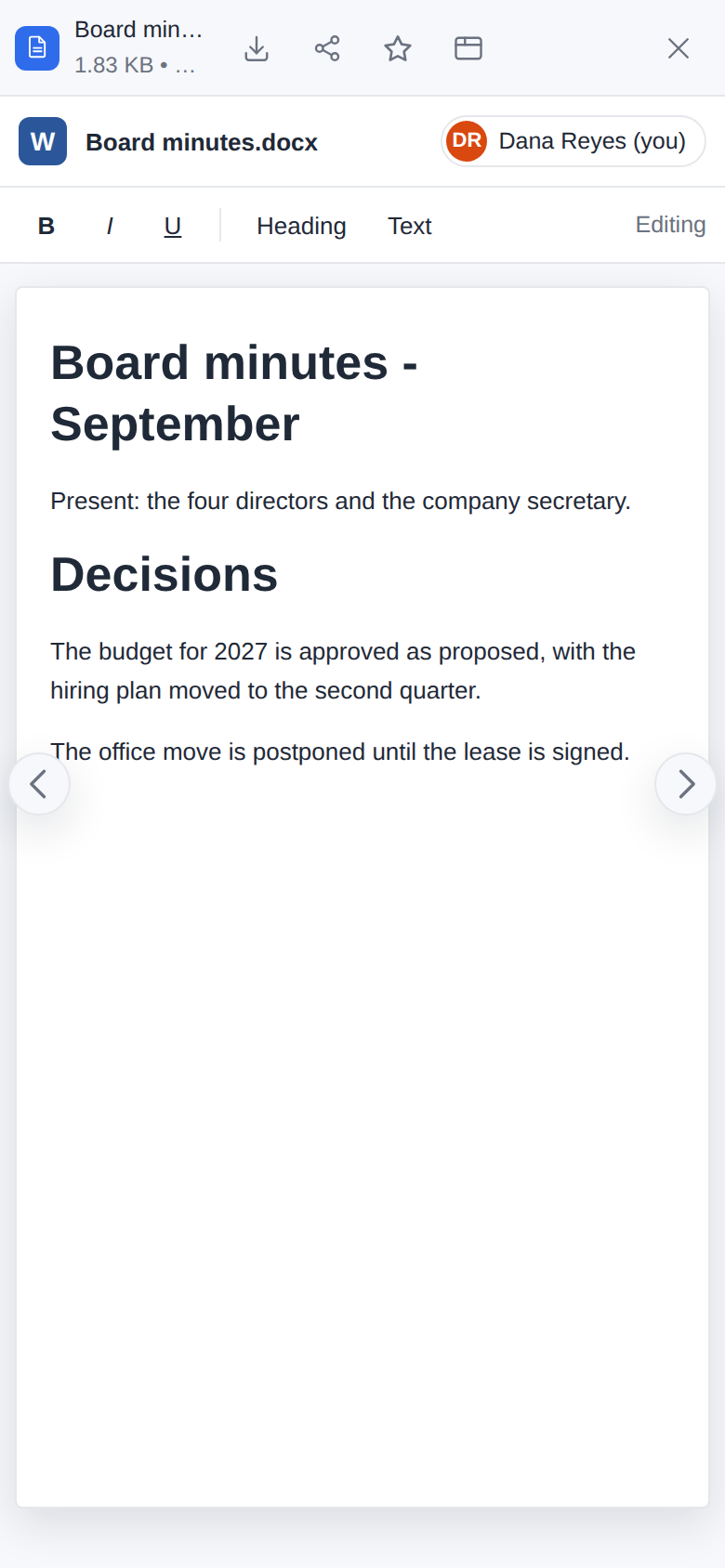
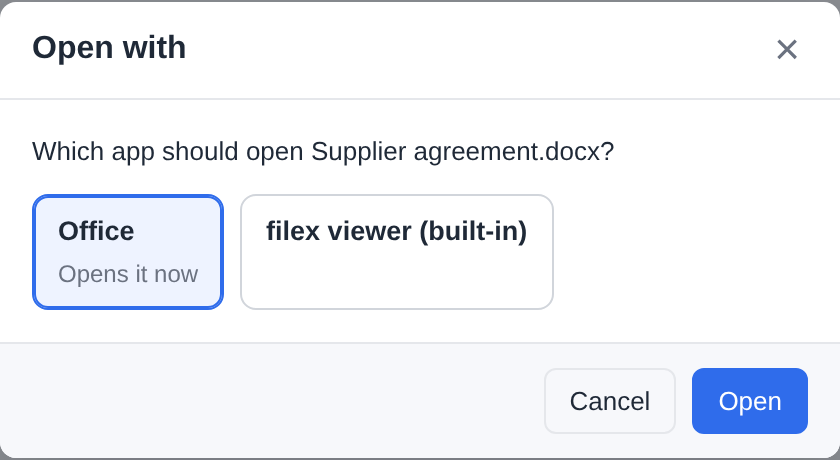
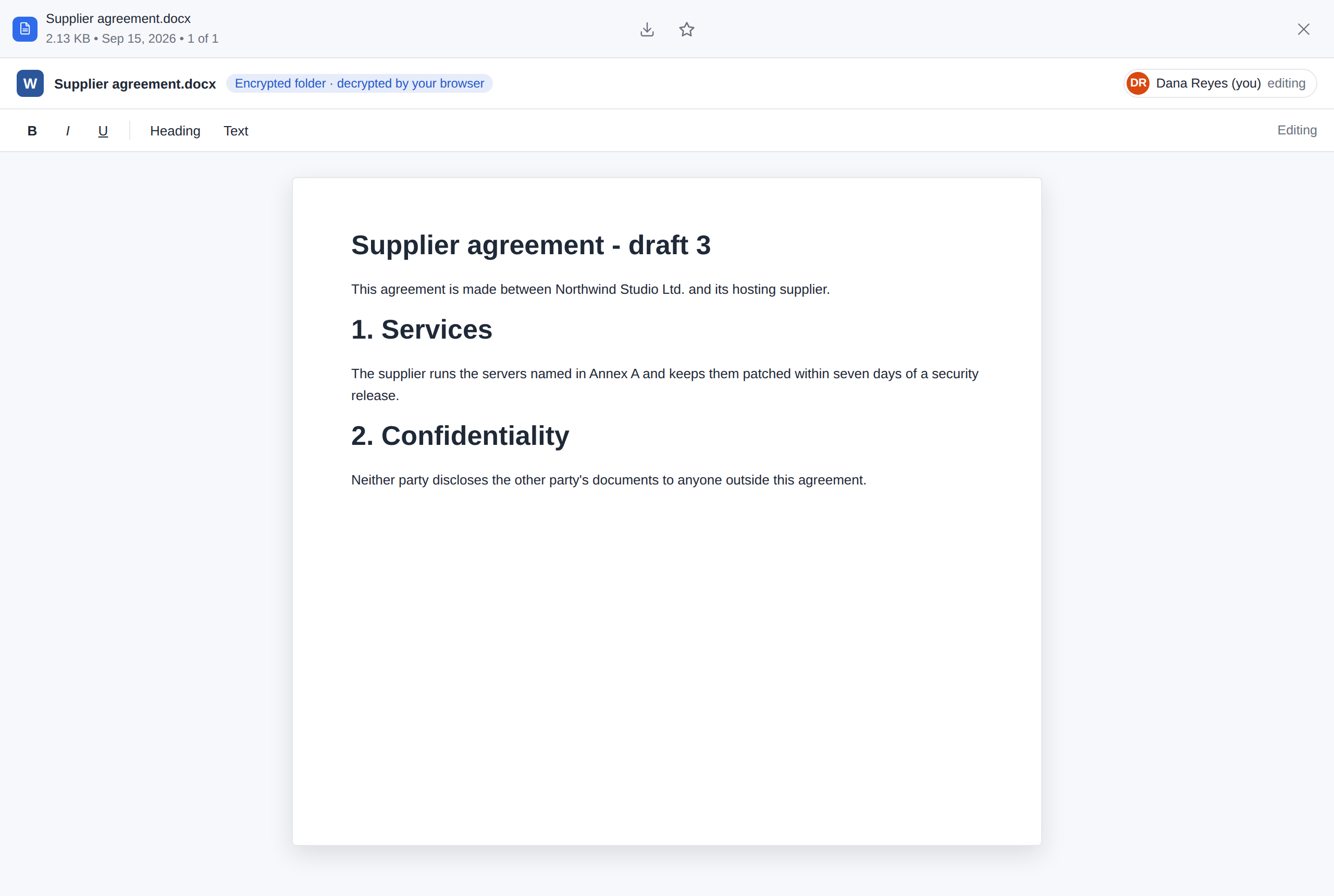
A file of an encrypted folder - Choose an app… offers the app beside filex's own viewer, with no "Always use this app" in a folder whose names are encrypted - and the file open in it, decrypted by the browser:
An origin of their own
By default an interface is served from filex's own address (/_appui/<app>/<package>/…) and made a stranger to it by the sandbox: the frame's origin is opaque, the route asks for no credential and sets no cookie. FILEX_APP_UI_ORIGIN moves interfaces to a host of their own - a second wall, for an instance that wants one:
- Point a second host at the same filex (the bundled
deploy/compose/Caddyfilehas the block, commented) and setFILEX_APP_UI_ORIGIN=https://that-host. filex answers only the interface route (and/healthz) there, and refuses the interface route on its own host; interface addresses become absolute on that host, filex's pages may frame it (frame-src), and each interface's policy names it. - ⚠ Choose a host on another registrable domain (
apps.example-usercontent.comforfiles.example.com). A sibling subdomain shares filex's site: WebKit sends aSameSite=Laxcookie to it, and a cookie set for the parent domain (FILEX_COOKIE_DOMAIN) reaches it. The route ignores cookies either way - the point of a separate site is that it never receives one. - The frame stays sandboxed and the bridge unchanged: a separate origin is added to the sandbox, not put in its place.
- That host is not a trusted origin for changes made with a person's session: filex refuses them from it like from any other site (CONFIGURATION.md → Requests from other origins). An interface never needs that, since it acts through the bridge.
- Not an origin, or filex's own, and filex refuses to start, saying what to write.
- When
FILEX_ONLYOFFICE_FRAME_ORIGINis empty, the same origin also takes the ONLYOFFICE editor's script out of filex's pages: filex serves the editor's frame there (/_appui/_onlyoffice/editor;_onlyofficecannot be an app's name) (ONLYOFFICE.md → The editor in a frame of its own).
Default apps: which app opens a file, and which draws its thumbnail
A kind of file can have more than one thing that handles it: filex's own viewer and a diagram app both open a .drawio; filex draws a .png thumbnail itself, and an app may draw one too. filex treats it the way a desktop does: every kind of file (by its extension, with its type) has two capabilities, and each capability an ordered list of handlers:
| Capability | Handlers | Who chooses |
|---|---|---|
| Open | filex's own viewer (built-in), every app interface that opens the kind (a viewer view: An app's own interface) and, for .csv while OnlyOffice is configured, ONLYOFFICE's spreadsheet editor (ONLYOFFICE: ONLYOFFICE.md → CSV files) | the administrator says which are on and in which order; each person picks among those, and may say "always open this kind with this one" |
| Thumbnail | ONLYOFFICE (ONLYOFFICE, for the office kinds while an office engine runs - the one the Office editor app brings, or a connected Document Server: thumbnails.md → Office through OnlyOffice), filex's own drawer (built-in, for the kinds it draws) and every app that declares the kind in its thumbnails block | the administrator alone; the first in the list that draws the file wins, the next one is asked when it cannot (thumbnails.md → Thumbnails drawn by apps) |
Handlers are named the same way everywhere (the API, the audit log, the rows): builtin; onlyoffice for ONLYOFFICE (one of filex's own, not an app: a thumbnail handler for the office kinds, drawn by whichever office engine runs, and an open handler for .csv only, the Document Server's spreadsheet editor); app:<app>/<view> for an app's interface that opens files; app:<app> for an app that draws thumbnails.
Below the kinds, the Office engine section orders the office engines themselves - the one an app brings and the connected Document Server - for the office conversions apps ask for and the office thumbnails (The office engine, below).
The default order
Until an administrator changes it:
- Open: the apps that open the kind first (by name, then each app's views in its manifest's order), filex's own viewer last. An installed draw.io app opens
.drawiofiles; Open with still offers filex's own viewer. A.csvopens in ONLYOFFICE first while OnlyOffice is configured, then in the apps that open.csv, filex's table last; an app installed for.csvlands after ONLYOFFICE unless the install review puts it first. - Thumbnail: ONLYOFFICE first for an office kind while an office engine runs, then filex's own drawer when it draws the kind, then the apps by name. An app that draws
.pngthumbnails is asked only for a file filex could not draw; an app that draws.jarthumbnails (filex draws none) is asked first; an app that draws.docxthumbnails is asked after ONLYOFFICE, or first when no office engine runs.
onlyoffice is in the thumbnail list only while an office engine runs, and in the open list (for .csv) only while a Document Server is configured; a new rule naming it where it is not is refused. An Open rule written while it was there is kept, and the kind opens in the next handler that is on until it is back.
What the administrator decides
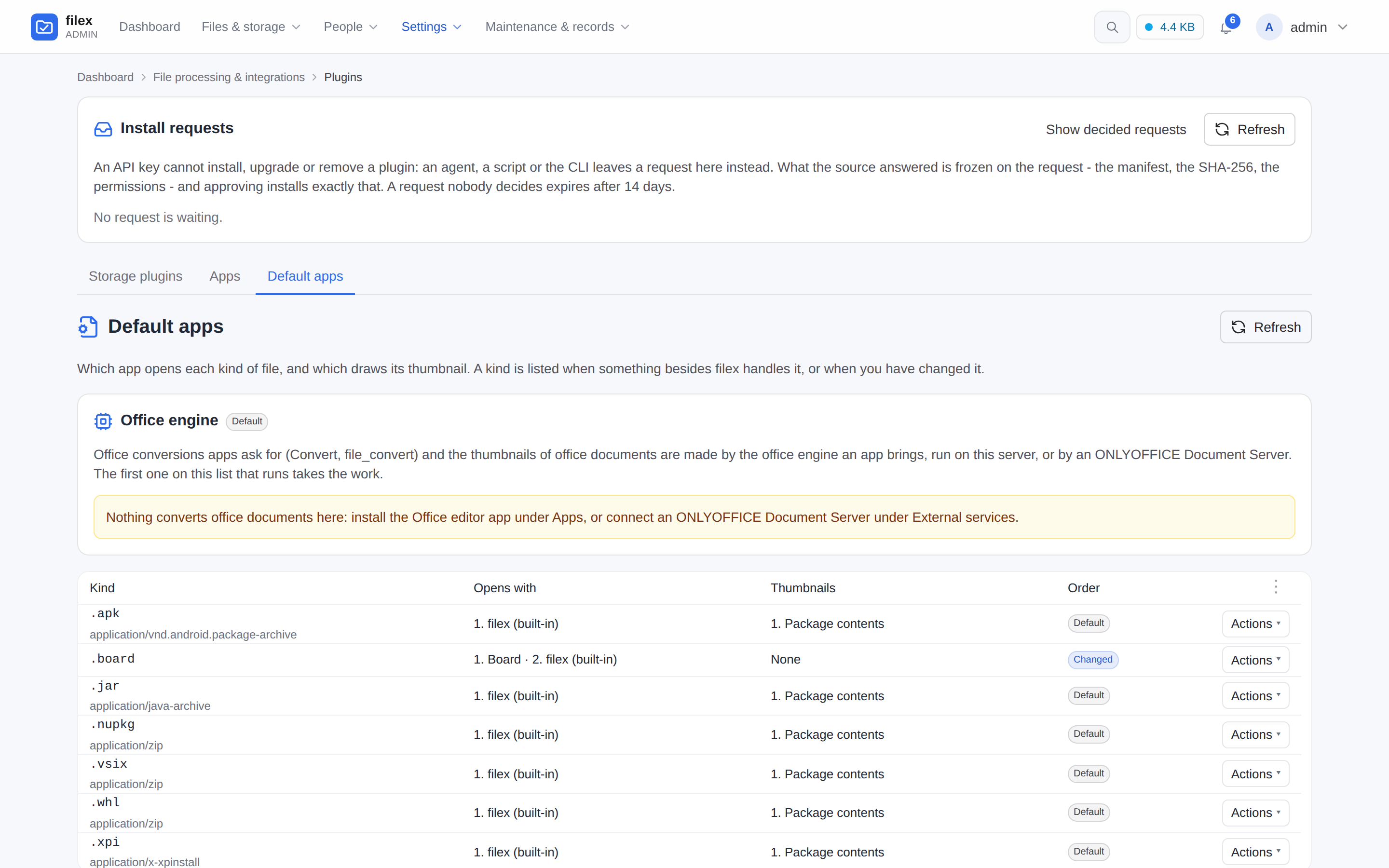
Admin → Plugins → Default apps lists every kind something other than filex handles (.csv too while OnlyOffice is configured), plus every kind the administrator has already changed: its extension and type, who opens it and who draws its thumbnails, in order, and whether that is the default or a choice. Edit opens the two lists for that kind: switch a handler on or off, move it up or down, or Back to the default. Both may stay on (filex's viewer and the app; the built-in drawer with the app as its fallback), or only one. A kind with every opener off opens in filex's own viewer all the same (a file must open somewhere); a kind with every thumbnail handler off gets no thumbnail (skipped, no_handler).
- What is stored is the administrator's order and the handlers switched off, per kind and capability. A handler the rule does not name (an app installed later) joins after the named ones, in the default order, and on.
- At install, at an upgrade, at an approved request. The review has a File types group for an app that opens or draws kinds: one row per kind, and for each capability where the app goes - first (the default), after the ones already there, or off; nothing chosen keeps the default order. An upgrade asks only about the kinds it adds (the order for the others is not reopened, and those kinds are new permissions too); a request's review works the group out when it is opened, and the choices go into the approval's audit row.
- Removing an app takes its handlers out of every list; a rule that named them keeps the others' order. Switching an app off does the same until it is on again.
- Who. The platform's: in multi-tenant mode the supertenant's administrators decide for every tenant (
403 supertenant_onlyfor a tenant administrator). A change needs an administrator signed in to the panel (an API key only reads), is refused on the demo instance, and is audited (file_association.update,file_association.reset). The wire shapes: APP-PLUGINS-API.md → Default apps.
The office engine
The office conversions apps ask for (the Convert app's office targets, MCP's file_convert) and the thumbnails of office documents are made by an office engine: the one an app brings - the Office editor app's, from its 0.4.0, run on this server in a process of its own - or a Document Server connected under External services. The Office engine section of Default apps lists the ones there are, each with how it stands (Ready, Being prepared for a few minutes after an install or an update, Failed with the reason, Not connected), in the order they are asked: an app's engine first by default, the Document Server after it, so the Document Server takes the work while the app's engine is being prepared. Runs first picks the one asked first, and Back to the default order undoes it; with neither engine, the section says to install the Office editor app or connect a Document Server. Through the API a rule may also switch one off (GET /api/admin/file-types → engines, PUT / DELETE /api/admin/file-types/engines/office; ONLYOFFICE.md → The engine and a Document Server).
What a person sees
Opening a file (a double click, Enter) opens it in the person's choice for that kind when they made one and it is still on, else in the first handler the administrator left on.
Open with. The file menu lists every handler that is on for the kind (Open with draw.io, Open with the built-in viewer) when there is more than one, and Choose an app…: a dialog with the same list, the current one marked, and Always use this app for .drawio files. Ticked, the choice is kept on the person's account, and every later opening of that kind uses it.
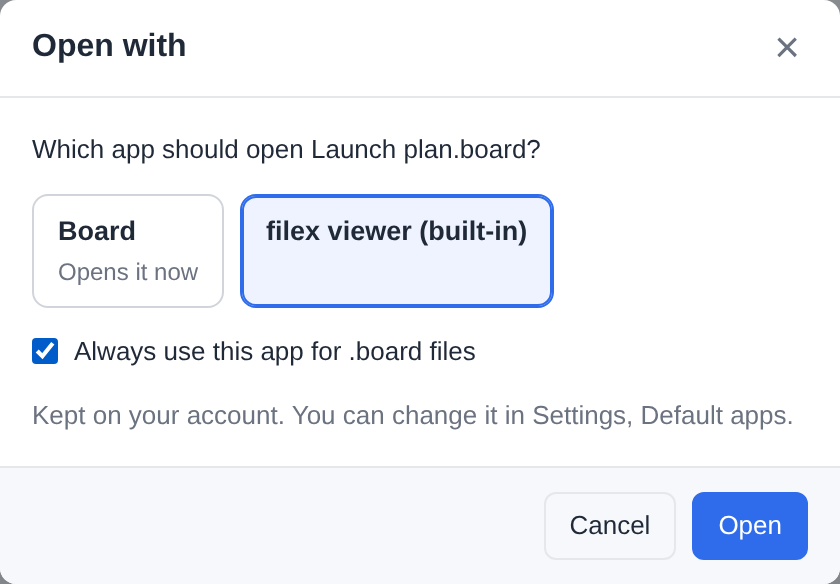
One choice for the whole account. The browser, the desktop app and an explorer embedded in another product read and write the same record. Where the chosen app cannot open the file - that surface does not offer it, or the administrator switched it off for the kind - the next handler that is on opens it, and the choice is kept for where it can. (It is not part of a surface's own preferences - theme, density, language - which stay per surface.)
User settings → Preferences → Default apps lists the person's choices: the kind, the app, a Change and a Reset, and Reset all. A choice whose handler the administrator switched off, or whose app was removed, is not lost: it says no longer available - opens with … and the file opens with the first handler that is on, until the person picks another or the handler comes back.
The editor tab (Open in new tab,
/files/edit) follows the same rule: itsapp=names a handler that is on, else the person's choice, else the first one on.
⚠ The server holds the line, not only the menu. A handler the administrator switched off for a kind is left out of every list the explorer gets, and an interface opened on such a file anyway (an old tab, a crafted request) is refused when it saves or calls its module: 403 handler_off.
The person's choices are /api/me/open-with, one kind at a time, so a surface that saves its theme cannot undo a choice made on another one; the administrator's rules are /api/admin/file-types (APP-PLUGINS-API.md → Default apps).
Dictionaries for the office editor
The office editor checks spelling and hyphenates in the languages it brings with it (filex's interface languages: English, Turkish, German, Spanish, French, Arabic). The other languages its release offers are listed on the app's page, Admin → Plugins → Apps → Office editor → Dictionaries: a row each, Install in its menu. filex downloads the language's files from the app's release and checks each against the release's sha256 before it keeps any of them; the row then says Installed.
A language the release does not offer can still be added by hand, with Add dictionary:
- Get the dictionary. ONLYOFFICE publishes one folder per language in its
dictionariesrepository on GitHub (pl_PL,de_AT,sr_Latn_RS...), each with<lang>.aff,<lang>.dicand, for many,hyph_<lang>.dic; the LibreOffice dictionaries are the same Hunspell files. - In the dialog, type the folder's name as the language (
pl_PL), pick the.affand the.dicfile, and the hyphenation file if there is one. - Add dictionary. The editor uses it the next time a document is opened.
A language added again is replaced; Remove in the row's menu takes it away for everybody. The files are kept outside the app's package, so an update of the app keeps them; removing the app removes them. They are served under the app's address without a sign-in, like the app itself: add only public dictionaries. The section shows only for an app that says it reads dictionaries (its manifest names them) and reads its own package (ui:package-fetch); draw.io has none (APP-PLUGINS-API.md → Files an administrator adds to an app).
Thumbnail limits per app
An app that draws thumbnails has a Thumbnails section on its page: the kinds it draws, and four limits - the largest file it is sent, the time it has per file, its memory, and how many files it draws at once. The defaults and ranges are in thumbnails.md → Thumbnails drawn by apps. A file over the size limit is not sent (app_too_large), and raising the limit makes those files drawn again; the same for the time limit. Changes need a signed-in administrator and are audited (app_plugin.thumbnail_limits).
Stores in detail
Reference for Installing from a store: what filex checks, which stores and keys it trusts, paid apps, and the store screen the people of this filex browse.
What filex checks before the review opens
Each refusal is said in a sentence on the page, and nothing is installed:
- The link stays in the tab. The token travels in the address's fragment (after
#), which a browser never sends to a server. The page takes it off the address bar before anything else runs and keeps it in that tab only, for at most an hour - in no history entry, no?redirect=, no single sign-on return address and no server log; the tab of somebody who is not an administrator keeps nothing. A fragment that is not exactly a store link (the two keys once each, the store an ASCII origin with no path or user name, the token in the store's alphabet, 4 KiB at most) is dropped and the page says so; plainhttp://is taken only for a store on this machine, withFILEX_PLUGIN_LOOPBACK_SOURCES=1in development. The page refuses to work inside a frame. - The store is trusted, and the link is signed by one of its
indexkeys that filex pinned - not by its license key, not by a key it published later. - The link is current and for this store: not expired (a link lives minutes, at most a week), not used here before, still known to the store, and naming an app and a release on GitHub.
- The repository serves what the store approved. filex reads the app at the commit the store approved, through the same guarded client as a GitHub install, and holds it to the link's pins - the manifest's, the module's and the interface's SHA-256, the name, the version, the declared permissions. A tag moved or a release asset swapped since the store reviewed it refuses the review (intent_pin_mismatch, naming which pin differs).
- It installs or upgrades, never goes back. A link naming the installed version or an older one is refused (intent_version_rollback), so an old link kept and replayed cannot downgrade an app.
The fields behind each check: APP-PLUGINS-API.md → The store contract.
Install reads the repository again and checks every pin again: what lands is what was reviewed, not what the source serves a minute later.
What a store link is held to (0.52.0)
What these mean for the operator; the codes and fields are in APP-PLUGINS-API.md → What the 0.52.0 security review tightened.
- The link is for this filex (intent_wrong_instance otherwise): it is compared with the origin of
FILEX_PUBLIC_URL, or with the origin the request arrived at when that is unset - so behind a proxy, setFILEX_PUBLIC_URL. It stops a link opened on the wrong filex by mistake or sent to another filex's administrator; it is no protection against the administrator of the filex that receives it. - The release is the commit the store approved, and the tag must still serve the same manifest (intent_pin_mismatch, field
commit). - An installed app keeps its source. A link for an app of the same name from another store or repository is refused (store_source_changed): remove the installed app first (an upgrade's review says where the installed one came from). An app installed from its repository directly is upgraded by a store's free link for that repository, but a paid link does not take it under the store's license (the store could then hold it at will).
- One review installs once; a failed paid upgrade leaves the license as it was.
- A license key goes to its own store only, and only while that store is trusted; a key copied into another app's row does not open.
- A store's time is its own: a license answer counts only within a day of this server's clock and moves only that store's licenses, and its grace is at most 30 days (Paid apps).
- A store's API follows no redirect, and an app reads its license's status and dates (
fx.license.get()), not who holds it.
Trusted stores
filex takes install links and license answers only from a store it trusts, and only signed with the keys it trusts that store with. A store becomes trusted in one of two ways:
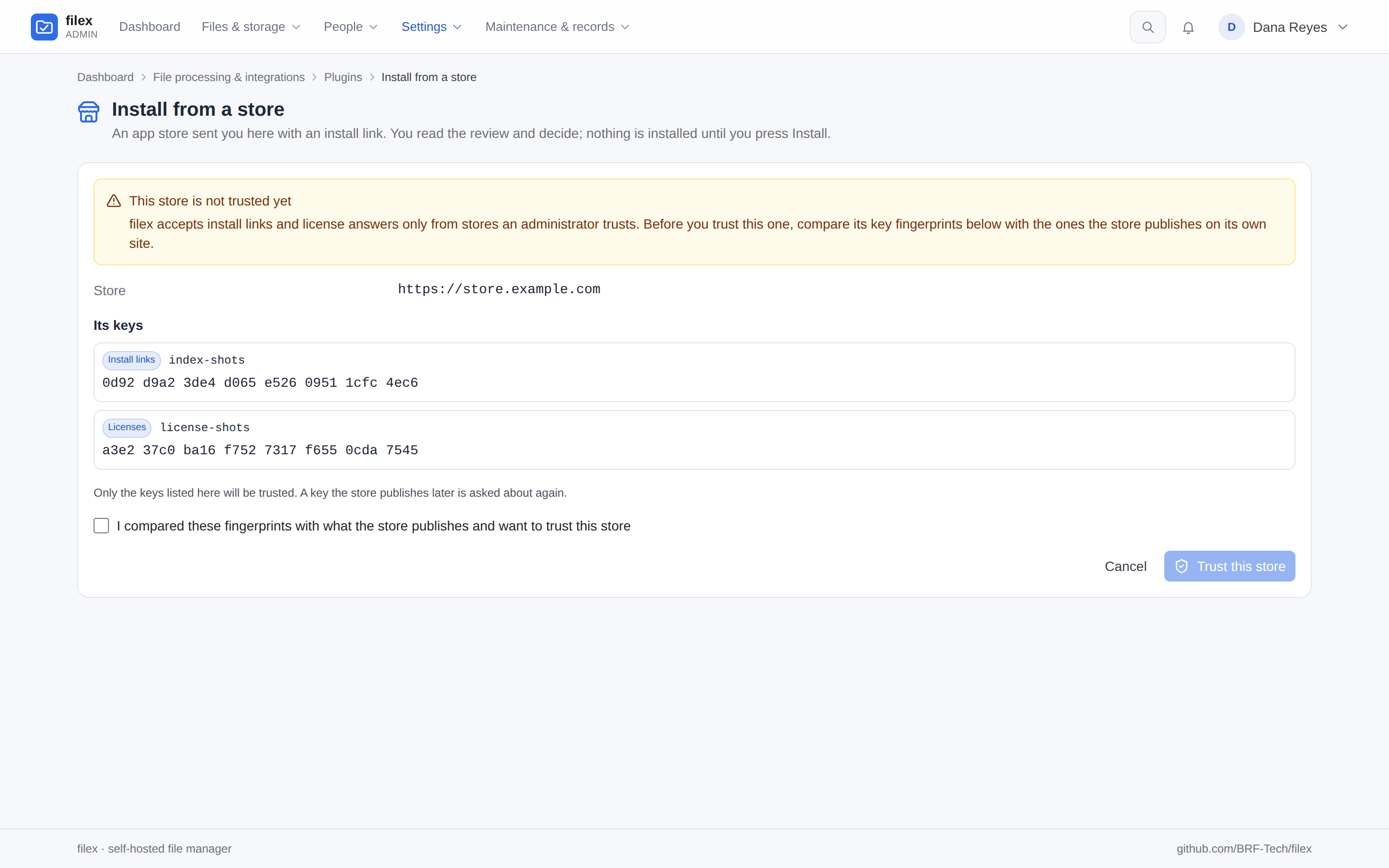
- By an administrator, on first use. The first link from a store opens a page that says the store is not trusted yet and shows its address and every key it publishes (
<store>/v1/keys.json) - its use (Install links, Licenses) and its fingerprint (the SHA-256 of the key, in groups of four). Compare them with what the store publishes on its own site, tick I compared these fingerprints… and press Trust this store. Nothing from the link is read before that. Cancel trusts nothing and tells the store nothing. - By configuration.
FILEX_APP_STORE_URLSlists stores trusted without asking, andFILEX_APP_STORE_KEYSthe keys they sign with. Such a store is never put to an administrator: a key it publishes that is not configured is refused (store_key_not_configured). Set, the list is an allow list: no other store is trusted, not even on first use (store_not_allowed).
The keys an administrator saw are the keys trusted. A store that later publishes another key (a new one, or other material under a known id) gets the question again, in red, with its old keys beside the new ones - a store rotating its keys looks like this, and so does somebody else answering in its name. A key the store retires leaves the trust, and one published as next becomes usable when the store makes it active, without anybody: they do not widen the trust.
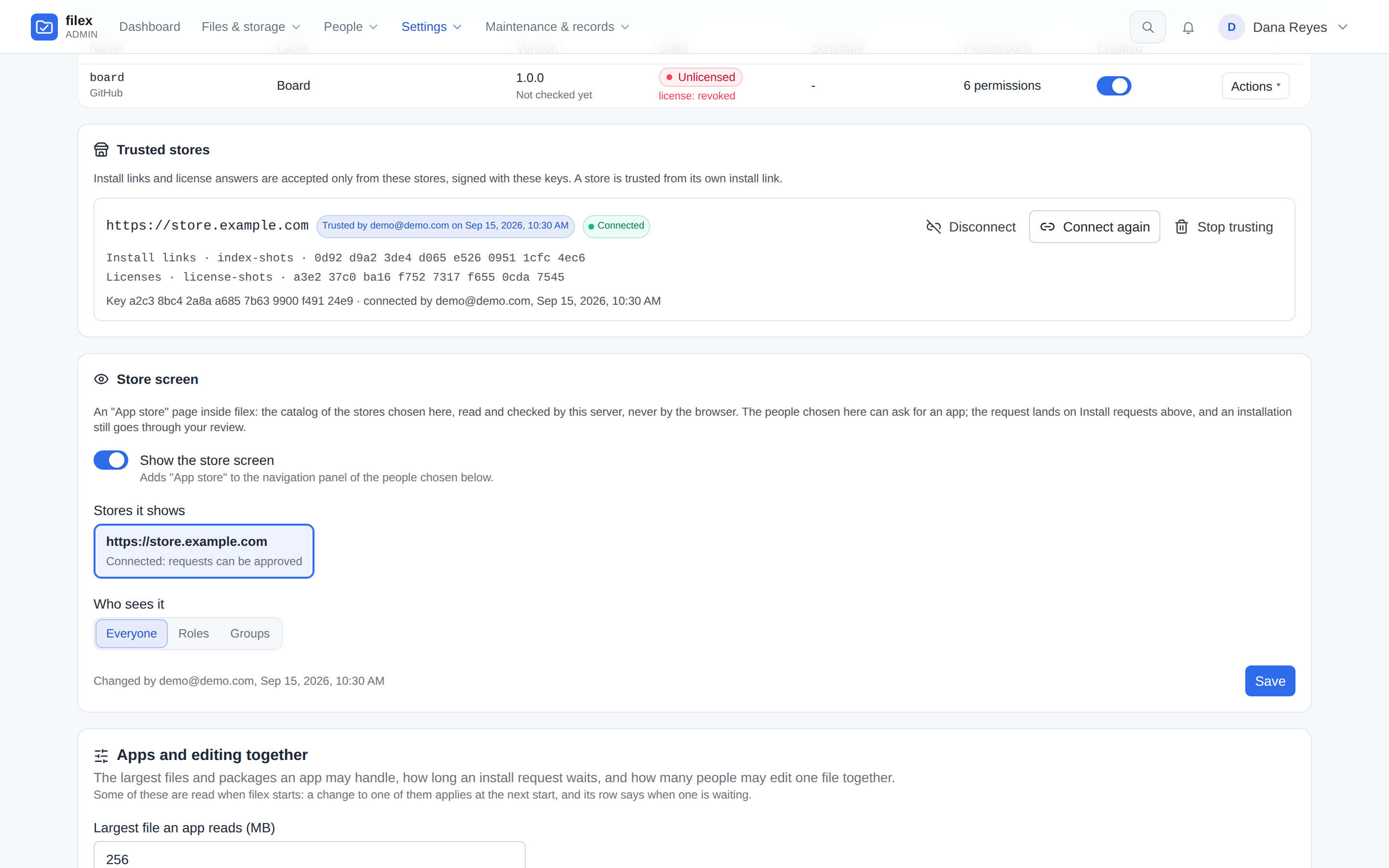
Admin → Plugins → Apps → Trusted stores lists them: where the trust comes from (who trusted it and when, or Configured) and the key fingerprints. Stop trusting refuses the store's links from then on; the licenses it issued can no longer be checked, and they hold until their grace ends. Connect binds this filex to the store for the store screen: see Connecting a store.

The reference store. filex Apps publishes these keys (https://apps.filex.sh/v1/keys.json); the trust question shows the first 32 characters of each fingerprint, in groups of four:
| Key | Signs | Fingerprint (SHA-256 of the 32-byte key, lower-case hex) |
|---|---|---|
index-2026-10 | install links | 205cd1302b9a5025776636b189b6ef80c5a72f4128acb802b917434380bc4c88 |
license-2026-10 | license answers | 2807b0749a94944285c293ee82ae46600877925a0815cbc0484a93789e0371b4 |
artifact-2026-10 | app modules and storage plugin builds - not asked about on the trust question; a module's or a build's signature is FILEX_PLUGIN_TRUSTED_KEYS's (a storage build's over its name, version, platform and sha256, PLUGINS.md → What is signed) | 94974dbae4cc3106406cbf812a4f33b530030ac244b57b73a8989bb23d4df62e |
The public keys themselves: index-2026-10df18ded0d71e46e2d53cd479526744ebb9c3ddadb854a32879448fa64453636c, license-2026-107cde525fd0e80e14b7d116e02aa4deb10067c711d9d8021147995d402bdb28e1, artifact-2026-103dda5d791aeae607cd92cbef9b2a7d635b7a99bbb2f6cea040557527f72f797c - the values FILEX_APP_STORE_KEYS takes (index:<key>, license:<key>) when the store is trusted by configuration.
Trusting a store is its own POST, from a signed-in administrator, through filex's cross-site request guard: a page elsewhere, a link or an API key cannot trust a store for anybody, and no GET changes anything.
Paid apps
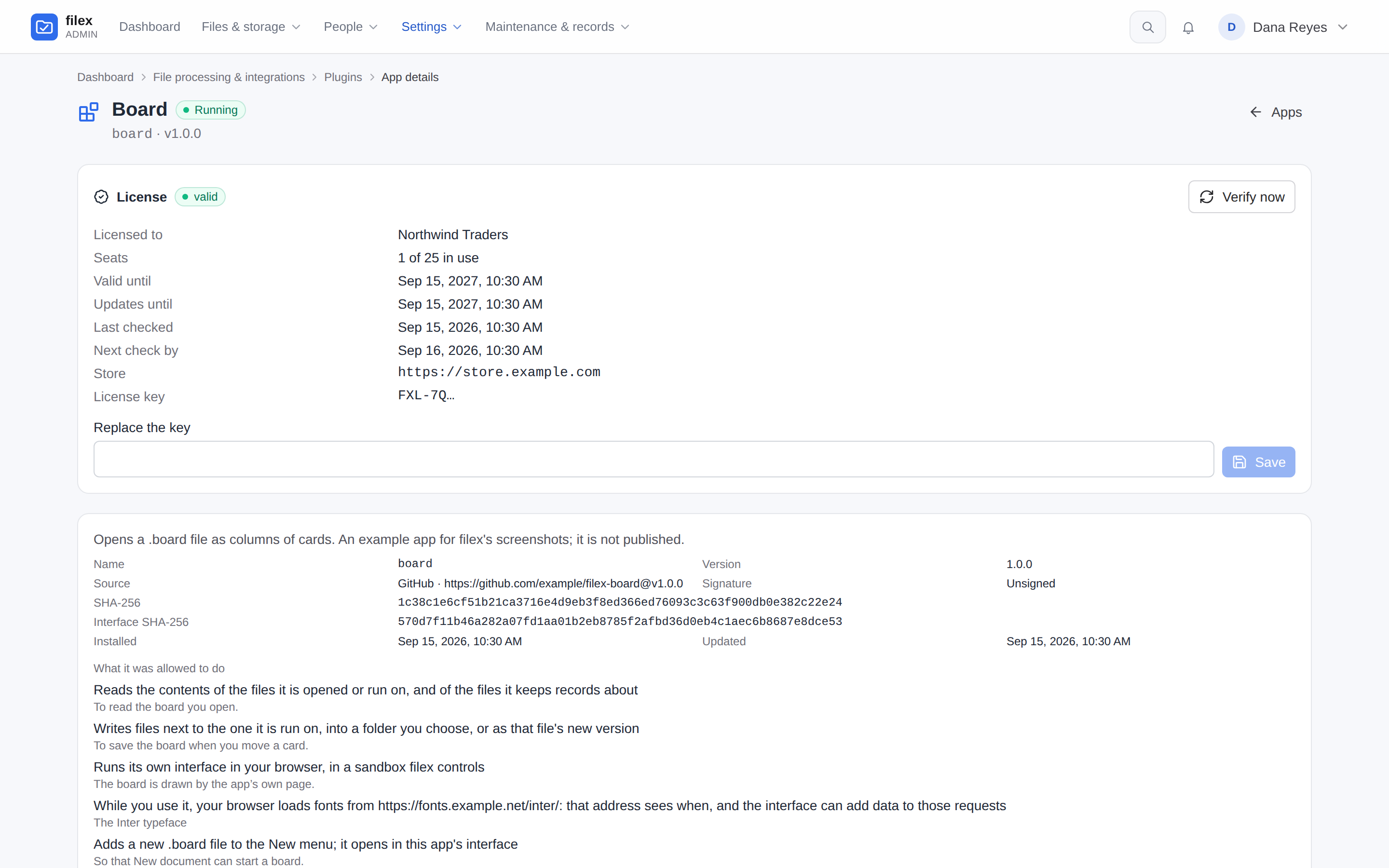
A store may sell an app - or a storage plugin, whose license is kept the same way under a row of its own (PLUGINS.md → A paid storage plugin). The license is issued, kept and answered for by the store; filex keeps the license key - encrypted with FILEX_SECRET_KEY, shown everywhere by its first characters only (FXL-7Q…), never in an answer, a log or the audit log - and asks the store about it:
- at the install: the review of a paid app has a License box. The store's link usually carries a key (the review shows its prefix; leave the box empty to use it), or type one;
- every day after that (
POST <store>/v1/licenses/verify, at the latest when the store'snext_check_bysays), and whenever Verify now is pressed.
The store's answer is signed with one of its license keys and says valid, invalid, revoked, expired, seats_exhausted or wrong_app, with the licensee, the seats, valid until, updates until and the grace it allows. What filex does with it:
| The store says | The app |
|---|---|
valid | runs |
revoked, expired, invalid, seats_exhausted, wrong_app | is held |
| nothing - it cannot be reached, or its answer does not verify | runs on the last valid answer until that answer's grace_until, then is held |
A held app stays installed - its settings, its records, its files, its version - and runs nothing: its actions leave the file menu, its interface is not served, its jobs and its wake-ups are refused, and its state reads Unlicensed. Nothing is removed by a license. It runs again as soon as the license holds (a new key, a renewed license, the store reachable again). Every hold and every release is in the audit log (app_plugin.license_held, app_plugin.license_released), and while one lasts a band on every admin page names the app; an app running on its grace gets an amber one.
⚠ The grace cannot be stretched. filex counts it against the later of the server's clock and the time the store last vouched for plus the time filex has run since (downtime not counted): turning the server's clock back does not stretch a grace, and turning it forward ends it early - even right after a valid answer - for as long as it is ahead. While the store cannot be reached, every start after an unclean stop (a crash, a kill, a power cut) takes one hour off the grace; a clean stop takes nothing, and the store's next answer gives the hour back. The exact rule: APP-PLUGINS-API.md → the license check (Time).
Admin → Plugins → Apps → the app → License shows the status, the licensee, the seats in use, valid until, updates until, when it was last checked and when it is next, the store, the key's prefix and the last failed check; there you enter a new key and press Verify now. An app reads its own status with fx.license.get().
The store screen
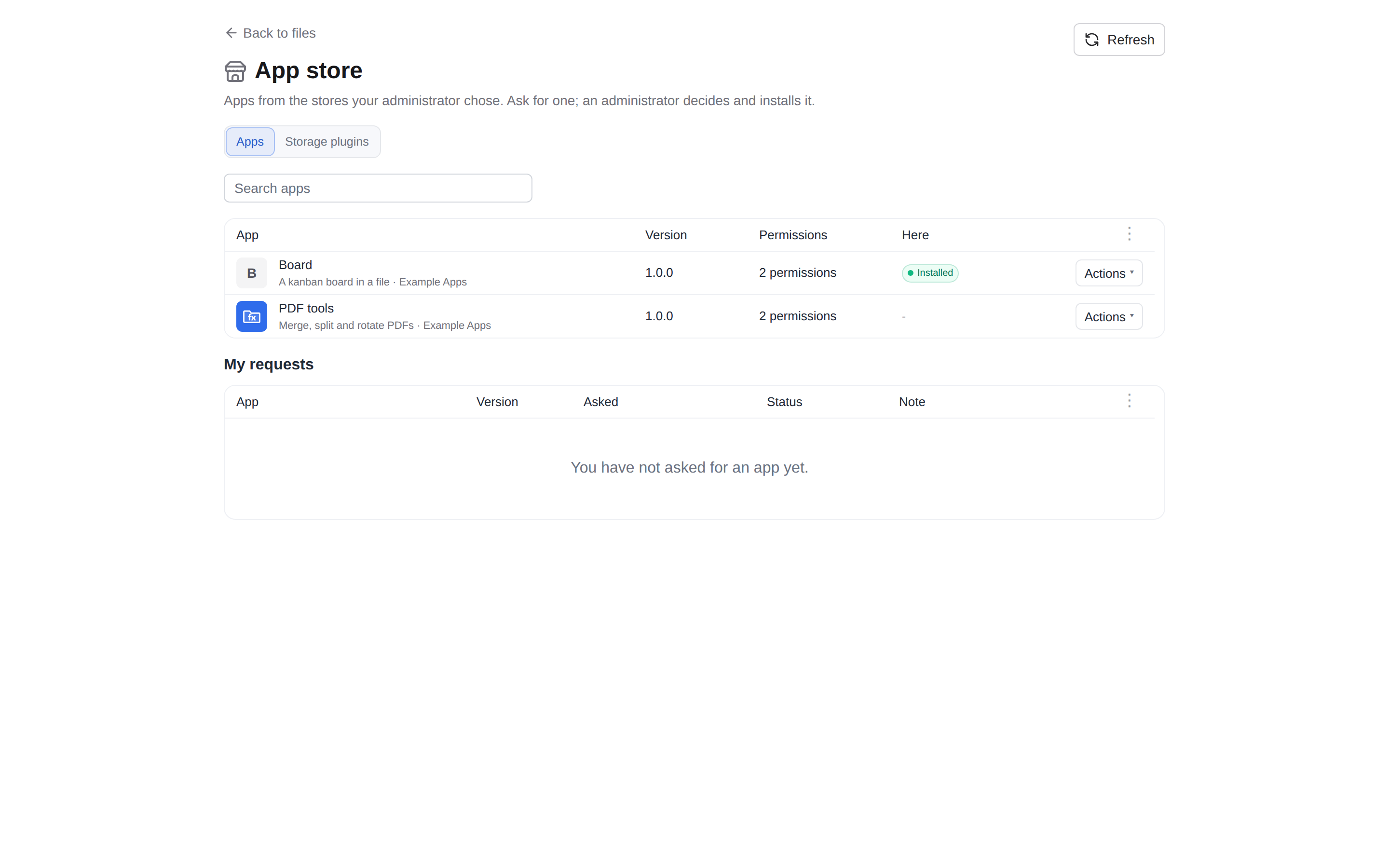
The people of this filex can browse a trusted store's catalog inside filex and ask for an app, without reaching the store or the admin panel: the navigation panel's Apps → App store row (Uygulama mağazası) opens filex's own App store page - in the web app, and in the desktop app in a window of its own (DESKTOP.md), under the same rule. It is filex's screen, drawn with its own components from the store's API - never a frame of the store:
- The catalog is read and verified on the server from the store's signed index, and the icons come through filex too, each held to its SHA-256: the browser never talks to the store, and an index that does not verify is an error, never shown in part (APP-PLUGINS-API.md → The embedded store). A catalog is kept ten minutes; while the store cannot be reached the page shows the last one filex checked, marked as such (a store never read says so). The browser not talking to the store is also why filex's Content-Security-Policy does not change for it.
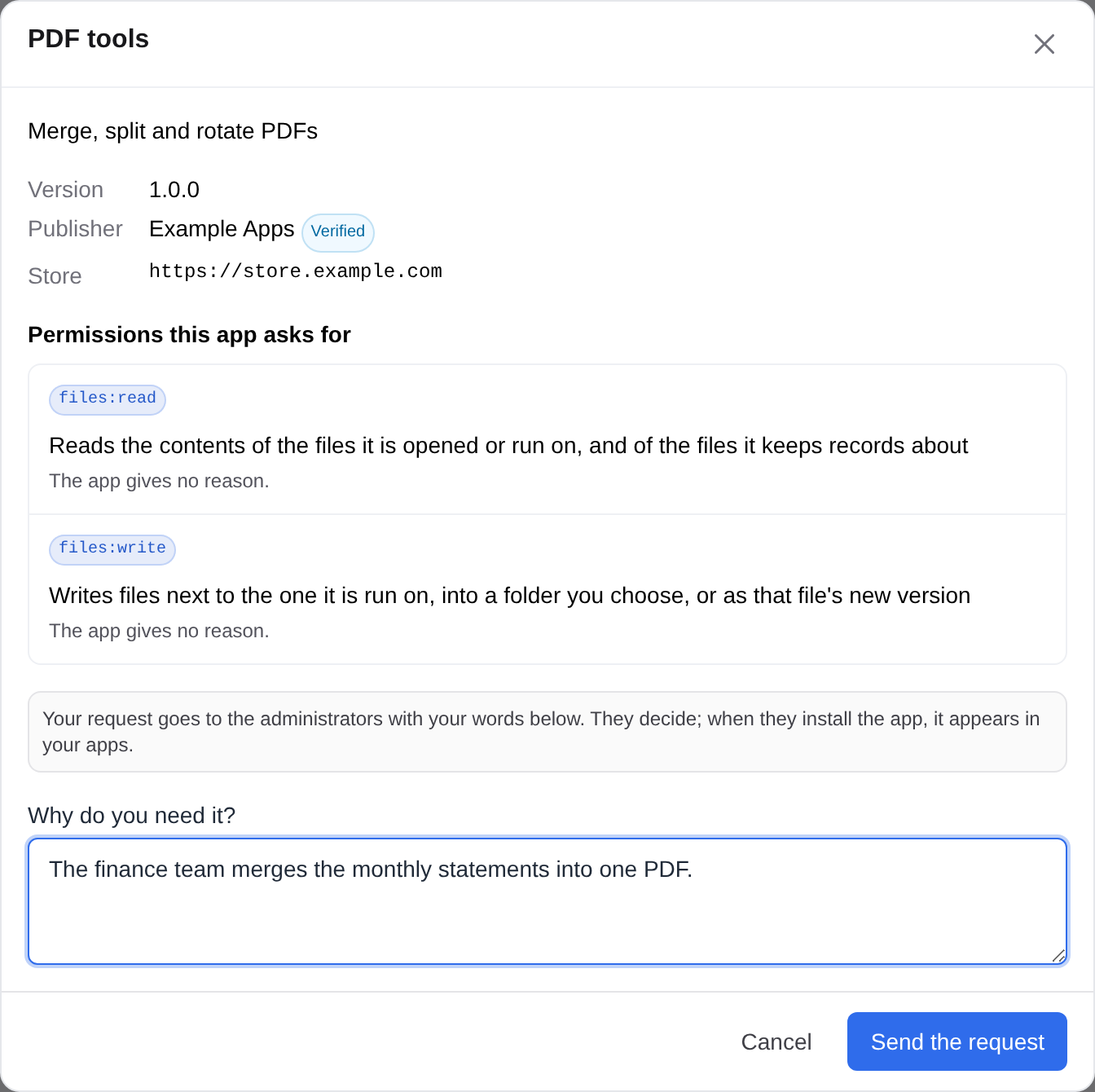
- Each app shows its name and summary, the publisher, the version on offer, the permissions it asks for (in filex's own words) and whether it is installed here or already asked for - the server's answer (
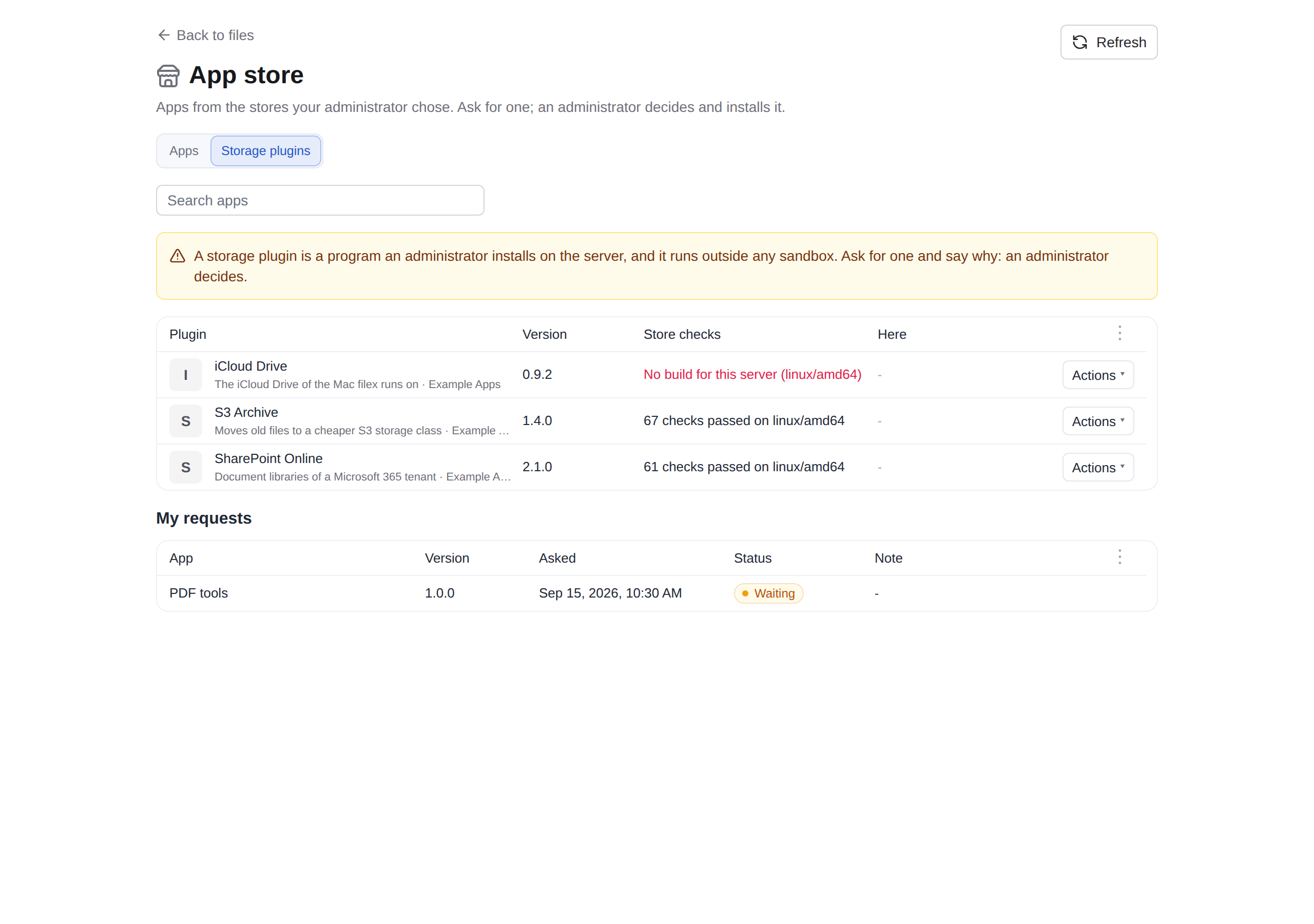
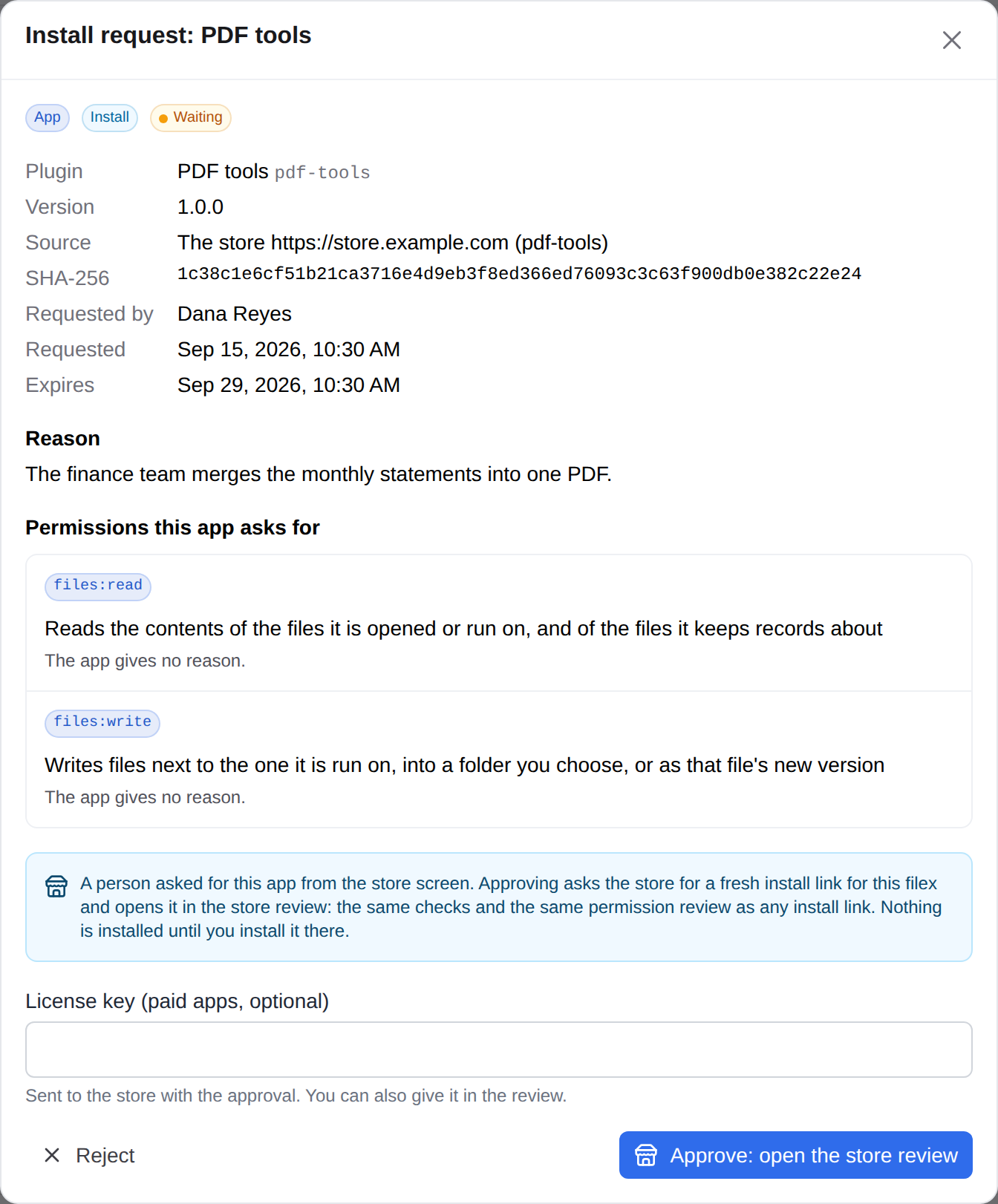
state), never worked out again in the page. Ask for this app takes a reason - required, the administrator reads it - and leaves a request on Install requests, the same list an API key's requests are on. My requests below says what became of each: waiting, approved, rejected (with the administrator's note), expired. - A person has at most ten requests waiting; asking again for the same app answers the waiting request.
Storage plugins (PLUGINS.md → Installing from a store): a store that lists them shows them on a tab of their own, Storage plugins, where this server runs storage plugins (with FILEX_PLUGINS_DISABLED=1 the screen shows none). Each row says, in the server's words, whether the store has a build for this server and what the store's checks proved; the tab says first what a storage plugin is - a program an administrator installs on the server, outside any sandbox. Ask for this plugin leaves the same kind of request, and its approval opens the storage plugin's own review; a plugin the store has no build of for this server is offered no request.
Who sees it is the platform operator's choice, on Admin → Plugins → Apps → Store screen: turn it on, pick which trusted stores it shows, and show it to everyone, to the people of some built-in roles (administrator, user, viewer) or to the members of some groups. On a multi-tenant install each tenant has its own setting, chosen with the Tenant field; a tenant with none does not see the screen, and a setting can name only that tenant's groups (or install-wide ones). A store that is no longer trusted leaves the screen by itself. The screen is a person's - a browser session or the desktop app's own pairing; any other API key reads it as not shown - and the web app and the desktop app draw its row by the same rule.
Approving such a request installs nothing by itself. The request freezes what the catalog said, but filex never installs from that: Approve: open the store review asks the connected store for a fresh install link for this filex (a link made when the person asked would have expired: links last 30 minutes, a request waits up to 14 days), keeps it in the browser tab and opens the store review there - the same review, checks and license step as a link from the store's own Install. Installing closes the request as approved; cancelling leaves it waiting. A paid app's license key may be given with the approval (the store takes it only for a license with a seat for this filex) or in the review.
Nothing here opens a door that was closed: reading a link, trusting a store, connecting to one and installing stay the platform operator's, signed in to the panel - an API key is refused, on the reads too.
Connecting a store
The fresh link an approval asks for comes from the store's instance connection: the store knows this filex as one of the saved instances of the person who connected it, and accepts requests from it signed by a key only this filex holds.
- On the store, open My instances, pick this filex's address and press Connect a filex server. The store shows a one-time connection code (
fxc_…): it works once, for 30 minutes. - Here, Admin → Plugins → Apps → Trusted stores → Connect on that store's row, paste the code and press Connect. The store must be trusted first (Trusted stores).
- filex makes an ed25519 key for this store and sends the store the code, the key's public half and its own address. The store answers, signed with the key it is trusted with, which instance the key is bound to; filex refuses an answer for another filex address or another key. The row then says Connected, with the key's fingerprint, who connected it and when.
The private key is kept encrypted with FILEX_SECRET_KEY and never leaves the server; when that secret changes the key no longer opens, and the store is connected again with a new code. Every request filex sends the store with it is signed over its method, path, body, a timestamp and a single-use nonce, so a copied request is worthless (APP-PLUGINS-API.md → The embedded store). Connect again replaces the key; Disconnect forgets it and tells the store to forget it too. A store the screen shows but this filex is not connected to still takes requests; they wait until it is connected.
Install requests
An API key cannot install a plugin. Installing, upgrading, going back, switching an app on or off, removing it and changing its action overrides need an administrator signed in to the admin panel. An API key - an agent, a script, the CLI - is refused 403 session_required whatever its scopes, and the refusal says where to go instead: it can leave a request, and an administrator decides it. The same holds for storage plugins. The reason: the permission review is the security boundary of the whole app model - the SHA-256 protects the administrator, the sandbox protects the user - and approving it is a person's decision; a key is held by a program.
A key can still read everything - the list, one app with its grant, its log, Check for updates - and run the review itself (?dry_run=1 installs nothing): that is how it sees what it would be asking for.
A person can leave a request too, from the store screen: an app of a trusted store's catalog, with their reason. It is on the same list and decided the same way, through the store review.
What a request freezes
When a request is left, filex runs the install review against the source and keeps what it answered on the request:
- the manifest as fetched, and its SHA-256;
- the SHA-256 the bytes must have - the module's, or the manifest's for an app without one (a language pack, an app that is only an interface);
- the permissions it asks to grant - for an upgrade, the ones it adds are marked;
- who asked (the account, and the label of the key it came through) and their reason, which is required.
Approve and install fetches the source again and installs exactly those bytes with exactly those permissions. When the source serves anything else by then - a new release under the same tag, a changed manifest - nothing is installed and the request is closed as Source changed (superseded); the requester can ask again, and the new request freezes the new bytes. A failure of any other kind (the source unreachable, the name taken since) leaves the request waiting, with the refusal shown on it.
- Asking twice for the same source answers the waiting request; nothing new is opened and nobody is told twice.
- A request nobody decides expires after 14 days (
FILEX_PLUGIN_REQUEST_TTL_DAYS). - The administrators are told in the bell - and by every webhook that carries operator alarms - with the
plugin_requestedevent (NOTIFICATIONS.md). - Every step is in the audit log:
plugin_request.create,.approve,.reject,.expire,.supersede. - In multi-tenant mode only the platform operator's administrators may leave, read or decide requests; a tenant administrator gets
403.
Deciding one
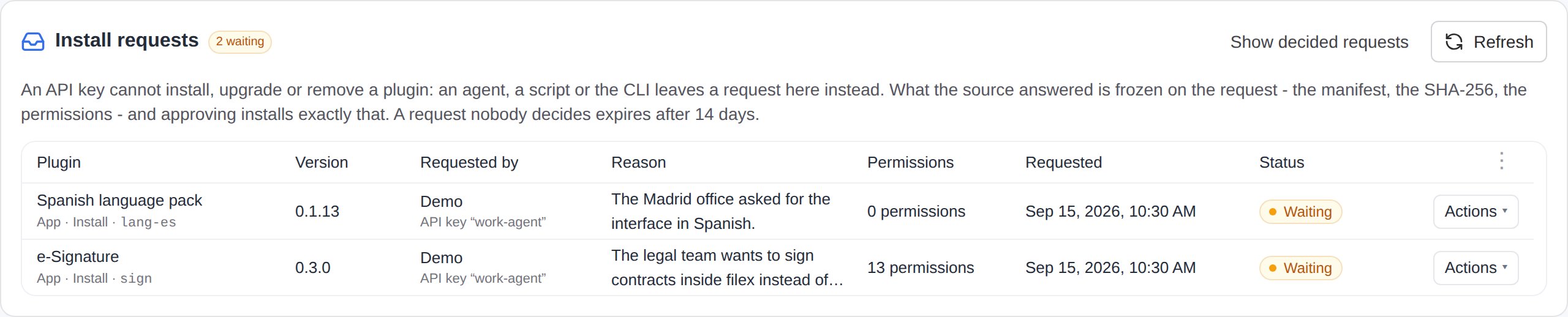
Admin → Plugins → Install requests is above both tabs. Each row says the plugin, the version (an upgrade: from → to), who asked through which key, their reason, how many permissions it asks for and when. Review opens the frozen SHA-256, the source, the requester's words and the permission list the install wizard shows - each permission with the app's own reason; a storage plugin's request carries the warning that it runs with filex's rights. Tick I understand what this app can do and want to install it and press Approve and install, or Reject with an optional reason the requester can read. Show decided requests lists the rest: approved, rejected, expired and source changed.
A request from the store screen says so - its source is The store <origin> (<app>) - and its review has no "I understand" box: Approve: open the store review opens the store review, where the permissions are read and Install is pressed, and the request is approved when that install ends (The store screen). Reject works as for any request, and the person reads the reason on their My requests.
Leaving one
| From | How |
|---|---|
| REST | POST /api/admin/plugin-requests with an admin-scoped key - BACKEND.md → Admin: plugin requests has every body |
| MCP | admin_plugin_request_install / admin_plugin_request_upgrade, and admin_plugin_request_get to follow it (MCP.md → Plugin tools) |
| CLI | filex client plugins request --kind app --github-repo BRF-Tech/filex-sign --ref v0.1.1 --reason "…", and filex client plugins requests (CLI.md) |
| A person | the store screen's Ask for this app (POST /api/app-store/requests {store, app, reason}, a browser session or the desktop app) - The store screen |
curl -sS -H "Authorization: Bearer $FILEX_KEY" -H 'Content-Type: application/json' \
  -d '{"kind":"app","github_repo":"BRF-Tech/filex-sign","ref":"v0.1.1","reason":"The legal team signs contracts here"}' \
  https://files.example.com/api/admin/plugin-requests
The answer is the request (status: "pending", the permissions and the SHA-256 it froze) and a sentence saying it waits for an administrator. There is no key door to approve or reject - /approve and /reject refuse an API key too - and no MCP tool for either: approving is the administrator's decision, made in the panel.
Signing documents, end to end
The e-Signature app (BRF-Tech/filex-sign) the way it is used: a person on your filex asks a colleague and an outside partner to sign an agreement. It is also the clearest picture of what the platform gives any app - screens, a lock, a scheduled deadline, a public link that is a share, and signatures made with a key the app never sees. The app's own screens and limits, step by step, are in its README.
Before you start
FILEX_SECRET_KEYmust be set. It seals the signing authority's key; without it the app's screens say signing is not available here.- Mail must be configured and verified (Admin → Settings → Email (SMTP)) for invitations, reminders and receipts to reach anybody by email. People with an account are told through the bell either way.
- PDFs only. The app runs no engine and needs no other app. Convert an office document (DOCX, XLSX, PPTX, ODT…) to PDF first with Convert… (or an office program): the signing rows are never offered on one, and a page of the app reached on one some other way (an old bookmark) says so and offers no button.
- The instance's maximum link life caps a signing link too (Admin → Protection → Share links → Maximum link life (days), default 7). The app is told the ceiling: its Time step offers no more and says why, and the review, the requester's notice and the signer's mail name the real date. Raise the ceiling if your requests need longer.
What e-Signature asks for at install, line by line. It holds schedule, so a request's deadline and its reminders run on their own:
| Permission | What it allows | Why e-Signature asks |
|---|---|---|
files:read / files:write | read the files it is opened or run on, and the files it keeps records about (a request's document, when it wakes up or a signer acts); write next to them, into a folder you choose, or as a new version | read the document; write the signed copy, the audit trail and receipts |
files:lock | freeze a file it works on read-only for everyone, administrators included - for up to a year, or until the app or an administrator lifts it | the Freeze the file while signatures are collected option, and Lock the signed file when every signature is in |
sign | have this server's signing key sign a digest (the key never leaves the server) | one certificate per signer, issued by the instance's authority, and the installation's seal that closes a completed request |
state | keep small per-file records | the request itself - signers, boxes, progress - and the list on its home screen |
settings | read the settings you enter for it | whether signatures are time-stamped, and by which authority |
public_pages | open time-limited, PIN-protected links for people without an account | one signing link per outside signer, their receipt, the finished document |
mail:send | send email through the server's mail settings | invitations, reminders, receipts (a PIN is never mailed) |
notify:send | send filex notifications | "please sign", and telling the requester what moved |
users:lookup | look up this instance's users by name or email | picking signers who have an account |
http:freetsa.org | make HTTP requests to that host only | a time stamp, when you switch time stamping on - a digest and a nonce, never the document |
http:fonts.gstatic.com | make HTTP requests to that host only | one Noto face, downloaded once and kept, when a name or a box is written in a script the app does not carry (Arabic, Hebrew, Devanagari, Thai, Chinese, Japanese, Korean…); the file is pinned by its SHA-256 and nothing but its address is sent |
schedule | be woken once an hour to run its own actions, with nobody present | closing a request at its deadline and sending reminders (Apps that wake up on their own) |
Signing it yourself
Sign… on a PDF: place the boxes (at least one signature box, each box named), fill them in (a signature drawn, typed in one of the offered faces, or uploaded as a picture), and choose where the result goes - a new file beside it (the default, {stem}-signed{ext}) or a new version of this file, with an optional reason.
Asking others to sign
Request signatures… opens a page wizard, one question per step:
Signers - people on this filex, picked by name or email, sign inside filex; anybody else, typed one per line (a name, an email address, or both), signs through a private link - somebody with no address still gets one, which the requester hands over. At most 20 signers.
Order - everybody at once, or one after another in the order listed (the next person hears from filex when the one before has signed). Asked only when there is more than one signer.
The boxes - defined, not placed (what is asked of whom is one decision, where it goes the next): one card per box - a signature, initials, text, a date or a tick box - with its name, whose it is (a signer, or Anyone), whether it is required, how a signature is made (drawn, or typed - only a typed one is asked for a face), what is printed under it (the signer's name, the date and time, the e-mail address, the IP address, the certificate's fingerprint or serial, the signing authority), a text box's rule (any text, numbers only, an email address; a length) and a date box's layout (
31.12.2000,12/31/2000or2000-12-31). Every signer needs at least one signature box.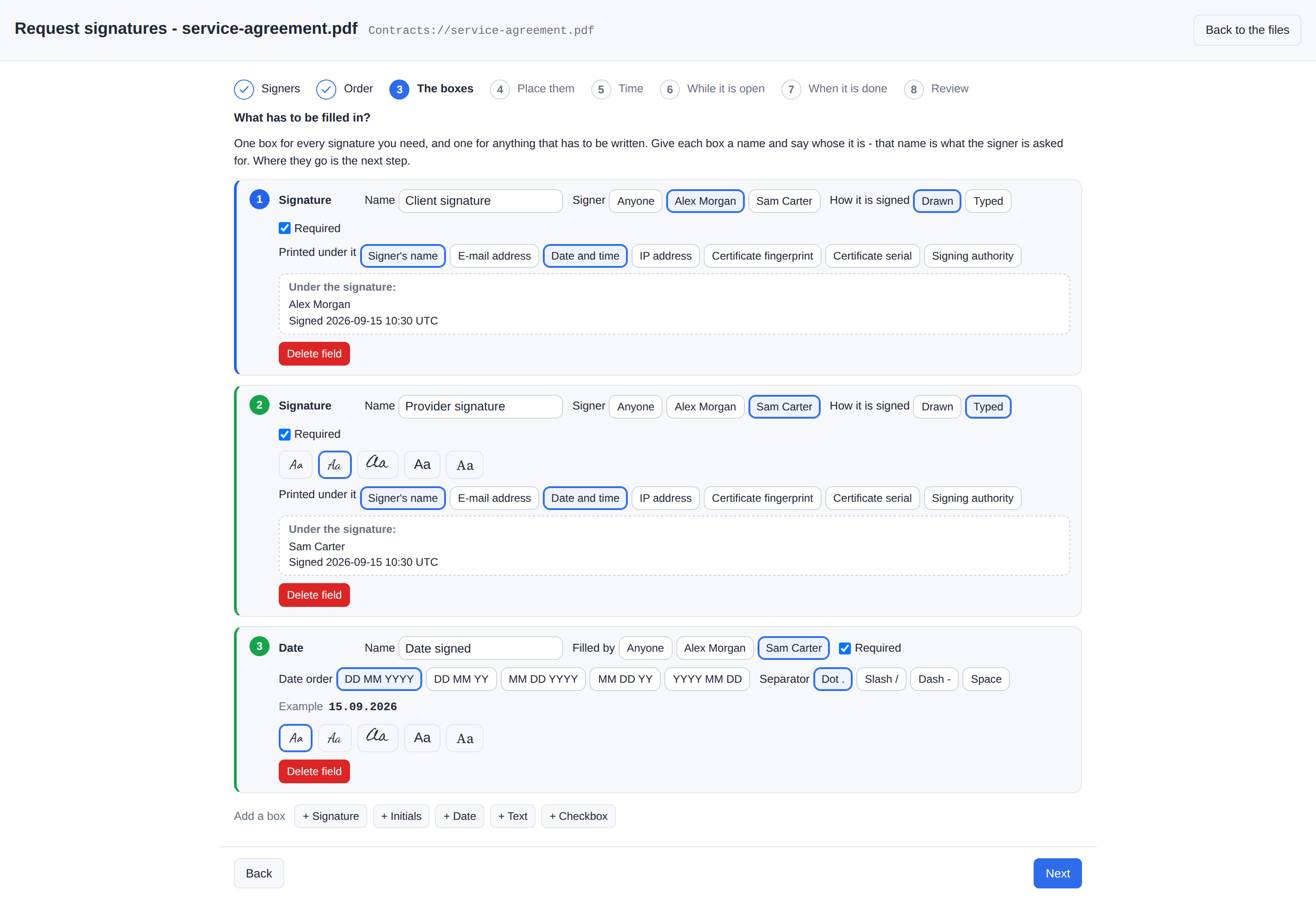
Place them - choose a box, then tap the page where it goes or drag to size it; a placed box can be moved, resized, taken off the page, copied to another page or deleted. The step cannot be left while a box has nowhere to go.
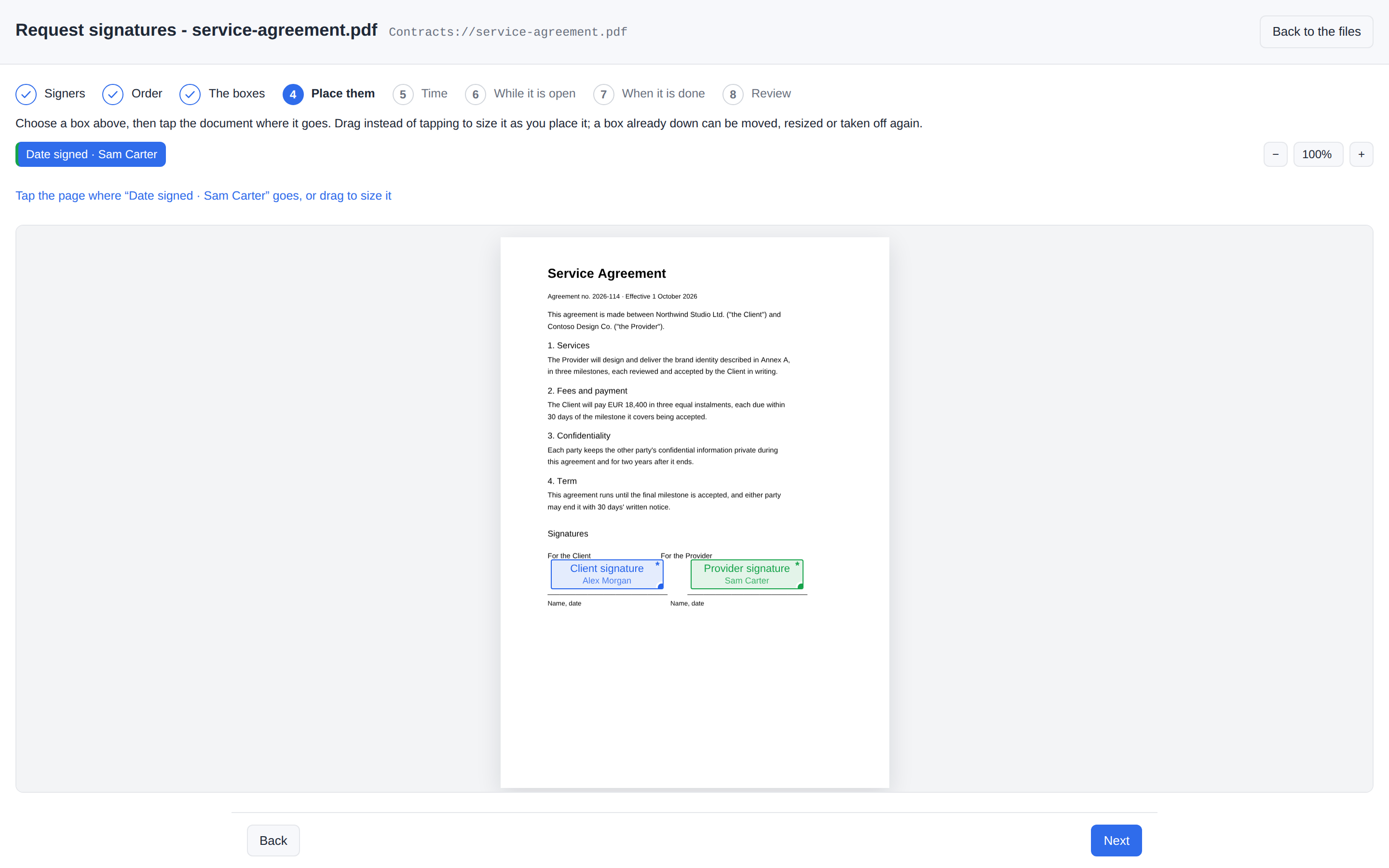
Time - how many days the links are valid (14 by default, at most 90 - both pulled down to the maximum link life, which the step names), an optional Sign by date (the request, its links and the lock end when that day ends), and how often a signer who has not signed is reminded (0 = never).
While it is open - a PIN per outside signer (yes by default), whether a signer may refuse (yes by default), whether to freeze the file while signatures are collected (nobody - not even an administrator - can change it until the request ends; only the app's own signing writes into it), whether to lock the signed file when every signature is in (When it is done), and an optional message.
When it is done - the signed document as a new version of this file (the default) or a new file beside it, whether it is sent to the signers as a filex link by email (and whether that link has a PIN), and whether an audit trail PDF is written (yes by default).
Review - who signs, in which turn, how each is reached (in filex, a link by email, a link you hand over), which boxes are theirs and how long the links will really live; then Send.
A document carries one request at a time. On one whose request is still open, the wizard says so on its first screen (who asked whom, how far it got) and offers the document's Signatures panel instead; once a request has ended, a new one is the next round on the same document, and its first step says it replaces the old record.
Send is one queued job. It is refused if the document already has an open request (the check for a job queued some other way); it takes the lock when you asked for it (signatures are being collected), opens one link per outside signer - an ordinary share of the document, PIN-protected unless you said otherwise (six digits, made by filex), switches the menu from Request signatures… to Sign / Fill, sends the invitations (to everybody, or only the first in line), and tells the requester Signature request sent - a message that carries each outside signer's PIN, and the link itself for a signer with no address.
⚠ A PIN is never mailed. The invitation says the PIN comes separately; the requester passes it on by another channel. A missed PIN is not lost: My shares (the requester) or Admin → Shares (an administrator) copies it again, audited (Outside participants).
What the signers see
A signer with an account gets a notification - "Dana Reyes asks you to sign a document" - that opens Sign / Fill on the document; in a sequential request before their turn, the screen says whose turn it is. Sign / Fill appears on a pending document for everybody who may edit it; somebody who is not one of its signers is told so, and the requester is pointed at the Signatures panel instead.
A signer from outside opens /s/<token> - filex's one public screen, in your instance's name, logo and colours (from Branding, and the default theme picked under Appearance), with a language picker - behind a PIN gate when the request used PINs (five wrong answers shut it for ten minutes, during which even the right PIN is refused).
| The partner's link, behind its PIN | …and what it opens: only their own boxes |
|---|---|
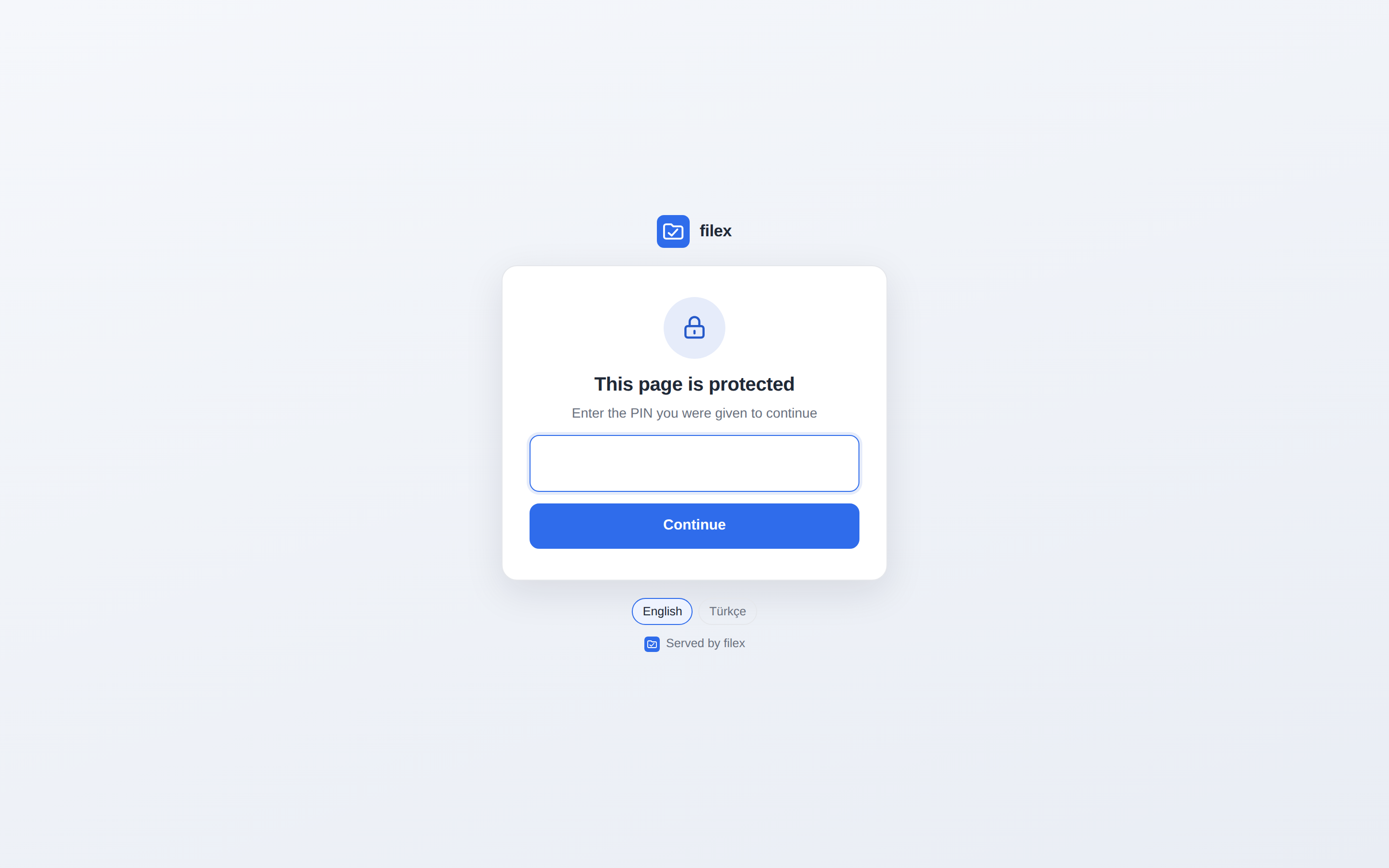 | 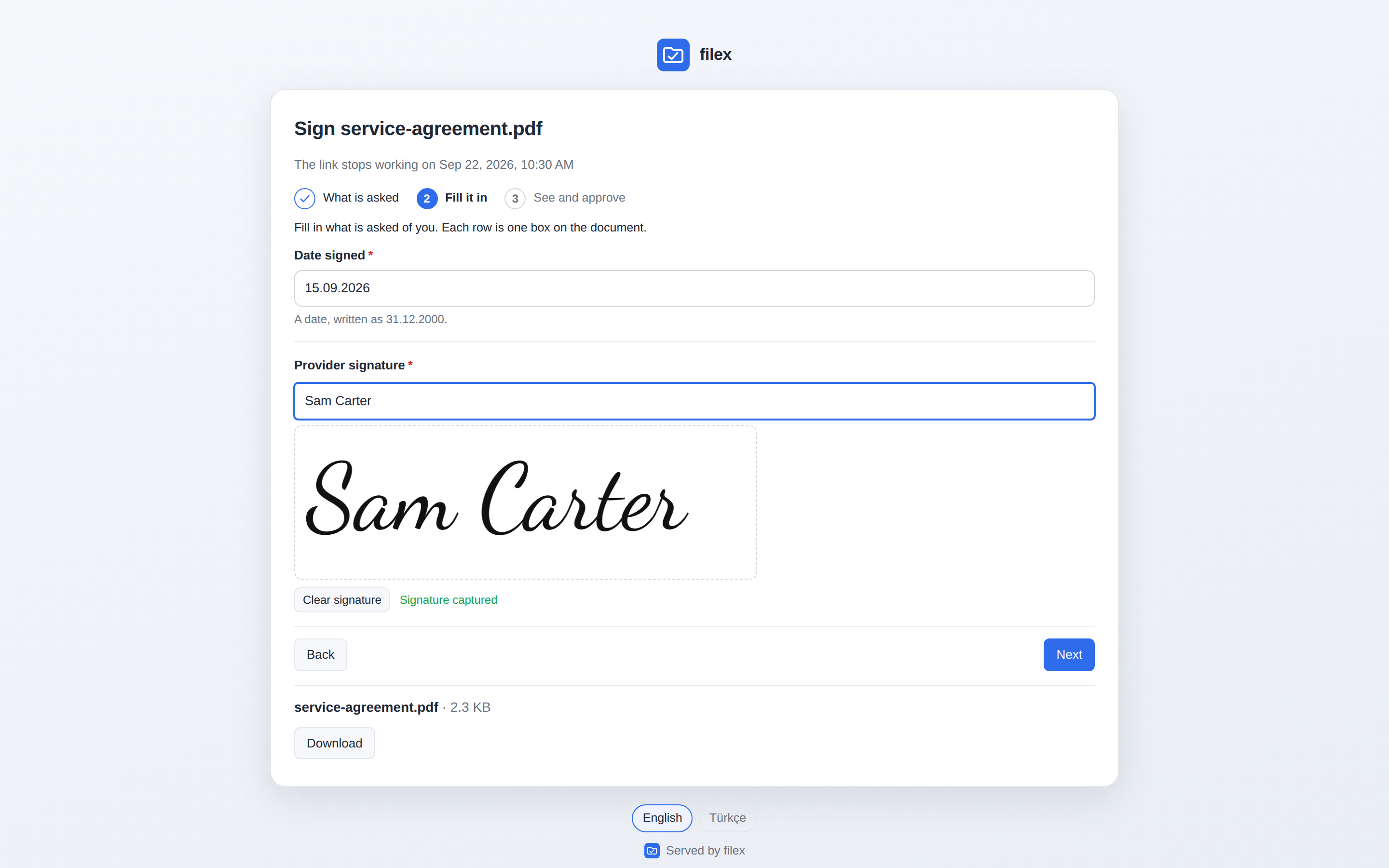 |
Both kinds of signer then walk the same three steps: what is asked (who asks, the message, a table of their boxes - what, what kind, on which page - the deadline and the identity the certificate will carry; Start, and I will not sign with an optional reason when refusing is allowed), fill it in (a plain form of their named boxes, each box's rule checked here; a signature drawn, typed or uploaded), and see and approve (the document with their values in place, and Sign). The outside signer's screen then says their answer was recorded and the signing link stops working. A receipt follows - a page of its own, and a mail when they have an address - with the signature's identity, time, certificate serial and fingerprint, the signing authority and its fingerprint, and the certificate files to keep.
Following a request
The document's details → Signatures: the request's state and how many of how many have signed, who asked and when, and one row per signer - Waiting, Invited, Opened it, Signed, Refused - whose Actions menu holds Remind and Show link. From here the request is cancelled, an expired one closed (which releases the file), and the audit trail saved - by anybody who may edit the document, not only the requester.
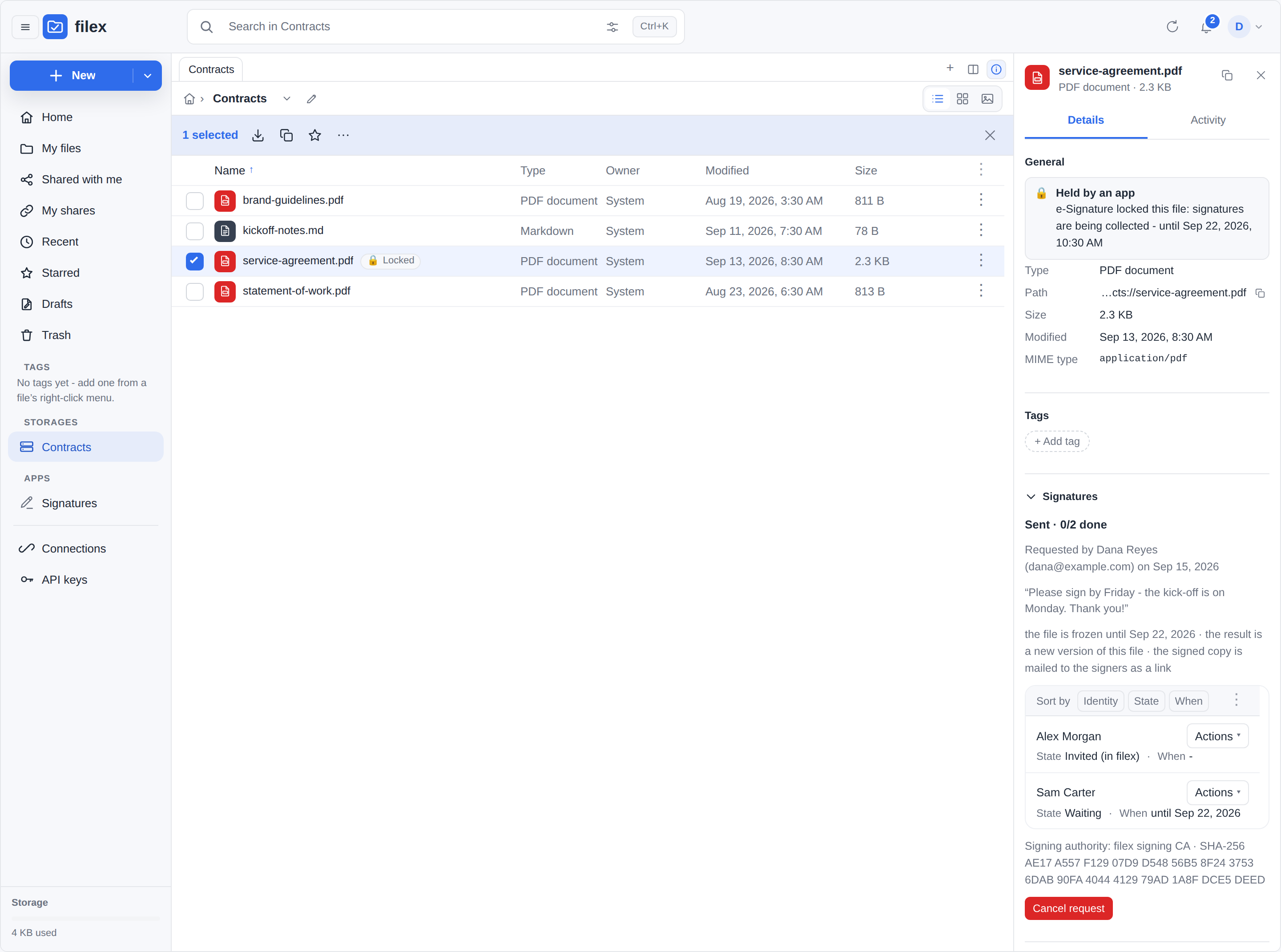
The Signatures home screen, under Apps in the navigation: what is waiting for my signature, what I asked for, what I have signed - and, for an administrator, every request on the instance that they may see. Its PINs section is where the requester reads back the PIN of a link to hand over: one row per link of their own, each PIN hidden until asked for, every read written to filex's audit trail.
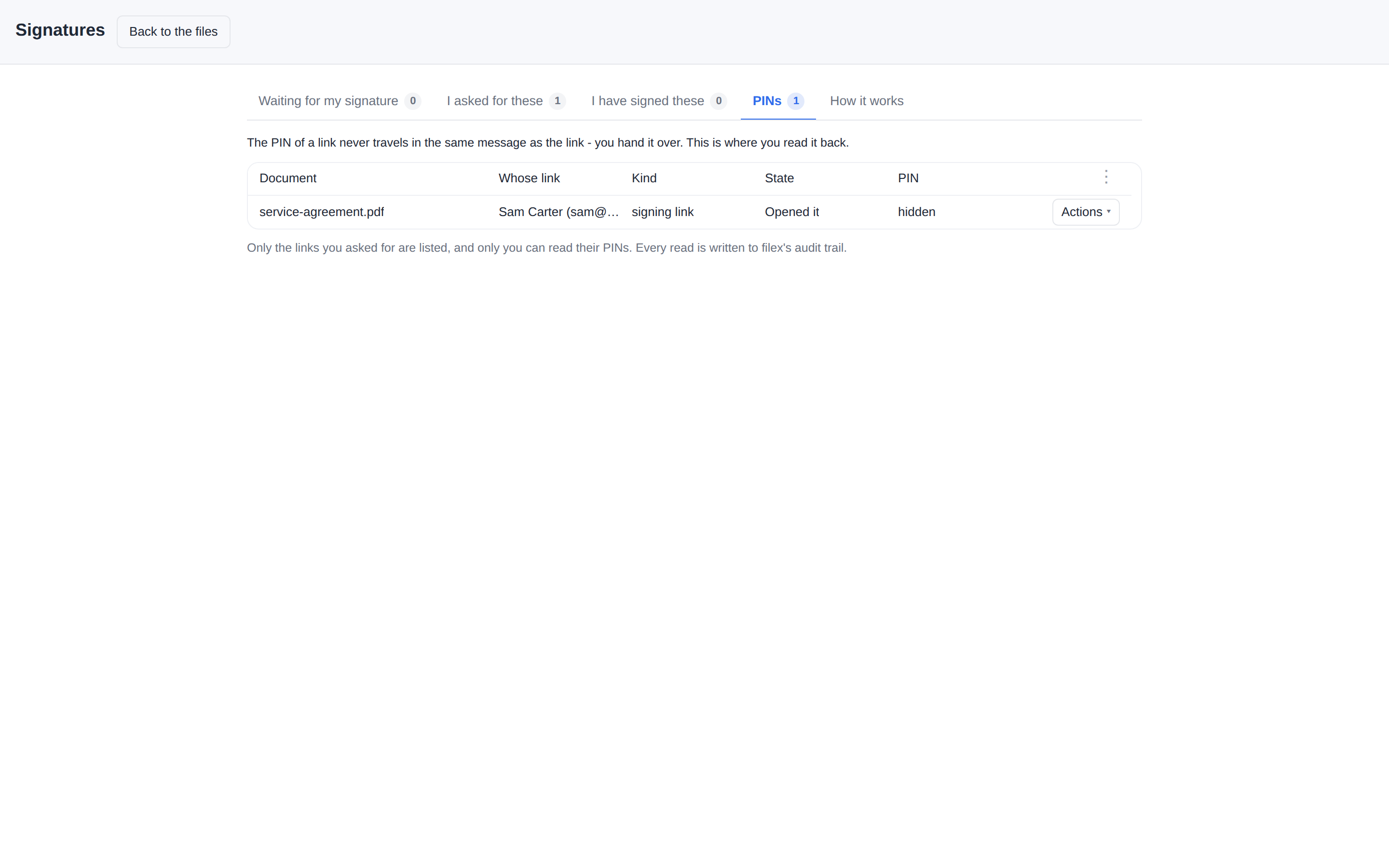
The bell tells the requester when an outside signer opened the document, when somebody signed or refused, and when everything is done.
When it is done
When the last signer signs, every open link is revoked, the freeze is lifted and the document is closed: the signature says so, filex seals it, and the file can be locked.
- The first signature certified the document (DocMDP P=2): from then on only filling in the form and signing were permitted. The signature fields - the seal's included - existed before anything was signed, so no later signer trips it.
- filex seals it. The moment the last signature lands, filex adds one more signature over the whole document with the installation's own seal - a certificate filex document seal from the tenant's authority, whose key the host keeps - into a field locked with P=1 (Acrobat's lock document after signing). After the seal, a PDF reader reports any change as changes not permitted, not merely "modified after signing".
- The SHA-256 of the sealed file goes to everyone - the requester and the inside signers in filex, the outside signers by mail (with the delivery link when the request sends the document; without it, the mail says the requester will hand it over) - with the seal's fingerprint and how to check: Verify in filex, or
sha256sum/Get-FileHashon any computer. The hash is of exactly the bytes written and delivered. - Lock the signed file, when the request asked for it: the signed file stays under the app's lock with no end - nobody, not even an administrator, can change, move or delete it until an administrator lifts the lock on the app's page under Apps (audited). Without it the signed file is an ordinary file afterwards; the certification, the seal and the hash every party holds still show any change.
The signed document is a PDF with a PAdES signature per signer and filex's seal - a new version of the file, or {stem}-signed{ext} beside it - and, when the request asked for delivery, one link to it goes to every signer. Sign… ends the same way: your signature certifies (when the document carried none), filex seals, and the job's answer carries the SHA-256. With the signed document written beside the original and audit trail on, {stem}-audit.pdf is written too: the document, the request and its options, every signer's invitations, reminders, views, signature or refusal with times and certificate details, what was filled in where, the event log and the signing authority - in the requester's language, whoever's signature completed the request. With the signed document kept as a new version, the Signatures panel offers Save the audit trail instead.
A request also ends when its deadline passes (the hourly wake-up closes it at the minute it is due: links revoked, lock lifted, the requester and the signers still owed a signature told), when a signer refuses (when refusing was allowed; it closes for everybody), when somebody cancels it from the Signatures panel, or when a signing link is revoked or deleted under My shares or Admin → Shares - that signer can no longer sign, so the request is cancelled within seconds, its Signatures panel names the link that was ended, the lock is lifted and the requester and the other waiting signers are told.
Verifying a signature
Verify on any PDF answers four questions before the details: is every signature valid, is the document certified (and what it permits), did filex seal it, and is this the file whose SHA-256 every party was sent (it finds the request that sealed exactly these bytes, wherever this copy lives). A change the certification or the seal does not permit is said first, in red, and named - page 1 draws something different, the form field “…” was changed. Then, per signature: whether it checks out, whether the document changed after it, who signed, when (proven by a time-stamping authority, or only declared by the signer's own clock), and which authority issued the certificate - valid, from an authority this filex trusts, or intact - the authority behind it is not one this filex knows, which is validity unknown, not invalid. Every authority the instance has ever used counts as trusted, retired ones included.
Time stamping is off by default. Switch it on in the app's Settings (Add a time stamp to every signature); it asks freetsa.org for a stamp over the signature's digest and a nonce, never the document. If the authority cannot be reached, the signature is made without a stamp, and a request's job message says so.
The signing authority
Apps that sign documents never hold a key. The host keeps a certificate authority per tenant (created on first use, sealed with the instance key), issues a certificate to the app for each signer, signs the digests the app hands it, and destroys the key seconds later - so the file a signer is given proves that signature is mine and can never make another one. To trust every signature made on this instance, a reader imports the authority's certificate: an administrator downloads it from GET /api/admin/app-plugins/signing/ca.pem (there is no button for it in the panel yet), and every receipt and every Verify report names its fingerprint.
- Bring your own authority - an in-house PKI, or a certificate your people trust everywhere else: the signing certificate (with its issuers, for an intermediate) and its private key, in PEM, at
POST /api/admin/app-plugins/signing/ca/import. Convert an encrypted.p12/.pfxfirst (openssl pkcs12 -in ca.p12 -nodes -out ca.pem). The imported key is sealed at rest like a generated one, and an RSA authority is accepted (the certificates it issues to signers are still ECDSA P-256, which is what the host signs with). - ⚠ Import an authority made for this, not your organization's general one. The import answers with a warning (
ca_not_limited_to_document_signing, also in the log) when the authority's certificate has no extendedKeyUsage or names purposes beside document signing: whatever trusts that authority for email, websites or code then trusts a key filex holds, and filex issues certificates under it in any name an app withsignasks for. A warning, not a refusal. What fits is an intermediate made for filex alone: extendedKeyUsage1.3.6.1.5.5.7.3.36(document signing) and1.2.840.113583.1.1.5(Adobe), with name constraints for your own domains. - ⚠ Authorities are never deleted. Importing one, or rotating (
POST /api/admin/app-plugins/signing/ca/rotate), retires the current authority - a signature made two authorities ago must still verify.GET …/signing/caslists every one the tenant has (subject, issuer, fingerprint, validity window, imported or generated, live or retired), and the bundle an app is handed for verification holds all of them, so a verify screen does not call last year's signatures untrusted. - ⚠ What this authority is, and is not. A per-tenant root this installation generated, or the one you imported - not Adobe's AATL or the EU trust list, which need an audited public certificate authority. The honest sentence, which e-Signature repeats: the signature comes from this installation's own signing authority; a reader who imports the CA once sees "valid", a reader who does not sees "validity unknown" - not "invalid"; for legally qualified signatures use a qualified provider.
- The seal. Beside the per-signer certificates, the host keeps one seal per tenant and app - CN filex document seal, OU the app's name, issued by the live authority, its key sealed like the authority's and never handed out or destroyed (
cert_issuewithpurpose: "platform"). It closes a completed request. After a rotation the next seal is issued by the new authority; the old seal's certificate stays inside every document it sealed. - ⚠ Certificates are for documents only: a signer's certificate and the seal carry the document-signing usages - RFC 9336's
1.3.6.1.5.5.7.3.36and Adobe's1.2.840.113583.1.1.5, which Acrobat accepts for signing - and nothing else. A seal issued before 0.50.0 (which also carried emailProtection) is replaced the next time it is used; signatures made with the older certificates still verify. - ⚠ Certificates are issued for ten years, on purpose: a verifier asks whether a certificate is valid now, so a short-lived one would make every signature read "certificate expired" once it lapsed, and the private key is destroyed seconds after the signature either way.
Converting files
The Convert app (BRF-Tech/filex-convert) adds Convert… to every file, and to a selection of several. It opens a short wizard in a dialog, with only the steps that have something to ask:
- Format - What should it become? The selection is summarised, then every target it can reach, as buttons under their category: Image, Video, Audio, Document, Archive, Data, Text, Subtitle, Font. With several files selected, only the targets every one of them can reach are offered.
- Combine - only when several files can become one (images into a PDF or an animation, clips into one video, anything into one archive): one file for all of them, or one file for each.
- Settings - only the knobs that conversion honours: quality, a video's CRF, preset and maximum height, an audio bitrate, a resolution in dpi, which pages, PDF/A, a frame's time, and so on.
- Review - what will happen, including the route the conversion takes, then Convert.
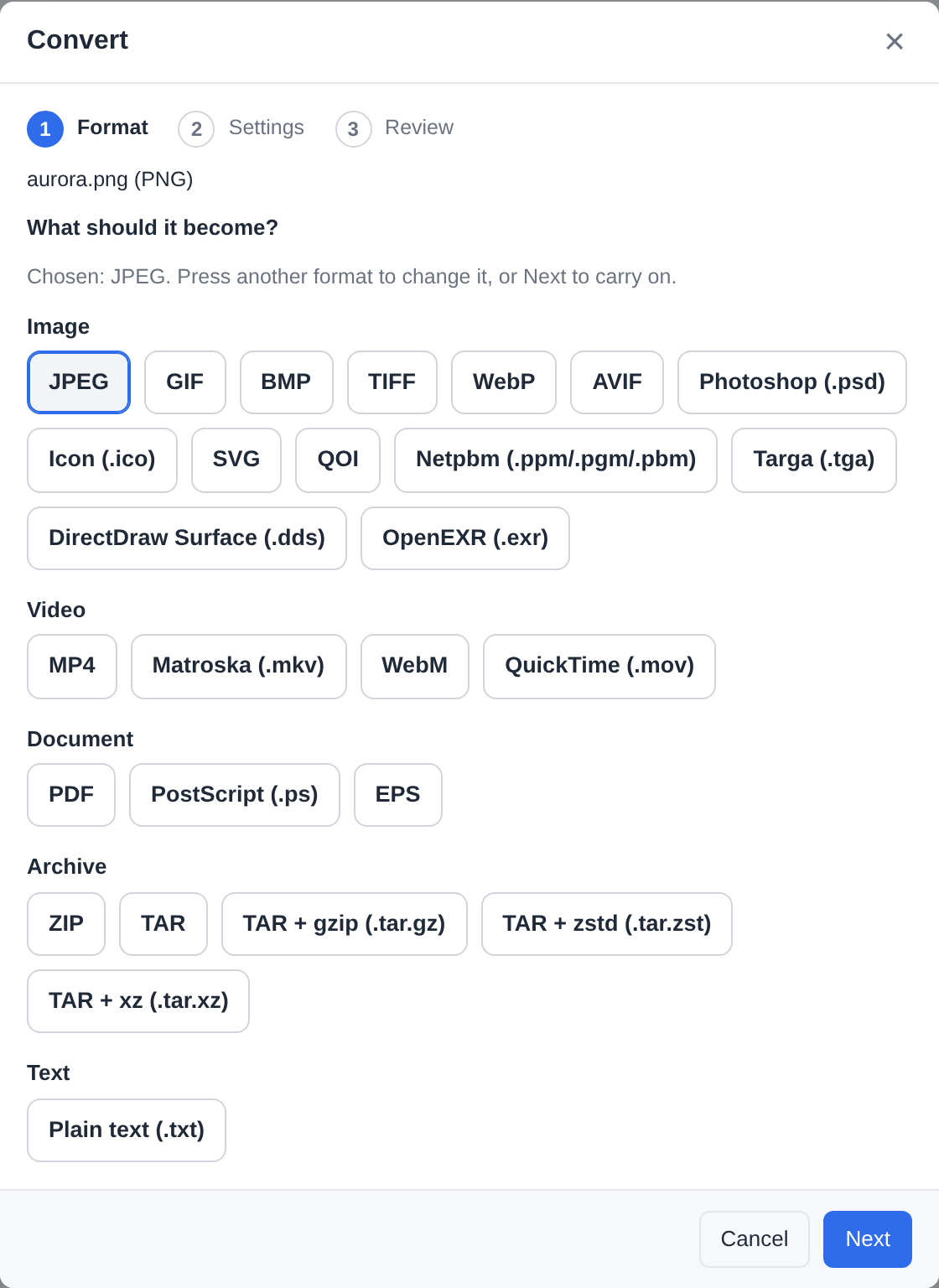
The result lands beside the input, as <name>.<new extension> (pages and frames as <name>-1.png, <name>-2.png, …); a taken name gets a suffix, and the original is never replaced.
Which engines the host needs. Most conversions - documents, images, data, archives, subtitles, fonts - run in pure Go inside the sandbox and need nothing. The rest use the server's own engines, each granted at install as its own permission:
| Engine | What it adds |
|---|---|
| ffmpeg | video, audio, animated images, frames, waveform and spectrogram pictures |
| ImageMagick | HEIC, PSD, XCF, DDS, EXR and AVIF, in or out |
| ONLYOFFICE (the office engine) | office documents with their layout kept - Word, Excel, PowerPoint and OpenDocument to PDF (PDF/A too) and to each other, EPUB and .odg drawings in. Install the Office editor app (its engine runs on the server, 0.4.0) or connect a Document Server under External services; until then these targets say so |
| Ghostscript | PDF compression, PDF/A, PostScript/EPS |
| poppler | PDF to images, text or SVG |
| rsvg | SVG to PNG, PDF, PS or EPS |
A target that needs an engine this host does not have is listed, not hidden: the Format step names the missing engines and lists what they would add (Image · AVIF - needs imagemagick), so a person can tell "this server cannot" from "this app has never heard of it". An engine installed on the server is seen after filex restarts; the office engine as soon as ONLYOFFICE is connected, or the Office editor app's engine is prepared. Jobs are bounded like every app's (Limits) and by the app's own limits - its README lists them.
From an agent: the MCP tool file_convert {path, target} and its REST twin POST /api/ai/convert start the same job the wizard's Convert does, and op_get follows it. Any other app's action is app_actions {path} (what applies to that file) and app_run; an action with a form answers its fields first. They run the explorer's own route, with its rules - see MCP.md.
Outside participants: an app's public page is a share
An app that needs somebody without an account (the person asked to sign a document) opens a link for them. That link is a share - the same kind of public link the explorer's Share dialog makes - so it lives at /s/<token> and appears in Shares beside the downloads, and in its creator's own My shares: one revoke list, one expiry policy (the instance's maximum link life caps an app's links like any other), one PIN implementation, one visit counter and one set of audit rows, for a signature request exactly as for a file somebody downloads. The PIN lock-out - five wrong answers shut the link for ten minutes - guards every public link.
What the visitor reaches is still deliberately small:
- only the files the app copied out for the link when it created it - no storage driver is ever opened for an anonymous request, and the file the link is about is an anchor the visitor cannot read;
- the app's own screen, drawn by the same components as every other screen;
- a PIN, when the app or the manifest asks for one - handed to the app once so it can show it to the requester, and kept sealed beside its hash, so the link's creator (My shares → Copy PIN) or an administrator (Shares → Copy PIN) can read it again, audited every time;
- an expiry and, optionally, a visit ceiling; the app can revoke the link, and so can you.
One screen for every public link. A share, a file request and an app's page are one screen: your instance's name and logo (from Branding) and its default theme (from Appearance), the PIN gate, the expiry, the visit counter, the language picker and the "this link is not available" wording, all the same whichever kind of link somebody was sent. A signature request from a renamed instance does not say "filex". Behind it the plain server-rendered pages are kept for a browser with no JavaScript, and curl -O on a share link still downloads the file rather than collecting an HTML page.
Old /p/<token> links redirect to /s/<token>, so a link already sent keeps working (APP-PLUGINS-API.md → Retired).
What guards an app's link
When the visitor's screen needs something done on the original file (the signature applied), the app asks for a job, and filex runs it as the person who created the link - the visitor never gains a user of their own. That job passes the same gate as one started inside filex:
- the action is looked up the way the menu looks it up, so an action you switched off, one you reserved to administrators (judged by the link's creator, never by the visitor), or an app that is stopped runs nothing;
- the creator's access to the document is read again at that moment - viewer, editor when the job writes, higher when the action asks for more;
- a document in an encrypted folder is refused;
- what the screen sends is capped at 64 KiB, and a field the screen was not showing is dropped before the job runs.
Consequences worth knowing:
- A link does not outlive its creator's access. When the person who opened it loses their grant on the document, the next thing the visitor submits is refused with one sentence asking them to get a new link from the person who sent it - and nothing about your instance.
- Switching an account off pauses every link it opened. The links answer not available: every event is refused with
410before the app is even called, and the exposed copies and the no-JS page stop serving the document too. It is a pause: switch the account back on and the same links work again. A link an app's scheduled wake-up opened has no account behind it and is not affected. - Revoking a signer's link in Shares stops the link at once and reaches the app: filex brings that app's hourly wake-up forward to a few seconds from now, and the app closes the request (When it is done).
Dead links are swept, exposed copies and all, a week after they end. The routes, the states and every refusal are in APP-PLUGINS-API.md → The visitor's routes.
Limits, and what they protect
| Limit | Default | Why |
|---|---|---|
| Module size | 64 MiB | a Go module is 3-25 MB; larger is a mistake |
| Interface bundle | 128 MiB zipped (FILEX_APP_PLUGIN_MAX_UI_MB), 512 MiB unzipped, 20 000 files, 64 MiB a file (8 MiB an HTML page) | draw.io's whole editor is about 60 MB zipped; the rest is a zip bomb |
| Mirrored external files | 32 MiB a file, 128 MiB an app, 32 addresses | a font or a stylesheet, fetched once at install through the same guarded client as the module |
| An interface's save | 512 MiB (FILEX_APP_PLUGIN_MAX_OUTPUT_MB) | the same ceiling as a job's output |
| An interface's call to its module | 4 MiB answer, the screen's time limit | a larger answer is a file |
| Memory per call | 64 MiB, at most 256 MiB (manifest limits.memory_pages) | the sandbox's ceiling; a runaway app is torn down, filex is not |
| Screen call | 15 s, at most 60 s | a screen must answer while a person waits |
| Action job | 5 min, at most 15 min | conversions and signatures; longer is a job that should be smaller |
| Input file | 256 MiB (FILEX_APP_PLUGIN_MAX_INPUT_MB) | what one job may read per file |
| Output file | 512 MiB (FILEX_APP_PLUGIN_MAX_OUTPUT_MB) | what one job may produce per file |
| Jobs per app | 2 at a time | the ops queue is shared with everybody's copies |
Wake-up (schedule) | once an hour, 30 s per call, 64 pieces of work each with at most 16 files | unattended work must not be able to fill the queue or hold up another app's schedule |
| 60 per hour per app | the server's SMTP reputation is yours, not the app's | |
| Outbound HTTP | hosts named in the grant; 8 MiB each way, 30 s, 5 redirects | private, loopback and link-local addresses are refused after DNS, so a granted name that resolves inward is refused too |
Pinned downloads (asset_fetch) | 32 MiB a file, 256 MiB an app (least recently used first), on the hosts named in the grant | a font or a dictionary an app fetches once instead of shipping it; every file is pinned by its SHA-256, and a mismatch keeps nothing |
| Engines | arguments are bare tokens: no path separators, no .., no @lists, no file:/http: schemes | the only files an engine can name are the ones placed in its private run directory |
| An app's public link | 16 files, 64 MiB each, 128 MiB total; PIN 5 strikes / 10 min; 12 h unlock cookie; the instance's maximum link life | a public link is a door; keep it small. A document larger than 64 MiB cannot be sent to an outside signer |
⚠⚠ A public demo must not offer this
A demo hands an admin account to strangers, and an admin can install apps. The sandbox makes that far less dangerous than a storage plugin (nothing runs outside it), but an app can still send mail from your server, notify every user, reach the hosts you granted - and, with schedule, do all of that on a timer with nobody watching. So FILEX_DEMO_MODE turns apps off unless FILEX_APP_PLUGINS_DISABLED=0 says otherwise, and the demo's read-only admin surface refuses installs regardless.
Configuration
| Variable | Default | Meaning |
|---|---|---|
FILEX_APP_PLUGINS_DISABLED | 0, 1 in demo mode | Turns the runtime off: nothing under <data-dir>/app-plugins is loaded, the file menu shows no app rows, no app is woken, the admin tab explains why |
FILEX_APP_PLUGIN_MAX_INPUT_MB | 256 | Per-file input ceiling for a job. Seeds the setting on Admin → Settings → Plugins → Apps (applies at the next start), like the three below |
FILEX_APP_PLUGIN_MAX_OUTPUT_MB | 512 | Per-file output ceiling for a job |
FILEX_APP_PLUGIN_MAX_WASM_MB | 64 | Largest module an install accepts |
FILEX_APP_PLUGIN_MAX_UI_MB | 128 | Largest interface bundle (zipped) an install accepts |
FILEX_APP_PLUGIN_UPDATE_CHECK | 1 | The daily check that asks every app's source for a newer version and tells the administrators - it installs nothing (Updates). 0 = no request leaves the server for it; Check for updates still works. Off on a demo regardless |
FILEX_PLUGIN_TRUSTED_KEYS | - | Shared with storage plugins: set it and every module must carry a detached ed25519 signature over its sha256 |
FILEX_PLUGIN_REQUEST_TTL_DAYS | 14 | How long an install request waits for an administrator before it expires (both kinds of plugin). Seeds the setting on Admin → Settings → Plugins → Apps |
FILEX_APP_STORE_URLS / FILEX_APP_STORE_KEYS | - | Stores trusted by configuration, and the keys they sign with (Trusted stores) |
FILEX_APP_GITHUB_RAW_BASE | https://raw.githubusercontent.com | Where a GitHub install and a store link read a repository's files (a mirror; the guard applies) |
FILEX_APP_CLOCK | - | ⚠ Screenshots and tests only: an RFC 3339 instant the apps' clock starts at - the time inside every module, and the host's times handed to an app (a lock's end, a link's expiry, a wake-up's window). What filex stores stays on the real clock (CONFIGURATION.md) |
FILEX_SECRET_KEY | - | Seals secret settings, the signing authority's key, share PINs and paid apps' license keys; without it secret settings and signing answer unavailable, and a PIN cannot be read back later. The public-link unlock cookie falls back to a per-process key: it works, but a restart signs visitors out and two instances behind one address do not share it |
Apps need an amd64 or arm64 host: the WebAssembly compiler has no interpreter fallback here, on purpose (an interpreter would take every core for minutes). On another architecture the admin tab says so and nothing else changes.
Where things live
<data-dir>/app-plugins/
  <name>/plugin.wasm       the module, sha256-checked at every load
  <name>/filex-app.json    the manifest as installed (the approved grant is in the database)
  <name>/ui.zip            the app's own interface, as installed - never unpacked,
                           sha256-checked at every load, served from its own index
  <name>/ui-ext/<sha256>   the external files the interface mirrors
  cache/                   compiled modules (safe to delete; rebuilt on next load)
  spool/                   per-call working files (emptied on boot)
  public/<share id>/       the copies an app's public link exposes
  assets/<app>/            files an app pinned and fetched once (`asset_fetch`),
                           kept across upgrades, removed with the app
  <name>.prev/             the previous version while an upgrade swaps it in;
                           put back at start if the process stopped mid-swap
  _versions/<name>/<id>/   the version the last approval replaced, kept to go
                           back to (one per app; removed with the app)
Tables: app_plugins, app_plugin_settings, app_plugin_overrides, app_plugin_state (per-file state an app keeps, with the file's path beside its hash so an app can find its own documents again), app_plugin_jobs, app_plugin_schedule (what a woken app asked for), app_plugin_signing_keys (every authority, retired ones included). An app's public links are rows in shares, carrying plugin_id, page_id, subject and the app's own record. app_plugins also keeps the manifest address of a URL install, the signature it was installed with, the interface bundle's SHA-256 and what the last update check found (its auto_update column is no longer read); app_plugin_versions keeps the version the last approval replaced; plugin_requests keeps the install requests of both kinds of plugin, with what each froze and how it was decided.
Audit entries: plugin_request.create, .approve, .reject, .expire and .supersede; app_plugin.action_run, app_plugin.page_job, app_plugin.unlock; app_plugin.upgrade and app_plugin.rollback (an administrator's approved change, by whom); app_plugin.update (an automatic update, written only by filex 0.47); app_plugin.ui_save (an interface saved a file); app_plugin.e2e_read / app_plugin.e2e_save (a file of an encrypted folder handed to an interface in the clear by the browser, or saved back encrypted - the app, the view, the file; never a byte of it); app_plugin.thumbnail_sent (a thumbnail call that reached the network: the app, the hosts, the file); app_plugin.thumbnail_limits; file_association.update / .reset (Default apps, before and after); app_plugin.signing_ca_import; share.pin_revealed for every PIN read back; and share.pin_locked for a PIN gate that shut (the row carries the token's hash, never the token).
Admin API
All under /api/admin/app-plugins, for the supertenant's administrator (503 with the reason when the runtime is off; the list itself still answers 200 so the panel can explain). Every route with its bodies and answers is in APP-PLUGINS-API.md → Admin surface; in short:
| What | Routes |
|---|---|
| The list, one app, install, upgrade, remove | GET / (the runtime and every row), POST / (install; ?dry_run=1 answers the permission review without installing), GET /{id}, PATCH /{id} ({enabled}; {auto_update} answers 400: nothing updates itself), POST /{id}/upgrade ({from_source: true} takes the newer version the app's source has), POST /{id}/rollback, DELETE /{id} |
| Updates | POST /updates/check - asks every app's source now and installs nothing |
| An app's page | GET/PUT /{id}/settings (*** keeps a secret), GET/PUT /{id}/overrides (menu actions only, stored as the change against the manifest), GET /{id}/logs?after=N, GET/PUT /{id}/thumbnails |
| The signing authority | GET /signing/ca.pem, GET /signing/cas, POST /signing/ca/rotate, POST /signing/ca/import (The signing authority) |
| Links and locks | GET /shares (the public links apps opened), GET /locks · DELETE /locks (lifts one by force, audited app_plugin.unlock) |
| Stores and licenses | /stores, /store-intent, /store-intent/install, /store-intent/cancel, /licenses, /{id}/license…, /stores/connection, /store-view (APP-PLUGINS-API.md → filex's side) |
⚠⚠ Install and upgrade (unless ?dry_run=1), PATCH, rollback, DELETE and PUT /{id}/overrides need an administrator signed in to the panel: an API key gets 403 session_required and is pointed at /api/admin/plugin-requests. So does every store and license route, the reads included. Everything else here stays open to an admin-scoped key.
Which app opens a kind of file, and which draws its thumbnails, is /api/admin/file-types (the same gates: supertenant, a signed-in administrator for a change, not on a demo) - APP-PLUGINS-API.md → Default apps; MCP reads it with admin_file_types_list. Who may use an app's actions is decided on the roles API with the rest (App permissions).
A refusal carries a code the wizard switches on (manifest_invalid, sha256_mismatch, signature_required, permissions_incomplete, name_taken, describe_mismatch, load_failed, load_timeout, incompatible, up_to_date and the rest: APP-PLUGINS-API.md → Errors) and the server's sentence for it in the reader's language (message).
The user-side routes (/api/files/plugins/*, /api/files/ops/{id}/cancel) are what the explorer calls, and /api/public/* is what a visitor's browser talks to; a script that wants either has BACKEND.md and The public surface for the shapes.
Writing one
PLUGIN-KIT.md - the manifest, the exports, every host function with its permission, the screen catalogue, public links end to end, and a test kit that runs before plugin.wasm exists - all in stock Go. The apps above are complete, readable examples (e-Signature and Convert for a module, filextext and draw.io for an interface); to start your own, copy the template repository BRF-Tech/filex-app-template.
Troubleshooting
| Symptom | Where to look |
|---|---|
| The tab says disabled | FILEX_APP_PLUGINS_DISABLED, or demo mode; on an unsupported CPU the banner says which |
An install through an API key answers 403 session_required | by design: a key cannot install - leave a request and an administrator approves it on the Plugins page |
An approval answers 409 superseded | the source serves different bytes than the request froze (a re-tagged release, a changed manifest); nothing was installed - ask again for the new bytes |
A GitHub install answers fetch_failed | the ref is empty or wrong: give the release's tag, not a branch (the module's address in the manifest names a release) |
Install answers sha256_mismatch | the module at the manifest's address is not the one the manifest describes - the release asset and the manifest at that tag disagree |
Install answers signature_required | the instance sets FILEX_PLUGIN_TRUSTED_KEYS; install with Upload files and the detached signature |
Install answers describe_mismatch | the module was built from a different manifest than the one installed - rebuild, or fix name/version/permissions; a schedule grant also needs a tick export |
Install answers load_timeout | the module did not start and describe itself within a minute (or its call_timeout_s, when longer): the server is busy - try again; the server's log says install refused, the module did not load with the detail |
Install answers load_failed | the module did not compile, did not start or crashed in describe; detail says which - an app's own bug, not its manifest |
| A menu row never appears | the action's applies rule (extension, MIME, multi) - check the override; the action may be switched off or reserved to administrators; it may need one of the app's own permissions the person does not hold (App permissions); a read-only storage hides writing actions; encrypted folders hide everything |
An action or screen answers 403 permission_denied with permission: "app.<app>.<id>" | the person does not hold that app permission; source says which layer decided - their exception, their custom role, the built-in role or the app's default (App permissions) |
An install of a newer app answers manifest_invalid … unknown field "user_permissions" | this filex is older than 0.49.0, and the app declares its own permissions - upgrade filex, or install a version of the app from before them |
| Request signatures… is missing on a document | a request is already open on it - the document offers Sign / Fill until that one ends |
| A job fails with the plugin ran out of memory / time | raise limits.memory_pages / limits.timeout_s in the manifest (up to the ceilings above), or make the job smaller |
| Mail from an app never arrives | SMTP must be configured and verified (Admin → Settings → Email (SMTP)); the app is told unavailable until then; then the 60/hour window |
http_request refused | the host is not in the grant, or the name resolves to a private address |
| Signing unavailable | FILEX_SECRET_KEY is not set |
| A signing link expires sooner than the request said | an app too old to read share_max_ttl_days: the instance's Maximum link life (Admin → Protection, default 7 days) caps every link. A current app is told the ceiling and names the real date |
A CA import answers ca_invalid | the key is encrypted (openssl pkcs12 -in ca.p12 -nodes -out ca.pem first), the key does not match the certificate, or the certificate is not one that may sign |
| An app's public link says it is not available | it expired (the clock ran out - an administrator's Revoke lands here too, by moving the expiry to now), or it is revoked: the visit ceiling is spent, the file is gone, the app was switched off or removed, or the account that created the link was switched off or deleted (switching it back on brings the link back). A shut PIN gate is neither - it lifts itself after ten minutes |
| An outside signer is told the link "can no longer be used" | the link's creator lost access to the document, or the action it needs was switched off; the creator sends a new link |
| A signature reads certificate expired | a certificate issued by a pre-v3 build, which used 30-day leaves; re-sign, or verify against the authority that issued it |