
AI assistant
An assistant in the explorer that finds, reads, summarises, tidies up and moves files for the person who asks - with that person's permissions and nothing more. It talks to a model you choose: Anthropic (Claude), OpenAI or any server that speaks OpenAI's API (OpenRouter, vLLM, LM Studio), or a local Ollama that keeps everything on your network.
It is off until an administrator turns it on.
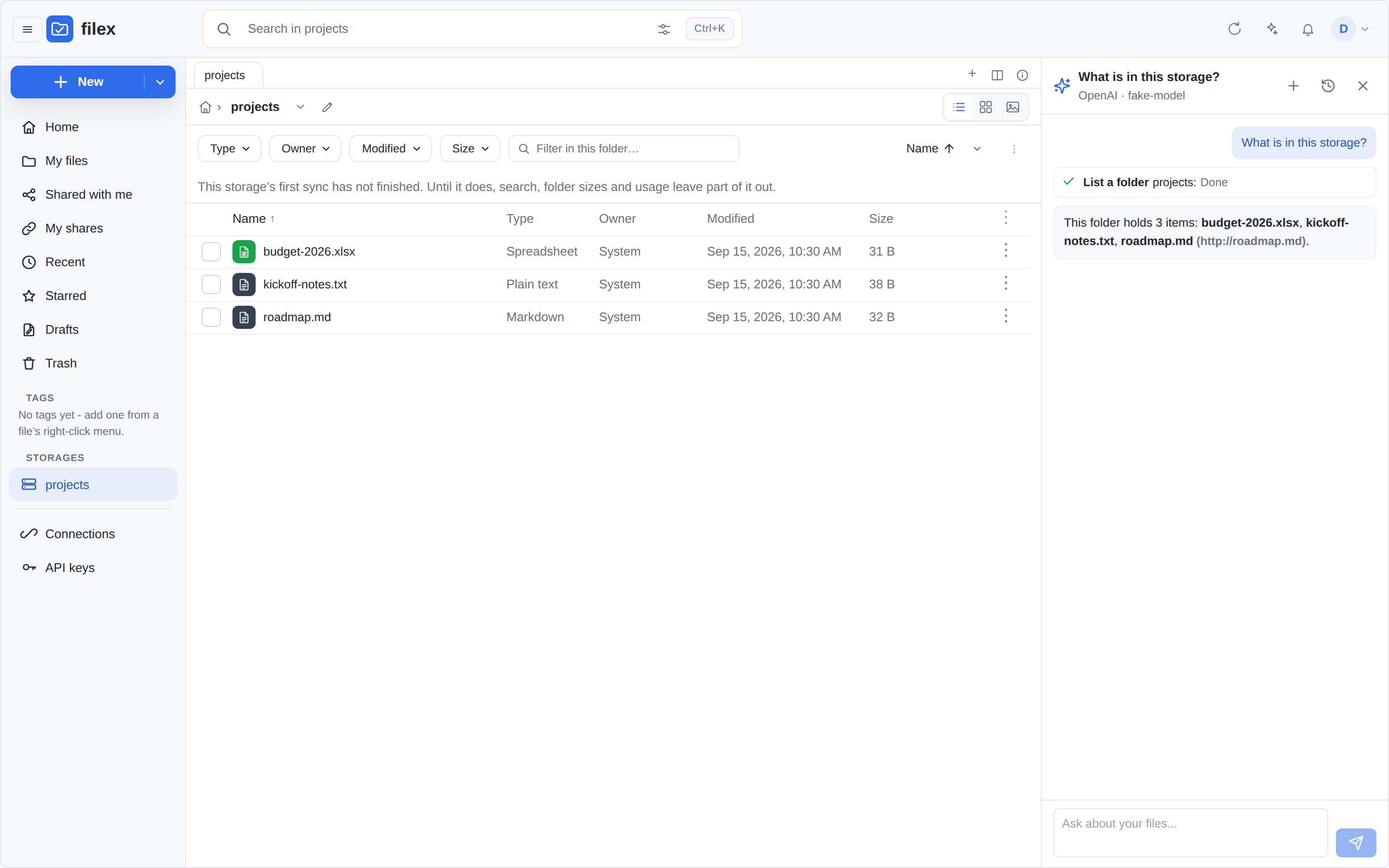
Set it up
- Admin → Settings → AI assistant (under File processing & integrations).
- Pick the provider, give its address if it is not the provider's own, paste the API key if it needs one, and name the model.
- Test the connection. The test lists the models the address offers and asks the model for a one-word reply with a tool on offer, so a model that cannot call tools is caught here rather than on the first question.
- Turn the assistant on and save. The explorer's toolbar now shows the spark button to everybody whose role allows it (Who may use it).
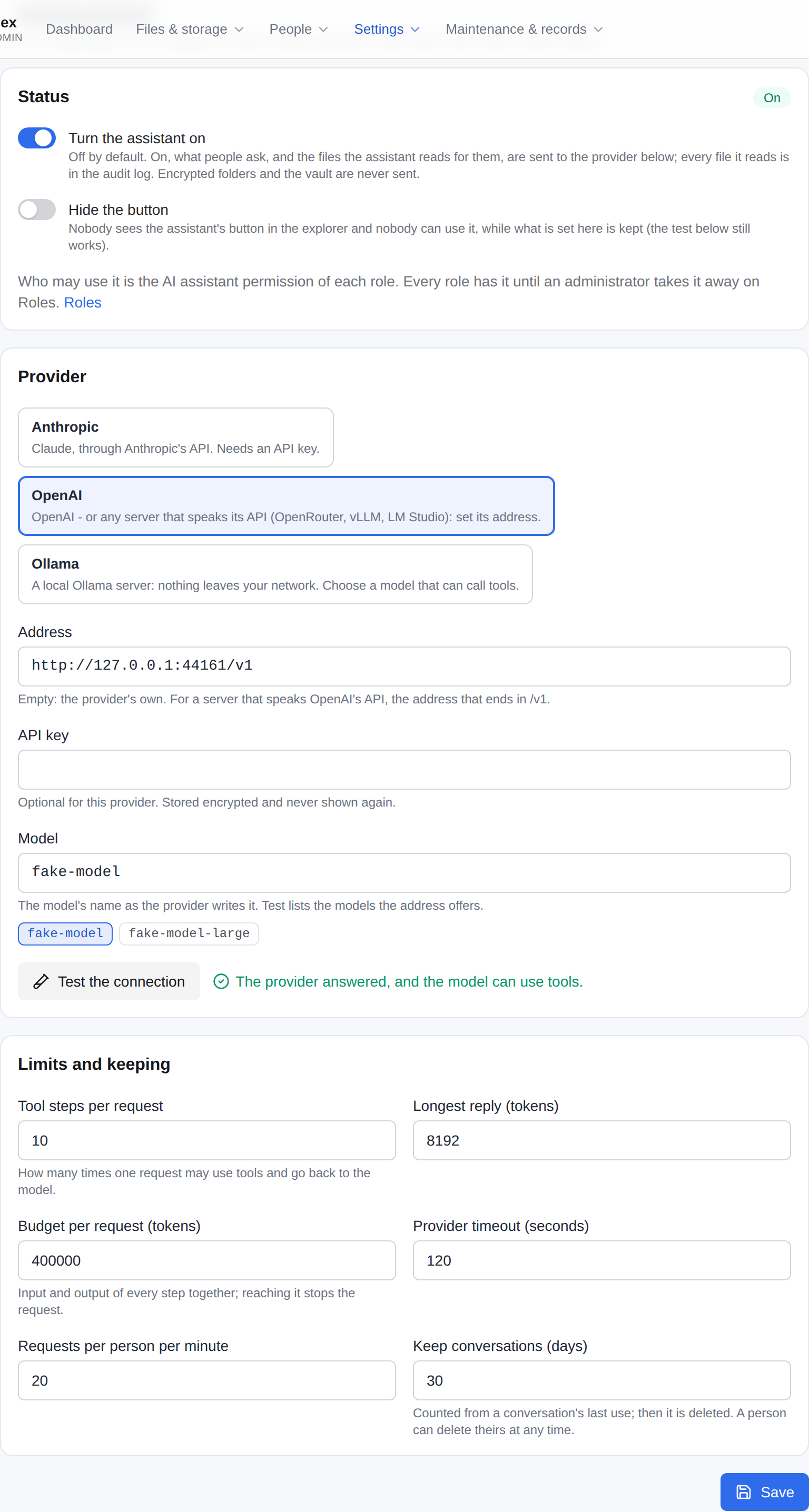
The API key is stored encrypted with the installation's FILEX_SECRET_KEY and is never shown again - the page says only whether one is stored. A server without FILEX_SECRET_KEY cannot store a key (assistant_no_secret_key); Ollama and an OpenAI-compatible server of your own that needs no key still work there.
Anthropic (Claude)
| Field | Value |
|---|---|
| Provider | Anthropic |
| Address | empty (https://api.anthropic.com) |
| API key | an Anthropic API key |
| Model | claude-opus-5-5, claude-sonnet-5-5, claude-haiku-5-5 or claude-fable-5-1 |
On Anthropic's own address filex also asks for the server-side fallback (fallbacks: "default") on the models that offer it: a request the model's safety classifiers decline is answered by the model Anthropic recommends for it, inside the same call.
OpenAI, or a server that speaks its API
| Field | Value |
|---|---|
| Provider | OpenAI |
| Address | empty for OpenAI; https://openrouter.ai/api/v1 for OpenRouter; http://vllm.internal:8000/v1 for vLLM; http://127.0.0.1:1234/v1 for LM Studio |
| API key | the provider's key; a server of your own may need none |
| Model | the model's name as that server lists it (Test lists them) |
filex speaks the Chat Completions API (/chat/completions, streamed, with function calling): the one every OpenAI-compatible server offers.
Ollama - everything on your own network
| Field | Value |
|---|---|
| Provider | Ollama |
| Address | empty (http://localhost:11434), or where your Ollama listens |
| API key | none |
| Model | a model that can call tools, for example qwen3, llama3.1 or mistral-nemo |
ollama pull qwen3Nothing leaves your network: the questions, the file names and the files the assistant reads go to your Ollama and nowhere else. A model that cannot call tools is refused by Ollama ("does not support tools"); the test says so.
Using it
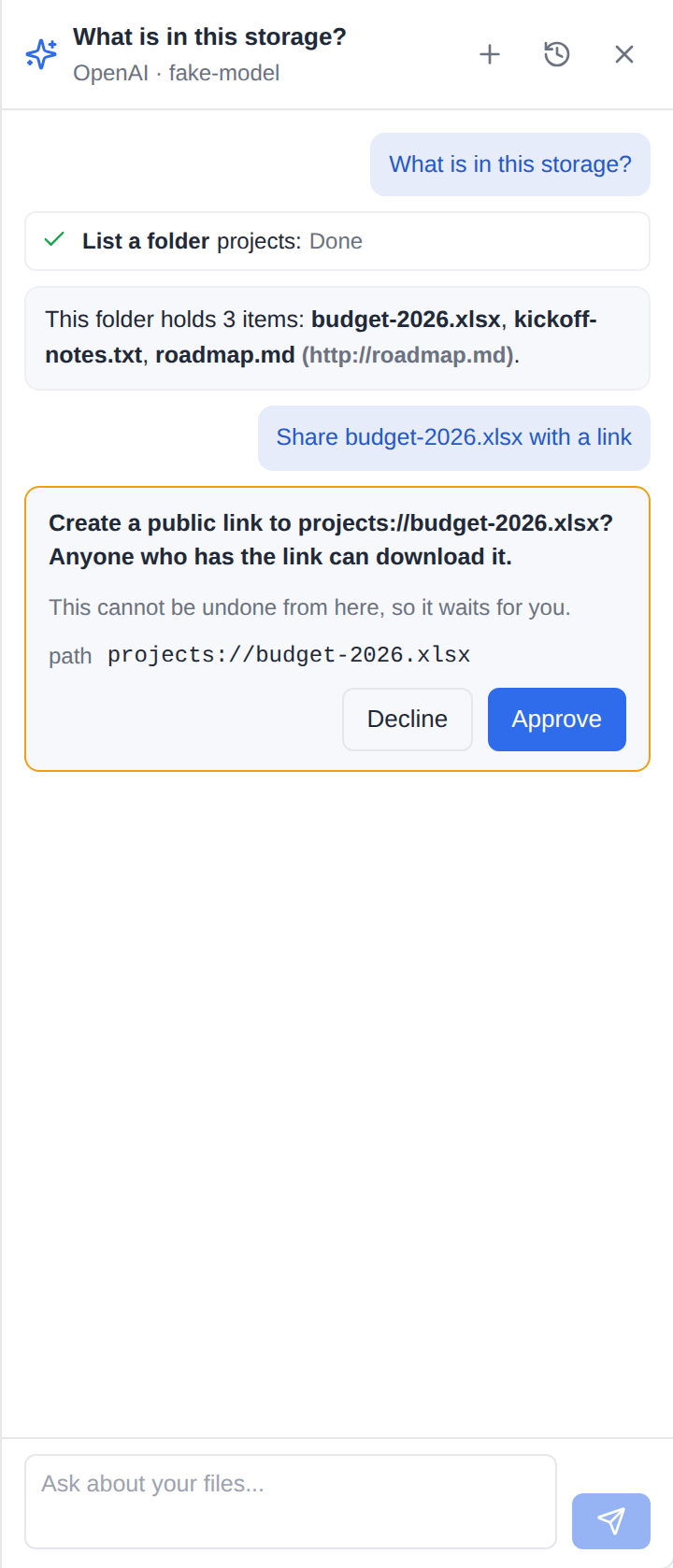
The spark button in the explorer's toolbar opens the panel, docked where the details panel docks (it covers the explorer on a phone). Ask in your own words; the reply streams in, and every tool the assistant used is a line of its own - what it did, on which item, and whether it worked. What you have selected goes with the message as context (the paths, not the contents - the assistant reads what it needs, and every read is logged).
- Changes that can be undone happen at once: moving, renaming, copying, writing a file, deleting to the trash, tags, stars, a comment. Each carries an Undo, which puts it back through the trash or the version history, as you.
- Actions that cannot be undone wait for you on a card that says what will happen and why it waits: a public link or an upload link, revoking a link, giving or taking access, deleting a comment, running an app or a conversion, cancelling a job - and a delete on a storage without a trash, writing over a file whose current content cannot be kept as a version, or extracting into a folder that is already there. Approve runs it; Decline tells the assistant you said no.
- Stop ends the request; what was done stays, and the conversation says where it stopped.
- Conversations lists your earlier conversations; each can be opened or deleted.
User settings → AI assistant shows the assistant's state (on, off, not set up by the administrator, not in your role), who reads what you write, how long conversations are kept, the choice to approve every change (then the changes that can be undone wait for you too), and the button that deletes your conversation history.
The assistant answers in your account's language.
Who may use it
The ai.assistant permission (Roles & per-user permissions). It comes on for everyone: every preset holds it, and the first start of the version that adds it gives it to every saved role, custom ones included (once: taken away, it stays away). The assistant itself stays off until an administrator sets it up. What it does is held to the person's own permissions, so a viewer's or a guest's assistant can only read. An administrator is bound by no role. A role and a person's exceptions turn it off or on like any other permission, on Admin → Roles and on the person's page.
ai.assistant is not ai.use: ai.use is the agent API an outside program reaches with an API key (MCP); the assistant never hands out a key.
The button is drawn only when all of these hold - the server answers it in GET /api/capabilities → assistant.button, and every surface (the web explorer, an embedded one, the desktop app) draws it from that alone:
- the administrator turned the assistant on and set it up (provider, model and, where the provider needs one, a key);
- Hide the button is off;
- the person holds
ai.assistant; - the caller is a person - a session or the person's own API key - and not an app's key (an embed's shared key has no person behind it).
Hide the button closes the assistant for everybody while keeping its settings (the connection test still works): no button, and the routes answer 404 assistant_off.
What the assistant can do
Exactly what the person can, through filex's own MCP tools - the ones an agent reaches at /api/ai/mcp (MCP) - called inside the server, as that person: their session or their own key with its verbs and root: folder, their tenant, their address. No token is minted for it, and no right is widened: a tool refuses whatever the person could not do - folder access, the files.download rule, the tenant boundary, the root - exactly as it refuses an agent.
The tools offered are the file tools: list, info, read, search, tags, write, new folder, move, copy, delete to the trash, zip and unzip, archives, versions, the trash, stars, comments, item permissions, links and upload links, app actions and conversion, the operations queue. Not offered: the upload ticket, the bell, and every admin_* tool - the assistant does not administer the instance, even for an administrator.
Privacy
- Off by default. Nothing goes to any model until an administrator turns the assistant on.
- Encrypted folders, encrypted files (
.fxe) and the vault never reach a model. A tool call that names one is refused before the tool runs (ENCRYPTED), a row inside one is taken out of every answer (listings, searches, the trash), and such an item cannot go with a message as context (assistant_encrypted). The server holds no key to them anyway; this keeps even their names inside away from the model. - Every file content that leaves for a model is in the audit log (
assistant.content_sent): who, which file, which provider and model, how many bytes. A file's text is cut to 32 KiB for the model; a binary file's bytes are never sent. Every change the assistant makes is audited like the same tool's -via: assistant, with the provider and the model. - What is sent: the person's messages, the paths they selected, and what the tools answer - file names, listings, the text of the files the assistant reads. Passwords are never asked for: the tools are offered without their password fields.
- Text inside files is treated as data: the system prompt tells the model never to follow instructions found there, and anything that cannot be undone waits for the person whatever the model was told.
- The answer loads nothing from elsewhere. A picture in the assistant's answer is drawn only when it is filex's own (or a
data:image); any other one is shown as a link with its address written out, because an instruction hidden in a file the assistant read could make it write a picture whose address carries that file's words to another server, and drawing it would send them. Links open in a new tab and show where they go. A file's own preview holds such a picture behind a placeholder until the person loads it, or turns on Load remote images in previews (Features); the assistant's answer has no such door, whatever that setting says.
Conversations are kept on the server
A conversation is kept for its person alone, on the server, so it follows them from the browser to the desktop app and a step that waits for approval survives a closed tab. It is deleted after Keep conversations days (30 by default) counted from its last use - swept every hour - and the person can delete one or all of theirs at any time.
Limits
| Setting | Default | What it bounds |
|---|---|---|
| Tool steps per request | 10 | how many times one request may use tools and go back to the model |
| Longest reply | 8192 tokens | one reply of the model |
| Budget per request | 400 000 tokens | input and output of every step together; reaching it stops the request |
| Provider timeout | 120 s | one call to the provider, retries included |
| Requests per person per minute | 20 | 429 assistant_busy past it |
| Keep conversations | 30 days | see above |
A provider that answers 429, 500, 502, 503, 504 or 529 is asked again (twice, after its Retry-After, at most 30 s) before anything of the reply was read.
API
The panel's routes, under /api/files/assistant (so an embed's proxy that forwards /api/files/* reaches them):
| Route | What |
|---|---|
GET /api/files/assistant | the state for this person, provider and model, retention, their choice |
PUT /api/files/assistant/prefs | {confirm_all} |
GET /api/files/assistant/conversations | their conversations |
DELETE /api/files/assistant/conversations | all of them, gone |
GET /api/files/assistant/conversations/{id} | one, as the panel draws it |
DELETE /api/files/assistant/conversations/{id} | one, gone |
POST /api/files/assistant/chat | {conversation_id?, message, paths?} - server-sent events |
POST /api/files/assistant/conversations/{id}/decide | {approve} - server-sent events |
POST /api/files/assistant/conversations/{id}/undo | {step_id} |
The events: conversation {id, title}, text {delta}, step and approval (a step: its name, status and target, already said in the person's language), done {reason, conversation}, error{error, message, detail}.
The settings: GET/PATCH /api/admin/assistant and POST /api/admin/assistant/test (the platform operator's), and their MCP twins admin_ai_assistant_get, admin_ai_assistant_update and admin_ai_assistant_test (MCP).
Troubleshooting
- No button.
GET /api/capabilities→assistantsays why:state(off,not_configured),permitted(the role),button. assistant_provider_key: the provider refused the key.assistant_no_tools: the model cannot call tools; choose one that can.assistant_provider: the provider failed; its own words are thedetail.- The assistant stopped (a note in the conversation): it reached the tool steps or the budget of one request; ask it to go on.