
filex - RBAC & per-file/folder permissions (API + MCP reference)
Added in v0.1.41+ (backend internal/acl). This documents the access model and every endpoint / MCP tool the feature exposes. Backwards compatible: RBAC is off per storage by default, so an untouched deployment behaves exactly as before.
What an account may do - delete, share, download, use SFTP, manage users - is the roles and per-user permission layer on top of this, in PERMISSIONS.md. A file action needs both: the grant level described here, and the permission. The explorer's AI assistant (permission
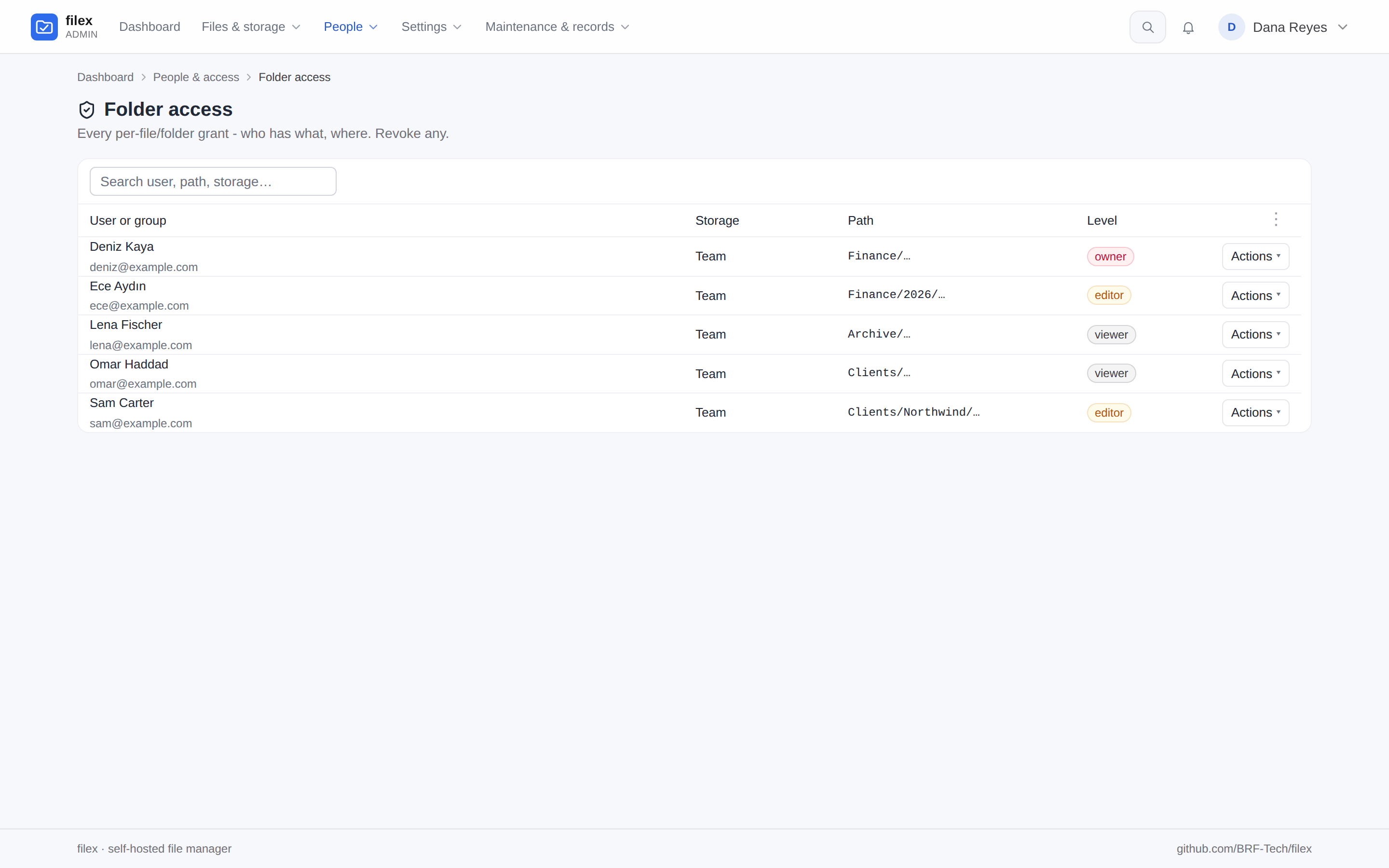
ai.assistant) is held to both as well: each tool it calls runs as the person who asked.In the admin panel the grants are Admin → Folder access (Klasör erişimi) - every per-file and per-folder grant, who has what, where - and the roles are Admin → Roles. (Before 0.49 the grants page was called Permissions.)
A grant can also be given to a group - every member holds it, the highest covering level still wins and the account ceiling still caps it. See GROUPS.md. In the panel routes below,
POSTtakes agroup_idin place ofuser_id; a group's grant is numbered apart from people's and is changed and revoked at/api/files/permissions/groups/{id}.
Model
Two layers combine, then a ceiling is applied:
Account role (
users.role):admin(full panel, exempt from all ACL),user(explorer only; read+write; can hold owner grants),viewer(explorer only; read-only - view/download, no edit/convert/mutate). For an account with no custom role of its own,userorviewerfollows the role its groups give it (GROUPS.md → The role)."Explorer only" is a URL as well as a permission: give a
userorvieweraccount the address…/driveand they land on their Home page - their storages, what they opened last, what they starred - one click from the file manager itself (uploads, sharing, search and the editor), with no admin chrome and nothing extra to deploy.…/adminis the same application served under the operator's prefix; a non-admin who follows an old/admin/...link is handed on to/drive/(and the backend re-checks the role on every/api/admin/*call regardless of which URL asked).Per-storage RBAC toggle (
storages.rbac_enabled, defaultfalse):- OFF → storage visible to every authenticated user; capability = account role (user→editor, viewer→viewer, admin→owner). No grants needed.
- ON → storage hidden; a non-admin sees only paths granted to them (directly or inherited from a parent folder).
Item grant level (
file_grants):viewer<editor<owner.- Inheritance: a folder grant cascades to descendants. Effective level = highest covering grant (direct or inherited), then capped by the account role (a viewer account stays viewer even if granted higher).
- Only an
ownerof an item (or an admin) may see/manage its permissions.
⚠ One surface was missing until the release this note ships in: /api/files/versions had no ACL check at all, so a viewer account could restore an old version over any file's live bytes. Restore and snapshot now require editor; listing the timeline stays at viewer. See TRASH-VERSIONING.md.
Enforcement is server-side at every /api/files/* chokepoint AND the /api/ai (REST + MCP) surface, keyed off the authenticated user - so cookie sessions are filtered too, not just tokens. internal/confine (the token root: scope hard ceiling) still composes on top.
API tokens: verbs on every surface
A request authenticated by an API token is limited by the token's verbs as well as by the account's grants, on every surface a token can use: /api/files, /api/shares, /api/notifications, /api/me, /api/ai (REST and MCP), WebDAV, SFTP, FTPS, and the S3 access keys and NFS exports minted from a token (they inherit its verbs).
| Verb | Needed for |
|---|---|
read | every request on these surfaces - listing, downloading, searching |
write | creating, changing, moving and renaming; public links and item permissions; uploads, archives, versions, restoring from the trash; team tags; app actions that need edit rights; changing the account itself - PATCH /api/auth/profile, POST /api/auth/password and POST /api/auth/totp/enroll, …/verify, …/disable. Without it the document editor opens read-only. |
delete | deleting (to the trash), discarding a draft, dropping versions or trash entries |
Without write a token keeps what a viewer keeps: its preferences, stars, recently opened, personal tags and notifications. Comments are a permission of their own, with a level (below). It can read its own account (GET /api/auth/me) but not change its profile, its password or its two-factor setup - a token that may only read must not be able to take the account over. A refused request answers 403 {"error":"token missing scope: <verb>"}. A browser session is judged by the account alone, as before. A token's list is exactly what it grants - an empty list grants nothing; tokens from before v0.43.0 carry the explicit full list. The desktop app's token carries write for every account - a viewer's too (read,write, never delete) - so its account dialog saves the profile, the password and two-factor as the web app does. write opens no file change for a viewer: the viewer role still refuses every write, link and grant, with the role's answer rather than the token's. A viewer's own API keys stay read.
On each surface:
| Surface | How the verbs apply |
|---|---|
/api/files, /api/shares, /api/notifications, /api/me (the explorer, filex client, an embed's proxy) | every route asks read; the routes that change files add write, those that remove files add delete. Two routes decide by the request: the manager's ?action= (delete asks delete, allowed - the question the explorer asks before it offers an action - asks read, every other action write) and the operations queue's job kind |
/api/ai REST and MCP | each route and each file_* tool asks the verb of its REST twin; tools/list leaves out the tools the token cannot use (MCP.md) |
/api/files/assistant (the explorer's AI assistant, a person's own key only) | its routes ask read - a conversation is the person's own, like their preferences - and the assistant is offered only the tools the key's verbs allow, each asking the verb of its REST twin as an agent's call does: a read-only key's assistant reads and changes nothing (AI-ASSISTANT.md) |
| WebDAV, SFTP, FTPS (a token as the password) | read to list and download, write to create, change, rename and move, delete to remove |
| S3 access keys and NFS exports minted from a token | carry that token's verbs the same way; one minted from a browser session carries every verb, as before |
Permissions with a level: comments
Beside its verbs, a token holds some permissions at a level. The first is comments:
| Level | In the token's list | Allows |
|---|---|---|
read | nothing (the default) | reading a file's or a folder's comments |
rw (read and write) | comments:rw | also adding a comment and deleting one (one's own; an administrator any on the tenant's files) |
The same rule on every door: POST / DELETE /api/files/comments, POST /api/ai/comments and POST /api/ai/comments/{id}/delete, and the MCP tools file_comment_add / file_comment_delete ask comments:rw; reading (GET /api/files/comments, GET /api/ai/comments, file_comments) asks read. One handler asks it for all of them (handlers/comments.go, through auth.CommentsWrite), and tools/list does not offer the two tools to a token without it. A token without it gets 403 {"error":"token missing scope: comments:write"}.
⚠ write does not include it (since 0.53). Until then /api/files/comments let any token add and delete (it asked read), while /api/ai and MCP asked write: one token could comment through one door and not through its twin. Now a token that should comment says so, whatever its verbs - a read,comments:rw token comments and changes no file, a read,write,delete token changes files and does not comment.
Every token reads comments unless it says otherwise. A token whose list does not name comments holds it at read: every API key and agent token minted before 0.53 - no migration rewrites their lists, the default is what an unnamed permission holds - and every new one minted without choosing.
The one exception is the desktop app's own token (the maintainer's decision): the desktop is the person's own app, like their browser, so a pairing is minted with comments:rw, for every role, and migration 00091 gave the pairings made before 0.53 the same level (source = 'desktop' tokens; a list that already names a level is left as it is). The account's own comments.write still decides, as in the browser. To let any other token comment:
- mint it with it -
comments:rwinscopes(POST /api/tokens,POST /api/admin/ai-tokens), or Comments → Read and write on the API keys screens (Admin → API / MCP, and the API keys panel of the explorer and the desktop app); - or raise an existing one -
PATCH /api/tokens/{id}orPATCH /api/admin/ai-tokens/{id}with{"permissions": {"comments": "rw"}}("read"takes it back), Edit on Admin → API / MCP, or the token's Actions → Comments: allow writing on the API keys panel. Only the levels change; the verbs and theroot:stay as they were.
comments:write is read as comments:rw when a token is minted; the stored form is rw, and a level that is the default is not written at all. Every token list answers each token's levels in permissions ({"comments": "read"}). A token caller cannot give a token a level above its own - minting one or raising one, its own included (403, reason: "token_ceiling").
The account still decides too: adding a comment needs the account's comments.write permission (PERMISSIONS.md), whatever the token holds. That role permission is the roles' side of the same thing - a role without it reads comments, a role with it reads and writes - and it is not changed: the built-in User and Viewer roles keep allowing it, as they did. A browser session is judged by the account alone.
⚠ Integrations that comment through a token - an embed's proxy token, an agent - need comments:rw after the upgrade to 0.53, or their people's comments answer 403.
Every permission added from now on (the rule)
A permission with a level is declared in backend/internal/tokenperm, and its declaration says what every token that does not name it holds - its DefaultLevel:
read- every permission. Existing tokens get it the moment the version that adds it starts, with no migration, and so does a new token whose minter did not choose.- none - only a super-administrator kind of permission (administering the server, tenants, system settings), marked
Superadmin. It is never handed to a token that did not ask for it.
A shipped default never changes: a token that never named the permission would change with it, without a word. tokenperm_test.go fails for a permission added without a DefaultLevel, for a default that breaks the rule, and for a shipped default that changed; CONTRIBUTING.md → Adding a permission says what to do.
A kind of token that should hold more than the default is given it where it is minted, with the reason written there - never by changing the default. The desktop pairing's comments:rw is the one such case today (handlers.desktopScopes, and migration 00091 for the pairings made before).
Role permissions (PERMISSIONS.md) are single actions - allowed or not, no level - and a new one follows the role catalogue's own upgrade rule there: it is handed to a saved role only when it is carved out of one the role already allows, and the administration permissions (admin.*) never.
Public links need edit rights on every surface
A public link - a download link or a file-drop link - hands the item to people who have no account, so it needs editor on the item, and the account's share.links permission (share.upload_links for a file drop), whichever door makes it: the explorer (POST /api/files/share), POST /api/ai/share, or the MCP file_share tool - and a token making it needs write. A download link also needs files.download on the item: a link cannot hand out what its creator may not download. filex's own folders (the trash, open-with copies) are never linked, and neither is a whole storage (below).
The link keeps needing them: it answers only while its creator still holds that permission at the editor level on the item, and answers 404 from the moment they do not - revoking a person's grant on a folder closes the links they made in it, and giving it back opens them again. Links an app opened, and links whose creator's account was deleted, are not affected (PERMISSIONS.md → Public links follow their creator).
Every file in a folder answers the download rule
files.download is asked of each file on its own path, not only of the folder that was picked. A rule that refuses it on one file or one subfolder (a custom role's part for some folders, PERMISSIONS.md) applies to archives and folder downloads as well:
- a folder archive - the selection download (
POST /api/files/archive/downloadand its/z/link), Compress (archive/create),archive/add, the agent zip (POST /api/ai/zip, MCPfile_zip) and a folder link's ZIP - leaves that file out and packs the rest. A/z/link asks again, as the account that made it, when it is opened; - a folder link serves, lists and packs only the files its creator may download;
- a link an app opens hands over only what the person its job runs for may download, and an app page's copies are withheld once its creator may no longer download the page's document (the page itself stays).
The rule is about the file's bytes, not one spelling of its path: a copy, a move, a rename, an extraction or an app's result that would put a file the account may not download where it could download it is refused, on every door (the explorer, the agent API, WebDAV, SFTP, FTPS, NFS and S3). The same operation inside the refused area, or by an account whose files.download is the same everywhere, works as before. The document editor opens such a file without its own Download as.
Administration and plugins need a session
Some acts are a signed-in administrator's only. An API token - even an administrator's own admin-scoped one - gets 403 {"error":"session_required", "message": …} on every door that reaches them (/api/admin, /api/ai/admin and the admin_* MCP tools alike):
- creating an administrator, promoting an account to administrator, changing an administrator's role, and setting or resetting an administrator's password;
- allowing an admin-area permission (
admin.*) - as a person's exception, in a custom role, or in a built-in role (PERMISSIONS.md); - installing, upgrading, going back, switching, removing and re-permissioning an app or a storage plugin, and approving or rejecting an install request - the refusal names
request_endpoint, where a token leaves a request instead (APP-PLUGINS.md → Install requests). - changing who may encrypt - a tenant's policy, the operator's ceiling for a tenant, answering an encryption request, and the
e2e.policysetting by whichever door reaches it (E2E-ENCRYPTION.md → Who may encrypt).
An administrator signed in to the admin panel does all of them as before. Managing accounts that are not administrators, taking a permission away, and reading plugins stay open to an admin-scoped token.
A whole storage for people and groups
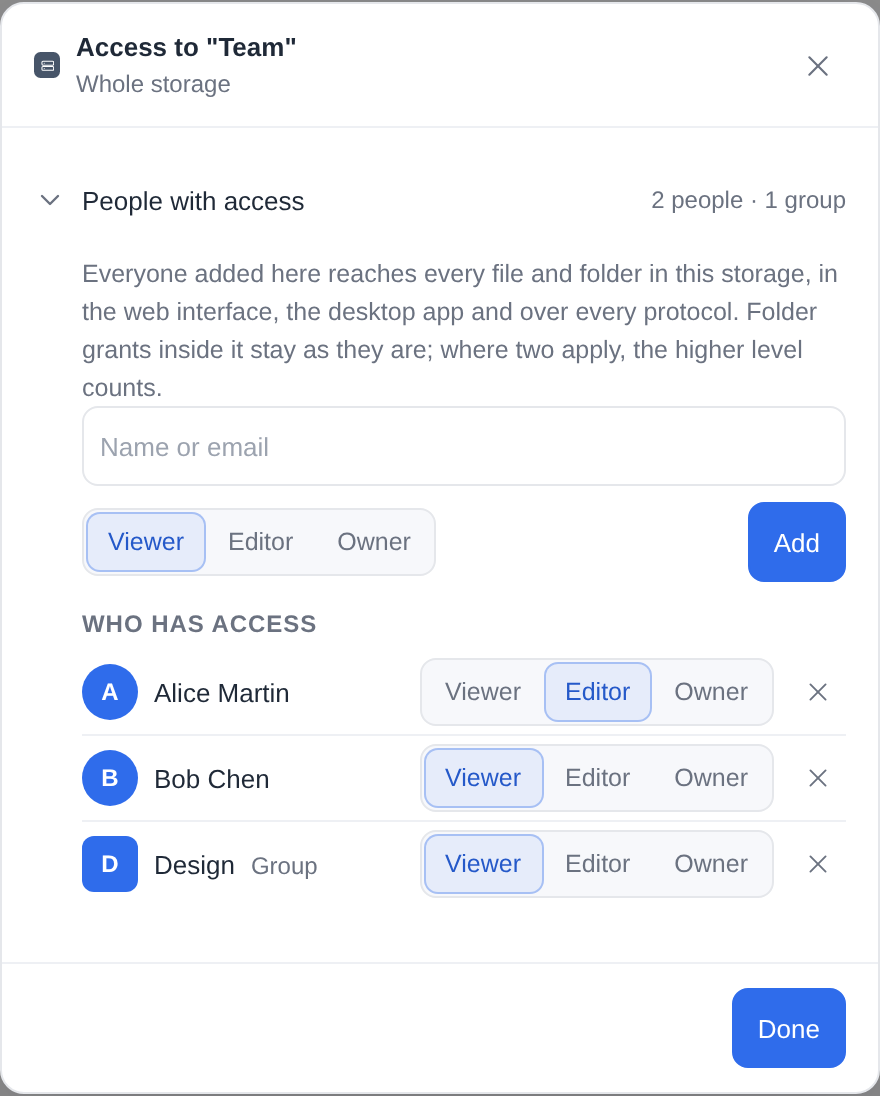
To give a person or a group an entire storage, open Admin → Storages → the storage → Access, pick them and a level, and they are in: every file and folder of the storage, however deep, with no folder grant of its own. The explorer offers the same on a storage row of its top level to whoever may manage it - an administrator, or a person given the storage as owner: right-click the storage → Access… opens the access dialog on the storage itself. The storage list says each caller's level at every root (storage_info[].perm on the manager's listings), which is how the explorer knows.
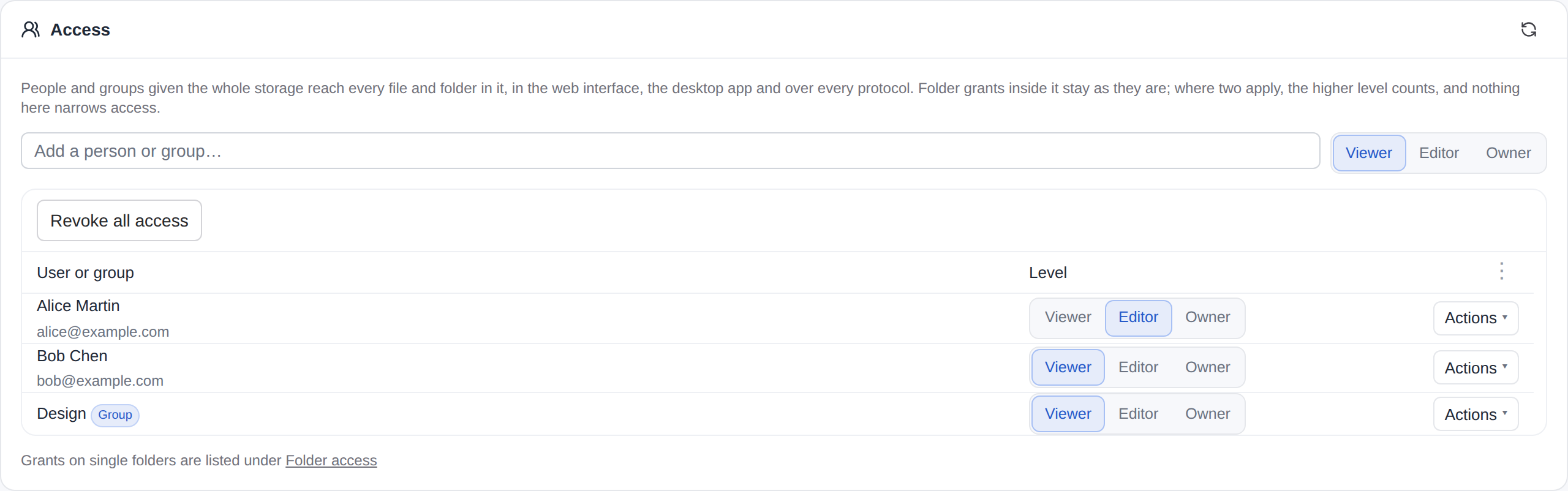
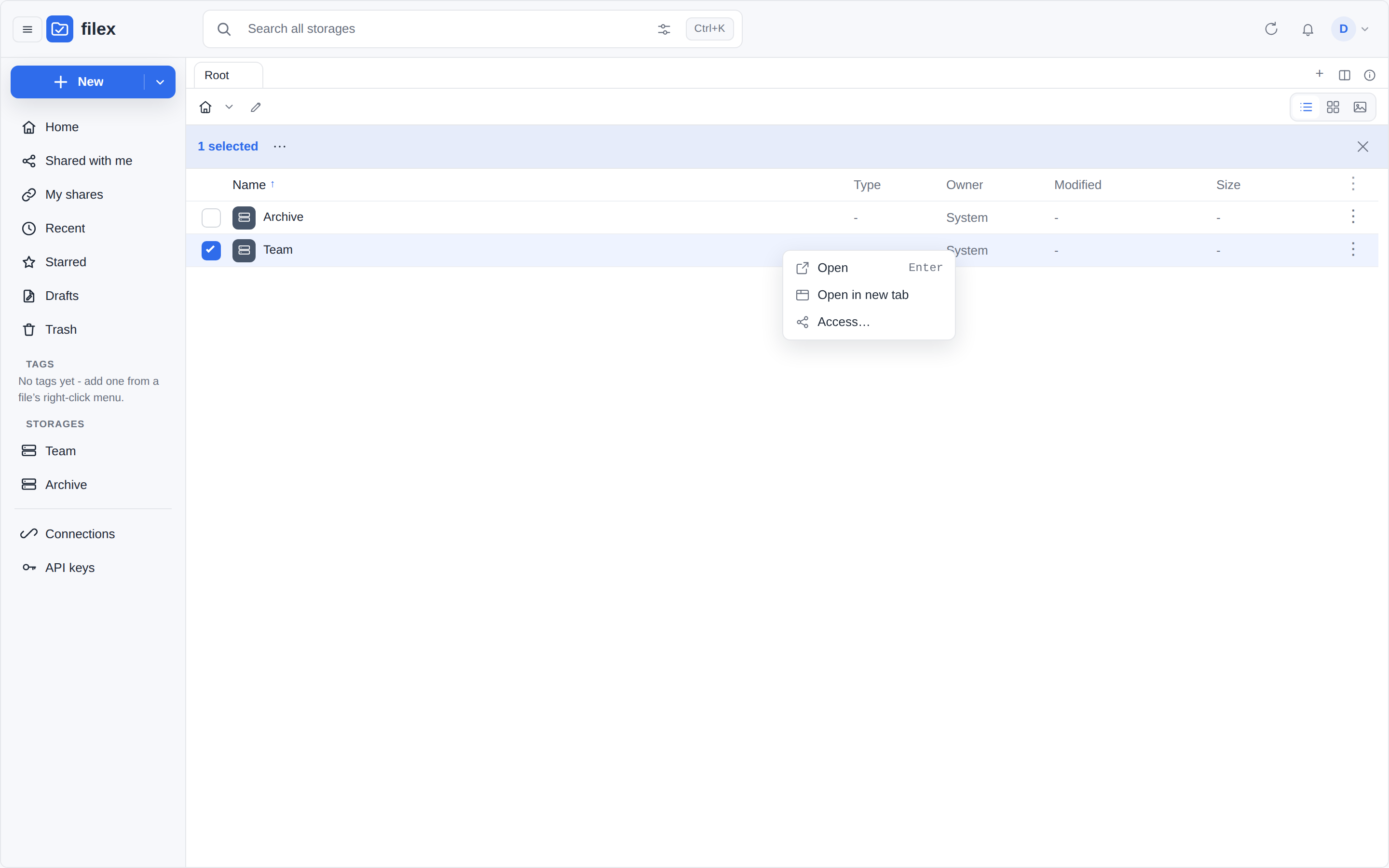
Under the hood it is an ordinary grant on the storage's root - the path <storage>://, stored with an empty path prefix - so nothing else knows it is special:
- Every surface agrees. The web interface, the desktop app, WebDAV, SFTP, FTPS, NFS, the S3-compatible API and an AI agent all ask the same resolver (
internal/acl), and a grant on the root covers every path in the storage. The storage appears in the person's storage list, on a mounted drive and at/of an SFTP session. - The higher level counts. Where a storage-wide grant and a folder grant both cover a path, the higher of the two applies. A folder grant can raise access inside a storage-wide one; nothing narrows it - there is no deny. To give someone less than the whole storage, give them folders instead.
- The account's role is still the ceiling. A viewer account given a storage as editor reads it and changes nothing; the panel offers a viewer account the viewer level only, and the server refuses more (
400). - Revoking leaves folder grants alone. Revoking a storage-wide assignment deletes that one row. Revoke all access deletes every storage-wide assignment of the storage, one row at a time; a folder grant of the same person is another row, and it stays and still answers. Folder grants are listed under Folder access, where the storage-wide ones read Whole storage.
- Per-item access control must be on. With it off everyone opens the storage by their role, so a grant would change nothing and the server refuses one (
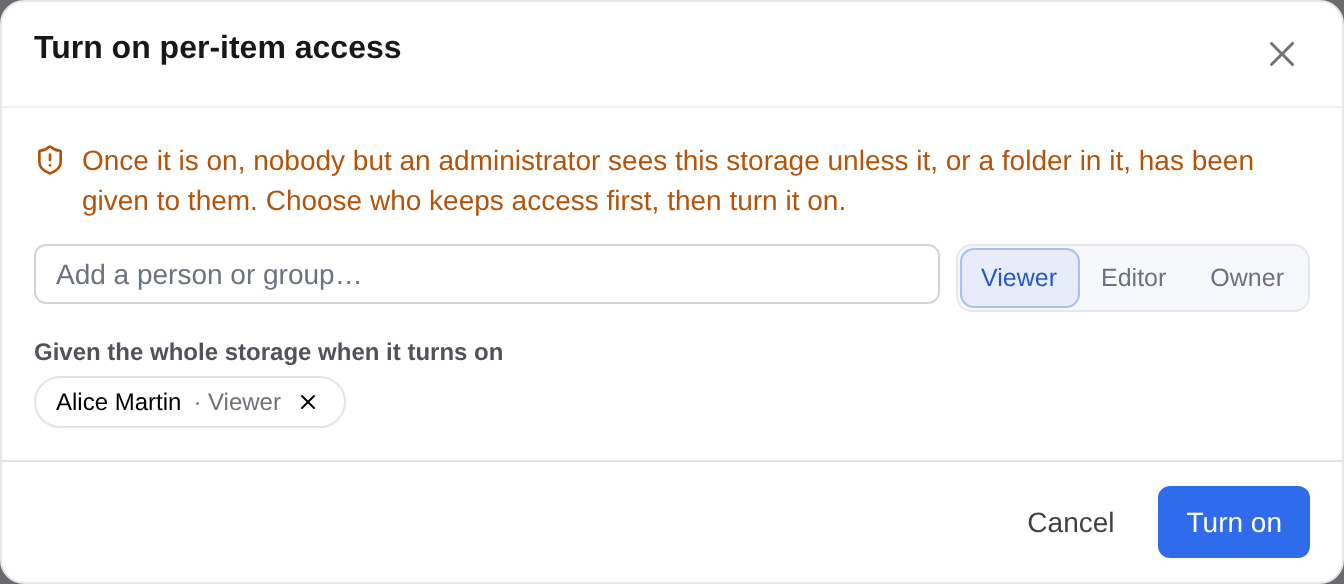
409). The Access section says so and offers Turn on per-item access in place. Turning it on hides the storage from every non-administrator who holds no grant in it, so the dialog first asks who keeps access, then turns it on and gives them the storage in the same press. Assignments made before it was turned off apply again.
No public link to a whole storage. A link would hand everything in the storage to whoever holds the address, so the access dialog on a storage offers people and groups only - no link switch, no file request - and every door that makes a link refuses the storage root: the share door (POST /api/files/share, 404, a storage root is not a file or folder it can name), the invitation's link for an address with no account (POST /api/files/permissions/invite, 400 root_link), and the agent's (POST /api/ai/share answers 400, the MCP file_share tool the same refusal). A folder inside the storage is shared as any folder is.
From the API, an assignment is a grant at the root:
# give a person the whole storage "team" (a group: "group_id" instead)
curl -X POST "$FILEX/api/files/permissions" -H "Authorization: Bearer $TOKEN" \
  -d '{"path": "team://", "user_id": 12, "level": "editor"}'
# the storage-wide assignments are the root's own ("direct") grants
curl "$FILEX/api/files/permissions?path=team://" -H "Authorization: Bearer $TOKEN"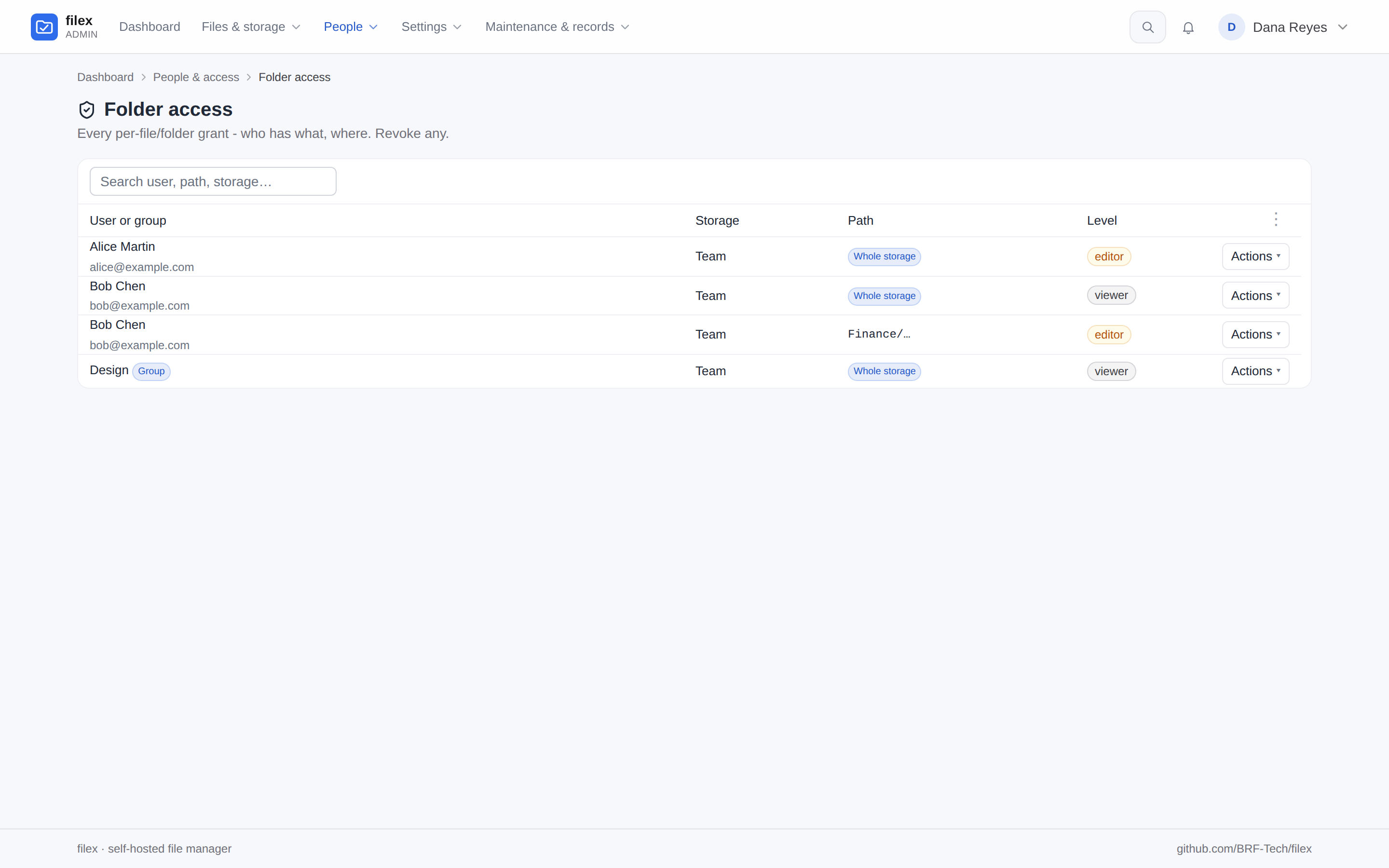
Endpoints - permissions panel (/api/files/permissions)
Mounted in the authenticated group. Every write requires the caller to be admin or hold owner on the target path.
| Method | Path | Body / query | Notes |
|---|---|---|---|
| GET | /api/files/permissions?path=<adapter>://<rel> | - | {direct[], inherited[], storage_rbac, effective}; each grant carries kind: user or group. Owner/admin only. |
| POST | /api/files/permissions | {path, user_id | group_id, level} | Upsert a grant, to a person or to a group; path: "<storage>://" gives the whole storage (above). 409 if storage RBAC off; 400 if granting a viewer account >viewer (a group takes any level; each member's account still caps it). Whether the grant is a folder's (is_dir) is read from the item in the catalogue - a path it has not seen counts as a folder; an is_dir in the body is not read (since 0.54). |
| PATCH | /api/files/permissions/{id} | {level} | Change a person's grant's level. |
| DELETE | /api/files/permissions/{id} | - | Revoke a person's grant. |
| PATCH | /api/files/permissions/groups/{id} | {level} | Change a group's grant's level (a kind: "group" row; its own id space). |
| DELETE | /api/files/permissions/groups/{id} | - | Revoke a group's grant. |
| GET | /api/files/permissions/resolve?email= | - | {found, user?} - existing account or not. |
| GET | /api/files/permissions/users?q= | - | {users[]} autocomplete of existing accounts. |
| GET | /api/files/permissions/groups?q= | - | {groups[]} - up to 10 groups, matched by name, that the caller could grant to. |
| POST | /api/files/permissions/invite | {path, email, level, create_user?, role?} | Existing user → grant; admin+create_user → new account+grant (temp password); else public share link - asked like every link (edit rights, share.links, never an encrypted folder), and never for a storage root (400 root_link). {mode, url?, temp_password?, emailed}. Mail sent only when SMTP is verified, else the link/password is returned for on-screen display. |
| POST | /api/files/permissions/share-mail | {share | share_id, email | emails[], locale?} | E-mail a public link the caller manages; the server writes the message from the link and never mails its PIN. At most 20 addresses per send, 100 an hour per account. SHARING.md → Emailing a link. |
| GET | /api/files/permissions/share-message?share=<token>&lang= | - | The same message, {subject, body, pin_withheld}, without sending it (the OS share sheet). |
Endpoint - "shared with me" (/api/files/manager/shared-with-me)
The permissions panel answers "who can see this folder". The reverse question - "what has been shared with me" - has its own endpoint, and it is what the explorer's navigation panel lists under Shared with me.
| Method | Path | Query | Notes |
|---|---|---|---|
| GET | /api/files/manager/shared-with-me | limit (100, max 500), offset | {files[], storages[], total, limit, offset}. Any authenticated caller; no admin or owner requirement - you are asking about your own grants. |
Three rules decide what is in it:
- Grants only. A storage with RBAC off is reached by every authenticated account through their role, so a grant row there is inert and its files are the caller's own, not "shared with them". Only RBAC-enabled storages are consulted.
- The item, not its contents. A grant on a folder lists the folder.
- A whole-storage grant is a drive, not an item. It has no name to render, so it is reported in
storages[]- the shared drives the UI marks in its storage list - instead of as a file row.
Tenant scope is applied explicitly here, not inherited: tenantstore wraps only the storage/user listing methods, so a per-grant read like this one has to gate itself or it hands one tenant the paths of another's shared folders.
So is a folder confinement (a root: token, X-Filex-Root): the rows are the grants inside the root, and storages[] names only the root's own storage, and only when one of the caller's grants there lies inside the root or covers it (a whole-storage grant, or one on a folder above the root).
Endpoints - self-service tokens (/api/tokens)
Any authenticated user (incl. non-admin) mints tokens bound to themselves, capped server-side:
| Method | Path | Notes |
|---|---|---|
| GET | /api/tokens | The caller's own tokens (no secrets). |
| POST | /api/tokens | {label, scopes, expires_in_days?}. Always minted as kind: "user". Verb-scope ceiling: viewer→read/mcp only; user→read,write,delete,mcp; never admin. At least one verb is required - an empty list is refused with 400 scopes_required (the rule every token door shares; an empty list grants nothing). A root:<adapter>://<rel> scope must be ⊆ the caller's own grants. comments:rw lets the token comment (above). Plaintext returned once. |
| PATCH | /api/tokens/{id} | Ownership-checked; label / usernames, and the levels of the token's permissions - {"permissions": {"comments": "rw"}} (above); the verbs and the root: never change. kind is admin-only. |
| DELETE | /api/tokens/{id} | Ownership-checked. |
⚠⚠ Since v0.43.0 the calling credential is a second ceiling. When the caller is a token, whatever it mints here - a token, an S3 access key, an SSH key or an NFS export - must hold a subset of that token's verbs, no permission at a level above its own (since 0.53, comments), a confinement root inside its root:, and an expiry no later than its own; a narrow caller cannot borrow a wider parent token either. Otherwise: 403, reason: "token_ceiling", naming what was too wide. Browser sessions are unaffected, and credentials that already exist are untouched.
⚠ This surface - and the other self-service credential surfaces, /api/auth/s3-keys, /api/auth/ssh-keys, /api/auth/nfs-exports, and reading a share link's PIN back (GET /api/shares/{id}/pin) - answer 403 to an app token (reason: "app_token", from one shared middleware, handlers.RequirePersonalCaller). A token acts AS its owner, so a shared integration token - the one a host app's proxy injects in front of many visitors - would otherwise let any of them list and revoke the credential that embed runs on, or mint a new S3 key bound to its owner. Cookie/OIDC sessions and user tokens are unaffected. See MCP.md → Token kinds; the escape hatch for a personal token that migration 00030 defaulted to app is PATCH /api/admin/ai-tokens/{id} {"kind":"user"}.
⚠ Kind is a different axis from role and from confinement. It does not widen or narrow what a caller may do - every check on this page still applies - it only decides whether the surfaces that belong to one identity are drawn at all.
Endpoints - admin (/api/admin)
| Method | Path | Notes |
|---|---|---|
| GET | /api/admin/grants | Global overview - the Folder access page: every grant enriched with storage_name, user_email and user_name (the person as every screen names them). Admin, or a delegated administrator holding admin.grants. |
| DELETE | /api/admin/grants/{id} | Admin override revoke (admin or admin.grants). |
| DELETE | /api/admin/grants/groups/{id} | The same for a group's grant (GROUPS.md). A group's grants are numbered apart from people's, so the rows of GET /api/admin/grants carry kind: "user" | "group" and each kind is revoked by its own route. |
| POST | /api/admin/settings/smtp-test | Admin only. {to?} → {ok, error?, sent?}. Verifies the SMTP config (auth handshake) and, with to, sends a real test mail. SMTP config lives in the smtp.* settings keys (host/port/tls/from/username/password). |
storages.rbac_enabled is set via the normal storage create/update payloads (POST/PATCH /api/admin/storages, field rbac_enabled).
MCP admin tools
Exposed on /api/ai/mcp for an API token carrying the admin scope (alongside the other admin_* tools - MCP.md → Tool set):
| Tool | Input | Effect |
|---|---|---|
admin_grants_list | - | List every grant (who/where/level), each row with kind: user or group. |
admin_grant_set | {body:{path, user_id | group_id, level}} | Grant/upsert, to a person or to a group. Storage must have RBAC on; viewer accounts capped to viewer. |
admin_grant_revoke | {id} | Revoke a person's grant (a kind: "user" row) by id. |
admin_group_grant_revoke | {id} | Revoke a group's grant (a kind: "group" row) by id. The two kinds are numbered apart: the same id can name a person's grant and a group's. |
The AI file surface (file_* tools + /api/ai/files|read|upload|...) is already gated by the bound user's grants + role ceiling via aiOps - a confined, non-admin token only sees/mutates what its user was granted.
An item's owner manages its grants from the AI surface too (since 0.50): file_permissions, file_permission_users, file_permission_set and file_permission_revoke, with their REST twins under /api/ai/permissions. They run the handlers of /api/files/permissions above, so the rules are these ones - owner level on the item, the account's share.users, a viewer account capped to viewer (MCP.md).
Tests
backend/internal/acl/acl_test.go (resolution: Effective/CanSee/ceiling/prefix), backend/internal/api/handlers/tokens_self_test.go (scope-ceiling / escalation), backend/internal/api/handlers/token_comments_test.go (the comments permission on every door, the default, the key screens' level), backend/internal/tokenperm/tokenperm_test.go (every permission states its default; the guard), backend/internal/api/handlers/grants_test.go (end-to-end: owner grant, viewer ceiling, owner-only panel, self-token limits, admin overview, non-admin 403), backend/internal/acl/acl_storage_root_test.go and backend/internal/api/handlers/grants_storage_root_test.go (a whole storage: the root grant's row, its reach, revoke keeps folder grants, RBAC off, the ceiling, the tenant, a root: key, no public link), backend/internal/dav/dav_storage_root_test.go and backend/internal/sftpsrv/storage_root_grant_test.go (the same grant over WebDAV and SFTP), and the browser run e2e/tests/247-storage-level-access.spec.ts.