
Storage plugins
Looking for the other kind of plugin - an app that adds actions to the file menu (convert, sign, send) rather than a storage backend? That is Apps (app plugins): sandboxed WebAssembly, installed from a GitHub URL with a permission review. This page is about storage drivers.
filex speaks local disk, S3, SFTP, FTP, WebDAV and SMB out of the box. A plugin is how it speaks to something it has never heard of: your appliance, your company's object store, a research archive with its own API - anything that can list, read and (optionally) write files.
A plugin is a separate program. filex starts it and talks to it over a small HTTP/JSON protocol, so a plugin can be written in any language, ships on its own schedule, and cannot take filex down when it crashes. Once it is running, its driver appears in the ordinary storage picker with the config form the plugin itself describes - nothing about filex's frontend or its release cycle is involved.
What a plugin claims is not taken on trust. Every capability it declares is probed before anybody can build a storage on it, and again against the configuration an operator types - see Conformance. A plugin that fails its own claims is refused, because a half-working driver produces failures the user reads as filex being broken.
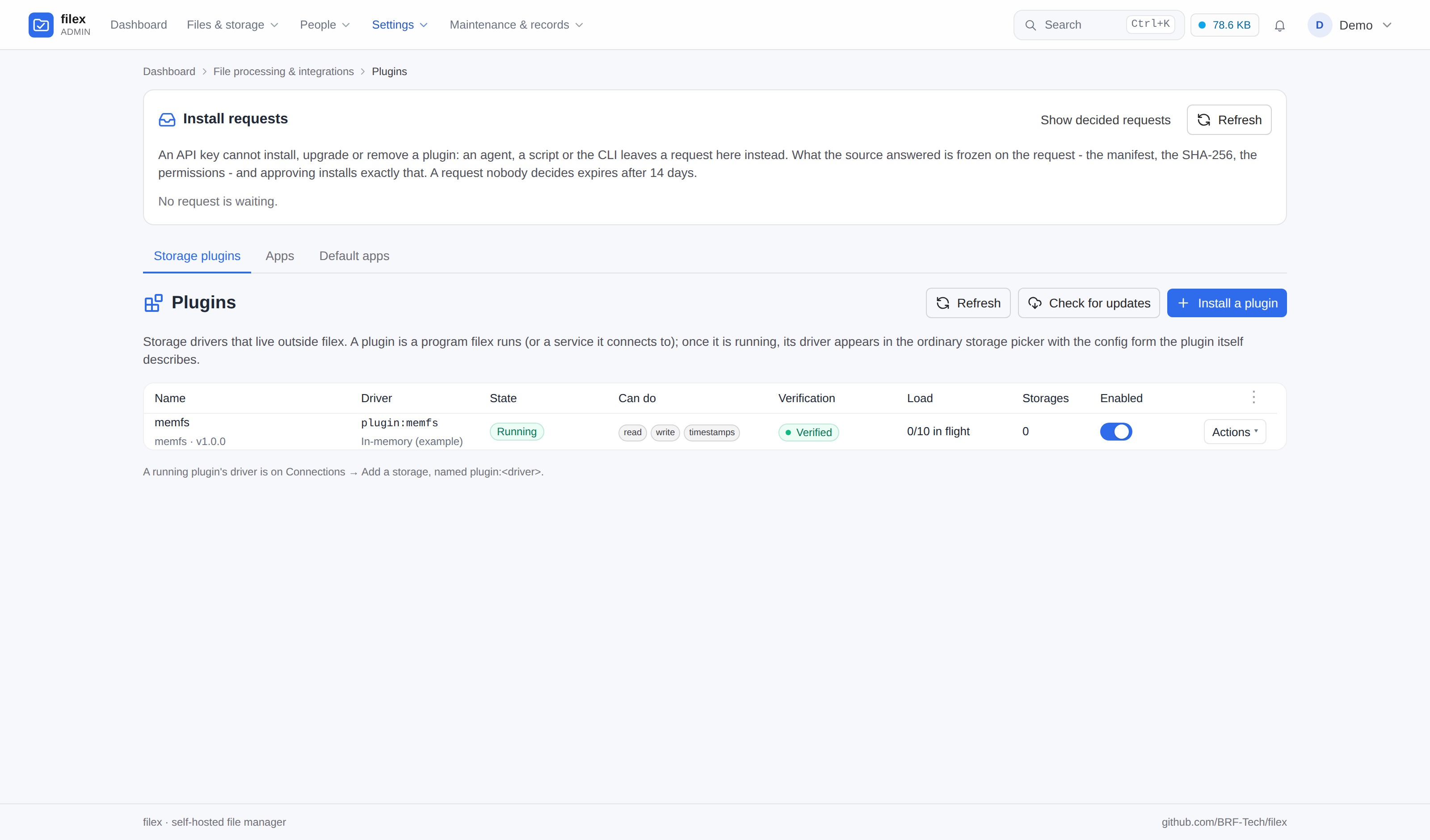
Admin → Plugins → Storage plugins  Admin → Storages → Add storage
        ┌──────────────┐                  ┌────────────────────┐
        │ your program │◀── HTTP/JSON ────│ filex              │
        │  (any lang)  │   unix socket    │  storage.Driver    │
        └──────────────┘   or loopback    └────────────────────┘
Install one
Admin → Plugins → Storage plugins → Install a plugin, in one of four ways - or, from 0.55, from an app store's install link (Installing from a store). (The Plugins page has two tabs, Storage plugins and Apps - the other kind of plugin, APP-PLUGINS.md. It opens on Apps when the app runtime is on and at least one app is installed.)
| Source | What happens | When to use it |
|---|---|---|
| Upload a binary | The file is stored under <data-dir>/plugins/<name>/, hashed, and launched. | The normal case. |
| From its source | A GitHub repository (owner/name) or the https address of a filex-storage.json (Updates): filex reads it, takes the build for this server's platform, holds it to the SHA-256 the feed names, and installs it as a URL install would. The source is kept, so newer versions are announced. | A plugin its author publishes with a feed. |
| From a URL | Downloaded, checked against a required SHA256 (and the signature, when required) before anything is executed, then as above. The URL must point at a public host: private, loopback and link-local targets are refused, after DNS and on every redirect (at most five), so a plugin URL cannot become a probe of the server's own network; a redirect from https:// to plain http:// is refused too. Apps are downloaded by the same client (APP-PLUGINS.md → Install one); for development, FILEX_PLUGIN_LOOPBACK_SOURCES=1 opens this machine to it (CONFIGURATION.md). | Unattended installs, scripted setups. |
| Remote service | Nothing is launched: filex connects to an address you give it with a bearer token you give it. Remote = TLS: https:// anywhere; plain http:// only when the address is on the private network (loopback, link-local, RFC 1918, ULA), because the token and every storage credential travel on that connection. | A sidecar container, a plugin on another host, or a plugin you are developing. |
| From a store (0.55) | A store's install link opens a review; Install reads the release's feed the store reviewed, holds this server's build to the store's pin and installs it as From its source would (Installing from a store). | A plugin a store lists - reviewed, its builds pinned and signed, its claims checked by the store. |
⚠ A plugin runs with filex's own privileges and is handed the credentials of every storage created on it. Install only plugins you trust - the same judgement you would apply to a package you install on the server.
⚠ The binary has to be built for the server, not for your laptop:
GOOS=linux GOARCH=amd64for the usual Docker image. A binary for the wrong platform fails to start, and the Plugins page shows the exec error.
Installing does not end at "the file is on disk". filex starts the plugin, asks it to describe itself, and then probes every capability it declared against a throwaway area the plugin opens for exactly that (POST /v1/selftest). Only then is the driver registered. A plugin that fails a probe never reaches running - it lands in Refused, and the page shows the report: which probe failed, what was expected, what happened.
⚠ The install call answers 201 before any of that has happened - describe and the probes run after the row exists. A script that treats the 201 as success will happily report a plugin installed that filex has already refused; read the state from
GET /api/admin/plugins.
A plugin that offers no /v1/selftest is still installed, but it is unverified: nothing was proven at install, and the same probes run when somebody saves the first storage on it. The Plugins page says which of the two you are looking at, because "verified" and "not yet probed" are different statements and only one of them is a promise.
The name you choose ([a-z0-9][a-z0-9_-]{0,31}) names the plugin's folder and appears in logs. The driver name comes from the plugin itself, and the storage driver is always plugin:<driver> - a plugin can never shadow a built-in driver, and two plugins cannot claim the same one (the second is refused, naming the first).
⚠ The driver name belongs to the plugin that was first accepted with it. Every storage on plugin:<driver> hands its configuration - its credentials - to whichever plugin provides that name, so from 0.50.0 the name is kept on the plugin's row: another installed plugin may not take it, even while the first one is switched off, and a plugin may not trade it for another one later (an upgrade, a remote that now describes itself differently). Either is refused, naming the plugin or the name involved. To give a plugin another driver name, remove it and install it again.
To turn the subsystem off entirely: FILEX_PLUGINS_DISABLED=1. Nothing is launched, no remote is contacted, and the admin API answers 503 saying so. In multi-tenant mode the page is supertenant-only: a tenant admin gets a 403 that says whose surface it is.
Install requests
⚠⚠ An API key cannot install, upgrade, switch or remove a storage plugin - nor name the source its updates come from. Those need an administrator signed in to the admin panel; a key is refused 403 session_required, whatever its scopes. A storage plugin's process runs with filex's rights and is handed every storage's credentials: the decision to run one is a person's.
What a key can do is leave a request, exactly as for an app (APP-PLUGINS.md → Install requests has the whole model): filex resolves the source now and freezes the build it found - the feed's version and the binary's SHA-256 for this server's platform, or, for a plugin by address, the SHA-256 of the binary it downloaded and hashed (without running it). An administrator approves or rejects it under Admin → Plugins → Install requests; approval installs exactly that build, held to that hash before anything is started, and a source that publishes another build by then closes the request as Source changed instead.
curl -sS -H "Authorization: Bearer $FILEX_KEY" -H 'Content-Type: application/json' \
  -d '{"kind":"storage","name":"myfs","source":"acme/filex-myfs","reason":"The archive team needs it"}' \
  https://files.example.com/api/admin/plugin-requests
{"kind":"storage","op":"upgrade","name":"myfs"} asks for the newer version the plugin's own source has (Updates). A key still reads the list, one plugin and the update check, and may Restart one.
States
| State | Meaning |
|---|---|
| Running | Described itself, driver registered, storages can open. |
| Starting… | Launched; the handshake or describe has not finished. |
| Failed | Exited or became unreachable. A binary is restarted with backoff - up to ten starts in a row that never come up, after which filex stops trying and says so (not restarting until Restart); a remote is re-checked every few seconds. |
| Refused | filex will not use it: protocol mismatch, an invalid describe, a driver-name collision or a changed driver name, a binary whose SHA256 no longer matches what was installed (checked at every start, a restart after a crash included), a missing or bad signature where one is required, a handshake that names anything but its own socket or a loopback port, a remote that answers with a redirect, or conformance failure - it declared a capability it could not perform. state_error carries the reason. Fix it and choose Restart from the plugin's Actions menu. |
| Off | Disabled by the toggle. The driver is unregistered, and storages on it stop opening. |
| Held | Installed from a store, and its license does not hold (0.55, A paid storage plugin): nothing runs, its driver is unregistered and its storages do not open; nothing is removed. It starts again by itself as soon as the license holds. |
Removing a plugin deletes its files and its registration. Storages created on it are left alone - they simply cannot open until the plugin is back. Deleting somebody's storages is not a decision Delete (in the plugin's Actions menu) makes; its confirmation says how many will be affected before you agree.
Upgrading replaces the binary and keeps everything else - see Upgrade in place. Do not remove-then-install to get a new version: removing takes the registration with it, and a storage whose driver has gone is a storage that cannot open.
Conformance: a plugin has to prove its claims
A plugin declares its capabilities and filex acts on them - it registers a driver whose method set matches, and every surface then offers those operations. If the plugin declared write and its write is broken, the user meets an upload button that fails, a trash move that fails and a version snapshot that fails, and reads all three as filex being broken. The plugin is the faulty part; the product wears the fault.
So each declared capability is measured, in two places:
| Gate | When | Against what |
|---|---|---|
| Self-test | at install, and every time the plugin starts | a throwaway instance the plugin opens for POST /v1/selftest |
| Storage save | when a storage on the plugin is created or edited | that storage's real configuration, in a scratch folder that is removed afterwards |
The second gate exists because the first cannot cover it. A self-test proves the plugin's code works; it cannot prove that these credentials reach that bucket, that this path exists, or that the account may write there. Finding that out when the storage is saved costs one error message; finding out later costs a user who uploads a file into a storage that cannot hold it.
What runs, in order: list · not_found · write · read (bytes compared) · stat (size and kind must agree with what was written) · list_after_write · range (bytes 8-17 must be those bytes) · set_mtime (set, then re-stat - a timestamp that is accepted and dropped makes every sync run copy everything again) · copy · move (the source must be gone afterwards) · mkdir · delete · delete_idempotent (deleting what is already gone must be a no-op - trash purge, sync and the ops worker all rely on that) · presign · multipart (one part, uploaded, completed, read back and compared) · watch. A capability that was not declared is reported as skipped, not passed.
⚠ list short-circuits: a backend that cannot list is not probed further, because every later probe would fail with the same cause and bury it.
⚠⚠ What conformance cannot check is worth knowing before you rely on it:
presignis verified to return an absolute URL that parses, not one a browser on another network can reach. filex may not share the client's network, so it deliberately does not fetch it - a plugin that hands back a loopback URL passes the probe and fails in every browser.watchis verified to open a stream, not to deliver an event for every change. Requiring an event would mean requiring the plugin to notice a change filex made inside a ten-second window, which a polling backend legitimately cannot.- Nothing here separates a slow backend from a broken one beyond the timeout (90 s for a whole run; the storage-save gate gives the whole check 2 minutes).
⚠ The storage-side probes write into your storage: a folder named .filex-conformance-<random> at the storage root, removed when the run finishes. If you find one left behind, that is the report - a plugin whose delete is broken is exactly what the delete probe catches. A read-only plugin creates nothing: its probes list and stat at the root and say plainly that the write half was not exercised.
Modes
FILEX_PLUGIN_CONFORMANCE - enforce (default) · warn · off.
| Mode | A plugin that fails its own claims |
|---|---|
enforce | is refused, and a storage cannot be saved on it. |
warn | is registered anyway; the report is kept and shown. For somebody writing a plugin - never the default, because the cost of a broken claim is paid by the user. |
off | is not probed at all. Both gates are skipped. |
The mode is reported by the admin API and shown on the page, so nobody has to discover that the safety net is down by meeting a broken storage.
⚠ Built-in drivers are not put through this. They are compiled in, covered by the repository's own tests, and already have a connection test; probing every storage save would change behaviour for paths that never had this problem.
Upgrade in place
POST /api/admin/plugins/{id}/upgrade - multipart, file (and signature and the version it was signed as when this instance requires one - What is signed). Admin → Plugins → Storage plugins → the plugin's Actions menu → Upgrade does the same thing.
The row, the name, the driver and every storage built on it survive. What happens, in order: stop the plugin, put the new file in place, start it, run the conformance gate. If the new binary does not come up - a bad build, a wrong architecture, a capability it can no longer perform - the previous binary is restored and started again, and the call answers 400 with both the failure and the plugin's current status. A failed upgrade costs an error message, not a plugin.
⚠ The plugin is stopped first, deliberately. A running executable cannot be replaced on Linux (
ETXTBSY), and a plugin serving requests should not have the ground moved under it. Storages on it fail for the length of the swap; they recover on their own when it comes back.
⚠ Only a binary plugin can be upgraded this way. A remote plugin is upgraded where it runs - filex only holds its address.
⚠ The file keeps the name it was installed under, whatever the upload is called (
myfs-v2replacesmyfsasmyfs). One name means one backup and one rollback; the signature you send is stored beside it, and a rollback restores the previous signature with the previous file.
Updates from a source
⚠⚠ Nothing updates itself - a storage plugin no more than an app (APP-PLUGINS.md → Updates). A binary plugin may name an update source; filex reads it once a day (and when you press Check for updates) and tells you when a newer version for this server's platform is there. Installing it is your decision.
- Naming a source. At install (the Update source field of an upload or a URL install, or From its source), or later from the row's Actions → Update source…; empty stops the checks.
PATCH /api/admin/plugins/{id}{"source": "…"}. - A source is
owner/name- thefilex-storage.jsonattached to the GitHub repository's latest release (https://github.com/<owner>/<name>/releases/latest/download/filex-storage.json) - or the https address of afilex-storage.jsonanywhere. - What the row says: Update available and the jump (
1.0.0 → 1.1.0), a newer version that needs a newer filex, Could not check (and why - the feed names another plugin, has no build for this platform, a build without its hash), or Up to date. The bell tells the administrators once per version ("Storage plugin myfs 1.1.0 is available"). - Review update (the row's Actions) shows the version jump, the SHA-256 of the build for this platform, the source and its notes (drawn as Markdown through the explorer preview's pipeline and its sanitizer, like an app's; nothing in them runs, a link opens in a new tab, a picture from another server waits for a click). Upgrade -
POST /api/admin/plugins/{id}/upgrade{"from_source": true}- downloads that build, refuses it unless its SHA-256 is the one the feed names (before anything is stopped), and then upgrades exactly as an uploaded file would (Upgrade in place): the signature on an instance that requires one, the conformance gate, the roll-back when the new binary does not come up. - Check for updates -
POST /api/admin/plugins/updates/check- reads every source now and installs nothing:{report: {checked_at, checked, available, failed}, plugins}. FILEX_APP_PLUGIN_UPDATE_CHECK=0stops the daily check for storage plugins too (one switch for "no request leaves the server by itself"); a demo never checks. A remote plugin is upgraded where it runs and has no source.
Publishing a feed (for a plugin's author): attach a filex-storage.json to every release -
{
  "name": "myfs",
  "version": "1.3.0",
  "filex": ">=0.47.0",
  "notes": "What changed, in Markdown: **Faster** listings.",
  "binaries": {
    "linux/amd64":   {"url": "https://github.com/acme/filex-myfs/releases/download/v1.3.0/myfs-linux-amd64",   "sha256": "…"},
    "linux/arm64":   {"url": "https://github.com/acme/filex-myfs/releases/download/v1.3.0/myfs-linux-arm64",   "sha256": "…"},
    "windows/amd64": {"url": "https://github.com/acme/filex-myfs/releases/download/v1.3.0/myfs-windows-amd64.exe", "sha256": "…", "signature": "…"}
  }
}
name is the plugin's install name or the driver it describes; version is compared with the version the running plugin describes (a pre-release is never taken); filex is a range in the grammar apps use (PLUGIN-KIT.md); each build's sha256 is required, and signature (a detached ed25519 signature over the build - the plugin's name, the feed's version, that build's platform and its sha256, What is signed) is needed on an instance that only runs signed plugins. The feed is read through the same guarded client as a URL install and is capped at 1 MiB; its notes at 8 KiB.
Installing from a store
From 0.55 an app store lists storage plugins beside apps - the reference one is filex Apps. Installing one goes the way an app from a store goes (APP-PLUGINS.md → Installing from a store): the store's Install asks for this filex's address and opens an install link on /admin/store-install, or a person asks for it on the store screen's Storage plugins tab and an administrator's approval asks the store for a fresh link. The same trust question, the same page, the same session gate; nothing is installed until Install is pressed.
On the store screen the tab says first, in the server's words, what a storage plugin is; each row's Store checks says what the store's run proved and on which platform, and a plugin the store has no build of for this server says so in red and offers nothing to ask for:
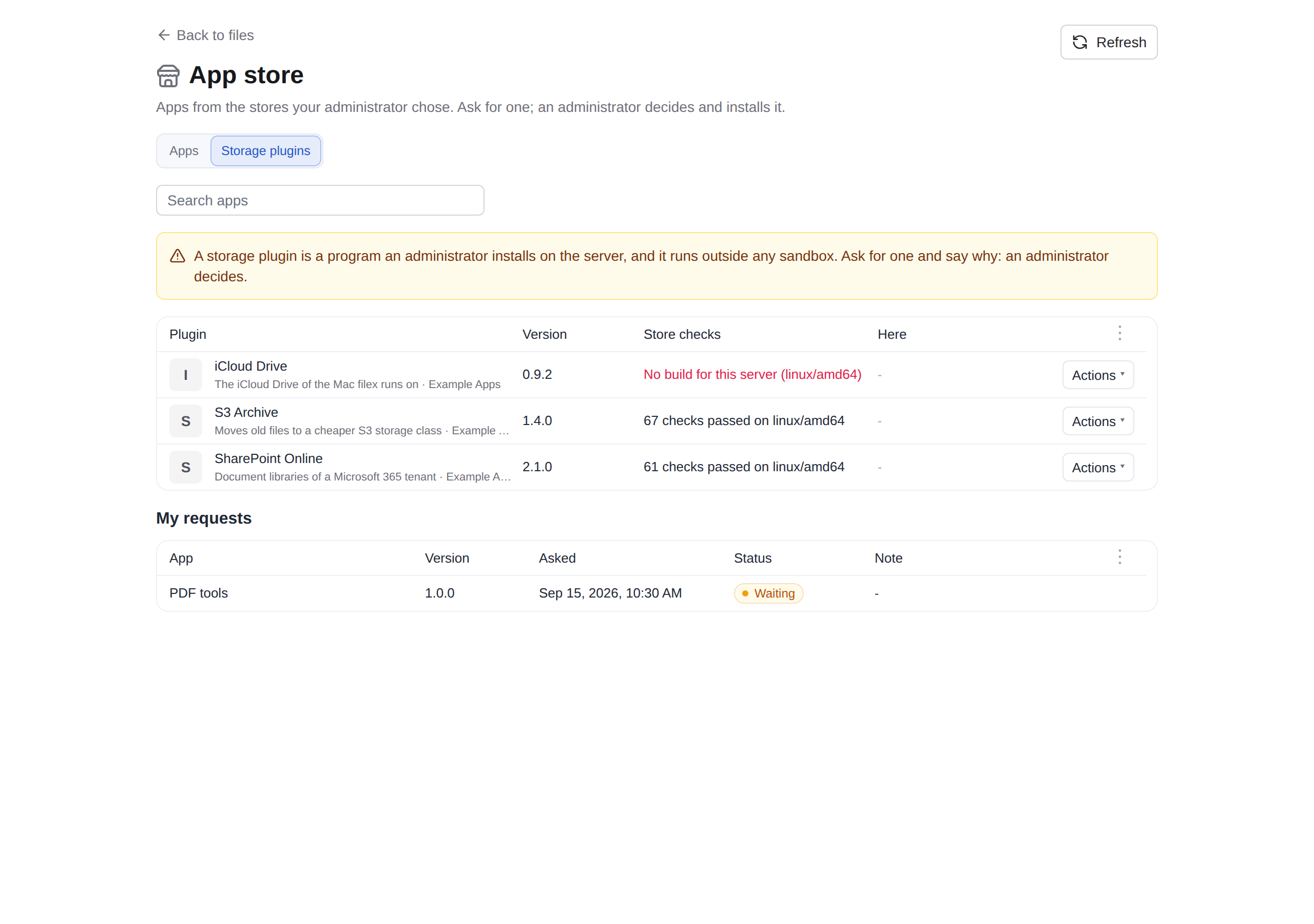
What the store did before it listed the plugin - the part a link vouches for:
- It read the plugin's feed - the
filex-storage.jsonattached to the release the publisher submitted, the file From its source reads - and pinned it by SHA-256. - It downloaded every build the feed names and held each to the SHA-256 the feed gives. A listed plugin has a build for
linux/amd64andlinux/arm64at least;windows/*anddarwin/*builds are pinned when the feed names them. - Its plugin validator ran the build for its own platform with filex's own code - the handshake, the describe filex accepts, and every conformance probe of the capabilities the plugin declared, against its
/v1/selftestarea - in a container with no network, the plugin as an unprivileged user (The store's plugin validator). A plugin that offers no selftest proves nothing, and is not listed. - It signed every build with its artifact key - the plugin's name, the version, the build's platform and its SHA-256 together (What is signed), never the SHA-256 alone.
The review shows, in the reader's language and from the server: what the plugin is (a program that runs on this server with filex's own rights, outside any sandbox, handed every storage's credentials), the build for this server (its platform, SHA-256, size), what the store's run measured and on which platform (a build for another platform is pinned and signed, but was not run by the store - the review says so), the capabilities it proved, the release notes, and where the build's signature stands against FILEX_PLUGIN_TRUSTED_KEYS:
| This server | The review | Install |
|---|---|---|
| requires signed plugins, and the store's or the publisher's signature verifies for this build - its name, the link's version, this platform (What is signed) | says it verifies | goes ahead; the signature that verified is kept beside the binary, with the version |
| requires signed plugins, and neither verifies | says so, in red | is refused (intent_signature_required) - add the store's artifact key to FILEX_PLUGIN_TRUSTED_KEYS |
| does not require signed plugins | says the store signed it | goes ahead; the store's signature is kept and checked from the day trusted keys are set |
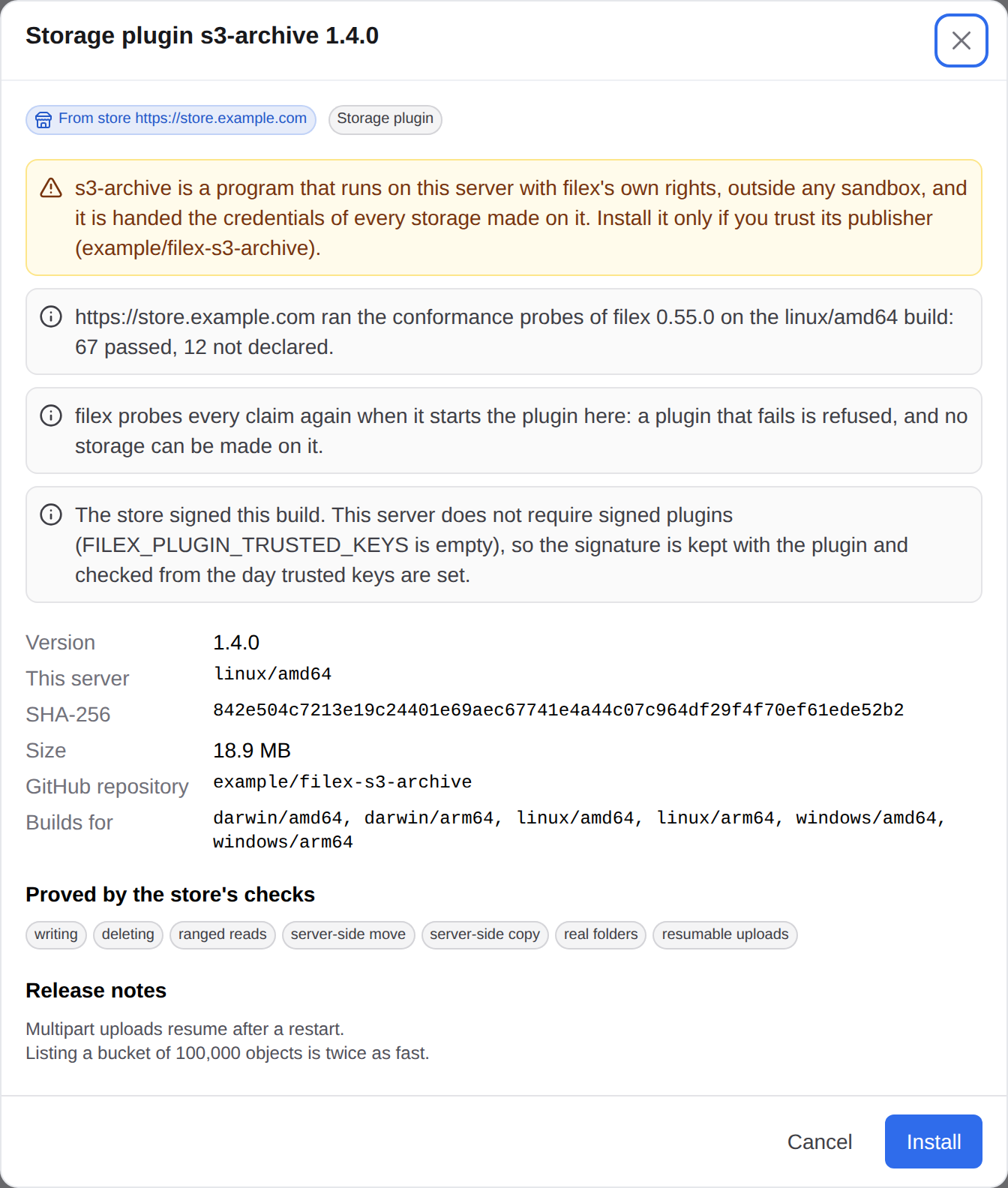
To run only builds a store vouched for, list its artifact key in FILEX_PLUGIN_TRUSTED_KEYS - for filex Apps, artifact-2026-10, 3dda5d791aeae607cd92cbef9b2a7d635b7a99bbb2f6cea040557527f72f797c (APP-PLUGINS.md → Trusted stores has every key and fingerprint). That key then vouches for a build through this review, and any other way only while the store still lists that version (A build a store signed).
Install reads the feed again and checks every pin again - the feed's SHA-256, the plugin's name and version, this platform's build - so what lands is what was reviewed, not what the release serves a minute later. Then it downloads the build through the guarded client, refuses other bytes before anything runs, and installs it as an ordinary binary plugin: started, described and probed again by filex itself - the store's run is not a reason to skip filex's own conformance gate. The plugin's source is kept as its repository (owner/name), so the daily check announces newer releases.
The rules a store link keeps for an app hold here too: a link for a plugin of the same name that came from another store or another repository is refused (store_source_changed, remove the installed plugin first), a link for the same version or an older one is refused (intent_version_rollback), a newer one upgrades in place (Upgrade in place). A server whose platform the store has no build for is told so (intent_no_build); with storage plugins off (FILEX_PLUGINS_DISABLED=1) the link is refused (plugins_disabled) and the store screen shows no storage plugin. Every refusal of a storage plugin's link carries the server's sentence in message, in the reader's language, and detail.kind: "storage" (API-ERRORS.md): the panel shows it as it came, never an app's wording.
The store screen's Storage plugins tab is shown to the same people as the store screen itself (Admin → Plugins → Apps → Store screen): there is no separate audience for it. A person there can only ask; installing a storage plugin stays an administrator's decision on this review. A storage plugin is the whole server's, so the tab tells a person who is not the server's administrator only whether it is installed here (state: "installed"), never which version (no installed_version, never state: "update") and never the server's platform (no storage.platform; "No build for this server" without naming it). The administrator - of the platform, in a multi-tenant filex - sees both.
⚠⚠ A store's review is not a sandbox. A storage plugin from a store runs exactly as one you uploaded: as filex's own user, with filex's rights and every storage's credentials. What the store adds is that the bytes are the bytes it reviewed, who vouches for them, and that the plugin's claims held on the store's validator. Whether you trust that publisher is still yours to decide - the review says it in those words.
A paid storage plugin
A store may sell a storage plugin as it sells an app (APP-PLUGINS.md → Paid apps): its license is the store's, kept here under its own row (storage: and the plugin's name - an app of the same name never shares it), its key sealed with FILEX_SECRET_KEY, checked with the store every day and on Verify now. The review asks for the key (the link usually carries one). The plugin is held from before it lands until the store confirms the license, and whenever the license stops holding (revoked, expired, its grace ended): state Held, nothing runs, its storages do not open, nothing is removed. Admin → Plugins → Storage plugins → the row's Actions → License… shows the license and takes a new key; a held plugin also names itself on the warning band above every admin page.
The hold is in place before any storage plugin starts: at start-up filex judges every license from the rows it keeps (the store's last signed answers) and only then starts the plugins, so a license that lapsed while the server was down does not run its plugin for a moment after every restart. With the app store off on this server (no app plugin runtime), nobody can check a license, so every storage plugin under a store's license starts held (license: not checked - the app store is off on this server).
An upgrade that lands while the plugin is held is not counted as done: the new binary has not started, let alone passed its probes. The previous binary stays beside it (<binary>.previous) until the new one first comes up; when the license holds and the new one does not come up, the previous one is put back and started, as a failed upgrade always is.
Listing your plugin in a store
What a storage plugin needs to be listed (filex Apps; the store's own pages say the rest):
- a public GitHub repository with a release whose assets include
filex-storage.json(the feed) and the builds it names -linux/amd64andlinux/arm64at least - and a.filex-apps.json(the store's consent file) at the tag; - self-contained builds: every build must be its platform's own executable (ELF for
linux/*, PE forwindows/*, Mach-O fordarwin/*, thin or universal) for the platform's architecture (an amd64 build in thelinux/arm64slot is refused) - a script that needs an interpreter is refused (build_not_native), because nothing promises a filex server has that interpreter. For the same reason alinux/*build is statically linked: an ELF that names a program interpreter (PT_INTERP, the dynamic loader of the C library it was linked against) is refused too. Go withCGO_ENABLED=0builds this way; Rust and C need their static (musl) target. A plugin written in a scripting language ships a self-contained build of itself; windows/*anddarwin/*builds are optional (filex servers run on Linux far more often); when the feed names one it is downloaded, pinned and signed like the Linux builds, but the store's validator runs only the Linux build;- a
/v1/selftestarea (Write one:SelfTestin the SDK) - without it nothing can be probed, and the store lists only what proved its claims; - a describe version equal to the feed's
version: filex compares the two to tell a newer release.
The store's plugin validator
filex plugin-validator --spool DIR - on Linux with --plugin-uid and --work-dir as well, which it refuses to start without (below) - is what a store runs to check a build (filex 0.55 and later). The store and the validator share one directory, because the validator's container has no network at all:
| File | Written by | Holds |
|---|---|---|
status.json | the validator, every few seconds | this filex's version and platform, the job it is running |
in/<id>.bin | the store | the build, held to its SHA-256 by both |
in/<id>.json | the store, last | the job: its id, the build's SHA-256, the feed's name and version |
out/<id>.json | the validator | the result: ok, a code and message when not, the plugin's describe, the conformance report |
Each build is copied into a private directory while it is hashed (what runs is what was checked), started as --plugin-uid/--plugin-gid, described and probed against its selftest area (plugin.CheckBinary, the code a Manager runs at every start), and stopped. in/ is handed to the store's user (--store-uid) and out/ stays the validator's, so the plugin under test can neither leave a job nor forge a result; a job file another user wrote is not run. A run is capped by --job-timeout (3 minutes; the start is 20 seconds and the probes 90 of it), a build by --max-binary-mb (512).
What it refuses to start with. On Linux --plugin-uid and --work-dir are required. The plugin's user is never uid or gid 0, never the validator's own user and never --store-uid, and nothing else in the container should run as it (between two runs every process of that user is killed). --work-dir is a directory of the validator's own, not a link and not a shared one such as /tmp (sticky or writable by anyone is refused); the validator makes it 0711. A spool the plugin's user could write in is refused too. Outside Linux there is no other user to start the plugin as, so the validator starts only with --insecure-dev, which is for developing a plugin, not for a store.
What one run can reach of another. Every run uses the same user, and a plugin can start a helper that leaves its process group (setsid), so:
- the run's directory (
0711) and the build (0555) stay the validator's, under--work-dir, which the plugin's user can pass through but not list: the plugin can start its build and enter its working directory, never change either. Its one directory of its own is its socket directory (FILEX_PLUGIN_SOCKET_DIR); for scratch files it has the temporary directory, as on any filex; - before and after every run, every process of the plugin's user is killed, and a run does not start while one is still alive; what that user left at the top of
/tmp,/var/tmpand/dev/shmis removed.
A PID namespace per run would do the killing by itself, but creating one needs CAP_SYS_ADMIN, which the store's container does not have (Docker's default seccomp profile refuses new namespaces without it); the sweep by user needs only CAP_KILL.
The container the store runs it in: network_mode: none; a read-only root with a tmpfs for --work-dir (mounted exec, mode=0711: Docker mounts a tmpfs noexec and 1777 unless told otherwise, and the build runs from there) and the plugin's own /tmp, while the image's PID 1 (tini) reaps what the sweep kills; cap_drop: ALL plus CHOWN, SETUID, SETGID, KILL (to hand the socket directory over, start the plugin as its user and kill what it leaves) and DAC_OVERRIDE, FOWNER (to clear the socket directory and the temporary files that user owned); no-new-privileges; and a memory, CPU and process ceiling.
Signed plugins
filex can require that a plugin binary is signed before it will accept it. Configure trusted ed25519 public keys (hex or standard base64) in FILEX_PLUGIN_TRUSTED_KEYS (comma-separated), or on the plugin manager's Options.TrustedKeys if you embed filex; when at least one key is present, install and upgrade both refuse an unsigned or badly signed binary, and the admin API reports requires_signature: true so the UI can ask for the signature up front rather than after a rejection.
What is signed
A storage plugin build's signature is over the build as a whole thing: its plugin name, its version, the platform it is for and its SHA256. filex builds this text and verifies an ed25519 signature over it, exactly as it is (not hashed again):
filex-storage-build:v1
<name>
<version>
<platform>
<sha256><name>is the name the plugin is installed under,<version>the version without a leadingv(1.3.0),<platform>theGOOS/GOARCHkey (linux/amd64,windows/amd64) and<sha256>the build's SHA256 in lower-case hex;- the five lines are joined by a single line feed (
\n), with no line feed at the end; - the signature is sent as hex or standard base64.
So a signature says "this file is version 1.3.0 of myfs for linux/amd64", and it does not verify as anything else: not as another version (an older one the publisher or a store has since withdrawn), not as another plugin, not for another platform. Where filex takes each field from:
| Install path | name | version | platform |
|---|---|---|---|
Upload or URL (POST /api/admin/plugins) | the name you install it under | the version field you send beside signature | this server's |
Upgrade (POST /api/admin/plugins/{id}/upgrade) | the installed plugin's name | the version field | this server's |
From its source ({source}, Review update) | the plugin's name here | the feed's version | this server's |
| From a store (the store review) | the link's plugin | the link's version | this server's |
The name a signed plugin is installed under must therefore be the name it was signed as. The version is kept beside the signature (<binary>.sig, second line version <v>), and every start rebuilds the text from it, the plugin's name and SHA256 and this server's platform.
To sign a build, write the text to a file without a trailing line feed and sign that file with your ed25519 key:
sha=$(sha256sum myfs-linux-amd64 | cut -d' ' -f1)
printf 'filex-storage-build:v1\n%s\n%s\n%s\n%s' myfs 1.3.0 linux/amd64 "$sha" > myfs-linux-amd64.build
# sign myfs-linux-amd64.build with your ed25519 key; send the detached
# signature (hex or base64) as `signature`, and `version: 1.3.0` beside it
The store's own tool signs the same text:
fapps sign -key store.seed -sha256 "$sha" -name myfs -version 1.3.0 -platform linux/amd64⚠ The old form - a signature over the SHA256 alone - is still accepted, with a warning, at least until filex 0.61 and 2027-10-09, whichever comes later (its compatibility window). Before 0.55 the signature was over the lower-hex SHA256 and nothing else; it vouched for the bytes but not for which plugin, which version or which platform they were. A build whose signature verifies only that way still installs and starts, and: its row on Admin → Plugins → Storage plugins says so (
legacy_signature: trueand the server's sentence insignature_noticeonGET /api/admin/plugins, which names the end of the window), its log says so at every start, and the audit row of the install or upgrade carrieslegacy_signature: true. Sign your builds over the text above, and sendversion; the release that stops taking the old form is announced in the CHANGELOG at least one release ahead. A store's signature in the old form is never taken (stores sign the text).
⚠ A plugin installed with the new form is refused at its next start by a filex older than 0.55 (it cannot read the text, nor the
.sigfile's second line); downgrading below 0.55 means reinstalling signed storage plugins.
A build a store signed
A store signs every storage plugin build it lists with its artifact key. Put that key in FILEX_PLUGIN_TRUSTED_KEYS and only builds the store reviewed run here - but the store has signed every version it ever listed, including ones it has since withdrawn. So filex remembers which keys are a trusted store's artifact keys (it reads them from the store's keys.json when it trusts the store and whenever it refreshes that trust, and remembers them even after the store is no longer trusted), and a build signed by one of them is taken:
- through that store's own install link (the review page) - the link is fresh, signed with the store's index key and names the current version; or
- any other way (an upload, an address, a source, another store's link) only while that store's current, verified catalog still lists that version of that plugin, not yanked, and the plugin itself is not revoked. A store that cannot be reached, is no longer trusted, or - with the app store off on this server - cannot be asked at all, does not vouch: the install is refused, and the store's link is the way to install it.
A publisher's own key (one that is no store's) is not asked anything more: it verifies the build's text or it does not.
⚠ A checksum and a signature answer different questions. The SHA256 an install already requires only proves the file has not changed since it arrived; it says nothing about who it came from. That is the whole reason this exists.
FILEX_PLUGIN_TRUSTED_KEYS=3d40…e91b,7ac2… filex serve⚠ Enforcement is off until a key is set - which is the honest default for a single-admin instance, and the wrong one for a shared server where "admin" is several people.
The signature is kept beside the binary as <binary>.sig (with the version it names) and verified again at every start, not only at install: a trusted key set is a rule about what may run, not a check on one upload. So setting a key does reach plugins already installed - one installed before the keys were set has no .sig and is refused at its next start with signature required (installed before trusted keys were set - reinstall); reinstall or upgrade it with a signature and it runs again.
⚠ Rotation is why the setting takes a list: any one trusted key verifying is enough, so a new key can be added before the old one is retired.
Compatibility window
A storage plugin built and signed for a filex release keeps working, unchanged, for at least 6 minor releases or 12 months after that release, whichever is longer. When filex replaces something a plugin sends it - a signature format, a field or a call of the protocol - the old form stays accepted for that long, with a warning on the plugin's row and in its log saying until when. After the window a release may refuse it, and only once the CHANGELOG of an earlier release has said so: you get at least one release of notice in the CHANGELOG before anything you built stops working.
Old forms a storage plugin may still send:
| Old form | Replaced in | Accepted at least until (the later of the two) |
|---|---|---|
| A build signature over the SHA256 alone (What is signed) | 0.55 (2026-10-09) | filex 0.61 and 2027-10-09 |
The full list, apps included, and how filex keeps it: CONTRIBUTING.md → Compatibility window for plugins and apps.
⚠⚠ A public demo must not offer this
An instance running with FILEX_DEMO_MODE publishes an admin login. The plugin API is admin-only, so on that one instance "admin-only" means anybody - and installing a plugin makes filex execute an uploaded program on the host.
So demo mode turns the subsystem off by default. FILEX_PLUGINS_DISABLED=0 overrides it, deliberately, for somebody who knows what they are handing out.
This default came from a measurement rather than a worry. On 2026-08-19 the project's own public demo was checked: the credentials printed on its landing page logged in as
role=admin, andGET /api/admin/pluginsanswered200. Nothing had been installed - and nothing was stopping it. A safe state that depends on the operator noticing is not a default.
The same reasoning is why the surface is supertenant-only in multi-tenant mode: a tenant admin administers their tenant, not the machine - and why a demo also refuses the local storage driver, which is the other way to reach the host's filesystem from an admin session (STORAGE.md).
What a plugin may cost filex
A plugin is somebody else's program in filex's request path. Without ceilings, one slow plugin is one slow filex.
| Bound | Value | Why |
|---|---|---|
| Concurrent operations, per plugin | 10, FILEX_PLUGIN_MAX_INFLIGHT | Comfortably above what a browsing user generates; low enough that a stuck plugin cannot consume the server. |
| Waiting for a slot | 5 s, then refused | If every slot is busy the honest answer is "this storage is overloaded", not a request that hangs for a minute and fails anyway. |
| Metadata operations | 60 s | list, stat, delete, mkdir, move, copy, set_mtime. Slowness there means trouble. |
| Reads and writes | no timeout | A 20 GB upload is legitimately slow; a deadline would turn a working transfer into a failed one. |
| Lifetime | bound to filex's | A plugin must not outlive its supervisor. Unix: a process group, so a helper the plugin forked goes with it. Windows: a job object with KILL_ON_JOB_CLOSE, which the kernel enforces even when filex is killed outright - measured, because otherwise the orphan holds its own .exe open and the next upgrade of that plugin fails. |
| Plugin stdout/stderr | 50 lines/s, burst 200 | A chatty debug build or a tight retry loop is otherwise filex filling the disk. Dropped lines are reported, once per window, rather than silently lost. |
A refusal is counted separately from a failure (outcome="busy", see METRICS.md): saturation is a sizing problem, not a bug to chase. Conformance probes are exempt from the ceiling - a probe must not be refused because users are keeping the plugin busy.
⚠⚠ filex is not a sandbox, and does not pretend to be one. A plugin runs as filex's own user with filex's own privileges. On Linux and macOS it is put in its own process group, so a helper it spawned (an
rclone, a mount, anssh) is killed with it instead of surviving to hold the socket - which is the failure that looks like "the plugin is stopped but the next start says address already in use". Memory and file-descriptor limits are not set: Go cannot apply an rlimit to a child between fork and exec, and setting one in the parent would cap filex itself. On Windows there is no process group in the POSIX sense, so a helper a plugin spawned outlives a plugin stop or restart there, and dies only when filex itself exits and the job object above closes. Real isolation means namespaces, seccomp or a container runtime - run the plugin as a remote service in its own container if you need that.
A plugin storage is a storage everywhere
A plugin driver is not a second-class mount. The same storage is served over WebDAV, SFTP, FTPS, NFS and the S3 endpoint (PROTOCOLS.md), gets thumbnails, is walked by the sync worker, and counts against quota - each of those has its own test against a live plugin in this repository, so none of it is an assumption.
Two behaviours are worth stating because they are the ones that would hurt:
- ⚠⚠ An unavailable plugin is an error, never an empty listing. A
PROPFINDagainst a storage whose plugin is down answers a failure, not200 OKwith nothing in it - a mirroring client that saw the second one would delete the user's local copy. The storage recovers on its own when the plugin answers again: no filex restart, no re-saving the connection. - ⚠⚠ A plugin outage does not wipe the index. The sync run fails, is recorded as
failed, and the nodes stay; the next healthy pass adds nothing because nothing was lost. A read-only plugin refuses writes on every one of those surfaces, not just in the web UI.
An entry your Stat cannot answer for
The sync removes an entry from the catalogue only when your driver's Stat answers not_found for it (storage.ErrNotFound in Go, the protocol's not_found code): the listing no longer holds it, and Stat confirms it is gone. Any other answer - your plugin does not implement Stat for folders, it lacks a permission, its backend failed - and filex cannot tell whether the entry still exists. Since 0.50 (issue #104) such an entry is kept and marked unavailable, file or folder:
- the explorer lists it with a ! badge whose tooltip says what happened and shows your plugin's answer; the details panel says the same;
- nothing can be done with it, or with anything inside it: opening, previewing, downloading, browsing into it, moving, copying, renaming, deleting, sharing, editing, archiving. The server refuses each one with
409 {"code": "ENTRY_UNAVAILABLE", "path", "reason"}- the explorer only hides what the server would refuse anyway. The AI/MCP tools answer the same; their listings carryunavailable: trueandunavailable_reason; - a public link made before the mark keeps working as a link, but serves nothing from it: the share page says the item cannot be opened right now, in the visitor's language, and offers no download (its state carries
unavailable: true); a download, a zip or a file inside a shared folder answers409with a page that says the same. The visitor never sees your plugin's answer; - the next sync pass that gets an answer settles it:
Statsucceeds, or the listing holds the entry again, and the mark goes;Statanswersnot_found, and the entry goes.
⚠ WebDAV, SFTP, FTPS, NFS and the S3 gateway do not read the mark: they talk to your driver directly, so their clients meet whatever your plugin answers for that path.
Before 0.50 the entry stayed in the catalogue unchanged - live, clickable, and saying nothing - and a folder deleted outside filex on such a plugin never left it. The fix on your side is the contract the conformance run already checks for files: answer not_found for a path that does not exist, folders included.
Plugin log
Every storage plugin has a log (Plugins → the plugin's Actions menu → Log; GET /api/admin/plugins/{id}/logs?after=<seq>, also on the admin API key routes), the same panel and the same rules as an app plugin's: its starts and failures, and each answer from your Stat that left an entry unavailable (the storage, the path and your answer). Each change of an entry's state is also written to the audit trail (storage.entry_unavailable, storage.entry_available).
The sync asks again on every pass, so the same line keeps coming. It is written once: a line repeated within the last 50 is counted on the line already there (count, and last: when it last repeated), and the server log gets a warning or an error at most once every five minutes, with how many times it repeated in between (repeated=). The page keeps the newest 500 lines, in memory: the log starts empty when filex restarts.
Write one (Go)
The SDK makes a plugin three methods and a Serve call. Everything else - handshake, routing, streaming, error codes, instance bookkeeping - is done for you.
package main

import (
	"context"
	"io"
	"os"

	"github.com/brf-tech/filex/backend/pkg/pluginsdk"
)

type myFS struct{ root string }

func (m *myFS) List(ctx context.Context, path string) ([]pluginsdk.Object, error) { /* … */ }
func (m *myFS) Stat(ctx context.Context, path string) (pluginsdk.Object, error)   { /* … */ }
func (m *myFS) Read(ctx context.Context, path string) (io.ReadCloser, error)      { /* … */ }

func main() {
	pluginsdk.Serve(pluginsdk.Plugin[*myFS]{
		Name:    "myfs",
		Version: "1.0.0",
		Label:   "My storage",
		Fields: []pluginsdk.Field{
			{Key: "root", Type: pluginsdk.FieldString, Label: "Root", Required: true, Root: true},
			{Key: "token", Type: pluginsdk.FieldPassword, Label: "API token", Secret: true},
		},
		Open: func(ctx context.Context, cfg map[string]any) (*myFS, error) {
			return &myFS{root: pluginsdk.String(cfg, "root")}, nil
		},
		// Scratch space filex may write to and delete, for the conformance
		// probes. Without it the plugin is registered UNVERIFIED and the
		// probes fall on somebody's first real storage instead.
		SelfTest: func(ctx context.Context) (*myFS, error) {
			dir, err := os.MkdirTemp("", "myfs-selftest-")
			if err != nil {
				return nil, err
			}
			return &myFS{root: dir}, nil
		},
	})
}
Two complete, working examples live in the repository, and filex's own tests install and drive them, so neither can rot:
backend/examples/plugin-memfs- the Go SDK in a single short file, in-memory, with aSelfTestarea.backend/examples/plugin-diskfs/plugin.py- Python, standard library only, no SDK: the same protocol implemented by hand, backed by a real directory, with every optional capability (ranged reads, move, copy, mkdir, mtimes, the change stream,/v1/selftestand multipart). It exists because “any language” is a claim worth proving rather than repeating; itsacceptance.shdrives the whole subsystem - conformance, a plugin that lies, multipart, upgrade and rollback - through filex's own admin API.
go build -o myfs ./cmd/myfs      # for the SERVER's platform
# Admin → Plugins → Storage plugins → Install a plugin → upload `myfs`
Capabilities are your method set
Add a method, gain a capability. There is no list to keep in step:
| Implement | filex gains | If you don't |
|---|---|---|
Write and Delete | uploads, rename, trash, versions | the storage is read-only everywhere in the UI |
RangeReader | ranged reads (video seek, partial downloads) | filex reads from the start and discards - correct, just slower |
Mover / Copier | server-side move / copy | emulated as copy+delete / read+write |
Mkdirer | real directories | treated like an object store: a no-op |
Toucher | a file's own mtime survives a sync | filex does not offer it (better than pretending) |
Watcher | event-driven sync instead of a poll, on a storage set to fsnotify | filex polls on its sync interval |
Presigner | share downloads redirect the visitor to your URL - the bytes never pass through filex. Only an absolute https:// URL is followed; anything else is streamed through filex | filex streams them from your plugin |
Multipart (needs Writer) | resumable uploads: the staged-upload commit pushes parts instead of one long PUT | filex writes the whole object in one Write |
⚠
WriteandDeletetravel together. A driver that can create files it cannot remove breaks trash and versioning, so filex refuses the pair split at registration - and the SDK reports the pair honestly rather than letting you discover it later.multipartwithout the pair is refused for the same reason: a resumable upload is still an upload.
⚠ Exactly one field should be marked
Root: true- the field that scopes a storage inside your backend (a path, a prefix, a bucket). filex refuses to mount a backend's root, so a plugin without one has every storage rejected.
⚠
SelfTestis optional and you want it. It is a backend over scratch space you are happy to have written to and deleted (a temp directory, a throwaway prefix, an in-memory area); filex releases it withDELETE /v1/instances/{id}when the probes are done. Skip it and your plugin is installed unverified, and the first person to save a storage on it runs the probes for you.
⚠⚠ Only declare
presignwhen the URL works from the client's network. Conformance can only check that a URL comes back and parses - filex may sit on a network the browser cannot see, so it will not fetch it for you. A plugin that returns a loopback URL passes the probe and then breaks every share download on that storage. And it must behttps://: from 0.50.0 a share visitor is redirected only to an absolute https URL. A plainhttp://one (the file in the clear, and a download browsers block from an https page) or anything that is not a web address is served through filex instead, as if the plugin had nopresign.
⚠
Watcheris now consumed, on a storage whose sync mode isfsnotifyand whose driver is not local (see below). The previous release's docs said "nothing yet" and were right at the time; the endpoint is no longer decoration.
⚠ Return the SDK's errors -
pluginsdk.ErrNotFound,ErrReadOnly,ErrUnsupported. They become filex's ownstorage.ErrNotFoundand friends, so a missing file answers 404 rather than 500. The conformance run tests this directly:Staton a path that does not exist must map tonot_found, or the probe fails and the plugin is refused - a 500 where a 404 belongs is how a missing file turns into "filex is broken".
watch: what filex does with your change stream
A storage set to sync_mode: fsnotify uses, in this order:
- inotify, when the driver is local - cheaper, and it sees changes made outside filex on the same disk;
- your stream, when the driver implements
Watcher- filex subscribes to/v1/instances/{id}/watchand re-scans on your events; - polling, when there is neither.
Events are coalesced (2 s debounce, the same as the inotify loop, so an unpacking archive is one scan rather than one per file) and each batch triggers the same full run a poll would. A missed or duplicated event therefore costs a scan, never a wrong index: your stream is a hint about when, not a ledger of what.
⚠ A stream that ends is not the end of the storage. When your plugin restarts or the connection drops, filex logs it and falls back to polling rather than leaving the storage frozen with a stale index - the failure that would otherwise look like "filex stopped seeing my files".
⚠ The initial scan still happens. The stream makes the index current sooner; the scan is what makes it true.
Developing against a running filex
Run the plugin yourself and register it as a remote plugin, so a rebuild is a restart of your own process:
FILEX_PLUGIN_TOKEN=dev-token FILEX_PLUGIN_LISTEN=127.0.0.1:9099 go run ./cmd/myfs
# Admin → Plugins → Storage plugins → Install a plugin → Remote service
#   Address: http://127.0.0.1:9099   Token: dev-token
⚠ Remote = TLS; plain
http://only on the private network.http://is accepted for loopback, link-local, RFC 1918 and ULA addresses (a name is resolved first, and every address it resolves to has to be private). Anything else is refused withremote plugins outside the private network must use https://- the bearer token and every storage credential travel on that connection. The rule is applied when the plugin is registered, at every start, and - from 0.50.0 - at every connection: a name that resolves to a public address later is refused at the dial, so a DNS answer that changes cannot move the token out of the private network.
⚠ filex does not follow a plugin's redirects (0.50.0). The token and the credentials go to the address you registered and nowhere else, so a remote that answers
301/302/307- anhttp://address a proxy upgrades tohttps://, say - is refused withthe plugin answered with a redirect. Register the address it points to.
While a capability is half-finished, run that filex with FILEX_PLUGIN_CONFORMANCE=warn: the probes still run and the report still appears, but a failure no longer refuses the plugin. Put it back to enforce before anyone else uses the instance - the point of the gate is that the person who pays for a broken claim is the user, not you.
The protocol (any language)
filex sets four environment variables and reads one line on stdout:
FILEX_PLUGIN_TOKEN=<32-byte hex>     the bearer token on every request
FILEX_PLUGIN_SOCKET_DIR=<dir>        a private directory (mode 0700) you may create a socket in
FILEX_PLUGIN_NAME=<name>             the name the admin installed you under
FILEX_PLUGIN_PROTOCOL=1              the protocol version this filex speaks

→ stdout: FILEX-PLUGIN/1 unix:/path/to.sock
      or: FILEX-PLUGIN/1 tcp:127.0.0.1:PORT
⚠ The plugin does not see filex's own environment - no
FILEX_*variables, no secrets. Besides the four above, the process inherits only what it needs to run:PATH,HOME,TMPDIR/TMP/TEMP,LANG,LC_*,TZand, on Windows,SystemRoot,USERPROFILE,ProgramData,ComSpec,PATHEXT. Anything a plugin needs beyond that belongs in its config fields, which filex hands it per instance.
Everything after that is HTTP with Authorization: Bearer <token>:
| Method | Path | Body / notes |
|---|---|---|
GET | /v1/describe | {protocol, name, version, label, fields[], capabilities{}} |
POST | /v1/instances | {config} → {instance} - one per storage row |
DELETE | /v1/instances/{id} | release it |
GET | /v1/instances/{id}/list?path= | {objects: [...]} |
GET | /v1/instances/{id}/stat?path= | one object |
GET | /v1/instances/{id}/read?path= | the bytes; honours Range when you declare range |
PUT | /v1/instances/{id}/write?path= | the bytes; X-Filex-Size carries the length (-1 = unknown) |
POST | /v1/instances/{id}/move · /copy | {src, dst} |
POST | /v1/instances/{id}/delete · /mkdir | {path} |
POST | /v1/instances/{id}/set-mtime | {path, mtime} (RFC 3339) |
GET | /v1/instances/{id}/watch | text/event-stream of {op, path, from}, when you declare watch |
POST | /v1/selftest | → {instance} - a throwaway instance for the conformance probes. No config; back it with scratch space you are happy to lose. Answer 404/unsupported if you have none: the plugin is then registered unverified. |
POST | /v1/instances/{id}/presign-upload | {path, size} → {url, method?, headers?, expires_at} (presign) |
POST | /v1/instances/{id}/presign-download | {path, ttl_s} → {url, expires_at} (presign) |
POST | /v1/instances/{id}/multipart/init | {path, total_size, part_count} → {upload_id, part_urls?} (multipart) |
PUT | /v1/instances/{id}/multipart/part?upload_id=&part=N&path= | the part's bytes (X-Filex-Size) → {etag} |
POST | /v1/instances/{id}/multipart/complete | {path, upload_id, parts:[{part_number, etag}]} |
POST | /v1/instances/{id}/multipart/abort | {path, upload_id} |
⚠⚠ What your objects report decides how often filex re-reads them. The storage sync compares the object's
etagwhen you return one, and its size and modification time to the second when you do not - that is howlocal,sftp,smbandftpwork too. So a plugin whose mtime jitters (a backend that reports the access time, or one that rounds differently on every call) reports drift on every file on every pass: the catalogue is rewritten, the content is re-extracted, and on an install with antivirus on, the entire storage is re-scanned every sync interval, forever. Return a stable etag if the backend has one; if it does not, make sure the mtime you report for an unchanged object does not move.
⚠
multipart/partis one route with a slash in it, notmultipartwith a sub-resource. Splitting the path and switching on the first segment alone makes every multipart call answer 404 - which is what the Python example did until conformance caught it.
⚠
part_urlsis ignored. It belonged to the browser-chunked upload endpoint (POST /api/files/upload/init), which was removed in 0.54.0. The path that exercises a plugin's multipart is the staged upload commit, and it holds the bytes itself, so it pushes each part throughmultipart/part. Returning none is normal.
Errors are {"error": <code>, "message": <text>}. Codes filex understands: not_found, read_only, unsupported, invalid, and no_instance - answer that one for an id you do not recognise and filex re-creates the instance from the saved config and retries the call once. That is what makes a plugin restart invisible to the person using the file manager.
⚠
multipart/partis the one call that is not retried. A part body can be read only once, and a plugin that lost its instance has also lost the upload the part belongs to - retrying would land a part in a different upload. The caller starts the upload again instead.
⚠ If you serve
/watch, flush the response headers immediately. Written but unflushed headers leave filex waiting for a response that has already been produced - a watch that appears to hang on an idle backend.
⚠ A plugin that listens on TCP must bind loopback. The token is the only thing between the world and the storage credentials filex sends you; filex refuses a handshake that advertises a non-loopback address.
⚠ And a unix socket must be in
FILEX_PLUGIN_SOCKET_DIR- itself, not a link to somewhere else (0.50.0). The handshake isunix:<a socket in that directory>ortcp:127.0.0.1:<port>and nothing else: anhttp(s)://address is a remote plugin's spelling, and a socket elsewhere is another program's door. Either is refused, because filex sends its token and the storages' credentials to whatever the handshake names.
Where things live
| What | Where |
|---|---|
| Installed binaries | <data-dir>/plugins/<name>/ |
| Sockets a plugin creates | <data-dir>/plugins/<name>/run/ (directory mode 0700; the SDK gives the socket 0600) |
| The copy a start runs | <data-dir>/plugins/.verified/<name>-<random>/<binary> (mode 0700): at every start - each restart after a crash included - filex checks the installed binary against its SHA256 and its stored signature while copying it, runs the copy, and removes it when the process ends. What runs is the bytes that were checked, whatever happens to the installed file meanwhile; leftovers are cleared the next time filex starts. The working directory is still the plugin's own folder |
| A binary that is arriving | <binary>.staged beside it (mode 0600, not executable) until the SHA256 and the signature have passed; only then does it become the executable <binary> |
| A binary's signature | <data-dir>/plugins/<name>/<binary>.sig (mode 0600) - the signature on its first line and, when the install knew it, version <v> on the second (What is signed); written at install/upgrade when a signature was supplied, verified again at every start while trusted keys are configured |
| Registration | the plugins table (migration 00029) |
| Install requests an API key left | the plugin_requests table (migration 00070), shared with apps - Install requests |
| A plugin installed from a store: the store, and a paid one's license | the app_store_state table (migration 00081), under source:storage: and license:storage: and the plugin's name - Installing from a store |
| A remote plugin's token | sealed with FILEX_SECRET_KEY - registering one without that key is refused rather than stored in plaintext |
| The previous binary, during an upgrade | <data-dir>/plugins/<name>/<binary>.previous (and <binary>.sig.previous), removed once the new one is up (and used to roll back when it is not) - an upgrade that landed while the plugin was held keeps it until the new binary first comes up, across restarts |
| Conformance probe leftovers | .filex-conformance-<random>/ at a storage's root - named so an operator who finds one knows what made it |
| Host implementation | backend/internal/plugin |
| Driver shapes | internal/plugin/driver_shapes.go - generated, 20 combinations: go run ./internal/plugin/gen > internal/plugin/driver_shapes.go. ⚠ Regenerate it after touching the generator: TestGeneratedShapesAreCurrent runs the generator and fails CI when the file differs (it skips under go test -short) |
| SDK | backend/pkg/pluginsdk |
| Metrics | filex_plugin_* - see METRICS.md |
⚠ Why the shapes are generated rather than written: filex decides what a storage can do by type-asserting optional interfaces wherever an operation needs one, so a plugin that cannot write must be handed to filex as a value with no
Writemethod - not one that returns an error, or the UI offers an upload button that fails at the last moment. With five optional axes (write, mtime, watch, presign, multipart) that is twenty structs, and twenty hand-written structs is where somebody eventually embeds the wrong thing and a read-only plugin quietly becomes writable.
Related: STORAGE.md for the built-in drivers, CONFIGURATION.md for the environment variables, METRICS.md for what to watch, BACKEND.md for the admin API, and PROTOCOLS.md for reaching filex from other clients (the opposite direction).