
Full-text search
filex ships an embedded full-text index so you can find files by name across every mounted storage at once, without walking the backends. Type a fragment of a filename and matching rows come back in a few milliseconds - the same fast path the explorer's toolbar search uses.
Name matching is forgiving: ., -, _ and a space all count as the same separator, every word of a multi-word query has to match, and a typo still finds the file. Results come back in a defined rank order, exact filename matches first. A query can also carry a tag: filter.
The index covers file metadata - name, path, mime type, and node type - and, since v0.2, the extracted contents of text-like files (see Content search). It is powered by Bleve, a pure-Go search library, so there is nothing external to run: the index is a directory on disk next to filex's other data.
The index also keeps itself current across upgrades: when a new filex indexes something the documents on disk do not carry, it rebuilds in the background and swaps the result in, without a search outage and without losing the text it already extracted. See Upgrading an existing index.
- How it works
- Query syntax
- Ranking
- Content search
- Configuration
- Searching - endpoints
- Admin - stats & rebuild
- Upgrading an existing index
- Failure modes & troubleshooting
- See also
How it works
The index is a Bleve database stored at <data_dir>/search.bleve. It's opened lazily on first use and shared by the whole server.
Each indexed document is one filesystem node, keyed by the node's database ID:
| Field | Source | Used for |
|---|---|---|
storage_id | mount the node lives on | scoping results to one storage |
name | filename, composed (NFC) | the primary match target |
path | full path within the mount, composed | substring matches on folders |
name_norm | the filename folded - composed, lower-cased, the four i's one letter - with every run of characters that are not letters, digits or combining marks collapsed to one space (invoice_2026.pdf becomes invoice 2026 pdf) | separator-blind and typo-tolerant matching |
path_norm | the same treatment applied to the path | separator-blind folder matches |
mime | detected mime type | stored, available to queries |
type | file / dir | stored |
content | extracted plain text (async, capped at 200 KiB) | content matches + snippets |
content_sig | fingerprint (etag, or size+mtime) of the bytes the content came from | skipping re-extraction when nothing changed |
How documents get in. Two paths keep the index populated, both best effort - a failure never blocks the underlying operation:
- On every write / mutation. When a node is created, uploaded, moved, or renamed, filex re-indexes it (
indexNode); deletes remove it (removeFromIndex). Search staleness is never worth failing a write, so any index error is swallowed. - During storage sync. The background sync worker feeds every upsert it discovers into the index (
AttachIndex), so files that appear on a backend outside filex (e.g. dropped straight into an S3 bucket) become searchable after the next sync.
⚠ Both paths had gaps closed in v0.34.0, and each of them looked like search being wrong rather than search being stale:
- Restoring from trash never re-indexed the file, so a restored file stayed unfindable (delete correctly removes it); restoring a version left the index holding the text of the version that had just been rolled back, so a content search returned the file for a phrase it no longer contains and missed the one it does. Both now re-index.
- Half the write surfaces indexed nothing at all - the AI/MCP surface, the archive extractor, the editor's save - and an MCP
file_deleteleft the document in the index for good. All of them go through the shared gate now.
How a query runs. Filenames tokenise awkwardly. Bleve's standard analyzer keeps square.jpg as one token, because a dot between two letters is not a word boundary - but it splits invoice_2026.pdf into invoice_2026 + pdf, and foo-bar.txt into foo + bar.txt. Which separator a file happened to use therefore decided whether a search found it, and that is not a distinction any user can predict. So filex does not leave the decision to the analyzer: it indexes a normalised copy of the name and normalises the query the same way.
A name search runs a disjunction of these:
- a match query on
name- exact-token and word-prefix hits (ranks full filenames likesquare.jpgwell); - a wildcard
*term*onname- mid-string substrings,squ→square.jpg; - a wildcard
*term*onpath- folder segments; - a match query on
name_normwith operator AND - every word of the normalised query has to be present. This is what makesinvoice 2026findinvoice_2026.pdf; - one
*word*wildcard per word onname_normand onpath_norm, all required. The whole-term wildcards above cannot match a multi-word query at all, because no indexed token contains a space - so before this, the first space you typed switched half the search off. These two only run where they can add something (a multi-word query, or a word normalisation changed), since a leading*costs a full term-dictionary walk.
The term is lower-cased for the wildcard sides (Bleve stores tokens lower-cased but does not analyse wildcard queries, so an upper-case term would otherwise miss every row), and each of the four i's in it is left open (?): Bleve's own lower-casing keeps ı apart from i, so IŞI would otherwise miss ışık.txt - the one rule everything else follows calls them one letter.
Names written decomposed
The same letter can be stored two ways. ü is one character when a keyboard types it (Unicode normalisation form C, NFC), and two - u followed by U+0308 COMBINING DIAERESIS - when a macOS client hands a filename over (form D, NFD). filex keeps a file's name exactly as it was uploaded, because the storage needs those bytes, so one catalogue routinely holds both: measured on a production catalogue of 169 471 files, 71 388 names were decomposed - about nine in ten of the names with a Turkish letter in them.
Search compares names composed: the query, the indexed name/path and their normalised copies, and every row the fallback reads back are put in NFC before they are compared, so Gürel typed on a keyboard finds a Gürel a Mac uploaded, and a name pasted from a Finder window finds one uploaded from Windows. The stored name is never changed. A combining mark that survives composition (every Devanagari vowel sign is one) is part of its word, not a separator. One mark is dropped instead: a dot above on i or j, which have one already. Lower-casing İ the full Unicode way (JavaScript's toLowerCase(), Python's lower()) gives i followed by U+0307, and a query a client lower-cased like that would otherwise match nothing.
Before this, every query word with ü, ö, ç, ş, ğ or İ in it matched only the composed names, and the normaliser cut each decomposed word in two at its mark (gu rel) - so a file's own name, typed as it is shown, found nothing.
Capital letters and the Turkish i
The default lower case of I is i, which is wrong in Turkish, where it is ı; and the Turkish rule is wrong for everybody else, who expect INVOICE to be invoice. So IŞIK and ışık - one word - used to be two to search, and a Turkish name in capitals did not answer the word typed in lower case: kış missed KIŞ LİSTESİ.xlsx, with the index and without it.
Search now treats the four Latin i's - I, ı, İ, i - as one letter, and lower-cases everything else the default way. It is the rule tags have used since v0.43.0, from one place in the code (internal/namefold), so a tag and the file name it was copied from are the same word to both. It applies to both sides of every comparison: the query, the index's normalised fields, the scorer, and the stored name in the fallback's database query. The explorer's name box ("Filter in this folder…") folds the same four letters.
The price is that two Turkish words spelt apart only by the dot - ılık and ilik - are one word to a search. Accents stay significant: musteri does not find Müşteri.
Typo tolerance. If that pass comes back with fewer surviving hits than the requested limit, a second, fuzzy pass runs: one edit-distance query per word, all required. Words of 3 characters or fewer must match exactly (one edit on a short word matches half a term dictionary and means nothing), 4-7 allow one edit, 8 and over allow two. A transposition counts as one edit, which is why mian.go finds main.go. Fuzzy hits always rank below literal ones - see Ranking.
⚠ A word that is all digits is never fuzzy, whatever its length. 2026 does not match 2025, and an invoice number does not match its neighbour. Edit distance models a finger landing on the wrong key in a word, where the reader still recognises what was meant; in a number there is nothing left to recognise - a near-miss digit is a different year, a different invoice, a different order, and returning it is a wrong answer wearing the clothes of a helpful one. Measured before the exemption: 2026 returned annual report 2025.docx as its second hit.
This turns off only the fuzzy pass for such a word. Exact, prefix, substring and separator-blind matching are untouched, so 2026 still finds invoice_2026.pdf and Budget-2026.csv, and invoice 2026 still ranks the file matching both words first.
Mixed words stay fuzzy. v2024x or report2024 are names with a number inside them; their letters carry the same typo risk any word does, and the normaliser has already split the numbers that stand on their own into their own words (invoice_2026.pdf becomes invoice, 2026, pdf). Exempting mixed tokens would take typo tolerance away from a whole class of real filenames to protect a number the normaliser never isolated.
Surviving, not returned: the candidates the first pass produced are put through the scorer before they are counted, so a pass that came back with fifty half-matches no longer looks like a full result set and no longer keeps this pass switched off.
The fuzzy pass is deliberately conditional. It is the cheap half of the query (measured on a 20 000-document index: 1.0 ms, against 7.8 ms for the wildcard scans), but always-on fuzziness pads a perfectly good result list with near-misses nobody asked for.
The default result cap is 50. Internally the index is asked for up to four times that (capped at 500), so the ranking has a real candidate pool to order rather than re-shuffling a window Bleve's raw scores had already chosen. Scoring that pool costs about 2 µs per candidate - 0.4 ms for the default 200, 1.0 ms at the 500 cap - against the 7.8 ms the wildcard scans cost to produce it.
SQL fallback. If the Bleve index is disabled or returns zero hits and the request is scoped to a specific storage, filex falls back to the nodes.name column. The fallback is a different code path, not a different product, so it is separator-blind too: every word of the query goes to the database as a condition on the name, and every row that comes back is re-checked in Go by the same scorer the index path uses, and ranked into the same tiers. invoice 2026 finds invoice_2026.pdf with the index switched off, and Code main drops the Code folder there exactly as it does with the index on.
The stored name goes through the same normaliser as the query. A database compares the bytes it holds, and a name can be held decomposed or composed, in any case, with any of the four i's. So the name is folded on the database's side the way the query was folded on filex's - one rule, spelt for each engine:
| Engine | How the stored name is compared |
|---|---|
| SQLite | fx_match and fx_rank, two functions filex registers on the driver, run the name through the normaliser in Go |
| PostgreSQL | normalize(name, NFC), lower-cased by the database's locale, ı made i (needs PostgreSQL 13 or later, a UTF-8 database, and a locale that is not C) |
| MySQL | its case- and accent-insensitive collation over both the composed and the decomposed form of each word, on the name with ı made i (it can compose nothing itself) |
A word made only of letters every form stores as they are - plan, 2026, report - needs none of that, and each engine looks for it with its own LIKE, which is cheap. A word with other letters also sends the run of letters all its forms share (arch for archive, rel for gürel), checked the cheap way first, so on SQLite the Go function only runs for the rows that pass it. The conditions are all on the name, which is in an index: SQLite rejects a row without reading it from the table. A query sends at most 32 conditions, and the words past them are still required by the scorer.
⚠ The fallback used to send only the longest word to the database, and checked the others afterwards over the first 1000 rows by name. When that word was one most files share, the file being looked for was simply past row 1000: measured on a production catalogue, a name's longest word was the prefix on 64 483 of 169 471 files, and the two files being looked for sat at rows 4 128 and 33 623. The more of a name somebody typed, the less they found. With every word a condition, the limit counts rows that answer the whole query. On a 170 000-file SQLite catalogue built the same way, the eleven-word name answers in less time than one scan of the names with SQLite's own LIKE, a person's name in about that time, and a word most files share in two to three times it. A query every name answers costs the most - every row is ranked, and a word of Turkish letters is compared through the normaliser row by row: about seven scans' worth for günlük öğün, which all 170 000 names held.
The fallback reads a window, and ranks it before the cut. The database returns at most a fixed number of rows - the explorer's search box reads 1,000 (its 250-hit page, four times over; 400 per storage when it searches every storage from the root), /api/files/search four times its limit. Which rows make that window is decided in SQL, before the LIMIT: names equal to the longest word (or to it plus an extension) first, then names starting with it, then the rest, shorter names first - compared the same folded way. Releases up to v0.42.2 took the first rows in ORDER BY name instead, so a word that matched more names than the window held could lose its exact match - a search for report among a thousand a-report-… files came back without report.txt. The rows are then re-ranked in Go by the whole query, as described above.
An answer that was cut says so. Both search responses carry truncated: true when more rows matched than came back - the index filled its page, or the fallback filled its window (with the fallback, rows past the window were never read, so a window that was full is a cut answer even when few of its rows answer the whole query). The explorer shows "More results than shown - narrow your search" above such a list. For a caller confined to a folder (a root: token, X-Filex-Root) only the hits inside that folder count: a page or a window that files outside it filled is not a cut answer to that caller, since saying so would tell it that they exist.
Two things the fallback does not do. Typo tolerance - edit distance is not something a LIKE can express, and faking it with more patterns would turn one scan into many. And every word has to be in the file's own name: a word that appears only in a folder name is found with the index, not without it. Matching the words against the path instead reads every candidate row from the table - 1.06 s for an eleven-word query on the catalogue above.
MySQL's collation ignores accents as well as case, so there the database can hand the scorer rows that differ from a word only by an accent (gurel for gürel); the scorer drops them, and the answer is the same on every engine.
RBAC filtering. Whichever path produced the hits, results are filtered through the caller's RBAC grants before they're returned - a user never learns that a file exists via search if they couldn't see it by browsing. Snippets ride on the hit and are dropped with it, so content search can never leak text from a file the caller couldn't open.
Query syntax
A query is free text, optionally carrying tag filters.
| You type | You get |
|---|---|
main go | main.go - separators do not matter |
invoice 2026 | invoice_2026.pdf |
foo bar | foo-bar.txt |
mian.go | main.go - one typo forgiven |
2026 | invoice_2026.pdf, Budget-2026.csv - not annual report 2025.docx: numbers are matched literally |
report 2025 | annual report 2025.docx - both words must match |
tag:invoice | every file tagged invoice |
main go tag:source | main.go, but only if it carries the source tag |
report -tag:archive | report… files that are not tagged archive |
Multi-word queries narrow. Every word has to match somewhere in the name (or, at a lower rank, the path). Adding a word never widens the result set.
Filtering by tag
Tags are the ones you apply from the explorer and browse on the Tagged files page; the API is POST /api/files/manager/tags (Tags - personal and team). In a search they are a filter, not a search term: main go tag:source does not also look for files called "source". tag:source matches your tags called source - your personal one and your team's - and never another person's personal tag or another tenant's.
| Rule | Behaviour |
|---|---|
| Case | Both the tag: prefix and the value are case-insensitive, the Turkish way included: tag:IŞIK, tag:ışık and tag:Işık are one filter (see what "the same tag" means). A tag keeps the capitals it was created with; only matching ignores them. |
| Several tags | ANDed. tag:invoice tag:2026 is the files carrying both. A filter narrows. |
| Exclusion | -tag:archive drops any file carrying that tag. Exclusions apply after inclusions. |
| Spaces | Quote them: tag:"quarterly report". |
| A tag that does not exist | Returns nothing. It is not ignored - a filter that matched nothing has an answer, and it is the empty set. A typo in a tag name shows up immediately as an empty result rather than as the whole storage. |
A bare tag: with no value | Not a filter. It stays part of the free text, so a file actually named tag: is still findable. |
| Text with no tags | Unchanged behaviour. |
tag: alone, no free text | A listing of the tagged files, newest first - there is no text to rank by. |
The filter is resolved against the database, not the search index, so a tag you applied a second ago filters correctly with no reindex. It is then pushed into the index as a document-ID set, which means limit counts filtered results: asking for 10 hits under a tag gives you 10 hits under that tag, not 10 unfiltered hits of which some happen to qualify.
Limit. One tag contributes at most 10 000 nodes to a filter. Past that the newest 10 000 are used (the order the tag listing returns). No hand-applied tag reaches this; a machine-applied one might.
Tag filtering is applied by /api/files/search, the explorer toolbar and the MCP file_search tool alike. Results are still passed through the caller's tenant scope and RBAC grants afterwards, exactly like any other hit - a tag cannot be used to learn that a file exists.
Tags - personal and team
v0.43.0. Until then a tag was one label per file, shared with every account on the server - across tenants - although the code introduced it as per-user metadata, and nothing on screen said so. A tester found it: a non-admin's "müşteri teklifi" showed in another user's and the admin's panel and on the file, the other user could remove it, and the name had been lower-cased. Tags now come in two kinds, and the screen always says which.
| Personal | Team | |
|---|---|---|
| Who sees it | Only you - like a star | Everyone in your tenant who can see the file |
| Who may add or remove it | You, on any file you can see | Anyone with edit permission on the file (editor or owner); a viewer sees team tags but cannot change them |
| Across tenants | - | Never. Not even on a storage linked to two tenants: each tenant has its own team tags |
| On a single-tenant install | Yours alone | The tenant is the instance |
| When the account is deleted | Deleted with it | Stays |
| In the explorer | Outlined chip, one-figure glyph, grouped under Personal | Filled chip, two-figure glyph, grouped under Team |
Tagged files puts both kinds on one page, each under its own heading, and opening one lists every file carrying it - from every folder and every storage the person can reach:
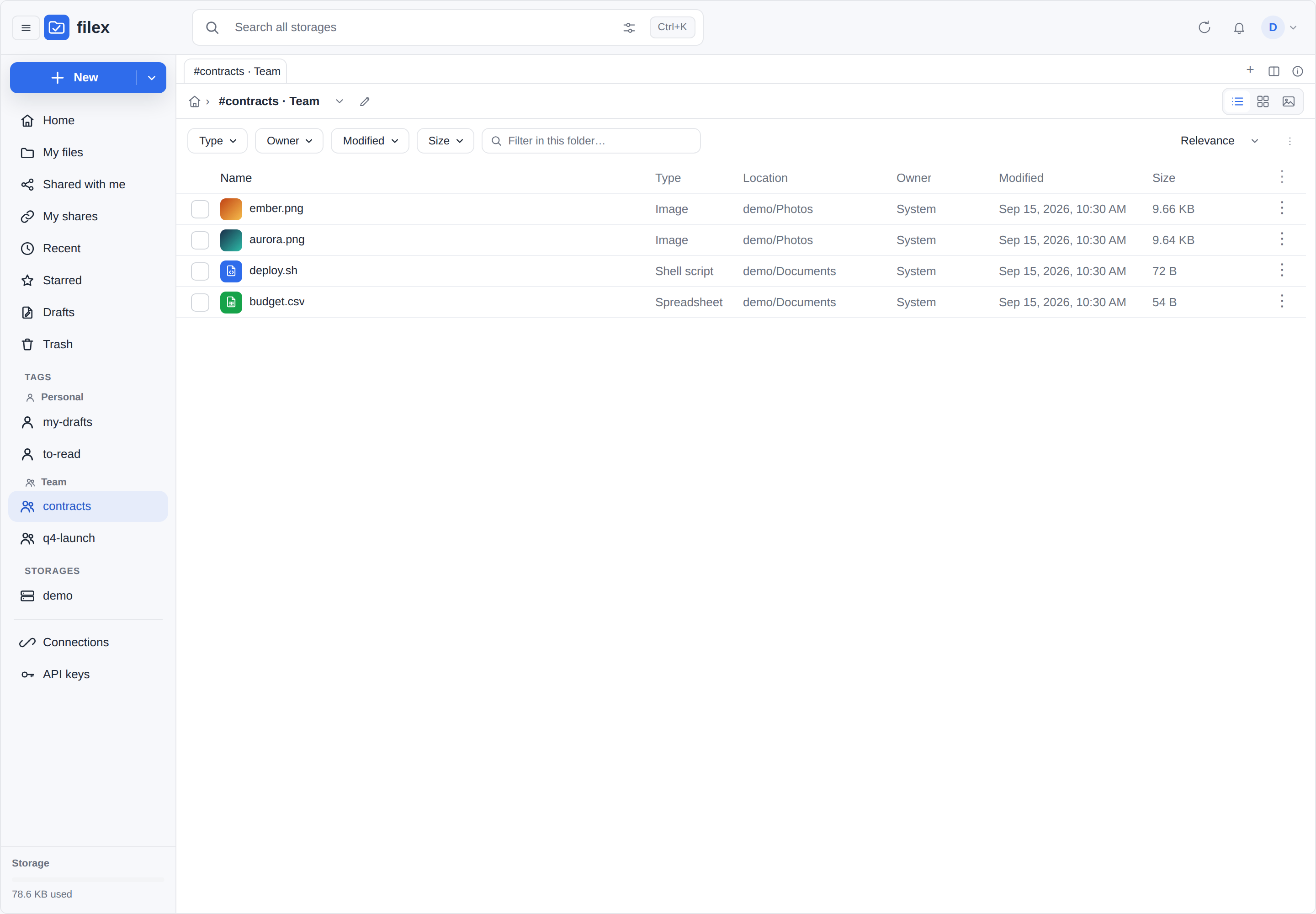
Rules that follow from it:
- A tag is only named to someone who can see a file carrying it. A tag's NAME is information ("Layoffs Q4"), so
tags/all, the Tagged files page and the navigation panel list a tag only if the person can see at least one live file that carries it - tenant, token root and RBAC included. - Editing a team tag is judged on the permission, not on the storage's read-only flag. A tag is catalogue metadata, not a byte on the storage; tagging an archive is exactly what tags are for. A file an app holds read-only for signature is a viewer's file to everyone, so its team tags freeze with it.
- A tag exists while it is on something. Removing a tag from its last file deletes it; the next file you tag makes it again, under the name you type then.
- The platform operator (the supertenant) reaches every storage and sees every tenant's team tags on the files it can see. A team tag it adds lands in the storage's tenant, so the customer sees it.
What "the same tag" means
Names keep the capitals they were typed with - "Müşteri Teklifi" stays "Müşteri Teklifi". Two names are one tag when they are equal after:
- whitespace at the ends is dropped and inner runs become one space;
- Unicode NFC (a decomposed "ü" pasted from a macOS file name is the same "ü"), with the dot a full Unicode lower-casing leaves on an
idropped; - the four Latin i's -
I,ı,İ,i- count as one letter; - full Unicode case folding (
ß=ss,ς=σ).
Steps 2 and 3 are the rule a file name search follows too - one place in the code, so a tag and the file name it was copied from are the same word to both. Step 4 is the tags' own: a search compares a typed word against a name letter by letter, so to it ß and ss stay two.
Step 3 is why this is not strings.EqualFold or a locale's lower-casing. The default Unicode lower case of I is i, so "IŞIK" and "ışık" - one Turkish word - would be two tags; Turkish lower-casing turns I into ı, so "INVOICE" and "invoice" would be two tags for everyone else. Folding all four i's together is right for both keyboards. The cost is that two Turkish words that differ only by the dot ("ılık" and "ilik") are one tag - rare in a tag vocabulary, and the display name is never changed. Accents stay significant: "müşteri" and "musteri", "şık" and "sık" are different tags.
The first spelling wins: typing "müşteri teklifi" on a second file adds the tag the first file already carries, still shown as "Müşteri Teklifi". A name is at most 64 characters, and may not contain control characters.
The API
/api/files/manager/…, session or API token.
| Method | Path | Answer |
|---|---|---|
| GET | /tags?node_id= | {node_id, tags:[names], items:[{name, kind}], can_edit_team} - the tags you can see on the file |
| GET | /tags?storage_id= | {storage_id, tags, items} - the tags you can see in use in one storage |
| GET | /tags/all | {tags, items} - every tag you can see, both kinds, alphabetical (personal before team for one name) |
| POST | /tags | {node_id, items:[{name, kind}]} - the tags you can see on the file become exactly this list. 403 if a team tag would be added or removed without edit permission; 400 for a bad kind or name |
| GET | /tagged?tag=&kind= | {nodes, tag, kind} - live files carrying the tag, newest first. kind = personal or team; absent = both |
tags (plain names) is still in every answer, one entry per name, for clients written before kinds existed.
What an old client gets. A POST {node_id, tags:[names]} with no kind - the shape every client before v0.43.0 sends - makes personal tags:
- a request that does not say who should see a label must not show it to anyone else; the finding was an unintended audience;
- it always works - anyone who can see a file may personal-tag it, while a team default would turn a viewer's old client into a stream of
403s; - it is what the code always claimed ("per-user").
Names in that list that match a tag the file already carries keep that tag as it is (a team tag stays team), so an old client that round-trips the list it read changes nothing. A team tag it leaves out is a removal, and needs edit permission like any other. {…, "kind": "team"} makes the new names team tags.
Agents have the same thing as GET/POST /api/ai/tags and the MCP file_tags tool (MCP.md) - with no default kind: an agent names the kind of every tag it writes.
Upgrading
Migration 00055 turns every existing tag into a team tag - they were effectively shared, so nothing anybody could see disappears. Its tenant follows the file's storage: one team tag per tenant the storage is linked to (a storage linked to two tenants gives each its own copy), tenant 0 ("the instance") for a storage linked to none. Existing names were stored lower-cased by the old code and stay that way; new tags keep their capitals. Downgrading rebuilds the old shared tags from the team tags and drops personal ones - the old schema has nowhere private to put them.
Ranking
The issue that prompted the forgiving matching also asked that exact filename matches keep ranking first. With fuzziness in the query that stopped being something merged relevance scores can be trusted to deliver - a two-edit fuzzy hit on a short filename can out-score an exact hit on a long one - so the order is decided explicitly and is covered by a test.
Hits are sorted by tier first, then by score within the tier, then by the shorter path, then by node id so the same query always answers in the same order.
| # | Tier | Means |
|---|---|---|
| 1 | exact | The filename equals the query, ignoring case and separators - or the query is the whole path. The extension is compared both ways, so report is an exact hit on report.txt and main go is an exact hit on main.go. |
| 2 | prefix | The filename starts with the query (report → report-final.txt). |
| 3 | name | Every query piece is answered by the filename (report → q1-report.txt). |
| 4 | path | At least one piece needed a folder to answer it (Code main → Code/main.go). |
| 5 | fuzzy | Only the typo-tolerant pass produced it (report → reprot.txt). An all-digit query word never lands anything here. |
| 6 | content | Matched inside the file, not in its name. |
Tier 6 sorting last is also how the pre-v0.2 contract - name hits before content-only hits - survives: a document that matched on both keeps its name tier, is reported once, and carries matched: "both" plus its snippet.
The tier is internal; it is not on the wire. The response shape is unchanged.
The SQL LIKE fallback applies the same tiers in Go, so an index-less deployment answers in the same order rather than in ORDER BY name - and the database already prefers exact and prefix names when it decides which rows reach Go (see How it works).
Scoring - how candidates are ordered and filtered
Bleve decides which documents are worth looking at. What makes one of them a better answer than another is decided afterwards, in Go, by a subsequence scorer ported from VS Code's Quick Open (fuzzyScorer.ts, MIT). A relevance score cannot express any of this: it does not know where in the filename the match landed, whether the file or its folder answered, or whether every word you typed was answered at all.
Three things follow from it, and all three were asked for in issue #15:
- Word order does not matter. The query is split on spaces into pieces, and each piece is matched independently.
main codeandCode mainboth findCode/main.go(with the index; the fallback asks the database for names holding every word, so without the index the folder cannot answer one). - The filename outweighs the folder. The filename and the folders above it are scored separately, and a piece answered by the filename is worth an order of magnitude more than one answered by a folder.
Code/main.goandexample/main.goare no longer the same thing to the search: naming one folder excludes the other. - Every piece must be answered, or the candidate is dropped. The scorer is the filter as well as the ranking. A query of
Code mainused to return theCodefolder too, because it answered "code" - and, at the default scope, seven more files that merely contained the word "code". It now returns the file.
Within a match, characters score by position, cumulatively: +8 at the start of the name, +5 straight after a /, +4 after _ - . space : ' ", +2 on a camelCase hump, plus a bonus for each consecutive character in a run. That is why report prefers report-final.txt over q1-report.txt even though both contain the word.
Multi-word content search narrows too. Extra words used to widen the content side (it was an OR), which is where most of that noise came from. A two-word query now requires both words in the text.
What fuzzy does not mean here
Two deliberate limits, both worth knowing before filing a bug:
- Subsequence scoring is not subsequence recall. The scorer only ever sees candidates the index produced, and no Bleve query retrieves
main.gofor a query ofmgo. Making it do so needs a whole-filename keyword field and a full reindex, not a scoring change. What the scorer buys is ordering and precision over candidates that were already found. - Edit distance stays, and it is not VS Code's behaviour.
mian.gois not a subsequence ofmain.go, so Quick Open would find nothing for it; filex still finds the file, via the typo pass, ranked below every subsequence match. That pass now fires when the surviving hits are fewer than the limit, rather than when the raw candidates are - before the scorer, a candidate list full of half-matches counted as a full result set and kept it switched off.
Content search
Since v0.2 ("Bul"), filex also indexes what's inside files, fully asynchronously - the write path never waits on (or fails because of) extraction.
Pipeline. Every time a file's metadata is (re)indexed - upload, save, rename, sync upsert - filex compares the file's content fingerprint (etag, falling back to size+mtime) against what the index already holds. On drift, a content_index job is enqueued on the persistent queue (FILEX_QUEUE_DRIVER). The worker reads the file from its storage driver, runs the matching extractor, and updates the node's document with the text - metadata fields are preserved. Unchanged files never re-extract; errors are logged and skipped.
⚠ An overwrite through filex did not move the fingerprint on S3 or WebDAV until the write paths started recording the etag of what they had just written. A browser upload over an existing file, a save from the text editor, a file-drop submission, a new document over a stale row, and every protocol write (WebDAV, the S3 gateway, SFTP, FTPS, NFS, the agent API, archive extract) kept the replaced file's etag on the row while updating its size - so the fingerprint said "unchanged", the new text was not extracted, and search kept finding the old words until the next storage scan noticed the etag drift. Each of them now reads back the size, etag and modification time the backend reports for what landed; when the backend cannot be asked, the etag is left empty (which the next scan corrects), never the old one.
⚠ On local, sftp, smb and ftp this never fired for a file changed outside filex, until v0.34.0. The fingerprint falls back to size+mtime, but the sync that decides whether to re-index compared etags only - and those backends report none, so two empty strings compared equal and nothing ever drifted. A file replaced on disk kept its old extracted text indefinitely: you found the words it used to contain and not the ones it does. The sync now compares size and modification time where there is no etag (STORAGE.md → Drift detection), so this is the likeliest answer to "why did content search suddenly start working".
What gets extracted (built-in extractors, internal/search/extract):
| Family | Types | How |
|---|---|---|
| Plain text & code | txt md csv tsv json log xml html css go js ts py php sh sql yaml toml ini … (plus any text/* mime) | direct read; invalid UTF-8 and NUL bytes dropped |
pdf | text layer via a pure-Go reader; scanned/image-only PDFs yield no text (that's OCR's job, a separate optional extractor) | |
| Office | docx xlsx pptx | native OOXML (zip+XML) walk - document body / shared strings / slide text |
Limits. Source files larger than the size limit (Admin → Settings → General → Search settings, default 5 MB, 1-1024) are skipped entirely; extracted text is always capped at 200 KiB per file. Corrupt or unextractable files index as "no content" - never as job failures.
PDF and office files are read in a process of their own (since 0.57.3, GitHub #123). A parser that walks a document's structure can be sent into memory without end by one file - a PDF of about a megabyte took a filex to 27 GB, and the kernel killed the whole server. filex now starts its own binary again for each such file, and that process holds itself to a memory ceiling, Memory for reading one file (search.extract_memory_mb, below), and to a time limit of two minutes; on Linux it is also the first process the kernel's OOM killer picks. A file that passes either is stopped, indexed by its name only (no retry), and logged:
level=WARN msg="content-index: extract failed; indexing without content" node=42 path=/reports/q3.pdf err="extraction stopped: over its memory ceiling of 512 MB"The ceiling's automatic value (0, the default) is the indexing budget below, shared by the extractions that run at once, between 256 MB and 1 GB (512 MB when the memory filex was given cannot be read). Plain text and code are read in filex itself: they are streamed, never parsed.
Memory. Extracted texts that are ready at the same time are written to the index together, in one batch. Indexing also has a memory budget: the Memory for indexing share on Admin → Settings → General (the Search index page links there) (default 25, between 1 and 50) percent of the memory filex was given - the container's limit when it has one, the machine's RAM otherwise - on top of what filex held when the budget was first set (the extraction ceiling is a share of the same budget). A new share applies the moment it is saved. Over it, extraction and a rebuild wait until the index's background merges give the memory back; nothing is dropped and nothing is stopped. The startup log says what it read:
level=INFO msg="search: indexing memory budget" percent=25 budget_mb=1024 given_mb=4096 from="cgroup v2 memory.max"Query surface. Search endpoints take a scope parameter - name | content | all (default all) - and every hit carries two new fields: matched ("name" / "content" / "both") and snippet, a short plain-text fragment around the content match with the matched terms wrapped in « » (never HTML). With scope=all, name hits rank first, so pre-v0.2 clients see the ordering they always did.
Turning it off / tuning. Since 0.57 these are settings an administrator changes on Admin → Settings → General → Search settings (or PATCH /api/admin/search/settings, below): Search inside files (the switch), the size limit, Memory for indexing and Memory for reading one file. The switch, the limit and the ceiling apply to the next file, the memory share at once - no restart. Switched off, nothing new is read and a queued extraction does nothing when it comes up; text already in the index keeps matching. Switched back on, files are read as they change - a rebuild with ?content=1 catches up the rest.
The variables and config.yaml keys below are now only the FIRST value of each setting: they are read on a boot where the setting has no stored value yet - for an upgrading install, its first start on 0.57, so a value you had set carries over - and ignored after that. Changing them later does nothing; change the setting instead.
FILEX_SEARCH_CONTENT=0            # first value of "Search inside files" (default: on)
FILEX_SEARCH_CONTENT_MAX=5242880  # first value of the size limit, in BYTES (stored in MB, rounded up)
FILEX_SEARCH_MEMORY_PERCENT=25    # first value of "Memory for indexing" (1-50, default 25)
FILEX_SEARCH_EXTRACT_MEMORY_MB=0 # first value of "Memory for reading one file" (MB, 0 = from the budget)# config.yaml equivalent (used when the variable is not set)
search:
content: true
content_max_bytes: 5242880
memory_percent: 25Content extraction also requires the persistent queue to be enabled (it is by default); with FILEX_QUEUE_ENABLED=false there is no worker to run the jobs, so search silently stays name-only.
Rebuild interaction. A rebuild carries extracted text across - it copies the content field of every document into the replacement index, so content search is not interrupted and nothing has to be re-derived. Pass ?content=1 to re-extract anyway, for when you have added an extractor or raised FILEX_SEARCH_CONTENT_MAX and want the text derived again rather than copied; expect a burst of queue jobs proportional to your text-like file count.
Before v0.30 a rebuild started from an empty index and extracted content was gone until each file next changed. That is why filex would not rebuild on its own - and why the upgrade it shipped for issue #15 reached nobody who already had an index.
Configuration
Search is on by default:
| Setting | Where | Default | Meaning |
|---|---|---|---|
FILEX_SEARCH_ENABLED | env | true | Master switch. Accepts 1 / true. When off, no index is opened and search uses the LIKE fallback only. |
search.enabled | config.yaml | true | Same switch in YAML form. |
search.index_path | config.yaml only | <data_dir>/search.bleve | Where the Bleve directory lives. No env override - set it in the file if you want the index somewhere else (e.g. a faster disk). |
search.content | Admin → Settings → General; first value from FILEX_SEARCH_CONTENT / search.content | true | Content search switch - off stops reading file text (already-indexed content keeps matching). Live. |
search.content_max_mb | Admin → Settings → General; first value from FILEX_SEARCH_CONTENT_MAX (bytes) / search.content_max_bytes | 5 (MB, 1-1024) | Source files above this size are never content-extracted. Live. |
search.memory_percent | Admin → Settings → General; first value from FILEX_SEARCH_MEMORY_PERCENT / search.memory_percent | 25 (1-50) | Share of the memory filex was given (container limit, else machine RAM) that indexing may take. Over it, extraction and a rebuild wait. Applied when saved. See Content search. |
search.extract_memory_mb | Admin → Settings → General; first value from FILEX_SEARCH_EXTRACT_MEMORY_MB | 0 (MB, 0-16384; 0 = from the budget) | Memory one PDF or office extraction process may reach before it is stopped and the file is indexed by its name only. Automatic: the budget shared by the extractions that run at once, 256 MB to 1 GB. Under 64 counts as 64. Live. See Content search. |
search.auto_rebuild | Admin → Settings → General; first value from FILEX_SEARCH_AUTO_REBUILD / search.auto_rebuild | true | Repair an index written by an older document schema, in the background, at startup. Off leaves it alone - the index keeps reporting needs_rebuild and you rebuild when it suits you. Read at startup. See Upgrading an existing index. |
⚠ The five rows above are settings, kept in the database: the variable or YAML key gives a setting its first value on a boot where it has none, and is ignored from then on (the rule every admin-editable setting follows - CONFIGURATION.md). FILEX_SEARCH_ENABLED and search.index_path stay in the environment and the file: whether the index is opened at all, and where it lives, are decided before anything could read a setting.
# config.yaml
search:
  enabled: true
index_path: /var/lib/filex/search.bleve # optional; defaults under data_dir# Disable the index entirely (LIKE-only search)
FILEX_SEARCH_ENABLED=falseAt startup, when search.enabled is true, filex opens (or creates) the index at index_path. If that open fails - corrupt directory, bad permissions, a stale lock - filex logs a warning and degrades to the SQL LIKE fallback rather than refusing to boot. Search keeps working, just slower and name-only.
Single-writer lock. Bleve takes an exclusive lock on the index directory, so only one process may hold it. This is why offline/maintenance commands that don't need search skip opening it - a running
filex servealready owns the lock.
Searching - endpoints
POST /api/files/search - canonical
Body-carrying form used by the app. Accepts a signed-in session or an API token, like every other /api/files route.
curl -X POST https://files.example.com/api/files/search \
  -H 'Content-Type: application/json' -b cookies.txt \
-d '{ "query": "invoice", "storage_id": 3, "limit": 50 }'| Field | Type | Default | Meaning |
|---|---|---|---|
query | string | - | The search text. May carry tag: / -tag: filters - see Query syntax. |
storage_id | int | 0 (all) | Restrict to one storage. Required to enable the LIKE fallback (see below). |
limit | int | 50 | Max results. |
scope | string | all | name | content | all - which fields to consult (see Content search). |
The narrowing parameters (type, mime, modified_after, modified_before, min_size, max_size, under, not_under, owner, hidden) are fields of the same body.
Response: { "results": [ { …node…, "snippet": "…«term»…", "matched": "name|content|both", "score": 812, "kind": "pdf", "starred": true }, … ], "truncated": false, "total": 1 }, already RBAC-filtered and in rank order. snippet is "" for name-only hits. truncated is true when more matched than came back: the index returned a full limit, or the LIKE fallback filled its window or still had more than limit rows after ranking (with a narrowing, also when the candidate window was full - rows it turned away may have hidden matches past it). For a caller confined to a folder, only the hits inside it are counted. The explorer's own search (/api/files/manager?action=search) carries the same flag.
total is how many rows matched before the page was cut, after the tenant and RBAC filters: exact while truncated is false, a lower bound while it is true (the server does not count past its window). score is the ranker's number for the hit, bigger is better within a tier. kind is what the row is (the words of type= below), and starred is present and true when the caller starred it - one query per answer, so a client needs no list of stars of its own.
Each hit also says what a bare node row cannot say about itself, so a client can open and label a hit from any storage without a second request:
| Field | Meaning |
|---|---|
storage | the name of the storage the hit lives on, beside the numeric storage_id - what a client needs to build the name://path that opens it |
owner_id / owner_name | who put the file there. Absent means System: nothing in filex put it there (the sync found it, or the row predates ownership) |
last_actor_id / last_actor_name | who touched it last, with the same meaning for absent |
owner_self | true when the caller is the owner; omitted otherwise |
The names are resolved after the tenant and RBAC filters have run, so a hit that was dropped never discloses who owns it. A name the server could not resolve leaves the id without its _name rather than failing the response.
# free text plus a tag filter
curl -X POST https://files.example.com/api/files/search \
  -H 'Content-Type: application/json' -b cookies.txt \
  -d '{ "query": "main go tag:source", "storage_id": 3 }'
GET /api/files/search?q=… - same handler
Convenience form for the SPA's toolbar (?q=, ?storage_id=, ?limit=, ?scope=, and the narrowing parameters). q and query are both accepted. Behaves identically to the POST form. There is no page / page_size: one answer is one page of limit rows, and truncated says whether more matched.
curl -G https://files.example.com/api/files/search \
  --data-urlencode 'q=report' --data-urlencode 'storage_id=3' -b cookies.txt
Note. The SQL LIKE fallback only fires when Bleve returns 0 results and you passed a non-zero
storage_id. An all-storages query (storage_id= 0) that the index can't answer returns empty rather than scanning every mount.
Narrowing a search
A search can be narrowed by what a row IS, not only by its name. The narrowing is applied by the server to every candidate before the limit counts it, so limit counts rows that satisfy the whole question: "files over 100 MB modified this week named report" is answered from the whole index, not from the first page of name hits. (Before 0.54 the explorer narrowed the first 250 name hits in the browser, and an API, MCP or CLI caller could not ask at all.)
The same parameters are read by POST|GET /api/files/search, GET /api/files/manager?action=search, GET /api/ai/search, the MCP tool file_search and filex client search (one flag each).
| Parameter | Value | Keeps |
|---|---|---|
type | file, dir (or folder), or a kind: document, spreadsheet, presentation, pdf, image, video, audio, archive, code, text, other | rows of that kind. A kind is decided by the extension, else by the sniffed mime type; document takes plain text too. Every row carries its kind. |
mime | a prefix, image/ or application/pdf | files whose mime type starts with it |
modified_after, modified_before | RFC 3339, YYYY-MM-DD (UTC) or epoch milliseconds | rows modified in that window, inclusive. A row with no date satisfies no window. |
min_size, max_size | bytes | files in that range, inclusive. A folder never satisfies a size bound. |
under, not_under | a folder, adapter://dir or storage-relative | rows inside (the folder itself counts) / outside it. An adapter prefix also names the storage. |
owner | me, system or an account id | rows that account put there; system is a row nobody put there through filex |
hidden | true / false | false drops names starting with a dot; absent keeps them |
A value the server cannot read is refused with 400 {"error":"bad_filter","field":"min_size"} rather than ignored: a dropped filter answers a wider question than the one asked. With a narrowing on, the index reads a wider window of candidates (2,000) and the index-less fallback a wider window of names (4,000).
The folder filter box
The explorer's "Filter in this folder" box asks POST /api/files/search/match. Sent {"q": "invoice 2026", "names": ["invoice_2026.pdf", "invoice-final.pdf"]}, it answers {"matches": [0]}: which of the given names answer the words by the search's own name rule - every word, . - _ and a space as one separator, accents significant, the four Latin i's one letter (the rule of the index-less fallback over a name on its own). The explorer's filter box asks it about the names on screen, once typing pauses, aborting a question typed past; it reads no storage and returns nothing the caller did not send. A name decrypted in the browser (an encrypted-names folder, a vault) is never sent: it is matched in the browser. Before 0.54 the box had a rule of its own (an accent-stripped substring), so "invoice 2026" did not find invoice_2026.pdf there while the search did.
Which explorer box asks what
Every search box in the explorer - in the web app, in the desktop app and in an embed, which all draw the same component - reads this one index, through one of two routes:
| Box | Request | Fields | Where |
|---|---|---|---|
| The header field (Search in …) and Advanced search's Name scope | GET /api/files/manager?action=search&filter=… | name + path (scope=name) | the drive you are in; every drive at the root |
| Advanced search's Content / All scopes | GET /api/files/search?scope=content (or all) &limit=250 | name, path, content | every drive you can reach |
| ⌘K → Everywhere | GET /api/files/search?scope=all&limit=8 | name, path, content | every drive you can reach - and, in the desktop app, every account on the rail, each searched with its own sign-in |
| Admin → Search (index test page) | GET /api/files/search | as asked | every drive the administrator can reach |
| Admin → Files (version history) | GET /api/files/search?scope=name&type=file&limit=50 | name + path, files only | every drive the administrator can reach |
| Filter in this folder… | POST /api/files/search/match | the names on screen | the rows in hand (see above) |
Both routes drop what the caller may not see before answering (tenant, per-drive grants, a token's root) - a content hit never carries a snippet from a file the caller could not open. e2e/tests/47-palette-everywhere.spec.ts checks it from the palette with a user granted one folder of three.
A ⌘K result is also something to act on: its row opens the file (or folder), has a download button (a folder downloads as one .zip), and drags out the way a row of the file list does - through the desktop app's own drag, or, in a browser, as a single-file download where the session is a cookie.
GET /api/ai/search?path=<adapter://>&q=… - token / agent surface
The programmatic search used by API tokens and the MCP/AI integration. Requires a token with the read permission - named scopes on the wire, and not to be confused with this endpoint's own scope parameter (MCP.md → Scopes). path addresses the adapter root to search within, q is the term. Results are confined to the token's root, so a confined token can't enumerate outside its grant.
curl -G https://files.example.com/api/ai/search \
  -H 'Authorization: Bearer <token>' \
  --data-urlencode 'path=s3://projects' --data-urlencode 'q=budget'
Response: { "entries": [ … ] }. It takes the narrowing parameters too.
The MCP tool file_search additionally accepts a boolean content argument (default true): content hits come back with snippet + matched fields, filtered through the same confinement-root and RBAC checks as the name search. content=false restores the pre-v0.2 name-only behavior.
q on this surface speaks the same query language as the HTTP endpoints - separator-blind text and tag: / -tag: filters - so an agent does not have to learn a second, smaller syntax. The name matches always come from the database, the way the HTTP fallback answers - every word in the file's own name, compared by the same rule - so typo tolerance needs the index and content=true. A bare tag:x lists every file carrying the tag, as /api/files/search does (it used to be the first 200 files of the storage, filtered by the tag).
Admin - stats & rebuild
Both endpoints require an admin session/token.
GET /api/admin/search/stats
Reports the index state:
{
  "enabled": true,
  "document_count": 18423,
  "index_size_bytes": 5242880,
  "last_updated_at": "",
  "needs_rebuild": false,
  "rebuilding": false,
  "last_rebuild_finished_at": "2026-09-26T10:00:00Z",
  "last_rebuild_error": ""
}enabled-falsewhen the index isn't wired (search is LIKE-only). The other counters are0.document_count- number of indexed nodes.index_size_bytes- on-disk size of thesearch.blevedirectory.last_updated_at- best-effort timestamp; may be blank.needs_rebuild-truewhen the index on disk was written by an older filex that did not index every field this build queries. Search still works, and filex normally repairs this by itself at startup, so seeingtruemeans either the repair is still running (rebuilding: true) or it is switched off (FILEX_SEARCH_AUTO_REBUILD=0) or it failed - the log says which. See Upgrading an existing index.rebuilding-truewhile a replacement index is being built, whether it was started by this endpoint or by the automatic repair. It staystrueuntil the new index is live, and it is why an admin UI can say "rebuilding" instead of showing aneeds_rebuildbanner over an index that is already being fixed.last_rebuild_finished_at/last_rebuild_error- how the latest rebuild of the running server ended: when, and why it did not go live (empty when it did).null/ empty before any has ended.rebuildingturnsfalseon a failure too, so this pair is what tells a finished rebuild from a failed one; the admin Search page reads it before it says the new index is live.
POST /api/admin/search/rebuild
Reindexes every node row from the database into a replacement index and swaps it in when it is finished. Returns immediately; the work runs in the background, and search keeps answering from the current index the whole time. Add ?content=1 to also re-enqueue content extraction for every eligible file - text already in the index is carried across either way, so this is for re-deriving it, not for getting it back.
curl -X POST https://files.example.com/api/admin/search/rebuild -b cookies.txt
curl -X POST 'https://files.example.com/api/admin/search/rebuild?content=1' -b cookies.txt| Status | Meaning |
|---|---|
| 202 Accepted | { "ok": true, "note": "rebuild started in background" } - rebuild launched. |
| 400 Bad Request | search index disabled - the index isn't enabled, so there's nothing to rebuild. |
GET and PATCH /api/admin/search/settings
The search settings (0.57) - what Admin → Settings → General → Search settings shows and saves. The platform operator's only in multi-tenant mode (one instance-wide index).
{
  "content": true,
  "content_max_mb": 5, "content_max_mb_min": 1, "content_max_mb_max": 1024,
  "memory_percent": 25, "memory_percent_min": 1, "memory_percent_max": 50,
  "memory_budget_bytes": 1073741824,
  "memory_given_bytes": 4294967296,
  "memory_from": "cgroup v2 memory.max",
  "memory_from_kind": "container",
  "auto_rebuild": true,
  "index_enabled": true,
  "extract_memory_mb": 0, "extract_memory_mb_min": 0, "extract_memory_mb_max": 16384,
  "extract_memory_bytes": 268435456,
  "extract_memory_auto": true
}memory_budget_bytes/memory_given_bytes/memory_from- what the share came to in the running server, of how much memory, read from where (memory_from_kind:container,host, or empty when it could not be read and indexing runs without a budget).index_enabled- whether this server opened the index (FILEX_SEARCH_ENABLED, read-only). The settings can be changed either way and apply once it is on.extract_memory_bytes/extract_memory_auto- the memory ceiling of one extraction process in force, and whether it came from the budget (extract_memory_mbis0).
PATCH takes any of content, content_max_mb, memory_percent, auto_rebuild, extract_memory_mb and answers the same shape. A number outside its bounds is refused (400 with field and a message in the reader's language), never clamped; content, content_max_mb and extract_memory_mb apply to the next file, memory_percent at once, auto_rebuild at the next start.
curl -X PATCH https://files.example.com/api/admin/search/settings -b cookies.txt \
  -H 'Content-Type: application/json' -d '{"memory_percent": 15, "content_max_mb": 20}'
| 409 Conflict | rebuild already in progress - one rebuild at a time, and that includes the automatic repair; wait for it to finish (rebuilding on the stats endpoint). |
Internally the rebuild builds a second index in <index_path>.rebuilding, verifies it, then swaps it into place under the index lock and deletes the old directory. Nothing observes a half-built index: a query that arrives during the swap waits for two directory renames and an index open, then runs against the new one. It runs on a detached (background) context so it survives the HTTP request returning - a large tree keeps reindexing to completion.
Two things are worth knowing before you run it on a big instance:
- Disk. Two indexes exist at once. Measured on a 20 202-document corpus (11.4 MB index): peak 36.2 MB across both directories, i.e. about 2.2x the old index in additional space. filex refuses to start a rebuild when the filesystem cannot hold roughly 4x the current index - it fails loudly, logs what it needed and what was free, and keeps serving the old index.
- Time. The same corpus rebuilt in 3.0 s. Watch for
search: rebuilt index is livein the log, orrebuildingon the stats endpoint.
Writes that arrive during a rebuild (uploads, renames, deletes, content extraction) go into both indexes, so nothing that happened while it ran is lost - or resurrected - at the swap.
These are also exposed to admin tokens as the MCP tools admin_search_stats, admin_search_rebuild, admin_search_settings_get and admin_search_settings_update.
Upgrading an existing index
The forgiving name matching added two indexed fields, name_norm and path_norm. Documents written by an older filex do not have them. Schema 3 (v0.43.0) indexes names composed and folds their normalised copies with the four i's as one letter: a schema-2 document holds a decomposed name's words in pieces, and IŞIK as a word no lower-case query reaches, so a schema-2 index is rebuilt the same way - automatically, in the background. Schema 4 (0.57) changes two things, and one rebuild after the upgrade carries both:
- it keeps only what filex reads back: no
_allfield, term vectors on the extracted text alone, no doc values. That alone changes no search's results; the index is a fraction of its former size (an install with 21,000 documents had an 8 GB schema-3 index), and the rebuild is what shrinks it; - it reads a name the way it is seen: an invisible format character (a zero-width space, a soft hyphen, a word joiner, a bidi control) no longer splits a word, so
zero+ U+200B +width.txtis found byzerowidth(File names).
An upgrade needs no action, and search does not get worse. The pre-existing sub-queries are still part of every query, precisely so that a document without the new fields keeps answering exactly what it answered before; the change adds recall, it never removes any. The separator-blind SQL fallback covers storage-scoped queries in the meantime, and every document filex writes or syncs from then on carries the new fields, so recall improves on its own as files change.
What an un-rebuilt index cannot do for its existing documents is the typo-tolerant pass, and multi-word matching on an unscoped (storage_id = 0) query, where the fallback does not fire.
filex repairs this by itself. At startup it compares the document schema stamped inside the index with the one this build writes, and when they differ it rebuilds in the background - building the replacement alongside the live index and swapping it in when it is complete. You do not have to do anything, and search does not go dark while it happens.
What you see in the log:
WARN  search: index document schema is out of date; separator-blind and typo-tolerant
      name matching cannot reach existing files until it is rebuilt
      found_schema="1 (pre-0.29, unstamped)" want_schema=2
INFO  search: the index was built by an older filex; rebuilding it in the background.
      The current index keeps answering every query until the replacement is ready
INFO  search: building a replacement index alongside the current one
      current_index_bytes=11437145 free_bytes=842927378432
INFO  search: rebuilt index is live  reason=schema-upgrade documents=20202
      index_bytes=14894776 took=2.657245423s
needs_rebuild on the stats endpoint stays true until the new index is live - the index answering queries really is the old one until then - and rebuilding is true in the meantime.
Extracted content is carried across, document by document, so content search keeps working throughout and nothing is re-extracted that has not changed. This is what makes an automatic rebuild safe: before v0.30 a rebuild started from an empty index, which is exactly why filex would not run one on its own.
If it does not finish
- It fails. The old index keeps serving,
needs_rebuildstaystrue, and the log says why (search: rebuild failed …), as doeslast_rebuild_erroron the stats endpoint - the admin Search page shows it. The half-built directory is removed. - The disk cannot take two indexes. Same outcome, refused before anything is written:
search: not enough free disk space to rebuild the index, with the bytes it needed and the bytes it found. - The container is killed mid-rebuild. The half-built index is discarded on the next start (
search: discarded a half-built index left by an interrupted rebuild) and the repair starts over. It is never swapped in.
Turning it off
Switch off Repair an outdated index at startup on Admin → Settings → General → Search settings (it applies at the next start). FILEX_SEARCH_AUTO_REBUILD=0 gives the setting its first value on a new install, as it always meant:
FILEX_SEARCH_AUTO_REBUILD=0The index is then left exactly as it is: still perfectly usable, still reporting needs_rebuild: true, and you rebuild when it suits you:
curl -X POST 'https://files.example.com/api/admin/search/rebuild?content=1' -b cookies.txtFailure modes & troubleshooting
A file I just uploaded doesn't show up in search
Indexing is best-effort and asynchronous - a write commits before (and regardless of whether) the index update lands, and files added straight to a backend only appear after a sync. Normally the lag is sub-second. If a file is persistently missing, run a storage sync or a POST /api/admin/search/rebuild and it will reappear.
A file that was put on the storage outside filex under a path the storage excludes from scanning (.*, *.tmp, downloads/incomplete/**, …) is never catalogued, so it is never indexed either - that is what the exclusion is for. Check the storage's Paths to exclude from scanning before rebuilding.
Search feels slow, or a typo finds nothing
You're on the SQL LIKE fallback. That happens when FILEX_SEARCH_ENABLED is off, or the Bleve index failed to open at startup (check the logs for search index open failed; falling back to SQL LIKE). The fallback is separator-blind and handles multi-word queries, but every word has to be in the file's name and it cannot do typo tolerance. Fix the index (see next) to get the fast, multi-field, fuzzy path back.
search index open failed in the logs
The Bleve directory is unreadable, corrupt, or locked by another process. Confirm only one filex instance points at that index_path, that filex can write it, then either restart, or delete the search.bleve directory and run a rebuild to recreate it cleanly.
A name with Turkish (or other accented) letters is not found
Typing the name exactly as it is shown used to find nothing when the file was uploaded from a Mac, which writes such names decomposed - see Names written decomposed - and a name in capitals did not answer the word typed in lower case when it had an I in it (kış for KIŞ LİSTESİ.xlsx) - see Capital letters and the Turkish i. Both paths compare names through one normaliser now. With the index on, the documents already in it are fixed by the automatic rebuild (needs_rebuild on the stats endpoint says whether it has run); without the index there is nothing to rebuild. On PostgreSQL the fallback needs version 13 or later and a database whose locale is not C - with C, the database lower-cases only A-Z. An accent is still a difference: musteri does not find Müşteri.
Substring, separator or typo searches miss rows
Substring and case are handled by the wildcard sub-queries, separators by the normalised fields, typos by the fuzzy pass (numbers excepted - see How it works). If those are silently missing while whole-name matches work, check needs_rebuild on the stats endpoint: an index carried over from an older filex has documents without the normalised fields. filex repairs that on its own at startup, so needs_rebuild: true after a restart means the repair is still running (rebuilding: true), was switched off with FILEX_SEARCH_AUTO_REBUILD=0, or failed - the log says which. See Upgrading an existing index. Otherwise the index is simply stale - trigger a rebuild.
A tag: filter returns nothing
That is what a filter matching nothing looks like, and it is deliberate - the alternative is answering a mistyped tag with the entire storage. Check the tag exists (GET /api/files/manager/tags?storage_id=…, or the Tagged files page) and remember that several tags in one query are ANDed - and that the filter sees only tags you can see: another person's personal tag, or another tenant's team tag, is not there for you to filter by.
filex takes a lot of memory while it indexes
Indexing keeps to its budget (see Memory under Content search), so first read the search: indexing memory budget line in the startup log: from says whether filex saw the container's limit or only the machine's RAM. Without a container limit the budget is a share of the whole machine; set one, or lower Memory for indexing on Admin → Settings → General (the Search index page links there) (it applies at once). While indexing is held the log says search: over the memory budget - that is the budget working, and the backlog drains as the merges finish. Switching off Search inside files stops content extraction altogether and leaves name search as it is.
After a bulk import, lots of files are unsearchable
Bulk imports that bypass filex's write path (rsync into a local mount, mass S3 upload) only enter the index via sync. Wait for the next sync of that storage, trigger an on-demand sync, or run a rebuild to index everything at once.
Nothing comes back for an all-storages query
Remember the fallback needs a scope: an unscoped query (storage_id = 0) that the index can't answer returns empty instead of doing a full-database LIKE scan. Pass a storage_id, or rebuild the index so Bleve can answer it directly.
See also
- STORAGE.md - storages and the sync worker that feeds the index
- RBAC.md - the per-storage/per-file grants that filter results
- CONFIGURATION.md - full config/env reference
- API.md - HTTP API overview