
Notifications
filex tells you when something needs attention - a replica fell behind, a storage is nearly full, a queue is stuck, someone dropped files into a shared folder. Every such event fans out to two channels at once from a single call: a persistent in-app bell and an outbound webhook POST to every configured destination.
The whole subsystem is optional and safe to leave on - with no webhook configured it simply records to the bell and skips the outbound call.
Out of the box every notification is told at once. The digest is optional: an administrator (for their tenant) or a person (for themselves) turns a kind off, and that kind is then held for a short window and told in one notification, folder by folder - a folder that receives 30 files in a minute is one notification, not 30.
- How it works
- What a notification says - which language · the words · an item inside an encrypted folder · who can make one
- Configuration
- The webhook - payload · headers · delivery--retry
- Event types & severities
- Click target - the field · which events carry one · where a click goes
- In-app bell (endpoints)
- Reaching someone who is not looking at the bell - browser notifications · desktop app · Web Push
- The digest - what is held · urgent kinds · the window · the digest row · email and webhooks
- Admin endpoints
- Per-user settings
- Failure modes & troubleshooting
- See also
How it works
A subsystem inside filex hands an event to one Service.Send call, and that call fans out to two independent channels:
                          ┌─► in-app bell   (row in notifications table - survives restart)
  subsystem ── Send() ──► │
└─► webhook POST (one per destination, async, retried)- In-app bell - the event is written to the
notificationstable synchronously, so it is durable the momentSendreturns and survives a server restart. Users read it back through the/api/notifications/…endpoints (bell icon, history, unread badge, mark-read). - Webhook - a
POSTtoFILEX_WEBHOOK_URL(the legacy global webhook) and to every enabled webhook target whose event allow-list matches the event, each dispatched in its own background goroutine so the originating request never blocks on any of them. The body is a generic JSON document (see The webhook).
The two channels are independent: a webhook failure never affects the bell row, and having no destination at all simply means the outbound call is skipped while the bell keeps recording.
The bell row is then read by four surfaces - the bell itself, a browser notification while a tab is open, the desktop app's native OS notification, and a push to a phone or a browser while filex is closed (Web Push, for a device whose person turned it on) - all of which take a person to the event's click target. They are readers of the one feed, not channels of their own: none of them decides anything the bell does not (see Reaching someone who is not looking at the bell). Webhook errors are recorded against the notification row, never bubbled up to break the action that triggered the event.
Which rows a person is TOLD about - the badge, the pop-ups, the pushes, the email - is decided in that same read, per person: a kind they hold for the digest (none, out of the box) is in their list at once but counts for nothing until the digest that carries it is written. Every row is still written the moment its event happens, and every webhook still receives it then.
Master switch. Notifications on Admin → Settings → Notifications (default on;
FILEX_NOTIFY_ENABLEDseeds it) toggles the whole subsystem, from the next start. When off,Service.Sendis a no-op and every/api/notifications/…endpoint returns 503{"error":"notifications offline"}. Leave it on unless you have a reason not to.
What a notification says
The server says it, on every channel, with one piece of code (internal/notify/say.go, since 0.54). A row keeps what HAPPENED - its event and its meta (the node, the actor, the share, the counts, an app's words per language) - and the server makes the sentence when the row is read, in the reader's language:
| Channel | Where its words come from |
|---|---|
| The bell, the full list, the page's pop-up | GET /api/notifications answers each row's title and body already said (notify.SayRows) |
| The desktop app's window bell and native toast | the same endpoint, shown as it is |
An agent (notifications_list) | the same endpoint |
| A Web Push | the same sentence, laid out as the page's pop-up lays it out |
| The emails (an urgent drop notice, the digest's) | the same sentence: the title is the subject, the body the text |
The webhooks' title and body | the same sentence, in the language chosen for that webhook (else the instance's), plus the message untranslated (i18n) |
| The administrators' history | the same sentence, in the reader's account language |
No screen composes a sentence: the explorer, the admin panel, the desktop app and the service worker show the words they are given (a toast lays out the instance's name over "title - body"). One notification therefore says the same thing in the bell, on a phone and in an email, a language changed in the settings or a language pack installed changes every row at once, and an operator alarm reaches a Turkish reader in Turkish. The emitter's own title and body stay on the row as its fallback: an event the catalogue has no phrase for (one a later version adds) is said in its emitter's words, and only an event that set none is said by its id.
Which language
Translated at the last stop (0.54, the maintainers' rule). A notification travels untranslated - its event, its facts and the catalogue keys it is said with - up to the point where it reaches its receiver, and only there is it said, in the language of the one who receives it:
- A person, on every channel - the bell and the full list (
GET /api/notifications), the administrators' history (GET /api/admin/notifications), the desktop app's toast, an agent (notifications_list), a Web Push, every email: the language of the person's account (users.locale), else the instance's (FILEX_DEFAULT_LOCALE), else English. An instance-wide notification (an operator alarm) is said for each reader in that reader's language. The request names no language:lang=is not read, and an embed drawn in its host's language still gets the person's notifications in the account's. - A webhook - a receiver no person stands behind: the language chosen for it - a target's own (Admin → Webhooks → Language), or
FILEX_WEBHOOK_LANGfor the legacy webhook - else the instance's. The body also carries the message untranslated (i18n). - An email to a bare address (a share or file-request link mailed to somebody with no account here): the language PICKED for the recipient in the share dialog (Recipient's language, optional), else the instance's - never the sender's screen language: the form sends a language only when somebody picked one. An address that belongs to an account reads its owner's language, whatever the form says (Emailing a link).
The account's language is the screen's. The web panel, the explorer and the desktop app read their language from the account, and a language picked on any of them is written to the account - so the screen and every notification channel always agree. A browser's own copy (filex.locale) is only the first paint before the account answers and the signed-out page's memory; the desktop app has no language of its own (an older install's pinned choice is handed to an account that held none, once). An account that holds no language is given the one it signs in with, by the server, at the sign-in (BACKEND.md). An explorer embedded in another page speaks the account's language too: the host's locale is only what it draws until the account answers and the starting value of an account with no language (API.md). Signed-out pages use the browser's language, else the instance's; an embedded explorer with nobody signed in (or an app's token) keeps the host's.
A language is one filex ships (English, Turkish) or one an installed language pack adds; any other answers in the instance default, then English.
The words
The phrases are keys of the server catalogue (internal/srvtext/locales), the same one the emails and the public pages are written from:
server.notify.<event>.title/.body- the sentence;{name},{path},{count}… are the row's facts (an unresolved one is removed together with the punctuation next to it);<field>_<category>- a plural form, by the CLDR category of the row's count (_one,_two,_few…);<field>_file- a single encrypted file's wording of an event that also happens to folders (e2e.escrow_used,e2e.password_changed);<field>_rejected- a NO to an encryption request;server.notify.digest.*- the digest's lines;server.notify.word.*- the words a sentence falls back on ("Someone", "a file", "🔒 Encrypted item").
A language pack translates them like any server string (ui_locales[<lang>]); a key the pack lacks is said in English, one key at a time, and a translation that drops or adds a placeholder is refused for the English one. A notice an app sends (plugin.notice) is said in the words the app wrote for the reader's language (else English), under the app's label in that language.
Right to left. In a right-to-left language the server wraps every value it places in a sentence - a name, a path, a reason, an app's words - in FIRST STRONG ISOLATE … POP DIRECTIONAL ISOLATE (U+2068 … U+2069), the rule the explorer's own strings follow: each keeps its own direction, and a path's leading slash stays where it belongs. A translation cannot carry these marks; the server adds them, once, for every channel.
An item inside an encrypted folder
⚠ The one exception. Inside an end-to-end encrypted folder whose names are encrypted, the server has only the scrambled names, so it cannot say the item's name. The sentence is still the server's: the name stands in it as "🔒 Encrypted item" (server.notify.word.locked; a path as <folder>/…/🔒 Encrypted item), and that is what a push, an email, a webhook and the desktop app's toast say - they have no key. A row read through the API also carries e2e, where those words stand:
"e2e": {
  "title": [{ "text": "New file: " }, { "name": 0 }],
  "body": [{ "name": 1 }],
  "names": [
    { "wire": "team://Vault/<scrambled>", "root": "team://Vault", "part": "name", "locked": "🔒 Encrypted item" },
    { "wire": "team://Vault/<scrambled>", "root": "team://Vault", "part": "path", "locked": "Vault/🔒 Encrypted item" }
  ]
}
A browser whose explorer has that folder unlocked puts the item's real name (or its path, for part: "path") in each marked place; every other reader uses locked, which is exactly what title and body already say. It builds no words - it fills a name into the server's sentence. A row that names no encrypted item carries no e2e.
Who can make one
Only the server makes a notification, from its own events (a write, a share, a drop, an alarm, an app's notify_send): no endpoint lets a client create one, choose who it is addressed to or supply its words - a client reads its own bell, marks rows read and changes its own settings, and the administrators' "Send test notification" writes the server's own row (handlers/notifications_text_test.go TestNotifications_NoEndpointTakesItsWordsFromTheClient holds it).
Configuration
Set via environment variables (or the equivalent notify.* YAML keys). All are optional - the defaults give you a working in-app bell with no outbound webhook.
| Env var | YAML | Default | Meaning |
|---|---|---|---|
FILEX_NOTIFY_ENABLED | notify.enabled | true | Seeds the master switch (the setting notify.enabled, Admin → Settings → Notifications; applies at the next start). 1/true enables; any other value disables (503 + no-op). |
FILEX_WEBHOOK_URL | notify.webhook_url | "" | Where each event is POSTed. Empty = webhook skipped (the bell still records). |
FILEX_WEBHOOK_TOKEN | notify.webhook_token | "" | Optional secret. Sent as Authorization: Bearer <token> on every webhook POST. |
FILEX_WEBHOOK_LANG | notify.webhook_lang | "" | Seeds the language the legacy webhook's title and body are said in (the setting notify.webhook_lang, Admin → Settings → Webhooks; applies at once): tr, en, a language pack's. Empty = the instance's default language, else English. A webhook v2 target has its own setting. |
FILEX_PUSH_ENABLED | notify.push.enabled | true | Web Push. Works only with FILEX_SECRET_KEY set: the key pushes are signed with is stored sealed with it. |
FILEX_PUSH_SUBJECT | notify.push.subject | FILEX_PUBLIC_URL (https) | The contact a push service may write to about this server: mailto:[email protected] or an https address. Without an https public address: mailto:filex@<its host>. |
FILEX_PUSH_HOSTS | notify.push.hosts | "" | Push services accepted besides the browsers' own, comma separated; * accepts any https host that is a name, never an address. |
# In-app bell only (no outbound webhook) - this is the default.
FILEX_NOTIFY_ENABLED=true

# Add a webhook (e.g. an incoming-webhook relay or your own receiver).
FILEX_WEBHOOK_URL=https://hooks.example.com/services/T000/B000/xxxx
FILEX_WEBHOOK_TOKEN=s3cr3t-shared-token
The webhook URL and token read from the environment at boot, but an admin can change them at runtime through the admin API without a restart - see Admin endpoints.
The webhook
Every event produces one outbound POST per destination. There are two kinds of destination and they are independent:
- the legacy global webhook -
FILEX_WEBHOOK_URL, one for the whole install, receives every event (exceptnotification.digest, see Email and webhooks); - any number of webhook v2 targets - rows managed in Admin → Webhooks, each with its own URL, its own signing secret, its own per-event allow-list and its own language (
lang, migration 00105: the language itstitleandbodyare said in; empty = the instance's). A target with an empty allow-list receives everything.
The deliveries run in parallel and retry independently; one failing receiver does not delay or fail the others.
Payload
The body is the JSON encoding of the event - a small, stable, provider-neutral document:
{
  "event": "quota_near_full",
  "severity": "warning",
  "title": "Storage almost full",
  "body": "team-bucket is at 92% of its 100 GB quota.",
  "meta": { "storage": "team-bucket", "used_pct": 92 },
  "ts": "2026-07-04T09:15:00Z",
  "at": "2026-07-04T09:15:00Z",
  "target": { "kind": "none" }
}
An event the server has a phrase for also carries itself untranslated (i18n, below) - a drop.received told to a target set to English:
{
  "event": "drop.received",
  "title": "1 file received",
  "body": "Ayşe → Inbox",
  "i18n": {
    "lang": "en",
    "title": { "key": "server.notify.drop.received.title", "count": 1, "vars": { "count": "1" } },
    "body": { "key": "server.notify.drop.received.body", "vars": { "uploader": "Ayşe", "folder": "Inbox" } }
  }
}| Field | Type | Notes |
|---|---|---|
event | string | Event type id (see Event types). |
severity | string | info · warning · error · critical. |
title | string | The headline - the sentence the bell says for the event (What a notification says), in this destination's language: a target's own lang, FILEX_WEBHOOK_LANG for the legacy webhook, else the instance's (FILEX_DEFAULT_LOCALE, else English). An event with no phrase carries its sender's title, or its id when it set none. |
body | string | The detail, said the same way. |
meta | object | Optional, event-specific key/values. Omitted when empty. |
ts | string (RFC 3339) | Event timestamp (UTC). |
at | string (RFC 3339) | The same timestamp under the webhook v2 field name. Always present - it is filled from ts on every send. |
node | object | The file/folder the event is about: storage_id, path, name, size (size omitted when zero). Present on the file events. |
share | object | The public link the event is about: token, path. Present on share.created. |
actor | object | Who triggered it, best-effort: id, email. Omitted on anonymous surfaces such as a public drop. |
target | object | Where a click on this notification goes - kind (file/dir/share/none) plus storage, path, id. Always present; see Click target. |
i18n | object | The message untranslated, for a receiver that translates for itself: lang (the language title/body above are in), title and body, each {key, count?, vars?} - the server catalogue's key (server.notify.*, the keys a translator gets in filex-catalogue-en.json), the count its plural form is chosen by (CLDR: <key>_one, _few... in the receiver's language; the plain key is other), and the values its {placeholders} take. An item inside an encrypted folder is the lock word here too. body is absent where the body is not one phrase (a digest: its lines are meta.groups[].parts, keys server.notify.digest.*); i18n is absent for an event the catalogue has no phrase for. |
The per-user routing field (
UserID) is internal only - it scopes the in-app bell row and is never included in the webhook payload.
The payload is deliberately generic JSON, so it works as-is with a self-hosted receiver, or behind a relay that adapts it for Slack / Discord / Microsoft Teams / PagerDuty / etc.
Headers
Every webhook request carries:
| Header | Value |
|---|---|
Content-Type | application/json |
User-Agent | filex-webhook/1.0 |
X-Filex-Event | The event id, so a receiver can route without parsing the body |
X-Filex-Delivery | A UUID minted once per delivery and reused across that delivery's retries - deduplicate on it |
Authorization | Bearer <token> - only on the legacy global webhook, and only when FILEX_WEBHOOK_TOKEN is set |
X-Filex-Signature | sha256=<hex HMAC-SHA256 of the raw body> - only when the target has a secret |
A webhook v2 target is authenticated by its signature, never by the bearer token: verify X-Filex-Signature against the raw request body using the secret you set on the target. The secret is write-only - the admin API returns a secret_set boolean and never the value.
Delivery & retry
Delivery is asynchronous - the POST runs in a background goroutine, so the user action that produced the event returns immediately.
- Attempts: an initial attempt plus 3 retries - up to 4 total.
- Backoff between attempts:
1s → 3s → 9s. - Per-attempt timeout: 10 s.
- Success: a 2xx stops that destination's retry chain. The notification row is marked
sentonly when every destination succeeded; otherwisefailed, with the per-destination errors joined (each prefixed with the target's name). - Retry: a transport error or any non-2xx (e.g.
HTTP 500) triggers the next attempt; the last error is recorded. - Exhausted: after the final attempt the row is marked
failedwith the last error message - investigate the receiver. - No destination: when there is neither a
FILEX_WEBHOOK_URLnor any enabled target matching the event, the row is markedskipped(the in-app bell row still exists). A malformed URL fails immediately without retrying. - Shutting down: an event recorded after filex began to stop is not delivered: the row is marked
skippedwith the codestopped. Deliveries already under way are cancelled, and stopping waits for them to return.
Each notification row tracks this lifecycle in webhook_status (pending → sent | failed | skipped) and webhook_error, both visible in the admin view. For a skipped row webhook_error is a CODE: no_destination (no URL, no enabled target takes the event), digest_unnamed (a digest goes only to a target that names notification.digest, and none does), sibling (the webhooks received this event with another row of it) or stopped (the server was shutting down). Every row read through the API also carries webhook_reason: why it was skipped, said by the server in the reader's language (server.webhooks.skipped.<code>), or a failed delivery's error as the receiver gave it. A row written before 0.54 kept the English sentence instead of a code; it is said the same way. The admin page prints webhook_reason - until 0.54 it said "no webhook is set up" for every skipped row, which was wrong for two of the four. That is the aggregate across destinations; each target additionally persists its own last delivery - final HTTP status (0 when there was no response), last error and timestamp - which is what Admin → Webhooks shows per row.
Event types & severities
Canonical events filex emits itself:
⚠ Read the Emitted column before you build an alert on one of these. Seven of the twenty-one operational alert ids below are declared in internal/notify/event.go and no code emits them - the id is accepted by a webhook target's allow-list, the target saves, and the event never arrives. A subscription that can never fire looks exactly like a subsystem that never has a problem, which is the worst way to learn your monitoring was never wired.
| Event | Typical severity | Emitted | When |
|---|---|---|---|
replica_fail | error | yes | A replica write/op failed. |
replica_fail_spike | critical | no ⚠ | Replica failures crossed a rate threshold. |
replica_reconcile_done | info | yes | A reconcile pass finished. |
replica_status_report | info | yes | Periodic replica health summary. |
primary_read_fail | error | yes | A read from the primary backend failed. |
quota_near_full | warning | no ⚠ | A storage is approaching its quota. |
quota_full | critical | no ⚠ | A storage hit its quota. |
queue_stuck | warning | no ⚠ | The op queue stopped making progress. |
auth_fail_spike | warning | no ⚠ | A burst of failed logins. |
auth_provider_down | warning | yes | An operating-system sign-in provider (windows, pam) that an administrator switched on cannot start; it is left out and every other way in keeps working (OS-LOGIN.md). Once per reason. |
ldap_legacy_account_elsewhere | warning | yes | Multi-tenant: a directory sign-in found the account an older filex opened under the same bare login name in another tenant. It is left alone; the person gets the first sign-in rule in their own tenant (LDAP.md). Once per old account. Only a platform administrator's bell carries it, never a tenant administrator's. Meta: provider, account, account_tenant, login_tenant, title_<lang>, body_<lang>. |
tenant_domain_suspended | warning | yes | Multi-tenant: a tenant's own domain no longer has its CNAME to the tenant's platform subdomain, so it stopped routing; it is kept and comes back with the record. Told to that tenant's administrators, each in their own bell (TENANT-ADMIN.md). |
tenant_domain_restored | info | yes | The CNAME of a suspended own domain is back, and the domain routes again. |
permission_gaps | warning | yes | Saved roles allow adding files but not encrypting, as a save on 0.50 or older leaves them; Admin → Roles lists them with one click to give the permission back (PERMISSIONS.md → Things to know). Once per new one: a broadcast the administrators nobody confines read, and one notification each to a tenant's administrators about that tenant's own roles. Meta: count, title_<lang>, body_<lang>. |
disk_full | critical | no ⚠ | The host disk is out of space. |
update_available | info | yes | A newer release was published. Fires once per release - the announcement is persisted, so a restart loop cannot turn it into a stream. |
update_applied | info | no ⚠ | A self-upgrade replaced the binary. |
app_updated | info | yes | An administrator approved another version of an app - an upgrade, or going back (meta rollback) (APP-PLUGINS.md → Updates). Nothing updates itself since 0.48. Meta: plugin, plugin_label_<lang>, version, from. |
app_update_available | info | yes | A newer version of an app waits for an administrator's review. Once per version. |
app_update_needs_approval | warning | yes | A newer version of an app asks for permissions it was not granted (meta added), or a language pack now brings a module (adds_module). Once per version. |
app_update_failed | warning | 0.47 only | An automatic app update was tried and undone; the version it had kept running. Only filex 0.47, which updated apps by itself, wrote it; the id stays so its rows still read. |
plugin_update_available | info | yes | A storage plugin's update source has a newer version for this server's platform; nothing is installed until an administrator reviews it (PLUGINS.md → Updates from a source). Meta: plugin, version. Once per version. |
plugin_requested | info | yes | An API key (an agent, a script, the CLI) asked for a plugin to be installed or upgraded, and the request waits under Plugins → Install requests (APP-PLUGINS.md → Install requests). Meta: plugin, plugin_label_<lang>, version, kind (app | storage), op (install | upgrade), requester, request_id, reason. Once per request: asking again for the same source tells nobody. |
File and share events (webhook v2) - the subscribable catalogue, every one of them tickable on a target in Admin → Webhooks:
| Event | When |
|---|---|
file.uploaded | A write created a file that was not there before. Since 0.51 also the file an ONLYOFFICE edit was saved as, beside a document in a format the document server does not write (meta.saved_beside: the document that was edited; the editors' own words in meta.title_<lang> / meta.body_<lang>; ONLYOFFICE.md → A save in another format). |
file.updated | A write replaced the bytes of a file that already existed - an editor save, a re-upload over the same name, a WebDAV PUT/S3 PutObject over an existing key. |
file.upload_failed | Bytes filex had already acknowledged could not be written to the storage driver. Since 0.51 also an ONLYOFFICE save filex did not write: a .csv save that was not CSV text, or a save in a format filex does not keep (meta.origin: "onlyoffice", meta.reason, the editors' own words in meta.title_<lang> / meta.body_<lang>; ONLYOFFICE.md → What a save writes, A save in another format). |
file.deleted | Permanent removal (trash purge, or a hard delete on a driver without move support). |
file.trashed | Soft delete - the file was moved into .filex-trash/ and is restorable. |
file.moved | A file was moved or renamed. meta.from / meta.to carry both paths. |
file.infected | The async antivirus scan flagged a file; meta.signature names it. Quarantine into the trash is best-effort: meta.quarantined says whether it worked and meta.trash_path appears only when it did. |
archive.created | Background archive creation completed. The component file write does not also emit file.uploaded. |
archive.extracted | Archive extraction completed. One event describes the batch rather than emitting file.uploaded for every extracted member; meta.count carries the number of files. |
share.created | A public share link was created. |
drop.received | A file arrived through a public "request files" link. |
comment.added | Somebody commented on a file or folder. meta carries comment_id and the first 200 characters of the body. |
e2e.escrow_used | An encrypted folder - or a single encrypted file (.fxe) - was opened with the operator's escrow key instead of its owner's passphrase - not the recovery key, which the owner holds. meta carries escrow_kid, storage, folder (for a file: file and kind: "file" instead) and, when the caller was signed in, actor_email. |
e2e.password_changed | An encrypted folder's password or recovery slot was changed. Said by the server from the key file it saw rewritten - on any surface, never from a client's announcement (E2E-ENCRYPTION.md). Sent to the folder's owner, who may not be the person who changed it - severity warning when somebody else made the change - or, when nobody owns the folder, to the administrators. meta carries storage, folder, changes (password, recovery_key, rekey, ...), rekey (the folder key was replaced too), origin (the surface), versions_deleted or versions_kept (the earlier key files; only the owner's or an administrator's change deletes them) and, when the writer is known, actor_email. A single encrypted file's password change is the same event, with file and kind: "file" in place of folder, sent to the file's owner. Up to 0.53 it also carried via, the client's word on how the change was proved; the server cannot know that, and it is gone. |
e2e.request_created | Somebody asked to encrypt a folder or a file under the tenant's approval policy (E2E-ENCRYPTION.md → Who may encrypt). A tenant's request is one broadcast placed on the folder: the tenant's administrators see it, the platform operator's bell does not (they see it under Admin → Encryption), a member never does. The platform's own request (the supertenant's) is addressed to each of the supertenant's administrators instead, the webhook told once. Webhooks get every tenant's. meta carries requester, reason, request_id, storage and target_kind (folder | new_folder | file; for a file the node is the folder it goes into). Once per request: asking again while it waits tells nobody. |
e2e.request_decided | An administrator approved or rejected an encryption request. Sent to the person who asked, and to nobody else. meta carries decision (approved | rejected), decider, note, request_id, storage and target_kind. A request that lapses unanswered tells nobody; the audit log has it (e2e_request.expire). |
notification.digest | One person's digest: the notifications of the kinds they did not mark urgent, held for the window and told together. Only to a target that ticks it - never to the legacy webhook or a target with an empty list, which received each row already. meta carries count, groups (per folder: storage, path, name, counts by event, parts, encrypted, e2e_root), other / other_parts (the rows that name no folder), more_folders, window_start, window_end, recipient.id and, for a digest of one row, item. |
plugin.notice | An installed app plugin (see APP-PLUGINS.md) sent a message through its notify_send host function - a signature request, a finished job. Title/body are the plugin's English wording; meta carries plugin (the app's install id), plugin_label_<lang> (its name as people know it - what a reader prints in front of the message, never the id), title_<lang>/body_<lang> - one of each per language the app wrote it in (_en/_tr always, at most 16 more; the reader's own language is used, then its base language, then English), job for a queued action, and up to eight small facts the plugin added. The app may address one person instead of the instance feed, and may attach a target: the file plus, optionally, the app screen to open on it (`target.open = {plugin, action |
The six write events (file.uploaded, file.updated, file.upload_failed, file.deleted, file.moved, file.trashed) come from one shared post-write gate, so every one of them carries meta.origin - which surface wrote it: manager, ai, sharex, dav, ops, s3, sftp, ftp, nfs, onlyoffice. The other events are emitted by their own subsystems and carry their own meta instead, as listed above.
Inside an end-to-end encrypted folder every event about an item in it also carries meta.e2e_root - the encrypted folder, as <storage>://<path> (E2E-ENCRYPTION.md). At level 2 the item's name and path are ciphertext (the server has nothing else), so the bell and the desktop app never print them: they show the real name where the reader's explorer has that folder unlocked, and 🔒 Encrypted item otherwise. A webhook receives the ciphertext names and the mark, and should do the same. The encrypted folder's own events (e2e.*) are about the folder itself, whose name is not encrypted, and carry no mark.
⚠ onlyoffice is its own origin rather than manager, and the distinction is load-bearing for a subscriber: the bytes are assembled and posted by the document server, not by the browser that opened the file, so the event arrives after the last editor closed the document rather than while somebody is still working in it. A pipeline that reacts to an office document wants that one and not every intermediate upload.
⚠
file.updatednarrowsfile.uploaded. Before it existed, both a created file and an edited one arrived asfile.uploaded, and nothing could tell them apart. A subscriber that watchedfile.uploadedto see edits will stop hearing them and has to subscribe tofile.updatedas well; a subscriber that only ever wanted new files needs no change and gets a quieter feed. A target with an empty event list still receives everything.
Subsystems may also emit non-canonical event ids - admin_test (the global test button, POST /api/admin/notifications/test) and webhook_test (Test in a target's Actions menu, which fires one attempt with no retries). The webhook echoes whatever event id is given; receivers should treat the list as open-ended and match on the strings they care about.
Severities: info · warning · error · critical. The store accepts any string, but the bell UI only colour-codes these four - stick to them.
Click target
A notification that tells you a file arrived and then cannot show you the file is half a notification. Every event therefore carries a typed target: what it is about, in a form a client can act on.
The field
target is present on every notification - in the webhook body, in the bell item, and in the row the admin list returns.
"target": { "kind": "file", "storage": "team-bucket", "path": "Documents/report.pdf" }| Field | Type | Notes |
|---|---|---|
kind | string | file · dir · share · trash · app · none. A closed set - clients switch on these six and nothing else; an older client reads an unknown kind as none. |
storage | string | The storage NAME, not its numeric id. Present on file/dir. |
path | string | Path inside that storage, relative, never carrying a <storage>:// prefix. The file itself for file, the folder for dir, the path the item was deleted from for trash. |
id | string | The share token, for kind: "share". |
open | object | App plugins only (plugin.notice): {plugin, action?, view?} - one of that app's own screens to open ON the file; for kind: "app", {plugin, view, section?} - one of the app's home pages, no file. The server validates the pair before storing it, so a client acts on it without re-checking. See APP-PLUGINS-API.md → Frontend needs (v2) §7. |
Three rules the field is built on, each of which is a bug somebody would otherwise hit:
noneis an answer, not a gap. An event about the whole instance - a replica failure, an available update - has nothing to open, and says so. On the webhook the field is always there ({"kind":"none"}); on a bell item it is simply absent, because it is not stored for those rows. Treat an absenttargetand{"kind":"none"}as the same thing.- The storage is a NAME because a client cannot turn an id into one.
/api/admin/storagesis admin-only, and the explorer addresses storages by name. It is resolved once, centrally, when the event is sent - no emitter looks it up and no two emitters can resolve it differently. - Half an address is refused. If the storage cannot be resolved (the row is gone, the store errored) the target is downgraded to
none. A path with no storage would otherwise be resolved by the client against whatever storage the user happened to have open - a click that lands somewhere plausible and wrong.
Not the same thing as
node/share. Those stay what they always were: descriptive context for a receiver.targetis the address, and the two genuinely differ -file.trasheddescribes the file at its original path and has to open the Trash view;share.createdcarries both a node and a share while only one of them is the thing to open.
Rows written before this field existed have no target and read as
none. Nothing is backfilled: the target is derived from what the emitter knew at the time, and there is no way to recover that afterwards.
Which events carry one
| Event | Target | Why that one |
|---|---|---|
file.uploaded · file.updated | file - the file | Opens its folder with it selected. |
file.moved | file - the new path | "Where is it now" is the only useful answer to a move. |
file.trashed | trash - the original path | The Trash view, with the item selected: that view lists items by where they came from. ⚠ Never .filex-trash/<key> - it used to be, and a click opened the bin's raw folder with nothing in it to restore (fixed 2026-09-21). |
file.deleted | dir - the parent folder | A permanent removal leaves no row to select. |
file.upload_failed | dir - the parent folder | The bytes never landed; the folder they were headed for is where the user retries. |
file.infected | trash - the original path when it was quarantined; file - the original path when the driver had no move | Where the file actually is. |
archive.created | file - the new archive | Opens its folder with the archive selected. |
archive.extracted | dir - the extraction destination | Opens the folder containing the extracted members. |
drop.received | dir - the drop folder | A drop can carry several files, so there is no single row to select. |
comment.added | file or dir | Read from the node row's type - a comment can hang on a folder. |
e2e.escrow_used | dir - the encrypted folder; file - a single encrypted file | |
e2e.password_changed | dir - the encrypted folder; file - a single encrypted file | |
e2e.request_created | dir - the folder to encrypt (for a file, its folder) | |
e2e.request_decided | dir - the folder to encrypt (for a file, its folder) | |
share.created | share - the token | The event is "a link now exists"; the link is the thing. |
notification.digest | the row's own target for a digest of one row; dir - the folder for a digest of one folder; none for several | A digest of several folders has no one place; the rows it carries are in the list under it. |
admin_test · webhook_test | none | |
update_available · update_applied | none | Not about a file. |
auth_provider_down · ldap_legacy_account_elsewhere | none | About sign-in, not a file. |
tenant_domain_suspended · tenant_domain_restored | none | About a tenant's address, not a file. |
permission_gaps | none | About roles, which Admin → Roles lists. |
app_updated · app_update_available · app_update_needs_approval · app_update_failed | none | About an app, which is managed on the admin Apps tab. |
replica_fail · replica_fail_spike · replica_reconcile_done · replica_status_report · primary_read_fail | none - honestly cannot | These carry a path and nothing else (internal/replica/): a bare path does not name a storage, and guessing which storage it belongs to would send a click into another tenant's folder whenever two storages share a folder name. |
quota_near_full · quota_full · queue_stuck · auth_fail_spike · disk_full | none | Declared but not emitted by any code - see the Emitted column above. |
filex's own directories
filex keeps machinery inside every storage - the bin (.filex-trash), version history (.versions), legacy thumbnails (.thumbs), the desktop app's "open with filex" working copies (.filex-open) and people's unsaved new documents (.filex-drafts), one list in backend/internal/syspath. Every write, move and delete there goes through the same post-write gate as a person's own files, so one rule decides what reaches a person, applied in notify.Service.Send (the door every event goes through) and again when rows are read:
| Event about… | Bell row / webhook |
|---|---|
| anything inside the bin, version history, thumbnails, or a keep marker | none - it is bookkeeping |
| a desktop working copy being placed or swept | none |
a desktop working copy being saved (file.updated) or found infected | announced under the original document's name, with an empty node.path, target: none and meta.open_with: true - the original lives on the person's own computer, so no storage path names it |
a person's file whose address is in the bin (file.trashed, a quarantine) | the file's own path, target: trash |
Rows recorded before this rule existed are filtered on read, never rewritten: a row whose body is a path inside one of these directories is left out of the list and of the unread count (in SQL, so the badge and the list agree), and an old file.trashed row that targeted the bin comes back addressed to the Trash view. The bell's copy of a row also drops meta.trash_path; the webhook body keeps it.
Where a click goes
One resolver, three surfaces. The bell row, the browser notification and the desktop app's native notification all route through packages/core/src/lib/notificationTarget.ts - the desktop main process imports that same file - so the three cannot disagree about where a click lands.
kind | Web (admin/drive SPA) | Desktop app |
|---|---|---|
file | /{base}explore?select=<storage>://<path>#<storage>/<folder> - the folder opens and the row is selected; with open, &app=…&appAction=/&appView=… as well, and the app's screen opens on that row | the explorer opens the folder in place and selects the row; with open, the app's screen opens on it |
dir | /{base}explore#<storage>/<folder> | the explorer opens the folder in place |
trash | /{base}explore?select=<storage>://<path>#.trash - the Trash view, the item selected | the explorer opens the Trash view and selects the item |
app | /{base}app/<plugin>/<view>?section=<section> - the app's home page, in the same tab | the explorer opens the app's home view |
share | the public /s/<token> page | opened in the system browser - a public page is not something to load into a window holding a bearer token |
none | nowhere - the row is not clickable | the bell's row is not clickable; a native notification brings the window to the front |
On the desktop both the bell's row and a clicked native notification land through the SAME code: the explorer's revealNotification(dest) (packages/core FileExplorer.vue, exposed on <filex-explorer>), which navigates the explorer it is called on rather than re-mounting it.
⚠⚠ none used to go to the notifications page. That page is the one the reader was most likely already looking at, and it is admin-gated - so for everybody else the same click was a guard bounce that threw away the folder they were standing in, and the row was STILL not about anything. A row that cannot go anywhere now takes no cursor, no hover and no click: reading it is the whole interaction (isNotificationClickable). Which is also why an event that CAN carry an address should carry one.
⚠ A file target resolves to its folder plus a selection, never to the file as a destination of its own. Opening "the file" would mean choosing between preview, edit and download - three answers for three file types - where showing it in its folder is right for every type, and is what "reveal" means in every file manager.
⚠ The two path shapes are not interchangeable and both are load-bearing: the explorer's address bar carries #<storage>/<folder>, while its rows carry data-fe-path="<storage>://<path>". Building one from the other by hand is how a hash ends up naming a folder called qldemo:.
Reaching someone who is not looking at the bell
The bell only notifies somebody who is looking at it. Three channels carry the same event further: a browser notification while filex is open in a tab, the desktop app's native one, and Web Push while filex is closed. The first two are mutually exclusive on any one machine, and a push replaces the page's toast of the same row rather than adding a second.
Browser notifications
While a filex tab is open and the browser has granted permission, each new bell row also raises a Notification. Clicking it focuses the tab and goes to the event's target.
- Permission is asked from a click - the button in the Notifications pane of the user-settings dialog (the account menu, on every front door), or the same pane of the admin panel's Notifications → Your notifications - and never on page load. An origin that asks without a gesture is answered by Chrome with a muted chip instead of a prompt - asking at the wrong moment can cost you the permission permanently.
- A per-user switch beside it turns it off. It is stored in
localStorage(filex.notify.browser.<user id>), not in the per-user settings row, because the permission it acts on is granted per browser profile and per device: a server-side flag would travel to a machine where the permission was never granted, and say "on" while nothing ever appeared. - It says WHO is notifying, and shows a logo the browser can decode. The title is the instance's name - the operator's own when they set one on the Branding page - and the event's sentence (the row's title and body, as the server said them) is the body, because a notification's second line is the app's identity and the browser fills it in only for an installed app; everywhere else it prints the bare origin. The
iconand thebadgeare PNG. The icon is the installed app's: the first PNGanyicon of the manifest this server serves - the logo the server drew for a branded instance (/admin/brand-icons/<hash>-192.png), filex's own/admin/icons/icon-192.pngotherwise (an SVG logo too, which has no PNG). The badge stays filex'sbadge-96.png. Both of filex's PNGs are rasterised fromicons/icon.svgbyscripts/make-icon-pngs.mjs. ⚠⚠ Not the SVG: Chromium decodes a notification's icon through its image decoders and SVG is not among them, so an SVG there is not a small logo or a blurry one - it is no logo, and the toast falls back to a generic bell. Firefox draws it, which is exactly why that lasted. The badge is a monochrome alpha mask on Android, which is why it is white on transparent rather than the full-bleed square. - It degrades silently. No API, an insecure origin, permission denied - all no-ops, never an error. A constructor that throws (Android Chrome, where only a service worker may notify) falls back to
registration.showNotification, whose click is handled byweb/public/notify-sw.js(focus an open tab and send it to the target, else open one). ⚠ The in-page path is tried FIRST, because a toast constructed by the page keeps its callback - which is what marks the row read and navigates inside the running SPA; the worker can only open an address. - The worker is found by its own scope (
/admin/), never by the page's address. A page under/drive/- the whole product for an account that is not an administrator - is outside that scope, and until #190 the lookup asked for a worker covering the page itself, found none, and dropped every notification on Android, in a tab and in the installed app alike. - iPhone and iPad: a Safari tab has no notifications at all (the dialog says so under the switch). The app added to the Home Screen has them, on iOS 16.4 or later, once the permission is asked from the button there (On a phone or a tablet).
- ⚠ Only while filex is open. These notifications ride the bell's poll (below), in a tab or in the installed app. With filex closed - on a phone above all - Web Push carries the same notifications to a device whose person turned it on;
notify-sw.jsraises its toast, the same branded one. - One toast per notification id (
tag: filex-notification-<id>), so a re-render cannot produce two.renotifyrides with the tag, because Android replaces a same-tag notification silently otherwise.
Desktop app
The desktop window draws the web app's bell in its top bar (since 2026-09-27; the explorer's config.notifications - the same NotificationBell, NotificationsPanel and feed the web uses, moved into packages/core), and the main process polls the same endpoint to raise a native OS notification for each new row - also with the window closed and the app in the tray - saying the row's words as the server said them: in the account's language (the app has no language of its own - Which language), a language pack's included. Clicking either one lands in the window (see Where a click goes); a share opens in the system browser. A clicked native notification that goes somewhere is marked read on the way, as the web's browser notification is. App settings → Notifications turns the native ones off; the bell stays.
The main process's poll is the only one: it hands the unread count to the window's bell (notify:unread), and the bell tells it when it marked something read, so the badge moves at once. The count also goes on the app's own icon: the dock / taskbar badge where the platform draws one (macOS; Windows and Linux have no such badge), and the tray icon's tooltip (filex - 12). See rule 3 below for why the badge and the tooltip round differently past 99.
It never double-notifies: the browser channel refuses to fire inside the Electron shell, so one event produces one notification on that machine.
Web Push
With filex closed - a phone in a pocket, a browser with no tab - nothing polls the bell. Push notifications on this device, in the Notifications pane of the user-settings dialog, turns Web Push on for that browser: what the person's bell tells them reaches the device through the browser's own push service (Chrome's, Firefox's, Apple's, Microsoft's), also with filex closed.
- The same notifications, at the same moment. A push is one more reader of the person's bell, not a channel with rules of its own (
internal/notify/push.go): the server reads the unread list exactly as the bell does - the person's own rows, the broadcasts their bell takes (the tenant, the grants), without their muted kinds, nothing at all with the bell switched off - and pushes each device what is new in it. A kind held for the digest is quiet in that list, so it is pushed as its digest row, when the window ends; an urgent kind is pushed the moment it is written. A row read before the push goes out is not news and is not pushed. - Once per row per device. Each device has a mark - the newest row pushed to it or passed over - moved by compare-and-set before anything is sent, so two filex servers on one database never push a row twice. A device that subscribes starts at the newest row there is: it is told what happens from then on, never the history. More than three new rows in one pass are one push ("5 new notifications"); a row older than an hour when the pass reaches it (a server that was down) is passed over.
- What it says. Exactly what the bell says (What a notification says), in the person's account language, laid out as the page's pop-up lays it out: the instance's name (the Branding page's) as the title,
<title> - <body>as the body ("New file: report.pdf - Reports/report.pdf"; a digest "34 notifications - Reports: 30 files added; …"), and the icon the page's own pop-up shows: the installed app's PNG, read off the manifest for the person's branding (a tenant's own for its people). The service worker only shows it. A name, a count and where - never file content, never a credential, never an encrypted item's name (the lock word stands there) - and the payload is encrypted for the one browser (RFC 8291): the push service carries ciphertext. - A tap opens
<scope>notify/<id>: the app finds the row, marks it read and goes where the bell would (the one resolver,lib/notificationTarget). A row with nowhere to go, and a summary, open filex itself. A push whose row's toast the page already raised replaces it silently (one tag per row,filex-notification-<id>), and the page raises none for a row a push already showed: one row, one alert. - Devices. The pane lists the person's devices ("Chrome · Android", "Safari · iPhone") with this one marked; any can be removed, and Send a test pushes to all of them. A device the push service says is gone (404 or 410) is forgotten at once, one that refuses five pushes in a row too, and a person keeps at most 20 (the oldest goes). Turning the switch off forgets this browser; signing out does too, and signing back in where it was on turns it on again. A second account that turns it on in the same browser profile takes the device over.
- iPhone and iPad: only filex added to the Home Screen (iOS and iPadOS 16.4 or later) can receive pushes (On a phone or a tablet); the switch asks for the permission from the tap itself, the only way Safari asks. Every push shows a notification - iOS stops delivering to a site whose pushes show none.
- Not in the desktop app: its native notifications already reach a closed window from the tray, so it has no such switch. An explorer embedded in another site has none either: the service workers there are that site's.
The key. Pushes are signed with the instance's VAPID key (RFC 8292). It is made at the first start and its private half is stored sealed with FILEX_SECRET_KEY (push_vapid_keys), never in the clear: without FILEX_SECRET_KEY push stays off and says so - in the pane to an administrator, and on Admin → Notifications. A key that no longer opens (the secret changed) is never replaced behind the operator's back: push says key_unreadable until it is rotated. Admin → Notifications → Push notifications → Rotate key (the platform operator's, signed in) makes a new one and forgets every device - a subscription is bound to the key it was made with; each device subscribes again the next time filex opens on it.
Which endpoints. A device's endpoint is an address the browser gives, but it reaches the server in a person's request. filex accepts only the browsers' push services over https (fcm.googleapis.com, updates.push.services.mozilla.com, web.push.apple.com, *.notify.windows.com and their kin); FILEX_PUSH_HOSTS adds others. The sender connects directly - not through HTTP_PROXY / HTTPS_PROXY - and refuses an address on the machine or on a private network, so no account can make the server post into its own network.
| Method & path | Purpose |
|---|---|
GET /api/notifications/push | {available, reason, public_key, devices}. reason when not available: disabled, no_secret_key, key_unreadable, error. A device is {id, label, endpoint_hash, service, created_at, last_ok_at} - never its endpoint or its keys; endpoint_hash is the hex SHA-256 of the endpoint, how a browser finds itself in the list. |
POST /api/notifications/push/subscriptions | This browser: {endpoint, keys: {p256dh, auth}, label} (PushSubscription.toJSON() and a name) → 201 the device. 400 push_endpoint_refused or push_keys_invalid; 409 push_unavailable with its reason. |
DELETE /api/notifications/push/subscriptions/{id} | One of the caller's devices → 204; another person's is 404. |
POST /api/notifications/push/forget | {endpoint}: this browser, turning push off or signing out → {removed}. |
POST /api/notifications/push/test | A test push to every device of the caller, now → {sent, failed}. |
⚠ They are a session's own: an API key is answered 403 session_required, because a device receives the person's whole bell and a key confined to one folder must not be able to register one.
Cost
Both channels ride the bell's existing 15 s unread-count poll - the one the bell has always run. The head of the unread list is fetched only when that count goes up, so a quiet instance costs exactly what it cost before. On the web the loop lives at the root of the SPA rather than in the bell component, so the screens that draw no bell (an app's full page, the standalone editor, My shares) are covered by the same loop rather than by a second one.
⚠ A baseline is taken before anything is announced. A reload, or an app start, must not replay every unread row the user already had as toasts.
Web Push costs the browser nothing at all: the server pushes when a row is written (a short wait gathers a burst into one pass), reading the bell only of people who have a device.
⚠ A notification carries a name, a count and a target - never file content and never a credential. The title and body are the same strings the bell shows.
The digest
A folder that receives 30 files in a minute produces 30 bell rows, 30 steps of the badge, 30 browser pop-ups and 30 desktop toasts, and people turn notifications off. Since 0.53 a kind of notification can be held instead: it waits for a short window, and the window ends in ONE notification that says, folder by folder, what changed:
34 notifications Rapor: 30 files added; Fotoğraflar: 3 files moved to the trash, 1 comment
The digest is optional, and off out of the box: every kind is urgent - told at once, exactly as before 0.53 - until an administrator or a person turns it off. An upgrade changes nobody's notifications.
The bell, the browser's pop-up, the desktop app, a push and the email all take the same digest: it is decided in the one read every one of them makes, not in any of them (internal/notify/digest.go).
What is held
- The row is written as always. Every event keeps its own row, the moment it happens: the history, the admin list, the audit log and the webhooks see each event on its own. Only the telling is held.
- A held row is quiet for its person: it is in their list at once (the bell's View all shows it), marked read, and counted by neither the badge nor
GET /api/notifications?unread=true- so neither the browser nor the desktop app raises a pop-up for it. - When the window ends, one row of
notification.digestis written to that person, unread. That row is the notification: the badge moves by one, the browser and the desktop app raise one pop-up, and the rows it carries are marked read for good. - A window of one row is told as that row: the digest says what it says and opens what it opens. A digest of one folder opens that folder; one of several folders opens nothing (the rows it carries are in the list under it).
- A muted kind is in no digest - it is in no bell. A person whose bell is off (
in_app_enabled: false) gets no digest row; an email a held row asked for is still sent.
Urgent kinds
Every kind is urgent by default (the built-in list, what an administrator who chose nothing has). The kinds that flood - and so the ones worth holding - are the file activity (file.uploaded, file.updated, file.moved, file.trashed, file.deleted), archive.*, share.created, drop.received and comment.added. The security and administrator alerts (file.infected, file.upload_failed, the e2e.* events, the operator alarms) can be held as well; that is a choice, not a default.
A kind a later version adds is told at once until somebody decides about it.
- The person: user settings → Notifications, an Urgent switch beside every kind under What to tell me about, and - for an administrator - one switch for all the administrator alerts. Turning a switch off holds that kind for this person; turning it on tells it at once again. The pane says how long a held kind waits only while one is held. A switch put back where the default is drops the person's own choice, so a later change of the default reaches them.
- The administrator: Admin → Notifications → Notification digest - how long the window is (1 to 15 minutes, default 1) and which kinds are told at once by default; the card says every kind is told at once while nothing is held, and Restore defaults brings back the built-in list (everything at once). On a multi-tenant install every tenant has its own: a tenant's administrator sets their tenant's, the platform operator the supertenant's. A person cannot change the window.
The window
The window starts with the first held row and ends that many minutes later; everything held by then is in the digest, and what arrives while it is being written starts the next window. A backlog larger than 2,000 rows is told oldest first, in more than one digest.
The window is in the database, not in memory (notify_digest_state, migration 00087): the person's digest point - every row at or below it has been told - and when the open window ends. A server that stops with a window open keeps it, and the next start tells it at its first pass (the background pass runs every 10 seconds; a person's own read of their bell tells an ended window too). The digest row is written in one transaction with a compare-and-set of the point, so two servers, two tabs or a restart in the middle never write it twice, and a row that no digest carried is simply unread again and told on its own - never lost.
A window of a person's own rows opens when the row is written. One of broadcasts - an antivirus alert for everybody who can see the file - opens at the person's next read of their bell, because who reads a broadcast is decided when it is read.
⚠ A digest is made of the rows the person's own bell shows: their own rows, and the broadcasts their bell takes, through the same per-row pass - the tenant, the grants (The bell, and who can reach it). It never names or counts a file the person could not read in their bell. A token confined to one folder reads a digest only when every folder it names is inside the folder.
The digest row
{
  "event": "notification.digest",
  "severity": "info",
  "title": "34 new notifications",
  "body": "Rapor: 30 files added; Fotoğraflar: 3 files moved to the trash, 1 comment",
  "meta": {
    "count": 34,
    "groups": [
      { "storage": "team", "path": "Rapor", "name": "Rapor", "count": 30,
        "counts": { "file.uploaded": 30 },
        "parts": [ { "key": "file_uploaded", "count": 30 } ] },
      { "storage": "team", "path": "Fotoğraflar", "name": "Fotoğraflar", "count": 4,
        "counts": { "file.trashed": 3, "comment.added": 1 },
        "parts": [ { "key": "file_trashed", "count": 3 }, { "key": "comment_added", "count": 1 } ] }
    ],
    "window_start": "2026-10-06T09:15:02Z",
    "window_end": "2026-10-06T09:15:58Z",
    "recipient": { "id": 7 }
  }
}| Field | Meaning |
|---|---|
count | How many rows the digest carries. |
groups | One per folder, the most changed first, at most 20: storage (name), path inside it, name, count, counts by event id, and parts - the phrases the line is said in (key is the catalogue key after server.notify.digest.; the administrator alerts share admin). A folder inside an end-to-end encrypted folder whose names are encrypted has no name and encrypted: true, with its e2e_root: a reader shows its own name where the explorer has it unlocked, the lock word otherwise, never the ciphertext. |
more_folders / more_count | The folders past the twentieth, and how many rows they held. |
other / other_parts | The rows that name no folder (an operator alarm), by event and as phrases. |
item | A digest of one row: that row's event, title, body and meta. |
recipient | Whose digest it is - for a webhook receiver; the row itself is addressed to that person. |
The row's stored title and body are the digest said in the instance's language (its fallback); a webhook gets it in its own language (with i18n carrying the title's key and count), and the bell, the pop-ups, the desktop app, a push and the email show it in the person's account language as the server says it (What a notification says: the server.notify.notification.digest.title phrase and the server.notify.digest.* lines of the server catalogue, which a language pack translates).
Email and webhooks
- Email. An event can ask for an email to its addressee - today the owner of a file request, told of each drop (
drop.received). When the owner holds that kind, the email waits too: one email per window, the digest's, in the owner's language, folder by folder, with the link the drop carried - its subject is the digest row's title and its lines are the row's lines, the words the bell says. When they mark it urgent, each drop is emailed at once, in the words the bell says for that row (the title as the subject); with notifications switched off (FILEX_NOTIFY_ENABLED=false) the owner still gets that email, in the same words. - Webhooks. Every webhook receives every event on its own, as before - nothing a receiver relies on is held. The digest is an event too,
notification.digest, and it goes only to a webhook target that ticks it in Admin → Webhooks: not to a target with an empty list (everything) and not to the legacy global webhook, which received each row already. One per person per window;meta.recipient.idsays whose.
Endpoints
| Method & path | Purpose |
|---|---|
GET /api/notifications/settings | Also answers urgent_overrides and digest - see Per-user settings. |
PATCH /api/notifications/settings | urgent_overrides changes the person's urgent choices; left out, they are kept. |
GET /api/admin/notifications/digest | The defaults the caller administers → {window_minutes, urgent_events, saved, scope, tenant, defaults, events, admin_events, window_min, window_max}. Out of the box urgent_events is every kind in events and saved is false. scope is instance on a single-tenant install, tenant otherwise (a tenant's own, the supertenant's included). |
PATCH /api/admin/notifications/digest | {window_minutes?, urgent_events?}. A field left out keeps its value; urgent_events: null restores the built-in list; a window outside 1-15 answers 400 invalid_window; event ids the catalogue does not know are dropped. |
The bell, and who can reach it (product rule)
⚠⚠ Three rules, written down because the product broke all three at once and each break is invisible from the code: the panel looked fine to the administrator who built it.
1. A notification is clickable exactly when it has somewhere to go. Clickability is not a style, it is a fact about the row: a row whose target resolves to a place opens that place, and a row with {"kind":"none"} (or no target at all) must not look clickable - no pointer cursor, no hover lift, no link role. Every event that CAN name a place must carry one: a file that arrived opens the file, a share that was created opens the share, an app plugin's notice opens that app's screen on that file. An event that genuinely has nowhere to go says none and says it honestly; an event that quietly forgets its target is a bug, not a none.
2. Every person reaches ALL of their notifications without leaving the explorer. The bell shows the last few; "see all" must open the full list inside the explorer - its own screen or a panel over it - and it must work for somebody who is not an administrator. (Today: View all at the foot of the bell opens it as a panel over the page, read from the user-scoped endpoints below.) ⚠ The admin notification page is for MANAGING the subsystem (the webhook, everybody's rows, the settings); it is not where an ordinary person reads their own notifications, and pointing "see all" at it hides a person's own mail behind a permission they do not have. An administrator can still walk to the admin page by themselves.
3. The count lives ON the icon. An unread count is drawn as a badge on the bell icon itself - in the explorer, in the desktop app, and on mobile when it comes. It reads the exact number up to 99 and 99+ above that, never a raw 3-digit number and never a bare dot. It clears as rows are read, and it is the same component on every surface: a counter written twice is a counter that disagrees with itself. (One deliberate exception: the desktop app's dock / taskbar badge is drawn by the operating system, which has room for the real number, so it is handed the exact count; the same module, unreadBadge.ts, clamps the tray tooltip to 99+.)
In-app bell (endpoints)
Authenticated user endpoints, scoped to the current user. All return 503 when the subsystem is disabled. An agent reads the same bell through the MCP tools notifications_list and notification_read and their REST twins under /api/ai/notifications (since 0.50), confined to its token's folder the same way (MCP.md).
What a bell holds:
- Rows addressed to the user. Routine file activity (
file.uploaded,file.updated,file.moved,file.trashed,file.deleted) is always addressed to the person who did it, including when the queue finished the work (a queued copy/move/delete, the commit of a staged upload): the queue row names who asked, and the event is theirs. - Broadcasts (rows addressed to nobody: antivirus alerts, replica reports, update notices, a drop or escrow notice with no owner on record) go to admins. A member receives four kinds: an antivirus hit (
file.infected), an upload that never landed (file.upload_failed), the admin page's test (admin_test) and an app's instance-wide notice (plugin.notice). Whenever one of them names a file, the member gets it only when that file is one they could see in the explorer: the same grants and the same "ancestor folders of a grant" rule the listing uses. A row that names a file by name but gives no path - an "open with filex" working copy, whose path names nothing anybody can open - reaches no member (the antivirus scanner addresses its own to the copy's owner). Everything else is for admins: an operator alarm names no storage, a drop or share notice carries the link's bearer token. - In multi-tenant mode the tenant boundary applies first: nobody receives a row about another tenant's storage, a tenant admin gets the broadcasts that name a file in their tenant, and a row that names no storage reaches only the supertenant's readers (its admins, and - for the admin test and an app's notice that names nothing - its members). One kind is left out of the supertenant admins' bell although they read every other: a tenant's new encryption request (
e2e.request_created), which that tenant's administrators decide; the platform operator sees those under Admin → Encryption instead. - A broadcast of routine file activity (a surface that could not say who asked - every queued operation before this rule existed) is in no bell at all; it stays in the table and in the admin list below.
- A folder-confined token (
root:<storage>://<folder>, narrowed by anX-Filex-Rootheader - the files routes' own confinement) reads only the notices about files inside its folder, its owner's own notices included; a notice naming a file outside it, or naming paths it cannot place (a replica alarm's bare paths), is invisible to that token, andread/read-allthrough it touch nothing else. A notice that names no file stays readable.
Which broadcasts a bell takes is decided in SQL, so rows a reader may not see never fill their page. The badge (unread-count) counts exactly what the list would show, and so does the list's total: the reader's own rows are counted in SQL and only the broadcasts their bell admits are walked, so a page is cut where the reader sees it and every row they may see is on some page.
Read state is per reader (migration 00056). A row addressed to a user is read when that user marks it. A broadcast is read separately for each reader, and marking it changes the caller's bell and nobody else's:
read-allreads every notification up to that moment, for the caller: one write, however many there are. Broadcasts the caller's bell does not show are read for them too, which changes nothing anybody sees. What arrives afterwards is unread again.readon a single broadcast marks it for the caller when their bell shows it (an admin nobody confines - single-tenant, or the supertenant - may mark any broadcast: they read them all in the admin history). On any other id, or an id that does not exist, it answers204and changes nothing, so the endpoint does not tell anyone which ids exist.- A broadcast marked read before 00056, when read state was one shared column, stays read for everyone; nothing is backfilled.
⚠ Operator alarms reach administrators only. update_available, update_applied, the four app_update* notices, the replica, quota, queue, auth and disk alarms, ldap_legacy_account_elsewhere and permission_gaps are recorded as broadcasts, but a non-administrator's list and unread count leave them out - they are about a server that person cannot touch (a plain user's bell used to read "filex v0.42.2 is available - this server runs 0.1.0-dev"). Other broadcasts - the admin test and an app's instance-wide notice - still reach everybody. Nothing is dropped: the admin list and the webhook carry them as before.
| Method & path | Purpose |
|---|---|
GET /api/notifications?unread=&limit=&offset= | Paginated history → {items, total, limit, offset}. unread=true returns only unread rows. Each row's title and body are said in the reader's account language - see Which language; a lang= is not read. |
GET /api/notifications/unread-count | Bell badge number → {count}. |
POST /api/notifications/{id}/read | Mark one notification read for the caller → 204 (also for an id the caller's bell does not show; nothing changes then). |
POST /api/notifications/read-all | Mark everything up to now read, for the caller → 204. |
GET /api/notifications/settings | Read per-user settings. |
PATCH /api/notifications/settings | Update per-user settings. |
Each item in items looks like:
{
  "id": 42,
  "event": "drop.received",
  "severity": "info",
  "title": "3 files received",
  "body": "alice → Inbox",
  "meta": { "folder": "Inbox", "count": 3, "uploader": "alice" },
  "target": { "kind": "dir", "storage": "team-bucket", "path": "Inbox" },
  "opens": true,
  "webhook_status": "sent",
  "created_at": "2026-07-04T09:15:00Z"
}
title and body are the sentence the server says for the row in the reader's language (What a notification says); e2e appears only on a row that names an item inside an encrypted folder (that section); opens says whether a click on the row goes somewhere - the server's one rule (notify.Opens), the one a push's open follows too, so the bell, the page's pop-up and a phone agree. read_at is absent until the row is marked read - for a broadcast, until the CALLER marked it - and then holds the timestamp; user_id is present only on user-scoped rows (absent on broadcasts); webhook_error appears only when the webhook for that row failed; and target is absent when there is nothing to open - see Click target, where an absent target and {"kind":"none"} mean the same thing.
Admin endpoints
Admin-session endpoints under /api/admin. These give the global view (all users' notifications plus broadcasts) and manage the webhook at runtime.
⚠ In multi-tenant mode the global history, the test event and the legacy webhook config are supertenant-only (403 supertenant_only for a tenant admin): all three span every tenant - a history row names its tenant only inside meta, and the test event goes to the instance's webhook receivers. A tenant admin reads the tenant's own events in their bell, which is scoped.
| Method & path | Purpose |
|---|---|
GET /api/admin/notifications?unread=&limit=&offset= | Global history across every user + broadcasts. A user-scoped row also carries user_name, the person's display name. A broadcast carries audience - who it reaches, by the rule above: everyone, viewers (admins and the members who can see the file it names), admins, or nobody (routine file activity recorded without the person who did it) - and admins_only (audience = admins). A broadcast's read_at (and unread=) is the caller's own; a user's row carries that user's. |
POST /api/admin/notifications/test | Emit an admin_test event through both channels → {id}. Use it to verify the webhook is wired. |
GET /api/admin/notifications/webhook-config | Current config → {url, token_set}. |
PATCH /api/admin/notifications/webhook-config | Set the webhook URL/token at runtime → {ok:true}. |
GET /api/admin/notifications/push | The instance's Web Push key and how many devices there are → {push: {available, reason, public_key, key_created_at}, devices}. Supertenant-only. |
POST /api/admin/notifications/push/rotate | A new Web Push key; every device is forgotten → {push, devices_forgotten}. Supertenant-only, and a session's (an API key is 403 session_required). |
GET / PATCH /api/admin/notifications/digest | The digest's defaults - the window and the urgent kinds - for the tenant the caller administers (the instance on a single-tenant install). Open to a tenant's administrator for their own tenant; see Endpoints. |
GET /api/admin/webhooks | List the webhook v2 targets (secrets masked to a secret_set flag) plus each one's last delivery. |
POST /api/admin/webhooks | Create a target: name, url (http:// or https://, in any case), optional secret, optional events allow-list, enabled, optional lang (its language; empty = the instance's). A refusal is 400 {error, field, message}: field is name, url or lang (a language the server does not speak is invalid_lang), message the sentence in the reader's language. |
PATCH /api/admin/webhooks/{id} | Update one target. |
DELETE /api/admin/webhooks/{id} | Remove one target. |
POST /api/admin/webhooks/{id}/test | Fire a synthetic webhook_test delivery at that one target and return the outcome synchronously. |
An admin API key reaches the same handlers under /api/ai/admin/webhooks (since 0.50), and an agent through the MCP tools admin_webhooks_list, _create, _update, _delete and _test (MCP.md) - supertenant-only in multi-tenant mode, as here.
The two families are separate on purpose: …/notifications/webhook-config governs the single legacy global webhook, …/webhooks governs the v2 targets. Both are set up on ONE screen in the admin UI, Webhooks - the default (global) webhook above the targets - so every place an event is delivered is visible in one place; Notifications keeps the history and points there.
Changing the webhook at runtime - PATCH …/webhook-config with {"url": "...", "token": "..."}:
- An empty
urldisables webhook delivery without taking the in-app bell down. - An empty
tokenclears the token; a non-empty one replaces it. - The body is the full new state. To keep an existing token you must resend it verbatim - there is no "keep current" shortcut (the literal
"__keep__"is explicitly rejected with 400).
The token is never echoed back.
GET …/webhook-configreturns only a booleantoken_set, never the secret itself - secrets don't round-trip through the admin UI.
Per-user settings
A person sets these in User settings → Notifications, in two parts that say where each switch is saved:
- My account - the bell (In-app notifications) and What to tell me about: one switch per kind, with Urgent beside it when the digest is on. Saved on the account (below), so every browser and the desktop app agree.
- This device - how this device tells you: Browser notifications (the web app in a tab), Push notifications on this device (Web Push) and, in the desktop app, Desktop notifications (its own toasts). Each is this device's, and another device keeps its own. The part is drawn only where the device has one of them.
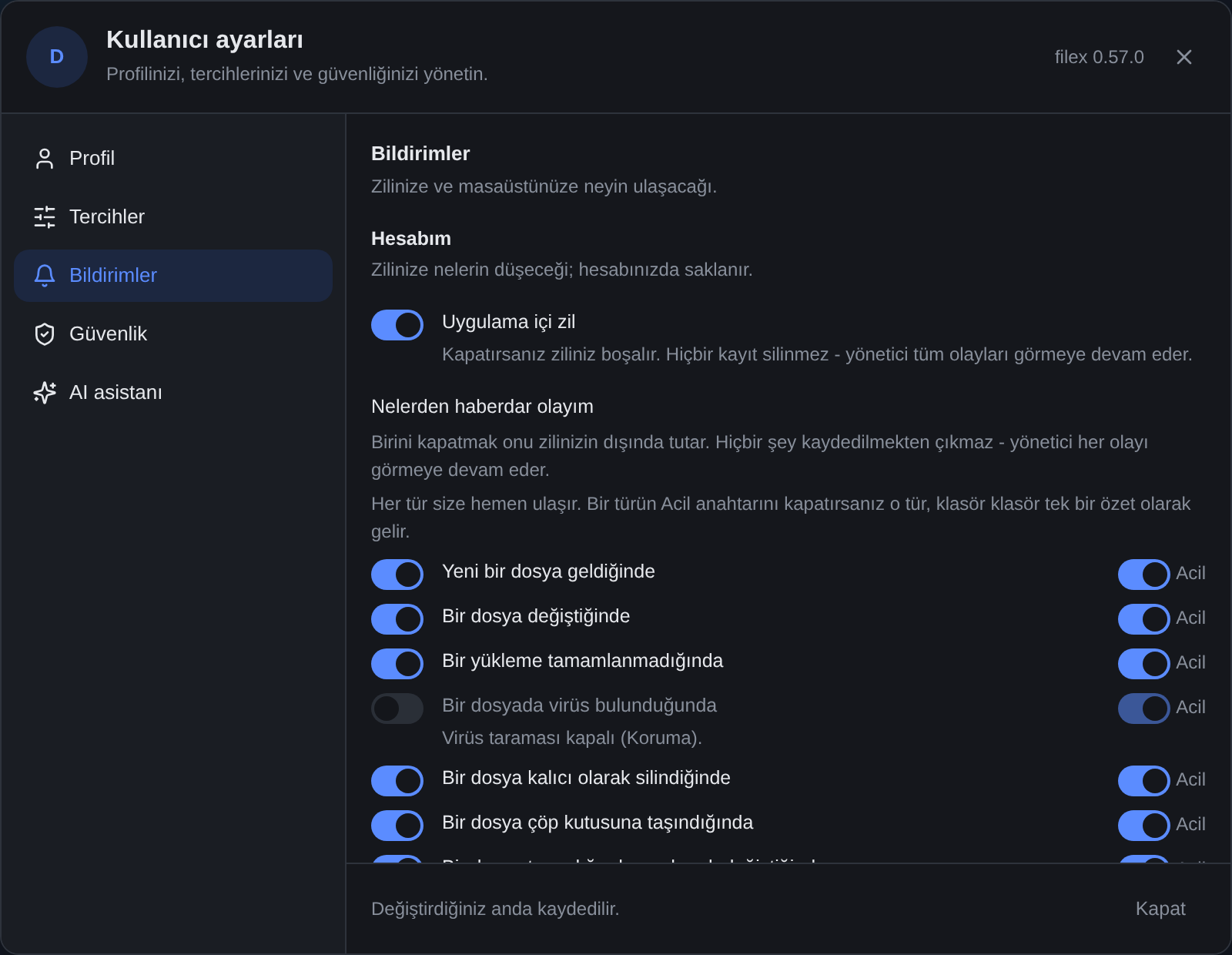
GET/PATCH /api/notifications/settings stores one preference row per user:
{
  "user_id": 7,
  "in_app_enabled": true,
  "muted_events": ["replica_status_report", "drop.received"],
  "urgent_overrides": { "file.uploaded": false, "comment.added": false },
  "digest": {
    "window_minutes": 1,
    "urgent_events": ["file.updated", "file.upload_failed", "file.infected", "…"],
    "default_urgent": ["file.uploaded", "file.updated", "file.upload_failed", "…"],
    "events": ["file.uploaded", "file.updated", "…"],
    "admin_events": ["update_available", "…"]
  }
}| Field | Type | Meaning |
|---|---|---|
in_app_enabled | bool | false empties this user's bell: the list returns nothing and the unread badge is 0. |
muted_events | array of event ids | Event types dropped from this user's list and unread count. |
urgent_overrides | object, event id → bool | The person's own digest choices: true tells a kind at once, false holds it. A kind not named follows the administrator's default (out of the box: at once). ⚠ Left out of a PATCH, they are kept - unlike the two fields above - so a client that does not know them cannot wipe them. A PATCH that carries them first tells what is held under the old choice. |
digest | object, read only | null when the digest is off. window_minutes, urgent_events (what is urgent for this person now), default_urgent (the administrator's list), events (every kind a choice can be made about) and admin_events (the administrator alerts among them). |
A user with no settings row is treated as the default: in_app_enabled=true with no muted events. PATCH replaces the whole preference (send the full muted_events list each time; omitting it clears the mutes).
These are per-user display preferences for the bell, and they gate the read, not the write:
- Nothing stops being recorded.
Sendstill inserts every event, so a muted one stays in the audit and reappears in full the moment the mute is lifted. Muting changes what a user sees, not what filex keeps.- The webhook is untouched. Delivery is global -
FILEX_WEBHOOK_URLplus the targets in Admin → Webhooks - and no per-user preference reaches it. To cut webhook volume, use a target's per-event allow-list instead.- The admin/global view is never filtered. A listing with no user scope returns everything the system recorded; one admin's personal mute list cannot hide rows from the audit.
⚠ A settings row that cannot be read - none written yet, a DB error, a hand-corrupted
muted_events- fails open: the user sees everything. A display preference must not be able to hide an antivirus hit behind a transient error.⚠
in_app_enabledhas a screen now, and everybody can reach it: the Notifications pane of the user-settings dialog, opened from the account menu on every front door - the admin chrome, Home and the standalone explorer, which between them are every screen a non-admin can be on. The admin panel's own Notifications → Your notifications section is the same two switches for an operator who is already there.muted_eventshas its switches in the dialog's What to tell me about list, one per event - and only for events that can happen on this instance: no virus switch while scanning is off, no escrow switch without an escrow key, no app switch while apps are off, and the two encryption-request switches only where a request can reach the person (under theapprovalpolicy with the tenant's ceiling on:e2e.request_createdfor an administrator account,e2e.request_decidedfor everyone). They read the person's own tenant, so an administrator whose tenant is under another policy - the platform operator's included - sees them greyed. Which events cannot happen, why, and who could change it is the SERVER's answer since 0.54:GET /api/files/capabilities→event_off({ "<event>": { reason, fixable, text } }, the sentence in the reader's language - BACKEND.md); the dialog and Admin → Webhooks only show it. Both screens resend the user's existing list verbatim so opening one cannot clear their mutes. The filtering itself is in force regardless of how the row got written.Why that matters more than it sounds: this endpoint is open to every account, and until the dialog existed its only screen sat behind the admin gate - so the people who receive notifications were the exact people who could not turn them off.
Failure modes & troubleshooting
The webhook never fires
Check, in order:
- Any destination at all? A row shows
webhook_status: skippedwhenFILEX_WEBHOOK_URLis empty and no enabled target matched the event (otherwisewebhook_errorholds the code of why -stopped,sibling,digest_unnamed- andwebhook_reasonsays it in words) - so check the target'senabledflag and its event allow-list too, not just the env var. Set the URL (env, orPATCH …/webhook-config) or add a target in Admin → Webhooks. - Subsystem enabled? If the
/api/notifications/…endpoints return 503notifications offline, notifications are switched off (Admin → Settings → Notifications) - nothing is sent at all. Turn them back on and restart filex. - Receiver reachable? Rows marked
failedcarry the last error inwebhook_error(e.g.HTTP 500, a connection error, or a DNS failure). Confirm the receiver is up and reachable from filex's network, then re-test withPOST /api/admin/notifications/test.
Webhook returns 401/403 at the receiver
The receiver expects auth filex isn't sending, or a mismatched secret. Set FILEX_WEBHOOK_TOKEN (or update it via PATCH …/webhook-config) to the value your receiver validates - filex sends it as Authorization: Bearer <token>.
Too many notifications
First, the digest, which is off out of the box: have the person turn the Urgent switch off for the noisy kind (user settings → Notifications), or hold it for everybody by default (Admin → Notifications → Notification digest). A held kind is told once per window, folder by folder, however many events it carries; the window is 1 to 15 minutes.
To stop hearing about a kind at all, it is a per-user preference, not a global one: have the user add the noisy event ids to muted_events via PATCH /api/notifications/settings, or set in_app_enabled: false to silence their bell entirely. To reduce webhook volume instead, give the target a per-event allow-list: tick only the events you want in Admin → Webhooks (events on POST/PATCH /api/admin/webhooks), and filex stops sending the rest to that target. An empty list means "every event". The legacy global webhook has no filter of its own - for that one, filter on event/severity at your receiver (the payload carries both).
Test button says the subsystem is offline
POST /api/admin/notifications/test returning 503 means notifications are switched off (Admin → Settings → Notifications). Switch them on and restart, then re-test. ⚠ Setting FILEX_NOTIFY_ENABLED=true in compose does not switch a stored off back on: the variable only seeds the setting (filex settings reseed notify.enabled writes it again).
Push notifications do not arrive
- Admin → Notifications → Push notifications says why push is off:
no_secret_key(setFILEX_SECRET_KEYand restart),key_unreadable(the secret changed: rotate the key),disabled(FILEX_PUSH_ENABLED). - The browser needs a secure origin: filex served over https (or
localhost). On an iPhone or an iPad, only filex added to the Home Screen. - The person turned it on for that device and the browser's permission is still granted (the pane says "Blocked by this browser" otherwise); Send a test answers how many devices took it.
- The server reaches the push services directly (no proxy): a firewall that blocks outgoing https to
fcm.googleapis.com,web.push.apple.comand the rest blocks every push. A browser whose push service filex does not know is refused when it subscribes (push_endpoint_refused): add it withFILEX_PUSH_HOSTS. - What is pushed is what the bell tells: a muted kind, a bell switched off, or a kind held for the digest (pushed as the digest, when its window ends) is not pushed on its own.
Nothing survives a restart
The in-app bell is durable (a DB row written before Send returns) - if the bell is empty after a restart, the events were never sent, or the subsystem was disabled when they fired. The webhook, by contrast, is fire-and-forget: an event that failed all retries is not re-queued across a restart (its row is left failed).
See also
- CONFIGURATION.md - full config/env reference
- STORAGE.md - storages, sync, and the replica events that feed notifications
- RBAC.md - who can reach the admin endpoints
- API.md - the complete HTTP API